Acer Aspire 1400 Series Laptop Service Guide Manual – PDF DOWNLOAD
Acer Aspire 1400 Series Laptop Service Guide Manual – PDF DOWNLOADPreface Before using this information and the product it supports, please read the following general information. 1. This Service Guide provides you with all technical information relating to the BASIC CONFIGURATION decided for Acer’s “global” product offering. To better fit local market requirements and enhance product competitiveness, your regional office MAY have decided to extend the functionality of a machine (e.g. add-on card, modem, or extra memory capability). These LOCALIZED FEATURES will NOT be covered in this generic service guide. In such cases, please contact your regional offices or the responsible personnel/channel to provide you with further technical details. 2. Please note WHEN ORDERING FRU PARTS, that you should check the most up-to-date information available on your regional web or channel. If, for whatever reason, a part number change is made, it will not be noted in the printed Service Guide. For ACER-AUTHORIZED SERVICE PROVIDERS, your Acer office may have a DIFFERENT part number code to those given in the FRU list of this printed Service Guide. You MUST use the list provided by your regional Acer office to order FRU parts for repair and service of customer machines
Acer Aspire 1400 Series Laptop Service Guide Manual – PDF DOWNLOAD
Aspire 1400.........................................................................  1
Revision History....................................................................  2
Copyright...........................................................................  3
Disclaimer..........................................................................  3
Conventions.........................................................................  4
Preface.............................................................................  5
Table of Contents...................................................................  7
Ch.1 System Specifications..........................................................  9
	Features........................................................................  9
	System Block Diagram............................................................ 11
	Board Layout.................................................................... 12
		Top View.................................................................... 12
		Bottom View................................................................. 13
	Outlook View.................................................................... 15
		Front View.................................................................. 15
		Left Panel.................................................................. 17
		Right Panel................................................................. 18
		Rear Panel.................................................................. 19
		Bottom Panel................................................................ 20
	Indicators...................................................................... 21
	Keyboard........................................................................ 23
	Lock Keys....................................................................... 23
	Embedded Numeri c Keypad........................................................ 24
	Windows Keys.................................................................... 25
	Hot Keys........................................................................ 26
	Keyboard Ergonomics............................................................. 27
	Touchpad........................................................................ 28
		Touchpad Basics............................................................. 28
	Launch Keys..................................................................... 30
	Hardware Specifications and Configurations...................................... 31
Ch.2 System Utilities............................................................... 43
	BIOS Setup Utility.............................................................. 43
		Navigating the BIOS Utility................................................. 43
		Main........................................................................ 44
		Advanced.................................................................... 46
		Security.................................................................... 48
		Others...................................................................... 51
		Boot........................................................................ 52
		Exit........................................................................ 53
	BIOS Phlash Utility............................................................. 54
	System Diagnostic Diskette...................................................... 54
		Running Diagnostic Program.................................................. 55
Ch.3 Machine Disassembly and Replacement............................................ 61
	General Information............................................................. 62
	Disassembly Procedure Flowchart................................................. 63
	Removing the HDD Module/FDD Module/RAM Door and Optical Drive................... 66
	Removing the LCD Module/the Power Board and the Keyboard........................ 67
		Removing the LCD Module..................................................... 67
		Removing the Power Board and the Keyboard................................... 67
	Disassembling the Main Unit..................................................... 68
		Separate the main unit into the logic upper and the logic lower assembly.... 68
		Disassembling the logic upper............................................... 68
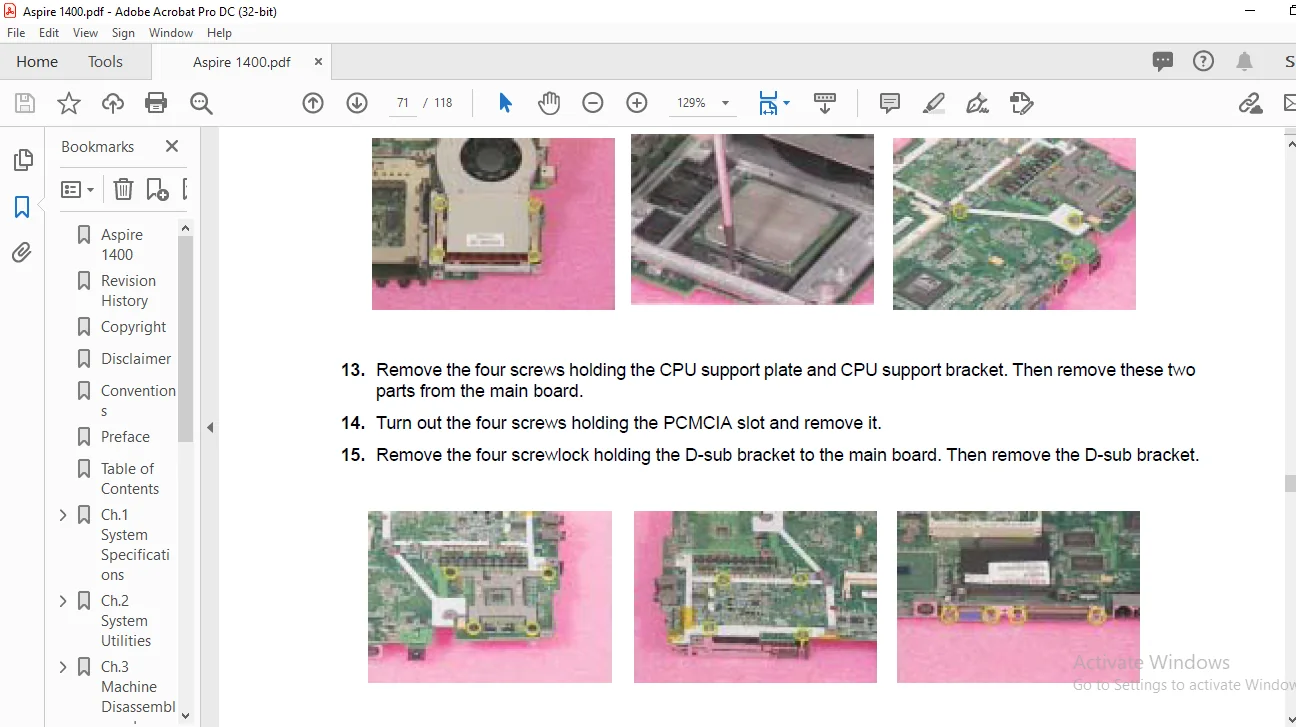
		Disassembling the logic lower............................................... 70
	Disassembling the LCD Module.................................................... 72
	Disassembling the External Modules.............................................. 73
		Disassembling the HDD Module................................................ 73
		Disassembling the Floppy Disk Drive Module.................................. 73
		Disassembling the Optical Drive Module...................................... 73
Ch.4 Troubleshooting................................................................ 75
	System Check Procedures......................................................... 76
		External Diskette Drive Check............................................... 76
		External CD-ROM Drive Check................................................. 76
		Keyboard or Auxiliary Input Device Check.................................... 77
		Memory Check................................................................ 77
		Power System Check.......................................................... 77
		Touchpad Check.............................................................. 78
	Power-On Self-Test (POST) Error Message......................................... 79
	Index of Error Messages......................................................... 80
	Index of Symptom-to-FRU Error Message........................................... 83
	Intermittent Problems........................................................... 86
	Undetermined Problems........................................................... 87
	Index of AFlash BIOS Error Message.............................................. 88
Ch.5 Jumper and Connector Locations................................................. 89
	Top View........................................................................ 89
	SW1 Settings (Lid switch)....................................................... 90
	SW2 Settings.................................................................... 90
	Bottom View..................................................................... 91
Ch.6 FRU (Field Replaceable Unit) List.............................................. 93
App. A Model Definition and Configuration...........................................110
	Aspire 1400.....................................................................110
	Main Features...................................................................111
App. B Test Compatible Components...................................................113
	Microsoft Windows XP Environment Test...........................................114
App. C Online Support Information...................................................115
Index...............................................................................117
PLEASE NOTE:
This is the SAME exact manual used by your dealers to fix your vehicle.
The same can be yours in the next 2-3 mins as you will be directed to the download page immediately after paying for the manual.
Any queries / doubts regarding your purchase, please feel free to contact [email protected]
s.m
✹
What Our Customers Say
★★★★★Live reviews from customers
Loading customer reviews...
🌟 Related Products
Discover more professional manuals for your equipment