Aspire Laptop 1450 Series Service Guide – PDF manual
Original price was: $86.95.$29.95Current price is: $29.95.
Aspire Laptop 1450 Series Service Guide – PDF manual
Description
Aspire Laptop 1450 Series Service Guide – PDF manual
Chapter 1 System Specifications 1
Features . . . . . . . . . . . . . . . . . . . . . . . . . . . . . . . . . . . . . . . . . . . . . . . . . . . . . . . .1
System Block Diagram . . . . . . . . . . . . . . . . . . . . . . . . . . . . . . . . . . . . . . . . . . . . .3
Board Layout . . . . . . . . . . . . . . . . . . . . . . . . . . . . . . . . . . . . . . . . . . . . . . . . . . . .4
Top View . . . . . . . . . . . . . . . . . . . . . . . . . . . . . . . . . . . . . . . . . . . . . . . . . . . .4
Bottom View . . . . . . . . . . . . . . . . . . . . . . . . . . . . . . . . . . . . . . . . . . . . . . . . .5
Outlook View . . . . . . . . . . . . . . . . . . . . . . . . . . . . . . . . . . . . . . . . . . . . . . . . . . . . .6
Front Open View . . . . . . . . . . . . . . . . . . . . . . . . . . . . . . . . . . . . . . . . . . . . . .6
Front Panel . . . . . . . . . . . . . . . . . . . . . . . . . . . . . . . . . . . . . . . . . . . . . . . . . .7
Left Panel . . . . . . . . . . . . . . . . . . . . . . . . . . . . . . . . . . . . . . . . . . . . . . . . . . .8
Right Panel . . . . . . . . . . . . . . . . . . . . . . . . . . . . . . . . . . . . . . . . . . . . . . . . . .9
Rear Panel . . . . . . . . . . . . . . . . . . . . . . . . . . . . . . . . . . . . . . . . . . . . . . . . .10
Bottom Panel . . . . . . . . . . . . . . . . . . . . . . . . . . . . . . . . . . . . . . . . . . . . . . .11
Indicators . . . . . . . . . . . . . . . . . . . . . . . . . . . . . . . . . . . . . . . . . . . . . . . . . . . . . .12
Using the Keyboard . . . . . . . . . . . . . . . . . . . . . . . . . . . . . . . . . . . . . . . . . . . . . .13
Lock Keys . . . . . . . . . . . . . . . . . . . . . . . . . . . . . . . . . . . . . . . . . . . . . . . . . .13
Embedded Numeric Keypad . . . . . . . . . . . . . . . . . . . . . . . . . . . . . . . . . . . . . . . .14
Windows Keys . . . . . . . . . . . . . . . . . . . . . . . . . . . . . . . . . . . . . . . . . . . . . . . . . .15
Hot Keys . . . . . . . . . . . . . . . . . . . . . . . . . . . . . . . . . . . . . . . . . . . . . . . . . . . . . . .16
The Euro Symbol . . . . . . . . . . . . . . . . . . . . . . . . . . . . . . . . . . . . . . . . . . . . . . . .18
Launch Keys . . . . . . . . . . . . . . . . . . . . . . . . . . . . . . . . . . . . . . . . . . . . . . . . . . . .19
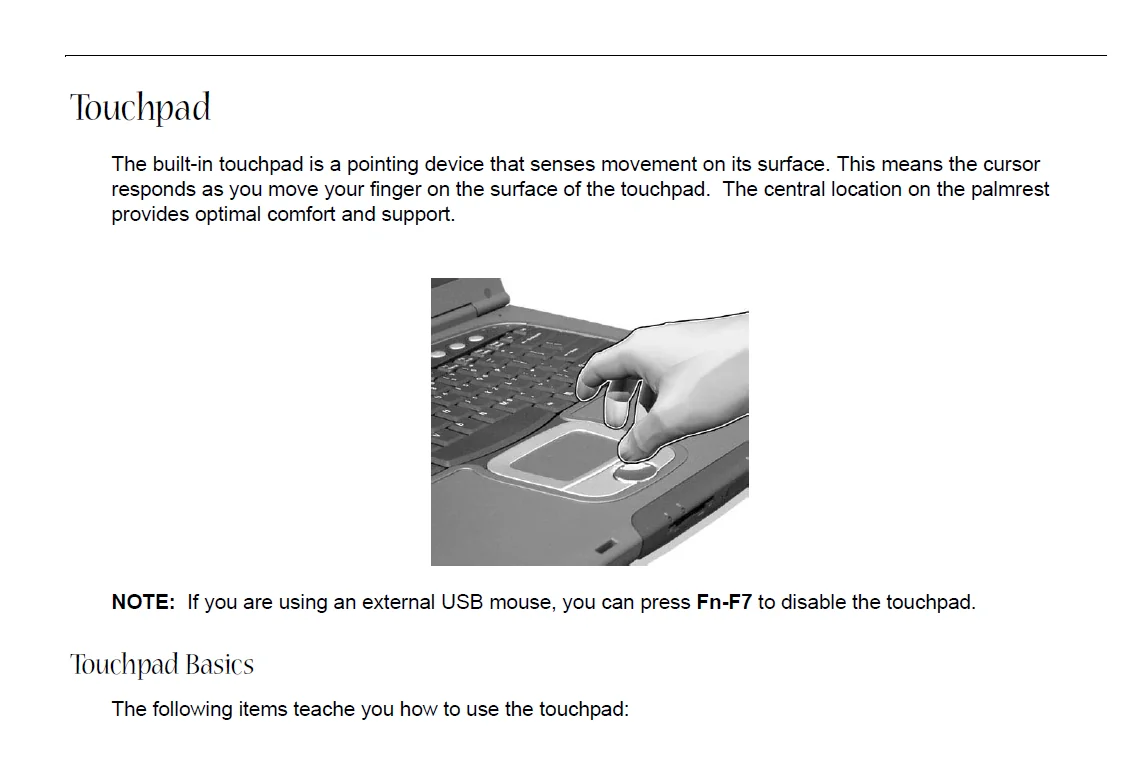
Touchpad . . . . . . . . . . . . . . . . . . . . . . . . . . . . . . . . . . . . . . . . . . . . . . . . . . . . . .20
Touchpad Basics . . . . . . . . . . . . . . . . . . . . . . . . . . . . . . . . . . . . . . . . . . . .20
Hardware Specifications and Configurations . . . . . . . . . . . . . . . . . . . . . . . . . . .22
Chapter 2 System Utilities 31
BIOS Setup Utility . . . . . . . . . . . . . . . . . . . . . . . . . . . . . . . . . . . . . . . . . . . . . . . .31
Navigating the BIOS Utility . . . . . . . . . . . . . . . . . . . . . . . . . . . . . . . . . . . . .32
Info. . . . . . . . . . . . . . . . . . . . . . . . . . . . . . . . . . . . . . . . . . . . . . . . . . . . . . . .33
Main . . . . . . . . . . . . . . . . . . . . . . . . . . . . . . . . . . . . . . . . . . . . . . . . . . . . . .34
Advanced . . . . . . . . . . . . . . . . . . . . . . . . . . . . . . . . . . . . . . . . . . . . . . . . . .36
Security . . . . . . . . . . . . . . . . . . . . . . . . . . . . . . . . . . . . . . . . . . . . . . . . . . . .38
Boot . . . . . . . . . . . . . . . . . . . . . . . . . . . . . . . . . . . . . . . . . . . . . . . . . . . . . . .42
Exit . . . . . . . . . . . . . . . . . . . . . . . . . . . . . . . . . . . . . . . . . . . . . . . . . . . . . . .43
BIOS Flash Utility . . . . . . . . . . . . . . . . . . . . . . . . . . . . . . . . . . . . . . . . . . . . . . . .44
System Diagnostic Diskette . . . . . . . . . . . . . . . . . . . . . . . . . . . . . . . . . . . . . . . .44
Chpater 3 Machine Disassembly and Replacement 45
General Information . . . . . . . . . . . . . . . . . . . . . . . . . . . . . . . . . . . . . . . . . . . . . .46
Before You Begin . . . . . . . . . . . . . . . . . . . . . . . . . . . . . . . . . . . . . . . . . . . .46
Disassembly Procedure Flowchart . . . . . . . . . . . . . . . . . . . . . . . . . . . . . . . . . . .47
Removing the Battery Pack . . . . . . . . . . . . . . . . . . . . . . . . . . . . . . . . . . . . . . . .50
Removing the Optical Module/HDD Module/
Wireless Lan Card and LCD module . . . . . . . . . . . . . . . . . . . . . . . . . . . . . . . . .51
Removing the Optical Module . . . . . . . . . . . . . . . . . . . . . . . . . . . . . . . . . . .51
Removing the HDD Module . . . . . . . . . . . . . . . . . . . . . . . . . . . . . . . . . . . .51
Removing the Wireless LAN Card . . . . . . . . . . . . . . . . . . . . . . . . . . . . . . .51
Removing the LCD Module . . . . . . . . . . . . . . . . . . . . . . . . . . . . . . . . . . . . .52
Disassembling the Main Unit . . . . . . . . . . . . . . . . . . . . . . . . . . . . . . . . . . . . . . .53
Remove the function key board and the keyboard . . . . . . . . . . . . . . . . . . .53
Separate the main unit into the logic upper and the logic lower assembly .53
Disassembling the logic upper assembly . . . . . . . . . . . . . . . . . . . . . . . . . .54
Disassembling the logic lower assembly . . . . . . . . . . . . . . . . . . . . . . . . . .55
Disassembling the LCD Module . . . . . . . . . . . . . . . . . . . . . . . . . . . . . . . . . . . . .57
VIII
Table of Contents
Disassembling the External Modules . . . . . . . . . . . . . . . . . . . . . . . . . . . . . . . . .59
Disassembling the HDD Module . . . . . . . . . . . . . . . . . . . . . . . . . . . . . . . . .59
Disassembling the Optical Drive Module . . . . . . . . . . . . . . . . . . . . . . . . . .59
Chpater 4 Troubleshooting 61
System Check Procedures . . . . . . . . . . . . . . . . . . . . . . . . . . . . . . . . . . . . . . . . .62
External Diskette Drive Check . . . . . . . . . . . . . . . . . . . . . . . . . . . . . . . . . .62
External CD-ROM Drive Check . . . . . . . . . . . . . . . . . . . . . . . . . . . . . . . . .62
Keyboard or Auxiliary Input Device Check . . . . . . . . . . . . . . . . . . . . . . . . .62
Memory check . . . . . . . . . . . . . . . . . . . . . . . . . . . . . . . . . . . . . . . . . . . . . . .63
Power System Check . . . . . . . . . . . . . . . . . . . . . . . . . . . . . . . . . . . . . . . . .63
Touchpad check . . . . . . . . . . . . . . . . . . . . . . . . . . . . . . . . . . . . . . . . . . . . .64
Power-On Self-Test (POST) Error Message . . . . . . . . . . . . . . . . . . . . . . . . . . .65
Index of Error Messages . . . . . . . . . . . . . . . . . . . . . . . . . . . . . . . . . . . . . . . . . . .66
POST Codes . . . . . . . . . . . . . . . . . . . . . . . . . . . . . . . . . . . . . . . . . . . . . . . . . . . .68
Index of Symptom-to-FRU Error Message . . . . . . . . . . . . . . . . . . . . . . . . . . . . .72
Intermittent Problems . . . . . . . . . . . . . . . . . . . . . . . . . . . . . . . . . . . . . . . . . . . . .76
Undetermined Problems . . . . . . . . . . . . . . . . . . . . . . . . . . . . . . . . . . . . . . . . . . .77
Chapter 5 Jumper and Connector Locations 79
Top View . . . . . . . . . . . . . . . . . . . . . . . . . . . . . . . . . . . . . . . . . . . . . . . . . . . . . . .79
Bottom View . . . . . . . . . . . . . . . . . . . . . . . . . . . . . . . . . . . . . . . . . . . . . . . . . . . .80
Chapter 6 FRU (Field Replaceable Unit) List 75
Exploded Diagram . . . . . . . . . . . . . . . . . . . . . . . . . . . . . . . . . . . . . . . . . . . . . . .76
Appendix A Model Definition and Configuration 86
Aspire 1450 Series . . . . . . . . . . . . . . . . . . . . . . . . . . . . . . . . . . . . . . . . . . . . . . .86
Appendix B Test Compatible Components 87
Microsoft® Windows® XP Home Environment Test . . . . . . . . . . . . . . . . . . . . . 88
Appendix C Online Support Information 93
Chapter 1 1
Features
This computer was designed with the user in mind. Here are just a few of its many features:
Performance
AMDTM XP-M processor at available in 1800+~ 2400+ and higher
Memory upgradeable up to 2GB with 2 slots (only one slot for user accessible)
Internal removable DVD drive (AcerMedia bay)
High-capacity, Enhanced-IDE hard disk
Li-Ion main battery pack
Microsoft Windows XP operating system
Display
Thin-Film Transistor (TFT) liquid-crystal display (LCD) displaying 32-bit high colour up to
1024X768 eXtended Graphics Array (XGA) resolution / 1400X1050 Super eXtended Graphics
Array+ (SXGA+) for 15.0”
3D graphics engine
Simultaneous LCD and CRT display support
S-video for output to a television or display device that supports S-video input
“Automatic LCD dim” feature that automatically decides the best settings for your display and
conserves pwer
DualViewTM
Multimedia
AC’97 stereo audio
Built-in dual speakers
Built-in microphone
High-speed optical drive
Built-in optical drive (DVD-ROM, DVD/CD-RW combo or DVD dual)
15.0” TFT XGA (1024×768 resolution) or SXGA+ (1400×1050 resolution) panel
Audio input and output jacks
Connectivity
High-speed fax/data modem port
Ethernet/Fast Ethernet port
Fast infrared wireless communication
Four USB 2.0 (Universal Serial Bus) ports
IEEE 1394 port
Invilink 802.11g wireless LAN (manufacturing optional)
Bluetooth ready (manufacturing optional)
System Specifications
Chapter 1
2 Chapter 1
SD/MMC/SM/MS memory slot (manufacturing optional)
Keyboard and Pointing Device
Internet 4-way scroll button
Sleek, smooth and stylish design
Acer FinTouch full-sized curved keyboard
Ergonomically-centered touchpad pointing device
Expansion
One type II CardBus PC Card slot
Upgradeable memory
I/O Ports
One Card bus type II slot
One RJ-11 jack for 56Kbps fax/modem
One RJ-45 jack for LAN
One DC-in jack for AC adapter
One ECP/EPP compliant 25-pin parallel port
One external 15-pin VGA port
One speaker/headphone/line-out jack
One audio line-in jack
One microphone-in jack
Four USB 2.0 ports (Disable middle port when docked with SPR)
One IEEE 1394 port
One S-video (NTSC/PAL) output port
4-in-1 Card Reader (Manufacture optional)
FIR (Fast Infred) port
PLEASE NOTE:
- This is the SAME exact manual used by your dealers to fix your vehicle.
- The same can be yours in the next 2-3 mins as you will be directed to the download page immediately after paying for the manual.
- Any queries / doubts regarding your purchase, please feel free to contact [email protected]