Baxter Colleague Volumetric Infusion Pump Service Manual – PDF
Original price was: $75.00.$20.95Current price is: $20.95.
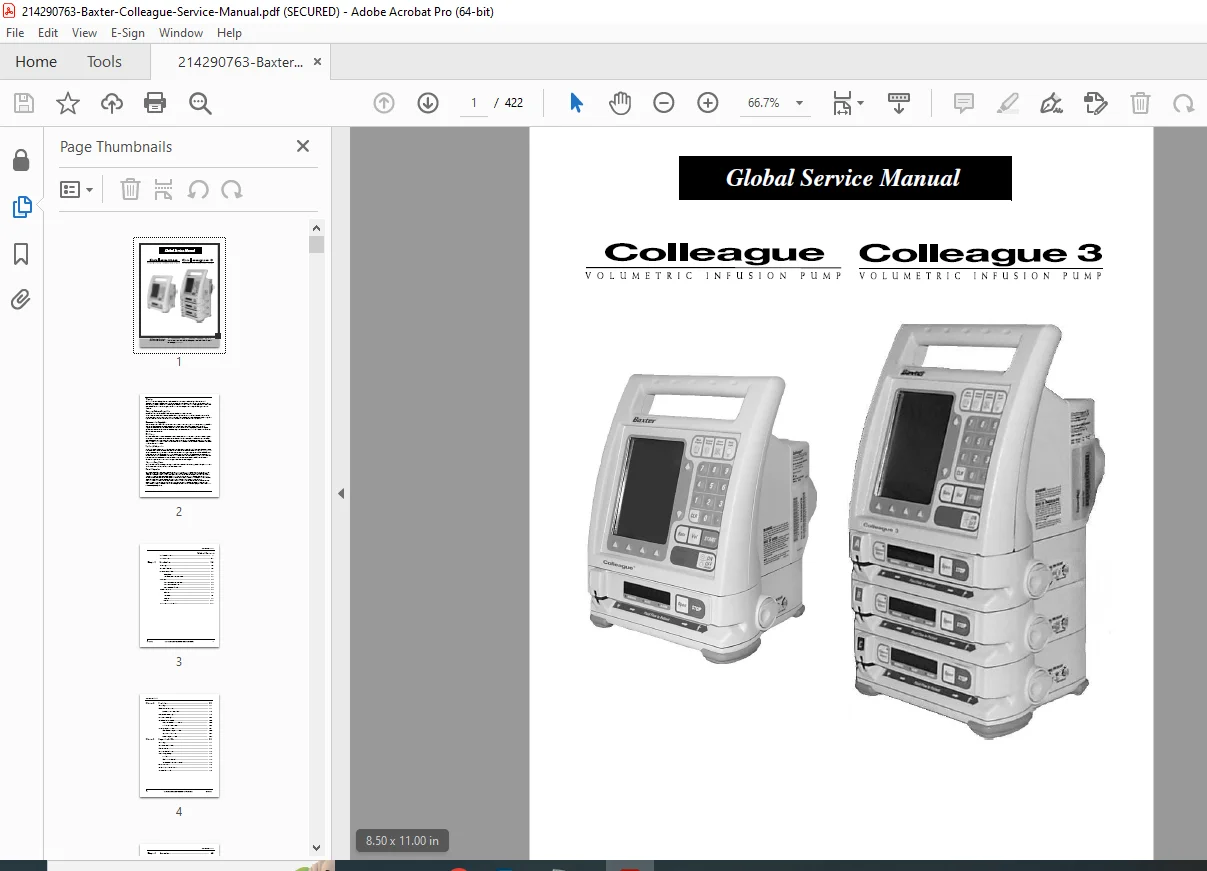
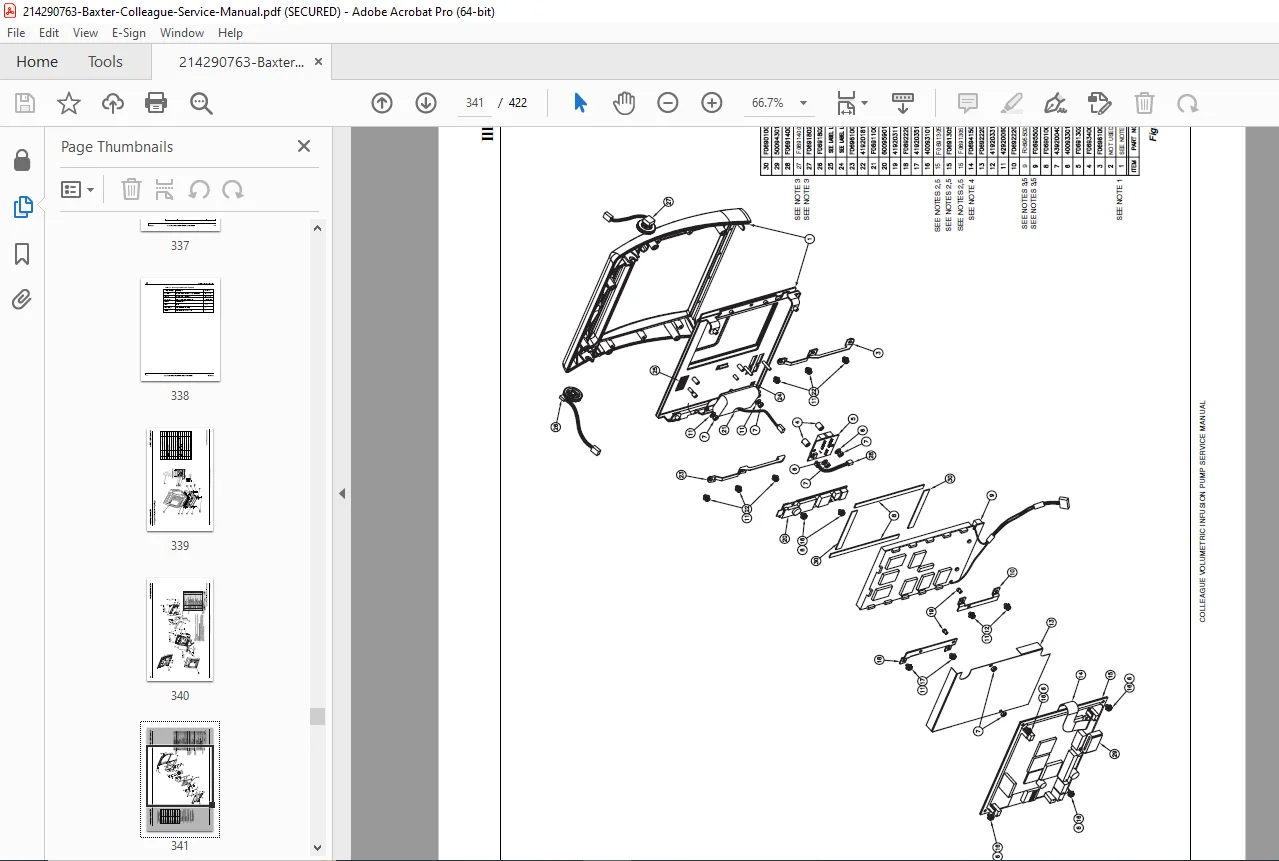
Professional service manual for Baxter Colleague and Colleague 3 volumetric infusion pumps. Complete biomedical device documentation including pump configuration procedures, battery maintenance, troubleshooting diagnostics, component removal/replacement, calibration procedures, and safety protocols for hospital biomedical technicians.
Description
Baxter Colleague Volumetric Infusion Pump Service Manual Biomedical – PDF DOWNLOAD
DESCRIPTION
Overview
The Baxter Colleague Service Manual is the definitive technical resource for biomedical technicians, clinical engineers, and hospital maintenance personnel responsible for servicing Baxter’s industry-standard volumetric infusion pumps. This comprehensive 422-page service manual provides professional-grade documentation essential for hospital biomedical departments, medical equipment service centers, and clinical engineering teams maintaining Colleague and Colleague 3 infusion pump systems in healthcare facilities worldwide.
Key Features & Comprehensive Content
Complete Biomedical Device Documentation: This Baxter Colleague volumetric infusion pump service manual encompasses detailed procedures for all major components, maintenance requirements, and regulatory compliance protocols:
- Safety & Regulatory Compliance – Comprehensive warnings, cautions, and safety notes for biomedical technicians, hazard labels and symbols, labeling definitions and abbreviations, serial number format identification, safety summary (general, warnings, cautions), authorized service centers contact information, Year 2000 Compliance certification (functions through 2035), extensive U.S. and international patent information, multiple language support (English, French, German, Spanish, Danish, Dutch, Swedish, Turkish, Brazilian Portuguese)
- Device Description & Components – Front panel detailed description, main display functions and status areas, pump module features and controls (Colleague and Colleague 3 configurations), rear panel specifications including power connectors, fuse holders, backup beeper, communication port (RS232/RS423), speaker volume control, contrast control, panel lockout security button, manual tube release assembly, mounting clamp release latch
- Configuration & Technical Specifications – Catalog code numbers for different models and languages (Colleague: 2M8151 U.S./2M8151K U.K.; Colleague 3: 2M8153 U.S./2M8153K U.K.), major software releases and version documentation, software upgrade labels with sequence numbers, configuration summary specifications, environmental operating specifications, applicable standards compliance, material specifications, technical specifications table with detailed parameters
- Installation & Preparation Procedures – Unpacking instructions with component verification, factory testing procedures and protocols, battery charging procedures and specifications, testing procedures for new pumps (self-test, electrical safety tests, volume delivery accuracy tests), nurse call cable configuration, computer monitoring cable setup, administration sets compatibility and setup
- Configuration & Service Features – Special key sequences for service access, comprehensive configurable pump options summary, accessing configuration/service menu procedures, personality feature sets configuration (creating, copying, renaming, enabling/disabling personality feature sets), personality list screen navigation, choosing power-on default personality feature sets, changing or viewing personality configurations
- Advanced Features Configuration – Colleague Guardian feature configuration process and procedures, guardian feature label management and restoration, event history viewing and analysis, service features access and utilization, device configuration data transfer procedures (pump-to-pump), software version 4.02 upgrade installation procedures, time and date setting procedures, user interface language reset procedures
- Routine Maintenance Procedures – General maintenance schedules and requirements, cleaning procedures (exterior, tubing channel, pump assembly prisms), battery care information, battery service life specifications and optimization, battery preventive maintenance program, battery charging procedures and parameters, used battery disposal procedures, battery operation verification procedures, storage procedures and environmental conditions, battery charge level indicator calibration
- Comprehensive Troubleshooting – Service information and categorization, troubleshooting methods and systematic approach, alert/alarm/failure message displays, event history access and interpretation, alerts categorization and meaning, alarms categorization and meaning, icon-encoded failure descriptions, troubleshooting by symptom approach with diagnostic flowcharts, troubleshooting by failure codes comprehensive reference, failure code database with corrections and solutions
- Removal & Replacement Procedures – Complete tools and materials lists (required tools, optional tools, consumable materials), torque specifications for various fasteners, post-repair testing and inspection procedures, front bezel assembly removal and replacement, tubing guide replacement (Colleague 3 only), user interface main PCB removal and replacement, main display assembly removal and replacement, backup battery assembly procedures
- Component Replacement Procedures – LED PCB assembly replacement, inverter PCB module replacement, contrast control adjustment and replacement, volume control adjustment and replacement, front bezel and keypad replacement, master and/or slave software updates and installation, mounting clamp assembly procedures, fuses and circuit breaker replacement
- Additional Component Procedures – Power cord replacement with region-specific power cords (U.S., European, Australian, U.K.), rear housing removal and replacement, main batteries replacement and upgrade, adding a second battery (Colleague pumps only), power supply assembly replacement, fan assembly replacement (Colleague 3 only), main speaker replacement and testing, backup beeper replacement procedures
- Specialized Procedures – 12 VDC connector assembly replacement, panel lockout switch replacement, communication port connector replacement, AC fuse holder replacement, AC toroid filter assembly replacement, AC connector replacement, center housing components (V-block, pole clamp friction pad, V-plate) replacement procedures
- Pump Module Components – Bottom panel removal and replacement procedures, pump module complete replacement procedures, accessory connector assembly replacement, manual tube release assembly replacement, pump mechanism complete procedures, shuttle motor replacement procedures, tube loading motor mounting inspection and gear tightening procedures, pump display PCB assembly replacement, pump module keypad replacement
- Advanced Pump Service – Air in line PCB replacement and testing, pump housing replacement procedures, pump module software updates and installation, pump feet replacement and inspection, upstream under platen flex connector insertion procedures, slide clamp prism replacement procedures
- Calibration & Testing – Tools and test equipment requirements for calibration, power supply calibration procedures with step-by-step instructions, battery charge level indicator calibration procedures, setup and battery preparation for calibration testing, charge current diagnostics procedures
Detailed Manual Structure – Comprehensive Coverage
Chapter 1: Introduction (Safety and Regulatory Information)
- Overview of manual contents and conventions
- Product features and capabilities
- Manual conventions and notation
- Warnings, cautions, and notes explanations
- Labeling information (symbols, abbreviations, serial number format)
- Safety summary (general, warnings, cautions, notes)
- Authorized service centers list
- Complete warning statements for technician safety
- Caution statements for device protection
- Important notes for operational safety
Chapter 2: Device Description (Hardware and Configuration)
- Front panel detailed description with all controls
- Main display areas and functions (status, body, prompt line, soft keys, pop-up window)
- Pump module features (Colleague single pump, Colleague 3 multi-channel)
- Channel identifier labels and selection (Colleague 3 specific)
- 8-character vacuum fluorescent displays
- Channel select keys and LEDs
- Stop key and open key functions
- Slot for keyed on/off clamp
- Tubing channel status LEDs and fluid flow labels
- Rear panel complete description
- Mounting clamp assembly and release latch
- Manual tube release assembly (Colleague 3)
- Fuse holders and circuit breakers
- Power cord connectors (region-specific: U.S., European, Australian, U.K.)
- Speaker and backup beeper locations
- Communication port specifications
- Configuration summary specifications
- Service upgrade label sequence numbers and descriptions
- Technical specifications table (complete parameters)
- Environmental specifications (operating conditions)
- Applicable standards and compliance certifications
- Material specifications for components
Chapter 3: Preparation for Use (Setup and Testing)
- Unpacking procedures with component verification
- Factory testing requirements and procedures
- Battery charging procedures and initial setup
- Testing new pumps procedures:
- Self-test procedures and verification
- Electrical safety tests and compliance
- Volume delivery accuracy tests and specifications
- Nurse call cable configuration and setup
- Computer monitoring cable installation and testing
- Administration sets compatibility and configuration
Chapter 4: Accessories (Optional Equipment)
- Compatible accessory components list
- Accessory connection procedures
- Optional equipment specifications
- Accessory compatibility matrix
Chapter 5: Configuration and Service Features (Software and Setup)
- Special key sequences for accessing service functions
- Summary of configurable pump options
- Accessing the configuration/service menu procedures
- Personality feature sets configuration:
- Personality list screen navigation
- Choosing power-on default personality
- Enabling/disabling named personalities
- Changing or viewing personality configurations
- Renaming personality feature sets
- Copying named personality feature sets
- Creating new personality feature sets
- Detailed configuration procedures for each setting
- Label library configuration and use
- Colleague Guardian feature configuration:
- Configuration process overview
- Guardian feature configuration procedure steps
- Clearing/restoring Colleague Guardian labels
- Event history viewing and analysis
- Service features utilization:
- Accessing service features securely
- Service mode procedures
- Diagnostic access and testing
- Configuration data transfer procedures (pump-to-pump)
- Software version upgrades:
- Version 4.02 software upgrade installation
- Step-by-step installation procedures
- Verification of upgrade completion
- Time and date setting procedures
- User interface language reset procedures
Chapter 6: Routine Maintenance (Preventive Care)
- General maintenance schedule requirements
- Routine maintenance procedures:
- Daily checks and verification
- Weekly maintenance tasks
- Monthly maintenance schedule
- Quarterly maintenance procedures
- Cleaning procedures:
- Cleaning the exterior housing
- Cleaning the tubing channel
- Cleaning pump assembly prisms
- Safe cleaning materials (isopropyl alcohol, lint-free cloths)
- Battery care comprehensive information:
- Battery service life specifications
- Optimizing battery service life techniques
- Battery preventive maintenance program details
- Battery charging procedures and parameters
- Proper charging station setup and use
- Used battery disposal procedures (environmental compliance)
- Verifying battery operation and health checks
- Battery charge level monitoring
- Emergency backup battery procedures
- Storage procedures:
- Short-term storage (days to weeks)
- Long-term storage (months to years)
- Environmental conditions for storage
- Pre-operation checks after storage
Chapter 7: Troubleshooting (Diagnostic and Problem-Solving)
- Overview of troubleshooting methodology
- Service information gathering and documentation
- Troubleshooting methods:
- Categorizing trouble reports
- Alert, alarm, and failure message displays
- Event history access and interpretation
- Alert messages list with meanings and solutions
- Alarm messages list with meanings and solutions
- Icon-encoded failure descriptions
- Failure code database (40+ codes with solutions)
- Troubleshooting by symptom:
- Systematic approach to symptom diagnosis
- Symptom-to-cause mapping
- Diagnostic flowcharts for common problems
- Step-by-step diagnostic procedures
- Common issues and resolutions
- Troubleshooting by failure codes:
- Complete failure code reference
- Code interpretation and meaning
- Diagnostic procedures for each code
- Component identification for failures
- Correction and resolution procedures
Chapter 8: Removal/Replacement Procedures (Component Service)
- Overview and general procedures
- Tools and materials required:
- Complete list of required tools (screwdrivers, hex wrenches, torque wrenches)
- Optional tools for advanced procedures
- Consumable materials (lubricants, sealants, gaskets)
- Torque specifications for critical fasteners
- Post-repair testing and inspection procedures
- Front bezel assembly:
- Removal procedures
- Replacement procedures
- Reassembly verification
- Testing after replacement
- Tubing guide (Colleague 3 only):
- Removal procedures
- Replacement procedures
- Alignment verification
- User interface main PCB (UIM PCB):
- Removal procedures with safety precautions
- Electrical connector documentation
- Replacement procedures with proper installation
- Cable routing and connection verification
- Testing after replacement
- Main display assembly:
- Removal procedures
- Replacement with proper alignment
- Connection verification
- Display testing and calibration
- Backup battery assembly:
- Removal procedures
- Battery specifications
- Replacement procedures
- Testing and verification
- LED PCB assembly:
- Removal and replacement procedures
- LED testing after replacement
- Functionality verification
- Inverter PCB module:
- Removal and replacement procedures
- Voltage testing after replacement
- System verification
- Contrast control:
- Adjustment procedures
- Component replacement if necessary
- Verification of adjustment range
- Volume control:
- Adjustment procedures
- Testing speaker output levels
- Component replacement if defective
- Front bezel and keypad:
- Complete removal and replacement procedures
- Flex connector handling
- Reassembly procedures
- Button function verification
- Master and/or slave software:
- Software identification
- Update procedures
- Installation verification
- Version confirmation
- Mounting clamp:
- Clamp assembly removal and replacement
- Release latch procedures
- Clamp knob adjustment
- Mounting verification
- Fuses and circuit breaker:
- Fuse holder location and specifications
- Replacement procedures (1.6A fuses)
- Circuit breaker testing and replacement
- Proper reinstallation verification
- Power cord:
- Removal procedures with power disconnection safety
- Region-specific power cord identification (U.S., European, Australian, U.K.)
- Replacement procedures with proper connections
- EMI filter and hospital-grade plug verification
- Safety testing after replacement
- Rear housing:
- Housing removal procedures
- Component inspection access
- Housing replacement and sealing
- Gasket and seal replacement
- Main batteries:
- Battery type and specifications
- Removal procedures with safety precautions
- Battery installation procedures
- Connection verification
- Charge level testing
- Adding a second battery (Colleague pumps):
- Secondary battery installation procedures
- Dual battery system configuration
- Load balancing procedures
- Charging procedures for dual battery setup
- Power supply assembly:
- Power supply removal and replacement
- Voltage regulation testing
- Protection circuit verification
- Reassembly and testing
- Fan assembly (Colleague 3 only):
- Fan removal procedures
- Airflow verification
- Fan replacement
- Thermal testing after replacement
- Main speaker:
- Speaker removal and testing
- Acoustic output verification
- Speaker replacement procedures
- Volume and tone testing
- Backup beeper:
- Backup beeper location and testing
- Sound output verification
- Component replacement if defective
- Alarm tone testing
- 12 VDC connector assembly:
- Connector removal and inspection
- Pin configuration verification
- Connector replacement
- Voltage testing after installation
- Panel lockout switch:
- Switch function testing
- Switch replacement procedures
- Lock/unlock verification
- Communication port connector:
- Port specifications (RS232/RS423)
- Connector removal and inspection
- Pin configuration documentation
- Connector replacement
- Serial communication testing
- AC fuse holders:
- Fuse holder location and specifications
- Fuse replacement procedures
- Proper fuse rating verification (1.6A)
- Circuit testing after replacement
- AC toroid filter assembly:
- Filter location and function
- Filter replacement procedures
- EMI testing after replacement
- Proper installation verification
- AC connector:
- Connector specifications for regional variants
- Connector removal and inspection
- Connector replacement procedures
- Connection security verification
- Center housing components:
- V-block removal and replacement
- Pole clamp friction pad replacement
- V-plate removal and replacement
- Alignment and torque verification
- Bottom panel:
- Panel removal procedures
- Gasket and seal inspection
- Panel replacement with proper sealing
- Fastener torque verification
- Pump module:
- Module removal procedures with connector documentation
- Module replacement procedures
- Cable routing verification
- Module function testing
- Accessory connector assembly:
- Connector removal and replacement
- Connection verification
- Accessory function testing
- Manual tube release assembly:
- Release mechanism removal and replacement
- Movement verification and adjustment
- Component replacement if worn
- Pump mechanism:
- Mechanism inspection procedures
- Component wear assessment
- Mechanism replacement procedures
- Complete functional testing
- Shuttle motor:
- Motor removal procedures
- Motor specifications and replacement part numbers
- Motor installation with proper alignment
- Motor operation testing and torque verification
- Tube loading motor:
- Motor mounting inspection procedures
- Gear tightening procedures with specified torque
- Motor operation and load testing
- Proper lubrication procedures
- Adjustment procedures for motor tension
- Pump display PCB:
- PCB removal with electrical connections documented
- PCB testing and verification
- PCB replacement procedures
- Display function testing after replacement
- Pump module keypad:
- Keypad removal and flex connector handling
- Keypad replacement procedures
- Button function verification
- Connection security checking
- Air in line PCB:
- PCB location and function
- PCB removal procedures
- Air detection circuit testing
- PCB replacement and verification
- System pressure testing
- Pump housing:
- Housing removal procedures
- Component inspection during disassembly
- Housing replacement with proper alignment
- Gasket and seal replacement
- Fastener torque verification
- Pump module software:
- Software version identification
- Software update procedures
- Installation verification
- Functional testing after update
- Pump feet:
- Foot removal and inspection
- Replacement procedures
- Reinstallation with proper alignment
- Stability verification
- Upstream under platen flex connector:
- Connector insertion procedures
- Connection verification
- Signal testing after connection
- Slide clamp prism:
- Prism location and function
- Prism removal procedures
- Prism replacement with proper alignment
- Optical testing and calibration
Chapter 9: Calibration (Precise Adjustment and Testing)
- Overview of calibration requirements
- Tools and test equipment required:
- Electrical multimeters
- Pressure testing equipment
- Calibrated flow measurement devices
- Battery chargers with monitoring
- Power supply calibration:
- Step-by-step calibration procedures
- Voltage output verification
- Load testing procedures
- Proper documentation of calibration results
- Battery charge level indicator calibration:
- Setup and battery preparation procedures
- Charge current diagnostics procedures
- Calibration point adjustment procedures
- Documentation and verification of calibration
Chapter 10: Advanced Topics
- (Additional chapters may include advanced diagnostics, network integration, regulatory compliance procedures)
Chapter 11: Accessories and Parts
- Accessory component specifications
- Power cord part numbers by region
- Battery specifications and part numbers
- Replacement component cross-reference
- Consumable materials and supplies
Key Medical Device Features
This infusion pump service manual documents features critical for healthcare applications:
- Volumetric Infusion Accuracy – Precise volume delivery with verification procedures
- Multi-Channel Configuration – Colleague 3 supports three independent infusion channels (A, B, C)
- Battery Power Operation – Extended runtime with battery management systems
- Hospital Integration – Nurse call cable and computer monitoring capabilities
- Safety Features – Panel lockout for security, air-in-line detection, alarm systems
- Personality Feature Sets – Customizable pump configurations for different hospital departments
- Colleague Guardian Feature – Advanced event tracking and monitoring
- Multi-Language Support – English, French, German, Spanish, Danish, Dutch, Swedish, Turkish, Brazilian Portuguese
- Y2K Compliance – Functions through 2035 without date-related failures
Technical Specifications Summary Table
| Specification | Details |
|---|---|
| Device Model | Baxter Colleague & Colleague 3 Volumetric Infusion Pumps |
| Device Category | Medical infusion pump (biomedical device) |
| Pump Configuration | Colleague: 1 pump module; Colleague 3: 3 pump modules (A, B, C) |
| Catalog Numbers | 2M8151/2M8151K (Colleague); 2M8153/2M8153K (Colleague 3) |
| Display Type | Vacuum fluorescent with contrast control |
| Pump Module Display | 8-character vacuum fluorescent per module |
| Control Interface | 8 buttons, soft keys, status keys, arrow keys |
| Communication | RS232/RS423 serial port (nurse call, computer monitoring) |
| Accessories | Nurse call cable, computer monitoring cable, administration sets |
| Power Sources | Mains AC power + rechargeable backup batteries |
| Battery Type | Rechargeable (specifications by model) |
| Speaker | Audio alert and alarm tones + backup beeper |
| Mounting | Mounting clamp assembly with release mechanism |
| Tubing Channel | Single tubing channel (Colleague); One per module (Colleague 3) |
| Configuration | Personality feature sets (customizable by hospital) |
| Guardian Feature | Colleague Guardian event tracking and monitoring |
| Software Versions | Multiple versions (4.02 through 5.45) with updates available |
| Language Support | 9 languages (English, French, German, Spanish, Danish, Dutch, Swedish, Turkish, Brazilian Portuguese) |
| Y2K Compliance | Yes – functions through 2035 |
| Patent Coverage | 24 U.S. and 50+ international patents |
| Regulatory Compliance | FDA cleared (medical device), international standards compliance |
Target Users & Professional Applications
This Baxter Colleague service manual is essential for:
- Hospital Biomedical Technicians – Clinical engineering departments
- Biomedical Equipment Service Centers – Commercial medical device service organizations
- Clinical Engineers – Healthcare facility equipment support teams
- Hospital Maintenance Staff – In-house medical equipment maintenance
- Medical Device Distributors – Equipment vendors and supply companies
- Training Programs – Biomedical technology educational institutions
- FDA/Regulatory Compliance – Healthcare organizations requiring service documentation
Critical Service Applications
The Colleague service manual enables:
- Complete pump configuration and customization for hospital departments
- Battery maintenance and optimization for continuous operation
- Comprehensive troubleshooting using failure codes and diagnostics
- Component-level repairs with detailed procedures
- Software upgrades and version management
- Proper calibration and accuracy verification
- Regulatory compliance documentation
- Equipment lifecycle management
📊 FILE DETAILS
| Field | Details |
|---|---|
| Manual Name | Baxter Colleague Volumetric Infusion Pump Service Manual |
| Models Covered | Baxter Colleague & Colleague 3 Infusion Pumps |
| Device Type | Volumetric infusion pump (biomedical device) |
| Publication Year | 2004 (Last updated Jan 8, 2010) |
| Manual Quality | Excellent – Professional PDF, comprehensive, well-organized |
| Total Pages | 422 pages (MOST COMPREHENSIVE – medical device documentation) |
| File Format | PDF (Portable Document Format v1.5) |
| File Size | 14.9 MB (largest file – detailed technical documentation) |
| Document ID | 07-19-H2-646 |
| Copyright | ©1996-2004 Baxter Healthcare Corporation |
| Language Support | 9 languages (English, French, German, Spanish, Danish, Dutch, Swedish, Turkish, Brazilian Portuguese) |
| Regulatory Status | FDA cleared medical device |
| Y2K Compliance | Yes – functions through 2035 |