BK Flex Focus Ultrasound Service Manual (200-800) PDF DOWNLOAD
Original price was: $95.00.$29.95Current price is: $29.95.
Download the BK Flex Focus service manual PDF for diagnostic ultrasound systems, including BK ultrasound Flex Focus repair guide with troubleshooting, adjustments, and theory of operation. This BK Medical Flex Focus 1202 maintenance manual covers models 200 to 800, offering essential guides for service and preventative maintenance. Perfect for technicians needing a service manual for BK Flex Focus 800 ultrasound or similar. High-quality PDF with 135 pages, BI1202-I revision.
Description
BK Flex Focus Ultrasound Service Manual (200-800) PDF DOWNLOAD
Description
The BK Flex Focus Ultrasound Service Manual PDF is a comprehensive resource for servicing and repairing BK diagnostic ultrasound systems. This BK ultrasound Flex Focus repair guide PDF provides detailed information on system configuration, software structure, DICOM setup, and hardware interconnections, making it an indispensable BK Medical Flex Focus 1202 maintenance manual for professionals handling Flex Focus models in clinical settings. Whether you’re troubleshooting specific issues, performing adjustments, or conducting preventative maintenance, this guide includes step-by-step procedures, safety aspects, and mechanical disassembly instructions to ensure safe and efficient repairs.
Key highlights cover license keys, service mode access, and specialized tools for checking procedures, all tailored for BK Flex Focus troubleshooting and adjustment guide needs. The manual emphasizes compliance with safety standards like EN/IEC 60601-1 and includes warnings, cautions, and symbols for proper handling of these medical devices.
File Details:
- Manual Name: Service Manual for Diagnostic Ultrasound System Flex Focus
- Models Covered: Flex Focus 200, Flex Focus 200 Surgery, Flex Focus 300, Flex Focus 400, Flex Focus 400 Anesthesia, Flex Focus 400 exp, Flex Focus 400 MSK, Flex Focus 500, Flex Focus 700, Flex Focus 800
- Year: BI1202-I Revision (circa 2015)
- Manual PDF Quality: High-quality scanned PDF
- Number of Pages: 135
Table of Contents (Extracted and Categorized):
- Section 1: General Information
- Safety Aspects (Page 2)
- Terms and Symbols used (Page 2)
- WARNINGS and CAUTIONS (Page 3)
- System Overview (Page 4)
- System Configuration (Page 4)
- Modules (Page 7)
- Replaceable parts (Page 10)
- Recommended Service Stock (Page 10)
- Connectors (Page 11)
- Revision System (Page 11)
- Special Tools and Equipment (Page 12)
- Checking Procedure (Section 3) (Page 12)
- Troubleshooting (Section 4) (Page 12)
- Adjustment Procedure (Section 5) (Page 12)
- Mechanical Parts (Section 6) (Page 12)
- Preventative Maintenance (Section 7) (Page 12)
- Electrical Safety Test (Page 12)
- Software Information (Page 13)
- License Keys (Page 13)
- Table of passwords (Page 14)
- Service Mode (Page 14)
- Software Structure (Page 16)
- DICOM (Page 19)
- Safety Aspects (Page 2)
- Section 3: Checking Procedure
- Introduction (Page 2)
- Necessary Equipment to Perform the Checking Procedure (Page 2)
- Basic Checks (Page 2)
- Visual Inspection (Page 2)
- Mobile Keyboard dock (Page 2)
- Before Power Up (Page 2)
- Power Up (Page 3)
- Functionality (Page 3)
- Flat Panel Checking (Page 4)
- Transducer Inputs (Page 4)
- Track Ball (Page 4)
- Gain/TGC (Page 5)
- Audio/Spectral Doppler (Page 5)
- CFM (Page 5)
- Image Storage (USB Memory Stick/DVD drive) (Page 6)
- Touch Screen (for Flex Focus 700 & Flex Focus 800 Only) (Page 8)
- Battery Support (for Flex Focus with Battery Support Only) (Page 9)
- Introduction (Page 2)
- Section 4: Troubleshooting & Guides
- INTRODUCTION (Page 2)
- TROUBLESHOOT SPECIFIC PROBLEMS (HINTS) (Page 2)
- TRANSDUCER OR SCANNER? (Page 2)
- LICENSE BASED FUNCTIONS DOES NOT WORK (Page 3)
- LOSS OF TIME (Page 3)
- IQ PACK NOT ACTIVE (ETD AND ACI NOT PRESENT) (Page 3)
- SOFTWARE GUIDES (Page 4)
- LOG FILES (Page 4)
- How to Grab the Log Files (Page 4)
- HOW TO CALIBRATE/ADJUST FLAT PANEL (Page 5)
- HOW TO CHECK DISK (Page 5)
- HOW TO FRAGMENT DISK (Page 6)
- EVENT VIEWER (Page 7)
- HOW TO SETUP DICOM (Page 8)
- Host Setup (Page 8)
- Worklist Setup (Page 11)
- MPPS Setup (1202 SW version 9302.79 and after) (Page 12)
- PACS Setup (Page 12)
- Printers Setup (Page 14)
- DICOM TROUBLESHOOTING (Page 14)
- Testing errors (Page 15)
- Status (Page 15)
- Ping (Page 17)
- HOW TO ADJUST VIDEO OUTPUT ON 1202 FLEX FOCUS (Page 17)
- IQPAC™: ACI & ETD SETUP DEMYSTIFIED (Page 19)
- How to Examine if IQPAC™ is enabled (Page 19)
- Enable IQPAC™ (Page 20)
- Usage of IQPAC™ (Page 20)
- Disable IQPAC™ (Page 21)
- HIPAA (HEALTH INSURANCE PORTABILITY AND ACCOUNTABILITY ACT) (Page 21)
- Enable patient privacy (Page 21)
- Create users (Page 22)
- HOW TO INSTALL AN XP EMBEDDED IMAGE (Page 23)
- BIOS access (Page 23)
- HOW TO DETECT KEYBOARD (Page 24)
- HOW TO RECOVER FROM A CRASHED MAIN DATABASE (Page 26)
- HOW TO RECOVER PATIENT DATABASE FROM A CRASHED SYSTEM (Page 26)
- Patient Database Recovery tool (Page 26)
- HOW TO CONFIGURE SCANNER TO USE AN EXTERNAL HARD DISK TO SAVE SCANS INSTEAD OF THE INTERNAL (Page 27)
- HOW TO CONFIGURE SCANNER TO USE A NETWORK DRIVE (Page 28)
- HOW TO REMOVE HANGING PRINTER ICON ON THE SCREEN (Page 31)
- LOG FILES (Page 4)
- HARDWARE GUIDES (Page 32)
- REPLACEABLE PARTS (Page 32)
- HOW TO INTERPRET/TRANSLATE THE LEDS IN THE BACK OF THE SCANNER (Page 32)
- HOW TO CHANG THE CORE BOARD / CORE BOARD ASSEMBLY (Page 33)
- HOW TO CHANG THE FLAT PANEL ASSEMBLY ZN0051 (Page 35)
- Section 5: Adjustment Procedure
- Introduction (Page 2)
- Trackball Friction Adjustment (Page 2)
- Monitor brightness (Page 2)
- Touch Screen Adjustment and Calibration (Page 3)
- Section 6: Mechanical Parts
- Dismantling and Reassemble Procedures (Page 2)
- Remove the Front Frame (Page 2)
- Undock the Scanner unit (Page 3)
- Remove the Flat Panel (Page 4)
- Remove the electronic assembly from the scanner (Page 6)
- Removing the Hard disk (Page 9)
- Removing the High-speed cable (Page 10)
- Removing the Core board assembly (Page 13)
- Removing the I/O board (Page 16)
- Removing the Front-end board (Page 17)
- Removing the TMUX board (Page 19)
- Removing the cable cover (Page 20)
- Removing the keyboard (from Keyboard Dock) (Page 21)
- Removing the Transducer holder (from Keyboard Dock) (Page 23)
- Removing the Power Supply (from Keyboard Dock) (Page 24)
- Removing the Track Pad (from Touch Dock) (Page 25)
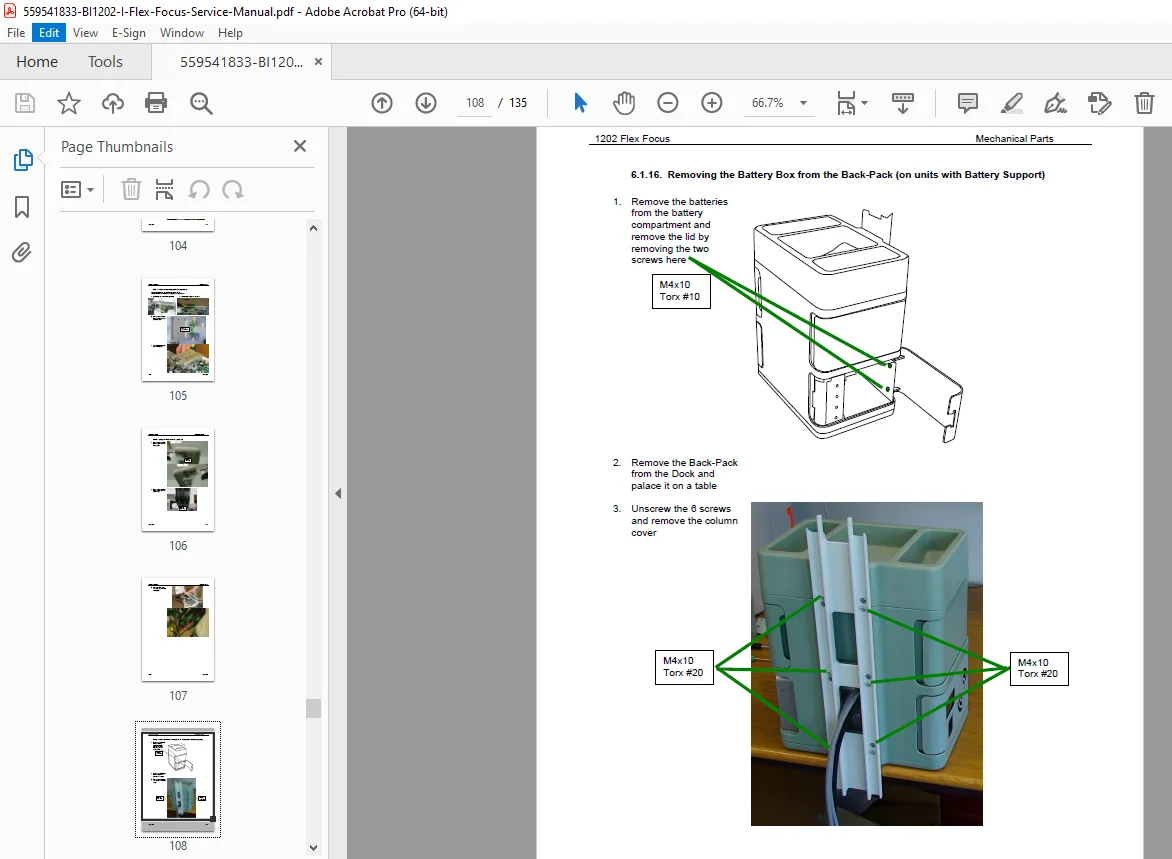
- Removing the Battery Box from the Back-Pack (on units with Battery Support) (Page 27)
- Removing the LCD Display from the Battery Box (Page 29)
- Removing the Power Supply from the Battery Box (Page 31)
- Exploded view / Part list (Page 34)
- Scanning unit (Page 34)
- Docking Units (Page 36)
- Dismantling and Reassemble Procedures (Page 2)
- Section 7: Preventative Maintenance
- Introduction (Page 2)
- Necessary Equipment (Page 2)
- What to do (Page 3)
- Section 8: Theory of Operation
- Introduction (Page 2)
- General Description (Page 2)
- Ultra Sound Signal Flow (Page 2)
- The Engine (Page 3)
- The Core Board (Page 3)
- Front End (Page 5)
- TMUX (Page 6)
- PMC Module (PCI Mezzanine Card) (Page 6)
- Dock and Keyboard (Page 7)
- Power supply (Page 8)
- Battery Pack (Page 8)
- Voltage Distribution (Page 8)
- Section 9: System Interconnections
- System interconnection diagram (Page 2)
- USB 2.0 (Page 3)
- LAN (Page 3)
- Video out (Page 3)
- DVI out (Page 3)
- Adaptors (Page 4)
- System interconnection diagram (Page 2)
This PDF manual for BK ultrasound systems models 200 to 800 equips you with expert knowledge from the BK Flex Focus troubleshooting and adjustment guide to maintain peak performance.
Elevate your ultrasound system repairs today—download this BK Flex Focus service manual download instantly and ensure reliable, compliant service without downtime