Trusted Business
Verified & Licensed
Virus Free Files
100% Safe Downloads
Secure Payment
SSL Protected
Instant Delivery
Available Immediately
Sale!


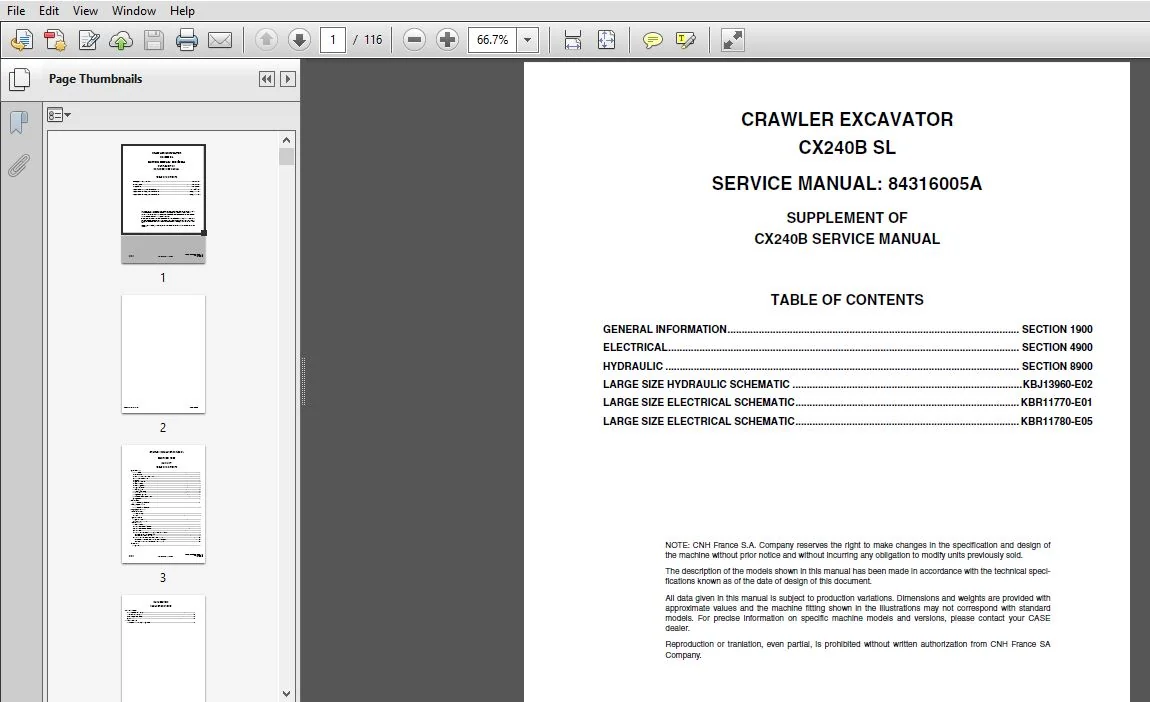
Case CX240B SL Crawler Excavator Service Repair Manual (843160051_A4) Case CX240B SL – PDF Download
Original price was: $84.95.$36.95Current price is: $36.95.
- Case CX240B SL Crawler Excavator Service Repair Manual (843160051_A4) Case CX240B SL
- Size : 10.4 MB
- Format : PDF
- Language : English
- Brand: Case
- Type of machine: Crawler Excavator
- Type of document: Service Manual
- Model: Case CX240B SL Crawler Excavator
- Part No:843160051_A4
Instant PDF Download
Available immediately
Save to Your Device
Download & keep forever
Antivirus Scanned
100% virus-free
Trusted Worldwide
175,000+ customers
Description
Case CX240B SL Crawler Excavator Service Repair Manual (843160051_A4) Case CX240B SL
File Details:
Case CX240B SL Crawler Excavator Service Repair Manual (843160051_A4) Case CX240B SL
Size : 10.4 MB
Format : PDF
Language : English
Brand: Case
Type of machine: Crawler Excavator
Type of document: Service Manual
Model: Case CX240B SL Crawler Excavator
Part No:843160051_A4
CASE CX240B SL CRAWLER EXCAVATOR SERVICE REPAIR MANUAL (843160051_A4) CASE CX240B SL – PDF DOWNLOAD:
Image Preview:
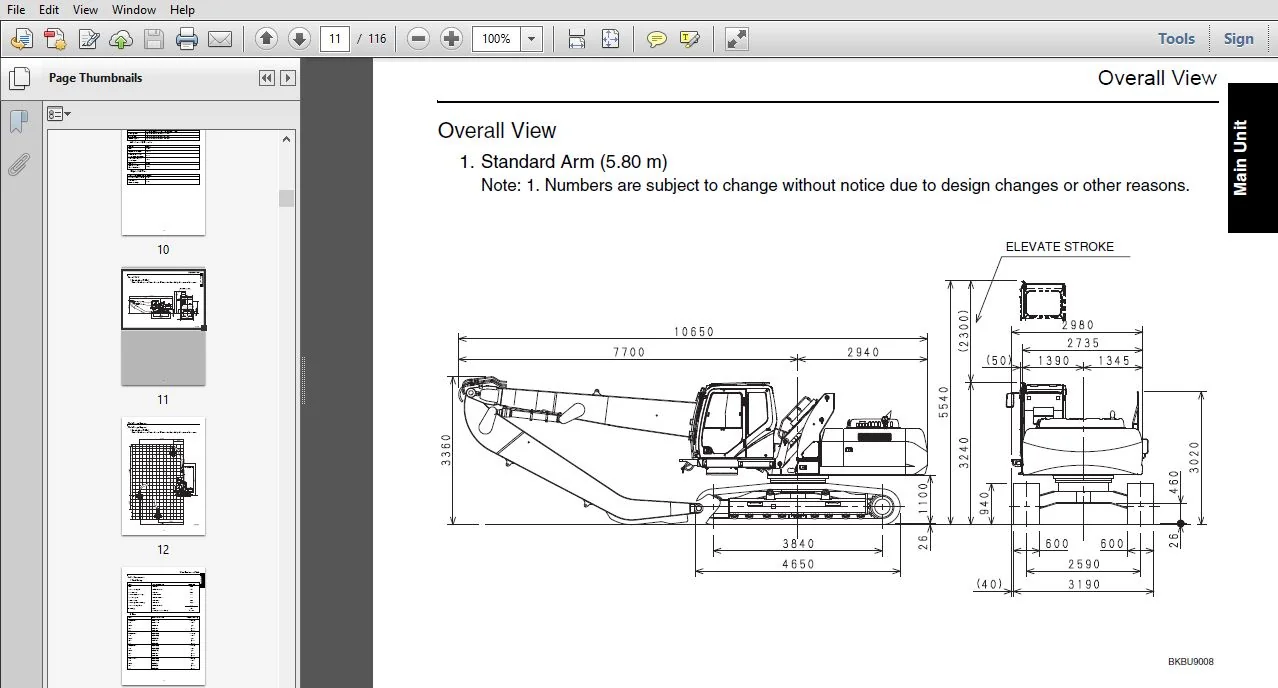
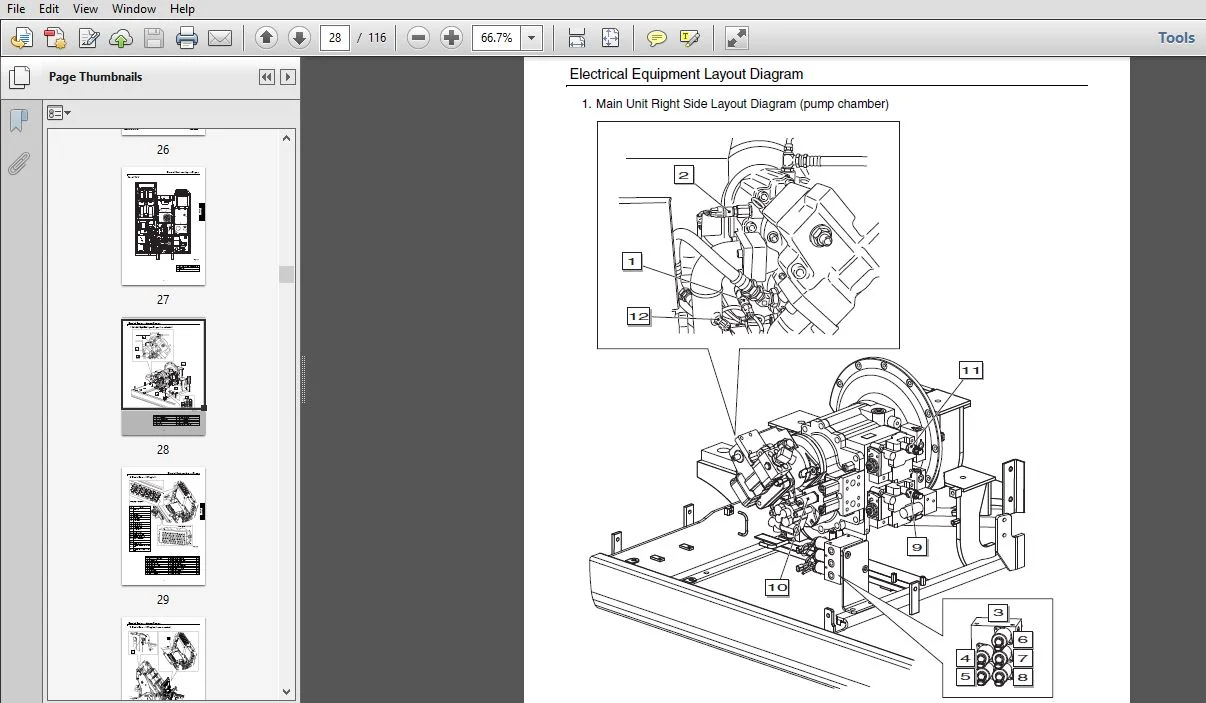
Sample Page From The Manual:
Case CX240B SL Crawler Excavator Service Repair Manual (843160051_A4) Case CX240B SL
- The description of the models shown in this manual has been made in accordance with the technical specifications known as of the date of design of this document.
- All data given in this manual is subject to production variations. Dimensions and weights are provided with
approximate values and the machine fitting shown in the illustrations may not correspond with standard models. For precise information on specific machine models and versions, please contact your CASE dealer. - Reproduction or tranlation, even partial, is prohibited without written authorization from CNH France SA Company
Tabe of Contents:
Case CX240B SL Crawler Excavator Service Repair Manual (843160051_A4) Case CX240B SL
SMCX240BSLTOC-0EN...................................................................................................................................................................................................................................................... 1 SMCX240BSLTOC-0EN-Sec1900.............................................................................................................................................................................................................................................. 3 1e_Main-Body........................................................................................................................................................................................................................................................... 5 4e_Deta................................................................................................................................................................................................................................................................21 SMCX240BSLTOC-0EN-Sec4900..............................................................................................................................................................................................................................................25 3e_Electrical..........................................................................................................................................................................................................................................................27 6E_Interference_Prevention_Device......................................................................................................................................................................................................................................49 Functions..........................................................................................................................................................................................................................................................49 System Function................................................................................................................................................................................................................................................49 [1] Cab interference prevention............................................................................................................................................................................................................................49 When the boom and arm are retracted with the elevator having been operated (A) or when the elevator is operated with the boom and arm retracted (B), speed will be reduced if the attachment comes too close to the cab................................49 If it comes closer, a buzzer for preventing touching will sound and the operating part (attachment) will automatically stop............................................................................................................................49 Caution................................................................................................................................................................................................................................................49 1) When checking operation, make sure to perform warm-up operation so that the hydraulic oil is about 20 C (the needle of the co.......................................................................................................................49 2) In the following cases, there is a possibility of interference with the cab occurring. Use sufficient caution during operation......................................................................................................................49 1. When the length of the tool and end attachment is not set...........................................................................................................................................................................................49 2. When collision with a sensor occurs or external scratching is discovered, inspect the automatic stopping operation state............................................................................................................................49 3. Do not remove sensors and computer for the interference prevention system and do not perform installation or disassembly repair.....................................................................................................................49 4. When a grapple is mounted and lifting magnet mode activated.........................................................................................................................................................................................49 5. When the elevator cab is lowered in an emergency....................................................................................................................................................................................................49 6. The interference prevention system computer may accidental operation due to abnormal radio disturbance from the outside.............................................................................................................................49 Interference Prevention System Operation.......................................................................................................................................................................................................................50 [1] Speed reduction area (A section).......................................................................................................................................................................................................................50 When an operation is performed in which the magnet comes near the cab and the attachment enters the A section shown in the right.......................................................................................................................50 Caution................................................................................................................................................................................................................................................50 When the short arm has been switched to the standard arm and when the standard arm has been switched to the short arm, it is necessary to change the interference prevention system....................................................................50 [2] Automatic stop area (B section)........................................................................................................................................................................................................................50 When the operating part moves closer to the cab and the attachment enters the B section shown in the right diagram, the operating part automatically stops and the warning buzzer sounds...............................................................50 · When automatic stopping occurs, boom-up operations, arm retraction operations, and elevator up/down operations cannot be performed. Other operations can be performed. Perform work with attachments moved sufficiently away from the cab........50 Temporary Cancellation Function................................................................................................................................................................................................................................51 If a temporary further continuation of operation is desired during automatic stopping due to cab interference prevention or any ...........................................................................................................................51 If the temporary cancellation switch (1) is released in a stop area, this will result in abnormal stopping. At this time, press the switch again and move to a safe area...................................................................................51 Caution....................................................................................................................................................................................................................................................51 During operations in which the temporary cancellation switch (1) is being pressed, touching the cab or an obstruction may occur............................................................................................................................51 Also, because the speed reduction function does not work, do not perform sudden lever operation............................................................................................................................................................51 Handling Abnormalities.........................................................................................................................................................................................................................................52 When an abnormality occurs in the interference prevention system, the buzzer sounds and the operation can no longer be performed...........................................................................................................................52 However, emergency lowering of the elevator cap is possible................................................................................................................................................................................................52 (There is a possibility of interference so pay adequate attention when doing work.)........................................................................................................................................................................52 In these cases, immediately stop operation and perform inspection..........................................................................................................................................................................................52 When machine operation is unavoidable in order to move the machine to a safe location, etc., operate the emergency cancellation switch (1) located at the right rear of the seat (above the cigar lighter).................................................52 Caution....................................................................................................................................................................................................................................................52 [1] Do not touch the emergency cancellation switch (1) other than during emergencies.......................................................................................................................................................................52 [2] The interference prevention system is cancelled when the emergency cancellation switch (1) is pressed, so use sufficient caution when performing operations in which the attachment comes near the cab.................................................52 [3] When the key switch is switched to OFF, the emergency cancellation state ends..........................................................................................................................................................................52 Circuit Explanations...............................................................................................................................................................................................................................................53 Boom (up) Interference Prevention Function.....................................................................................................................................................................................................................53 This section explains the flow of electrical signals when the boom is in the automatic stopping state due to operation of the interference prevention device when a boom-up operation is performed in front of the cab.....................................53 When a boom-up operation is performed, the electrical signals sent from each of the potentio- meters (3), (4), (5) installed on the boom, elevator cab, and arm are sent as voltage values to the computer B (12)......................................53 The computer B (12) performs AD conversion (analog => digital) of the voltage values from each of the potentio-meters (3), (4), (5) of the boom, elevator cab, and arm with the internal microcomputer (CPU), and calculates arm top and cab positions.....53 If the boom-up operation is continued, the boom potentio-meter (3) voltage increases, and the computer B (12) recognizes that th.......................................................................................................................53 The reducing valve (6) reduces the switchover pressure to the pilot port of the control valve, and the spool returns to the neutral direction. This reduces the amount of flow to the cylinder and reduces the speed.......................................53 When the boom rises further and enters the stop area, the computer B (12) sends a stop command milli-amp and the buzzer sounds.........................................................................................................................53 At this time, the computer B (12) sends a stop command not only to boom (R3) of the reducing valve (6), also to elevator cab (R2) and arm (R1), and all operations are stopped.............................................................................53 The stop command milli-amp is as shown in the table below..................................................................................................................................................................................................53 Caution....................................................................................................................................................................................................................................................53 [1] During stopping, a large amount of milli-amp will momentarily flow, but this is not abnormal...........................................................................................................................................................53 [2] When measuring milli-amp, use the service connectors (for PAX) listed below. WDB0055-6, WDB0055-7......................................................................................................................................................53 [3] Adhesive tape of the colors listed in the table below is wrapped around the electromagnetic valve connectors...........................................................................................................................................53 Note that, in safety areas, the milli-amp listed in the table below flows to the reducing valve (6) so that the computer B (12) can perform disconnection detection....................................................................................53 Elevator Cab Interference Prevention Function..................................................................................................................................................................................................................55 This section explains the flow of electrical signals when the elevator cab is in the automatic stopping state due to operation o...........................................................................................................................55 When an elevator left operation is performed, the electrical signals sent from each of the potentio- meters (4), (3), (5) installed on the elevator, boom, and arm are sent as voltage values to the computer B (12).......................................55 The computer B (12) performs AD conversion (analog => digital) of the voltage values from each of the potentio-meters (4), (3), (5) of the elevator, boom, and arm with the internal microcomputer (CPU), and calculates arm top and cab positions.........55 If the elevator operation is continued, the elevator potentio-meter (4) voltage changes, and the computer B (12) recognizes that...........................................................................................................................55 The reducing valve (6) reduces the switchover pressure to the pilot port of the control valve, and the spool returns to the neutral direction. This reduces the amount of flow to the cylinder and reduces the speed.......................................55 When the elevator cab enters the stop area, the computer B (12) sends a stop command milli-amp and the buzzer sounds.......................................................................................................................................55 At this time, the computer B (12) sends a stop command not only to elevator (R2) of the reducing valve (6), also to boom (R3) and arm (R1), and all operations are stopped.................................................................................55 The stop command milli-amp is as shown in the table below..................................................................................................................................................................................................55 Caution....................................................................................................................................................................................................................................................55 [1] During stopping, a large amount of milli-amp will momentarily flow, but this is not abnormal...........................................................................................................................................................55 [2] When measuring milli-amp, use the service connectors (for PAX) listed below. WDB0055-6, WDB0055-7......................................................................................................................................................55 [3] Adhesive tape of the colors listed in the table below is wrapped around the electromagnetic valve connectors...........................................................................................................................................55 Note that, in safety areas, the milli-amp listed in the table below flows to the reducing valve (6) so that the computer B (12) can perform disconnection detection....................................................................................55 Arm (in) Interference Prevention Function......................................................................................................................................................................................................................57 This section explains the flow of electrical signals when the arm is in the automatic stopping state due to operation of the interference prevention device when an arm-in operation is performed in front of the cab......................................57 When an arm-in operation is performed, the electrical signals sent from each of the potentio-meters (5), (3), (4) installed on t...........................................................................................................................57 If the arm-in operation is continued, the arm potentio-meter (5) voltage increases, and the computer B (12) recognizes that the ...........................................................................................................................57 The reducing valve (6) reduces the switchover pressure to the pilot port of the control valve, and the spool returns to the neutral direction. This reduces the amount of flow to the cylinder and reduces the speed.......................................57 When the arm moves further in and enters the stop area, the computer B (12) sends a stop command milli-amp and the buzzer sounds...........................................................................................................................57 At this time, the computer B (12) sends a stop command not only to arm (R1) of the reducing valve (6), also to boom (R3) and elevator cab (R2), and all operations are stopped.............................................................................57 The stop command milli-amp is as shown in the table below..................................................................................................................................................................................................57 Caution....................................................................................................................................................................................................................................................57 [1] During stopping, a large amount of milli-amp will momentarily flow, but this is not abnormal...........................................................................................................................................................57 [2] When measuring milli-amp, use the service connectors (for PAX) listed below. WDB0055-6, WDB0055-7......................................................................................................................................................57 [3] Adhesive tape of the colors listed in the table below is wrapped around the electromagnetic valve connectors...........................................................................................................................................57 Note that, in safety areas, the milli-amp listed in the table below flows to the reducing valve (6) so that the computer B (12) can perform disconnection detection....................................................................................57 Temporary Cancellation Function................................................................................................................................................................................................................................59 If the computer B (12) detects that the temporary cancellation switch (13) is pressed, it enters cancellation mode and the buzzer sounds...................................................................................................................59 At this time, the cancellation milli-amp listed in the table below flows to the reducing valve (6).........................................................................................................................................................59 Note that, measurement can be performed by installing a milli-amp gauge at the (a) positions shown in the diagram..........................................................................................................................................59 Handling Abnormalities (shut-off function).....................................................................................................................................................................................................................61 If the computer B (12) detects an abnormality such as a disconnection of the reducing valve (6), the power supply to the shut-off solenoid valve (11) is stopped and the status of shut-off solenoid valve (11) becomes "shut-off".........................61 Note that, "shut-off" status does not occur due to abnormalities with each potentio-meter (3), (4), and (5)................................................................................................................................................61 (Emergency lowering is possible even if the power supply is stopped. However, there is a possibility of interference.).....................................................................................................................................61 Handling Abnormalities (redundancy function)...................................................................................................................................................................................................................63 This section explains the flow of electrical signals when recovery of the shut-off solenoid valve (11) from the "shut-off" state is performed with the emergency cancellation switch (8)...................................................................63 If the emergency cancellation switch (8) is pressed, the redundant relay (7) is excited and the contact changes, milli-amp flows to the shut-off solenoid valve (11), and the "shut-off" state is cancelled................................................63 Note that, the emergency cancellation switch (8) is a momentary operation switch, but because the excitation state is held by the redundancy relay (7), the excitation state is not cancelled unless the key is switched OFF...............................63 At this time, the power supply to the CN1 terminals (15), (16) of the computer B (12) is cut off and the interference prevention function connected to the computer B (12) terminals stops.................................................................63 The power supply of the CN1 terminals (15), (16) of the interference prevention computer (12) is the following.............................................................................................................................................63 a) (R1), (R2), (R3) power supply of reducing valve (6).....................................................................................................................................................................................................63 .........Arm retraction, boom up, and elevator are free....................................................................................................................................................................................................63 Also, due to switching of the redundant relay (7) contact, the redundant buzzer relay (9) is excited, the contact switches, and the buzzer sounds..........................................................................................................63 Settings Method....................................................................................................................................................................................................................................................65 Settings Confirmation..............................................................................................................................................................................................................................................76 Operation Confirmation for Cab Interference Prevention Function................................................................................................................................................................................................76 After default settings for the interference prevention function are complete, perform function confirmation using the following procedure..................................................................................................................76 [1] Preparations for confirmation of interference prevention function operation............................................................................................................................................................................76 After default settings are complete, turn the starter switch to "OFF" and wait about 7 sec. until the monitor display is no longer illuminated.........................................................................................................76 Turn the starter switch to "ON" again, start the engine, and run the engine at maximum rotation (high idle)............................................................................................................................................76 [2] Arm-in stop confirmation...............................................................................................................................................................................................................................76 Confirmation posture...................................................................................................................................................................................................................................76 1) Elevator in up position.........................................................................................................................................................................................................................76 2) Boom in state in which boom-down flange is nearly vertical with the ground......................................................................................................................................................................76 3) Arm at out stroke end...........................................................................................................................................................................................................................76 4) End attachment at out stroke end................................................................................................................................................................................................................76 [3] Boom-up stop confirmation..............................................................................................................................................................................................................................77 Confirmation posture...................................................................................................................................................................................................................................77 1) Elevator in up position.........................................................................................................................................................................................................................77 2) Arm in automatic stop position from out stroke end position.....................................................................................................................................................................................77 3) End attachment at out stroke end................................................................................................................................................................................................................77 4) Lower the boom until the top of the end attachment is lightly touching the ground...............................................................................................................................................................77 [4] Elevator cab lowering stop confirmation................................................................................................................................................................................................................78 Confirmation posture...................................................................................................................................................................................................................................78 1) Elevator in up position.........................................................................................................................................................................................................................78 2) Boom in state in which boom-down flange is nearly vertical with the ground......................................................................................................................................................................78 3) End attachment at out stroke end................................................................................................................................................................................................................78 [5] Elevator cab raising stop confirmation.................................................................................................................................................................................................................78 Confirmation posture...................................................................................................................................................................................................................................78 1) Elevator in down position.......................................................................................................................................................................................................................78 2) Boom in state in which boom-down flange is nearly vertical with the ground......................................................................................................................................................................78 3) End attachment at out stroke end................................................................................................................................................................................................................78 Operation Confirmation of Emergency Cancellation...............................................................................................................................................................................................................79 Confirmation posture.......................................................................................................................................................................................................................................79 1) Elevator in down position...........................................................................................................................................................................................................................79 2) Boom in state in which boom-down flange is nearly vertical with the ground..........................................................................................................................................................................79 3) Arm in automatic stop position from out stroke end..................................................................................................................................................................................................79 4) End attachment at out stroke end....................................................................................................................................................................................................................79 If the engine is run at minimum rotation (low idle) and the emergency cancellation switch at the right rear of the seat is operated, the buzzer will sound continuously....................................................................................79 At this time, confirm that boom up, elevator up/down, and arm retraction operations can be performed.......................................................................................................................................................79 Use caution to perform these operations as the interference prevention function is not working.............................................................................................................................................................79 If the starter switch is turned "OFF" and then "ON" again, the interference system will return to default settings and the interference system will work...................................................................................................79 Error Code.........................................................................................................................................................................................................................................................80 When an abnormality occurs in the liftcrane device, the warning buzzer sounds in order to perform notification of the abnormality..............................................................................................................................80 See below for information on buzzer patterns...................................................................................................................................................................................................................80 Buzzer pattern during abnormality occurrence...................................................................................................................................................................................................................80 About buzzer patterns shown in table.......................................................................................................................................................................................................................80 · The rising and lowering of the horizontal line indicates the buzzer turning ON and OFF...............................................................................................................................................................80 · The length of the horizontal line indicates time. (There are 2 lengths.).................................................................................................................................................................................80 (Example)..................................................................................................................................................................................................................................................80 · The buzzer patterns repeat after 1 sec. pauses...........................................................................................................................................................................................................80 SMCX240BSLTOC-0EN-Sec8900..............................................................................................................................................................................................................................................81 2e_Hydraulic...........................................................................................................................................................................................................................................................83 KBJ13960-E02........................................................................................................................................................................................................................................................... 0 KBR11770-E01........................................................................................................................................................................................................................................................... 0 KBR11780-E05........................................................................................................................................................................................................................................................... 0
Please Note:
- This is not a physical manual but a digital manual – meaning no physical copy will be couriered to you. The manual can be yours in the next 2 mins as once you make the payment, you will be directed to the download page IMMEDIATELY.
- This is the same manual used by the dealers inorder to diagnose your vehicle of its faults.
- Require some other service manual or have any queries: please WRITE to us at [email protected]