CAT GE Multilin PQM Instruction Manual – PDF DOWNLOAD
$28.95
CAT GE Multilin PQM Instruction Manual – PDF DOWNLOAD
Description
CAT GE Multilin PQM Instruction Manual – PDF DOWNLOAD
FILE DETAILS:
CAT GE Multilin PQM Instruction Manual – PDF DOWNLOAD
Language : English
Pages : 209
Downloadable : Yes
File Type : PDF
DESCRIPTION:
CAT GE Multilin PQM Instruction Manual – PDF DOWNLOAD
1.1 Introduction
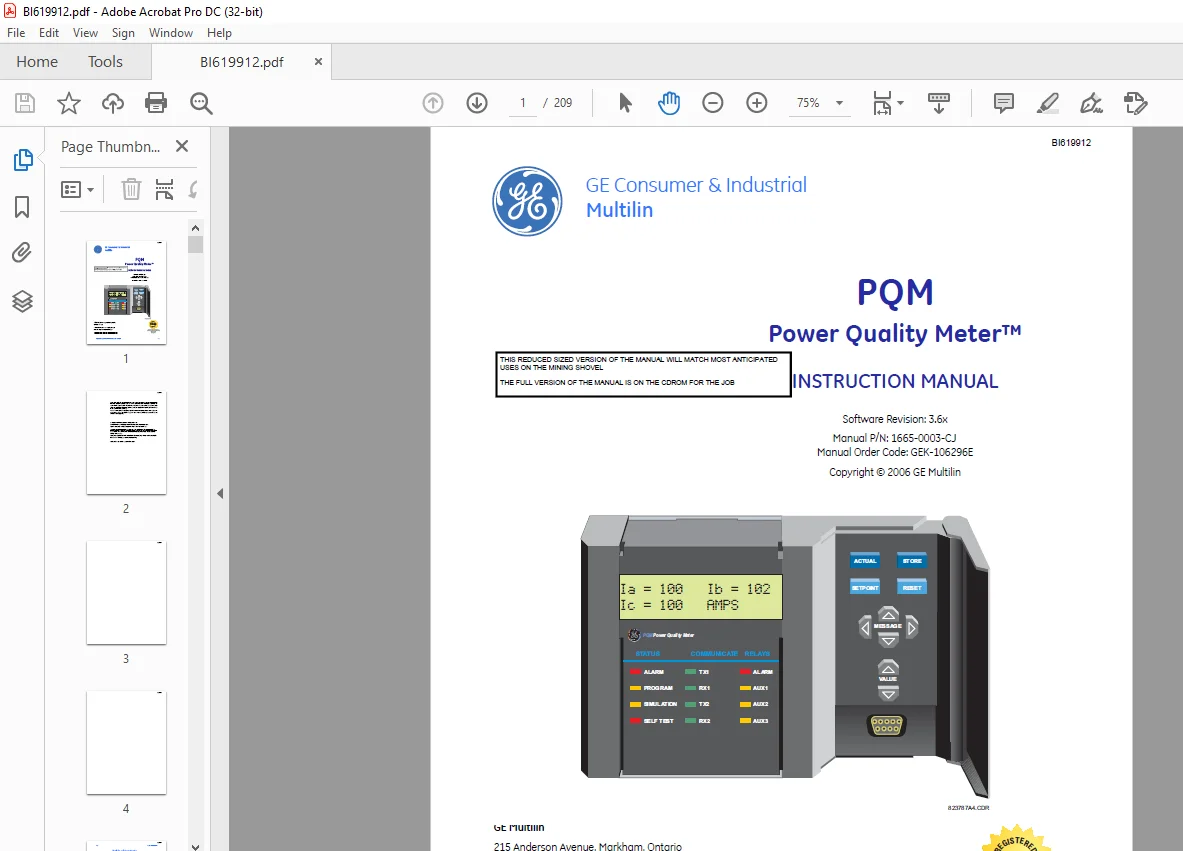
- The GE Multilin PQM Power Quality Meter is an ideal choice for continuous monitoring of a single or three-phase system. It provides metering for current, voltage, real power, reactive power, apparent power, energy use, cost of power, power factor, and frequency.
- Programmable setpoints and four assignable output relays allow control functions to be added for specific applications. This includes basic alarm on over/under current or voltage, unbalance, demand based load shedding, and capacitor power factor correction control.
- More complex control is possible using the four switch inputs; these can also be used for status information such as breaker open/closed, flow information, etc. As a data gathering device for plant automation systems that integrate process, instrument, and electrical requirements, all monitored values are available via one of two RS485 communication ports running the Modbus protocol.
- If analog values are required for direct interface to a PLC, any of the monitored values can output as a 4 to 20 mA (or 0 to 1 mA) signal to replace up to 4 separate transducers. A third RS232 communication port connects to a PC from the front panel for simultaneous access of information by other plant personnel.
- With increasing use of electronic loads such as computers, ballasts, and variable frequency drives, the quality of the power system is important. With the harmonic analysis option, any phase current or voltage can be displayed and the harmonic content calculated. Knowledge of the harmonic distribution allows action to be taken to prevent overheated transformers, motors, capacitors, neutral wires, and nuisance breaker trips.
- Redistribution of system loading can also be determined. The PQM can also provide waveform and data printouts to assist in problem diagnosis. Economical system monitoring or control is possible by selecting the non-display chassis model as a system component and adding required options to obtain the desired level of functionality.
IMAGES PREVIEW OF THE MANUAL:


TABLE OF CONTENTS:
CAT GE Multilin PQM Instruction Manual – PDF DOWNLOAD
1: OVERVIEW INTRODUCTION 1-1
DESCRIPTION 1-1
FEATURE HIGHLIGHTS 1-2
APPLICATIONS 1-3
STANDARD FEATURES 1-5
METERING 1-5
FUTURE EXPANSION 1-6
OPTIONAL FEATURES 1-6
ENERVISTA PQM SETUP SOFTWARE 1-11
ORDER CODES 1-12
SPECIFICATIONS 1-13
PQM SPECIFICATIONS 1-13
2: INSTALLATION PHYSICAL 2-1
MOUNTING 2-1
PRODUCT IDENTIFICATION 2-2
REVISION HISTORY 2-3
ELECTRICAL 2-5
EXTERNAL CONNECTIONS 2-5
CONTROL POWER 2-15
VT INPUTS 2-15
CT INPUTS 2-15
OUTPUT RELAYS 2-16
SWITCH INPUTS (OPTIONAL) 2-16
ANALOG OUTPUTS (OPTIONAL) 2-18
ANALOG INPUT (OPTIONAL) 2-19
RS485 SERIAL PORTS 2-19
RS232 FRONT PANEL PORT 2-21
DIELECTRIC STRENGTH TESTING 2-22
3: OPERATION FRONT PANEL & DISPLAY 3-1
FRONT PANEL 3-1
DISPLAY 3-2
STATUS INDICATORS 3-3
DESCRIPTION 3-3
STATUS 3-3
COMMUNICATE 3-3
RELAYS 3-4
KEYPAD 3-5
DESCRIPTION 3-5
SETPOINT KEY 3-5
ACTUAL KEY 3-5
STORE KEY 3-5
RESET KEY 3-6
MESSAGE KEYS 3-6
VALUE KEYS 3-7
DATA ENTRY METHODS 3-7
SETPOINT ACCESS SECURITY 3-8
BI619912
TOC–II PQM POWER QUALITY METER – INSTRUCTION MANUAL
TABLE OF CONTENTS
DEFAULT MESSAGES 3-9
DESCRIPTION 3-9
ADDING A DEFAULT MESSAGE 3-9
DELETING A DEFAULT MESSAGE 3-9
4: PROGRAMMING INTRODUCTION 4-1
SETPOINT ENTRY METHODS 4-1
S1 PQM SETUP 4-3
DESCRIPTION 4-3
PREFERENCES 4-3
SETPOINT ACCESS 4-4
RS485/RS232 SERIAL PORTS 4-7
DNP 3 0 CONFIGURATION 4-8
CLOCK 4-9
CALCULATION PARAMETERS 4-10
CLEAR DATA 4-12
EVENT RECORDER 4-14
TRACE MEMORY 4-15
PROGRAMMABLE MESSAGE 4-18
PRODUCT OPTIONS 4-20
S2 SYSTEM SETUP 4-21
CURRENT/VOLTAGE CONFIGURATION 4-21
ANALOG OUTPUTS 4-24
ANALOG INPUT 4-29
SWITCH INPUTS 4-31
PULSE OUTPUT 4-33
PULSE INPUT 4-34
DATA LOGGER 4-36
S3 OUTPUT RELAYS 4-37
DESCRIPTION 4-37
ALARM RELAY 4-37
AUXILIARY RELAYS 4-38
S4 ALARMS/CONTROL 4-39
CURRENT/VOLTAGE ALARMS 4-39
TOTAL HARMONIC DISTORTION 4-45
FREQUENCY 4-46
POWER ALARMS 4-47
POWER FACTOR 4-49
DEMAND ALARMS 4-52
PULSE INPUT 4-54
TIME 4-55
MISCELLANEOUS ALARMS 4-57
S5 TESTING 4-58
TEST OUTPUT RELAYS & LEDS 4-58
CURRENT/VOLTAGE SIMULATION 4-59
ANALOG OUTPUTS SIMULATION 4-60
ANALOG INPUT SIMULATION 4-61
SWITCH INPUTS SIMULATION 4-62
FACTORY USE ONLY 4-62
BI619912
TOC TABLE OF CONTENTS
PQM POWER QUALITY METER – INSTRUCTION MANUAL TOC–III
5: MONITORING ACTUAL VALUES VIEWING 5-1
DESCRIPTION 5-1
A1 METERING 5-3
CURRENT 5-3
VOLTAGE 5-5
PHASORS 5-7
POWER 5-9
ENERGY 5-14
DEMAND 5-16
FREQUENCY 5-17
PULSE COUNTER 5-18
ANALOG INPUT 5-19
A2 STATUS 5-21
ALARMS 5-21
SWITCH STATUS 5-23
CLOCK 5-24
PROGRAMMABLE MESSAGE 5-24
A3 POWER ANALYSIS 5-25
POWER QUALITY 5-25
TOTAL HARMONIC DISTORTION 5-26
DATA LOGGER 5-27
EVENT RECORDER 5-28
A4 PRODUCT INFO 5-33
SOFTWARE VERSIONS & MODEL INFORMATION 5-33
6: SOFTWARE INTRODUCTION 6-1
OVERVIEW 6-1
HARDWARE CONFIGURATION 6-2
ENERVISTA PQM SETUP INSTALLATION 6-4
CHECKING IF INSTALLATION/UPGRADE IS REQUIRED 6-4
INSTALLING/UPGRADING ENERVISTA PQM SETUP 6-4
CONFIGURING ENERVISTA PQM SETUP COMMUNICATIONS 6-6
ENERVISTA PQM SETUP MENUS 6-8
DESCRIPTION 6-8
UPGRADING FIRMWARE 6-9
DESCRIPTION 6-9
SAVE/PRINT PQM SETPOINTS TO A FILE 6-9
LOADING NEW FIRMWARE INTO THE PQM 6-9
FIRMWARE UPGRADE RECOVERY 6-11
LOADING SAVED SETPOINTS INTO THE PQM 6-13
USING ENERVISTA PQM SETUP 6-14
ENTERING SETPOINTS 6-14
VIEWING ACTUAL VALUES 6-15
SETPOINT FILES 6-15
GETTING HELP 6-15
POWER ANALYSIS 6-17
WAVEFORM CAPTURE 6-17
HARMONIC ANALYSIS 6-18
TRACE MEMORY 6-20
DATA LOGGER 6-22
BI619912
TOC–IV PQM POWER QUALITY METER – INSTRUCTION MANUAL
TABLE OF CONTENTS
7: MODBUS
COMMUNICATIONS
OVERVIEW 7-1
MODBUS PROTOCOL 7-1
ELECTRICAL INTERFACE 7-1
DATA FORMAT & DATA RATE 7-2
DATA PACKET FORMAT 7-2
ERROR CHECKING 7-3
CRC-16 ALGORITHM 7-3
TIMING 7-4
MODBUS FUNCTIONS 7-5
PQM SUPPORTED MODBUS FUNCTIONS 7-5
FUNCTION CODES 03/04 – READ SETPOINTS/ACTUAL VALUES 7-6
FUNCTION CODE 05 – EXECUTE OPERATION 7-7
FUNCTION CODE 05 – BROADCAST COMMAND 7-8
FUNCTION CODE 06 – STORE SINGLE SETPOINT 7-9
FUNCTION CODE 07 – READ DEVICE STATUS 7-10
FUNCTION CODE 08 – LOOPBACK TEST 7-11
FUNCTION CODE 16 – STORE MULTIPLE SETPOINTS 7-12
FUNCTION CODE 16 – PERFORMING COMMANDS 7-13
FUNCTION CODE 16 – BROADCAST COMMAND 7-14
ERROR RESPONSES 7-15
MODBUS MEMORY MAP 7-16
MEMORY MAP INFORMATION 7-16
USER-DEFINABLE MEMORY MAP 7-16
PQM MEMORY MAP 7-17
MEMORY MAP DATA FORMATS 7-72
ANALOG OUTPUT PARAMETER RANGE 7-92
8: DNP
COMMUNICATIONS
DNP 3 0 PROTOCOL 8-1
DEVICE PROFILE DOCUMENT 8-1
IMPLEMENTATION TABLE 8-4
DEFAULT VARIATIONS 8-6
INTERNAL INDICATION BITS 8-6
BINARY INPUT / BINARY INPUT CHANGE POINT LIST 8-7
BINARY OUTPUT / CONTROL RELAY OUTPUT POINT LIST 8-9
POINT LIST FOR ANALOG INPUT/OUTPUT CHANGE 8-11
POINT LIST FOR COUNTERS 8-21
9: COMMISSIONING COMMISSIONING 9-1
10: MISCELLANEOUS WARRANTY 10-1
TABLE OF REVISIONS 10-2
REVISIONS:
1605-0003-CH
TO
1605-0003-CJ 10-2
BI619912
TOC TABLE OF CONTENTS
PQM POWER QUALITY METER – INSTRUCTION MANUAL TOC–V
APPENDIX: APPLICATION
NOTES
EVENT RECORDER A-1
INTERFACING USING HYPERTERMINAL A-7
PHASORS IMPLEMENTATION A-10
TRIGGERED TRACE MEMORY A-12
PULSE OUTPUT APPLICATION A-13
DATA LOGGER IMPLEMENTATION A-15
READING LONG INTEGERS FROM MEMORY MAP A-20
PULSE INPUT APPLICATION A-22
PULSE TOTALIZER APPLICATION A-24
Contact us: [email protected]
PLEASE NOTE:
- This is the same manual used by the dealers to diagnose and troubleshoot your vehicle
- You will be directed to the download page as soon as the purchase is completed. The whole payment and downloading process will take anywhere between 2-5 minutes
- Need any other service / repair / parts manual, please feel free to contact [email protected] . We still have 50,000 manuals unlisted
S.M