CAT Roof Support BMA Shield PMC-R Operation Manual – PDF DOWNLOAD
Original price was: $78.00.$27.95Current price is: $27.95.
CAT Roof Support BMA Shield PMC-R Operation Manual – PDF DOWNLOAD
Description
CAT Roof Support BMA Shield PMC-R Operation Manual – PDF DOWNLOAD
DESCRIPTION
CAT Roof Support BMA Shield PMC-R Operation Manual – PDF DOWNLOAD
About this manual
This chapter contains important information which will simplify work with this manual for you. In addition, it contains information about the structure of the manual and on the characters and symbols used
Before starting work
Using a manual that is not written for the equipment at hand can result in a safety hazard for yourself and others. Make sure the information on the equipment complies with that given in the manual. The manual must be accessible at all times to all persons working on or with the equipment. There should, if possible, always be a manual for the equipment available at the place of operation. Request a new manual immediately if the current manual is no longer complete or has become illegible
TABLE OF CONTENTS:
CAT Roof Support BMA Shield PMC-R Operation Manual – PDF DOWNLOAD
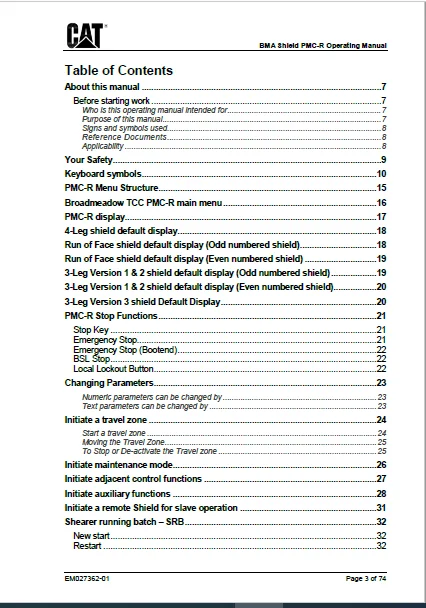
About this manual.................................................... 7
	Before starting work............................................. 7
		Who is this operating manual intended for.................... 7
		Purpose of this manual....................................... 7
		Signs and symbols used....................................... 8
		Reference Documents.......................................... 8
		Applicability................................................ 8
Your Safety.......................................................... 9
Keyboard symbols.....................................................10
PMC-R Menu Structure.................................................15
Broadmeadow TCC PMC-R main menu......................................16
PMC-R display........................................................17
4-Leg shield default display.........................................18
Run of Face shield default display (Odd numbered shield).............18
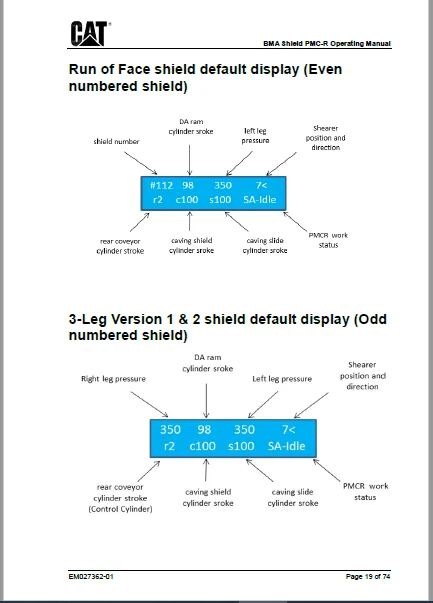
Run of Face shield default display (Even numbered shield)............19
3-Leg Version 1 & 2 shield default display (Odd numbered shield).....19
3-Leg Version 1 & 2 shield default display (Even numbered shield)....20
3-Leg Version 3 shield Default Display...............................20
PMC-R Stop Functions.................................................21
	Stop Key.........................................................21
	Emergency Stop...................................................21
	Emergency Stop (Bootend).........................................22
	BSL Stop.........................................................22
	Local Lockout Button.............................................22
Changing Parameters..................................................23
	Numeric parameters can be changed by.............................23
	Text parameters can be changed by................................23
Initiate a travel zone...............................................24
	Start a travel zone..............................................24
Initiate maintenance mode............................................26
Initiate adjacent control functions..................................27
Initiate auxiliary functions.........................................28
Initiate a remote Shield for slave operation.........................31
Shearer running batch – SRB..........................................32
	New start........................................................32
	Restart..........................................................32
	Initiate an SRB Newstart – Shearer communications tracking.......33
	Initiate an SRB Newstart – manual mode...........................34
	Initiate an SRB restart..........................................35
	Initiate the trigger for the Main to Tail TCC sequence...........36
	Reversing the shearer during SRB operations......................37
Initiate an auto sequence (Shield advance)...........................38
Initiate an ASQ Batch................................................39
Initiate an adjacent group bankpush..................................40
	The outcomes of bankpush direction selection.....................41
	Bank pushing the face using adjacent group Bankpush..............41
Types of bankpush....................................................42
	(S) Snake........................................................42
	(T) Taper........................................................42
	(All) All........................................................43
	Protection zones.................................................43
Initiate a lock on push..............................................44
Initiate an adjacent group conveyor pullback.........................45
Initiate a conveyor pullback (deadman group).........................46
Initiate a BSL push/MG RCP Pull......................................47
Initiate a rear AFC advance adjacent group...........................48
Initiate a lock on rear AFC advance..................................49
Initiate an adjacent flipper group...................................50
Initiate an adjacent forepole group..................................51
Initiate in–shield caving functions..................................52
Initiate in–shield auto TCC..........................................53
Initiate an auto TCC adjacent group..................................54
	Stagger TCC......................................................56
	Sequential TCC...................................................58
	Random TCC.......................................................59
Auto TCC Suspend/Inhibit.............................................60
	Rear AFC Stop....................................................60
	Rear AFC Overload................................................60
	TCC_PLC_Inhibit..................................................61
Positive set automatic...............................................62
	Guaranteed Set...................................................62
	High Pressure Set................................................62
	Disabling Positive Set...........................................63
Shearer remote stop operation........................................64
Anti-collision over-rides............................................65
	Shearer Anti-Collision Override..................................65
	Rear AFC Anti-Collision..........................................65
Minimum height dump over-ride........................................66
Motion monitoring maximum travel error reset.........................67
Compensation Cylinder Stop Errors....................................68
	CompCylinder Stop #..............................................68
	MM MaxCmpAng.....................................................68
	MM MinCmpAng.....................................................69
Gate End Sequence With Target Line...................................70
	Previous Sequence (Before V20)...................................70
	Push to Target Sequence (V20 Onwards)............................72
RCP Broken Chain Warning.............................................73
PMCR Shortcuts.......................................................74
	B key............................................................74
	P key............................................................74
IMAGES PREVIEW OF THE MANUAL:
CAT ROOF SUPPORT BMA SHIELD PMC-R OPERATION MANUAL – PDF DOWNLOAD:
https://vimeo.com/661424497
PLEASE NOTE:
- This is the SAME exact manual used by your dealers to fix your vehicle.
- The same can be yours in the next 2-3 mins as you will be directed to the download page immediately after paying for the manual.
- Any queries / doubts regarding your purchase, please feel free to contact [email protected]
S.M