CAT Rotary Track Drills MD6750 49HR 400 Series Plat Panel Industrial PC Hardware Reference Technical Manual – PDF
Original price was: $80.00.$24.95Current price is: $24.95.
CAT Rotary Track Drills MD6750 49HR 400 Series Plat Panel Industrial PC Hardware Reference Technical Manual – PDF DOWNLOAD
Description
CAT Rotary Track Drills MD6750 49HR 400 Series Plat Panel Industrial PC Hardware Reference Technical Manual – PDF DOWNLOAD
DESCRIPTION:
CAT Rotary Track Drills MD6750 49HR 400 Series Plat Panel Industrial PC Hardware Reference Technical Manual – PDF DOWNLOAD
- Trademark Information Brand or product names are registered trademarks of their respective owners. Windows is a registered trademark of Microsoft Corp. in the United States and other countries.
- Copyright Information This document is copyrighted by XYCOM AUTOMATION Incorporated (Xycom) and shall not be reproduced or copied without expressed written authorization from Xycom. The information contained within this document is subject to change without notice. United States FCC Part 15, Subpart B, Class A EMI Compliance Statement:
- NOTE: This equipment has been tested and found to comply with the limits for a Class A digital device, pursuant to part 15 of the FCC Rules. These limits are designed to provide reasonable protection against harmful interference when the equipment is operated in a commercial environment. This equipment generates, uses, and can radiate radio frequency energy and, if not installed and used in accordance with the instruction manual, may cause harmful interference to radio communications.
- Operation of this equipment in a residential area is likely to cause harmful interference in which case the user will be required to correct the interference at his own expense. For European Users – WARNING: This is a Class A product. In a domestic environment this product may cause radio interference in which case the user may be required to take adequate measures. INSTALLATION: Electromagnetic Compatibility WARNING The connection of non-shielded equipment interface cables to this equipment will invalidate FCC EMI and European Union EMC compliance and may result in electromagnetic interference and/or susceptibility levels which are in violation of regulations which apply to the legal operation of this device.
- It is the responsibility of the system integrator and/or user to apply the following directions which relate to installation and configuration: 1. All interface cables must include shielded cables. Braid/foil type shields are recommended. Communication cable connectors must be metal, ideally zinc die-cast backshell types, and provide 360 degree protection about the interface wires.
- The cable shield braid must be terminated directly to the metal connector shell, ground drain wires alone are not adequate. 2. Protective measures for power and interface cables as described within this manual must be applied. Do not leave cables connected to unused interfaces or disconnected at one end. Changes or modifications to this device not expressly approved by the manufacturer could void the user’s authority to operate the equipment. 3. EMC compliance is, in part, a function of PCB design.
- Third party add-on AT/XT peripheral PCB assemblies installed within this apparatus may void EMC compliance. FCC/CE compliant PCB assemblies should always be used where possible. XYCOM can accept no responsibility for the EMC performance of this apparatus after system integrator/user installation of PCB assemblies not manufactured and/or expressly tested and approved for compliance by XYCOM. It is the responsibility of the system integrator/user to ensure that installation and operation of such devices does not void EMC compliance.
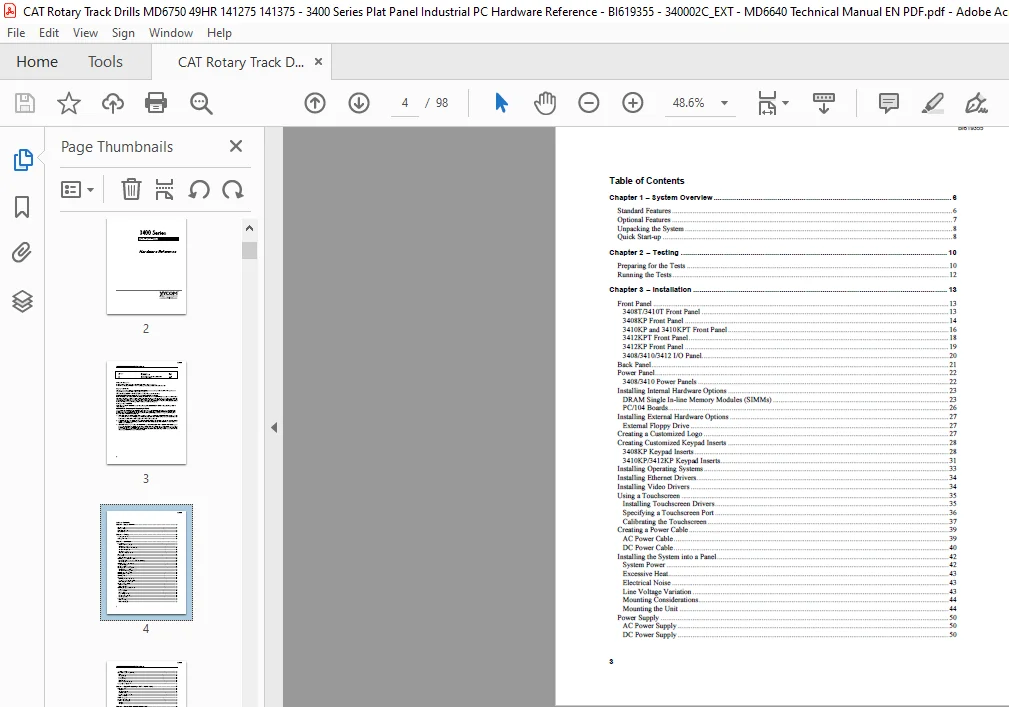
TABLE OF CONTENTS:
CAT Rotary Track Drills MD6750 49HR 400 Series Plat Panel Industrial PC Hardware Reference Technical Manual – PDF DOWNLOAD
Chapter 1 – System Overview 6
Standard Features 6
Optional Features 7
Unpacking the System 8
Quick Start-up 8
Chapter 2 – Testing 10
Preparing for the Tests 10
Running the Tests 12
Chapter 3 – Installation 13
Front Panel 13
3408T/3410T Front Panel 13
3408KP Front Panel 14
3410KP and 3410KPT Front Panel 16
3412KPT Front Panel 18
3412KP Front Panel 19
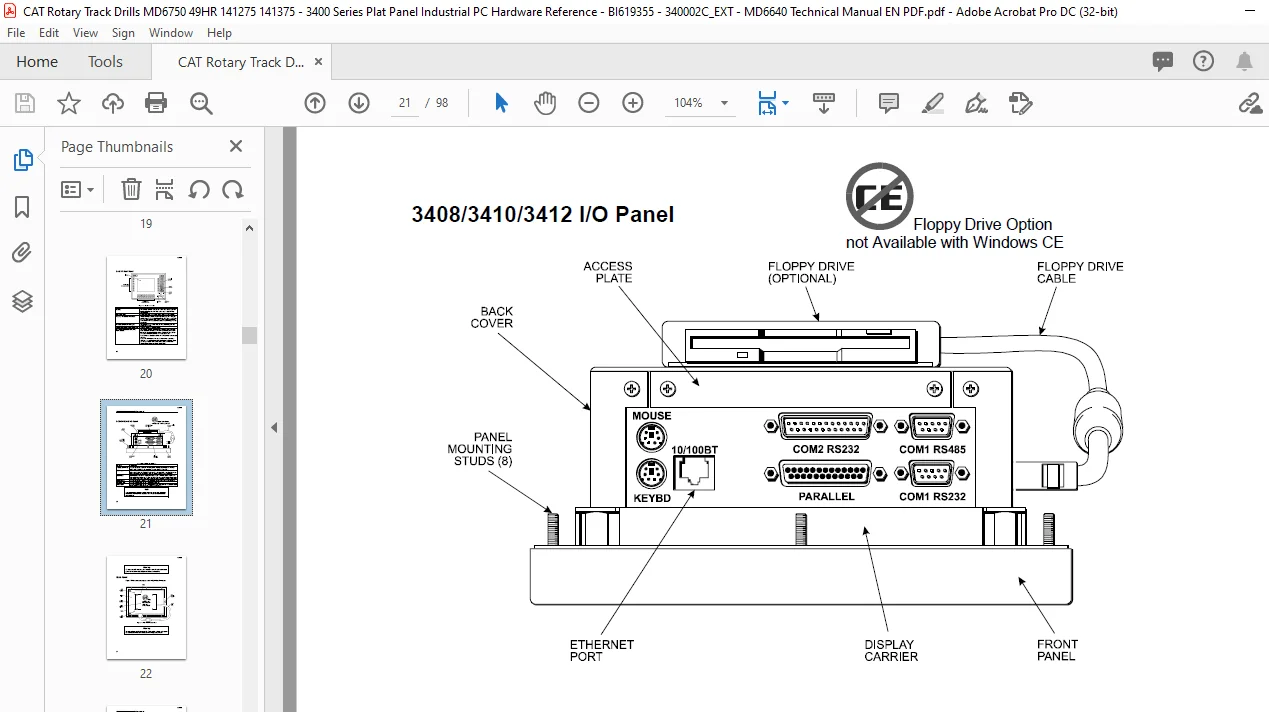
3408/3410/3412 I/O Panel 20
Back Panel 21
Power Panel 22
3408/3410 Power Panels 22
Installing Internal Hardware Options 23
DRAM Single In-line Memory Modules (SIMMs) 23
PC/104 Boards 26
Installing External Hardware Options 27
External Floppy Drive 27
Creating a Customized Logo 27
Creating Customized Keypad Inserts 28
3408KP Keypad Inserts 28
3410KP/3412KP Keypad Inserts 31
Installing Operating Systems 33
Installing Ethernet Drivers 34
Installing Video Drivers 34
Using a Touchscreen 35
Installing Touchscreen Drivers 35
Specifying a Touchscreen Port 36
Calibrating the Touchscreen 37
Creating a Power Cable 39
AC Power Cable 39
DC Power Cable 40
Installing the System into a Panel 42
System Power 42
Excessive Heat 43
Electrical Noise 43
Line Voltage Variation 43
Mounting Considerations 44
Mounting the Unit 44
Power Supply 50
AC Power Supply 50
DC Power Supply 50
Expansion Power 50
Hazardous Location Installations 50
Definitions 52
Group Ratings 53
Enclosures 54
Power Switch 54
Cable Connections 54
Operation and Maintenance 55
Safety Agency Approval 56
Chapter 4 – Keypad Functionality (3408KP/3410KP/3412KP) 57
Control Keypad 57
3408KP 57
3410KP/3412KP 57
Alternate Configuration 58
Function and Alpha Modes 58
Contrast Control 59
Numeric Keypad 59
Cursor Control Keypad 59
Function/Alpha Keypads 60
3408KP 60
3410KP 60
Chapter 5 – Keypad Utility 3408KP/3410KP/3412KP 62
Loading the Keypad Utility 62
Using the Keypad Utility 62
Startup 63
Utility Batch Mode 63
Main Menu 63
Exit 64
Files Menu 64
Macros Keypad Type Menu 64
Macros Edit Menu 65
Upload Menu 66
Download Menu 67
Utilities Menu 67
Keypad Scan Codes 68
Chapter 6 – Maintenance 74
Preventive Maintenance 74
Xycom Recommended Hard Drive Preventative Maintenance 74
Replacing the Fuse 75
Chemical Compatibility 75
Compatible Lubricants 76
Compatible Cleaning Agents 77
Non-compatible Cleaning Agents 77
Spare Parts 77
Product Repair Program/Returning a Unit to Xycom Automation 78
Appendix A– Technical Specifications 80
Hardware Specifications 80
Environmental Specifications 81
Appendix B – Pinouts 82
Parallel Port Connector 82
PS/2 Keyboard Connector 83
Mouse Port Connector 83
External Floppy Drive Connector 84
Power Connector 84
Ethernet Connector 84
COM1 Connector 85
RS-232 Connector 85
RS-485 Connection 85
COM2 Connector 86
Appendix C – Replacing Flat-Panel Display Bulbs 87
3408 Units 87
3410 Units 89
3412 Units 91
Appendix D – Installing the IDE Flash Drive 93
Installing the IDE Flash Drive 93
Configuring the IDE Flash Drive 94
CAT ROTARY TRACK DRILLS MD6750 49HR 400 SERIES PLAT PANEL INDUSTRIAL PC HARDWARE REFERENCE TECHNICAL MANUAL – PDF:
IMAGES PREVIEW OF THE MANUAL:


PLEASE NOTE:
- This is the same manual used by the DEALERSHIPS to SERVICE your vehicle.
- The manual can be all yours – Once payment is complete, you will be taken to the download page from where you can download the manual. All in 2-5 minutes time!!
- Need any other service / repair / parts manual, please feel free to contact us at heydownloadss @gmail.com . We may surprise you with a nice offer
S.M