CLAAS LINER 3000 Operator’s Manual – PDF DOWNLOAD
Original price was: $89.95.$29.95Current price is: $29.95.
CLAAS LINER 3000 Operator’s Manual – PDF DOWNLOAD
Description
CLAAS LINER 3000 Operator’s Manual – PDF DOWNLOAD
DESCRIPTION:
CLAAS LINER 3000 Operator’s Manual – PDF DOWNLOAD
Introduction :
2.1 General information :
- This operator’s manual provides information on the use, adjustment, and operation of your CLAAS rotary swather. Please note that the CLAAS rotary swather is also simply called ‘machine’ in the following chapters. Follow the advice on maintenance and service for your machine in order to obtain maximum performance and long service from the swather. Assembly and regular inspections of your machine should be carried out by your specialist workshop.
- Neglect in maintenance or service, and incorrect use will result in poor machine efficiency and loss of time. With correct operation and maintenance, you will benefit from the technical know-how and experience that went into the design of the machine, and your rotary swather will always work reliably.
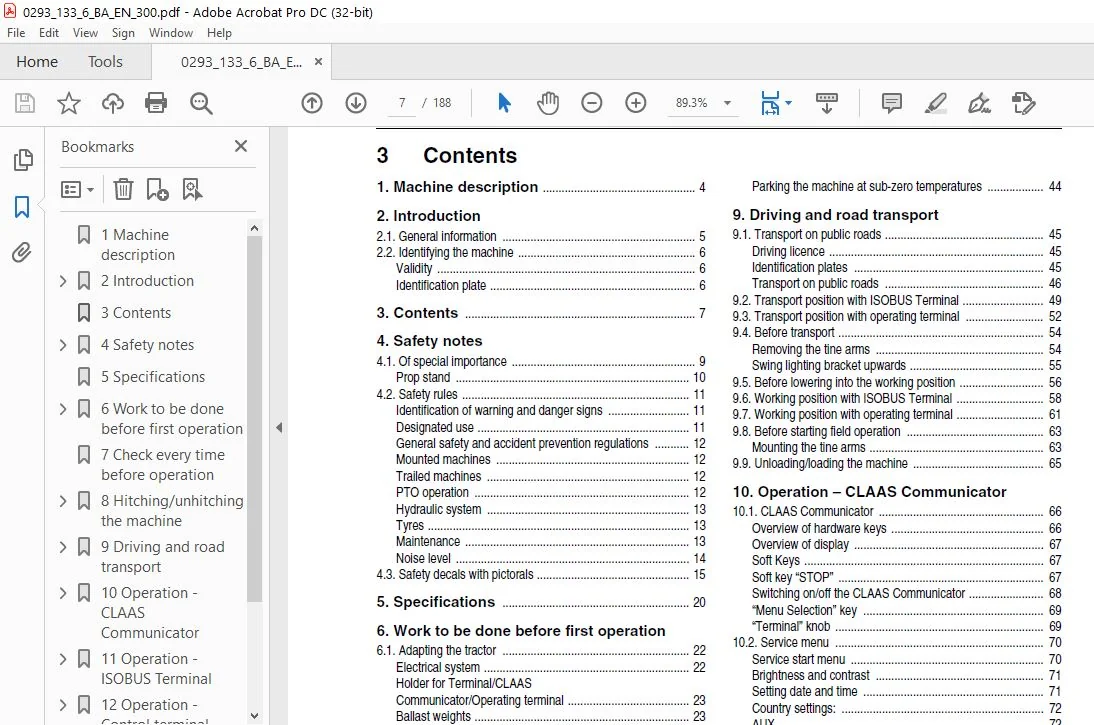
TABLE OF CONTENTS:
CLAAS LINER 3000 Operator’s Manual – PDF DOWNLOAD
1 Machine description 4
2 Introduction
2 1 General information 5
2 2 Identifying the machine 6
Validity 6
Identification plate 6
3 Contents 7
4 Safety notes
4 1 Of special importance 9
Prop stand 10
4 2 Safety rules 11
Identification of warning and danger signs 11
Designated use 11
General safety and accident prevention regulations 12
Mounted machines 12
Trailed machines 12
PTO operation 12
Hydraulic system 13
Tyres 13
Maintenance 13
Noise level 14
4 3 Safety decals with pictorals 15
5 Specifications 20
6 Work to be done before first operation
6 1 Adapting the tractor 22
Electrical system 22
Holder for Terminal/CLAAS
Communicator/Operating terminal 23
Ballast weights 23
6 2 Hitching/adapting the swather 24
Adapting the hitching points 25
Adapting the universal drive shaft 25
Adapting the hydraulics 26
7 Check every time before operation 28
8 Hitching/unhitching the machine
8 1 Hitching the machine 29
Attaching to the bottom links 30
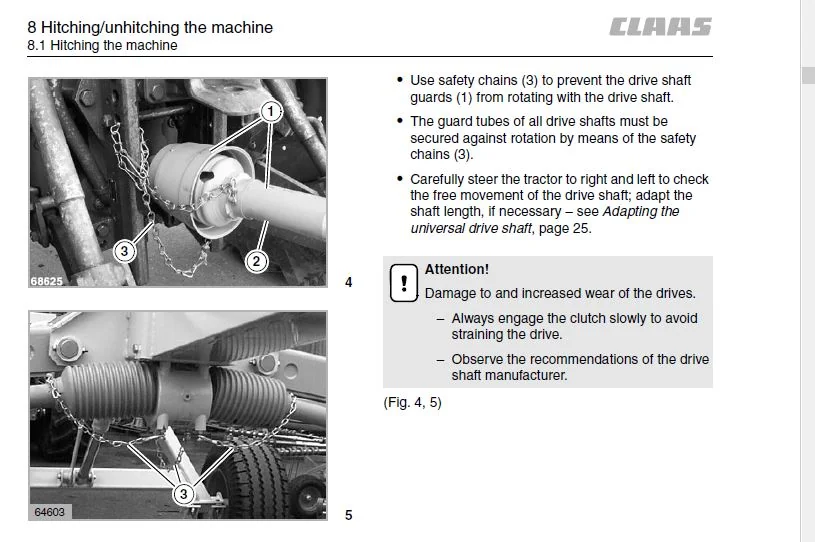
Mounting the universal drive shaft 30
Prop stand 33
Connecting the hydraulics 34
Opening the shut-off valve for the rear rotors
(only applies up to Serial No 60501857) 35
Connecting the electrical system 35
Connecting the pneumatic brake system 36
Connecting the hydraulic brake system 36
Parking brake 37
Wheel chocks 37
Connecting ISOBUS Terminal 38
Installing the operating terminal 38
8 2 Unhitching and parking the machine 39
Parking the machine at sub-zero temperatures 44
9 Driving and road transport
9 1 Transport on public roads 45
Driving licence 45
Identification plates 45
Transport on public roads 46
9 2 Transport position with ISOBUS Terminal 49
9 3 Transport position with operating terminal 52
9 4 Before transport 54
Removing the tine arms 54
Swing lighting bracket upwards 55
9 5 Before lowering into the working position 56
9 6 Working position with ISOBUS Terminal 58
9 7 Working position with operating terminal 61
9 8 Before starting field operation 63
Mounting the tine arms 63
9 9 Unloading/loading the machine 65
10 Operation – CLAAS Communicator
10 1 CLAAS Communicator 66
Overview of hardware keys 66
Overview of display 67
Soft Keys 67
Soft key “STOP” 67
Switching on/off the CLAAS Communicator 68
“Menu Selection” key 69
“Terminal” knob 69
10 2 Service menu 70
Service start menu 70
Brightness and contrast 71
Setting date and time 71
Country settings: 72
AUX 72
Software management 73
11 Operation – ISOBUS Terminal
11 1 Display 74
Overview of display 74
Title bar 74
Menu bar 75
Soft Key icons 76
Status bar 78
Data field 78
Software Version 79
Service menu/memory administration 79
11 2 Programming ISOBUS Terminal 80
Initial settings 80
Query of saved “Headland values” 83
Adjusting the working width 84
Adjusting the headland settings 84
11 3 Manual control 89
Of special importance 89
Activating manual control 90
Running gear 92
Raising/lowering the rotors 93
Contents
8 BA LINER 3000 – 0293 133 6
Contents
Setting the height of the rotor
(Rake height, additional equipment) 93
Reducing/increasing the working width 94
Switching off the manual control 94
11 4 Basic setting (initialisation) 95
Starting the initialization process 96
Basic headland settings 97
11 5 Manual operation of hydraulic system 98
12 Operation – Control terminal
12 1 Control terminal 100
Survey of keys 100
Indicator light 102
12 2 Adjustments using the control terminal 103
Adjusting the headland position 103
Basic headland setting 106
Clearance height at headland 107
12 3 Manual control 109
Of special importance 109
Activating manual control 110
Running gear 112
Raising/lowering the rotors 113
Increasing/decreasing the working width (rotor overlap) 114
Switching off the manual control 114
12 4 Basic setting (initialisation) 115
Start initialization 116
Initialization completed 119
12 5 Emergency operation 120
Functional test of angle encoders 120
12 6 Manual operation of hydraulic system 121
13 Field operation
13 1 Using the swather 123
Using the machine with ISOBUS Terminal 125
Using the machine with the control terminal 130
Changing the swath width 135
Height adjustment of rotors (rake height) 136
13 2 Accessory equipment 138
Individual raising of the front rotors
(only for swathers with control terminal) 138
Slip yoke kit (M03/010) 139
Hydraulic couplings for tractors (R03/020) 139
Adapter for USA road lighting (USA, R03/500) 139
14 Trouble shooting
14 1 General faults 140
14 2 Error messages in the display
(swather with ISOBUS Terminal) 142
15 Maintenance
15 1 Important notes on maintenance 144
Spare parts 144
Screws and bolts 144
Tyres 144
Hydraulic system 145
Lubrication 145
Protective devices 145
15 2 Maintenance schedule 146
15 3 Lubricants chart 147
15 4 Drives 148
Rotor drive 148
Angle drives 154
Universal drive shaft 155
Assembling/dismantling the universal
drive shaft protection 156
15 5 Brakes 160
Pneumatic brake system 160
15 6 Adjustment work 163
Flotation springs 163
Rotor flotation 163
Adjusting the reed switch
(from Serial No : 605 0 1113 onwards) 164
Adjusting the overspeed monitor 164
Angle encoders 165
Angle sensor
(LINER 3000 with ISOBUS Terminal
from serial No : 605 0 2103) 165
Checking/adjusting the track 168
15 7 Rotor running gear 170
15 8 Tyres 171
Tyre pressure 171
Wheel change 171
15 9 Hydraulics 172
Hydraulic hoses 172
Replacing the pressure filter 172
15 10 Fixing elements 173
Threaded fasteners 173
Fasteners 174
Quick-fit coupling 174
15 11 Recommendations for winter storage 175
16 Lubricating chart
CLAAS LINER 3000 OPERATOR’S MANUAL – PDF DOWNLOAD:
IMAGES PREVIEW OF THE MANUAL:
PLEASE NOTE:
- This is the SAME exact manual used by your dealers to fix your vehicle.
- The same can be yours in the next 2-3 mins as you will be directed to the download page immediately after paying for the manual.
- Any queries / doubts regarding your purchase, please feel free to contact [email protected]
S.V