Claas Miscellaneous CDS Operation Manual PDF Download
Original price was: $78.00.$20.95Current price is: $20.95.
CLAAS Miscellaneous CDS Operator’s Manual – PDF DOWNLOAD
Description
CLAAS Miscellaneous CDS Operator’s Manual – PDF DOWNLOAD
DESCRIPTION
CLAAS Miscellaneous CDS Operator’s Manual – PDF DOWNLOAD
Introduction
1.1 General Information
1.1.1 How to use this manual
This Operator’s Manual is intended primarily for the operator and provides information about the use, settings and operation of the diagnosis system
Texts and figures
Pictures and graphics are neutral. Differences are pointed out by notes beneath the figure. Texts are short and not machine-specific as far as possible. Differences are pointed out by intermediate headings. Different types of texts can easily be distinguished from one another by their formats. The following formats are distinguished:
2 Safety
2.1 General Information
2.1.1 Important information
- The instructions contained in this manual must be read and observed by all persons who are concerned with the use, maintenance, repair or inspection of this unit in order to prevent hazards.
- The use of spare parts, accessories and ancillary equipment not originally manufactured by CLAAS and not checked and approved by CLAAS can change the specified design characteristics of the CLAAS unit or can detract from its functional
- performance, with a possible adverse effect on the safety of the unit and its occupational safety standards (accident prevention). CLAAS assumes no liability for damage caused by the use of non-CLAAS genuine parts, accessories or ancillary equipment.
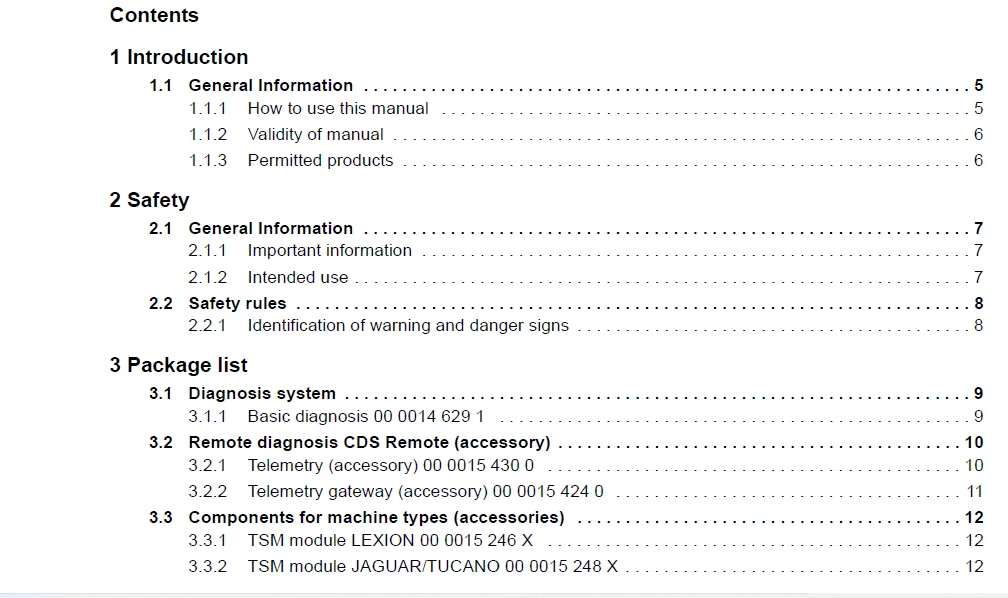
TABLE OF CONTENTS:
CLAAS Miscellaneous CDS Operator’s Manual – PDF DOWNLOAD
1 Introduction
11 General Information 5
111 How to use this manual 5
112 Validity of manual 6
113 Permitted products 6
2 Safety
21 General Information 7
211 Important information 7
212 Intended use 7
22 Safety rules 8
221 Identification of warning and danger signs 8
3 Package list
31 Diagnosis system 9
311 Basic diagnosis 00 0014 629 1 9
32 Remote diagnosis CDS Remote (accessory) 10
321 Telemetry (accessory) 00 0015 430 0 10
322 Telemetry gateway (accessory) 00 0015 424 0 11
33 Components for machine types (accessories) 12
331 TSM module LEXION 00 0015 246 X 12
332 TSM module JAGUAR/TUCANO 00 0015 248 X 12
4 Prior to initial operation
41 General Information 13
411 Initial operation check list 13
42 Remote diagnosis CDS Remote (accessory) 14
421 Putting the TSM module (accessory) into operation 14
422 Preparing the TSM module 14
423 Transmitting the telemetry registration data 17
424 Configuring the machine Telematics 19
5 Software overview
51 Diagnosis software 22
511 Overview of software user interface 22
512 Menu structure 24
6 Fieldwork settings
61 Diagnosis 25
611 Connecting the diagnosis system 25
612 Starting the diagnosis 25
613 Starting the diagnosis (ARION 400) 26
62 Remote diagnosis (CDS Remote) 29
621 Remote diagnosis structure (CDS Remote) 29
622 Connecting the diagnosis system 30
623 Connecting a mobile TSM module (accessory) 30
624 Starting remote diagnosis 32
625 Opening the CDS Remote phonebook 34
626 Adding a phonebook entry 34
7 Fieldwork
71 General Information 36
711 General warnings Fieldwork 36
72 Using the diagnosis system 37
721 Updating the module software 37
722 Changing the machine configuration 37
723 Changing the machine configuration (ARION 400) 39
724 Parameters of module A060 HYD (ARION 400) 40
725 Performing a module diagnosis 41
726 Signal groups 42
727 Performing the function diagnosis 43
728 Replacing a module 45
729 Replacing the AUTO 5 module (ARION 400) 46
8 Faults and remedies
81 General problems and remedies 48
811 Problems and remedies – Diagnosis 48
812 Problems and remedies – Remote diagnosis 48
813 Checking the reception of the telemetry module 49
IMAGES PREVIEW OF THE MANUAL:
PLEASE NOTE:
- This is the same manual used by the dealers to diagnose and troubleshoot your vehicle
- You will be directed to the download page as soon as the purchase is completed. The whole payment and downloading process will take anywhere between 2-5 minutes
- Need any other service / repair / parts manual, please feel free to contact [email protected] . We still have 50,000 manuals unlisted
S.M