Clevo D500E / D510E / D520E /D530E NoteBook Service Manual – PDF DOWNLOAD
Original price was: $80.00.$17.95Current price is: $17.95.
Clevo D500E / D510E / D520E /D530E NoteBook Service Manual – PDF DOWNLOAD
Description
Clevo D500E / D510E / D520E /D530E NoteBook Service Manual – PDF DOWNLOAD


Preface
Notice
The company reserves the right to revise this publication or to change its contents without notice. Information contained
herein is for reference only and does not constitute a commitment on the part of the manufacturer or any subsequent vendor.
They assume no responsibility or liability for any errors or inaccuracies that may appear in this publication nor are
they in anyway responsible for any loss or damage resulting from the use (or misuse) of this publication.
This publication and any accompanying software may not, in whole or in part, be reproduced, translated, transmitted or
reduced to any machine readable form without prior consent from the vendor, manufacturer or creators of this publication,
except for copies kept by the user for backup purposes.
Brand and product names mentioned in this publication may or may not be copyrights and/or registered trademarks of
their respective companies. They are mentioned for identification purposes only and are not intended as an endorsement
of that product or its manufacturer
Clevo D500E / D510E / D520E /D530E NoteBook Service Manual – PDF DOWNLOAD
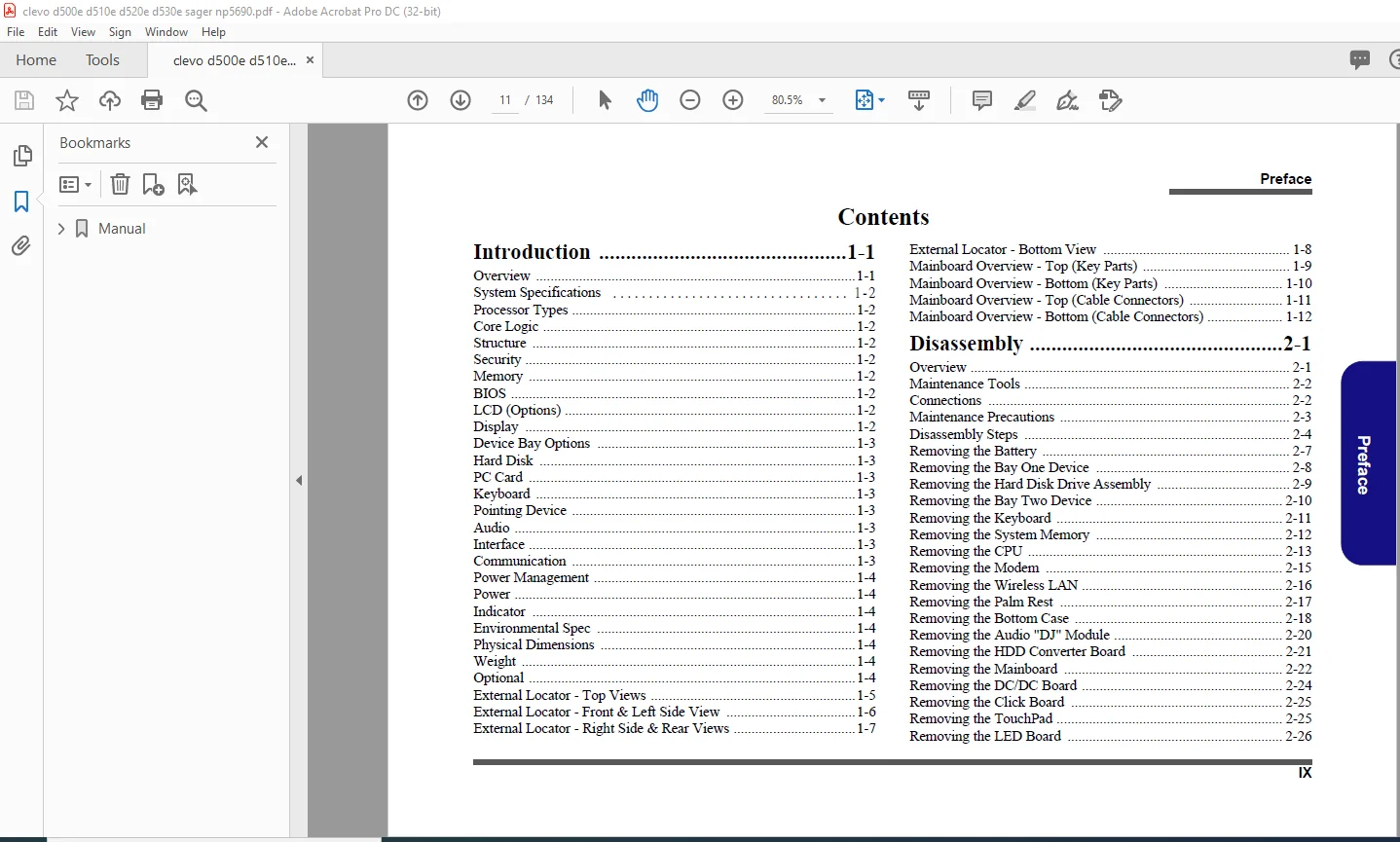
Manual.....................................................................  1
	Preface................................................................  4
		Trademarks.........................................................  4
		About this Manual..................................................  5
		IMPORTANT SAFETY INSTRUCTIONS......................................  6
			CAUTION........................................................  6
		Instructions for Care and Operation................................  7
		Power Safety.......................................................  8
		Battery Precautions................................................  9
			Related Documents.............................................. 10
		Introduction 1-1................................................... 11
		Disassembly 2-1.................................................... 11
	1: Introduction........................................................ 15
		Overview........................................................... 15
		System Specifications.............................................. 16
			Processor Types................................................ 16
			Core Logic..................................................... 16
			Structure...................................................... 16
			Security....................................................... 16
			Memory......................................................... 16
			BIOS........................................................... 16
			LCD (Options).................................................. 16
			Display........................................................ 16
			Device Bay Options............................................. 17
			Hard Disk...................................................... 17
			PC Card........................................................ 17
			Keyboard....................................................... 17
			Pointing Device................................................ 17
			Audio.......................................................... 17
			Interface...................................................... 17
			Communication.................................................. 17
			Power Management............................................... 18
			Power.......................................................... 18
			Indicator...................................................... 18
			Environmental Spec............................................. 18
			Physical Dimensions............................................ 18
			Weight......................................................... 18
			Optional....................................................... 18
		External Locator - Top Views....................................... 19
		External Locator - Front & Left Side View.......................... 20
		External Locator - Right Side & Rear Views......................... 21
		External Locator - Bottom View..................................... 22
		Mainboard Overview - Top (Key Parts)............................... 23
		Mainboard Overview - Bottom (Key Parts)............................ 24
		Mainboard Overview - Top (Cable Connectors)........................ 25
		Mainboard Overview - Bottom (Cable Connectors)..................... 26
	2: Disassembly......................................................... 27
		Overview........................................................... 27
			Maintenance Tools.............................................. 28
			Connections.................................................... 28
			Maintenance Precautions........................................ 29
				Cleaning................................................... 29
		Disassembly Steps.................................................. 30
			To remove the Battery:......................................... 30
				1. Remove the battery page 2 - 7........................... 30
			To remove the Bay One Device:.................................. 30
				1. Remove the battery page 2 - 7........................... 30
				2. Remove the Bay One device page 2 - 8.................... 30
			To remove the Hard Disk Drive:................................. 30
				1. Remove the battery page 2 - 7........................... 30
				2. Remove the Bay One device page 2 - 8.................... 30
				3. Remove the hard disk drive assembly page 2 - 9.......... 30
			To remove the Bay Two Device:.................................. 30
				1. Remove the battery page 2 - 7........................... 30
				2. Remove the Bay Two device page 2 - 10................... 30
			To remove the Keyboard:........................................ 30
				1. Remove the battery page 2 - 7........................... 30
				2. Remove the keyboard page 2 - 11......................... 30
			To remove the System Memory:................................... 30
				1. Remove the battery page 2 - 7........................... 30
				2. Remove the keyboard page 2 - 11......................... 30
				3. Remove the memory page 2 - 12........................... 30
			To remove the CPU:............................................. 30
				1. Remove the battery page 2 - 7........................... 30
				2. Remove the CPU page 2 - 13.............................. 30
			To remove the Modem:........................................... 30
				1. Remove the battery page 2 - 7........................... 30
				2. Remove the keyboard page 2 - 11......................... 30
				3. Remove the modem page 2 - 15............................ 30
			To remove the Wireless LAN:.................................... 30
				1. Remove the battery page 2 - 7........................... 30
				2. Remove the keyboard page 2 - 11......................... 30
				3. Remove the Wireless LAN page 2 - 16..................... 30
			To remove the Palm Rest:....................................... 30
				1. Remove the Palm Rest page 2 - 17........................ 30
			To remove the Bottom Case:..................................... 30
				1. Remove the battery page 2 - 7........................... 30
				2. Remove the Bay One device page 2 - 8.................... 30
				3. Remove the hard disk drive assembly page 2 - 9.......... 30
				4. Remove the Bay Two device page 2 - 10................... 30
				5. Remove the keyboard page 2 - 11......................... 30
				6. Remove the CPU page 2 - 13.............................. 30
				7. Remove the Palm Rest page 2 - 17........................ 30
				8. Remove the bottom case page 2 - 18...................... 30
			To remove the Audio “DJ” Module:............................... 31
				1. Remove the battery page 2 - 7........................... 31
				2. Remove the Bay One device page 2 - 8.................... 31
				3. Remove the hard disk drive assembly page 2 - 9.......... 31
				4. Remove the Bay Two device page 2 - 10................... 31
				5. Remove the keyboard page 2 - 11......................... 31
				6. Remove the CPU page 2 - 13.............................. 31
				7. Remove the Palm Rest page 2 - 17........................ 31
				8. Remove the bottom case page 2 - 18...................... 31
				9. Remove the Audio “DJ” module page 2 - 20................ 31
			To remove the HDD Converter Board:............................. 31
				1. Remove the battery page 2 - 7........................... 31
				2. Remove the Bay One device page 2 - 8.................... 31
				3. Remove the hard disk drive assembly page 2 - 9.......... 31
				4. Remove the Bay Two device page 2 - 10................... 31
				5. Remove the keyboard page 2 - 11......................... 31
				6. Remove the CPU page 2 - 13.............................. 31
				7. Remove the Palm Rest page 2 - 17........................ 31
				8. Remove the bottom case page 2 - 18...................... 31
				9. Remove the Audio “DJ” module page 2 - 20................ 31
				10. Remove the HDD converter board page 2 - 21............. 31
			To remove the Mainboard:....................................... 31
				1. Remove the battery page 2 - 7........................... 31
				2. Remove the Bay One device page 2 - 8.................... 31
				3. Remove the hard disk drive assembly page 2 - 9.......... 31
				4. Remove the Bay Two device page 2 - 10................... 31
				5. Remove the keyboard page 2 - 11......................... 31
				6. Remove the CPU page 2 - 13.............................. 31
				7. Remove the Palm Rest page 2 - 17........................ 31
				8. Remove the bottom case page 2 - 18...................... 31
				9. Remove the Audio “DJ” module page 2 - 20................ 31
				10. Remove the HDD converter board page 2 - 21............. 31
				11. Remove the mainboard page 2 - 22....................... 31
			To remove the DC/DC Board:..................................... 31
				1. Remove the battery page 2 - 7........................... 31
				2. Remove the Bay One device page 2 - 8.................... 31
				3. Remove the hard disk drive assembly page 2 - 9.......... 31
				4. Remove the Bay Two device page 2 - 10................... 31
				5. Remove the keyboard page 2 - 11......................... 31
				6. Remove the CPU page 2 - 13.............................. 31
				7. Remove the Palm Rest page 2 - 17........................ 31
				8. Remove the bottom case page 2 - 18...................... 31
				9. Remove the Audio “DJ” module page 2 - 20................ 31
				10. Remove the HDD converter board page 2 - 21............. 31
				11. Remove the mainboard page 2 - 22....................... 31
				12. Remove the DC/DC board page 2 - 24..................... 31
			To remove the Click Board:..................................... 31
				1. Remove the battery page 2 - 7........................... 31
				2. Remove the Bay One device page 2 - 8.................... 31
				3. Remove the hard disk drive assembly page 2 - 9.......... 31
				4. Remove the Bay Two device page 2 - 10................... 31
				5. Remove the keyboard page 2 - 11......................... 31
				6. Remove the CPU page 2 - 13.............................. 31
				7. Remove the Palm Rest page 2 - 17........................ 31
				8. Remove the bottom case page 2 - 18...................... 31
				9. Remove the Click Board page 2 - 25...................... 31
			To remove the TouchPad:........................................ 32
				1. Remove the battery page 2 - 7........................... 32
				2. Remove the Bay One device page 2 - 8.................... 32
				3. Remove the hard disk drive assembly page 2 - 9.......... 32
				4. Remove the Bay Two device page 2 - 10................... 32
				5. Remove the keyboard page 2 - 11......................... 32
				6. Remove the CPU page 2 - 13.............................. 32
				7. Remove the Palm Rest page 2 - 17........................ 32
				8. Remove the bottom case page 2 - 18...................... 32
				9. Remove the TouchPad page 2 - 25......................... 32
			To remove the LED Board:....................................... 32
				1. Remove the battery page 2 - 7........................... 32
				2. Remove the Bay One device page 2 - 8.................... 32
				3. Remove the hard disk drive assembly page 2 - 9.......... 32
				4. Remove the Bay Two device page 2 - 10................... 32
				5. Remove the keyboard page 2 - 11......................... 32
				6. Remove the CPU page 2 - 13.............................. 32
				7. Remove the Palm Rest page 2 - 17........................ 32
				8. Remove the bottom case page 2 - 18...................... 32
				9. Remove the LED board page 2 - 26........................ 32
			To remove the Speakers:........................................ 32
				1. Remove the battery page 2 - 7........................... 32
				2. Remove the Bay One device page 2 - 8.................... 32
				3. Remove the hard disk drive assembly page 2 - 9.......... 32
				4. Remove the Bay Two device page 2 - 10................... 32
				5. Remove the keyboard page 2 - 11......................... 32
				6. Remove the CPU page 2 - 13.............................. 32
				7. Remove the Palm Rest page 2 - 17........................ 32
				8. Remove the bottom case page 2 - 18...................... 32
				9. Remove the speakers page 2 - 26......................... 32
			To remove the Inverter:........................................ 32
				1. Remove the battery page 2 - 7........................... 32
				2. Remove the Bay One device page 2 - 8.................... 32
				3. Remove the hard disk drive assembly page 2 - 9.......... 32
				4. Remove the Bay Two device page 2 - 10................... 32
				5. Remove the keyboard page 2 - 11......................... 32
				6. Remove the CPU page 2 - 13.............................. 32
				7. Remove the Palm Rest page 2 - 17........................ 32
				8. Remove the bottom case page 2 - 18...................... 32
				9. Remove the inverter page 2 - 27......................... 32
			To remove the LCD panel:....................................... 32
				1. Remove the battery page 2 - 7........................... 32
				2. Remove the Bay One device page 2 - 8.................... 32
				3. Remove the hard disk drive assembly page 2 - 9.......... 32
				4. Remove the Bay Two device page 2 - 10................... 32
				5. Remove the keyboard page 2 - 11......................... 32
				6. Remove the CPU page 2 - 13.............................. 32
				7. Remove the Palm Rest page 2 - 17........................ 32
				8. Remove the bottom case page 2 - 18...................... 32
				9. Remove the LCD Panel page 2 - 28........................ 32
		Removing the Battery............................................... 33
			Figure 2 - 1 Battery Removal Sequence.......................... 33
		Removing the Bay One Device........................................ 34
			Figure 2 - 2 Bay One Device Removal Sequence................... 34
		Removing the Hard Disk Drive Assembly.............................. 35
			Figure 2 - 3 Hard Disk Removal Sequence........................ 35
		Removing the Bay Two Device........................................ 36
			Figure 2 - 4 Bay Two Device Removal Sequence................... 36
		Removing the Keyboard.............................................. 37
			Figure 2 - 5 Keyboard Removal Sequence......................... 37
		Removing the System Memory......................................... 38
			Figure 2 - 6 Memory Removal Sequence........................... 38
		Removing the CPU................................................... 39
			Figure 2 - 7 Processor Removal Sequence........................ 39
			Figure 2 - 8 Processor Removal Sequence (cont’d)............... 39
			Figure 2 - 9 Processor Removal Sequence (cont’d)............... 40
		Removing the Modem................................................. 41
			Figure 2 - 10 Modem Removal Sequence........................... 41
		Removing the Wireless LAN.......................................... 42
			Figure 2 - 11 Wireless LAN Module Removal Sequence............. 42
		Removing the Palm Rest............................................. 43
			Figure 2 - 12 Palm Rest Removal Sequence....................... 43
		Removing the Bottom Case........................................... 44
			Figure 2 - 13 Bottom Case Removal Sequence..................... 44
			Figure 2 - 14 Bottom Case Removal Sequence (cont’d)............ 45
			Figure 2 - 15 Bottom Case Removal Sequence (cont’d)............ 45
		Removing the Audio "DJ" Module..................................... 46
			Figure 2 - 16 Audio "DJ" Module Removal Sequence............... 46
		Removing the HDD Converter Board................................... 47
			Figure 2 - 17 HDD Converter Board Removal Sequence............. 47
		Removing the Mainboard............................................. 48
			Figure 2 - 18 Mainboard Removal Sequence....................... 48
			Figure 2 - 19 Mainboard Removal Sequence (cont’d).............. 49
		Removing the DC/DC Board........................................... 50
			Figure 2 - 20 DC/DC Board Removal Sequence..................... 50
		Removing the Click Board........................................... 51
			Figure 2 - 21 Click Board Removal Sequence..................... 51
		Removing the TouchPad.............................................. 51
			Figure 2 - 22 TouchPad Removal Sequence........................ 51
		Removing the LED Board............................................. 52
			Figure 2 - 23 LED Board Removal Sequence....................... 52
		Removing the Speakers.............................................. 52
			Figure 2 - 24 Speakers Removal Sequence........................ 52
		Removing the Inverter.............................................. 53
			Figure 2 - 25 LCD Removal Sequence............................. 53
		Removing the LCD Panel............................................. 54
			Figure 2 - 26 LCD Removal Sequence............................. 54
	Appendix A: Part Lists................................................. 55
		Part List Illustration Location.................................... 56
		Top (D500E)........................................................ 57
			Figure A - 1 Top (D500E)....................................... 57
		Bottom (D500E)..................................................... 58
			Figure A - 2 Bottom (D500E).................................... 58
		LCD 15” (D500E).................................................... 59
			Figure A - 3 LCD 15” (D500E)................................... 59
		Card Reader (D500E)................................................ 60
			Figure A - 4 Card Reader (D500E)............................... 60
		SAMSUNG CD-ROM Drive (D500E)....................................... 61
			Figure A - 5 CD-ROM TEAC (D500E)............................... 61
		KME CD-RW Drive (D500E)............................................ 62
			Figure A - 6 CD-RW KME (D500E)................................. 62
		Combo Drive (D500E)................................................ 63
			Figure A - 7 Combo (D500E)..................................... 63
		DVD-ROM Drive (D500E).............................................. 64
			Figure A - 8 DVD-ROM Drive (D500E)............................. 64
		Audio DJ (D500E)................................................... 65
			Figure A - 9 Audio DJ (D500E).................................. 65
		HDD (D500E)........................................................ 66
			Figure A - 10 HDD (D500E)...................................... 66
		Floppy Disk Drive (D500E).......................................... 67
			Figure A - 11 Floppy Disk Drive (D500E)........................ 67
		Top (D510E)........................................................ 68
			Figure A - 12 Top (D510E)...................................... 68
		Bottom (D510E)..................................................... 69
			Figure A - 13 Bottom (D510E)................................... 69
		LCD 15” (D510E).................................................... 70
			Figure A - 14 LCD 15” (D510E).................................. 70
		Card Reader (D510E)................................................ 71
			Figure A - 15 Card Reader (D510E).............................. 71
		SAMSUNG CD-ROM Drive (D510E)....................................... 72
			Figure A - 16 TEAC CD-ROM Drive (D510E)........................ 72
		KME CD-RW Drive (D510E)............................................ 73
			Figure A - 17 KME CD-RW Drive (D510E).......................... 73
		Combo Drive (D510E)................................................ 74
			Figure A - 18 Combo Drive (D510E).............................. 74
		DVD-ROM Drive (D510E).............................................. 75
			Figure A - 19 DVD-ROM Drive (D510E)............................ 75
		Audio DJ (D510E)................................................... 76
			Figure A - 20 Audio DJ (D510E)................................. 76
		HDD (D510E)........................................................ 77
			Figure A - 21 HDD (D510E)...................................... 77
		Floppy Disk Drive (D510E).......................................... 78
			Figure A - 22 Floppy Disk Drive (D510E)........................ 78
		Top (D520E)........................................................ 79
			Figure A - 23 Top (D520E)...................................... 79
		Bottom (D520E)..................................................... 80
			Figure A - 24 Bottom (D520E)................................... 80
		LCD 15” (D520E).................................................... 81
			Figure A - 25 LCD 15” (D520E).................................. 81
		Card Reader (D520E)................................................ 82
			Figure A - 26 Card Reader (D520E).............................. 82
		TEAC CD-ROM Drive (D520E).......................................... 83
			Figure A - 27 TEAC CD_ROM Drive (D520E)........................ 83
		KME CD-RW Drive (D520E)............................................ 84
			Figure A - 28 KME CD-RW Drive (D520E).......................... 84
		Combo Drive (D520E)................................................ 85
			Figure A - 29 Combo Drive (D520E).............................. 85
		DVD-ROM Drive (D520E).............................................. 86
			Figure A - 30 DVD-ROM Drive (D520E)............................ 86
		Audio DJ (D520E)................................................... 87
			Figure A - 31 Audio DJ (D520E)................................. 87
		HDD (D520E)........................................................ 88
			Figure A - 32 HDD (D520E)...................................... 88
		Floppy Disk Drive (D520E).......................................... 89
			Figure A - 33 Floppy Disk Drive (D520E)........................ 89
		Top (D530E)........................................................ 90
			Figure A - 34 Top (D530E)...................................... 90
		Bottom (D530E)..................................................... 91
			Figure A - 35 Bottom (D530E)................................... 91
		LCD 15” (D530E).................................................... 92
			Figure A - 36 LCD 15” (D530E).................................. 92
		Card Reader (D530E)................................................ 93
			Figure A - 37 Card Reader (D530E).............................. 93
		TEAC CD-ROM Drive (D530E).......................................... 94
			Figure A - 38 TEAC CD_ROM Drive (D530E)........................ 94
		KME CD-RW Drive (D530E)............................................ 95
			Figure A - 39 KME CD-RW Drive (D530E).......................... 95
		Combo Drive (D530E)................................................ 96
			Figure A - 40 Combo Drive (D530E).............................. 96
		DVD-ROM Drive (D530E).............................................. 97
			Figure A - 41 DVD-ROM Drive (D530E)............................ 97
		Audio DJ (D530E)................................................... 98
			Figure A - 42 Audio DJ (D530E)................................. 98
		HDD (D530E)........................................................ 99
			Figure A - 43 HDD (D530E)...................................... 99
		Floppy Disk Drive (D530E)..........................................100
			Figure A - 44 Floppy Disk Drive (D530E)........................100
	Appendix B: Schematic Diagrams.........................................101
		System Block Diagram...............................................102
			Sheet 1 of 29 System Block Diagram.............................102
		CPU 1 of 2.........................................................103
			Sheet 2 of 29 CPU 1 of 2.......................................103
		CPU 2 of 2.........................................................104
			Sheet 3 of 29 CPU 2 of 2.......................................104
		Clock Generator....................................................105
			Sheet 4 of 29 Clock Generator..................................105
		GMCH-1.............................................................106
			Sheet 5 of 29 GMCH-1...........................................106
		GMCH-2 Power.......................................................107
			Sheet 6 of 29 GMC-2 Power......................................107
		GMCH-3 DDR.........................................................108
			Sheet 7 of 29 GMCH-3 DDR.......................................108
		DIMMA..............................................................109
			Sheet 8 of 29 DIMMA............................................109
		DIMMB..............................................................110
			Sheet 9 of 29 DIMMB............................................110
		AGP/ POWER.........................................................111
			Sheet 10 of 29 AGP/ POWER......................................111
		GMC-1..............................................................112
			Sheet 11 of 29 GMC-1...........................................112
		GMC-2..............................................................113
			Sheet 12 of 29 GMC-2...........................................113
		VGA Connector......................................................114
			Sheet 13 of 29 VGA Connector...................................114
		ICH5 (1 of 3)......................................................115
			Sheet 14 of 29 ICH5 1 of 3.....................................115
		ICH5 (2 of 3)......................................................116
			Sheet 15 of 29 ICH5 2 of 3.....................................116
		ICH5 (3 of 3)......................................................117
			Sheet 16 of 29 ICH5 3 of 3.....................................117
		HDD/CD-ROM/FDD.....................................................118
			Sheet 17 of 29 HDD/CD-ROM/FDD..................................118
		PCI 1410...........................................................119
			Sheet 18 of 29 PCI 1410........................................119
		PCI1394 TSB43AB21..................................................120
			Sheet 19 of 29 PCI1394 TSB43AB21...............................120
		PCI RTL8100C / RTL8110S............................................121
			Sheet 20 of 29 PCI RTL8100C / PRTL8110S........................121
		LPC Super I/O......................................................122
			Sheet 21 of 29 LPC Super I/O...................................122
		LPC H8.............................................................123
			Sheet 22 of 29 LPC H8..........................................123
		AC'97 Codec........................................................124
			Sheet 23 of 29 AC'97 Codec.....................................124
		FAN/MBC/Mini PCI...................................................125
			Sheet 24 of 29 FAN/MBC/Mini PCI................................125
		ACIN; PWR Button...................................................126
			Sheet 25 of 29 ACIN; PWR Button................................126
		D/D Conn...........................................................127
			Sheet 26 of 29 D/D Conn........................................127
		VCORE..............................................................128
			Sheet 27 of 29 VCORE...........................................128
		System Power 1.....................................................129
			Sheet 28 of 29 System Power 1..................................129
		System Power 2.....................................................130
			Sheet 29 of 29 System Power 2..................................130
	Appendix C: Installing Optional Module.................................131
		Overview...........................................................131
		Installing a Bluetooth Modem.......................................132
			Figure C - 1 Bluetooth Modem Installation Sequence.............132
		Installing the 802.11b+g Wireless LAN..............................133
			Figure C - 2 802.11b+g Wireless LAN Installation Sequence......133
		Installing the 802.11a+b+g Wireless LAN............................134
			Figure C - 3 802.11a+b+g Wireless LAN Installation Sequence....134
PLEASE NOTE:
- This is the same manual used by the dealers to diagnose and troubleshoot your vehicle
- You will be directed to the download page as soon as the purchase is completed. The whole payment and downloading process will take anywhere between 2-5 minutes
- Need any other service / repair / parts manual, please feel free to contact [email protected] . We still have 50,000 manuals unlisted
S.M