
Hitachi ARIETTA 50 Diagnostic Ultrasound System Service Manual PDF
$75.00 Original price was: $75.00.$29.95Current price is: $29.95.
Download the official Hitachi ARIETTA 50 Diagnostic Ultrasound System Service Manual Volume 1 (MN2-2124 Rev.1) in PDF format. This comprehensive 352-page guide covers installation, disassembly, troubleshooting, system overview, performance checks, and safety precautions for efficient repairs and maintenance. Ideal for biomedical engineers and service technicians working on Hitachi ultrasound equipment. Instant digital download – no shipping required!
Description
Hitachi ARIETTA 50 Diagnostic Ultrasound System Service Manual Volume 1 PDF – Repair Guide, Troubleshooting & Disassembly Instructions (MN2-2124 Rev.1)
| Attribute | Details |
|---|---|
| Manufacturer | Hitachi, Ltd. (now part of FUJIFILM Healthcare) |
| Model | ARIETTA 50 Diagnostic Ultrasound System |
| Document Type | Service Manual (Volume 1 of 2) |
| Revision/Part Number | MN2-2124 Rev.1 |
| Publication Year | 2019 (Copyright year from document) |
| Total Pages | 350 |
| File Name | 814878241-MN2-2124-01-Service-Manual-Vol1.pdf |
| File Format | PDF (Digital Download) |
| Content Focus | Introduction, Service Process, Installation/Disassembly, System Overview, Troubleshooting, Performance Check |
| Target Audience | Biomedical engineers, service technicians, ultrasound system repair professionals |
| Key Features Covered | Safety precautions, disassembly procedures, error messages, software installation, performance checks, system specifications (e.g., probes, power supply, monitors) |
| Applicable Standards | EMC/EMI compliance, WEEE/RoHS Directives, environmental conditions (as per Chapter 4) |
| Related Volume | Volume 2 (Covers System Operation, Schematics, Service Information, Adjustment, Parts List) |
| Language | English |
| Size/Compatibility | Digital PDF; Compatible with all PDF readers (e.g., Adobe Acrobat); No physical media |
IMAGES:
Comprehensive Table of Contents for Hitachi ARIETTA 50 Service Manual Volume 1 (MN2-2124 Rev.1)
- Chapter 1: Introduction to ARIETTA 50 Ultrasound System Service (Pages 1-1 to 1-10 | 10 Pages)
- 1-1: Service Manual Overview
- 1-2: Contents of This Service Manual
- 1-3: Construction of This Service Manual
- 1-4: Contents of Each VOLUME/Chapter
- 1-5: Precautions Against Electrical Hazards in Ultrasound Repair
- 1-6: Precautions Against Mechanical Hazards
- 1-7: Precautions Against Germ Hazards
- 1-8: Precautions to Ensure Safety of Software
- 1-9: Precautions for Software Safety of Maintenance Tools
- 1-10: Precautions Regarding Handling of Patient Data
- 1-11: Preparation to Be Made Before Visiting Customer
- 1-12: Care to Be Taken in the Field
- 1-13: Handling of PCB
- 1-14: WEEE Directive and RoHS Directive Compliance
- 1-15: EMC and EMI Guidelines for Diagnostic Equipment
- 1-16: System Symbols Explanation
- Chapter 2: ARIETTA 50 Service Process and Upgrade Guide (Pages 2-1 to 2-10 | 10 Pages)
- 2-1: Repair Work on the Description of Service Manual
- 2-2: Upgrade Work on the Description of Service Manual
- Chapter 3: Installation and Disassembly Instructions for ARIETTA 50 Ultrasound (Pages 3-1 to 3-160 | 160 Pages)
- 3-1: How to Use This Instruction
- 3-2: Disassembly Instruction
- SSD-ARIETTA50 Disassembly Procedures
- 0: Parts Identification / Individual Unit Layout / Dismounting Flowchart
- 1: How to Remove the Covers, Tray, and Pedal
- 2: How to Remove the Operation Panel
- 3: How to Remove the Power Supply Unit
- 4: How to Remove the Main Unit
- 5: How to Remove the Physiological Signal Unit
- 6: How to Remove the Monitor
- 7: How to Remove the Monitor Arm
- 8: How to Remove Panel Arm, Speaker Assy, Foot Switch Assy
- 9: How to Remove the Casters
- 10: How to Remove the Cable
- Chapter 4: ARIETTA 50 System Overview and Specifications (Pages 4-1 to 4-28 | 28 Pages)
- 4-1: System Specifications
- 4-1-1: Overview of Main Unit
- 4-1-2: Probe Details
- 4-1-3: B/W Beam Processor Section
- 4-1-4: Doppler Color Processor Section
- 4-1-5: Digital Data Storage and Output Function
- 4-1-6: Patient Information Management
- 4-1-7: Display Information
- 4-1-8: Measurement Function
- 4-1-9: I/O Signal
- 4-1-10: Observation Monitor
- 4-1-11: Power Supply, Power Consumption
- 4-1-12: Cabinet Dimensions, Weight
- 4-1-13: Classification of Equipment
- 4-1-14: Environmental Conditions
- 4-1-15: Applicable Standard
- 4-2: System Configuration
- 4-3: System Block Diagram
- 4-4: System Configuration Details
- 4-4-1: Front End (FE)
- 4-4-2: Back End (BE)
- 4-4-3: Power Supply Unit
- 4-4-4: Monitor
- 4-4-5: Operation Panel
- 4-4-6: AC Outlet Extension Unit
- 4-4-7: AC Adapter Unit for Jelly Warmer Unit
- 4-4-8: Lithium-Ion Battery Pack
- 4-1: System Specifications
- Chapter 5: Troubleshooting Guide for ARIETTA 50 Ultrasound System (Pages 5-1 to 5-90 | 90 Pages)
- 5-1: Introduction
- 5-2: Cautions
- 5-3: Necessary Tools and Measurement Instruments
- 5-4: Unit and Module Arrangement
- 5-5: Default Setting and Status
- 5-5-1: i5 Processor Board
- 5-6: Operation Panel
- 5-6-1: Forcible Shutdown
- 5-6-2: Direct Shutdown by Operating System
- 5-7: System Troubleshooting
- 5-7-1: Front End
- 5-7-2: Back End
- 5-7-3: System Console
- 5-7-4: Power Supply Battery
- 5-7-5: Forcibly Shut Down
- 5-8: Monitor IPF-2104-FD*
- 5-8-1: Precautions on Repairing the Monitor
- 5-8-2: LED Monitor Dead Pixel Judgment Criteria
- 5-8-3: Monitor Troubleshooting
- 5-9: System Boot Error
- 5-9-1: Check of Power Voltage
- 5-9-2: Operation After Power-On
- 5-9-3: Operation After Power-Off
- 5-10: Error Messages
- 5-10-1: Dialog Message
- 5-10-2: Assist Message
- 5-10-3: Other Message
- 5-11: Errors Related to Network
- 5-11-1: Checking Hardware and Software Failures
- 5-11-2: Checking the Network and DICOM Environments
- 5-11-2-1: Checking the DICOM Settings for the Diagnostic Ultrasound System
- 5-11-2-2: Checking the DICOM Settings for the Image Server
- 5-11-2-3: Checking the DICOM Settings for the Worklist Server
- 5-11-2-4: Checking the DICOM Printer Settings
- 5-11-2-5: Checking the DICOM Settings for the SR (Structured Report) Server
- 5-11-2-6: Checking the DICOM Settings for the QR (Query/Retrieve) Server
- 5-11-2-7: Checking the DICOM Settings for the MPPS Server
- 5-11-2-8: Checking the DICOM Settings for Storage Commitment Server
- 5-11-2-9: Checking the DICOM Common Settings
- 5-11-3: Troubleshooting Related to the Operation of Saving Images
- 5-11-3-1: Interruption of Communication Caused by the Disparity of Transfer Syntax
- 5-11-3-2: Abnormal Image Display Caused By Wrong RGB Data Format
- 5-11-4: Troubleshooting Related to the Operation of Worklist
- 5-11-4-1: Error Caused by Incorrect Date Setting
- 5-11-4-2: “No Patient Information Can Be Found.” Error Due to Search Key Inconsistency
- 5-11-4-3: Handling the Institution Name at Worklist Operation
- 5-12: Software Installation
- 5-12-1: Software Installation Procedures
- 5-12-1-1: Prior Confirmation
- 5-12-1-2: Preparation for Installation
- 5-12-1-3: Installation Procedure
- 5-12-1-4: License Authentication of the Operating System
- 5-12-1-5: License Authentication Check
- 5-12-1-6: Settings After Installation
- 5-12-2: About Inspection Tool
- 5-12-2-1: About Inspection Tool BeHITS
- 5-12-1: Software Installation Procedures
- Chapter 6: Performance Check and Safety Precautions for ARIETTA 50 (Pages 6-1 to 6-30 | 30 Pages)
- 6-1: Introduction
- 6-2: Safety Precautions
- 6-3: Filling in the Service Report
- 6-4: Performance Check
- 6-4-1: Appearance and Mechanism Check
- 6-4-2: Cleaning
- 6-4-3: System Information and Power Voltage Check
- 6-4-4: Function Check
- 6-4-5: Image Quality Check
- 6-4-6: Safety Check
- Diagnostic Ultrasound Imaging System ARIETTA 50 Check Sheet (Page 6-27)
- Revision History of the Service Manual
- Revision History of VOLUME 1 (1/1)
Contents of ARIETTA 50 Service Manual Volume 2 (Referenced in Volume 1)
- Chapter 1: System Operation
- Chapter 2: Schematics
- Chapter 3: Service Information
- Chapter 4: Adjustment
- Chapter 5: Parts List
- Revision History of the Service Manual VOLUME 2
Discover the essential Hitachi ARIETTA 50 diagnostic ultrasound system service manual Volume 1 (MN2-2124 Rev.1) in convenient PDF format. This official 352-page digital guide from Hitachi (now part of FUJIFILM Healthcare) is a must-have for biomedical engineers, ultrasound technicians, and repair professionals maintaining the ARIETTA 50 ultrasound machine. Packed with detailed instructions on installation, disassembly, troubleshooting, system overview, and performance checks, it ensures efficient repairs and optimal system performance for this compact, high-quality diagnostic ultrasound equipment.
![ARIETTA 50 | Fujifilm [Germany]](https://asset.fujifilm.com/www/de/files/2021-11/aeb547b0c0ea8dac727e57787c122969/pic_arietta-50_ov_02.jpg)
Whether you’re dealing with error messages, software installation, or hardware disassembly, this ARIETTA 50 service manual PDF provides step-by-step guidance to minimize downtime in clinical settings. Released in 2019, it covers safety precautions, system specifications, and network-related troubleshooting, making it ideal for servicing this versatile ultrasound system used in hospitals and veterinary practices.
Key Features of the Hitachi ARIETTA 50 Service Manual Volume 1
- Comprehensive Coverage: 352 pages including introduction, service processes, disassembly procedures, system overview, troubleshooting, and performance checks.
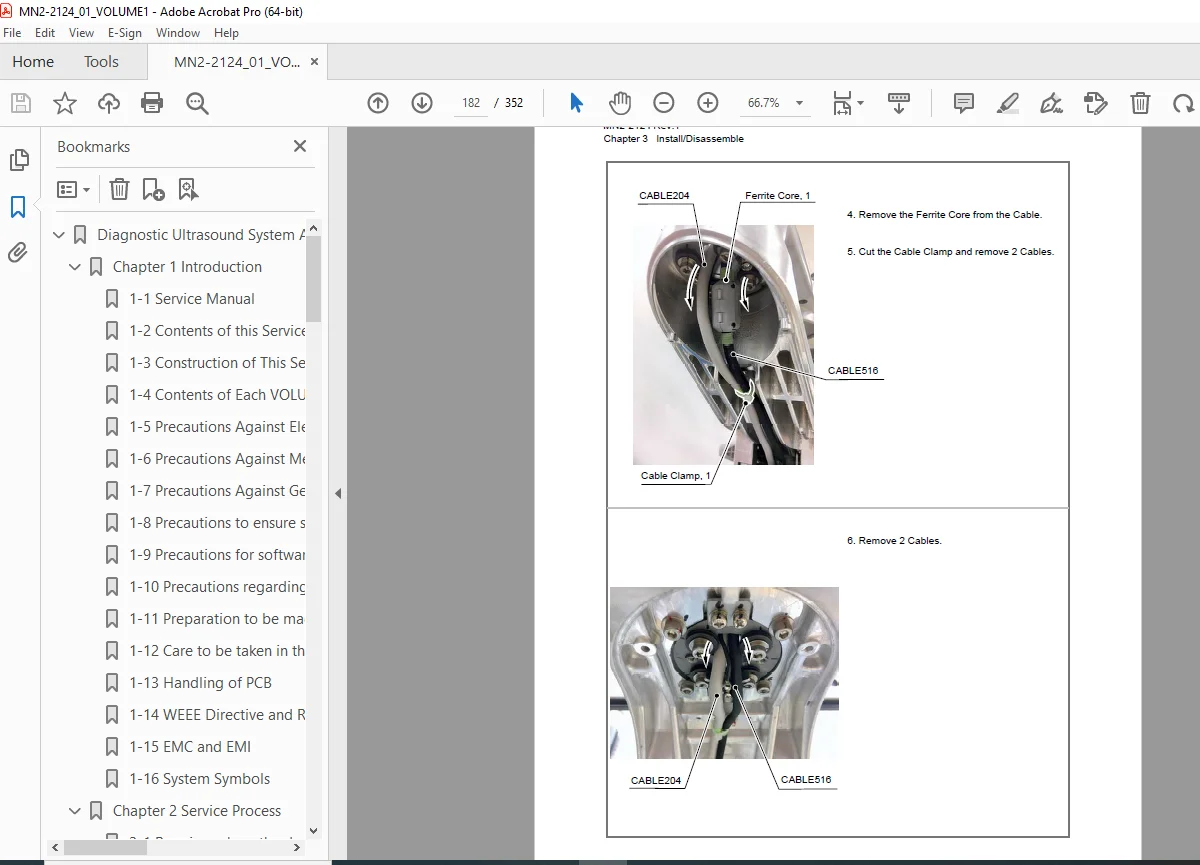
- Detailed Disassembly Instructions: Step-by-step guides for removing covers, operation panels, power supplies, monitors, and more.
- Troubleshooting Expertise: In-depth sections on error messages, network issues, DICOM settings, and system boot errors.
- System Specifications: Probes, beam processors, power supply details, environmental conditions, and compliance standards (EMC/EMI, WEEE/RoHS).
- Software and Maintenance Tools: Installation procedures, license authentication, and inspection tools like BeHITS.
- Safety and Performance Checks: Electrical, mechanical, and germ hazards precautions, plus image quality and function verification.
Full Table of Contents for ARIETTA 50 Service Manual Volume 1
- Chapter 1: Introduction to ARIETTA 50 Ultrasound System Service (Pages 1-1 to 1-10 | 10 Pages) Covers service manual overview, precautions against hazards (electrical, mechanical, germ, software), patient data handling, PCB care, directives (WEEE/RoHS), EMC/EMI, and system symbols.
- Chapter 2: ARIETTA 50 Service Process and Upgrade Guide (Pages 2-1 to 2-10 | 10 Pages) Details repair and upgrade work based on the service manual.
- Chapter 3: Installation and Disassembly Instructions for ARIETTA 50 Ultrasound (Pages 3-1 to 3-160 | 160 Pages) Includes how-to guides for disassembly, parts identification, removing covers/tray/pedal, operation panel, power supply, main unit, physiological signal unit, monitor, monitor arm, panel arm/speaker/foot switch, casters, and cables.
- Chapter 4: ARIETTA 50 System Overview and Specifications (Pages 4-1 to 4-28 | 28 Pages) System specs on main unit, probes, B/W and Doppler processors, data storage, patient management, display/measurement functions, I/O signals, monitor, power supply, dimensions/weight, classification, environmental conditions, standards, configuration, block diagram, and components (FE, BE, power unit, monitor, panel, AC outlets, adapter, battery).
- Chapter 5: Troubleshooting Guide for ARIETTA 50 Ultrasound System (Pages 5-1 to 5-90 | 90 Pages) Introduction, cautions, tools, unit arrangement, defaults, operation panel shutdowns, system troubleshooting (front/back end, console, battery), monitor repairs (IPF-2104-FD), boot errors, error messages, network/DICOM issues, software installation (confirmation, procedure, licensing, settings), and inspection tools.
- Chapter 6: Performance Check and Safety Precautions for ARIETTA 50 (Pages 6-1 to 6-30 | 30 Pages) Safety precautions, service report filling, checks for appearance/mechanism, cleaning, system info/power voltage, functions, image quality, safety, and ARIETTA 50 check sheet.
- Revision History of Volume 1 Includes updates and changes.
Contents of ARIETTA 50 Service Manual Volume 2 (Referenced)
- Chapter 1: System Operation
- Chapter 2: Schematics
- Chapter 3: Service Information
- Chapter 4: Adjustment
- Chapter 5: Parts List
- Revision History of Volume 2
This digital PDF download is instantly accessible – no waiting for shipping. Perfect for quick reference on laptops, tablets, or printouts. Optimize your ultrasound maintenance workflow and extend the life of your ARIETTA 50 system today. Download now and get back to reliable diagnostics!
What Our Customers Say
🌟 Related Products
Discover more professional manuals for your equipment

Hitachi Ex1900 5 Excavator Equipment Components Parts Catalog Manual SN 000101 & UP - PDF DOWNLOAD

Hitachi Ex50ur Ex50urg Excavator Equipment Components Parts Catalog Manual

Hitachi Ex2500-5 Excavator Parts Catalog Manual SN 000501 - PDF DOWNLOAD!!!