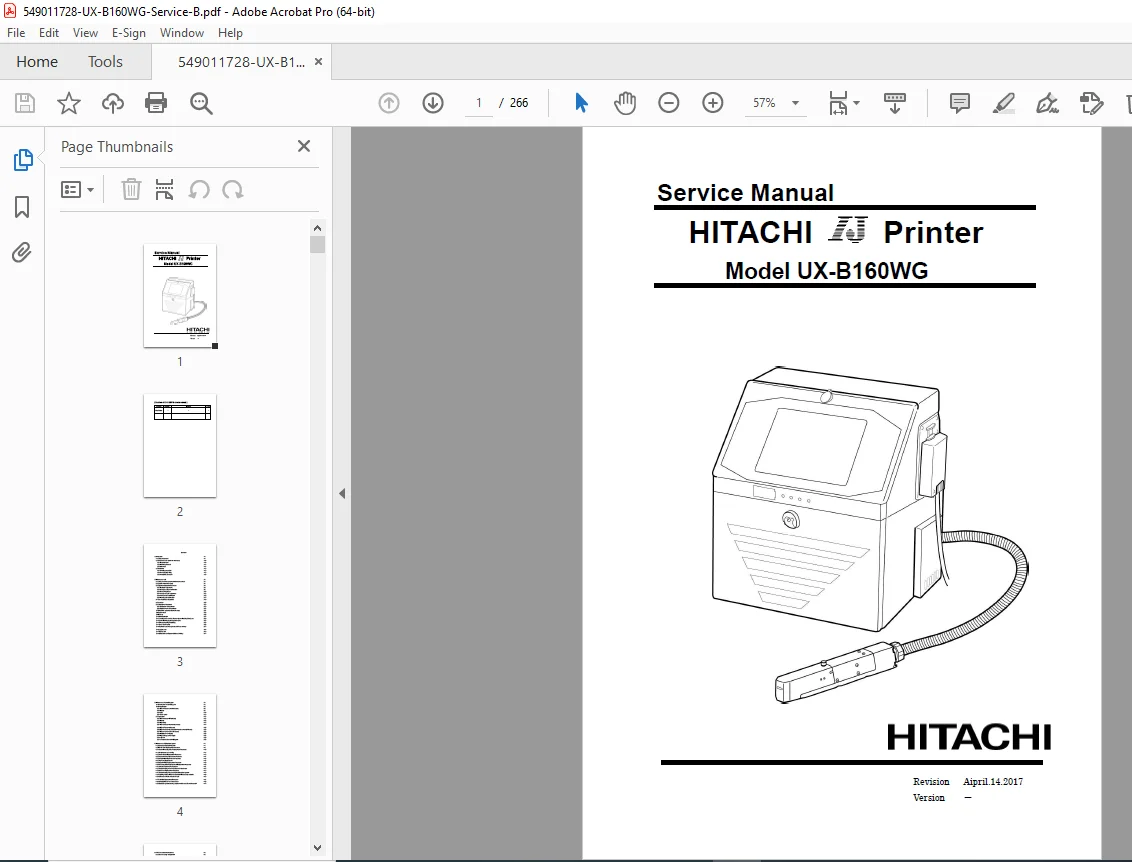
Hitachi UX-B160WG Industrial Inkjet Printer Service Manual PDF
Original price was: $95.00.$29.95Current price is: $29.95.
Complete factory service manual for Hitachi UX-B160WG continuous inkjet (CIJ) industrial printer. This comprehensive 266-page PDF covers maintenance procedures, circulation system service, print head repair, electrical components, troubleshooting, fault codes, and component replacement. Includes detailed schematics, adjustment procedures, safety protocols, and diagnostic flowcharts. Essential technical reference for technicians servicing industrial marking, coding, and product identification systems.
Description
Hitachi UX-B160WG Industrial Inkjet Printer Service Manual PDF DOWNLOAD
DESCRIPTION
Hitachi UX-B160WG Industrial Continuous Inkjet Printer – Complete Factory Service Manual
This is the official factory service manual (Revision April 14, 2017) for the Hitachi UX-B160WG continuous inkjet (CIJ) industrial printer. This professional-grade 266-page Hitachi UX-B160WG service manual provides complete technical documentation for installation, maintenance, troubleshooting, and repair of these industrial marking and coding systems used in manufacturing, packaging, and product identification applications.
📋 FILE DETAILS
| Detail | Information |
|---|---|
| Manual Type | Factory Service & Repair Manual |
| Manufacturer | Hitachi Industrial Equipment Systems |
| Model | UX-B160WG |
| Printer Type | Continuous Inkjet (CIJ) Industrial Printer |
| Revision Date | April 14, 2017 |
| Total Pages | 266 pages |
| Page Format | A4 size |
| PDF Quality | High-quality optimized factory manual |
🖨️ SYSTEM TYPE & APPLICATIONS
Continuous Inkjet (CIJ) Technology:
- Industrial product marking and coding
- High-speed production line integration
- Date/lot code printing
- Barcode and serial number marking
- Product identification and traceability
- Packaging industry applications
- Manufacturing line coding
Key System Features:
- Deflection electrode technology (~6kV charging voltage)
- Ink circulation system with automatic viscosity control
- Makeup solvent management
- Touch screen interface
- Multiple power supply options (100-120V / 200-240V, 50/60Hz)
- Service personnel maintenance mode
📖 COMPLETE TABLE OF CONTENTS
CHAPTER 1 – INTRODUCTION (15 pages)
1.1 Safety Precautions:
- ✓ Grounding Requirements
- ✓ Cable Handling Safety
- ✓ Ink and Makeup Handling (Flammable Solvent Safety)
- ✓ Main Body Handling Precautions
- ✓ Electrical Parts Handling
- ✓ High Voltage Safety (6kV Deflection Electrode)
- ✓ Related Regulations and Compliance
- ✓ Waste Disposal Requirements
1.2 Structure of Each Part:
- ✓ External Views (Front and Rear)
- ✓ Main Body Internal Components
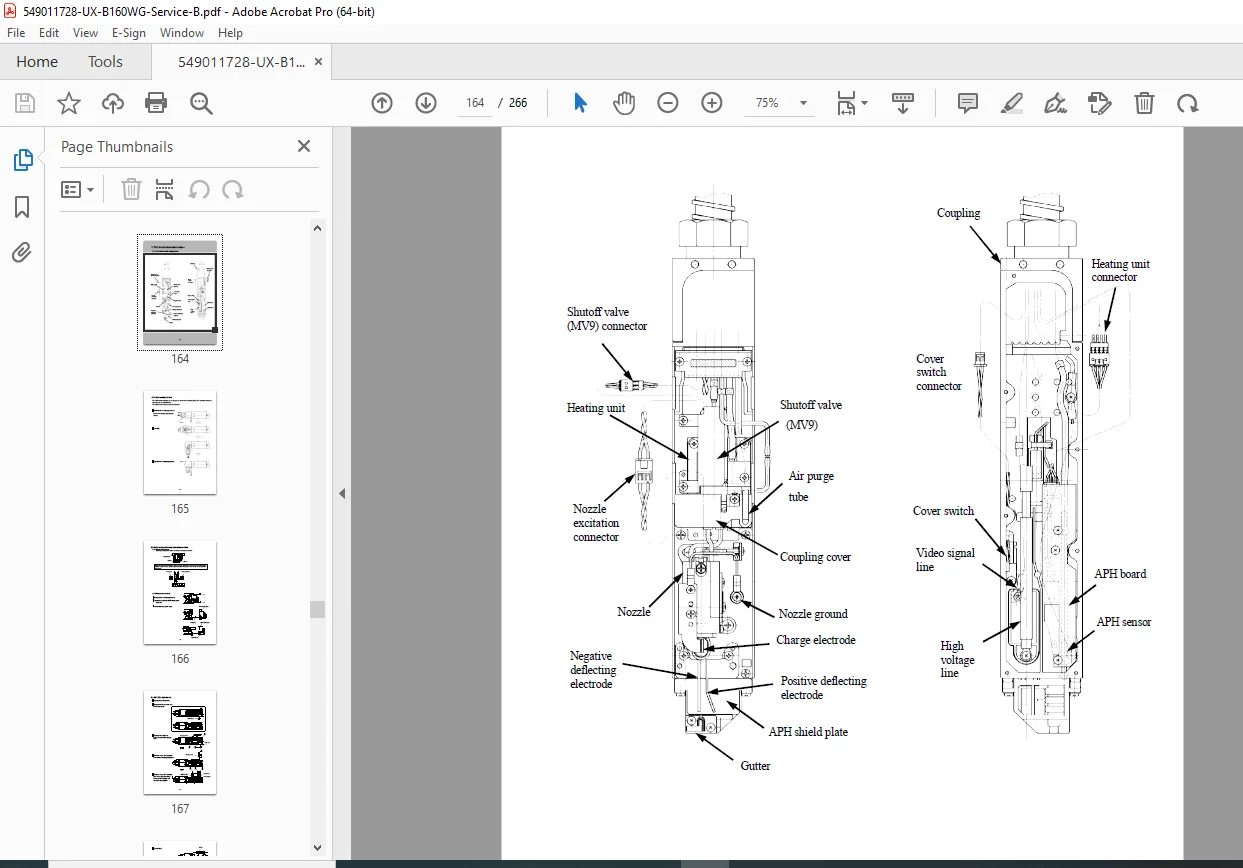
- ✓ Print Head Configuration
- ✓ Operation Status Indicator Lamps
- ✓ Maintenance Cover Access
- ✓ Ink and Makeup Cartridge Locations
1.3 Installation:
- ✓ Installing Precautions and Space Requirements
- ✓ Power Supply Wiring (Detailed)
- ✓ Ground Connection Procedures
- ✓ Cable Routing and Protection
- ✓ Installation Procedure Step-by-Step
CHAPTER 2 – MAINTENANCE WORK (47 pages)
Service Personnel Functions:
- ✓ Setting Service Personnel Maintenance Mode
- ✓ System Environment Setup
- ✓ Adjustment and Operational Checkout Procedures
Critical Adjustments:
- ✓ Excitation Adjustment Procedures
- ✓ Charging Voltage Confirmation (6kV System)
- ✓ Phase Margin Test
- ✓ Auto Phase Gain Adjustment
- ✓ Level Sensor Confirmation
- ✓ Heating Unit Confirmation
System Tests:
- ✓ Solenoid Valve Testing
- ✓ Pump Testing Procedures
- ✓ Download Functions
- ✓ Viscometer Calibration Procedures
- ✓ Viscometer Operation Test
- ✓ Circulation System Environment Setup
- ✓ System Reset Procedures
Data Management:
- ✓ Back Up Procedures
- ✓ Unit Information Display
- ✓ Product Speed Matching Error Handling
- ✓ Fault/Warning Log Management Codes
- ✓ Time of Preparing for Printing
- ✓ Touch Screen Setup
- ✓ Ink and Makeup Expiration Date Management
- ✓ Logging Data Functions
- ✓ Rescue Software Procedures
- ✓ Tapered-Printhead Printing Dimensions
CHAPTER 3 – MAINTENANCE OF CONTROLLING PART (30 pages)
3.1 Construction of Controlling Part:
- ✓ Complete System Architecture
- ✓ Control Block Diagrams
3.2 Controller Part:
- ✓ EZJ128 Board (Controller Board) – Removal/Installation
- ✓ Battery Replacement Procedures
- ✓ LCD Display Service
- ✓ Touch Panel Replacement
3.3 Engine Part:
- ✓ EZJ126 Board (MPU Board) – Service Procedures
- ✓ Battery Maintenance
- ✓ Model Key Replacement
- ✓ EZJ125 Board (Nozzle Drive Board) – Detailed Service
- ✓ EZJ127 Board (I/O Board) – Complete Procedures
- ✓ EZJ132 Board (Ink Circulation Module Connection)
- ✓ EZJ114 Board (LED/SW Board)
- ✓ Multiple Power Supply Service
- ✓ High Voltage Power Supply (6kV System)
- ✓ DC Fan Replacement
- ✓ Electrical Connection Diagrams (Complete)
CHAPTER 4 – MAINTENANCE OF CIRCULATION SYSTEM (57 pages)
4.1 Structure of Circulation System:
- ✓ Complete System Diagram
- ✓ Component Identification
- ✓ Fluid Flow Paths
Component Replacement Procedures:
- ✓ Main Ink Tank Replacement (Step-by-Step)
- ✓ Pressure Reducing Valve Service
- ✓ Joint Structure and Handling
- ✓ Solenoid Valves Replacement
- ✓ Pressure Sensor Replacement
- ✓ Circulation Unit Replacement
- ✓ Pump Parts Replacement (Detailed)
- ✓ Circulation Filter Replacement
- ✓ Ink Reservoir/Makeup Reservoir Replacement
- ✓ Solenoid Replacement Procedures
Troubleshooting and Recovery:
- ✓ Viscometer Fault Troubleshooting
- ✓ Print Head Replacement Complete Procedures
- ✓ Circulation System Troubleshooting (Systematic)
- ✓ Dry or Stuck Circulation Route Repair
- ✓ Intake Fan Unit Maintenance
- ✓ Air Filter Replacement
- ✓ Liquid Spill Check on Exhaust Duct
- ✓ Circulation System Cleaning (Ethanol-based Ink)
CHAPTER 5 – PRINT HEAD RELATED MAINTENANCE (23 pages)
Print Head Configuration:
- ✓ Print Head Rough Configuration
- ✓ Cable Running Direction
- ✓ Component Layout
Component Service:
- ✓ Gutter Configuration and Replacement
- ✓ MGV Filter Replacement
- ✓ Shutoff Valve (MV9) Replacement
- ✓ Heating Unit Replacement
- ✓ APH Board Replacement
- ✓ Nozzle Replacement Procedures
- ✓ Nozzle Orifice Cleaning (Critical)
- ✓ Thermistor Replacement
- ✓ Deflecting Base Replacement
- ✓ Head Base Replacement
- ✓ Head Cable Replacement
CHAPTER 6 – TROUBLESHOOTING (56 pages)
6.1 Troubleshooting List:
- ✓ Complete Fault Code Reference
6.2 Faults – Ink-Stop Type:
- ✓ Systematic Diagnostic Procedures
- ✓ Fault Code Definitions
- ✓ Corrective Actions
6.3 Faults – Print-Stop Type:
- ✓ Print Quality Issues
- ✓ System Shutdown Faults
- ✓ Emergency Stop Conditions
6.4 Warning Conditions:
- ✓ Warnings with Continued Printing
- ✓ Maintenance Alerts
- ✓ Preventive Warnings
6.5 Faults – No On-Screen Indications:
- ✓ Silent Failure Diagnosis
- ✓ System Non-Responsive Troubleshooting
CHAPTER 7 – ATTACHED DRAWINGS (6 pages)
- ✓ Circulation System Diagram (Complete)
- ✓ Electrical Connection Diagram (Full Schematic)
- ✓ Circulation Sequence Diagrams
- ✓ Dimensions Around Charge Electrode
- ✓ Deflection Electrode Specifications
🔍 KEY FEATURES OF THIS HITACHI UX-B160WG SERVICE MANUAL
Continuous Inkjet Technology:
- Complete documentation of CIJ printing principles
- Charging voltage system (approximately 6kV)
- Deflection electrode operation
- Drop formation and control
- Character generation technology
Ink Circulation System:
- Viscosity control and monitoring
- Makeup solvent automatic addition
- Pressure regulation systems
- Filter maintenance schedules
- Contamination prevention
- Ethanol-based ink handling
Safety-Critical Information:
- Flammable ink and makeup handling
- High voltage safety procedures
- Electrical shock prevention
- Fire prevention protocols
- Proper grounding requirements
- Waste disposal compliance
Electronic Control Systems:
- Multiple PCB board detailed service
- Controller architecture
- MPU board diagnostics
- Nozzle drive system
- I/O board configuration
- Power supply systems
Comprehensive Diagnostics:
- Fault code library with descriptions
- Troubleshooting flowcharts
- System test procedures
- Component verification methods
- Performance validation
💼 WHO NEEDS THIS INDUSTRIAL INKJET PRINTER REPAIR PDF?
- Industrial printer technicians servicing Hitachi UX-B160WG service manual systems
- Manufacturing facility maintenance teams performing CIJ printer troubleshooting guide repairs
- Packaging line service professionals using continuous inkjet maintenance manual procedures
- OEM equipment integrators installing Hitachi printer fault codes systems
- Contract maintenance providers performing inkjet circulation system repair
- Food & beverage industry technicians maintaining coding equipment
- Pharmaceutical packaging engineers servicing product identification systems
- Technical training institutions teaching industrial printer service
✅ WHAT MAKES THIS MANUAL ESSENTIAL?
Factory-Official Documentation:
- Genuine Hitachi service procedures
- Official component specifications
- Verified troubleshooting methods
- Authorized repair procedures
Complete System Coverage:
- All major assemblies documented
- Every circuit board detailed
- Full circulation system
- Complete electrical schematics
Safety Compliance:
- Regulatory waste disposal guidelines
- Flammable material handling
- High voltage safety protocols
- Grounding requirements
Professional Diagnostics:
- Fault code complete library
- Systematic troubleshooting trees
- Component test procedures
- Performance verification methods
Detailed Replacement Procedures:
- Step-by-step component replacement
- Special tool requirements
- Adjustment procedures after service
- Calibration requirements
Real-World Service Focus:
- Common failure modes addressed
- Preventive maintenance schedules
- Emergency repair procedures
- System recovery methods
🎯 INSTANT DIGITAL DELIVERY
Download immediately after purchase and access all 266 pages of factory service information for your Hitachi UX-B160WG industrial continuous inkjet printer! No shipping delays or waiting for printed manuals. This searchable PDF allows you to quickly locate specific Hitachi UX-B160WG service manual procedures, industrial inkjet printer repair PDF schematics, or CIJ printer troubleshooting guide diagnostic flowcharts when servicing production equipment. Jump directly to continuous inkjet maintenance manual sections for circulation system service, reference Hitachi printer fault codes during diagnostics, or review inkjet circulation system repair procedures at the production line. Print only the chapters you need for your current repair or keep the entire manual on your tablet or smartphone for instant access on the factory floor. Whether you’re replacing a nozzle assembly, troubleshooting charging voltage issues, servicing the ink circulation system, diagnosing fault codes, or performing preventive maintenance, this comprehensive factory manual provides the same technical information Hitachi-certified technicians rely on. Minimize production downtime with professional service procedures and accurate technical specifications!