HP 2533t Mobile Thin Client Laptop Maintenance and Service Guide Manual – PDF DOWNLOAD
Original price was: $60.00.$16.95Current price is: $16.95.
HP 2533t Mobile Thin Client Laptop Maintenance and Service Guide Manual – PDF DOWNLOAD
Description
HP 2533t Mobile Thin Client Laptop Maintenance and Service Guide Manual – PDF DOWNLOAD
Copyright 2008 Hewlett-Packard
Development Company, L.P.
Bluetooth is a trademark owned by its
proprietor and used by Hewlett-Packard
Company under license. Microsoft,
Windows, and Windows Vista are U.S.
registered trademarks of Microsoft
Corporation. SD Logo is a trademark of its
proprietor.
The information contained herein is subject
to change without notice. The only
warranties for HP products and services are
set forth in the express warranty statements
accompanying such products and services.
Nothing herein should be construed as
constituting an additional warranty. HP shall
not be liable for technical or editorial errors
or omissions contained herein.
First Edition: May 2008
Document Part Number: 462925-001
HP 2533t Mobile Thin Client Laptop Maintenance and Service Guide Manual – PDF DOWNLOAD
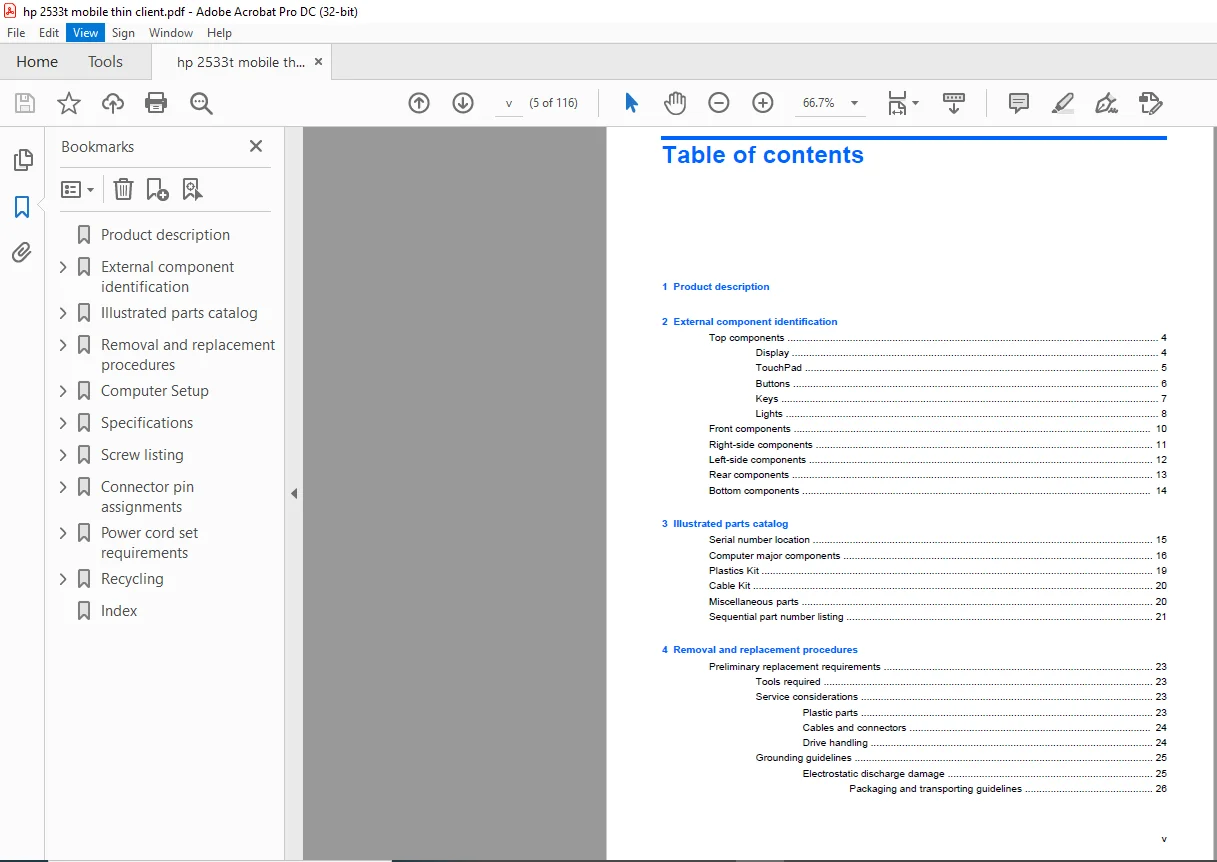
Product description……………………………….. 9
External component identification…………………… 12
Top components………………………………… 12
Display…………………………………… 12
TouchPad………………………………….. 13
Buttons…………………………………… 14
Keys……………………………………… 15
Lights……………………………………. 16
Front components………………………………. 18
Right-side components………………………….. 19
Left-side components…………………………… 20
Rear components……………………………….. 21
Bottom components……………………………… 22
Illustrated parts catalog………………………….. 23
Serial number location…………………………. 23
Computer major components………………………. 24
Plastics Kit………………………………….. 27
Cable Kit…………………………………….. 28
Miscellaneous parts……………………………. 28
Sequential part number listing………………….. 29
Removal and replacement procedures………………….. 31
Preliminary replacement requirements…………….. 31
Tools required…………………………….. 31
Service considerations……………………… 31
Plastic parts………………………….. 31
Cables and connectors…………………… 32
Drive handling…………………………. 32
Grounding guidelines……………………….. 33
Electrostatic discharge damage…………… 33
Packaging and transporting guidelines…. 34
Workstation guidelines………………. 34
Equipment guidelines………………… 35
Unknown user password………………………. 36
Component replacement procedures………………… 37
Serial number……………………………… 37
Computer feet……………………………… 38
Battery…………………………………… 38
Memory module……………………………… 40
WLAN module……………………………….. 42
Flash drive……………………………….. 44
Optical drive……………………………… 46
Switch cover and keyboard…………………… 48
USB board and optical drive bezel……………. 52
RTC battery……………………………….. 54
Display assembly…………………………… 55
Top cover…………………………………. 60
LED board…………………………………. 63
Speaker…………………………………… 64
System board………………………………. 65
PC Card assembly…………………………… 67
Modem module………………………………. 69
Heat sink…………………………………. 71
Computer Setup……………………………………. 73
Starting Computer Setup………………………… 73
Using Computer Setup…………………………… 74
Navigating and selecting in Computer Setup……. 74
Restoring factory settings in Computer Setup….. 74
Computer Setup menus…………………………… 75
File menu…………………………………. 75
Security menu……………………………… 75
Diagnostics menu…………………………… 75
System Configuration menu…………………… 76
Specifications……………………………………. 77
Computer specifications………………………… 77
12.1-inch, WXGA display specifications…………… 78
8X Max DVD-ROM Drive specifications……………… 79
System DMA specifications………………………. 80
System interrupt specifications…………………. 81
System I/O address specifications……………….. 82
System memory map specifications………………… 84
Screw listing…………………………………….. 85
Phillips PM2.5×6.0 captive screw………………… 86
Phillips PM2.0×4.0 screw……………………….. 87
Torx T8M2.0×5.0 screw………………………….. 90
Torx T8M2.5×6.0 screw………………………….. 92
Phillips PM2.5×11.0 captive screw……………….. 95
Phillips PM2.5×4.0 screw……………………….. 96
Phillips PM2.0×6.0 screw……………………….. 97
Phillips PM2.0×5.0 screw……………………….. 98
Torx T8M2.0×10.0 captive screw………………….. 99
Connector pin assignments…………………………..100
Audio-out (headphone)…………………………..100
Audio-in (microphone)…………………………..100
External monitor……………………………….101
RJ-11 (modem)………………………………….102
RJ-45 (network)………………………………..103
Universal Serial Bus……………………………103
Power cord set requirements…………………………104
Requirements for all countries and regions………..104
Requirements for specific countries and regions……105
Recycling…………………………………………106
Battery……………………………………….106
Display……………………………………….106
Index…………………………………………….112