Konica Minolta Magicolor 1680MF 1690MF Service Repair Manual Color Laser PDF
Original price was: $85.00.$18.95Current price is: $18.95.
Complete factory service manual for Konica Minolta magicolor 1680MF and 1690MF color laser multifunction printers. Comprehensive technical documentation includes theory of operation, composition diagrams, electrical schematics, adjustment procedures, error code troubleshooting, maintenance schedules, and complete disassembly/reassembly instructions. Essential professional guide covering scanner, print engine, fuser, toner cartridges, and all major components for desktop color laser MFP systems.
Description
Konica Minolta Magicolor 1680MF 1690MF Service Repair Manual Color Laser PDF DOWNLOAD
DESCRIPTION
This is the complete official Konica Minolta Magicolor 1680MF/1690MF Service Manual (Version 1.0, November 2008) for desktop full-color laser beam multifunction printers. This comprehensive factory workshop manual provides professional-grade service information for authorized technicians servicing these popular color laser MFP systems.
Models Covered by This Service Manual
Primary Models:
- magicolor 1680MF – Desktop color laser MFP
- magicolor 1690MF – Desktop color laser MFP with expansion capabilities
Optional Accessories Covered:
- Auto Document Feeder (ADF) Unit
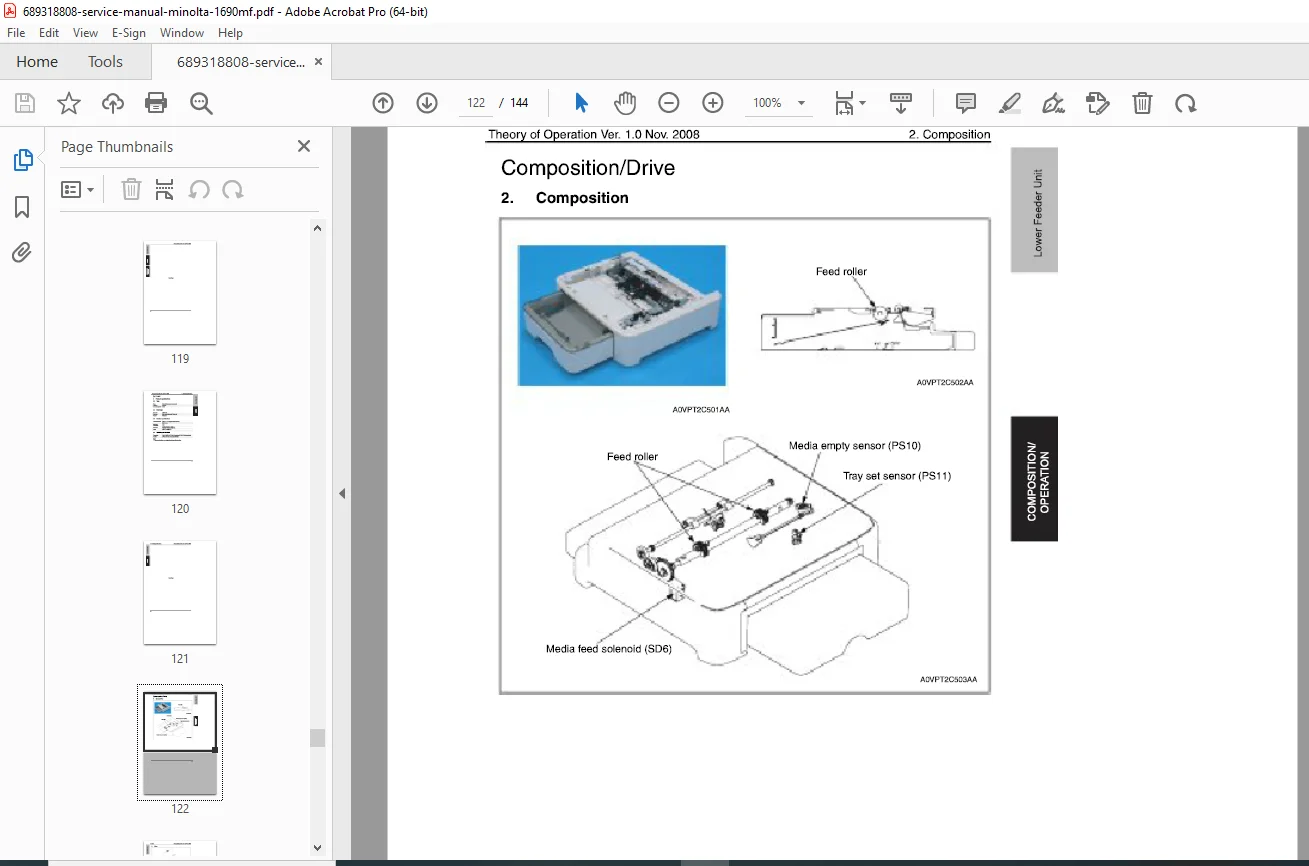
- Lower Feeder Unit (LFU) – for magicolor 1690MF
- Duplex Option Attachment
- Duplex Option Unit
- Dust Cover
Technical Specifications Summary
System Type:
- Type: Desktop full-color laser beam printer/MFP
- Printing System: Semiconductor laser and electrostatic image transfer
- Exposure System: 2 laser diodes with polygon mirror
- Resolution: 1200 × 600 dpi, 600 × 600 dpi
- PC Drum: OPC (Organic Photo Conductor)
- Developing System: Single-element developing
- Charging System: DC comb electrode scorotron
- Transfer System: Intermediate transfer belt system
- Fusing System: Roller fusing
- Media Exit: Face down (100-sheet output tray capacity)
Media Feeding:
- magicolor 1680MF: One-way system (Tray 1: 200 sheets)
- magicolor 1690MF: One-way system (Tray 1: 200 sheets), expandable to two-way with optional Lower Feeder Unit
Complete Manual Contents (144 Pages)
This Konica Minolta 1690MF service manual PDF is organized into two comprehensive sections with detailed safety information:
SAFETY AND IMPORTANT WARNING ITEMS
Critical Safety Information:
- Important Notice: KMBT strongly recommends all servicing be performed only by KMBT-trained service technicians
- Danger/Warning/Caution Classifications: Comprehensive safety symbol explanations
- Prohibited Modifications: Strict guidelines against unauthorized modifications to maintain safety standards
Safety Warnings Cover:
1. Modifications Prohibited:
- Using non-specified cables, power cords, fuses, or thermostats
- Disabling fuse functions or safety circuits
- Disabling interlock safety functions
- Making unauthorized modifications
- Using non-KMBT specified parts
2. Power Plug Selection:
- Power cord set requirements for different regions
- Proper grounding procedures
- Conductor connection standards (Line/Neutral/Earth)
- Voltage compatibility verification
3. On-Site Service Checkpoints:
Power Supply Safety:
- Mains voltage verification
- Proper wall outlet configuration
- Grounding verification procedures
- Power cord condition inspection
- Dust collection checks around plugs
- Extension cord usage guidelines
Installation Requirements:
- Prohibited installation locations (near flammables, water exposure)
- Ventilation requirements for ozone management
- Caster stopper locking procedures
- Long-term storage precautions
4. Servicing Safety:
Inspection Before Servicing:
- Power disconnect requirements
- High-temperature area warnings (fuser unit)
- Powered-on work precautions
- High-voltage area identification
- Laser safety protocols
Safety Checkpoints:
- Exterior and frame damage inspection
- Foreign object prevention
- Wiring damage detection
- Toner and dust removal from electrical components
- High-voltage cable inspection
- Electrode unit deterioration checks
- Laser write unit disassembly precautions
- Interlock switch functionality verification
- Component reinstallation verification
5. Consumables Handling:
- Toner and developer safety (non-harmful but requires care)
- Eye exposure first aid procedures
- Fire safety (never burn toner cartridges)
- Isopropyl alcohol and acetone handling
- Solvent evaporation requirements
- Room ventilation when using cleaners
6. Fuse Information:
- Double pole/neutral fusing requirements
7. Battery Precautions:
- Lithium battery replacement procedures
- Explosion danger warnings
- Disposal instructions
- Multi-language safety warnings (English, German, French, Danish, Finnish, Swedish, Norwegian)
8. Laser Safety:
- Class 3b laser designation
- Wavelength: 785 nm
- Laser caution label locations
- Laser protective goggle specifications
- Disassembly precautions for laser beam path
- Print head handling restrictions (no field disassembly)
9. High-Temperature/High-Voltage Warnings:
- Fuser unit burn hazard areas
- High-voltage generation areas
- Caution label locations on machine
10. Accident Response:
- Emergency measure procedures
- Distributor notification requirements
- On-site evaluation protocols
- Cause determination documentation
THEORY OF OPERATION SECTION
1. OUTLINE
System Configuration:
- Complete system diagrams for both models
- Optional accessory integration
- Component relationship mapping
Product Specifications:
- Detailed technical specifications
- Performance parameters
- Operating characteristics
Center Cross Section:
- Internal component layout diagrams
- Mechanical assembly visualization
Media Path:
- Complete paper path diagrams
- Media flow from input to output
- Multi-path routing for duplex operations
2. COMPOSITION/OPERATION
5. Overall Composition:
- Control block diagrams
- Image creation process flow
- Operation sequence timing
6. Interface Section:
- magicolor 1680MF interface composition
- magicolor 1690MF interface composition
- Control panel integration
- External connectivity
7. Scanner Section:
- Scanner unit composition
- Drive mechanism details
- Operation procedures:
- Start key press sequence
- Home position detection
- Shading compensation algorithms
8. Write Section (Print Head Section):
- PH unit composition and layout
- Laser exposure process
- Laser emission area specifications
- Image stabilization control parameters
- Polygon mirror operation
- 2-laser diode system coordination
9. Imaging Cartridge Section:
- Cartridge composition
- Drive mechanisms
- Toner delivery systems
10. Photo Conductor Section:
- PC drum composition
- Drive mechanism operation
- Photo conductor cleaning mechanism
- Blade cleaning system
11. Charge Corona Section:
- DC comb electrode scorotron composition
- Charge corona control algorithms
- High-voltage application
12. Developing Section:
- Developer unit composition
- Drive mechanisms
- Toner flow diagrams
- Toner cartridge rack operation
- Developing roller drive system
- Developing bias control
- Single-element developing system operation
- Toner cartridge (TC) life control algorithms
13. 1st Transfer Section:
- Intermediate transfer belt composition
- Drive system mechanics
- 1st transfer output control
- Transfer belt cleaning mechanism
- Cleaning blade pressure/retraction mechanism
14. 2nd Transfer Section:
- Secondary transfer composition
- Media separation systems
- Curvature separation process
- Charge-neutralizing system
15. Waste Toner Section:
- Toner collection mechanism
- Waste toner container composition
- Waste toner near-full detection system
- Disposal procedures
16. Media Feed Section:
- Paper tray composition (200-sheet capacity)
- Drive mechanisms
- Up/down control systems
- Paper feed control algorithms
- Double feed prevention mechanism
- Remaining media detection control
- Media feed retry function
17. Fusing Section:
- Roller fusing system composition
- Drive mechanisms
- Fusing temperature control algorithms
- Wait control procedures
- Print control sequences
- Protection against abnormally high temperature
- PPM (Pages Per Minute) control
18. Media Exit Section:
- Output tray composition (100-sheet capacity)
- Drive mechanisms
- Conveyance control
- Face-down stacking system
19. Fan Control Section:
- Cooling fan locations
- Temperature-based fan control
- Component cooling strategies
20. Power Supply Section:
- Power distribution composition
- Control functions
- Voltage regulation
- Safety control conditions
FIELD SERVICE SECTION
OUTLINE:
- System configuration overview
- Product specification quick reference
- Service approach methodology
MAINTENANCE:
Service Schedule:
- Periodic maintenance intervals
- Component replacement schedules
- Cleaning procedures and frequencies
- Lubrication requirements
Maintenance Steps:
- Step-by-step maintenance procedures
- Preventive maintenance checklists
- Consumable replacement procedures
Service Tools:
- Required tool specifications
- Special tool identification
- Tool usage guidelines
Removal/Reinstallation Methods:
- Major component disassembly sequences
- Photo illustrations for each procedure
- Reassembly verification steps
- Screw location diagrams
- Connector identification
- Cable routing paths
Components Covered:
- Scanner unit removal/installation
- Print head (PH) unit service
- Imaging cartridge replacement
- Fuser unit removal/installation
- Transfer belt replacement
- Charge corona wire replacement
- Developer unit service
- Paper feed mechanism service
- Control board replacement
- Power supply unit service
- Fan replacement procedures
- Sensor replacement
Firmware Version Update:
- Firmware update procedures
- Version verification methods
- Update troubleshooting
ADJUSTMENT/SETTING:
Utility Mode:
- User-accessible settings
- Function customization
- Network configuration
- Print quality adjustments
Service Mode:
- Technician-level diagnostics
- Hidden menu access procedures
- System parameter adjustments
- Calibration routines
Mechanical Adjustments:
- Scanner alignment procedures
- Print head positioning
- Transfer belt tension adjustment
- Fuser pressure adjustment
- Paper feed roller alignment
- Sensor position calibration
- Media path alignment
- Registration adjustment procedures
Electrical Adjustments:
- Laser power calibration
- Charge corona voltage adjustment
- Developing bias tuning
- Transfer voltage optimization
- Fuser temperature calibration
TROUBLESHOOTING:
Jam Code Lists:
- Complete jam code reference
- Jam location identification
- Clearing procedures for each jam type
- Root cause analysis
- Prevention strategies
Error Code Lists:
- Comprehensive error code database
- Error code meanings and descriptions
- Diagnostic flowcharts
- Component-specific error codes
- System error codes
Countermeasures:
- Step-by-step repair procedures for each error
- Component testing methods
- Voltage and resistance verification
- Signal flow troubleshooting
- Logic board diagnostics
Common Issues:
- Print quality problems (banding, streaking, spots)
- Color registration issues
- Feeding problems
- Jamming patterns
- Communication errors
- Scanner malfunctions
- Temperature-related failures
Diagnostic Procedures:
- Symptom-based troubleshooting trees
- Isolation testing methods
- Sensor verification procedures
- Motor function tests
- Solenoid testing
- High-voltage testing safety procedures
APPENDIX:
Parts Layout Drawings:
- Exploded view diagrams
- Component identification numbers
- Assembly relationships
- Fastener types and locations
Connector Layout Drawings:
- PCB connector locations
- Pin assignments
- Cable connection diagrams
- Harness routing illustrations
Timing Charts:
- Operation sequence timing diagrams
- Motor drive timing
- Sensor detection timing
- Print process timing
- Scan operation timing
Overall Layout Drawing:
- Complete machine layout
- Component positioning
- Access panel locations
- Service point identification
Windows Compatibility Information
This manual references compatibility with:
- Microsoft Windows NT 4.0
- Microsoft Windows 2000
- Microsoft Windows XP
- Microsoft Windows Vista
Driver and software installation procedures included for network and USB connectivity.
Paper Notation System
Manual uses specific notation for paper feeding direction:
- Long Edge Feeding: Standard notation (e.g., “A4”)
- Short Edge Feeding: Identified with [S] notation (e.g., “A4S”)
- Single Direction Only: No special notation added
Professional Service Features
Comprehensive Documentation:
- Written by Konica Minolta Business Technologies, Inc.
- Same manual used by authorized service centers
- Professional technical language with precise terminology
- Clear safety warnings integrated throughout
Visual Learning:
- High-resolution photographs and diagrams
- Exploded assembly views
- Color-coded wiring diagrams
- Step-by-step illustrated procedures
Multi-Language Safety:
- English primary language
- Safety warnings in German, French, Danish, Finnish, Swedish, Norwegian
- International compliance information
Technical Depth:
- Component-level troubleshooting
- Theory of operation for understanding system function
- Practical field service procedures
- Comprehensive parts identification
Who Should Use This Manual?
This magicolor color laser printer repair guide is essential for:
- Authorized Konica Minolta service technicians
- Professional copier/printer repair specialists
- Corporate IT departments with in-house service teams
- Independent office equipment service companies
- Technical training institutions
- Advanced technicians with laser printer experience
Required Knowledge:
- Basic understanding of electrostatic printing principles
- Familiarity with laser safety protocols
- Electrical troubleshooting skills
- Mechanical aptitude for precision adjustments
Important Service Notes
Authorized Service: KMBT strongly recommends all servicing be performed only by KMBT-trained service technicians due to safety hazards and risk of product damage.
Safety First:
- High-voltage areas require extreme caution
- Laser safety protocols must be strictly followed
- Fuser unit temperatures can cause severe burns
- Proper grounding is essential to prevent electric shock
Lithium Battery: Contains lithium battery requiring proper replacement and disposal according to local regulations. Improper replacement can cause explosion.
Manual Updates: This is Version 1.0 (November 2008). Changes may have been made to improve product performance after manual publication. For latest service information, contact authorized Konica Minolta service channels.
Parts and Consumables: Use only genuine Konica Minolta parts and consumables to maintain safety standards, print quality, and warranty compliance.
FILE DETAILS
| Attribute | Details |
|---|---|
| Manual Name | Konica Minolta magicolor 1680MF/1690MF Service Manual |
| Models Covered | magicolor 1680MF, magicolor 1690MF |
| Printer Type | Desktop Full-Color Laser Beam Multifunction Printer |
| Technology | Laser, Electrostatic Transfer, OPC Drum |
| Resolution | 1200 × 600 dpi, 600 × 600 dpi |
| Options Covered | ADF, Lower Feeder Unit, Duplex Option, Dust Cover |
| Manual Type | Factory Service & Repair Technical Manual |
| File Format | PDF (A4 size pages) |
| File Size | ~18.4 MB |
| Total Pages | 144 pages |
| PDF Quality | High-resolution factory manual with clear diagrams |
| Language | English (with multi-language safety warnings) |
| Publisher | Konica Minolta Business Technologies, Inc. |
| Version | 1.0 |
| Publication Date | November 2008 |