Liebherr LR 1600-2 LICCON Work Planner – US version User & Reference Manual – PDF DOWNLOAD
$28.95
Liebherr LR 1600-2 LICCON Work Planner – US version User & Reference Manual – PDF DOWNLOAD
Description
Liebherr LR 1600-2 LICCON Work Planner – US version User & Reference Manual – PDF DOWNLOAD
FILE DETAILS:
Liebherr LR 1600-2 LICCON Work Planner – US version User & Reference Manual – PDF DOWNLOAD
Language : English
Pages : 105
Downloadable : Yes
File Type : PDF
IMAGES PREVIEW OF THE MANUAL:
DESCRIPTION:
Liebherr LR 1600-2 LICCON Work Planner – US version User & Reference Manual – PDF DOWNLOAD
Preface:
In order to effectively plan crane applications, LIEBHERR now offers the LICCON Work
Planner to its customers. The development of this comprehensive software package
for planning, simulation and documentation of crane applications was made possible by
structuring and streamlining all the necessary data for the operation of a work planner by
computer. In order to assure realistic planning capabilities, the program had to contain the same
data stored in the LICCON in every individual crane, permitting a variety of uses for the LICCON
Work Planner.
Notes on Safety:
This user handbook has been compiled for the purposes of operating the LICCON
application planner correctly and efficiently, as well as to enable the numerous planning options to be realised to the
fullest.
Introduction:
In order to effectively plan crane applications, Liebherr offers the LICCON work planner to customers. The
development of this extensive software package for planning, simulation and documentation of crane
applications was made possible by structuring the required data for operation of a job planner and by
preparing them for use on a PC. In order to assure realistic planning capabilities, the program had to contain
the same data stored in the LICCON in every individual crane. For all LIEBHERR cranes, crane specific data
disks are available.
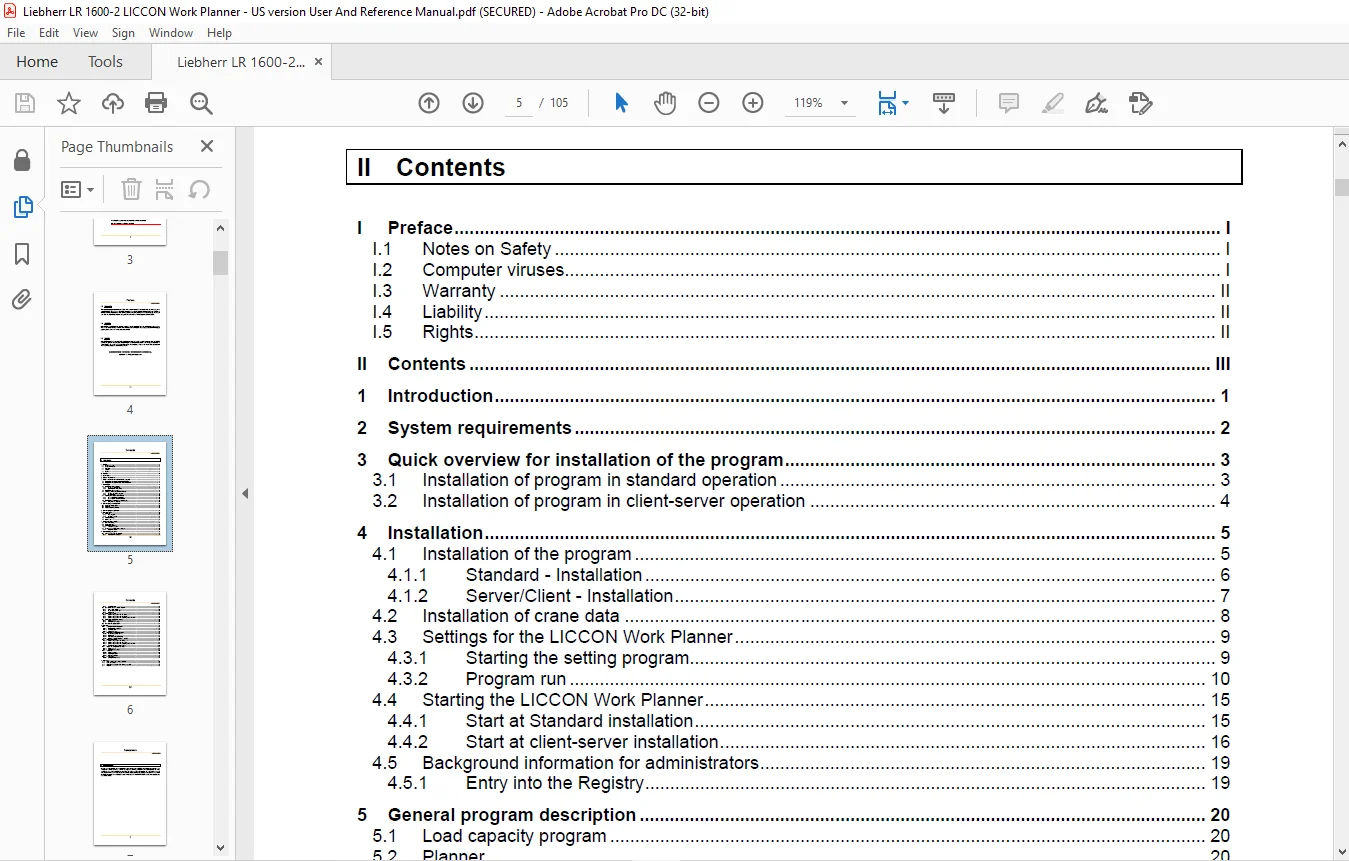
TABLE OF CONTENTS:
Liebherr LR 1600-2 LICCON Work Planner – US version User & Reference Manual – PDF DOWNLOAD
I Preface................................................................................................  3
	I.1 Notes on Safety..................................................................................  3
	I.2 Computer viruses.................................................................................  3
	I.3 Warranty.........................................................................................  4
	I.4 Liability........................................................................................  4
	I.5 Rights...........................................................................................  4
II Contents..............................................................................................  5
1 Introduction...........................................................................................  7
2 System requirements....................................................................................  8
3 Quick overview for installation of the program.........................................................  9
	3.1 Installation of program in standard operation ...................................................  9
	3.2 Installation of program in client-server operation .............................................. 10
4 Installation........................................................................................... 11
	4.1 Installation of the program...................................................................... 11
		4.1.1 Standard - Installation.................................................................... 12
		4.1.2 Server/Client - Installation............................................................... 13
	4.2 Installation of crane data....................................................................... 14
	4.3 Settings for the LICCON Work Planner............................................................. 15
		4.3.1 Starting the setting program............................................................... 15
		4.3.2 Program run................................................................................ 16
			4.3.2.1 Settings............................................................................. 16
				4.3.2.1.1 Window size.................................................................... 16
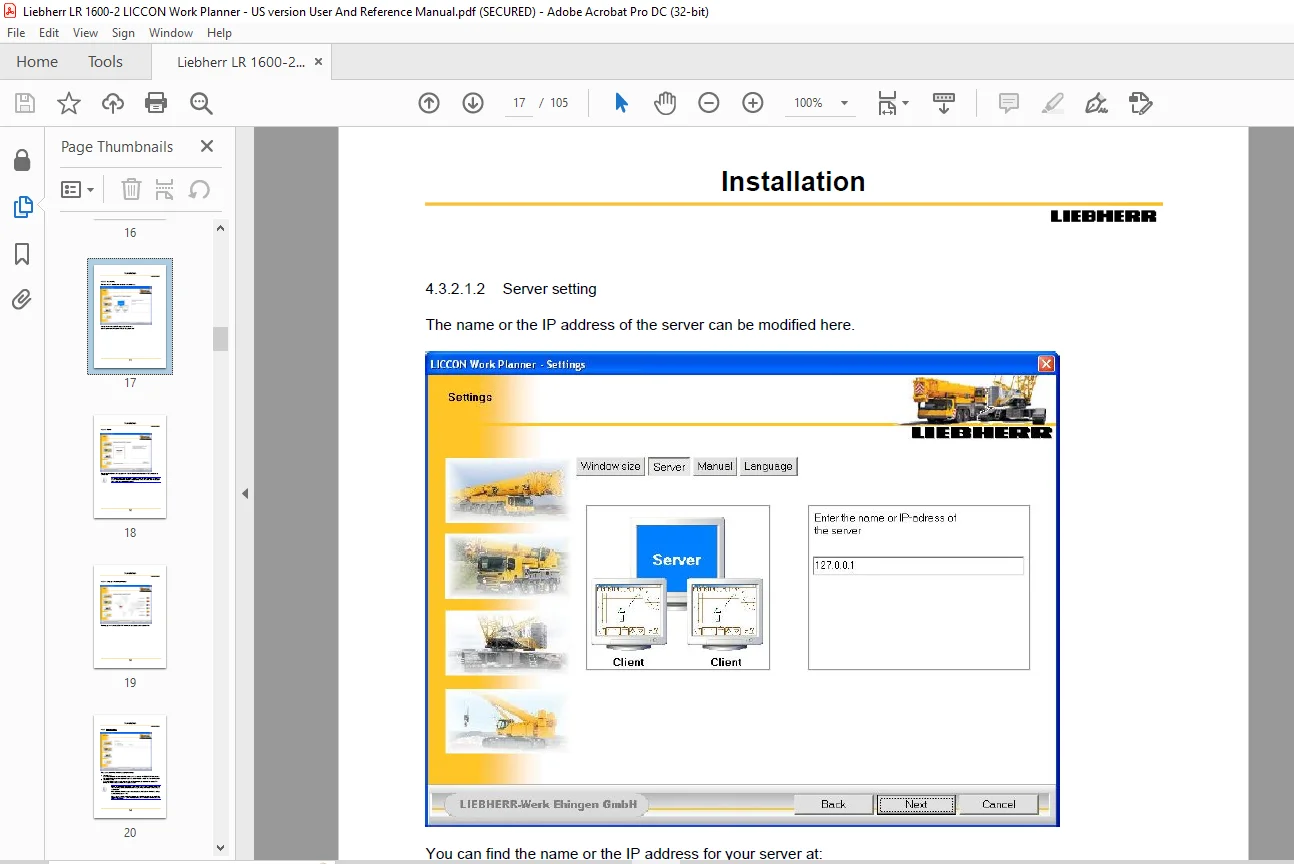
				4.3.2.1.2 Server setting................................................................. 17
				4.3.2.1.3 Manual......................................................................... 18
				4.3.2.1.4 Language settingsettings: language ............................................ 19
			4.3.2.2 Storing the settings................................................................. 20
	4.4 Starting the LICCON Work Planner................................................................. 21
		4.4.1 Start at Standard installation............................................................. 21
		4.4.2 Start at client-server installation........................................................ 22
			4.4.2.1 Starting the server.................................................................. 22
			4.4.2.2 Starting the client.................................................................. 24
	4.5 Background information for administrators........................................................ 25
		4.5.1 Entry into the Registry.................................................................... 25
5 General program description............................................................................ 26
	5.1 Load capacity program............................................................................ 26
	5.2 Planner.......................................................................................... 26
	5.3 Automatic crane selection ....................................................................... 26
6 General program operation.............................................................................. 27
7 Menu program........................................................................................... 28
	7.1 Toolbar.......................................................................................... 28
		7.1.1 End program................................................................................ 29
		7.1.2 Display Help text.......................................................................... 29
	7.2 Versions display................................................................................. 29
	7.3 Menu bar......................................................................................... 29
8 Automatic crane selection.............................................................................. 30
	8.1 Edit crane listing............................................................................... 31
	8.2 Load case data................................................................................... 31
	8.3 Optimizing parameter............................................................................. 31
		8.3.1 Intrusion contour.......................................................................... 31
	8.4 Complete automatic crane selection............................................................... 32
		8.4.1 Selection results ......................................................................... 33
9 Load capacity program.................................................................................. 35
	9.1 Start the load capacity program.................................................................. 35
		9.1.1 Manual crane selection..................................................................... 35
		9.1.2 Last load case............................................................................. 36
	9.2 Description of load capacity program............................................................. 37
		9.2.1 Show chart values.......................................................................... 38
		9.2.2 Status and symbol bar...................................................................... 38
			9.2.2.1 End program.......................................................................... 38
			9.2.2.2 Indicate operating modes............................................................. 38
			9.2.2.3 Print screen......................................................................... 38
		9.2.3 Setting bar................................................................................ 39
			9.2.3.1 Vertical paging in chart............................................................. 39
			9.2.3.2 Horizontal paging in chart........................................................... 39
	9.3 Crane configuration.............................................................................. 40
		9.3.1 Crane configuration with the setting bar................................................... 40
		9.3.2 Crane configuration with LML-Code.......................................................... 40
		9.3.3 Crane configuration with operating mode overview........................................... 40
	9.4 Crane and configuration change................................................................... 40
		9.4.1 Crane change............................................................................... 40
		9.4.2 Configuration change....................................................................... 40
	9.5 End load capacity program........................................................................ 41
10 Planner............................................................................................... 42
	10.1 Starting the Planner program.................................................................... 42
		10.1.1 Manual crane selection.................................................................... 42
		10.1.2 Last load case............................................................................ 42
		10.1.3 Saved load case........................................................................... 42
	10.2 Description of Planner program.................................................................. 42
		10.2.1 Status and symbol bar..................................................................... 44
			10.2.1.1 End program......................................................................... 45
			10.2.1.2 Show operating modes................................................................ 45
			10.2.1.3 Turning the LML on / off ........................................................... 45
			10.2.1.4 Draw intrusion contour.............................................................. 45
			10.2.1.5 Turn on measuring mode.............................................................. 45
			10.2.1.6 Zoom - Enlarge or reduce the view................................................... 45
			10.2.1.7 Pan - Move the view................................................................. 45
			10.2.1.8 Lines/buildings..................................................................... 46
			10.2.1.9 Drawing a circle (arch)............................................................. 46
			10.2.1.10 Writing text....................................................................... 46
			10.2.1.11 Deleting everything................................................................ 46
			10.2.1.12 Turning the crane.................................................................. 46
			10.2.1.13 Crane selection.................................................................... 46
			10.2.1.14 Print screen....................................................................... 46
		10.2.2 Setting bar .............................................................................. 47
			10.2.2.1 View ............................................................................... 48
			10.2.2.2 Crane configuration ................................................................ 48
		10.2.3 Operating data field (BDF) ............................................................... 49
			10.2.3.1 Maximum load / Actual load.......................................................... 50
				10.2.3.1.1 Actual load................................................................... 50
				10.2.3.1.2 Maximum load.................................................................. 50
				10.2.3.1.3 Maximum load at optimum derrick ballast....................................... 51
				10.2.3.1.4 Maximum load at current derrick ballast....................................... 51
			10.2.3.2 Working radius symbol l............................................................. 51
			10.2.3.3 Pulley head height symbol l......................................................... 52
			10.2.3.4 Telescopic length symbol............................................................ 52
			10.2.3.5 Derrick counterweight und derrick counterweight radius.............................. 53
				10.2.3.5.1 Derrick ballast (suspended ballast and ballast trailer)....................... 53
				10.2.3.5.2 Derrick counterweight radius.................................................. 58
			10.2.3.6 Derrick angle....................................................................... 59
			10.2.3.7 Slewing platform lock symbol........................................................ 59
			10.2.3.8 MRT-adjustment...................................................................... 60
		10.2.4 Second bar with operating data fields..................................................... 62
	10.3 Crane configuration............................................................................. 63
		10.3.1 Crane configuration with setting bar...................................................... 63
			10.3.1.1 Function key F2..................................................................... 63
			10.3.1.2 Function key F3..................................................................... 64
			10.3.1.3 Function key F4..................................................................... 64
			10.3.1.4 Function key F5..................................................................... 64
				10.3.1.4.1 Function key F5 - general..................................................... 64
				10.3.1.4.2 Function key F5 – crawler general............................................. 65
				10.3.1.4.3 Function key F5 - Crawler with stabilizers.................................... 65
			10.3.1.5 Function key F6..................................................................... 66
		10.3.2 Crane configuration with LML Code......................................................... 67
		10.3.3 Crane configuration with operating mode overview.......................................... 67
		10.3.4 Additional configuration settings......................................................... 68
	10.4 Crane and configuration change.................................................................. 69
		10.4.1 Crane change.............................................................................. 69
		10.4.2 Configuration change...................................................................... 69
	10.5 Simulation...................................................................................... 70
		10.5.1 Crane functions........................................................................... 70
			10.5.1.1 Actual load input................................................................... 70
			10.5.1.2 Luffing the main boom............................................................... 71
			10.5.1.3 Telescoping......................................................................... 72
				10.5.1.3.1 Discretionary telescoping..................................................... 72
				10.5.1.3.2 Stepless telescoping.......................................................... 72
			10.5.1.4 Luffing the auxiliary equipment..................................................... 73
			10.5.1.5 Input of derrick counterweight and adjustment of derrick counterweight radius....... 74
			10.5.1.6 LML-STOP............................................................................ 76
			10.5.1.7 Turn the LML on or off.............................................................. 77
		10.5.2 Planning functions........................................................................ 78
			10.5.2.1 Top View............................................................................ 78
			10.5.2.2 Frontal View........................................................................ 79
			10.5.2.3 Calculate support pressure and ground pressure...................................... 80
				10.5.2.3.1 Support pressure.............................................................. 81
				10.5.2.3.2 Ground pressure............................................................... 83
				10.5.2.3.3 Indication of center of gravity, transversal and longitudinal inclination .... 85
			10.5.2.4  Draw an intrusion contour.......................................................... 91
			10.5.2.5 Fade in coordinates................................................................. 92
			10.5.2.6 Measure distances................................................................... 92
			10.5.2.7 Zoom - Increase or decrease a detail................................................ 93
			10.5.2.8 Pan - Move a detail................................................................. 94
			10.5.2.9 Turning the crane................................................................... 94
			10.5.2.10 Call up the crane selection chart.................................................. 95
			10.5.2.11 Position crane automatically....................................................... 95
			10.5.2.12 Recalculate the drawing range...................................................... 95
			10.5.2.13 End the program.................................................................... 95
		10.5.3 Drawing functions......................................................................... 96
			10.5.3.1 Draw and delete line(s)/buildings................................................... 96
			10.5.3.2 Draw and delete circles/arches...................................................... 97
			10.5.3.3 Write and delete text............................................................... 97
			10.5.3.4 Erase everything.................................................................... 98
			10.5.3.5 Recalculate the representation...................................................... 98
	10.6 End program..................................................................................... 99
		10.6.1 Saving the load case...................................................................... 99
11 Appendix..............................................................................................100
	11.1 FAQ – Frequently Asked Questions................................................................100
	11.2 Contact address.................................................................................102
	11.3 Overview of LICCON Work Planner symbols.........................................................103
	11.4 INDEX...........................................................................................104
Contact us: [email protected]
PLEASE NOTE:
- This is the same manual used by the DEALERSHIPS to SERVICE your vehicle.
- The manual can be all yours – Once payment is complete, you will be taken to the download page from where you can download the manual. All in 2-5 minutes time!!
- Need any other service / repair / parts manual, please feel free to contact us at heydownloadss @gmail.com . We may surprise you with a nice offer
S.V