Philips BDS4241V BDH4241V BDH5021V Plasma Monitor Service Manual PDF
Original price was: $95.00.$32.95Current price is: $32.95.
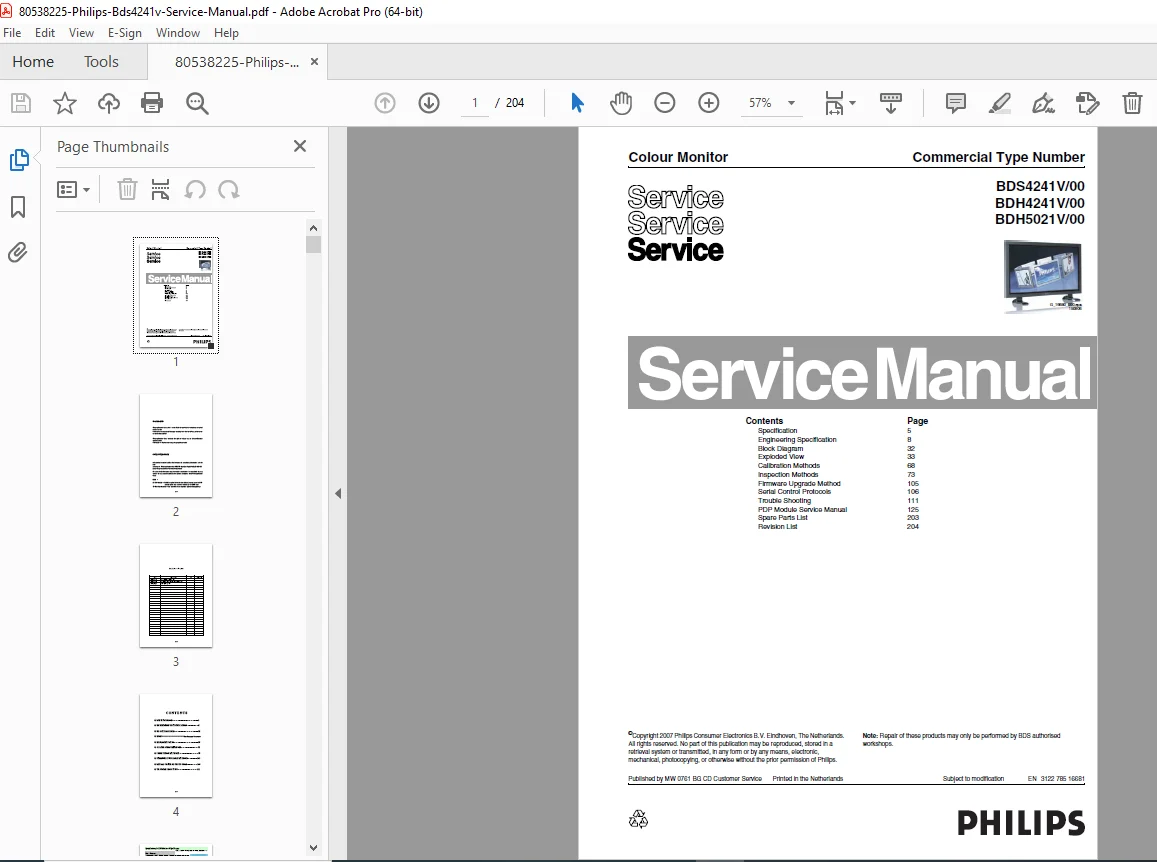
Complete factory service manual for Philips commercial plasma display monitors BDS4241V, BDH4241V (42-inch), and BDH5021V (50-inch). Comprehensive 204-page technical documentation covering specifications, block diagrams, exploded views, calibration procedures, firmware upgrades, and troubleshooting. Includes PDP module service manual, serial control protocols, and inspection methods. Essential for commercial display technicians servicing Pixelworks DNX technology plasma monitors with HDMI/DVI inputs.
Description
Philips BDS4241V BDH4241V BDH5021V Plasma Monitor Service Manual 42″ 50″ PDP PDF DOWNLOAD
DESCRIPTION
Philips Commercial Plasma Display Monitor – Complete Service Manual
This comprehensive Philips BDS4241V/BDH4241V/BDH5021V service manual provides complete technical documentation for servicing Philips professional plasma display monitors. Essential reference for commercial display technicians, audiovisual engineers, and digital signage service professionals.
📋 FILE DETAILS
- Manual Name: Philips Colour Monitor Service Manual
- Models Covered:
- BDS4241V/00 (42-inch Standard Definition)
- BDH4241V/00 (42-inch High Definition)
- BDH5021V/00 (50-inch High Definition)
- Display Type: Plasma Display Panel (PDP) Commercial Monitors
- Manufacturer: Philips Consumer Electronics B.V.
- Document Number: EN 3122 785 16681
- Copyright: 2007 Philips (Printed in Netherlands)
- OEM: WoosungNextier Corp. (Korea)
- Pages: 204 pages
- PDF Quality: High-quality factory original documentation
- File Size: 23.0 MB
📺 DISPLAY SPECIFICATIONS
BDS4241V/00 (42-inch SD)
- Screen Size: 42″ (920.1H x 518.4V mm active area)
- Resolution: 852 x 480 pixels (EDTV)
- Aspect Ratio: 16:9
BDH4241V/00 (42-inch HD)
- Screen Size: 42″ (920.1H x 518.4V mm active area)
- Resolution: 1024 x 768 pixels (XGA)
- Aspect Ratio: 16:9
BDH5021V/00 (50-inch HD)
- Screen Size: 50″ (1106.5H x 622.1V mm active area)
- Resolution: 1024 x 768 pixels (XGA)
- Aspect Ratio: 16:9
🔧 MANUAL SECTIONS & PAGE REFERENCES
1. SPECIFICATION (Page 5)
- Complete technical specifications for all three models
- Display characteristics and performance parameters
- Audio and video feature listings
2. ENGINEERING SPECIFICATION (Page 8)
- Detailed circuit-level specifications
- Component ratings and tolerances
- Electrical characteristics and power requirements
- Signal processing specifications
3. BLOCK DIAGRAM (Page 32)
- Complete system architecture diagrams
- Signal flow illustrations
- Component interconnections
- Power distribution schematics
4. BOM (Bill of Materials)
- See separate document reference
- Complete parts listing with part numbers
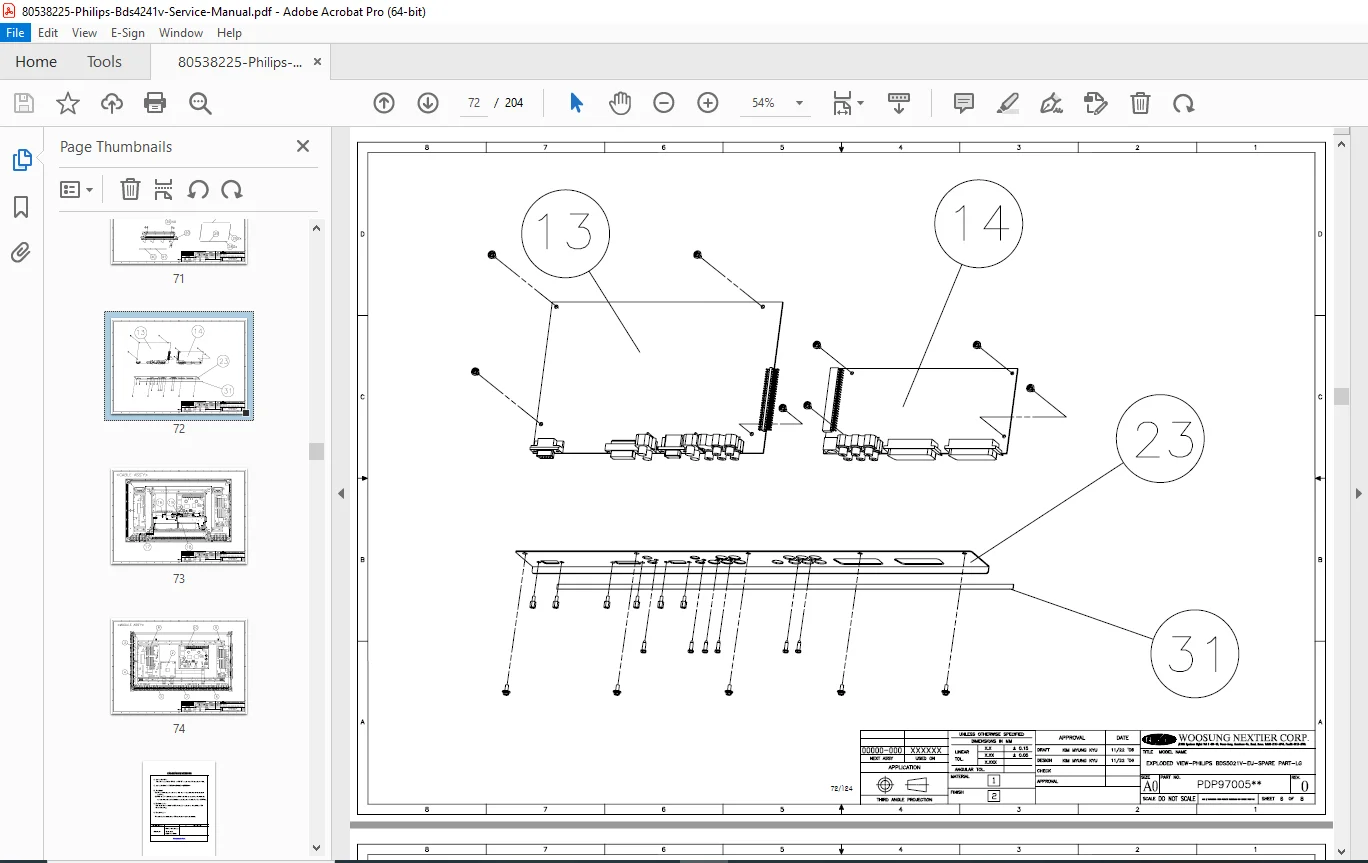
5. EXPLODED VIEW (Page 33)
- Detailed mechanical disassembly diagrams
- Component identification and positioning
- Assembly/disassembly procedures
- Hardware and fastener specifications
6. CALIBRATION METHODS (Page 68)
- White balance calibration procedures
- Color temperature adjustment protocols
- Brightness and contrast calibration
- Geometry and convergence adjustments
- Factory alignment procedures
7. INSPECTION METHODS (Page 73)
- Quality control test procedures
- Visual inspection criteria
- Display cell defect specifications
- Performance verification protocols
- Acceptance/rejection criteria
8. FIRMWARE UPGRADE METHOD (Page 105)
- Firmware update procedures
- Software version management
- Programming protocols
- Recovery procedures for failed updates
9. SERIAL CONTROL PROTOCOLS (Page 106)
- RS-232 communication specifications
- Command structure documentation
- Control code reference
- Integration with external control systems
- Serial port configuration parameters
10. TROUBLE SHOOTING (Page 111)
- Symptom-based diagnostic flowcharts
- Common failure modes and solutions
- Component-level troubleshooting
- Error code interpretation
- Repair decision trees
11. PDP MODULE SERVICE MANUAL (Page 125)
- Plasma display panel specifications
- PDP module replacement procedures
- Safety precautions for plasma servicing
- Module-specific technical features
- Formation and specification documentation
- Adjustment procedures
12. SPARE PARTS LIST (Page 203)
- Complete parts catalog with numbers
- Component cross-references
- Ordering information
13. REVISION LIST (Page 204)
- Service manual version history
- Engineering change notices
- Update tracking
⚙️ ADVANCED DISPLAY TECHNOLOGIES
Pixelworks DNX™ (Digital Natural Expression) Technology:
- Motion-adaptive deinterlacing for smooth video
- Advanced noise reduction for progressive sources
- Dynamic edge enhancement
- Smoothing of moving lines
- Sophisticated digital video processing
- Natural-looking SD and HD video images
Video Processing Features:
- DCTI (Digital Chroma Transient Improvement)
- DLTI (Digital Luminance Transient Improvement)
- Digital luminance and horizontal peaking
- Advanced sharpness controls
- Flesh Tone Correction (FTC)
- Chroma Upsampling Error (CUE) correction
- White and black-level expansion
- Digital 3D comb-filter (optional)
- PixelBoost™ overdrive technology
- True 10-bit (1 billion color) processing (optional)
Deinterlacing Technology:
- SDTV and HDTV support (NTSC/PAL/SECAM, 1080i)
- Per-pixel motion-compensated deinterlacing
- Improved Low-Angle Interpolation
- Film mode for 3:2/2:2 pull-down (including 1080i)
🔌 CONNECTIVITY & INPUTS
Digital Inputs:
- HDMI (High Definition Multimedia Interface) – Optional dual inputs
- Supports up to 720p, 1080i, 1280×1024/60Hz (SXGA)
- HDCP (High-bandwidth Digital Content Protection) compliant
- DVI (Digital Visual Interface)
- Supports up to 720p, 1080i, 1280×1024/60Hz (SXGA)
Analog Inputs:
- RGB (PC) – Multi-standard monitor support
- Up to 720p, 1080i, 1280×1024/60Hz (SXGA)
- Component Video – Multi-standard compatibility
- 480i, 576i, 480p, 576p, 720p, 1080i
- Composite Video – NTSC, PAL, SECAM support
Audio Features:
- Built-in speakers (optional)
- Variable audio control: Volume, Mute, Bass, Treble, Balance
- Automatic Volume Correction (AVC)
- Audio delay for lip sync (optional)
- Spatial effects and pseudo stereo
📐 DISPLAY FEATURES
Screen Modes:
- Multi-screen display: Normal, PiP/PBP (Picture-in-Picture/Picture-by-Picture – optional)
- Variable image sizes: Auto, Fill All (16:9), Fill Aspect, Zoom, Anamorphic, Wide
- Independent vertical and horizontal scalers
- Anamorphic scaling for 4:3↔16:9 aspect ratio conversion
Picture Controls:
- Brightness, Contrast, Sharpness, Color, Tint adjustments
- Digital brightness, contrast, hue, saturation control
- High brightness and contrast ratio
- User-adjustable color temperature
Additional Features:
- Multi-language On-Screen Display (OSD)
- Still image function
- Image sticking minimum function
- Sleep timer
- Teletext support (1000 pages)
- Quiet fanless operation
- Ultra-slim and lightweight design
🎯 IDEAL FOR
- Commercial display service technicians
- Digital signage installation and maintenance teams
- Corporate AV department engineers
- Broadcasting facility technicians
- Retail display system integrators
- Hospitality industry AV specialists
- Educational institution AV technicians
- BDS (Business Display Solutions) authorized workshops
- Independent plasma display repair specialists
⚠️ AUTHORIZED SERVICE NOTICE
Important: Repair of these products may only be performed by BDS authorized workshops. This manual is intended for qualified service personnel with appropriate training and certifications.
Safety Precautions:
- Comprehensive safety guidelines included in PDP module section
- High voltage warnings for plasma panel servicing
- Proper handling procedures for display panels
- ESD (electrostatic discharge) protection requirements
💡 WHY THIS MANUAL IS ESSENTIAL
Philips commercial plasma displays are sophisticated professional-grade monitors requiring precise calibration and specialized service knowledge. This factory manual provides:
✓ Exact calibration procedures for optimal color reproduction
✓ Serial control protocols for system integration troubleshooting
✓ Firmware upgrade methods to maintain current software
✓ PDP module specifications critical for plasma panel servicing
✓ Display cell defect criteria for quality assessment
✓ Complete block diagrams for circuit-level troubleshooting
✓ Exploded views for mechanical disassembly guidance
Commercial Display Environment: These monitors are designed for demanding commercial applications including digital signage, corporate presentations, retail displays, and broadcast monitoring where reliability and image quality are critical.
🚀 Download instantly and service with confidence! Stop guessing at complex plasma display issues or struggling without proper calibration data. This factory-authorized manual provides the exact procedures, specifications, and protocols used by Philips-certified technicians worldwide. Ensure your commercial plasma displays deliver optimal performance with manufacturer-exact service documentation.
Pricing rationale:
- 204 pages of comprehensive technical content
- Covers three commercial plasma display models (42″ and 50″)
- Factory-authorized Philips documentation
- Includes specialized PDP module service manual
- Essential for servicing $3,000-8,000 commercial displays
- Contains firmware upgrade and serial control protocols
- Detailed calibration and inspection procedures
- Professional/commercial display audience (narrower than consumer)
- 2007 vintage equipment (still in use but aging installed base)
- OEM manufactured by WoosungNextier (Korea)