
Qualstar TLS-4000 Tape Library Technical Service Manual PDF (FRU & Firmware)
Original price was: $95.00.$28.95Current price is: $28.95.
Complete TLS-4000 Series Technical Service Manual PDF for Qualstar tape libraries. Covers safety, model identification and specifications, theory of operation (motion systems, sensors, handler, barcode, I/O port), full menu system (Maintenance + Private menus), troubleshooting (power-up, operation, calibration), field-replaceable units (FRUs) removal/replacement and after-maintenance tests, firmware updating (SCSI/Fibre/Q-Link/Q-Conn), model expansions, and system interconnect diagram.
Description
Qualstar TLS-4000 Tape Library Technical Service Manual (FRU & Firmware) PDF DOWNLOAD
Description
This TLS-4000 Technical Service Manual is written for tape library service personnel and provides a complete service-level reference for maintaining, troubleshooting, repairing, and updating the Qualstar TLS-4000 Series tape library systems. It includes detailed theory of operation, diagnostics via the Maintenance/Private menus, step-by-step FRU replacement procedures, firmware update methods, expansion upgrades, and system interconnect documentation.
✅ Models Covered (TLS-4000 Series)
4210, 4212, 4222
4420, 4440, 4480
4660, 46120
Table of Contents (Neatly Categorized)
1) Introduction & Safety
Who should read this manual (service personnel)
Important safety information
Lithium battery handling precautions
2) Description & Theory of Operation
Model identification (feature/model comparison)
General description
Motion systems (carriage, handler insertion axis, I/O port slot, carousel)
Sensors (analog + digital) and how they work
Handler solenoid & gripper operation
Barcode reader (standard/optional by model)
Barcode label requirements and usage
Component identification (models, handler, I/O port assembly)
Field-Replaceable Units (FRUs) overview
3) Menu System (Diagnostics & Controls)
Using control keys (MENU, UP/DOWN, ENTER, EXIT, CALL)
Daisy key special functions (I/O port, park high/low)
Top menu, menu elements, hierarchy
Displaying firmware revision
Alerts and dynamic menus
4) Maintenance Menu (Safe Diagnostics)
Display log / data logging
Status screens (prevents, revisions, stats, voltage)
Test functions (inventory, keyboard, LCD)
5) Private Menu (Technician-Level Access)
Security locks (door lock, master lock)
Enabling private menu + password set/clear
Calibrate / clear access / reset SCSI bus
Configuration, defaults, SCSI settings
Display A/D, locations, positions, sensors
Drive bay, executive menu tools
6) Troubleshooting
Power-up and initialization failures
Operation failures
Calibration failures
7) Field-Replaceable Units (FRUs) – Remove/Replace
Required tools & materials
Panels and major assemblies (carriage, PCBAs, barcode reader, fans/filters)
I/O port assembly & PCBA
Power supplies (handler and tape drive)
Executive PCBA, drive bay PCBA, carousel PCBA & motor
SCSI differential adapter, Q-Link
After-maintenance test procedures
8) Firmware Updating
Firmware replacement workflow
Determining installed hardware and required firmware
Update methods:
Via SCSI or Fibre Channel
Via Q-Link
Via Q-Conn / RS-232 (cable wiring + terminal setup)
Xmodem download mode
Flash memory IC replacement procedures (Executive and Drive Bay boards)
9) TLS Expansions
Model expansion kits (install + password + reconfigure model number)
Recalibration after expansion
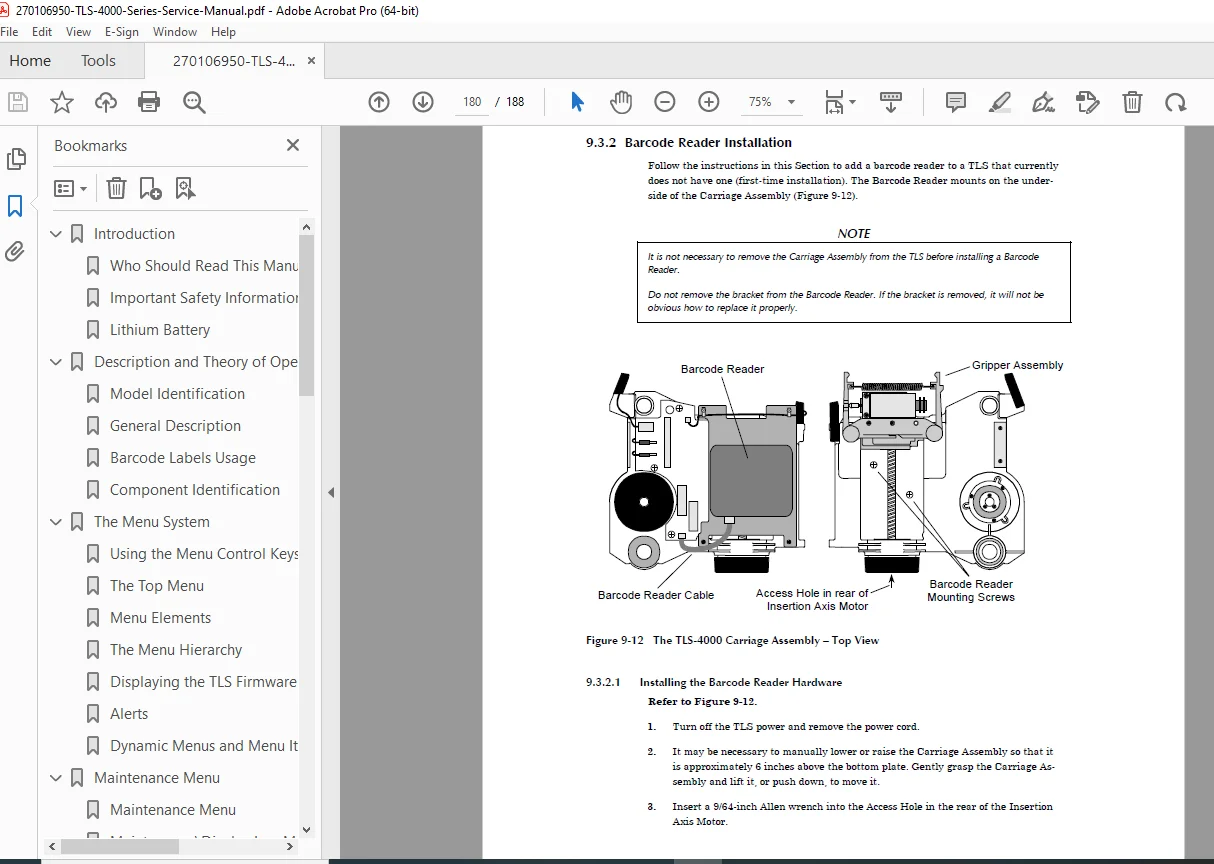
Adding barcode reader or I/O port (parts/tools + installation)
10) System Interconnect Diagram
Full system interconnect documentation for service reference
🗂️ File Details
| Item | Details |
|---|---|
| Manual Name | TLS-4000 Technical Service Manual |
| Models Covered | TLS-4000 Series (4210/4212/4222/4420/4440/4480/4660/46120) |
| Year | 2004 (Rev. B – April 14, 2004) |
| Manual PDF Quality | Clean, readable technical manual with diagrams, procedures, and service menus |
| No. of Pages | 188 pages |
Repair and maintain your library the right way—this manual gives you the exact service menus, FRU procedures, troubleshooting steps, and firmware update methods technicians rely on. Instant download so you can start diagnosing immediately.