Samsung OfficeServ 7400 PBX Phone System Service Manual Repair PDF
Original price was: $85.00.$16.95Current price is: $16.95.
Official Samsung OfficeServ 7400 business telephone system service manual for service engineers and telecom technicians. This comprehensive 491-page PDF covers complete system architecture, troubleshooting, circuit board descriptions, maintenance programming, and repair procedures for this IP/digital PBX system. Includes detailed module configurations, VoIP features, LAN/WAN interfaces, parts layouts, and circuit diagrams. Essential for telecom service companies and IT departments maintaining Samsung OfficeServ systems
Description
Samsung OfficeServ 7400 PBX Phone System Service Manual Repair PDF DOWNLOAD
DESCRIPTION
Samsung OfficeServ 7400 Communication System Service Manual – Complete Professional Telecom Service Reference
This is the official factory service manual for the Samsung OfficeServ 7400 business telephone system (PBX/IP-PBX). Published in December 2005 by Samsung Electronics Co., Ltd. (Document Number: GANA-000041, Edition 00), this professional-grade technical documentation is essential for service engineers, telecom technicians, and IT professionals who install, maintain, and troubleshoot this advanced unified communications platform.
📋 FILE DETAILS
- Manual Name: OfficeServ 7400 Service Manual
- System Covered: Samsung OfficeServ 7400 Unified Communications System
- Manufacturer: Samsung Electronics Co., Ltd.
- Publication Date: December 2005
- Document Number: GANA-000041
- Edition: 00 (First Edition)
- Total Pages: 491 pages
- File Format: PDF
- PDF Quality: High-quality official manual with detailed diagrams
- Language: English
- Page Size: Letter format
🔧 COMPREHENSIVE COVERAGE INCLUDES:
Chapter 1: Introduction to System (System Overview)
Main Functions:
OfficeServ 7400 System Overview:
- Business communication product for middle and small-sized offices
- Supports up to 500 subscribers
- Hybrid TDM/IP architecture
- Combines traditional PBX with IP telephony
- Voice and data transmission capabilities
- Multi-platform support (Digital Phone, IP Phone, Mobile)
Key Functional Areas:
Data Network Communication:
- LAN (Local Area Network) integration
- WAN (Wide Area Network) connectivity
- Data module interfaces
- Network convergence
- Data packet handling
Pure IP Solution:
- Mail server functions
- SIP (Session Initiation Protocol) server
- VoIP UMS (Voice over IP Unified Messaging Service)
- Linux-based feature server
- Expandable IP-based features
- Software-defined capabilities
IP Phone Features:
- High voice quality
- QoS (Quality of Service)
- Packet prioritization (voice vs. data)
- Voice packet optimization
- G.711, G.729 codec support
- SIP protocol support
Interface Capabilities:
- WAN interface modules
- LAN interface modules
- Traditional PSTN interfaces
- Digital trunk interfaces (PRI, BRI)
- Analog trunk interfaces
- Station line interfaces
System Configuration:
Front View:
- System cabinet layout
- Module slot configuration
- LED indicators
- Front access panels
- Ventilation design
- Cable management
Rear Side:
- Power connections
- External interfaces
- Grounding points
- Cable entry points
- Cooling system
- Peripheral connections
System Specifications:
System Capacity:
- Maximum lines: Up to 500
- Station capacity (analog/digital/IP)
- Trunk capacity (analog/digital/PRI/VoIP)
- Maximum system configurations
- Expansion capabilities
- Module slot assignments
Electrical Specifications:
- Voltage requirements
- Current ratings
- Circuit protection
- Grounding requirements
- Surge protection
- Power consumption
Power Specifications:
- AC input voltage range
- DC power distribution
- Battery backup compatibility
- Power redundancy options
- UPS requirements
External Rectifier:
- Rectifier specifications
- Battery charging
- Backup power systems
- Power failover
Rings and Signal Tones:
- Ringing patterns
- Cadence specifications
- Tone frequencies
- Signal levels
- Country-specific tones
Available Terminals:
- Compatible phone models
- Digital terminals
- IP phones
- Analog terminals
- Wireless terminals
- Softphone support
Device Specifications:
- Physical dimensions
- Weight
- Environmental requirements
- Operating temperature range
- Humidity specifications
- Ventilation requirements
Chapter 2: Inside the Circuit (Complete System Architecture)
System Structure:
Block Diagram:
- Overall system architecture
- Module interconnections
- Communication paths
- Signal flow
- Control hierarchy
Characteristics of Communication System Between Modules:
- Inter-module communication protocols
- TDM bus architecture
- IP networking
- Control signaling
- Data transfer methods
Mother Board:
- Backplane design
- Slot configuration
- Bus architecture
- Power distribution
- Module interconnection
- Signal routing
Power Supply Module:
- AC/DC conversion
- Voltage regulation
- Power distribution circuits
- Redundancy features
- Battery backup interface
- Protection circuits
Control Boards:
MP40 Board (Main Processor):
- System controller
- CPU architecture
- Memory configuration
- System software
- Call processing
- Feature execution
- System management
- Database management
LP40 Board (Link Processor):
- Inter-processor communication
- System synchronization
- Timing generation
- System clocking
- Protocol handling
Universal Boards (Interface Modules):
8TRK Board:
- 8-port analog trunk interface
- CO line connections
- Ring detection
- Loop start/ground start
- Caller ID reception
- DTMF detection/generation
TEPRI Board:
- T1/E1 PRI (Primary Rate Interface)
- ISDN PRI connectivity
- 23/30 channel capacity
- D-channel signaling
- Q.931 protocol
- Digital trunk features
TEPRI2 Board:
- Enhanced PRI interface
- Improved performance
- Additional features
- Protocol enhancements
8SLI Board:
- 8-port single line interface
- Analog station connections
- 2-wire analog phones
- Tip/ring interface
- Battery feed
- Ring generation
16SLI Board:
- 16-port single line interface
- High-density analog stations
- Compact design
- Power management
16SLI2/16MWSLI Board:
- Enhanced 16-port SLI
- Music-on-hold capability
- Improved features
- Message waiting indication
8HYB/8HYB2 Board:
- 8-port hybrid interface
- Analog/digital capability
- Flexible port configuration
- Multi-function interface
8DLI Board:
- 8-port digital line interface
- Digital phone support
- High-speed signaling
- Digital feature access
16DLI/16DLI2 Board:
- 16-port digital line interface
- High-density digital stations
- Samsung digital phones
- Enhanced features
MGI Board (Media Gateway Interface):
- VoIP gateway
- IP-to-TDM conversion
- H.323 protocol
- SIP support
- Codec transcoding
- Echo cancellation
MGI64 Board:
- 64-channel VoIP gateway
- High-capacity IP trunking
- Enhanced processing
- Multiple protocols
4DSL Board:
- 4-port DSL interface
- High-speed data
- Internet connectivity
- Remote access
4WLI Board:
- 4-port wireless LAN interface
- Wireless phone support
- DECT technology
- Base station connectivity
WBS24 Base Station:
- Wireless base station
- 24-channel capacity
- DECT handset support
- Roaming capability
- Coverage area
- Handoff management
LIM Board (LAN Interface Module):
- Ethernet interface
- 10/100 Mbps
- IP phone support
- Network connectivity
- VLAN support
PLIM Board (Primary LAN Interface):
- Enhanced LAN interface
- Gigabit capability
- Advanced networking
- QoS features
GPLIM Board (Gigabit Primary LAN Interface):
- Gigabit Ethernet
- High-speed IP connectivity
- Enhanced throughput
- Advanced features
GSIM Board (Gateway SIP Interface Module):
- SIP trunking
- Internet telephony
- SIP protocol support
- Service provider connectivity
GWIM Board (Gateway WAN Interface Module):
- WAN connectivity
- Remote site linking
- VPN support
- Wide area networking
Option Boards (Daughter Boards):
Modem Board:
- Dial-up modem capability
- Remote access
- Remote programming
- Remote diagnostics
MIS Board (Management Information System):
- SMDR (Station Message Detail Recording)
- Call accounting
- Traffic analysis
- Reporting interface
MFM/SCM Board (Multi-Function Module/System Control Module):
- Additional features
- System control functions
- Enhanced capabilities
RCM Board (Ring/Cadence Module):
- Custom ring patterns
- Distinctive ringing
- Regional compliance
- Tone generation
CRM Board (Carrier Return Module):
- Music-on-hold source
- External audio interface
- Background music
RCM2 Board:
- Enhanced ring/cadence
- Additional patterns
- Improved features
MGI2D Board:
- Dual MGI capability
- Increased VoIP capacity
- Redundancy
GWIMS Board:
- Enhanced WAN interface
- Additional protocols
- Improved performance
Terminals:
DPIM (Digital Phone Interface Module):
- Digital phone connectivity
- Samsung proprietary protocol
- Feature access
- Display support
- Multi-line appearances
Chapter 3: Troubleshooting (Comprehensive Diagnostic Guide)
System-Level Troubleshooting:
- Power supply issues
- System startup failures
- Module recognition problems
- Communication errors
- Database corruption
- Software issues
Module-Specific Troubleshooting:
- Trunk interface problems
- Station line issues
- Digital phone failures
- IP phone connectivity
- VoIP quality problems
- Network issues
Call Processing Problems:
- No dial tone
- Call routing errors
- Feature malfunctions
- Intercom issues
- Transfer failures
- Conference problems
Voice Quality Issues:
- Echo problems
- One-way audio
- Choppy voice
- Latency issues
- Jitter problems
- Packet loss
Network Troubleshooting:
- IP connectivity
- VLAN configuration
- QoS issues
- Bandwidth problems
- Network congestion
- Protocol errors
Diagnostic Tools:
- System logs
- Error codes
- LED indicators
- Test modes
- Diagnostic commands
- Traffic analysis
Systematic Fault Isolation:
- Problem identification
- Component testing
- Module replacement
- Configuration verification
- Performance testing
Chapter 4: Maintenance Programming (System Management)
Smart Media:
- Smart media card usage
- System backup procedures
- Software loading
- Database restoration
- Configuration storage
- Firmware updates
CPLD (Complex Programmable Logic Devices):
- CPLD programming
- Hardware configuration
- Logic updates
- Version management
Offline Programming:
- MMC (Man Machine Communication)
- System programming methods
- Database editing
- Configuration management
- Feature activation
- User setup
Programming Interfaces:
- Phone-based programming
- PC-based programming
- Web interface (Data Server)
- Command-line interface
System Maintenance:
- Database backup/restore
- Software version management
- System upgrades
- License management
- Feature activation
- Configuration changes
Chapter 5: Parts Layout (Component Location)
Physical Layout Diagrams:
- Mother board component locations
- Module slot assignments
- Connector locations
- LED indicators
- Test points
- Jumper settings
Board-Level Layouts:
- Component identification
- IC locations
- Connector pinouts
- Power connections
- Signal routing
Access Points:
- Service access locations
- Cable routing
- Module removal procedures
- Component replacement
Chapter 6: Parts Lists (Complete Component Catalog)
Overall System Parts:
- Cabinet components
- Power supply parts
- Cooling system components
- Hardware and mounting
Board-Level Parts:
- Mother board components
- Control board parts
- Universal board components
- Option board parts
Part Numbers:
- Samsung part numbers
- Component specifications
- Ordering information
- Replacement parts
Consumables:
- Cables and connectors
- Mounting hardware
- Labels and documentation
Chapter 7: System Parts Diagram (Exploded Views)
Apparatus Drawings:
- Exploded parts diagrams
- Assembly drawings
- Component relationships
- Installation views
Part Lists by Apparatus:
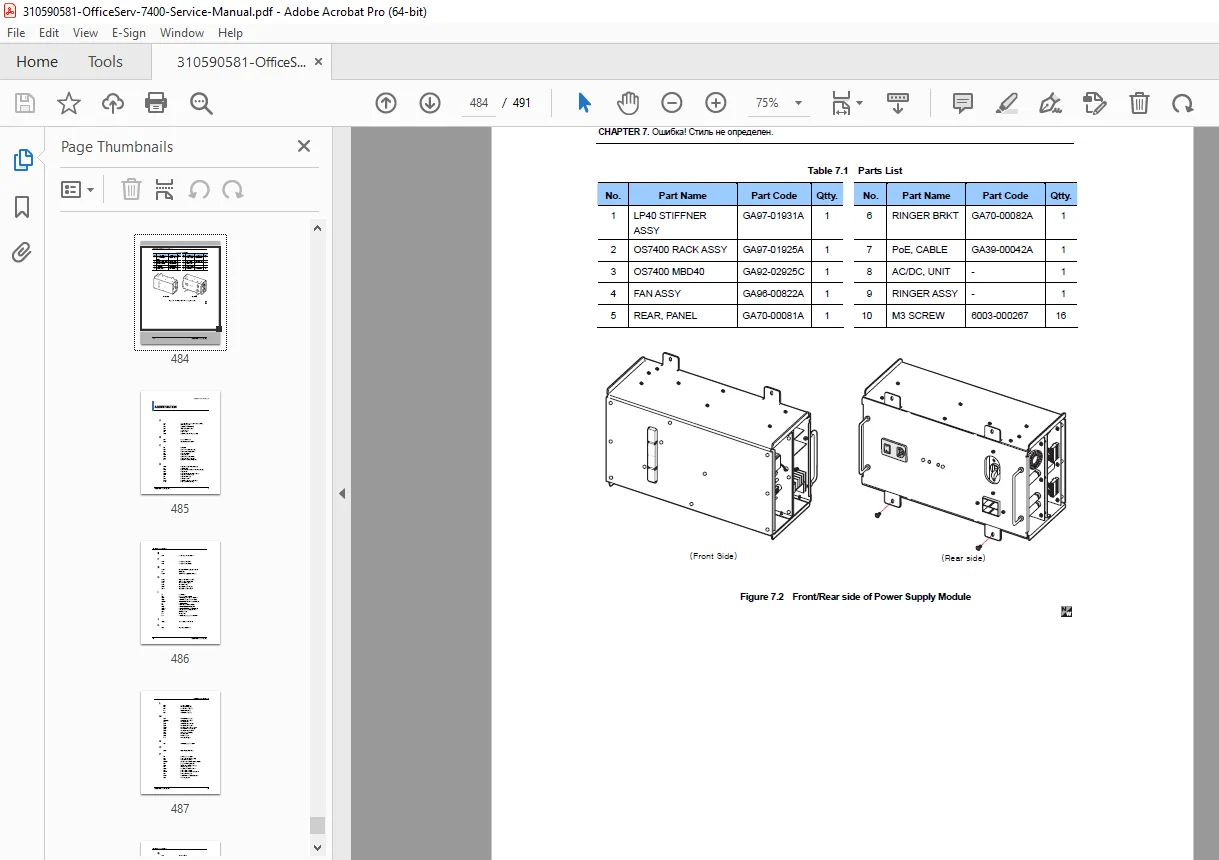
- Cabinet assemblies
- Module assemblies
- Power system parts
- Connector assemblies
OfficeServ 7400 Configuration:
- Complete system layout
- Module placement
- Cable routing
- Service access
Abbreviations Index
Technical Abbreviations:
- Complete glossary
- Industry-standard terms
- Samsung-specific terminology
- Protocol abbreviations
- Technology acronyms
🎯 SYSTEM FEATURES & CAPABILITIES:
Unified Communications: ✅ Traditional PBX features
✅ VoIP capability (SIP, H.323)
✅ Unified messaging
✅ Email integration
✅ Voice mail
✅ Fax mail
✅ Mobile integration
Station Support: ✅ Analog phones (single-line)
✅ Digital phones (Samsung proprietary)
✅ IP phones (SIP-based)
✅ Wireless phones (DECT)
✅ Softphones
✅ Mobile phones (via mobility features)
Trunk Interfaces: ✅ Analog CO lines (loop start/ground start)
✅ T1/E1 PRI (ISDN Primary Rate Interface)
✅ VoIP trunks (SIP/H.323)
✅ BRI (Basic Rate Interface)
Networking: ✅ LAN/WAN connectivity
✅ Multi-site networking
✅ VPN support
✅ IP routing
✅ VLAN support
✅ QoS (Quality of Service)
Capacity: ✅ Up to 500 stations
✅ Scalable architecture
✅ Modular expansion
✅ Flexible configurations
✅ Mixed analog/digital/IP support
💡 IDEAL FOR:
✅ Telecom service companies
✅ PBX installation technicians
✅ IT departments with Samsung phone systems
✅ Telecom equipment service specialists
✅ System integrators
✅ VoIP service providers
✅ Building management companies
✅ Corporate IT staff
✅ Communication system administrators
✅ Anyone servicing Samsung OfficeServ systems
🌟 KEY BENEFITS:
- Comprehensive 491 Pages: Extensive technical documentation
- Complete System Coverage: All modules and interfaces documented
- Unified Communications Platform: TDM and IP telephony integration
- Module-Level Service: Detailed repair procedures for all boards
- VoIP Expertise: Complete IP telephony documentation
- Minimize Downtime: Systematic troubleshooting reduces repair time
- Official Samsung Documentation: Factory service procedures
- Complete Parts Catalog: Part numbers for all components
- Safety First: Comprehensive safety warnings and procedures
- Configuration Management: Programming and database procedures
📊 TECHNICAL SPECIFICATIONS COVERED:
System Architecture:
- TDM bus structure
- IP network integration
- Hybrid design
- Modular expansion
- Redundancy options
Voice Technologies:
- Circuit-switched (TDM)
- Packet-switched (VoIP)
- H.323 protocol
- SIP protocol
- Codec support (G.711, G.729)
- Echo cancellation
Network Integration:
- Ethernet interfaces
- IP routing
- VLAN support
- QoS mechanisms
- Bandwidth management
Telephony Features:
- Call routing
- Auto attendant
- Voice mail
- ACD (Automatic Call Distribution)
- Call accounting
- SMDR
- Conference calling
- Call transfer
- Call forwarding
⚙️ ADVANCED SERVICE CONTENT:
Electronic Systems:
- MP40 main processor
- LP40 link processor
- Power supply circuits
- Battery backup systems
- Module communication protocols
Software Systems:
- Linux-based feature server
- Call processing software
- SIP server
- VoIP gateway software
- System management
Programming:
- MMC programming
- Smart media procedures
- Database management
- CPLD programming
- Feature activation
Testing:
- System diagnostics
- Module testing
- Call testing
- Network testing
- Performance verification
📥 DOWNLOAD INFORMATION:
- Instant Download: Immediate access after purchase
- Format: PDF with bookmarks for easy navigation
- Compatibility: Works on PC, Mac, tablet, smartphone
- Searchable: Full-text search for quick reference
- Printable: Print entire manual or specific sections
- High Quality: Clear diagrams, schematics, and photographs
- Bookmarked: Navigate easily to any chapter or section
- Professional: Official Samsung documentation
⚠️ IMPORTANT NOTES:
- This is a professional service manual for qualified service engineers
- Contains static electricity warnings (ESD protection required)
- Official Samsung Electronics documentation
- Essential for maintaining system performance
- Service requires telecom technician knowledge
- Programming access requires authorization codes
- Some procedures require Samsung-specific tools
- Safety warnings must be followed
🔧 REQUIRED SERVICE EQUIPMENT:
- Digital Multimeter
- Oscilloscope
- Network cable tester
- Laptop with terminal software
- Smart media card reader
- Standard electronic tools
- ESD protection equipment
- Telecom test set
- Network analyzer
- Protocol analyzer (for VoIP troubleshooting)
🌟 WHY CHOOSE THIS MANUAL?
This is the authentic Samsung Electronics factory service manual, not third-party documentation. It contains proprietary diagnostic procedures, circuit descriptions, programming methods, and repair procedures developed by Samsung engineers. The OfficeServ 7400 is a sophisticated unified communications platform requiring factory-level service procedures to ensure reliable operation.
The manual’s comprehensive coverage of both traditional telephony and advanced VoIP features makes it invaluable for service companies supporting hybrid business phone systems.
Order now for immediate download access to complete Samsung OfficeServ 7400 service documentation!