Tadano AML-C Automatic Moment Limiter Service Manual W301-0471E – PDF DOWNLOAD
$28.95
Tadano AML-C Automatic Moment Limiter Service Manual W301-0471E – PDF DOWNLOAD
Description
Tadano AML-C Automatic Moment Limiter Service Manual W301-0471E – PDF DOWNLOAD
FILE DETAILS:
Tadano AML-C Automatic Moment Limiter Service Manual W301-0471E – PDF DOWNLOAD
Language : English
Pages : 233
Downloadable : Yes
File Type : PDF
DESCRIPTION:
Tadano AML-C Automatic Moment Limiter Service Manual W301-0471E – PDF DOWNLOAD
Foreword:
- This service manual (this document) is compiled to provide information on the AML-C that is equipped on the crane.
- “Input/Output Signals of the AML System” in this document offers the general description on the electrical circuit of the crane. For the detailed electrical circuit, refer to the service manual (Circuit diagrams and Data) of each model.
- For the actual works, perform appropriate repair and service with referring to the separate operation and maintenance manual, parts catalog, and service manual of the applicable model.
- When part replacement is needed, refer to the parts catalog first to check the disassembly unit as well as the parts sales unit.
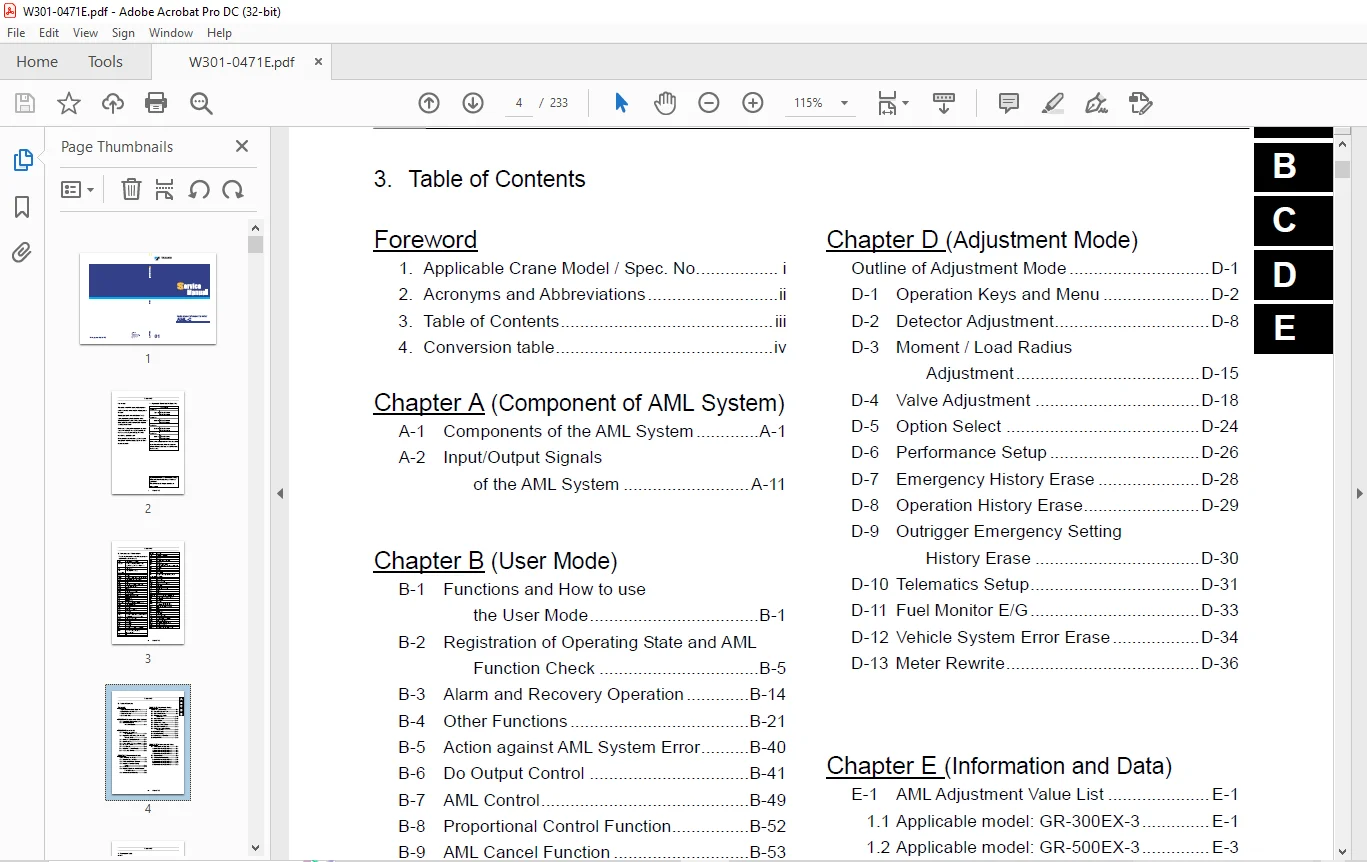
TABLE OF CONTENTS:
Tadano AML-C Automatic Moment Limiter Service Manual W301-0471E – PDF DOWNLOAD
W301-0471E 1
Foreword 2
1 Applicable Crane Model / Spec No 2
2 Acronyms and Abbreviations 3
3 Table of Contents 4
4 Conversion table 5
(A) Components of AML System 7
A-1 Components of the AML System 8
1 1 System configuration 8
1 1 1 Diagram of the main system 8
1 1 2 AML-C block diagram 9
1 2 Display unit 10
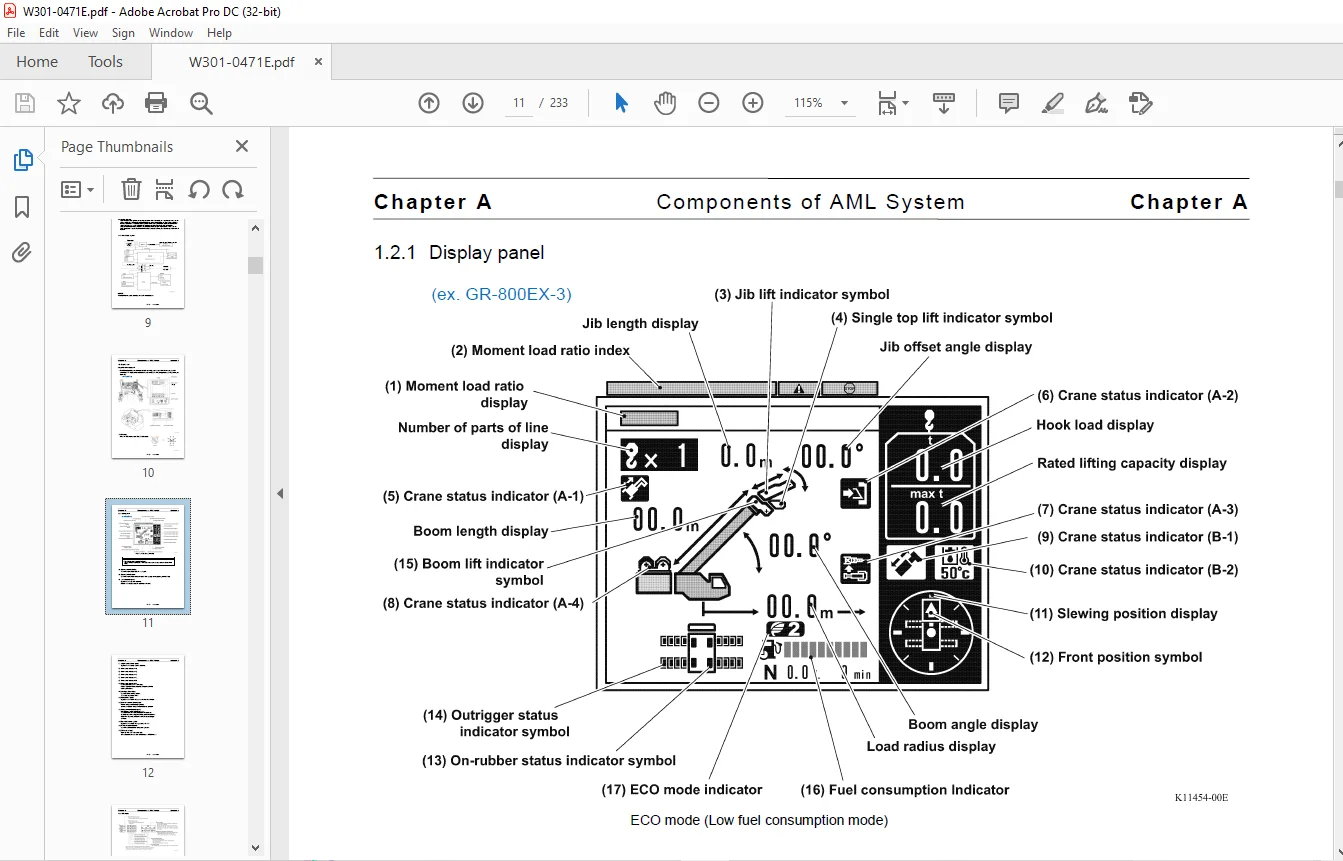
1 2 1 Display panel 11
1 2 2 LED display 13
1 2 3 Control switches 14
1 3 AML main unit 15
1 3 1 Construction 15
1 3 2 Panel outside view (CN1 – CN9) 16
1 3 3 Boards and Inner connectors 17
A-2 Input/output Signals of the AML System 18
2 1 AML control unit (pin assignment) 18
2 1 1 Explanation of the signals (Di, Do) 18
2 1 2 CN1 connector (8-Pin) 19
2 1 3 CN2-1 connector (20-Pin) 19
2 1 4 CN2-2 connector (16-Pin) 22
2 1 5 CN3 connector (12-Pin) 24
2 1 6 CN4 connector (6-Pin) 25
2 1 7 CN5 connector (16-Pin) 26
2 1 8 CN6 connector (14-Pin) 30
2 1 9 CN7 connector (20-Pin) 31
2 1 10 CN8 connector (8-Pin) 32
2 1 11 CN9 (USB) connector (4-Pin) 32
(B) User Mode 33
B-1 Functions and How to use the User Mode 35
1 1 Mode structure 35
1 2 Display selection 36
1 3 Operation indicator display 37
B-2 Registration of Operating State and AML Function Check 39
2 1 Registration of outrigger state 39
2 2 Registration of crane state 42
2 3 Registration of number of part-lines of wire rope 44
2 4 Pre-operational Inspection on AML 46
B-3 Alarm and Recovery Operation 48
3 1 Type of error codes and buzzer 48
3 2 Error code 49
3 3 Error code and remedy list 50
3 3 1 Stop error code 50
3 3 2 Warning error code 52
B-4 Other Functions 55
4 1 Working range limit function 55
4 1 1 Display of limit function state 56
4 1 2 Registering boom slewing angle, lifting height, and load radius limit 56
4 1 3 Registration of slewing range limit function 58
4 1 4 Alarm for work range limit and recovery operation 60
4 2 TARE function 61
4 3 Fuel consumption Indicator 62
4 4 Mute alarm function 63
4 5 Preset menu 64
4 5 1 Adjustment menu/model comparison table 64
4 5 2 Preset menu 64
4 5 3 Eco mode selection 65
4 5 4 Activating/deactivating the winch drum rotation buzzer function 66
4 5 5 Fuel consumption history display 67
4 5 6 Selection of winch to be used (applicable to GR-500EX-3, GR-600EX-3, GR-800EX-3) 68
4 5 7 Adjustment of display panel contrast 70
4 5 8 Transmission of Telematics Data 71
4 5 9 Setting of anemometer alarm threshold value (Option) 72
4 6 Back light on (off) function 73
B-5 Against Action for AML’S System Error 74
B-6 Do Output Control 75
6 1 Cause for AML automatic stop output 75
6 1 1 100% lifting performance stop 76
6 1 2 Anti-two-block stop 77
6 1 3 Backward stability stop 77
6 1 4 Boom upper limit stop 78
6 1 5 Boom lower limit stop 78
6 1 6 Lifting height limit stop 78
6 1 7 Load radius limit stop 79
6 1 8 Elevation lower limit 79
6 1 9 Elevation upper limit 80
6 2 Drum Indicator control function 81
6 2 1 Outline of drum Indicator control function 81
6 2 2 Input 81
6 2 3 Output 81
6 2 4 Panel LED control 81
6 2 5 Drum Indicator Do output control 82
6 2 6 Drum Indicator Do output restriction 82
6 3 Output of warning 82
6 3 1 Safety signal 82
6 3 2 90% warning 82
6 3 3 100% warning 82
B-7 AML Control 83
7 1 Backward stability stop function 83
7 1 1 Outline of function 83
7 1 2 Restriction contents 83
7 2 Working range limit stop function 83
7 2 1 Outline of function 83
7 2 2 Restriction contents 84
7 2 3 Cancel condition 84
7 2 4 Storing of setting condition 84
7 3 Output of Interference prevention warning 85
7 3 1 Function 85
7 3 2 Data specification 85
7 3 3 Input 85
7 3 4 Warning condition 85
7 3 5 Error code 85
B-8 Proportional Control Function 86
8 1 Factors for control 86
8 2 Elevation slow stop 86
8 3 Slewing slow stop 86
B-9 AML Cancel Function 87
9 1 Introduction 87
9 2 Canceling method 88
9 2 1 Cancel status judgment 88
9 2 2 Cancel switch abnormality judgment 88
9 3 Interlock stop 89
9 3 1 Cancel contents 89
9 4 Overload cancel 89
9 4 1 Cancel contents 89
9 5 Detector abnormality 90
9 5 1 Stop processing at detector abnormality (compulsory unload output) 90
(C) Maintenance Mode 93
Outline of Maintenance Mode 95
C-1 Operation Keys and Menu 96
1 1 Operation keys 96
1 2 Structure of maintenance mode menu 97
1 3 Mode shift and menu structure 98
1 3 1 Shift to maintenance mode 98
1 3 2 Menu selection 98
1 3 3 Maintenance main menu functions 99
C-2 Individual Main Menu Functions 100
2 1 ROM ID check 100
2 2 Di check 101
2 3 Ai check 102
2 4 Pi check 103
2 5 Si check 104
2 6 Do check 106
2 7 Ao check 107
2 8 VC check 108
2 8 1 Description of display contents 109
2 8 2 Operation method 109
2 8 3 Selection of VC check selection menu Item 109
2 8 4 DCU2 check, Di check 110
2 8 5 DCU2 check, Ai check 111
2 8 6 DCU2 check, Pi check 112
2 8 7 DCU2 check, Do check 113
2 8 8 DCU2 check, Ao check 114
2 8 9 DCU2 check, Po check 115
2 8 10 VCU check, Di check 116
2 8 11 VCU check, Ai check 117
2 8 12 VCU check, Pi check 118
2 8 13 VCU check, Do check 119
2 8 14 VCU check, DoPow_Moni check 120
2 8 15 VCU check, Ao check 121
2 8 16 VCU check, Po check 122
2 9 System voltage check 123
2 10 Error history display 124
2 11 Erasing error history 125
2 12 AML emergency switch history display 126
2 13 Latest overload history display 127
2 14 Maximum overload history display 128
2 15 Outrigger (O/R) emergency setting history display 129
2 16 Vehicle system error display 130
2 16 1 Purpose 130
2 16 2 Applicable machine 130
2 16 3 Method of displaying screen 130
2 16 4 Description 130
2 17 Telematics check 132
2 18 Clock adjustment 133
2 19 Unit selection 135
2 20 Language selection 136
C-3 Integrated Information Display Screen 137
3 1 Crane Information display screen 137
3 2 Vehicle Information display screen 137
3 3 Display contents 138
3 4 Vehicle error Information 142
C-4 Error Code 143
4 1 Classification of error code 143
4 2 Error history 143
4 3 Error notification 144
4 4 Error code table 145
4 4 1 Communication device error (transmitter, etc ) 145
4 4 2 Detector abnormality or abnormal combination of detectors 148
4 4 3 AML Internal abnormality (system abnormality) 156
4 5 CPU state Indicator LED 158
C-5 Required Adjustment after AML System Part Replacement 159
C-6 Disassembly and Assembly 160
6 1 Disassembly of AML main unit 160
6 2 Replacing the clock battery 161
(D) Adjustment Mode 162
Outline of Adjustment Mode 164
D-1 Operation Keys and Menu 165
1 1 Operation Keys 165
1 2 Structure of Adjustment Mode Menu 166
1 3 Mode Shift 167
1 3 1 Shift to Maintenance Mode 167
1 3 2 Menu Selection 167
1 3 3 Shift to Adjustment Mode 168
1 3 4 Adjustment Main Menu 169
D-2 Detector Adjustment 171
2 1 Length and Angle Adjustment Screen 171
2 2 Boom Length Adjustment 172
2 2 1 Boom Length Zero Adjustment 172
2 2 2 Boom Length Span Adjustment 172
2 2 3 Adjustment Check 172
2 3 Boom Angle Adjustment 173
2 3 1 Boom Angle Zero Adjustment 173
2 3 2 Boom Angle Span Adjustment 173
2 3 3 Adjustment Check 173
2 4 Slewing Angle Adjustment 174
2 4 1 Slewing Angle 1 Zero Adjustment 174
2 4 2 Slewing Angle 2 Zero Adjustment 174
2 4 3 Slewing Angle 1 Span Adjustment 175
2 4 4 Slewing Angle 2 Span Adjustment 175
2 4 5 Adjustment Check 175
2 5 Outrigger Length Adjustment 176
2 5 1 Outrigger Length Zero Adjustment 176
2 5 2 Outrigger Length Span Adjustment 177
2 5 3 Adjustment Check 177
D-3 Moment / Load Radius Adjustment 178
3 1 Moment Zero Adjustment 179
3 2 Moment Span Preliminary / Load Radius Adjustment 179
3 3 Moment Span Adjustment 180
3 4 Moment Adjustment Check 180
D-4 Valve Adjustment 181
4 1 Adjustment Sub Menu 181
4 2 Slewing Output Adjustment (Offset Method) 182
4 3 Slewing Output Adjustment (Characteristics Measurement Method) 183
4 3 1 Adjustment Procedure 183
4 4 Elevating / Telescoping Output Adjustment 185
4 5 Function of Slow Stop 186
4 5 1 Elevation Slow Stop 186
4 5 2 Slewing Slow Stop 186
D-5 Option Select 187
5 1 Operation Procedure 187
5 2 Processing Depending on Setting Status 187
5 3 Processing at Setting without Detector 188
5 4 Processing at Setting without Function 188
D-6 Performance Setup 189
6 1 Winch drum position selection (Not applicable to GR-300EX-3) 189
D-7 Emergency History Erase 191
7 1 Operation Procedure 191
7 2 Operating Conditions 191
D-8 Operation History Erase 192
8 1 Operation Procedure 192
D-9 Outrigger Emergency Setting History Erase 193
9 1 Operation Procedure 193
9 2 Operating Conditions 193
D-10 Telematics Setup 194
10 1 Method 194
10 2 Process According to the Registered Configuration 195
10 2 1 Allowing / prohibiting Communication Via communication terminal: “Terminal Communication” 195
10 2 2 Operation data forcible exclusion setting: “Unsent data -> Sent data” 195
D-11 Fuel Monitor E/G 196
11 1 Purpose 196
11 2 Screen Description 196
11 2 1 Method of Displaying Screen 196
11 2 2 Description 196
D-12 Vehicle System Error Erase 197
12 1 Purpose 197
12 2 Applicable Machine 197
12 3 Screen Description 197
12 3 1 Method of Displaying Screen 198
12 3 2 Description 198
D-13 Meter Rewrite 199
13 1 Purpose 199
13 2 Restriction (Rewrite Conditions for CMA) 199
13 3 Screen Description 199
13 3 1 Method of Displaying Screen 200
13 3 2 Description 201
(E) Information and Data 202
E-1 AML Adjustment Value List 204
1 1 Applicable model: GR-300EX-3 204
1 1 1 Initial adjustment 204
1 1 2 Detector adjustment 204
1 1 3 Slow stop adjustment 205
1 1 4 Setting item after adjustment 205
1 1 5 Option setting 205
1 1 6 Adjustment item at AML replacement 205
1 2 Applicable model: GR-500EX-3 206
1 2 1 Initial adjustment 206
1 2 2 Detector adjustment 206
1 2 3 Slow stop adjustment 207
1 2 4 Setting item after adjustment 207
1 2 5 Option setting 207
1 2 6 Engine (E/G) setting 207
1 2 7 Adjustment item at AML replacement 207
1 3 Applicable model: GR-600EX-3 208
1 3 1 Initial adjustment 208
1 3 2 Detector adjustment 208
1 3 3 Slow stop adjustment 209
1 3 4 Setting item after adjustment 209
1 3 5 Option setting 209
1 3 6 Engine (E/G) setting 209
1 3 7 Adjustment item at AML replacement 209
1 4 Applicable model: GR-800EX-3 210
1 4 1 Initial adjustment 210
1 4 2 Detector adjustment 210
1 4 3 Slow stop adjustment 211
1 4 4 Setting item after adjustment 211
1 4 5 Option setting 211
1 4 6 Engine (E/G) setting 211
1 4 7 Adjustment item at AML replacement 211
E-2 Detector Check 212
2 1 Boom length detector 212
2 2 Boom angle detector 213
2 3 Slewing angle detector 213
2 4 Outrigger extension length detector 214
2 5 Pressure sensorfor moment detection 214
2 6 Pressure sensorfor moment detection 215
E-3 AML Control Function List 216
3 1 Applicable model: GR-300EX-3 216
3 1 1 Setting of operation status No 216
3 1 2 Subtraction load at single top 216
3 1 3 Section range setting 216
3 1 4 Data specifying boom telescoping No and telescoping sequence 216
3 1 5 Number of part-lines of wire rope and limit load 216
3 1 6 Hysteresis data 216
3 1 7 Stroke end stop 217
3 1 8 Backward stability 217
3 1 9 Warning and stop % during boom lift with jib extended 217
3 1 10 Hook load check 217
3 1 11 Fuel consumption monitor 218
3 1 12 Eco mode 218
3 1 13 Self diagnosis 218
3 1 14 Telematics 218
3 1 15 Setting of allowable value for overload stop cancel 218
3 2 Applicable model: GR-500EX-3 219
3 2 1 Setting of operation status No 219
3 2 2 Subtraction load at single top 219
3 2 3 Section range setting 219
3 2 4 Data specifying boom telescoping No and telescoping sequence 219
3 2 5 Number of part-lines of wire rope and limit load 219
3 2 6 Hysteresis data 220
3 2 7 Stroke end stop 220
3 2 8 Backward stability 220
3 2 9 Condition for boom extension warning during jib set status 220
3 2 10 Interference prevention area 221
3 2 11 Warning and stop % during boom lift with jib extended 221
3 2 12 Hook load check 221
3 2 13 Fuel consumption monitor 222
3 2 14 Eco mode 222
3 2 15 Self diagnosis 222
3 2 16 Telematics 222
3 3 Applicable model: GR-600EX-3 223
3 3 1 Setting of operation status No 223
3 3 2 Subtraction load at single top 223
3 3 3 Section range setting 223
3 3 4 Data specifying boom telescoping No and telescoping sequence 223
3 3 5 Boom telescoping control 224
3 3 6 Number of part-lines of wire rope and limit load 224
3 3 7 Hysteresis data 224
3 3 8 Stroke end stop 224
3 3 9 Backward stability 225
3 3 10 Slewing alarm output 225
3 3 11 Condition for boom extension warning during jib set status 225
3 3 12 Interference prevention area 226
3 3 13 Warning and stop % during boom lift with jib extended 226
3 3 14 Hook load check 226
3 3 15 Fuel consumption monitor 227
3 3 16 Eco mode 227
3 3 17 Telematics 227
3 4 Applicable model: GR-800EX-3 228
3 4 1 Setting of operation status No 228
3 4 2 Subtraction load at single top 228
3 4 3 Section range setting 228
3 4 4 Data specifying boom telescoping No and telescoping sequence 228
3 4 5 Boom telescoping control 229
3 4 6 Number of part-lines of wire rope and limit load 229
3 4 7 Hysteresis data 229
3 4 8 Stroke end stop 229
3 4 9 Backward stability 230
3 4 10 Slewing alarm output 231
3 4 11 Condition for boom extension warning during jib set status 231
3 4 12 Interference prevention area 231
3 4 13 Warning and stop % during boom lift with jib extended 231
3 4 14 Hook load check 232
3 4 15 Fuel consumption monitor 232
3 4 16 Eco mode 232
3 4 17 Telematics 232
History of revision 233
IMAGES PREVIEW OF THE MANUAL:
Questions? Email us: [email protected]
PLEASE NOTE:
- This is the same manual used by the DEALERSHIPS to SERVICE your vehicle.
- The manual can be all yours – Once payment is complete, you will be taken to the download page from where you can download the manual. All in 2-5 minutes time!!
- Need any other service / repair / parts manual, please feel free to contact us at heydownloadss @gmail.com . We may surprise you with a nice offer
S.V