TravelMate 4200 Series Guide Manual – PDF DOWNLOAD
TravelMate 4200 Series Guide Manual – PDF DOWNLOADPreface Before using this information and the product it supports, please read the following general information. 1. This Service Guide provides you with all technical information relating to the BASIC CONFIGURATION decided for Acer’s “global” product offering. To better fit local market requirements and enhance product competitiveness, your regional office MAY have decided to extend the functionality of a machine (e.g. add-on card, modem, or extra memory capability). These LOCALIZED FEATURES will NOT be covered in this generic service guide. In such cases, please contact your regional offices or the responsible personnel/channel to provide you with further technical details. 2. Please note WHEN ORDERING FRU PARTS, that you should check the most up-to-date information available on your regional web or channel. If, for whatever reason, a part number change is made, it will not be noted in the printed Service Guide. For ACER-AUTHORIZED SERVICE PROVIDERS, your Acer office may have a DIFFERENT part number code to those given in the FRU list of this printed Service Guide. You MUST use the list provided by your regional Acer office to order FRU parts for repair and service of customer machines
TravelMate 4200 Series Guide Manual – PDF DOWNLOAD
Features....................................................................................... 7
System Block Diagram........................................................................... 9
Board Layout...................................................................................10
	Top View...................................................................................10
	Bottom View................................................................................11
Jumper Board Layout............................................................................12
	Switch Board Top View......................................................................12
	Media Board Top View.......................................................................12
	Media Board Bottom View....................................................................13
	LS-2923P Power Board Top View..............................................................13
	Jumper Setting.............................................................................14
Your Acer Notebook tour........................................................................15
	TravelMate 4200 front view.................................................................15
	Closed Front View..........................................................................16
	Left View..................................................................................17
	Right View.................................................................................17
	Rear Panel.................................................................................18
	Base view..................................................................................18
	Indicators.................................................................................19
	Easy-Launch Buttons........................................................................20
Using the Keyboard.............................................................................21
	Lock Keys and embedded numeric keypad......................................................21
	Windows Keys...............................................................................22
	Hot Keys...................................................................................22
	Special Key................................................................................24
Acer Empowering Technology.....................................................................25
	Acer eDataSecurity Management..............................................................25
	Acer eLock Management......................................................................27
	Acer ePerformance Management...............................................................28
	Acer eRecovery Management..................................................................29
	Acer eSettings Management..................................................................30
	Acer eNet Management.......................................................................31
	Acer ePower Management.....................................................................32
Hardware Specifications and Configurations.....................................................35
System Specifications.......................................................................... 7
	BIOS Setup Utility.........................................................................43
		Navigating the BIOS Utility............................................................44
		Information............................................................................45
		Main...................................................................................46
	Advanced...................................................................................48
		Security...............................................................................49
		Boot...................................................................................53
		Exit...................................................................................54
	BIOS Flash Utility.........................................................................55
System Utilities...............................................................................43
	General Information........................................................................58
		Before You Begin.......................................................................58
	Disassembly Procedure Flowchart............................................................59
	Removing the Battery Pack..................................................................61
	Removing the HDD Module/Memory/System Fan/Thermal Module/ CPU/ODD Module and LCD Module....62
		Removing the HDD Module................................................................62
		Removing the Memory/System Fan/Thermal Module/CPU......................................62
		Removing the ODD Module................................................................64
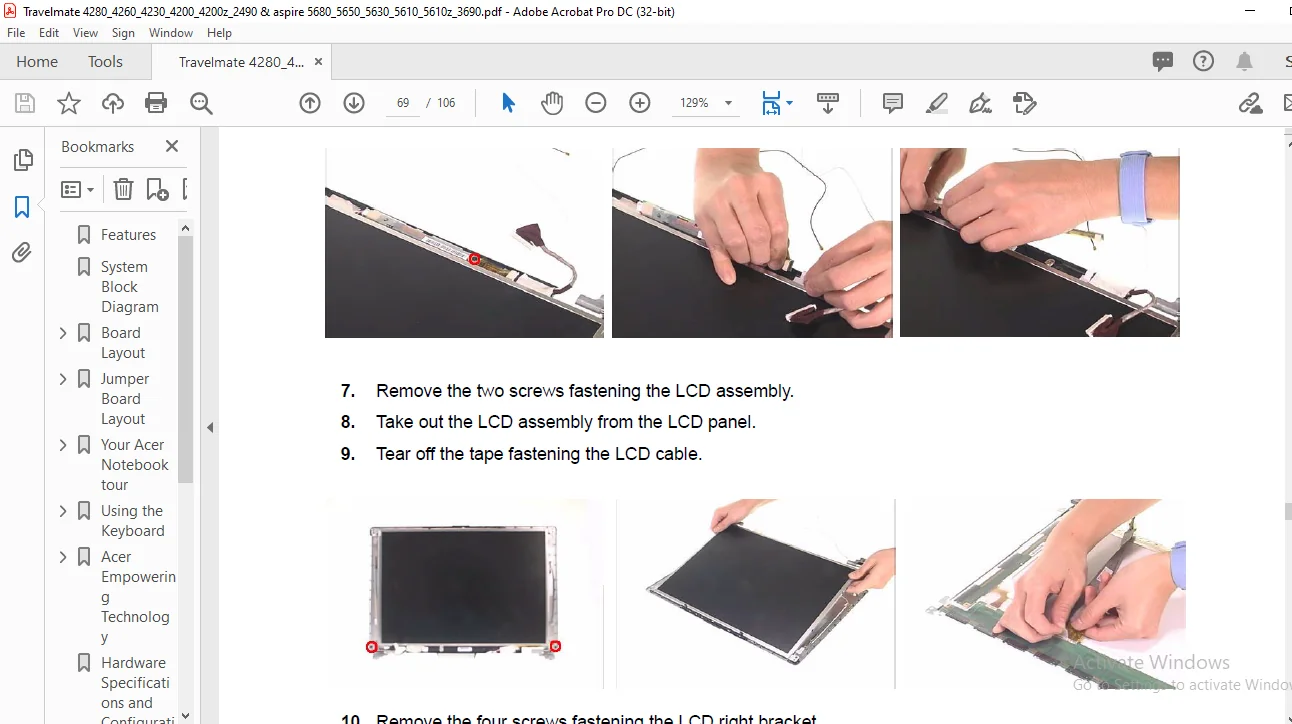
		Removing the LCD Module................................................................64
	Disassembling the Main Unit................................................................66
		Separate the Main Unit Into the Upper and the Lower Case Assembly......................66
		Disassembling the Upper Case Assembly..................................................66
		Disassembling the Lower Case Assembly..................................................67
	Disassembling the LCD Module...............................................................69
	Disassembling the External Modules.........................................................71
		Disassembling the HDD Module...........................................................71
		Disassembling the ODD Module...........................................................71
Machine Disassembly and Replacement............................................................57
	System Check Procedures....................................................................74
		External Diskette Drive Check..........................................................74
		External CD-ROM Drive Check............................................................74
		Keyboard or Auxiliary Input Device Check...............................................74
		Memory check...........................................................................75
		Power System Check.....................................................................75
		Touchpad Check.........................................................................77
	Power-On Self-Test (POST) Error Message....................................................78
	Index of Error Messages....................................................................79
	Phoenix BIOS Beep Codes....................................................................82
	Index of Symptom-to-FRU Error Message......................................................86
	Intermittent Problems......................................................................89
	Undetermined Problems......................................................................90
Troubleshooting................................................................................73
	Board Layout...............................................................................91
		Top View...............................................................................91
		Bottom View............................................................................92
	Jumper Board Layout........................................................................93
		Switch Board Top View..................................................................93
		Media Board Top View...................................................................93
		Media Board Bottom View................................................................94
		LS-2923P Power Board Top View..........................................................94
		Jumper Setting.........................................................................95
Jumper and Connector Locations.................................................................91
	Exploded Diagram...........................................................................98
	Parts......................................................................................99
FRU (Field Replaceable Unit) List..............................................................97
PLEASE NOTE:
This is the SAME MANUAL used by the dealerships to diagnose your vehicle
No waiting for couriers / posts as this is a PDF manual and you can download it within 2 minutes time once you make the payment.
Your payment is all safe and the delivery of the manual is INSTANT – You will be taken to the DOWNLOAD PAGE.
So have no hesitations whatsoever and write to us about any queries you may have : heydownloadss @gmail.com
S.M
✹
What Our Customers Say
★★★★★Live reviews from customers
Loading customer reviews...
🌟 Related Products
Discover more professional manuals for your equipment