TravelMate 5710 5310 Series Extensa 5610 5210 Series Laptop Service Guide Manual – PDF DOWNLOAD
Original price was: $60.00.$14.95Current price is: $14.95.
TravelMate 5710 5310 Series Extensa 5610 5210 Series Laptop Service Guide Manual – PDF DOWNLOAD
Description
TravelMate 5710 5310 Series Extensa 5610 5210 Series Laptop Service Guide Manual – PDF DOWNLOAD


Preface
Before using this information and the product it supports, please read the following general information.
1. This Service Guide provides you with all technical information relating to the BASIC CONFIGURATION
decided for Acer’s “global” product offering. To better fit local market requirements and enhance product
competitiveness, your regional office MAY have decided to extend the functionality of a machine (e.g.
add-on card, modem, or extra memory capability). These LOCALIZED FEATURES will NOT be covered
in this generic service guide. In such cases, please contact your regional offices or the responsible
personnel/channel to provide you with further technical details.
2. Please note WHEN ORDERING FRU PARTS, that you should check the most up-to-date information
available on your regional web or channel. If, for whatever reason, a part number change is made, it will
not be noted in the printed Service Guide. For ACER-AUTHORIZED SERVICE PROVIDERS, your Acer
office may have a DIFFERENT part number code to those given in the FRU list of this printed Service
Guide. You MUST use the list provided by your regional Acer office to order FRU parts for repair and
service of customer machines.
TravelMate 5710 5310 Series Extensa 5610 5210 Series Laptop Service Guide Manual – PDF DOWNLOAD
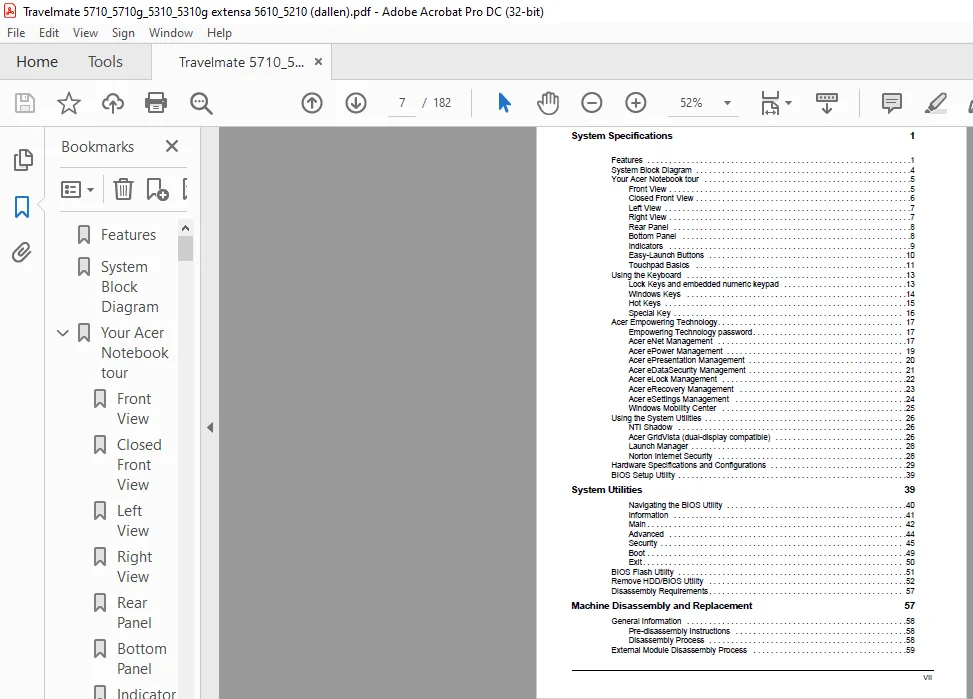
Features........................................................... 11
System Block Diagram............................................... 14
Your Acer Notebook tour............................................ 15
	Front View..................................................... 15
	Closed Front View.............................................. 16
	Left View...................................................... 17
	Right View..................................................... 17
	Rear Panel..................................................... 18
	Bottom Panel................................................... 18
	Indicators..................................................... 19
	Easy-Launch Buttons............................................ 20
	Touchpad Basics................................................ 21
Using the Keyboard................................................. 23
	Lock Keys and embedded numeric keypad.......................... 23
	Windows Keys................................................... 24
	Hot Keys....................................................... 25
	Special Key.................................................... 26
Acer Empowering Technology......................................... 27
	Empowering Technology password................................. 27
	Acer eNet Management........................................... 27
	Acer ePower Management......................................... 29
	Acer ePresentation Management.................................. 30
	Acer eDataSecurity Management.................................. 31
	Acer eLock Management.......................................... 32
	Acer eRecovery Management...................................... 33
	Acer eSettings Management...................................... 34
	Windows Mobility Center........................................ 35
Using the System Utilities......................................... 36
	NTI Shadow..................................................... 36
	Acer GridVista (dual-display compatible)....................... 36
	Launch Manager................................................. 38
	Norton Internet Security....................................... 38
Hardware Specifications and Configurations......................... 39
System Specifications.............................................. 11
	BIOS Setup Utility............................................. 49
		Navigating the BIOS Utility................................ 50
		Information................................................ 51
		Main....................................................... 52
		Advanced................................................... 54
		Security................................................... 55
		Boot....................................................... 59
		Exit....................................................... 60
	BIOS Flash Utility............................................. 61
	Remove HDD/BIOS Utility........................................ 62
System Utilities................................................... 49
	Disassembly Requirements....................................... 67
	General Information............................................ 68
		Pre-disassembly Instructions............................... 68
		Disassembly Process........................................ 68
	External Module Disassembly Process............................ 69
		External Modules Disassembly Flowchart..................... 69
		Removing the Battery Pack.................................. 70
		Removing the SD dummy card................................. 70
		Removing the PC and ExpressCard dummy cards................ 71
		Removing the Lower Cover................................... 72
		Removing the DIMM.......................................... 73
		Removing the WLAN Board Modules............................ 74
		Removing the Hard Disk Drive Module........................ 75
		Removing the Optical Drive Module.......................... 76
	Main Unit Disassembly Process.................................. 79
		Main Unit Disassembly Flowchart............................ 79
		Removing the Modem Board................................... 80
		Removing the Heatsink Fan Module........................... 80
		Removing the CPU and VGA Heatsink Module................... 81
		Removing the CPU........................................... 83
		Removing the VGA board (for Discrete model only)........... 83
		Removing the Middle Cover and the Power Board.............. 84
		Removing the Keyboard...................................... 86
		Removing the LCD Module.................................... 88
		Separating the Upper Case from the Lower Case.............. 91
		Removing the Launch Board.................................. 94
		Removing theTouch Pad Board Module......................... 95
		Removing the main board.................................... 98
		Removing the Speaker Modules...............................100
		Removing the USB Board.....................................101
	LCD Module Disassembly Process.................................103
		LCD Module Disassembly Flowchart...........................103
		Main Screw List............................................103
		Removing the LCD Bezel.....................................104
		Removing the LCD module with the Brackets..................105
		Removing the Inverter Board and FPC Cable..................106
		Removing the LCD Brackets..................................107
		Removing the Left and Right Hinge..........................107
		Removing the Antennas......................................108
		Removing the Internal Microphone and Web Camera............109
Machine Disassembly and Replacement................................ 67
	System Check Procedures........................................112
		External Diskette Drive Check..............................112
		External CD-ROM Drive Check................................112
		Keyboard or Auxiliary Input Device Check...................112
		Memory check...............................................113
		Power System Check.........................................113
		Touchpad Check.............................................115
	Power-On Self-Test (POST) Error Message........................116
	Index of Error Messages........................................117
	Phoenix BIOS Beep Codes........................................120
	Index of Symptom-to-FRU Error Message..........................125
	Intermittent Problems..........................................129
	Undetermined Problems..........................................130
Troubleshooting....................................................111
	Top View.......................................................131
	Bottom View....................................................132
Jumper and Connector Locations.....................................131
	TravelMate 5710/5310 and Extensa 5610/5210 Exploded Diagram....136
FRU (Field Replaceable Unit) List..................................135
Model Definition and Configuration.................................148
	TravelMate 5710/5310 Series....................................148
	Extensa 5610/5210 Series.......................................170
	Microsoft® Windows® Vista Environment Test.....................176
Test Compatible Components.........................................175
Online Support Information.........................................179
Index..............................................................181
PLEASE NOTE:
- This is not a physical manual but a digital manual – meaning no physical copy will be couriered to you. The manual can be yours in the next 2 mins as once you make the payment, you will be directed to the download page IMMEDIATELY.
- This is the same manual used by the dealers inorder to diagnose your vehicle of its faults.
- Require some other service manual or have any queries: please WRITE to us at [email protected]
s.m