
2016 Mitsubishi Fuso FUSO Diagnostics Operation Manual – Truck & Bus ECU Service Guide 90EXX0002
Original price was: $44.95.$26.95Current price is: $26.95.
The complete April 2016 FUSO Diagnostics operation manual (90EXX0002) covering ECU troubleshooting, coding, reprogramming, data logger functions, and FRN field rewrite procedures for Mitsubishi Fuso trucks and buses.
Description
File Details
- Manual Type: Operation Manual — Diagnostic Software & Hardware Guide
- Brand: Mitsubishi Fuso
- Systems Covered: FUSO Diagnostics, FUSO Connect
- Document Number: 90EXX0002
- Date: April 2016
- Language: English
- Page Count: 437
- File Format: PDF
- Applicable FD Versions: FDS-R10 through FDS-R14-1.2
Chapters Covered
- Product Overview
- Precautions
- Basic Functions
- FUSO Diagnostics Components and Their Use
- Cable Connection
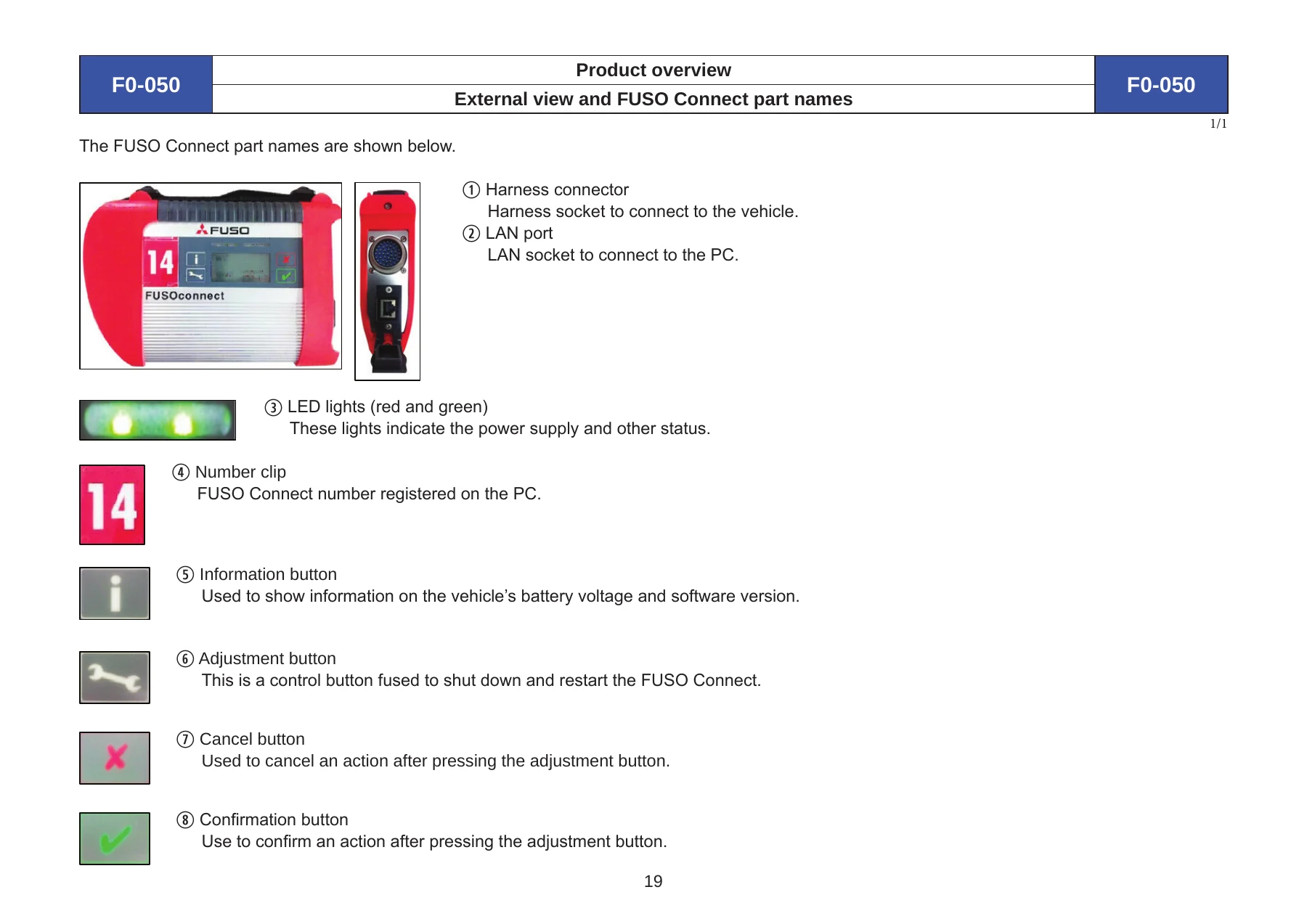
- External View and Part Names of FUSO Connect
- FUSO Connect Functions
- Basic Operation
- Starting Up the PC and FUSO Diagnostics System
- Using the CD-ROM Drive
- Description of Button Icons
- Screens Displayed Before Starting Troubleshooting
- Troubleshooting
- Other Functions
- Error Code (Diagnosis Code)
- Actual Values (Service Data)
- Actuations (Actuator Test)
- Exiting the FUSO Diagnostics System and Shutting Down the PC
- High-Functional Operations
- Adaptation — Teach-In Processes (Resetting)
- Code Entry (Coding)
- Initial Startup — Control Unit Replacement
- Reprogramming (Software Rewriting)
- Reset of Coding (Coding)
- VIN Recognition Function
- Data Transfer — Copy to/from USB Storage Device
- Data Logger Functions
- Example of Use in Part Replacement and Repair
- [LDT] Canter/Rosa — Changing the Specifications
- [LDT] Canter/Rosa — EEC (Engine ECU), TCM (DUONIC ECU), ABS (Hydraulic Unit ECU), EZGO (Lock Brake ECU), IMMO (Immobiliser ECU), ISS (ISS ECU), HLAL (Headlights Auto-Levelling ECU), ICUC (Meter Cluster), SAM, EMCM (Motor ECU)
- [LDT] Canter/Rosa — When PTO Related Specifications Are Changed
- [MDT] FK, FM, FN, FQ, MK, MP — ACM (SCR ECU)
- [HDT] FP, FS, FU, FV, FY, MM, MS — Changing the Specifications
- [HDT] FP, FS, FU, FV, FY, MM, MS — MCM (Engine ECU), ACM (SCR ECU), CPC2, MR2
- Troubleshooting
- Checking and Remedial Methods of Troubles
- When FRN History File Cannot Be Created
- How to Cope with Error in Rewriting ECU
- If Communication Error from ECU Is Displayed
- Simulation Function — FUSO Diagnostics Simulation
- FRN (Field Rewrite Network)
- Overview of FRN
- Logon to FRN
- Rewriting
- History Search
- Configuration Change
Vehicle Models & ECU Coverage
This FUSO Diagnostics operation manual spans the complete Mitsubishi Fuso commercial vehicle range. Light-duty truck coverage includes the Canter and Rosa. Medium-duty coverage includes the FK, FM, FN, FQ, MK, MP series. Heavy-duty coverage includes the FP, FS, FU, FV, FY, MM, MS and Super Great platforms. Bus coverage includes Fighter, Aero-Ace, Aero-Star, Aero-Midi and Aero-Queen.
ECU-level coverage is equally thorough: EEC (Engine ECU), TCM (DUONIC ECU), ABS (Hydraulic Unit ECU), EZGO (Lock Brake ECU), IMMO (Immobiliser ECU), ISS (Automatic Engine Start/Stop ECU), HLAL (Headlights Auto-Levelling ECU), ICUC (Instrument Panel/Meter Cluster), SAM/SSAM (Signal & Actuator Module), EMCM (Motor ECU), ACM (SCR ECU), CPC2 (Common Powertrain Controller), MCM (Engine ECU — heavy-duty), and MR2.
What the FUSO Diagnostics System Does
FUSO Diagnostics is the diagnostic software platform that communicates with on-board electronic control units through the FUSO Connect interface. The manual explains that by performing diagnostic communication with an ECU that incorporates a diagnosis function, the following capabilities become available:
- Version — Displays detailed on-board ECU information including software version, hardware version, boot software version, supplier data, and diagnostic identifier.
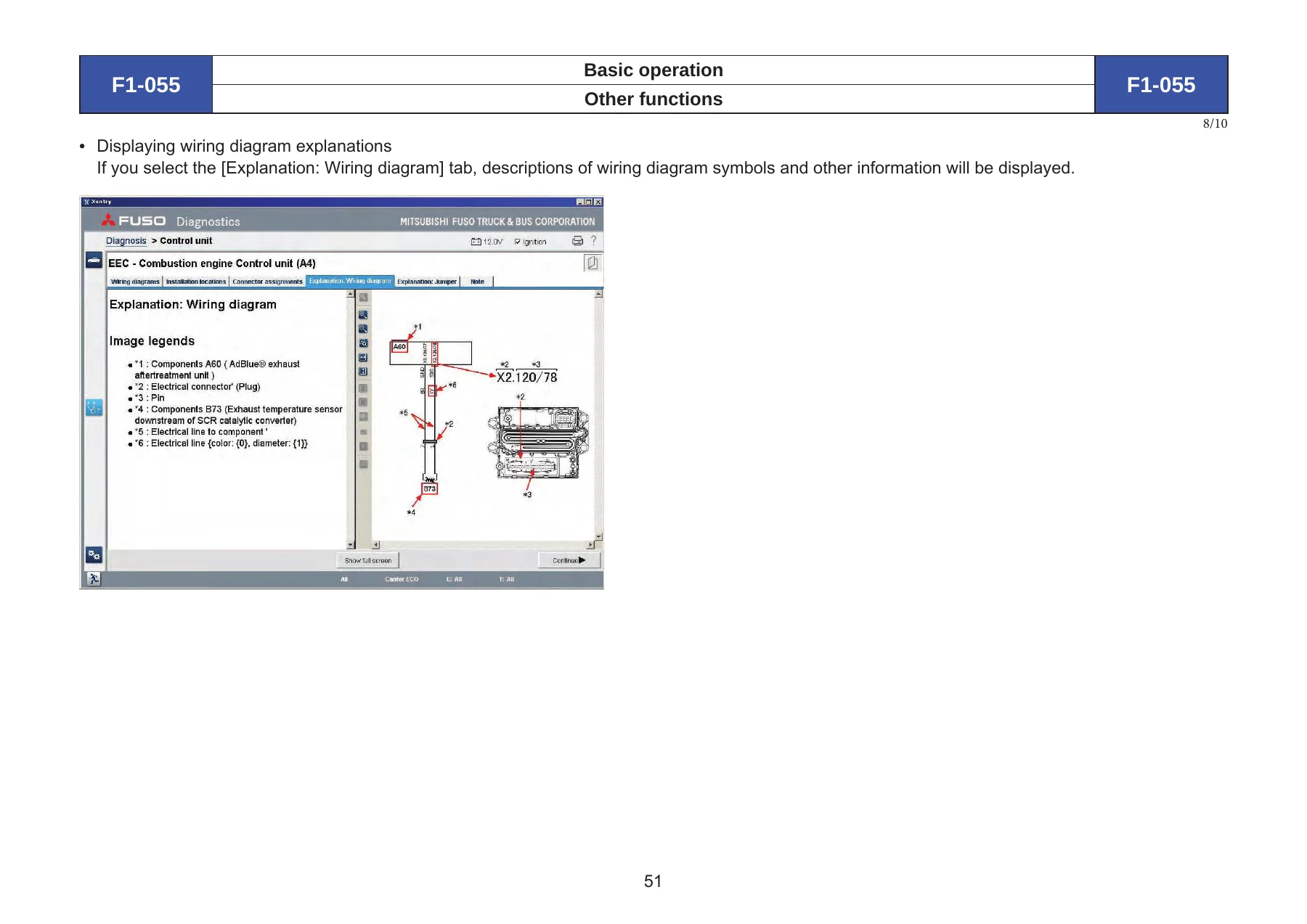
- Error Codes (Diagnosis Codes) — Reads stored fault codes with code numbers, names, and interactive troubleshooting that walks the technician through the detailed inspection procedure to locate the causal problem.
- Actual Values (Service Data) — Shows sensor and switch data in tabular, bar graph, or line graph format.
- Actuations (Actuator Test) — Allows manual start/stop of actuators connected to the ECU.
- Adaptations (Coding/Resetting/Programming) — Teach-in processes, code entry, initial startup, control unit replacement, reprogramming, and reset of coding.
- Data Transfer — Exchange data between FUSO Diagnostics and a USB storage device.
System Setup and Hardware Connection
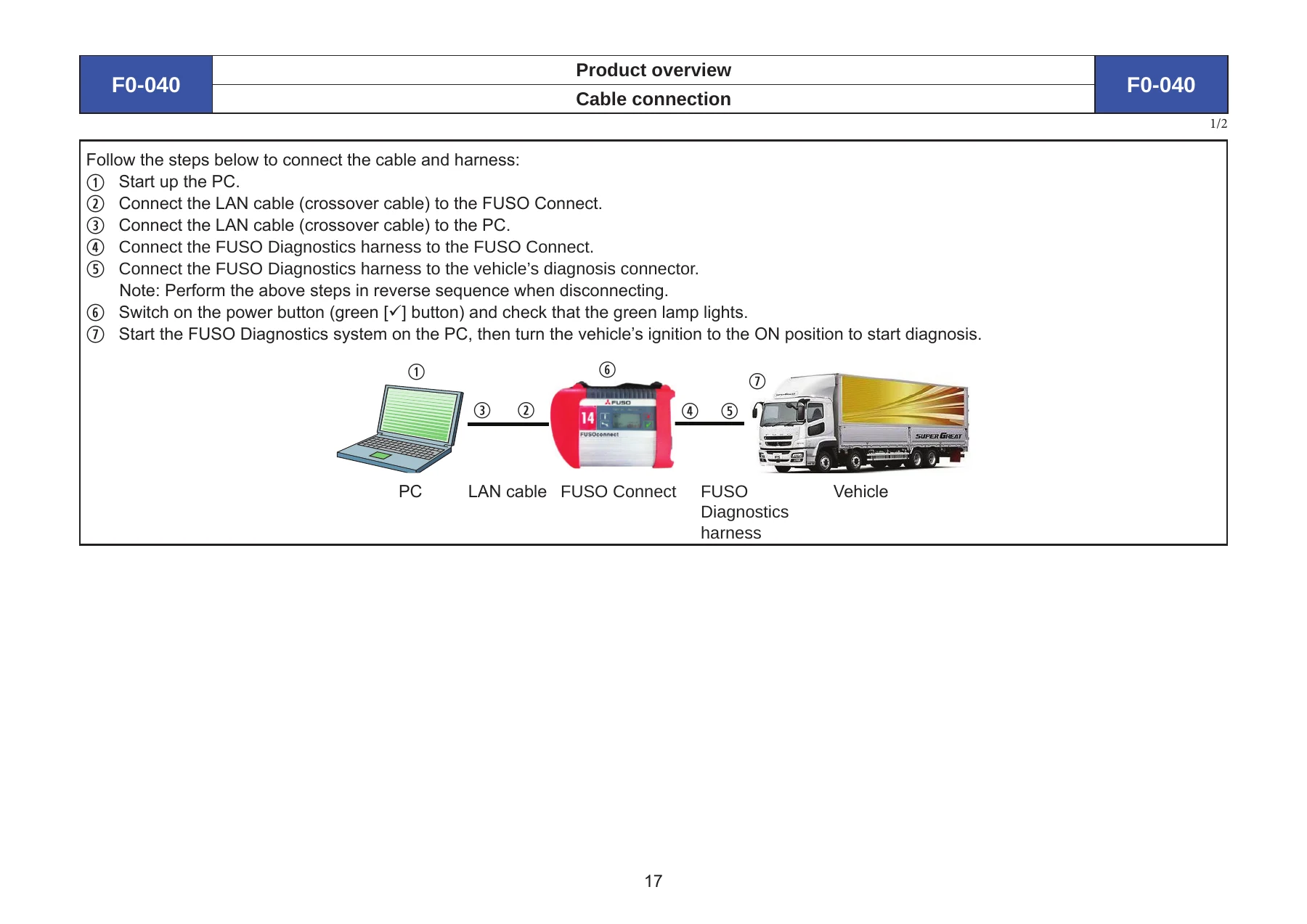
Detailed step-by-step procedures cover connecting the FUSO Connect interface to the PC via a crossover LAN cable and to the vehicle through the FUSO Diagnostics harness. The manual explains FUSO Connect can be used on both 12-volt and 24-volt vehicles. The connection sequence — PC startup, LAN cable to FUSO Connect, LAN cable to PC, harness to FUSO Connect, harness to vehicle diagnosis connector — is illustrated and described in full. Reverse sequence is specified for disconnection.
High-Functional Operations in Depth
The Adaptation — Code Entry (Coding) section provides a complete flowchart for changing coding parameters when adding or changing electronic vehicle control specifications. This includes downloading ECU data from the FRN, transferring data via USB, changing coding parameters manually, applying changes and creating upload data, performing the ECU after-run process, confirming changes on setup screens, and uploading ECU data back to the FRN.
Control Unit Replacement is documented for MCM, ACM, EEC, and TCM — with a caution that other ECUs should use Coding instead of the Control Unit Replacement option. The procedure includes authentication via inquiry number and password obtained from the FRN, and requires checking that the ECU software version and object number have been transferred from the replaced ECU.
Reprogramming (Software Rewriting) covers the full flowchart from checking software object numbers before and after programming through reset of coding and ECU after-run process. A caution notes reprogramming cannot be performed if SAM was manufactured before February 13, 2011, and warns against Reset of Coding on ACM (SCR ECU) of export vehicles.
VIN Recognition Function adds matching and writing of ECU and FRN history file with VIN, helping avoid reprogramming with another vehicle’s FRN file. The VIN is displayed on the Current VIN screen, and if ECU and FRN history file VINs do not match, a message states reprogramming is not possible.
Data Logger Functions cover recording vehicle log data in CSV format, with trigger levels of Manual or Fault Code. The manual provides detailed Excel macro instructions for importing CSV and creating graphs.
FRN (Field Rewrite Network)
The FRN section explains the complete workflow: applying for user ID registration, accessing the system via Internet Explorer, obtaining rewriting data, transferring data between FUSO Diagnostics and a USB memory stick, rewriting data when the ECU is replaced, rewriting data when the injector is replaced, registering rewriting data, cancelling rewriting, inquiring rewriting history, and obtaining data when replacing with a new or recycled engine.
Simulation Function
The FUSO Diagnostics simulation function allows operators to simulate individual functions using only FUSO Diagnostics without connecting the PC to a vehicle. The manual provides an extensive cross-reference table of diagnosis codes for Canter and Rosa, mapping codes given on the meter cluster or in the service manual to the codes shown on the FUSO Diagnostics simulation display.
Who This Manual Is For
This operation manual is written for technicians, workshop operators, and fleet maintenance personnel who use the FUSO Diagnostics system to troubleshoot Mitsubishi Fuso trucks and buses. It assumes familiarity with Windows-based PC operation and basic vehicle electrical systems. Whether you are running a quick test, reading and clearing diagnostic trouble codes, viewing live sensor data, performing actuator tests, coding a replacement ECU, resetting learned values, updating software, or uploading history data to the FRN, this manual provides the operating procedures to complete the task correctly.
Get the Complete FUSO Diagnostics Operation Manual
With 437 pages covering every major function of the FUSO Diagnostics and FUSO Connect system, this manual gives you the procedures needed to diagnose, repair, and reprogram electronic control units across the Mitsubishi Fuso truck and bus range. It covers diagnosis code reading and clearing, actual value monitoring in table and graph formats, actuator testing, teach-in and resetting of learned values, coding parameter changes for changed vehicle specifications, control unit replacement, software reprogramming, VIN recognition, data transfer via USB, data logger recording and macro analysis, and the full FRN field rewrite network workflow including engine replacement procedures.
Having the correct operating procedures matters because incorrect coding, resetting, or reprogramming can cause ECU circuit damage, vehicle malfunction, or failed diagnosis. This FUSO Diagnostics operation manual provides the exact sequences, cautions, and requirements — ignition ON or OFF, engine at standstill, authentication steps, after-run processes, and parameter verification screens — that factory procedures require. The PDF is delivered instantly after payment with no shipping, works on any device, and is printable for workshop use.
IMAGES PREVIEW
Reviews
There are no reviews yet.