Acer Iconia Tab A100/A101 Service Manual (Service Guide 2011) – PDF
Original price was: $95.00.$18.95Current price is: $18.95.
Official Acer ICONIA Tab A100/A101 Service Guide (2011) in PDF. Includes full hardware specifications, system block diagram, diagnostic utilities (EUU/Picasso), step-by-step disassembly & maintenance (battery, mainboard, cameras, IO board, antennas, etc.), detailed troubleshooting (power/no display/touchscreen/USB/Wi-Fi/3G/GPS/cameras), jumper/connector locations, FRU list + exploded diagrams, and model configuration details. Instant download.
Description
Acer Iconia Tab A100/A101 Service Manual (Service Guide 2011) – PDF DOWNLOAD
Acer ICONIA Tab A100 / A101 – Service Guide (Service Manual PDF)
This is the complete factory-style service guide for the Acer Iconia Tab A100 & A101—perfect for repair shops and DIY technicians who need the correct teardown order, connector layouts, diagnostics, and troubleshooting flow.
✅ Models Covered
Acer ICONIA Tab A100
Acer ICONIA Tab A101
📑 Table of Contents
CHAPTER 1 — Hardware Specifications
Features & form factor (7″ tablet)
CPU / memory / display (LCM) / network / GPS / cameras
Connectivity (micro-USB, micro-HDMI), sensors, audio, OS
Dimensions & weight, expansion slot, adapter & battery
Tablet tour (front/rear/top/left/right)
System Block Diagram + detailed specification tables
Notable spec highlights (for buyers/SEO):
Tegra 250 dual Cortex-A9, 1GHz + ULP GeForce GPU
7″ 1024×600 display, microSD up to 32GB, HDMI Type-D
Android Gingerbread listed in OS section
CHAPTER 2 — Diagnostic Utilities
Diagnostic tools overview
NGA EUU installation procedure (USB driver + USB debugging steps)
Picasso diagnostic tool
CHAPTER 3 — Maintenance Procedures (Disassembly / Replacement)
Getting started + recommended tools
SIM / microSD removal & install
Lower case removal / installation
Battery removal / installation
3G module removal / installation
DC-in cable, speakers, microphone module
IO board FPC + IO board R&R
Antennas (3G, GPS, WLAN)
Mainboard removal / installation
Rear CCD board removal / installation
Home key board removal / installation
CHAPTER 4 — Troubleshooting
Power on issues / no display
LCD picture failure / touchscreen failure
Speaker / microphone failures
USB / mini-USB failures
Front camera / back camera failures
Sensor failures
3G / wireless / GPS test failures
Docking station test failure
CHAPTER 5 — Jumper and Connector Locations
Mainboard top / bottom layouts
CHAPTER 6 — Field Replaceable Unit (FRU) List
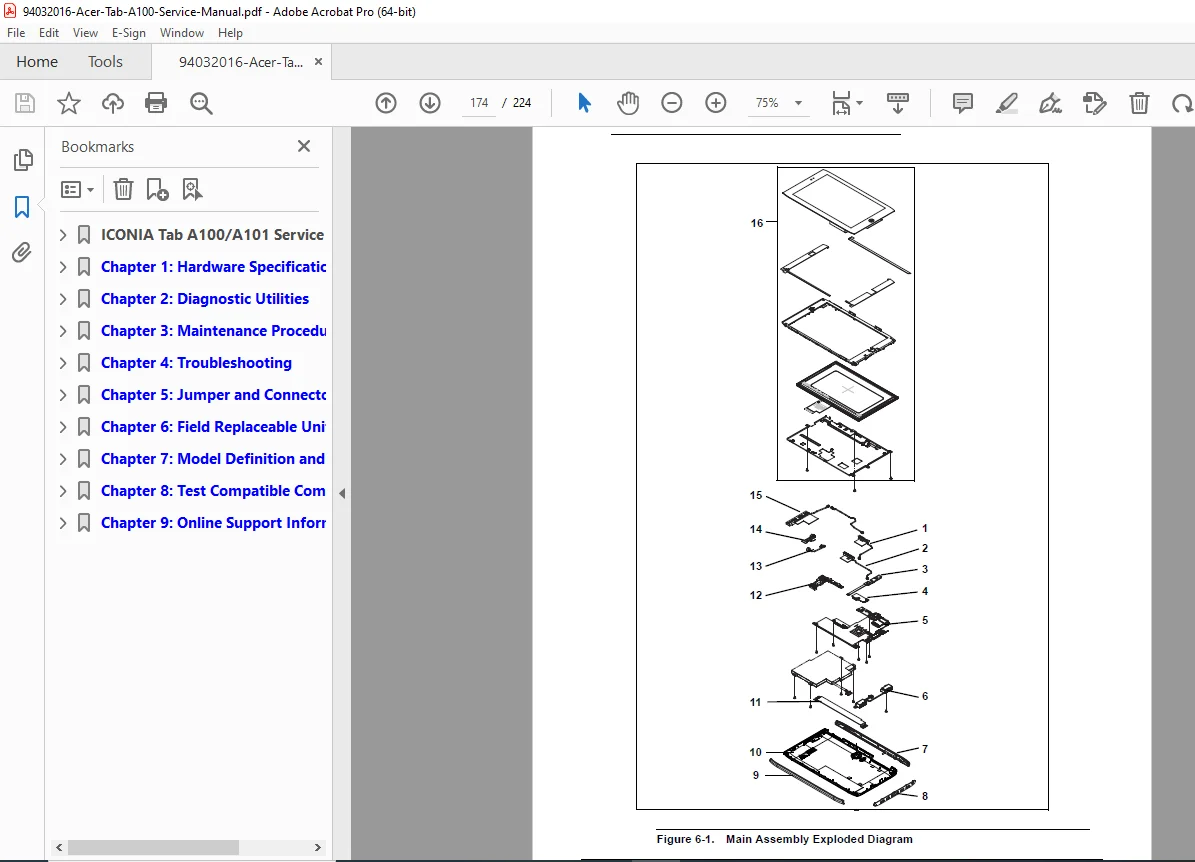
Exploded diagrams (main assembly)
FRU list + screw list
CHAPTER 7 — Model Definition and Configuration
A100 configuration
A101 configuration
CHAPTER 8 — Test Compatible Components
Android OS environment test
A100/A101 compatibility references
CHAPTER 9 — Online Support Information
📌 File Details
| Item | Details |
|---|---|
| Manual Name | Acer ICONIA Tab A100/A101 – Service Guide |
| Models Covered | A100, A101 |
| Year | 2011 |
| PDF Quality | Clear service-guide scan with tables/diagrams |
| Pages | 224 pages |
Fix your Iconia Tab the right way—this guide gives you proper teardown steps, connector maps, troubleshooting, and FRU diagrams in one place. Buy now and download instantly so you can start diagnosing and repairing today.