
Campbell Scientific PC400 Version 4.2 Datalogger Support Software User Manual – PDF Download
Original price was: $43.95.$26.95Current price is: $26.95.
Complete 254-page Campbell Scientific PC400 Version 4.2 user manual covering EZSetup Wizard, Monitor Data, Collect Data, Split post-processing, View data files, Short Cut program generation, Edlog and CRBasic Editor programming, and all PC400 utilities. Instant PDF download.
Description
File Details
- Manual Type: Software User Manual
- Brand: Campbell Scientific
- Software: PC400 Datalogger Support Software
- Version: 4.2
- Year: 2013
- Language: English
- Page Count: 254 pages
- File Format: PDF
What This Manual Covers
The Campbell Scientific PC400 Version 4.2 User Manual is the complete operational reference for PC400, the datalogger support software used to set up, configure, and retrieve data from Campbell Scientific dataloggers. This 254-page guide walks through every function of the software, from initial installation and the EZSetup Wizard through data collection, post-processing with Split, viewing data in View, and creating datalogger programs with Short Cut, Edlog, or CRBasic Editor.
PC400 supports the CRBasic datalogger family — CR200/205, CR800, CR1000, CR3000, CR5000, and CR9000 — as well as Edlog dataloggers including CR500, CR510, CR10, CR10X, 21X, CR23X, and CR7 in their mixed-array, table-data, and PakBus configurations. The manual documents communications over direct serial connections, telephone and TAPI, TCP/IP, VHF/UHF radios, RF400-series spread spectrum radios, and multidrop modems (MD9 and MD485).
Chapters Covered
- Introduction
- System Requirements
- Installation, Operation and Backup Procedures
- The PC400 Main Screen
- Split
- View
- Short Cut Program Generator
- Datalogger Program Creation with Edlog
- Datalogger Program Creation with CRBasic Editor
- Utilities
Introduction and System Requirements
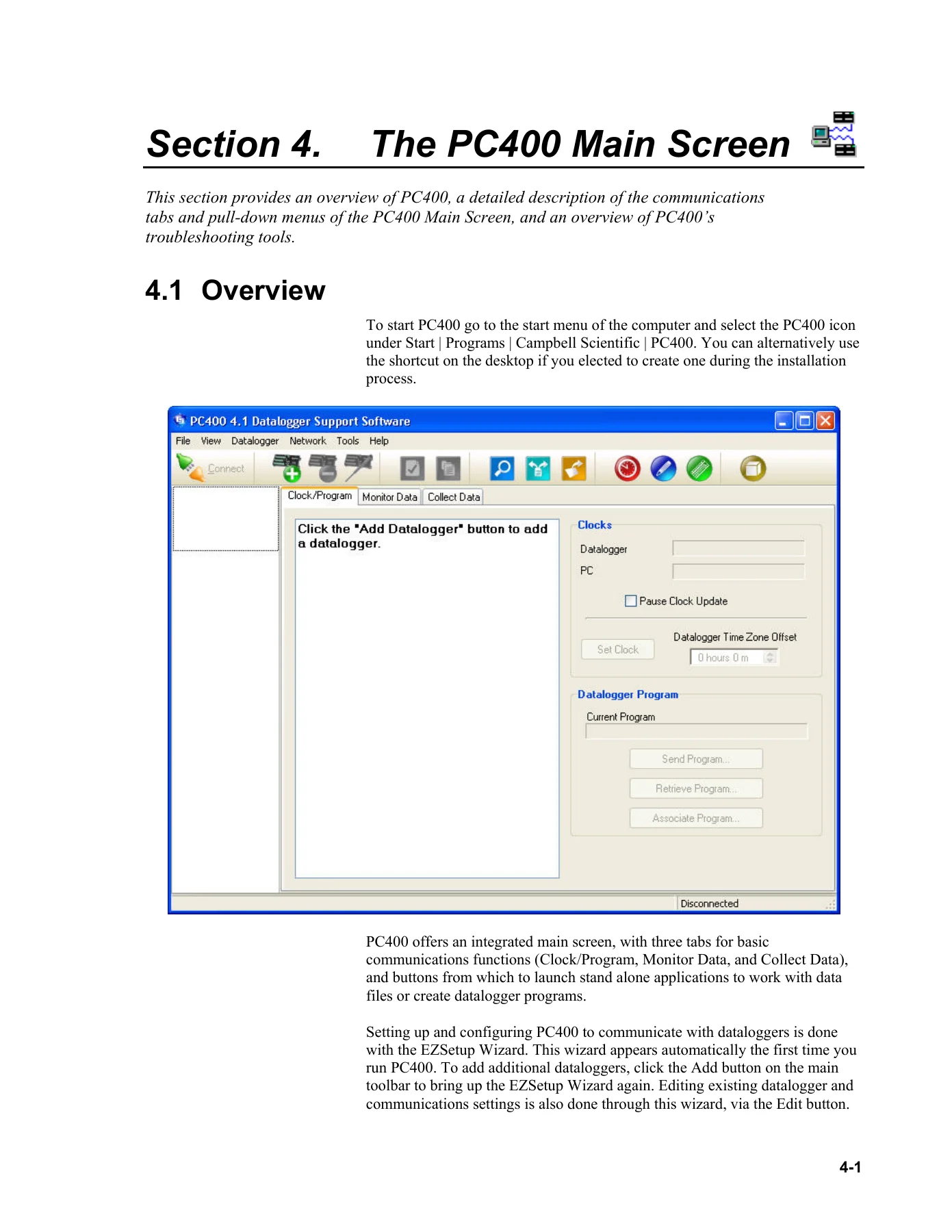
The opening chapters explain the PC400 architecture, the three main communication tabs (Clock/Program, Monitor Data, and Collect Data), and the standalone utilities accessible from the main screen. System Requirements covers the 32-bit Windows environment, including Windows XP, Vista, and 7, plus the TCP/IP service dependency. The What’s New in Version 4 section documents the introduction of the View data file viewer, read-only file opening in CRBasic Editor, persistent bookmarks, Unicode support, PakBus Encryption for CR1000/CR3000/CR800 series dataloggers, and the Constant Customization feature.
Installation, Operation and Backup Procedures
This chapter covers CD-ROM installation, the directory structure under C:CampbellSci (including CRBasicEditor, DevConfig, EdlogW, Lib, PC400, PC400SYS, SCWin, SplitW, and View), and the backup/restore procedure for the network map and data files. It explains the PC400.bkp backup file format, the restore process that overwrites the existing network, and recovery procedures for power loss and program crashes. The directory structure figure and the explanation of each working directory are included.
The PC400 Main Screen
The largest chapter in the manual, covering the Clock/Program tab and its EZSetup Wizard (communication setup, datalogger settings, communications test, clock setting, and program sending), the Monitor Data tab (live input locations, public variables, port/flag monitoring and editing, Boolean variable display, and decimal/update interval controls), and the Collect Data tab (new data versus all data collection, file append and overwrite behavior). The pull-down menus are documented in detail: View menu (language packages), Datalogger menu (Connect/Disconnect, Update Table Definitions, Station Status, File Control for CR5000/CR800/CR1000/CR3000/CR9000, Terminal Emulator), Network menu (Add/Delete/Edit/Rename Datalogger, Backup/Restore Network, Computer’s Global PakBus Address), and Tools menu (Standalone Applications, Options, LogTool, PakBus Graph). File Control covers the Send, Format, Refresh, Retrieve, Run Options, Delete, and Stop Program functions, with specific Run Now dialogs for CR1000/CR3000/CR800 series versus CR9000(X)/CR5000 dataloggers.
Split
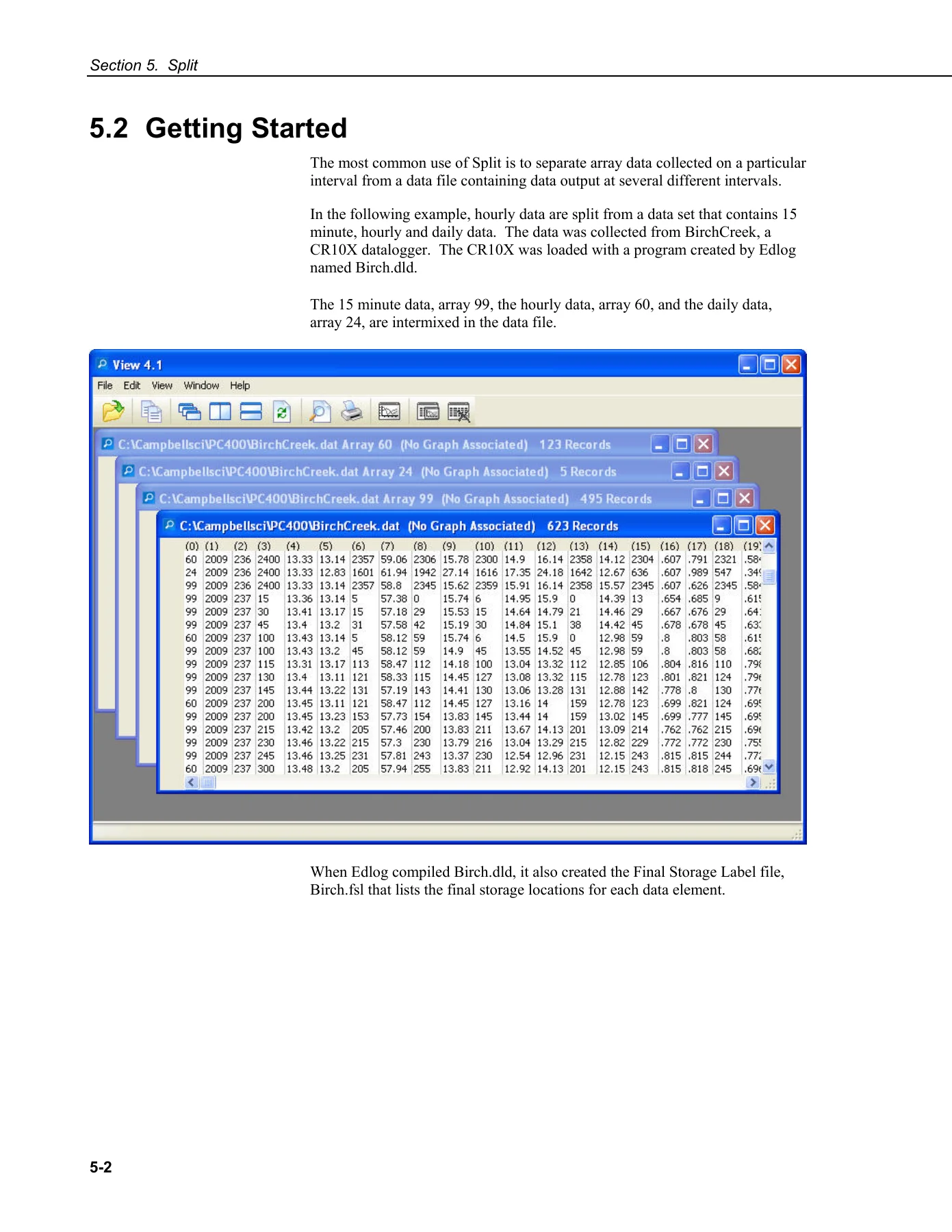
The Split chapter is a complete guide to post-processing datalogger data files. It covers input file formats (Printable ASCII, Comma Separated ASCII, Field Formatted ASCII, Final Storage Binary, TOACI1, TOA5, TOB, and Raw A/D), start and stop conditions, copy and select parameters, range testing, mathematical functions, time series functions (Avg, Blanks, Count, Max, Min, RunTotal, Sd, Smpl, SmplMax, SmplMin, Total, WAvg), special functions (Crlf, Date, Edate, Label, Line, Smpl page break, PCdate, WDQ, WDQS), time synchronization for merging up to eight data files, output file formats (Field, Comma, Printable, Custom), report and column headings, and running Split from the command line with the /R, /Q, /H, /M switches. The Split Functions Example includes a complete wind chill calculation parameter file with the formula and output.
View
View is the data file viewer introduced in version 4. The chapter covers opening data files (TOACI1, TOA5, TOB1, TOB2, TOB3), opening other file types as text or hex, importing CSV files with header line and delimiter controls, the data view grid with column sizing, header information, timestamp column locking, file information, background color, and font controls, and the line graph system including data selection, graph width, scrolling, zoom, graph cursor, and the line graph toolbar. Right-click menus for the data view (Define Selection, Copy Selection, Add to Graph, Format Columns, Autosize, Bookmarks, View Record) and graphs (Export, Copy, Print, Options) are documented.
Short Cut Program Generator
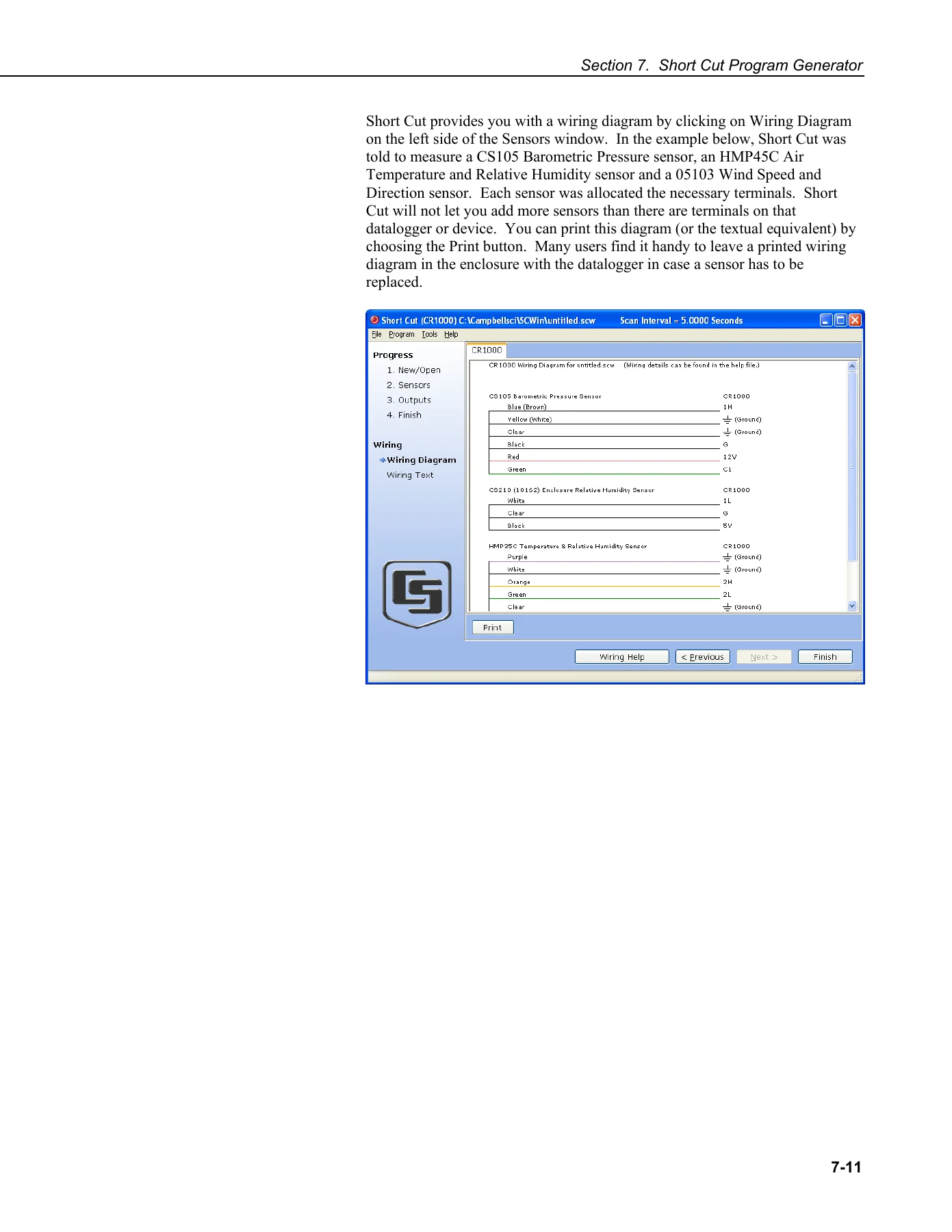
The Short Cut chapter walks through the five-step program generation process: create a new file or open an existing one, select the datalogger and scan interval, choose sensors to monitor, set up output tables, and generate the program. It covers sensor selection from the application groups (Sensors, Calculations & Control, Devices), wiring diagram generation with printable terminal assignments, output table configuration with average/maximum/minimum/sample/stddev/total/wind vector processing, advanced outputs (time, flag, measurement, data event triggers), the #Records and TableName settings for table-based dataloggers, PC card and SC115 storage options, and the generated file types (SCW, DLD, CR1/CR3/CR5/CR8/C9X, BIN, DEF, FSL). Short Cut settings include Program Security, Datalogger ID, Power-up Settings, CR200 Compiler selection, Sensor Support (CSI versus CSL), Integration (60 Hz/50 Hz/Fast), Font, Working Directory, and Custom Sensor File creation.
Edlog
Edlog supports the CR7, CR10, 21X, CR500, CR510, CR10X, and CR23X dataloggers, including their table-data (TD) and PakBus (PB) operating systems. The chapter covers program structure (Measure Sensors, Process Measurements, Control, Output Data), file types (CSI, DLD, PTI, FSL, LBR, TXT), inserting instructions with the dialog box, parameter entry with right-click pick-lists and F1 help, expressions and the expression compiler, error messages for expression syntax, input location management with the Input Location Editor, final storage labels, and datalogger settings stored in the DLD file (Program Security, Final Storage Area 2, DLD File Labels, Power Up/Compile Settings, Serial Port Settings, PakBus settings including Network, Beacon Intervals, Neighbor Filter, and Allocate General Purpose File Memory).
CRBasic Editor
The CRBasic Editor chapter covers the programming environment for CR800, CR1000, CR3000, CR5000, CR9000, and CR200 series dataloggers. It documents the Instruction Panel, parameter dialog boxes with variable lists, the toolbar functions (Compile, Compile/Save/Send, Conditional Compile and Save, Templates, Bookmarks, GoTo navigation), editor preferences (pop-up hints, vertical spacing, syntax highlighting), instruction panel preferences, and the Tools menu features (Edit Instruction Categories, Constant Customization, Associate Files, Keyboard Shortcuts, Show Tables, Insert Symbol, DLD Extension, Display Settings). The CRBasic Programming section explains program declarations, mathematical expressions, measurement and output processing instructions, line continuation, comments, data tables, the Scan/NextScan timing model, numerical entry formats, logical expression evaluation, flags, parameter types, arrays of multipliers and offsets for sensor calibration, and program access to data tables.
Utilities
The Utilities chapter documents four standalone tools. CardConvert converts binary datalogger data from compact flash or PCMCIA cards to TOA5, TOB1, Array Compatible CSV, or CSIXML format, with filemark and removemark processing, time-based file splitting, conversion of only new data, and a repair option for corrupted TOB2/TOB3 files. Transformer converts Edlog programs to CRBasic for CR10X/CR510 to CR800/CR1000 and CR23X to CR3000 migrations, with a side-by-side view and Action Log. The Device Configuration Utility (DevConfig) handles operating system downloads, terminal emulation, unknown device identification, and off-line mode configuration. File Format Convert converts between TOA5, TOACI1, TOB2, TOB3, TOB1, CSIXML, and CSV formats, with record checking, baling by time/filemark/removemark/discontinuity, and null record filling.
Appendices
Three appendices round out the manual. Appendix A is a glossary of datalogger and communications terms. Appendix B covers table-based datalogger memory allocation for Edlog TD family, CR800/CR1000/CR3000/CR5000/CR9000, and CR200 series dataloggers, converting mixed-array programs to TD or PB table-based programs, and default tables (Timeset, Errorlog, Inlocs/Public, Status). Appendix C documents the LogTool application, log categories (Transaction, Communications Status, Object State, Low Level I/O), log file message formats, and the full table of transaction log messages with codes, parameters, meanings, and suggested user responses.
Who This Manual Is For
This manual is written for field technicians, research scientists, environmental monitoring specialists, and datalogger programmers who deploy Campbell Scientific equipment and need to configure PC400 for their specific network. If you manage a network of CR1000 or CR3000 dataloggers over TCP/IP or radio links, need to post-process mixed-array data with Split, or are migrating from Edlog to CRBasic programming, the procedures in this manual cover the software end to end. The EZSetup Wizard chapter alone walks you through adding a datalogger and testing communications step by step, making it accessible even if you are new to PC400.
Get the Complete PC400 Version 4.2 Reference
The Campbell Scientific PC400 User Manual Version 4.2 gives you the exact procedures, settings, and command-line options that Campbell Scientific documents for its datalogger support software. Every function of the main screen, every Split parameter, every CRBasic Editor toolbar button, and every utility option is described with the detail you need to configure, collect, and process data without guesswork. Whether you are setting up a new network, troubleshooting a communications link, writing a CRBasic program, or converting an Edlog program to run on a newer datalogger, this manual is the reference you will keep open on the bench.
IMAGES PREVIEW
Delivered as an instant PDF download, this manual is printable and viewable on any computer, tablet, or phone. No shipping, no waiting — download it now and have the full 254-page reference in your hands in minutes.
Reviews
There are no reviews yet.