CAT Roof Support PMC-R Shield Control System Operation Manual – PDF DOWNLOAD
Original price was: $78.00.$28.95Current price is: $28.95.
CAT Roof Support PMC-R Shield Control System Operation Manual – PDF DOWNLOAD
Description
CAT Roof Support PMC-R Shield Control System Operation Manual – PDF DOWNLOAD
DESCRIPTION
CAT Roof Support PMC-R Shield Control System Operation Manual – PDF DOWNLOAD
DESCRIPTION
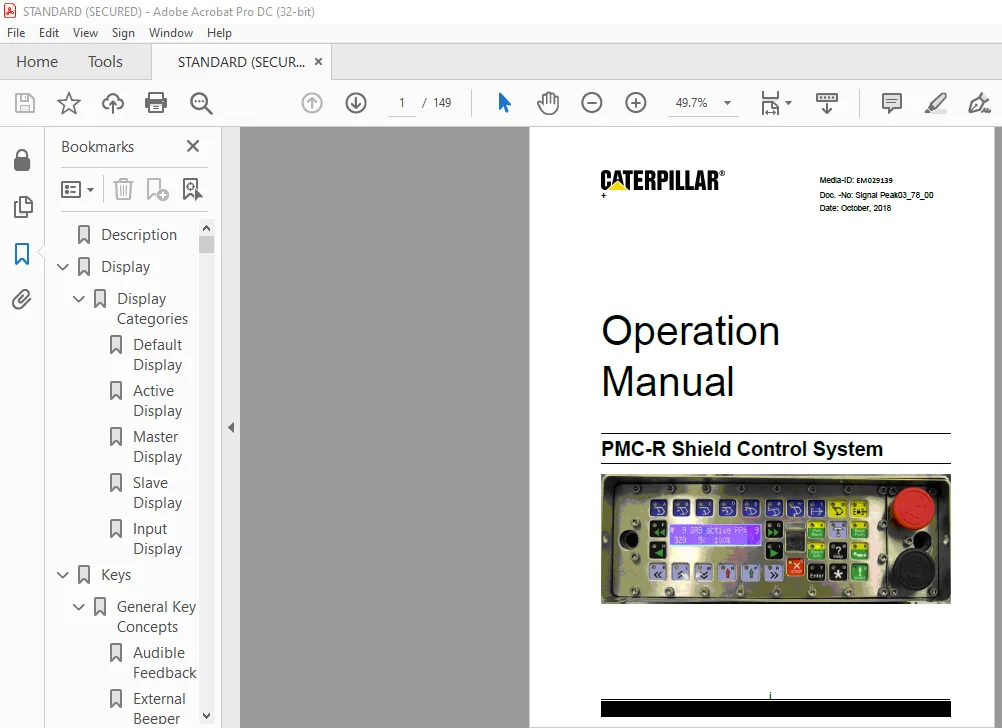
The PMC-R Shield Control Unit is an advanced digital shield control system. It is based on patented state-of-the-art electronics and contains multiple sub-processors, a dual line display, color coded keys, and a built-in infrared receiver. The PMC-R is capable of operating in a network of hundreds of units and utilizes modern software concepts to maximize the effectiveness of the computing and communications hardware. The PMC-R is housed in a stainless steel watertight enclosure that will hold up to most underground situations. The keys are color coded to match the type of purpose they serve
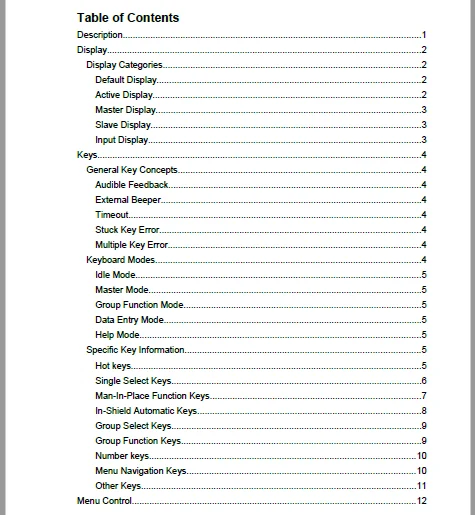
TABLE OF CONTENTS:
CAT Roof Support PMC-R Shield Control System Operation Manual – PDF DOWNLOAD
Description.....................................................  9
Display......................................................... 10
	Display Categories.......................................... 10
		Default Display......................................... 10
		Active Display.......................................... 10
		Master Display.......................................... 11
		Slave Display........................................... 11
		Input Display........................................... 11
Keys............................................................ 12
	General Key Concepts........................................ 12
		Audible Feedback........................................ 12
		External Beeper......................................... 12
		Timeout................................................. 12
		Stuck Key Error......................................... 12
		Multiple Key Error...................................... 12
	Keyboard Modes.............................................. 12
		Idle Mode............................................... 13
		Master Mode............................................. 13
		Group Function Mode..................................... 13
		Data Entry Mode......................................... 13
		Help Mode............................................... 13
	Specific Key Information.................................... 13
		Hot keys................................................ 13
			Operator Assigned Hot Key........................... 14
		Single Select Keys...................................... 14
		Man-In-Place Function Keys.............................. 15
			Manual Control of Selected Shield................... 15
		In-Shield Automatic Keys................................ 16
			In-Shield Automatic Functions on Selected Shield.... 16
		Group Select Keys....................................... 17
		Group Function Keys..................................... 17
		Number keys............................................. 18
		Menu Navigation Keys.................................... 18
		Other Keys.............................................. 19
Menu Control.................................................... 20
	Navigation.................................................. 20
	Freeze Display Feature...................................... 21
	Go-Back Feature............................................. 21
	Parameter Changing.......................................... 22
		Local / Global Parameters............................... 23
		Parameter Locking....................................... 23
Safety Features................................................. 24
	Local Lockout Button........................................ 24
	Quickstop Button............................................ 24
	Pressure Dump Feature....................................... 24
		Resetting the System.................................... 25
	Redundant Link (Intelligent)................................ 25
	Conveyor Prestart with Visual Warning....................... 26
	Conveyor Overload........................................... 27
	Umbrella Lock............................................... 27
		Controlling the Umbrella Lock........................... 27
			Active Umbrella Lock Displays....................... 28
			Umbrella Lock Messages.............................. 28
	Maintenance Lock............................................ 29
		Controlling the Maintenance Lock........................ 29
		Active Maintenance Lock Displays........................ 29
	Stop Key.................................................... 30
Flashing lights................................................. 31
	Shearer Signaling........................................... 32
Single Shield Control........................................... 33
	Adjacent manual operation................................... 33
	Adjacent automatic operation................................ 33
	Remote Control.............................................. 33
Autosequence.................................................... 34
	Overview.................................................... 34
	Start Options............................................... 35
	Prewarning / Active Display................................. 35
	Restrictions................................................ 35
		Umbrella Lock interaction............................... 35
	Detailed Operating Logic.................................... 35
		Autosequence Chart...................................... 36
		List of Steps........................................... 36
			ASQ Begin........................................... 37
			First Prewarning.................................... 37
			Adjacent Shield Interlock........................... 38
			Second Prewarning................................... 38
			Flipper Retract..................................... 38
			Baselift While Lowering............................. 39
			Initial Lowering.................................... 39
			Extra Lowering...................................... 40
			Pre-Baselift........................................ 40
			Tip Up or Tip Down.................................. 40
			Advance Delay....................................... 40
			Ready To Advance.................................... 41
			Baselift While Advancing............................ 41
			Advancing........................................... 41
			Relowering.......................................... 42
			Readvancing......................................... 42
			Advance While Setting............................... 43
			Initial Set......................................... 43
			Final Set........................................... 43
			Conveyor Push Refill................................ 44
			Flipper Extend...................................... 44
			Umbrella Lock Pause................................. 44
		Errors.................................................. 45
		Parameter Summary....................................... 46
Group Auto Functions............................................ 48
	Batch Advance............................................... 48
		Keystroke Details....................................... 49
		Prewarning / Active Display............................. 50
		Operating Logic & Modes................................. 50
			Sequential Mode..................................... 50
			Rabbit Mode......................................... 50
			Standard Mode....................................... 50
		Enable / Disable Options................................ 51
		Restrictions............................................ 51
		Errors.................................................. 51
		Parameter Summary....................................... 51
	Wedge Advance............................................... 51
		Operator Display & Keystrokes........................... 51
		Prewarning / Active Display............................. 52
		Operating Logic......................................... 52
		Enable / Disable Options................................ 53
		Restrictions............................................ 53
		Errors.................................................. 53
		Parameter Summary....................................... 53
	Batch Pullback.............................................. 53
		Operator Display & Keystrokes........................... 53
			Keystroke Details................................... 53
				Automatic Mode.................................. 54
				Manual Mode..................................... 54
		Prewarning / Active Display............................. 54
		Operating Logic......................................... 55
			Conveyor Pullback Protection........................ 55
			"Shield Up" protection.............................. 56
			Shield Set to Roof.................................. 56
			Conveyor Pullback Timeout........................... 56
			Snake Area.......................................... 56
		Enable / Disable Options................................ 57
		Restrictions............................................ 57
		Errors.................................................. 57
		Parameter Summary....................................... 57
	Bankpush.................................................... 57
		Operator Display & Keystrokes........................... 58
			Keystroke Details................................... 58
				Batch Operation................................. 59
		Prewarning / Active Display............................. 59
		Operating Logic......................................... 59
		Enable / Disable Options................................ 60
		Restrictions............................................ 60
		Errors.................................................. 60
		Parameter Summary....................................... 60
	Conveyor Push............................................... 60
		Operator Display & Keystrokes........................... 61
			In-shield Locking Push.............................. 61
			Endgate Push........................................ 61
		Prewarning / Active Display............................. 62
		Operating Logic......................................... 62
			Shield Back protection.............................. 62
			Push Protection Parameter........................... 62
				FULL............................................ 63
				PARTIAL......................................... 63
				NONE............................................ 63
			Adjacent "Delta" Protection......................... 63
			Conveyor Push Timeout............................... 63
			Target Stroke....................................... 64
			Endgate Even-push Feature........................... 64
			Triggering Method Affects Operation................. 65
		Enable / Disable Options................................ 65
		Restrictions............................................ 65
		Errors.................................................. 65
		Parameter Summary....................................... 66
	Batch Flippers.............................................. 67
		Operator Display & Keystrokes........................... 67
			Keystroke Details................................... 67
		Prewarning / Active Display............................. 68
		Operating Logic......................................... 69
		Enable / Disable Options................................ 69
		Restrictions............................................ 69
		Errors.................................................. 69
		Parameter Summary....................................... 69
	Auto Flippers............................................... 69
		Operator Display & Keystrokes........................... 69
		Prewarning / Active Display............................. 69
		Operating Logic......................................... 70
			Setting the Auto Flippers Zone...................... 70
			Retracting flippers................................. 70
			Extending the flippers.............................. 70
		Enable / Disable Options................................ 70
		Restrictions............................................ 70
		Errors.................................................. 70
		Parameter Summary....................................... 71
Shearer Running Batch (SRB)..................................... 72
	Shearer Position............................................ 72
		Manual Shearer Tracking................................. 72
		Infrared Shearer Tracking............................... 72
		Serial Shearer Tracking................................. 72
	Primepoint.................................................. 73
	Mining Cycle Overview....................................... 73
		Bidirectional........................................... 73
	Operator Display & Keystrokes............................... 73
		Newstart................................................ 73
		Restart................................................. 74
		Entering a Manual Position.............................. 75
		Stopping SRB............................................ 76
	Prewarning / Active Display................................. 76
		When Starting........................................... 76
		When Active............................................. 77
		When Stopping........................................... 77
	Setting up the Safety Zones................................. 77
		Operator Safety Zone.................................... 77
		Manual Safety Zone...................................... 79
		Conveyor Push Distance Behind Advanced Shields.......... 80
	Delayed or Reverse Pushing.................................. 81
	SRB Gate Operation.......................................... 81
		Leaving the Gate End.................................... 81
		Entering the Gate End................................... 82
	Bidirectional Cutting Cycle................................. 83
		Bidirectional Cutting Cycle Beginning at Headgate....... 84
		Bidirectional Cutting Cycle Beginning at Tailgate....... 86
	Gate-area Shield Re-advance................................. 88
	Restrictions................................................ 88
		Parameter Summary....................................... 88
Pressure Pause.................................................. 91
Diagnostics..................................................... 92
CST Declutch.................................................... 92
Errors.......................................................... 92
	Clearing Errors............................................. 93
	Error List.................................................. 93
PMC‑R System Components......................................... 97
	PMC‑R Single Control Unit (SCU)............................. 97
	Driver Board................................................ 97
	Brass Bar................................................... 98
	Isolation Adapter........................................... 99
	SKK24 Hose Cable............................................ 99
	SKK28 Hose Cable............................................ 99
	Pressure Sensor.............................................100
	Reed Rod....................................................101
Configuration Drawings..........................................102
	Shield Layout (Face)........................................102
	Shield Layout (Face with sideseal)..........................103
	Headgate Area...............................................104
	Group Layouts...............................................106
		Left Hand Face Configuration............................107
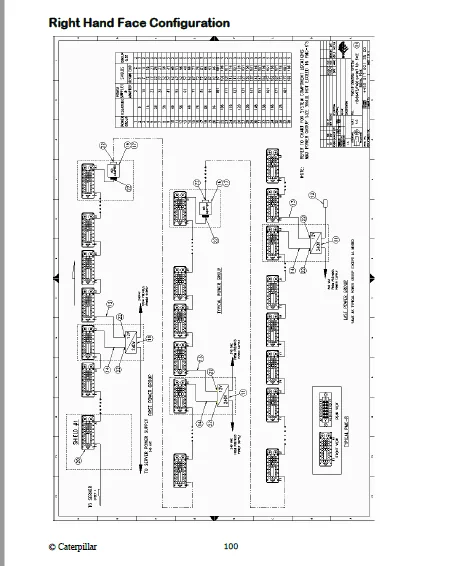
		Right Hand Face Configuration...........................108
Display Glossary................................................109
IMAGES PREVIEW OF THE MANUAL:
CAT ROOF SUPPORT PMC-R SHIELD CONTROL SYSTEM OPERATION MANUAL – PDF DOWNLOAD:
https://vimeo.com/661422769
PLEASE NOTE:
- This is the SAME manual used by the dealers to troubleshoot any faults in your vehicle. This can be yours in 2 minutes after the payment is made.
- Contact us at [email protected] should you have any queries before your purchase or that you need any other service / repair / parts operators manual.
S.M