
CellaVision DM1200 Slide Scanning Unit Service Manual – PDF Workshop & Repair Guide
Original price was: $44.95.$27.95Current price is: $27.95.
Complete CellaVision DM1200 service manual PDF – 244 pages covering microscope, robot gripper unit, immersion oil unit, X/Y/Z motors, CCU, cabling, calibration, troubleshooting, spare parts and yearly maintenance for the slide scanning unit.
Description
The CellaVision DM1200 Slide Scanning Unit Service Manual is the full technical service documentation for the CellaVision DM1200 automated slide scanning system – a computer-controlled in vitro diagnostic instrument built around a motorized microscope, a digital colour camera, an immersion oil unit, and a robot gripper unit. This CellaVision DM1200 service manual PDF covers the whole slide scanning unit (SSU) from the casing and hood down to individual motor, sensor, linear guideway, and control unit (CCU) replacement procedures, with test and calibration routines plus a full troubleshooting chapter for every subsystem. It is the document a service technician works from when the instrument needs to be opened, adjusted, calibrated, repaired, or returned to specification.
File Details
- Manual type: Service Manual
- Brand: CellaVision AB
- Model covered: CellaVision DM1200 Slide Scanning Unit (SSU)
- Article number: PM-10326-01
- Revision: 2017-06-12
- Language: English
- Page count: 244
- File format: PDF
- Intended audience: Authorized service personnel
Chapters Covered
The contents of this CellaVision DM1200 Slide Scanning Unit service manual are organised into eleven numbered chapters plus an appendix and a glossary:
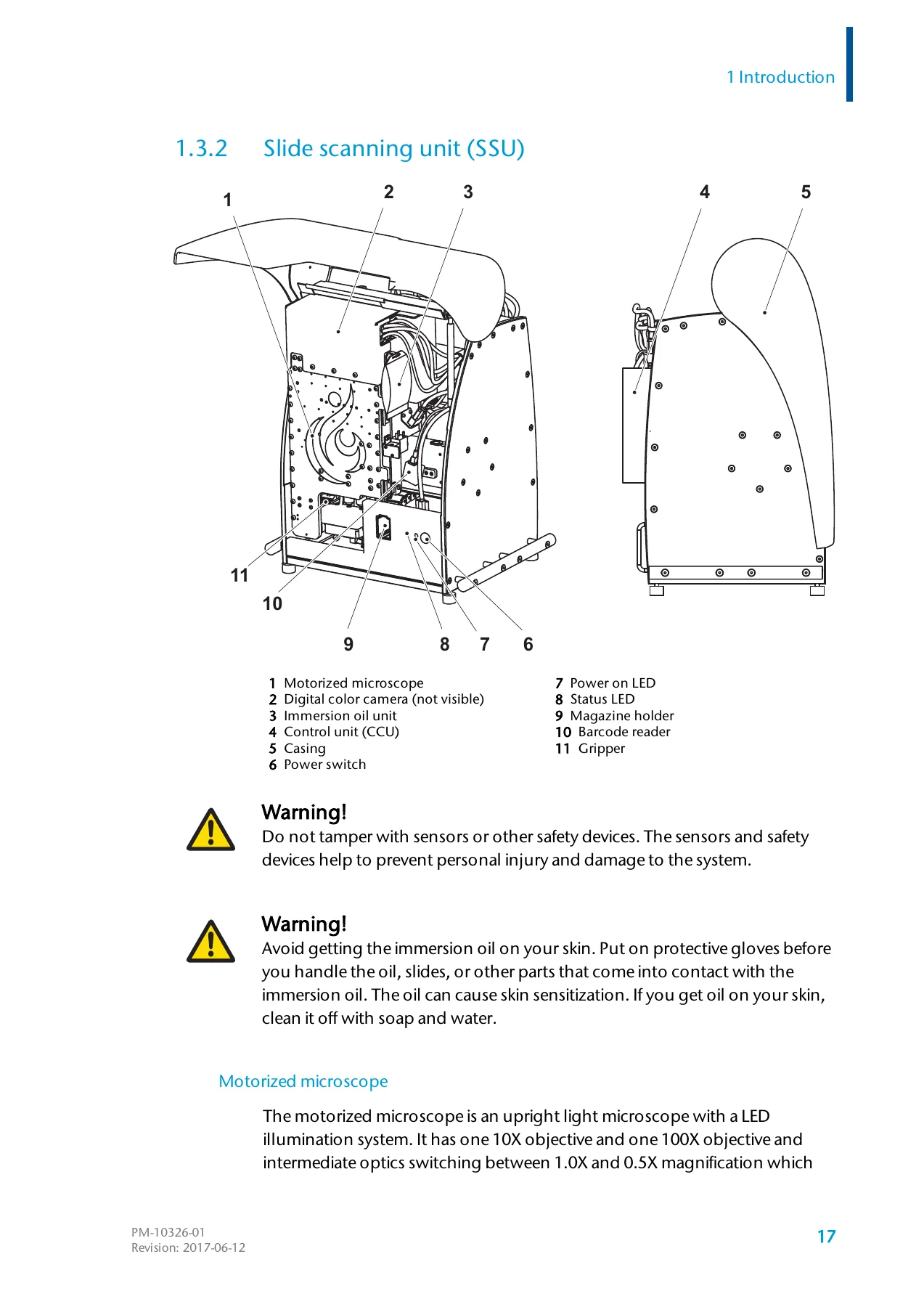
- 1. Introduction – warnings and precautions, safety alerts and symbols, general safety, electrical safety, mechanical safety, service information, components and mechanical operation, system computer, slide scanning unit (SSU), system specifications, climate, physical, electrical and noise specifications, tools and consumables, patents
- 2. Software tools – CellaVision DM Software, DM Configuration Tool, CellaVision DM Service Wizard (Tests, Calibration, Live view, Sensors, Utilities)
- 3. Yearly maintenance – the yearly maintenance procedure list and kit reference
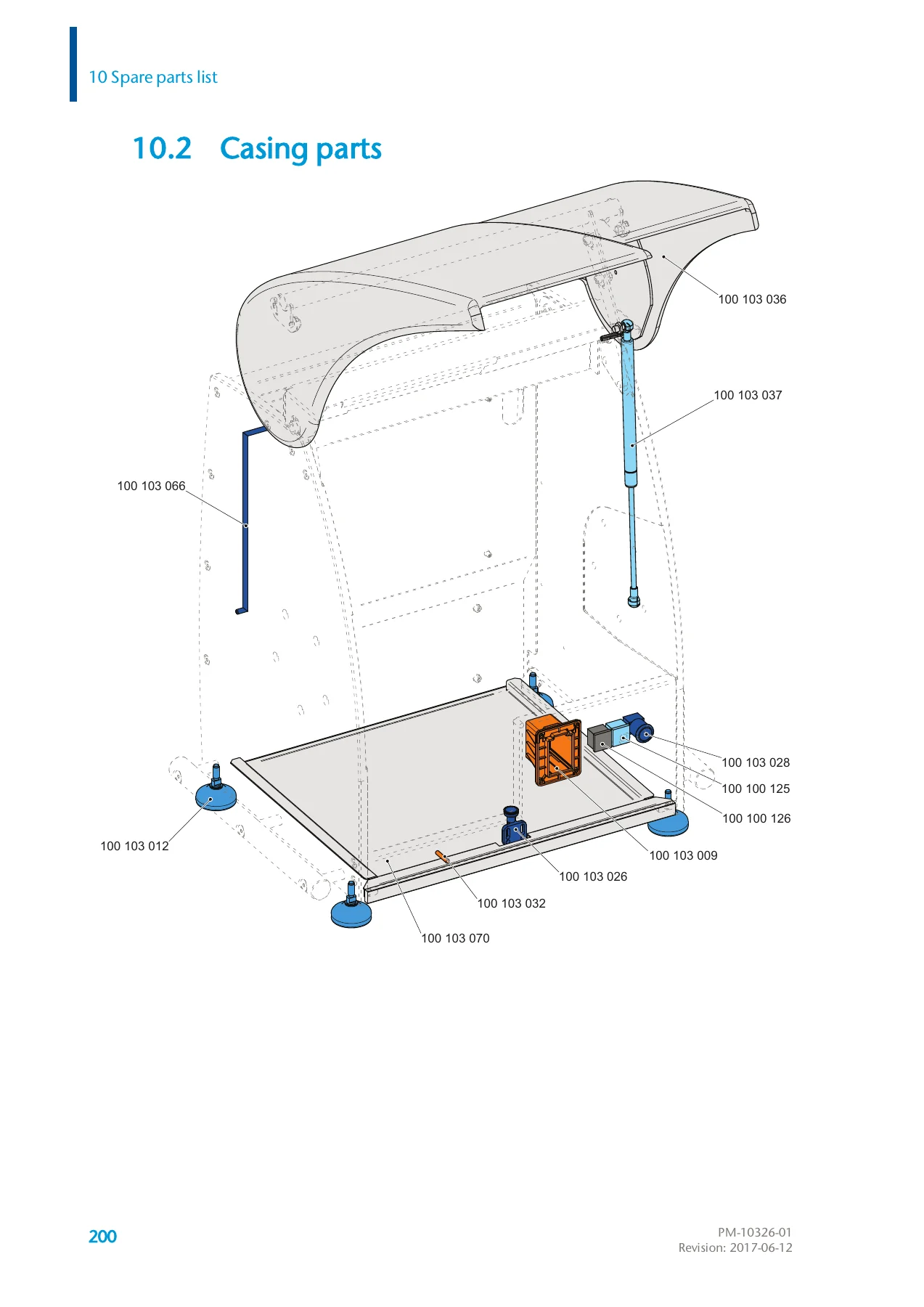
- 4. Casing – casing foot change, service hatch open and bar change, front panel open and close, front panel LED indicator, power switch, magazine holder, tray stop bolt, hood change, hood damper, hood sensor
- 5. Microscope – top cover removal, service position, objectives change, camera change and motor, camera motor lubrication, camera linear guideway, camera sensor, camera energy chain, lens tube energy chain, lens tube motor and lubrication, lens tube linear guideway, lens tube sensor, cleaning the 0.5x tube and the 1.0x tube, LED table change, LED table motor, LED table linear guideway, LED table sensor
- 6. Robot gripper unit – barcode reader, circular level, immersion oil unit (oil valve, oil valve connectors, oil hose, oil drop sensor), gripper change and adjustment (revision 01 and revision 02), gripper head with nails, internal spring, external spring, home sensor, close sensor, X motor, Y motor and Z motor change/lubrication/sensor procedures, robot beam support, Z linear guideway and spring
- 7. CCU – control unit change and filter change
- 8. Test and calibration – casing tests, microscope tests and calibrations, camera tests and calibrations, lens tube tests and calibrations, LED table tests and calibrations, robot gripper unit tests and calibrations, immersion oil unit tests, gripper tests and calibrations, X, Y and Z motor tests and calibrations, CCU tests and calibrations, yearly maintenance tests and calibrations, failed service wizard tests
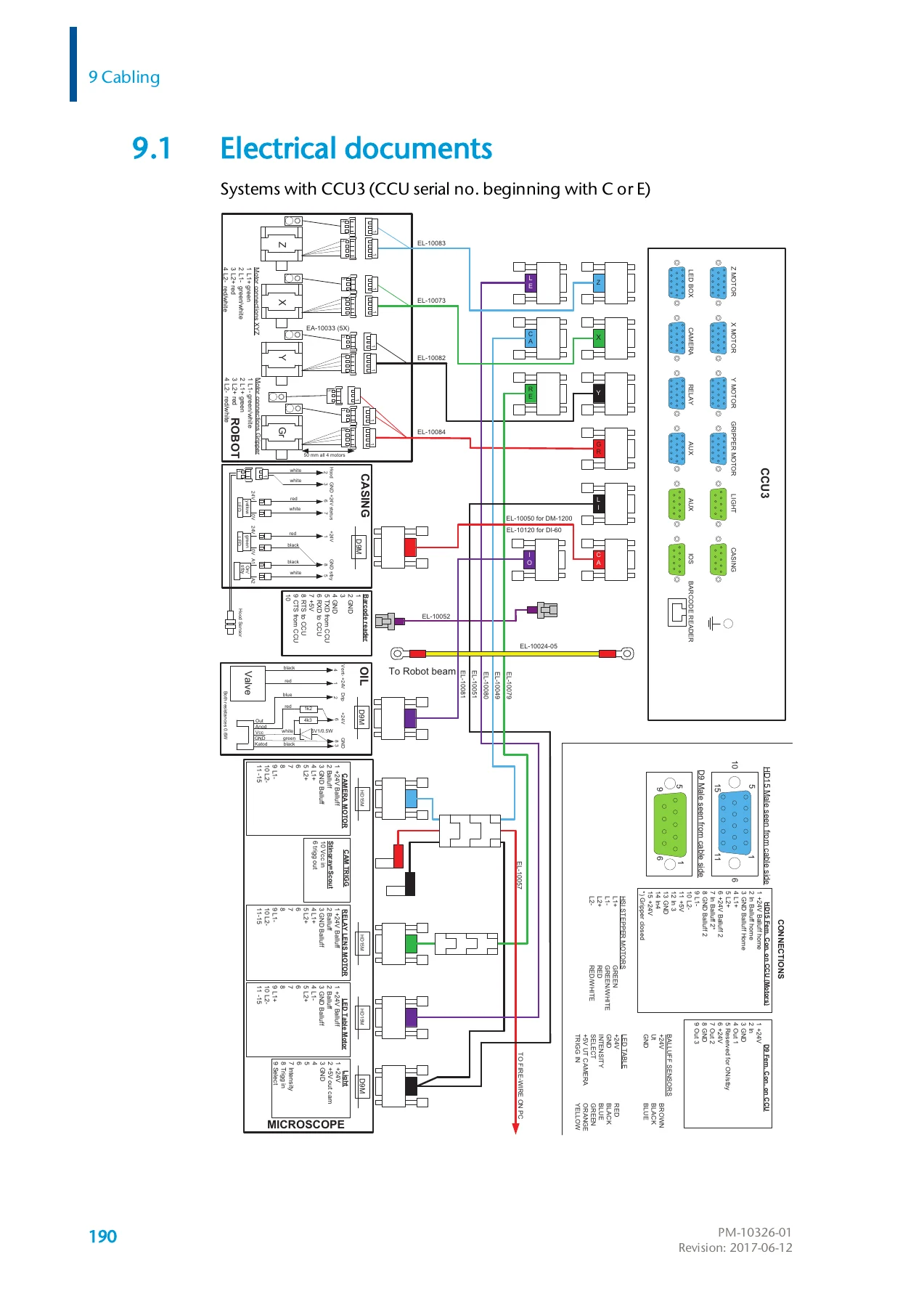
- 9. Cabling – electrical documents, casing cables, microscope cables, robot cables, control unit wiring
- 10. Spare parts list – general parts, casing parts, microscope parts, robot gripper unit parts
- 11. Troubleshooting – log files, event logs, CCU log file, usage log, usage log entries, usage log error codes (CCU, Camera, Batch Server), start-up errors, database errors, print errors, LIS errors, archiving errors, slide processing errors, slide jam
- Appendix A – Service checklist CellaVision DM1200
- Glossary
What This CellaVision DM1200 Service Manual Gives You
This is not a user guide. It is the workshop-level document for the DM1200 slide scanning unit, and it assumes the reader is carrying out real service work. Every mechanical procedure is written with numbered steps, part references, and illustration callouts, so the technician can identify the exact screw, sensor, energy chain, guideway or motor that needs to come out, and understand the order in which it has to be removed. The manual also flags the consequences of getting it wrong – for example, the warnings that removing the gripper will lose the LED-table Z-positioning and the XYZ-offset calibration, or that the dolly will fall when the Z motor screw is loosened.
Because the CellaVision DM1200 is an in vitro diagnostic medical device, the manual opens with a full safety chapter: biohazard handling of body fluid samples, electrical safety (grounded sockets, mains supply cord disconnection, external computing devices rated Limited Power Source and SELV), mechanical safety around moving components, and the specific immersion oil handling precautions including skin sensitisation. Servicing this instrument without that context is unsafe and may produce misleading results, which is exactly why the document is structured the way it is.
Calibration, Testing and Diagnostics
A large part of the CellaVision DM1200 Slide Scanning Unit service manual is dedicated to the test and calibration matrix you run after any repair. The manual maps each maintenance procedure to the calibration and test routines it requires in the CellaVision DM Service Wizard, so you know that changing a camera motor means running optics alignment, camera alignment, XYZ-offset calibration and the magnification test – while changing a Z motor also pulls in the Z axis alignment test, hysteresis test Z and the slope test.
The troubleshooting chapter is equally practical. It explains the event log, the CCU log and the usage log, then lists the usage log error codes for the CCU (13001-13203), the camera (11001-11010) and the Batch Server (12001-12020), along with start-up errors, database errors, print errors, LIS errors, archiving errors and slide processing errors. Slide jam diagnosis is covered separately, including gripper positioning, clipped corner slides, unreadable barcodes, and critical jam errors that require a restart of the SSU and the program.
Serial Number and Revision Coverage
Some procedures in this CellaVision DM1200 service manual are revision-specific, and the manual states the serial ranges clearly. The Z motor change is split into revision 01 (systems with serial numbers 33001 through 33276) and revision 02 (systems with serial number 33277 and higher). The CCU wiring is also split into CCU3 (CCU serial number beginning with C or E, and separately G) and CCU4 (CCU serial number beginning with H), with different connector layouts and a note that systems with CCU4 do not use an internal battery. Gripper adjustment is likewise split into revision 01 (single sensor plate) and revision 02 (two separate sensor plates). Getting the right revision matters, and this manual makes the distinction explicit.
Electrical Documentation and Spare Parts
The cabling chapter contains electrical documents and wiring for the casing, the microscope, the robot and the control unit, plus the CCU3 and CCU4 connector panel layouts. The spare parts list is divided into general parts, casing parts, microscope parts, and robot gripper unit parts, with part numbers and a cross-reference back to the procedure that uses each part – so a technician can go straight from a part number to the installation instructions. The manual also states the requirement to use original CellaVision AB listed spare parts and their specified components to keep the analyzer compliant with current device registrations.
Who This CellaVision DM1200 Slide Scanning Unit Service Manual Is For
This CellaVision DM1200 Slide Scanning Unit service manual is written for authorized service personnel working on the DM1200 system – field service engineers, in-house biomedical technicians at laboratories running the instrument, and service organisations supporting CellaVision installations. It covers the slide scanning unit and its control unit, including the system computer interface, and the yearly maintenance routine that keeps the instrument running reliably.
Buyers should note this manual is a service document for a regulated in vitro diagnostic medical device and does not replace training, authorization, or the standard laboratory safety procedures that apply when working with patient samples.
Get the CellaVision DM1200 Service Manual Delivered Instantly
With this CellaVision DM1200 Slide Scanning Unit service manual PDF you can strip and rebuild the slide scanning unit, replace the camera, lens tubes, LED table, gripper, immersion oil components and X/Y/Z motors, run the correct Service Wizard calibrations, read the error codes, and order the right spare parts by number. Following the correct procedures, torque values, sensor distances and calibration sequences is what protects the instrument’s image quality and keeps results trustworthy – and it is what this manual gives you.
The file is delivered instantly as a PDF after payment. No shipping, no waiting for a courier, no physical book to keep on a shelf. Open it on a laptop, tablet or phone at the bench, print the pages you need for the job in front of you, and keep the rest of the 244-page document on hand for the next service visit.
IMAGES PREVIEW
Reviews
There are no reviews yet.