
Dell Precision 7670 Service Manual – Laptop Repair & Disassembly Guide PDF
Original price was: $29.95.$17.95Current price is: $17.95.
Complete 114-page Dell Precision 7670 Service Manual PDF covering full teardown, component removal and installation, screw lists, BIOS setup and troubleshooting for the Precision 7670 mobile workstation.
Description
Dell Precision 7670 Service Manual – File Details
- Manual type: Service Manual (field service, removal and installation)
- Brand: Dell
- Model: Precision 7670
- Language: English
- Page count: 114
- File format: PDF
- Battery documented: 83 Wh Standard Rechargeable Li-ion, Type RCVVT, 11.55 V
The Dell Precision 7670 Service Manual is the full field-service document for the Precision 7670 mobile workstation. Every removal and installation procedure in the machine is laid out in sequence, with the screw type and quantity called out for each component so fasteners do not get mixed up on the bench. If you are replacing a swollen battery, swapping a failed M.2 solid-state drive, reseating CAMM memory, or lifting the system board out of the chassis, this Precision 7670 repair guide gives you the order of operations and the hardware involved at every step.
Chapters and Sections Covered in This Precision 7670 Service Manual
- Working Inside Your Computer – safety instructions, safety precautions, standby power, bonding, electrostatic discharge (ESD) protection, ESD field service kit components, transporting sensitive components, after working inside your computer, and BitLocker.
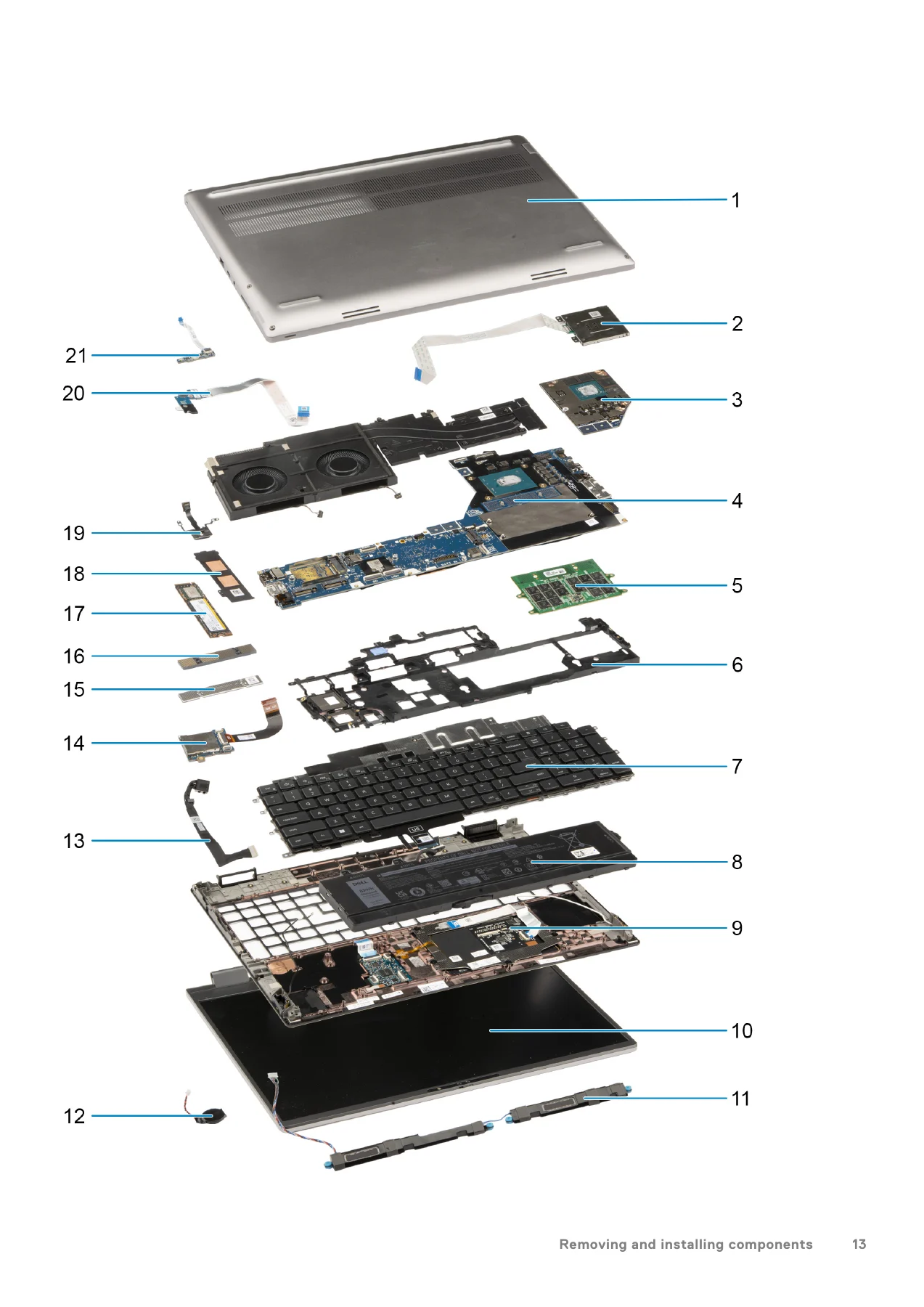
- Removing and Installing Components – recommended tools, screw list, major components of Precision 7670, base cover, battery and Lithium-ion battery precautions, SIM card, Compression Attached Memory (CAMM) module, long CAMM module, memory modules, memory interposer board, primary and secondary M.2 solid-state drives, heat sink for integrated graphics, heat sink for discrete graphics, GPU card, GPU power cable, power button board, power button, speakers, inner frame, SD card reader FPC, SD card reader, system board, coin-cell battery, display assembly, power-adapter port, smart-card reader, keyboard, and palm rest.
- Drivers and Downloads
- BIOS Setup – entering the BIOS setup program, navigation keys, one-time boot menu, BIOS setup options, updating the BIOS in Windows, updating the BIOS in Linux and Ubuntu, updating the BIOS using a USB drive, updating the BIOS from the F12 One-Time boot menu, system and setup password, assigning a system setup password, deleting or changing an existing password, clearing CMOS settings, and clearing BIOS and system passwords.
- Troubleshooting – handling swollen Lithium-ion batteries, Dell SupportAssist Pre-boot System Performance Check diagnostics, built-in self-test (BIST), M-BIST, LCD Power rail test (L-BIST), LCD Built-in Self Test, system-diagnostic lights, recovering the operating system, Real-Time Clock (RTC Reset), backup media and recovery options, WiFi power cycle, and draining residual flea power.
- Getting Help and Contacting Dell
Read end to end, this Dell Precision 7670 Service Manual is a complete teardown and rebuild path for the machine rather than a scattered collection of tips. The safety chapter establishes grounding, bonding and ESD handling before anything is touched, the component chapter carries you through the chassis in a repeatable order with a matching screw list, and the later chapters cover what to do when the laptop will not POST, will not charge, or shows a diagnostic LED pattern. BIOS-side material rounds it out, including the password, CMOS-clearing and BIOS update procedures that owners frequently need but rarely find documented in one place.
Hardware Documented in This Precision 7670 Service Manual
The manual documents the Precision 7670 as shipped in its various configurations. Battery servicing is covered for the 83 Wh Standard Rechargeable Li-ion pack (Type RCVVT, 11.55 V), including the Lithium-ion handling precautions and the guidance on swollen cells. Memory coverage handles both the Compression Attached Memory (CAMM) module and the long CAMM module, plus the memory interposer board used on SODIMM configurations. Storage coverage spans the primary M.2 SSD in slot 3 and the secondary M.2 SSD in slot 4, along with the SSD door latch found on some models. Graphics coverage splits into an integrated heat-sink procedure and a discrete heat-sink procedure, with the GPU card and GPU power cable handled separately. The system board chapter lists the board connectors by function, covering the WWAN antenna connectors, fan cable connectors, GPU card cable connector, IR camera cable connector, display cable connector, power adapter cable connector, touchpad cable connector, M.2 SSD slot connectors, battery cable connector, power button board FFC connector, USH board cable connector, SD card reader FPC cable connector, SIM card slot, WWAN card connector, and speaker cable connector. Display, power-adapter port, smart-card reader, speakers, coin-cell battery, power button, power button board, inner frame, SD card reader, keyboard and palm rest each get their own illustrated removal and installation procedure.
What the Precision 7670 Service Manual Lets You Do
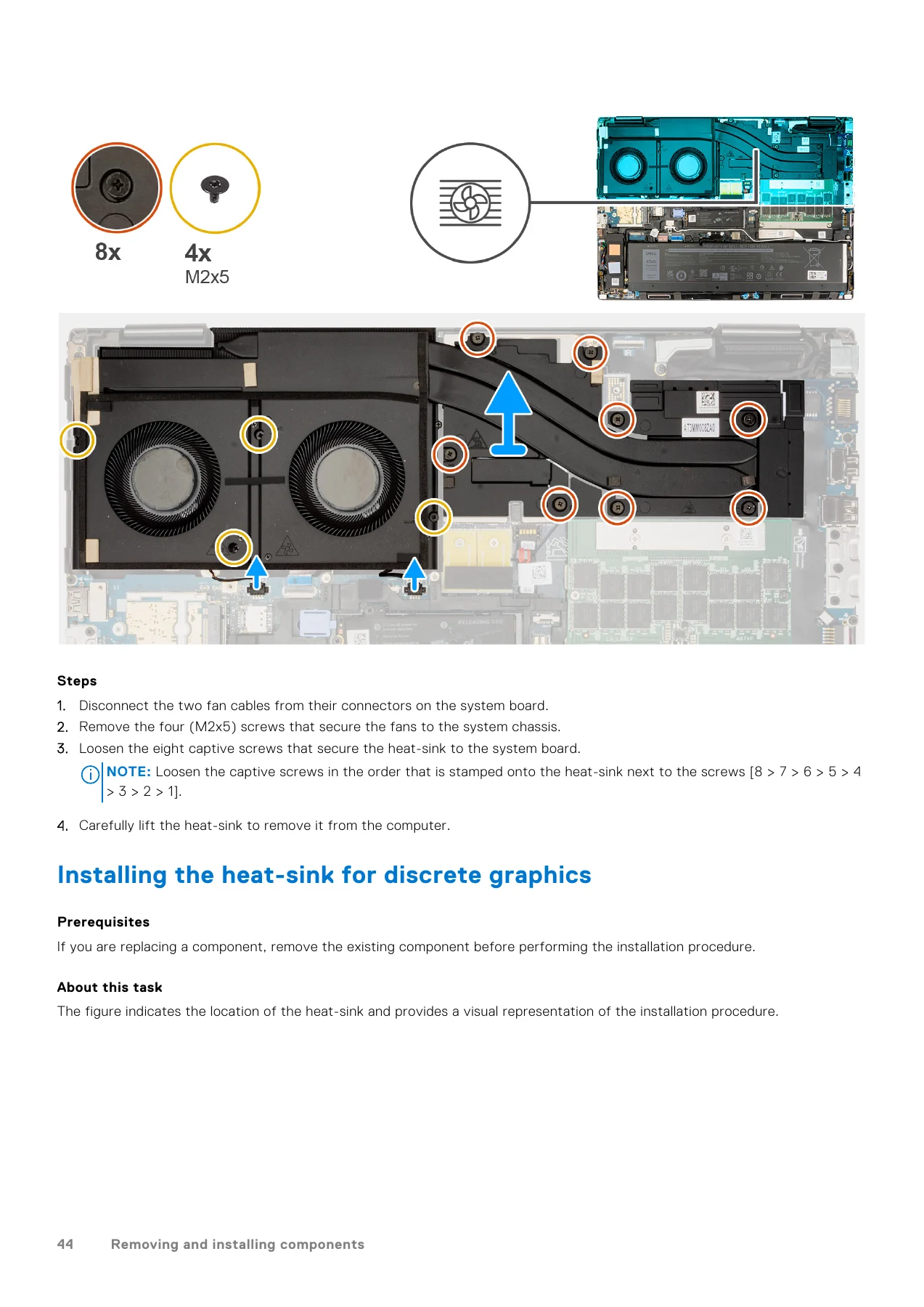
With this document on hand you can strip the Precision 7670 down to the palmrest and build it back up without guessing. Each procedure tells you which screws come out, how many there are, and in what order captive screws should be loosened or tightened – the heat-sink sections in particular specify a numbered sequence stamped next to the screws, which matters on a machine with eight captive fasteners over a discrete GPU. When a unit fails to boot, the troubleshooting chapter gives you the system-diagnostic light patterns and their suggested resolutions, the SupportAssist Pre-boot System Performance Check routine, and the M-BIST, L-BIST and LCD BIST self-tests to separate a screen fault from a system board fault. The BIOS chapter covers the setup menus, the update routes through Windows, Linux, USB drive and the F12 One-Time boot menu, and the password and CMOS clearing steps.
Getting the sequence wrong on a laptop like this is expensive – a bent display cable, a punctured battery cell or a stripped captive screw all turn a simple upgrade into a chassis replacement. Working from the correct procedure and the correct fastener list is what keeps a repair to the cost of the part. This Dell Precision 7670 Service Manual PDF is delivered instantly after payment, with no shipping and no waiting. Read it on a laptop, tablet or phone at the bench, or print the pages for the job you are doing and keep the rest on file.
IMAGES PREVIEW
Reviews
There are no reviews yet.