
GE LOGIQ e Ultrasound Basic User Manual Direction 5118586-100 Rev. 2 PDF
Original price was: $29.95.$18.95Current price is: $18.95.
833-page GE LOGIQ e Basic User Manual, Direction 5118586-100 Rev. 2, covering system setup, safety, scanning modes, measurements, clinical workflows, recording, customization, probes, biopsy, and user maintenance for R4.x.x software.
Description
GE LOGIQ e Ultrasound Basic User Manual Direction 5118586-100 Rev. 2 PDF
This GE LOGIQ e Ultrasound Basic User Manual Direction 5118586-100 Rev. 2 PDF is the operator-facing reference for the LOGIQ e ultrasound system running R4.x.x software. It is written for users who are already familiar with basic ultrasound principles and techniques, and it brings together the practical instructions needed to operate the system safely, prepare exams, optimize images, take measurements, record studies, customize presets, handle probes, and perform routine user maintenance. The document is a Basic User Manual, not the Advanced Reference Manual or a service manual, so it focuses on the controls, workflows, clinical calculation menus, safety information, and maintenance tasks that belong in daily system use.
File Details
- Manual type: Basic User Manual
- Brand: GE Healthcare
- Model: LOGIQ e ultrasound system
- Software: R4.x.x
- Document number: Direction 5118586-100
- Revision: Rev. 2
- Revision date: August 1, 2006
- Language: English
- Page count: 833
- File format: PDF
Chapters Covered
- Chapter 1 – Introduction: system overview, documentation set, principles of operation, indications for use, contraindications, prescription device notice, and contact information
- Chapter 2 – Safety: precaution levels, hazard symbols, patient safety, device labels, EMC information, patient environmental devices, acoustic output display, and warning label locations
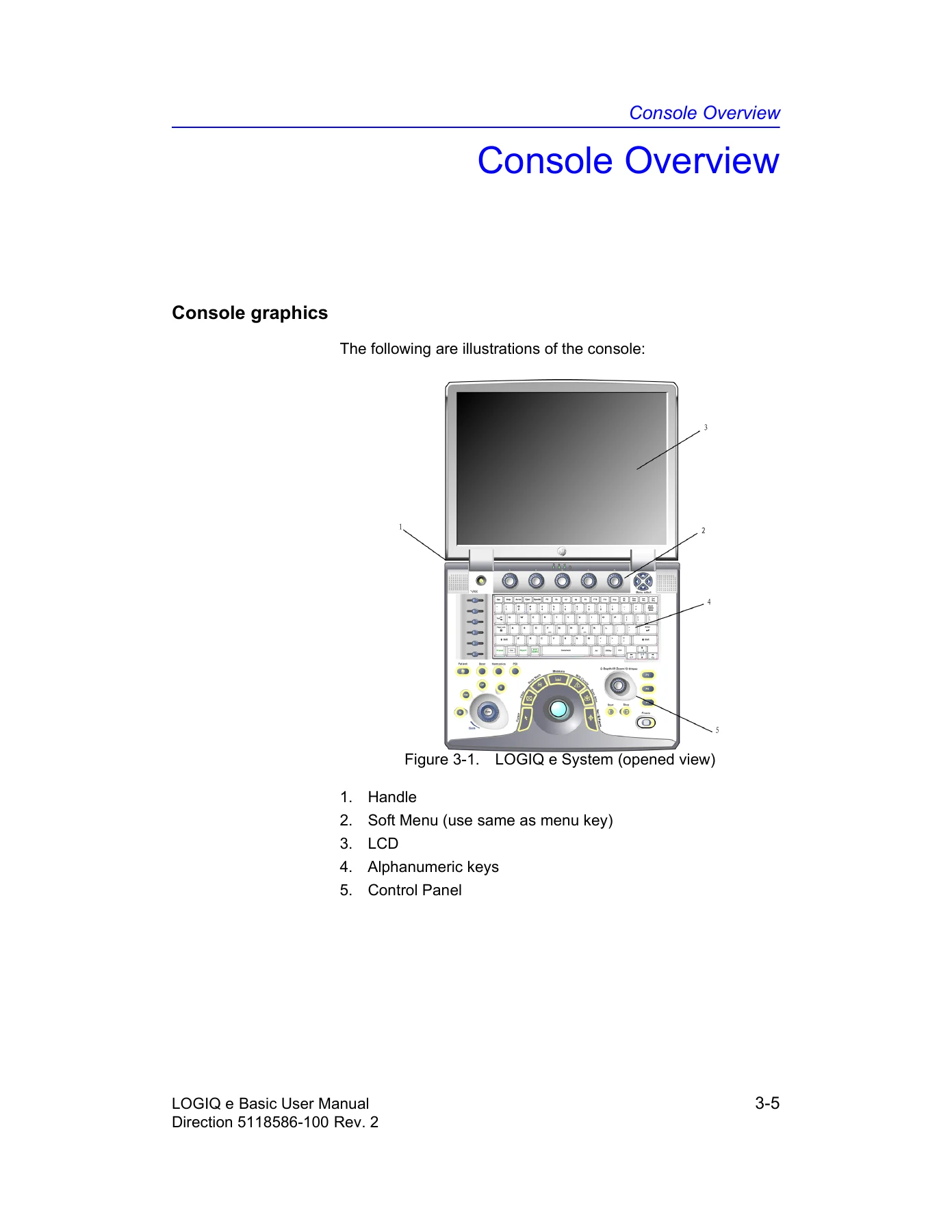
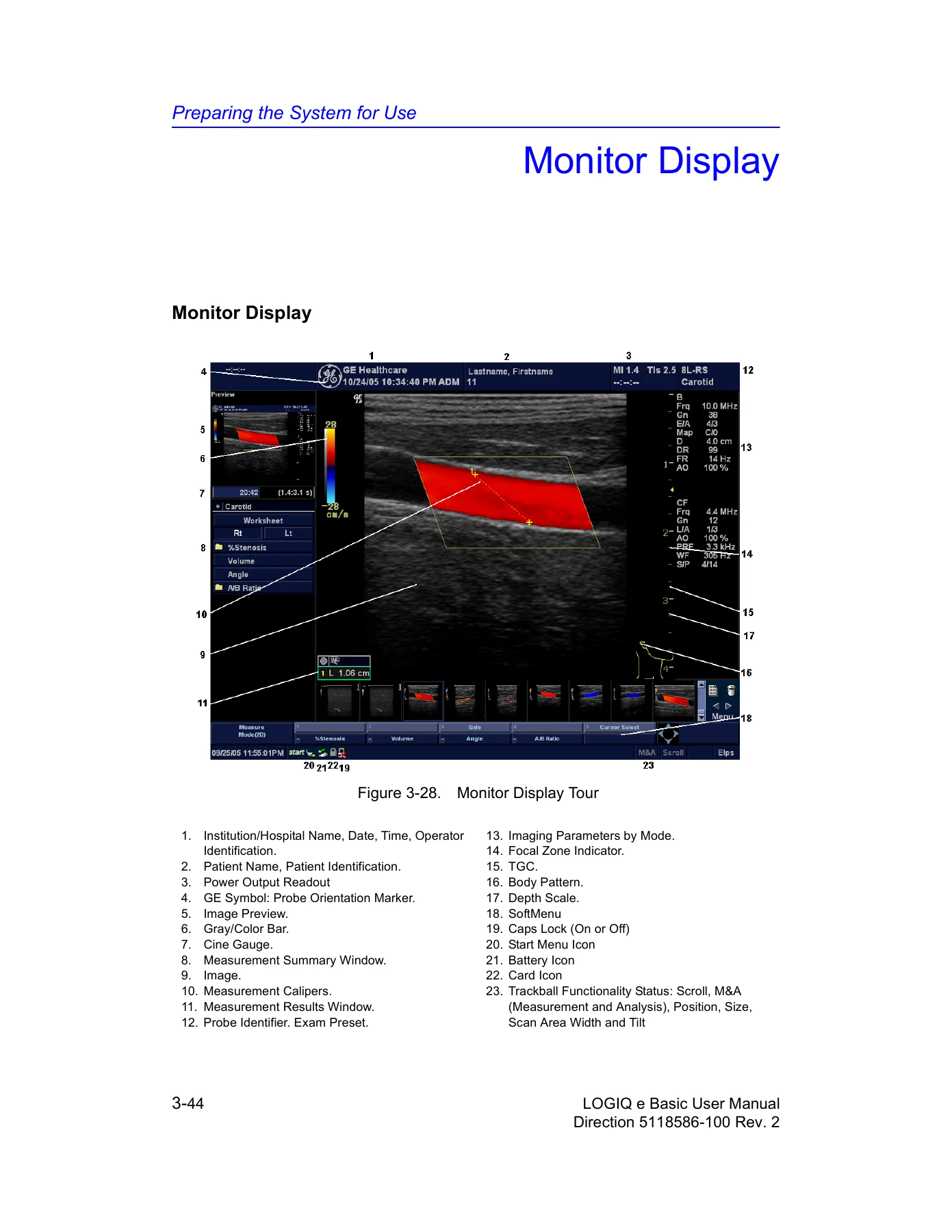
- Chapter 3 – Preparing the System for Use: site requirements, environmental limits, acclimation time, console graphics, battery, AC adapter, peripheral connections, system positioning and transport, power on and off, monitor adjustment, probes, operator controls, and monitor display tour
- Chapter 4 – Preparing for an Exam: beginning a new patient, Patient screen functions, patient list, searching and reviewing archived information, deleting records, changing patient or exam data, selecting application presets and probes, and ending a patient exam
- Chapter 5 – Optimizing the Image: B-Mode, M-Mode, Color Flow, M Color Flow, Spectral Doppler, and 3D, including controls, scanning hints, presets, and bioeffect notes
- Chapter 6 – Scanning/Display Functions: zoom, split screen, freezing an image, CINE, annotation, body patterns, online help, and electronic documentation
- Chapter 7 – General Measurements and Calculations: measurement controls, calipers, exam workflow, study and measurement setup, B-Mode, M-Mode, Doppler, worksheets, and generic measurements
- Chapter 8 – Abdomen and Small Parts: exam preparation, abdomen B-Mode, M-Mode and Doppler measurements, small parts, thyroid measurements, and related calculations
- Chapter 9 – OB/GYN: obstetric exam preparation, acoustic output considerations, OB measurements and calculations, OB worksheet, anatomical survey, OB graphs, multigestational workflow, OB table editor, EFW table and formula editing, and gynecology measurements
- Chapter 10 – Cardiology: cardiac measurement naming, B-Mode, M-Mode, Doppler, Color Flow, combination-mode measurements, cardiac worksheet, generic study, and ECG option controls
- Chapter 11 – Vascular: vascular exam preparation, measurement menus, auto vascular calculation, manual vascular calculation, vascular worksheet, intravessel ratio, vessel summary, and carotid and renal study notes
- Chapter 12 – Urology: urology exam preparation, B-Mode calculations, bladder volume, prostate volume, PSA-related calculations, and renal volume
- Chapter 13 – Pediatrics: pediatric exam preparation, pediatric calculations, and hip dysplasia measurements including alpha HIP and d:D ratio
- Chapter 14 – ReportWriter: chapter noting that the feature is not available at this time
- Chapter 15 – Recording Images: connectivity workflow, adding devices and dataflows, removable media, DICOM spooler, clipboard, storing images and CINE loops, Save As, USB flash drive, EZBackup and EZMove, data transfer, Send To, daily maintenance, printing options, transferring patient data to a PC, and portable exam
- Chapter 16 – Customizing Your System: presets, system presets, imaging presets, comment libraries, body pattern libraries, application presets, test patterns, connectivity setup, measurement setup, system administration, users, logon, function keys, service, and search
- Chapter 17 – Probes and Biopsy: probe overview, ergonomics, labeling, applications and features, specifications, care and maintenance, safety, cleaning and disinfection, probe discussion, biopsy precautions, guidezone display, biopsy guide attachment, needle path verification, biopsy procedure, and surgery or intra-operative use
- Chapter 18 – User Maintenance: system data, features and specifications, clinical measurement accuracy, system care and maintenance, quality assurance, test procedures, record keeping, and supplies and accessories
- Index: alphabetical reference to topics, controls, measurements, clinical workflows, and maintenance subjects
Across its 833 pages, this Basic User Manual works as a complete operating reference rather than a repair guide. It explains how the LOGIQ e is powered and positioned, how probes are connected and stored, how patient exams are started and closed, how imaging modes are adjusted, how measurements and calculations are selected, how clinical worksheets and graphs are used, how images and exam data are stored or transferred, and how presets and connectivity are configured. The clinical chapters cover abdomen and small parts, OB/GYN, cardiology, vascular, urology, and pediatrics, with measurement sequences and worksheet behavior described for each area. Safety content is not an afterthought: acoustic output, ALARA practice, electrical and mechanical hazards, EMC, probe handling, infection control, and warning labels are addressed throughout the manual. Maintenance content covers inspection, cleaning, quality assurance testing, and accessory information. The document also states clearly where it points readers to other GE publications, such as the Advanced Reference Manual for calculation formulas and acoustic output tables.
Practical Use on the LOGIQ e
Technicians, sonographers, clinical application specialists, and biomedical teams can use this manual to understand the LOGIQ e control layout, the Top/Sub Menu structure, the patient workflow, the freeze and CINE behavior, the measurement caliper system, and the way exam categories and studies are organized. It is particularly useful when a department needs to confirm the correct sequence for a measurement, locate a preset or connectivity screen, review acoustic output controls, or check how a probe should be cleaned and disinfected. The clinical chapters are organized by exam category rather than by a single generic procedure list, so the reader can move from OB calipers to cardiac worksheets to vascular auto calculations without losing the system-level context. Because the text is tied to R4.x.x software and Direction 5118586-100 Rev. 2, it also serves as a reference for the menus and terminology used in that revision.
Document Scope and Limitations
This is the Basic User Manual for the LOGIQ e ultrasound system. It supports safe operation and user-level maintenance tasks, but it is not a service manual and does not replace hands-on applications training or local clinical protocols. The manual notes that it does not include sonographic training or detailed clinical procedures. It also points to the Advanced Reference Manual for data tables such as OB and acoustic output tables, and it distinguishes the Basic User Manual from the Quick Guide and Advanced Reference Manual in the documentation set. Readers should use the manual together with the system screens, local infection-control policies, and the clinical judgement of the attending physician.
Put the GE LOGIQ e Basic User Manual to Work
IMAGES PREVIEW
With this GE LOGIQ e Ultrasound Basic User Manual Direction 5118586-100 Rev. 2 PDF, a user can work through the LOGIQ e operating sequence from power-up and probe connection through patient entry, image optimization, measurements, worksheets, recording, and shutdown, while checking the safety and maintenance details that support consistent use. Having the correct procedures and system references in one place matters because the LOGIQ e spans multiple clinical categories, measurement packages, and connectivity options, and small menu choices can change how an exam is stored or calculated. The manual is delivered as an instant PDF download after payment, with no shipping and no physical media, and it can be viewed on a computer, tablet, or phone and printed for departmental reference.
Reviews
There are no reviews yet.