

GE SenoAdvantage 2.1 Service Manual 5182291-1-100 – Mammography Review Workstation Installation & Repair Guide
Original price was: $39.95.$24.95Current price is: $24.95.
Complete 258-page GE SenoAdvantage 2.1 service manual covering installation, monitor calibration, DICOM configuration, software reload, PCI card and CPU box replacement, upgrades, and planned maintenance for the Volume Share 2/AW4.4 mammography review workstation.
Description
File Details
- Manual Type: Service Manual (sm)
- Brand: GE Healthcare
- Product: SenoAdvantage 2.1
- Document Number: 5182291-1-100
- Revision: Revision 1
- Language: English
- Page Count: 258
- File Format: PDF
- Publication Dates: October 23, 2006 (M3 release); February 14, 2007 (M4 release)
What This Service Manual Covers
The GE SenoAdvantage 2.1 Service Manual is the complete field service publication for the SenoAdvantage 2.1 mammography review workstation, a product built on the Volume Share 2/AW4.4 multi-modality platform. This 258-page document gives service providers, biomedical engineers, and field engineers a structured path through every service context the system supports: new product installation, B&W portrait monitor calibration, system upgrades, corrective maintenance, and planned maintenance.
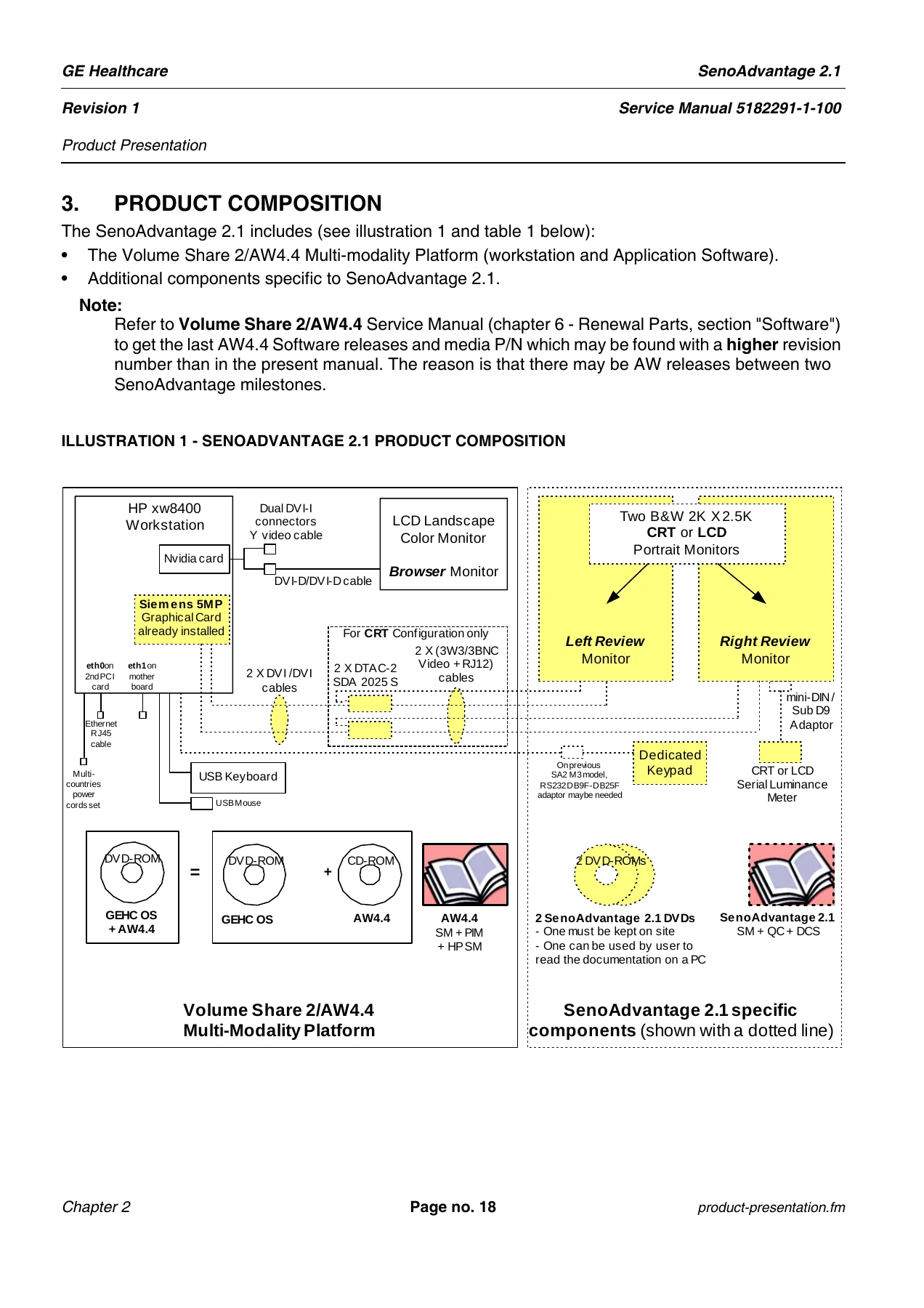
The manual opens with a How to Use chapter that maps service scenarios to job cards, followed by a Product Presentation chapter that details the SenoAdvantage 2.1 composition, hardware and software history, and how to determine the exact configuration of a given system. From there, the bulk of the document is organized into installation, upgrade, corrective maintenance, and planned maintenance chapters, each containing step-by-step job cards and scenarios.
Chapter 3 — Installation of a New Product
- Scenario IST000 — New Product Installation workflow
- Job Card IST001 — Volume Share 2/AW4.4 Workstation installation
- Job Card IST002 — Site configuration
- Job Card IST003 — DICOM Printer declaration (with printer-specific parameters for Agfa, Fuji, Kodak, and Konica models)
- Job Card IST004 — SenoAdvantage 2.1, Premium View and CAD software installation
- Job Card IST005 — Portrait monitors position configuration
- Job Card IST006 — Mammo Keypad installation and test
- Job Card IST007 — Software options installation
- Job Card IST008 — Final check and portrait monitors calibration
- Job Card IST009 — Turnover to the Customer
- Job Card IST010 — CRT portrait monitors installation
- Job Card IST011 — LCD portrait monitors installation
- Job Card IST012 — Synchronization to HIS/RIS
- Scenario CAL000 — B&W portrait monitors calibration
- Job Cards CAL010 through CAL061 — Ambient light measurement, SMfit ACT preferences, CRT and LCD monitor calibration, monitor calibration baselines, DIN homogeneity measurements, and French protocol for 5MP monitors
- Job Cards TSG010 through TSG030 — Monitor and SMfit ACT troubleshooting, Siemens CRT portrait monitor adjustment and tests, and NEC LCD 1980SXi/1990SXI software issues
Chapter 4 — Upgrade
- Scenario UPG000 — HP workstation to SenoAdvantage 2.1 and higher upgrade (covering upgrades from HP xw8000 and HP xw8200 platforms running SA1.x, SA2.0, and SA2.1)
- Scenario UPG001 — RWS to SenoAdvantage 2.1 and higher upgrade
- Job Card UPG001 — RWS to SenoAdvantage 2.1 upgrade procedures, including RWS user parameters save, RWS patient images restore, peer-to-peer network transfer, old system image file deletion, and old hardware return process for the Americas, Asia, and Europe
Chapter 5 — Corrective Maintenance
- Renewal Part List (FRU references specific to SenoAdvantage 2.1)
- Scenario D/R000 — Disassembly/Reassembly procedures
- Job Card D/R001 — 5MP Graphical and Ethernet PCI Cards replacement
- Job Card D/R002 — CPU Box replacement
- Job Card D/R003 — Software Reload from Cold (both AW4.4 Fast Load DVD-ROM and GEHC OS DVD-ROM + AW4.4 CD-ROM methods)
Chapter 6 — Planned Maintenance
- Scenario PM000 — Planned Maintenance schedule
- Job Card PM001 — Cleaning of Monitors and Keyboard
- Job Card PM002 — Site Parameters Back-Up
- Job Card PM003 — DICOM Printer Check
- Job Card PM004 — Portrait Monitors Calibration Check
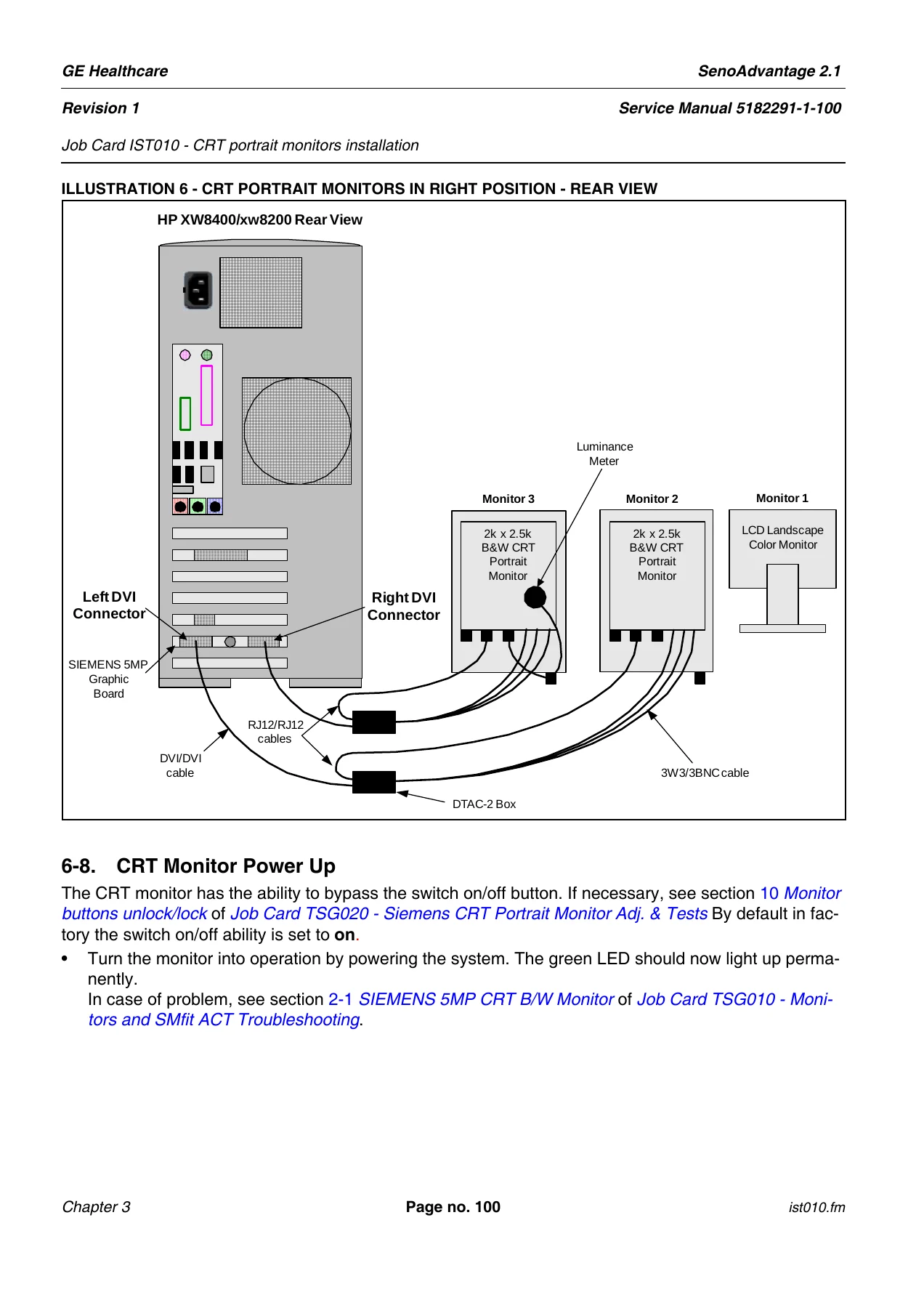
Beyond the chapter structure, this SenoAdvantage 2.1 service manual contains detailed hardware connection diagrams for the HP xw8400 and xw8200 workstations, DTAC-2 box mounting instructions, 3W3/3BNC video cable routing, DVI cable connections for both right-hand and left-hand portrait monitor positions, RS232 keypad connection, and the graphical and Ethernet card slot positions on the system board.
Software and Configuration Coverage
The manual documents both software load paths for the workstation — the AW Fast Load from Cold DVD-ROM procedure and the GEHC OS DVD-ROM plus AW4.4 application CD-ROM procedure. It covers Direct Connect Ethernet configuration (including eth0 and eth1 port setup and the requirement for 1Gbps networks with Category 5E or 6 cabling), CCOW context management for HIS/RIS synchronization, SoftSwitch configuration for keyboard and mouse control across workstations, DICOM printer declaration with validated parameters for Agfa Drystar 4500M, Agfa LR5200, Agfa LR5500/5503, Fuji FMDPL, Fuji Drypix 4000/5000/7000, Kodak DryView 8600/8610, Kodak DryView 8900, and Konica 793 printers.
Monitor Calibration Detail
A significant portion of the manual is dedicated to B&W portrait monitor calibration for both CRT and LCD configurations. It covers ambient light measurement with the Wellhoffer Serial Spotmeter, calibration target value setup (including French protocol-specific Lmin and Lmax tables keyed to ambient light values), DICOM 14 gamma model selection, luminance conformance testing, and the use of SMfit ACT calibration software in Service Level 1 and Service Level 2 modes. It also includes the DIN homogeneity measurement procedure required for facilities in Germany, Austria, and Switzerland, plus the French protocol for 5MP monitors with its specific ambient light, geometric distortion, contrast, resolution, display artifact, luminance, and uniformity requirements.
Corrective Maintenance Procedures
The corrective maintenance chapter provides full disassembly and reassembly instructions for the SenoAdvantage 2.1-specific FRUs: the Siemens 5MP Graphical card (with dipswitch and jumper settings, product reference SDG 1612D, and firmware revision checks), the Ethernet PCI card (including the license ID implications of card replacement), and the CPU Box. The software reload from cold procedure is documented in full for both the Fast Load and GEHC OS paths, with data recovery options, hostname/IP/netmask configuration, Direct Connect eth1 setup, time zone configuration, site parameters restore from CD-ROM, and the SenoAdvantage application and options reinstallation steps.
Why This Service Manual Matters
For any field engineer, biomedical technician, or service organization responsible for a GE SenoAdvantage 2.1 mammography review workstation, this service manual is the single most important reference document. The SenoAdvantage 2.1 is a specialized diagnostic imaging workstation with tightly integrated hardware and software — from the Siemens 5MP graphical card and DTAC-2 boxes to the SMfit ACT calibration software and DICOM printer configurations. Servicing this system without the correct procedures, target values, and configuration parameters risks leaving the workstation in a state where mammographic images cannot be reliably reviewed.
This manual gives you the exact steps to install the system from scratch, calibrate the portrait monitors to DICOM 14 and MQSA or French protocol standards, declare DICOM printers with manufacturer-validated parameters, replace the graphical or Ethernet card, swap the CPU box, reload the software from cold, and upgrade older SenoAdvantage or RWS systems to the 2.1 release. It also provides the routine planned maintenance schedule that keeps the system performing to specification over its service life.
IMAGES PREVIEW
Because this is a digital download, you receive the complete 258-page GE SenoAdvantage 2.1 service manual immediately after purchase — no shipping, no waiting. The PDF can be viewed on any device, searched for specific procedures or part numbers, and printed for use in the field. Whether you are performing a first installation, diagnosing a monitor calibration fault, or replacing a failed graphical card, this manual provides the manufacturer-level procedures and specifications you need.
Reviews
There are no reviews yet.