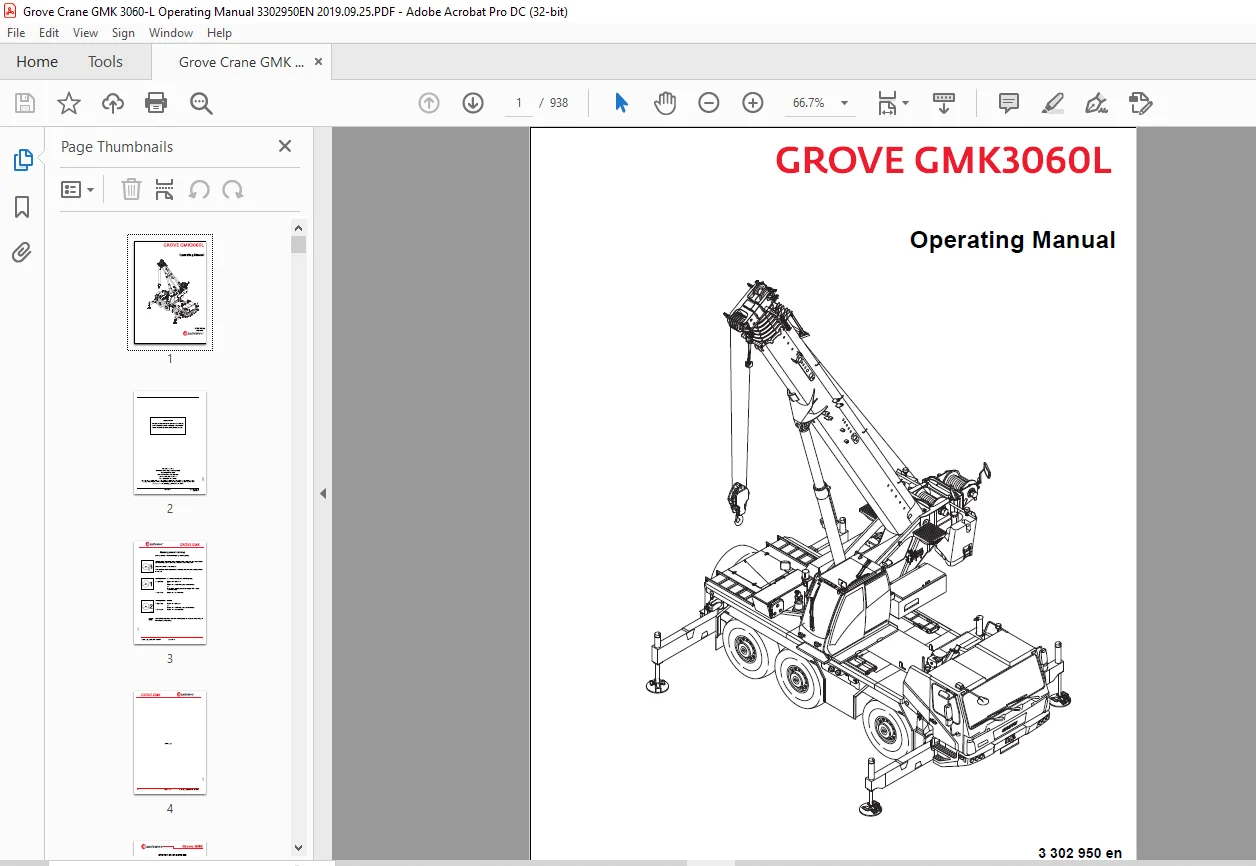
Grove Crane Manitowoc GMK3060L Operating Manual 3302950 – PDF DOWNLOAD
Original price was: $86.95.$28.95Current price is: $28.95.
Grove Crane Manitowoc GMK3060L Operating Manual 3302950 – PDF DOWNLOAD
Description
Grove Crane Manitowoc GMK3060L Operating Manual 3302950 – PDF DOWNLOAD
FILE DETAILS:
Grove Crane Manitowoc GMK3060L Operating Manual 3302950 – PDF DOWNLOAD
Language : English
Pages : 938
Downloadable : Yes
File Type : PDF
Size: 29.8 MB
DESCRIPTION:
Grove Crane Manitowoc GMK3060L Operating Manual 3302950 – PDF DOWNLOAD
Basic safety instructions:
Intended Use:
The GMK3060L truck crane is constructed in accordance with the latest technology and recognized safety regulations. However, it is important to note that the operator or third parties can still be endangered, and there is a risk to the crane or other property during its use.
- Modification of the truck crane is only permitted with the consent of Manitowoc Crane Group Germany GmbH.
- The GMK3060L truck crane should only be used when it is in perfect technical condition, for its intended purpose, and with proper attention paid to safe operation and possible hazards.
- Any malfunctions that could impair safety must be immediately addressed.
- The GMK3060L truck crane may only be operated without the corresponding special equipment within the permitted temperature range (refer to Technical Data, p. 1-7).
- The GMK3060L truck crane is designed exclusively for lifting loads within the permitted GMK3060L lifting capacities. The load must be slung as prescribed to a vertically positioned hook block prior to lifting.
Intended use also includes:
- Observing the entire crane documentation, including the operating manual(s), lifting capacity table, outrigger pressure table, and safety manual.
- Adhering to the inspection and maintenance requirements specified in the maintenance manual.
- The GMK3060L may only be operated with equipment parts that have been approved by Manitowoc Crane Group Germany GmbH and labeled with the serial number of the GMK3060L.
- The manufacturer is not liable for any damage caused by improper or unauthorized use of the GMK3060L truck crane. The user assumes the sole responsibility and associated risks.
IMAGES PREVIEW OF THE MANUAL:
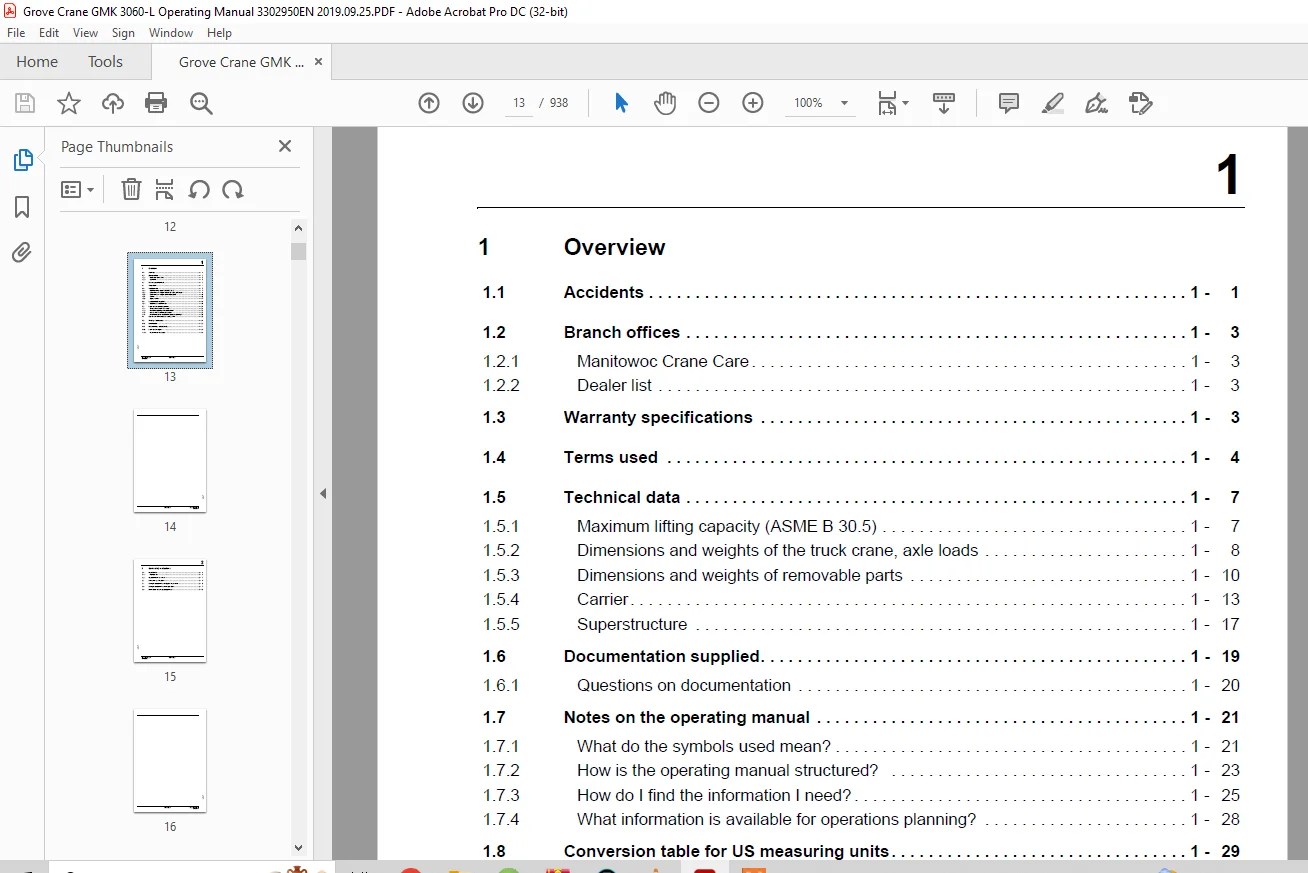
TABLE OF CONTENTS:
Grove Crane Manitowoc GMK3060L Operating Manual 3302950 – PDF DOWNLOAD
Additional pages 3
Steering circuit warning 3
Steering circuit 3 display (emergency steering pump) 3
Outrigger control units 7
Switching over the display between metre/feet and percent 7
Driving from the crane cab 5
Crane movement partially blocked 5
Battery spray 9
Voltage monitoring display after engine start 9
1 Overview 43
Accidents 43
Branch offices 45
Manitowoc Crane Care 45
Dealer list 45
Warranty specifications 45
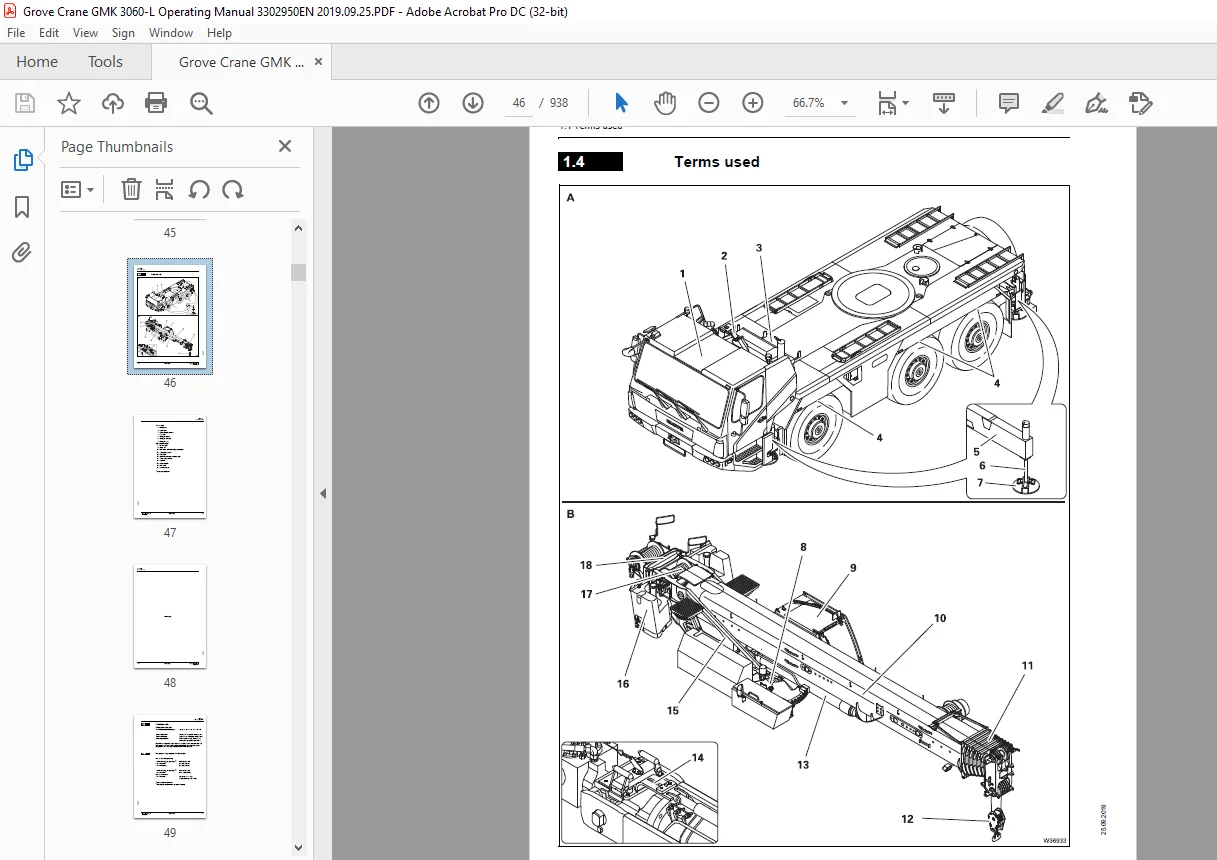
Terms used 46
Technical data 49
Maximum lifting capacity (ASME B 30 5) 49
Dimensions and weights of the truck crane, axle loads 0
Dimensions 51
Weight and axle loads 51
Dimensions and weights of removable parts 52
Spare wheel 52
Outriggers 52
Hook blocks 52
Counterweight sections 53
Auxiliary hoist 54
Carrier 55
Engine 55
Transmission 55
Transfer case 55
Axle lines 55
Steering 56
Tyres 56
Turning radii 56
Outriggers 57
Electrical system 58
Tool 58
Towing couplings 58
Driving speeds 58
Climbing ability 58
Superstructure 59
Main hoist 59
Auxiliary hoist 59
Slewing gear 59
Derricking gear 59
Main boom 60
Lattice extension 60
Operating speeds 60
Documentation supplied 61
Questions on documentation 62
Notes on the operating manual 63
What do the symbols used mean? 63
How is the operating manual structured? 65
Division 65
Structure of the chapters 65
Structure of the pages 66
How do I find the information I need? 67
Cross-references example 68
What information is available for operations planning? 70
Conversion table for US measuring units 71
Training – Information 73
Identification 74
EC Declaration of Conformity 76
Notes on the engine 77
Information on the engine 77
2 Basic safety instructions 79
Intended use 79
Improper use 80
Organisational measures 81
Personnel qualifications 83
Safety instructions for driving the truck crane 84
Safety instructions for crane operation 85
Instructions on transporting persons 88
Equipment for lifting persons 88
Personnel 89
Operation 89
Truck crane 90
3 Operating elements for driving 91
Overview of the operating elements 91
On the outside of the truck crane 92
Driver’s cab – Overview 96
Overview 96
Front overview 98
Side overview 99
Rear overview 100
Overview of doors 101
Steering column/steering wheel 102
Instrument panel 103
Left/right 103
Middle 104
Driving mode display 108
Transmission operating elements 109
Tachograph 110
Heating and air-conditioning system 111
Standard heating system 111
Auxiliary water heating system 112
CCS control unit 113
CCS – Menu-independent displays 114
CCS – Start menu 115
CCS – Overview of menu groups 116
Carrier menu group 118
Suspension/level adjustment menu 119
Driving menu 120
Exhaust system menu 121
Air intake inhibitor menu 122
Settings menu group 123
Set display brightness menu 124
Information menu group 125
Operating hours menu 126
Engine/ transmission error menu 127
Crane operation error menu 128
Various controls menu group 129
Outrigger control units 130
Brief description of the operating elements 131
Definition of direction information 132
Basic rule 132
General rules for buttons and symbols on the display 133
Engine 134
Steering column 134
Multipurpose switch 134
Instrument panel 135
CCS display 136
AdBlue (DEF) system/Exhaust gas emission control system 137
Instrument panel 137
CCS display 138
Air intake inhibitor 139
Battery master switch 141
Electrical system 141
Crane control CCS 142
Transmission 144
Transmission control unit 144
Driving mode display 147
Reverse camera 148
BirdView system 270° 149
Final drive 150
Brakes 152
Service brake 152
Additional brakes 153
Parking brake 154
Steering/separate steering 155
Instrument panel 155
Driver’s door 155
CCS display 156
Suspension 159
CCS display 159
Lighting/windscreen wipers/horn 160
Steering column 160
Instrument panel 160
CCS display 163
Roof 163
Level adjustment system 164
CCS display 165
Tachograph/speedometer 166
Tachograph 166
Cover 166
Speedometer 166
Diagnostics 167
Front flap 167
Windows and doors 168
Window winder 168
Doors 168
Access ladders and ladders 169
4 Starting/stopping the engine – for driving 173
Starting the engine – from the driver’s cab 173
CHECKLIST: Starting the engine 174
CHECKLIST: At low temperatures 177
Refuelling 178
Fuel tank 178
AdBlue (DEF) tank 180
Checks before starting the engine 181
At the hydraulic tank 181
Battery master switch 182
Switching the ignition on 182
Lamp test/comparison of the switching states 183
Lamp test 183
Comparison of the switching states 183
Display – setting the brightness 184
In the driver’s cab 184
In the crane cab 184
Adjusting the brightness 184
Temperature on the display 184
Starting the engine 185
Without flame start system 186
With flame start system 187
Checks after starting the engine 188
Starting the engine – at the outrigger control units 190
Prerequisites 190
Starting the engine 190
Switching off the engine 192
In the driver’s cab 192
After switching off 192
On the outrigger control units 192
With emergency stop switches 193
Resetting the emergency stop switch 193
Air intake inhibitor 194
Opening the air intake inhibitor 194
5 Driving mode 195
Before driving 195
CHECKLIST: Checks before on-road driving 195
Checking the condition of the truck crane 200
Electrical system 200
Adjusting the mirrors 200
Warning plates for vehicle width 202
Checking the vehicle height 202
Supply pressure 203
Parking brake 204
Third brake light 205
Adjusting the seat and the steering column 206
Adjusting the driver’s seat 206
Adjusting the passenger seat 208
Adjusting the steering column 209
Storage compartment 209
Switching the suspension on/off 210
Opening the menu 210
Switching on the suspension 211
Switching off the suspension 211
Setting the tachograph 212
Prerequisites 212
In the event of malfunctions 212
Setting the tachograph 213
Displaying and resetting operating hours 217
Settings/indicators on the driving mode display 218
Operating the transmission 219
Switching on 219
Switching the transmission to the neutral position 220
Selecting the direction of travel and starting gear 221
Selecting the driving direction 221
Selecting the starting gear 222
Changing the operating mode 223
Changing to automatic mode 223
Changing to manual mode 223
Starting 224
Driving and changing gears 225
In Automatic operating mode 225
In Manual operating mode 226
Changing the driving direction 227
Stopping the truck crane 227
Stopping for a long period of time 227
DM and RM transmission mode 228
Switching on 228
Switching off 229
On the roller type dynamometer 230
Preheating the transmission 230
Driving and parking the truck crane 231
Checks while driving 231
Brakes 231
ABS system 231
Steering 232
Warning messages 232
Cruise control 233
Switching on 233
Switching off 234
Driving downhill 235
Starting 235
Inspections when driving downhill 236
Downshifting 236
Additional brakes 237
Driving uphill 238
Starting 238
Driving 238
Torque reduction 239
AdBlue (DEF) supply 239
System malfunction 240
Overriding torque reduction 242
Cleaning the exhaust system 243
Automatic cleaning 243
Manual cleaning 244
Disabling cleaning 245
Parking the truck crane 246
Securing against rolling away 246
When stationary for more than 8 hours 247
Fold-up berth 248
Off-road driving 249
Adjustments to the transmission 249
Connections 249
Changing the vehicle level 249
Rocking the vehicle free and towing 249
Longitudinal and transverse differential locks 250
Operating the level adjustment system 252
Opening the menu 252
Setting the on-road level 253
Pre-selecting suspension struts 254
Changing the vehicle level 254
Viewing the current inclination 255
Exiting the menu 255
Freeing a stuck truck crane 256
Rocking the truck crane free 256
Towing free forwards 257
Towing free in reverse gear 257
Separate steering 259
Switching to separate steering 260
Switching to normal steering mode 262
Heating and air-conditioning system 263
Standard heating system 263
Switching on 263
Heating 263
Air distribution 264
Examples 265
Switching off 265
Air-conditioning system 266
Notes 266
Switching on/off 266
Cooling 267
Drying 267
Auxiliary water heating system 268
Preheating the engine 268
Preheating the driver’s cab 269
Switching on 269
Setting the date and time 271
Storing the heating start 272
Battery heater 274
Radio 274
Towing a trailer 275
Effects on the axle loads 275
Coupling the trailer 276
Connecting the supply lines 277
Removing the supply lines 278
Uncoupling the trailer 278
Checking the braking force 280
6 Driving modes 281
Driving modes 281
Information about the axle loads 281
Notes on how to use the tables 282
Table for a maximum axle load of 12 t (26,500 lbs) 283
Tyres 385/95 R25 283
Tyres 445/95 R25 284
Tyres 525/80 R25 285
Maximum permitted speeds with an axle load of over 12 t (26,500 lbs) 286
Weighing the truck crane 287
Axle groups 288
Weighing procedure 289
Evaluation 290
7 Transport 291
Transport with transport vehicle 291
CHECKLIST: Checks before transport 292
Driving the truck crane on to the transport vehicle and lashing down 294
Transport by ship 295
8 Malfunctions in driving mode 297
Emergency stop switch 297
What to do when malfunctions occur 298
Procedure in the event of a malfunction in road traffic 298
Warning and error messages 299
Warning and malfunction messages on the instrument panel 299
Meaning of the lamps 299
Warning messages on the driving mode display 304
Error messages 304
Warning messages on the CCS display 306
Representation of the symbol frame 306
Symbols on the CCS display 307
Error messages on the CCS display 319
Exiting the menu 320
Troubleshooting 321
Engine malfunctions 321
Faults on the Adblue (DEF) system 323
Differential lock malfunctions 323
Malfunctions in the transmission 324
Steering malfunctions 325
Service brake malfunctions 326
Malfunctions of the level adjustment system 327
Malfunctions in the hydraulic system/hydraulic oil cooler 327
Malfunctions in the CCS control unit 327
Emergency operation and breakdown assistance 329
Externally starting the truck crane 329
Battery charger 330
Prerequisites 330
Towing the truck crane 331
In the case of engine/ transmission damage 331
Longer towing distances 334
Tow starting 334
Wheel change 335
Removing a damaged wheel 335
On the spare wheel holder 336
Mounting a wheel 337
Inflating the tyres yourself 339
Connecting the filling hose 339
Inflating the tyres 340
Removing the filling hose 340
Tilting/lowering the driver’s cab 341
Prerequisites and information on tilting 341
Tilting and lowering the driver’s cab 342
Operating the hand pump 342
Tilting the driver’s cab 343
Lowering the driver’s cab 344
Fuses on the carrier 345
Notes on changing fuses 345
Fuses in the driver’s cab 346
Fuses in the battery box 352
9 Operating elements for crane operation 353
Overview of the operating elements 353
Exterior of the truck crane 354
Crane cab 358
Side panel 360
Crane cab, rear 362
Control panels 364
Left 364
Right 365
Control lever configuration 366
Version 1 366
Version 2 367
Heating/Air-conditioning system 368
CCS control unit 370
Menu-independent displays 372
CCS – Start menu 373
RCL display 374
Slewing ranges/ working radii display 375
CCS – Overview of menu groups 376
Superstructure menu group 380
Superstructure lock menu 381
Counterweight menu 382
Outrigger/driving menu group 383
Outrigger beam menu 384
Outrigger cylinders menu 386
Driving menu 388
Exhaust system menu 390
Air intake inhibitor menu 391
RCL/Telescoping menu group 393
Enter rigging mode/telescope status menu 394
Pre-selection telescoping menu 398
Lifting capacity tables menu 400
Telescoping semi-automation menu 401
Manual telescoping menu 402
Working range limiter menu group 403
Overall height menu 404
Working radius menu 405
Slewing angle menu 406
Hoist rope travel limitation menu 407
Information menu group 1 408
Hydraulic pressure and fuel consumption menu 409
Heating/Engine/Additional equipment menu group 410
Remote control menu 411
Telescoping emergency program menu group 412
Telescoping emergency program menu 414
Unknown telescoping menu 416
Settings menu group 417
Crane cab menu 418
Set display brightness and date/ time menu 419
Switch units menu 420
Set control lever characteristic curve menu 421
Power unit speeds menu 422
Information menu group 2 423
Operating hours menu 424
Engine/transmission error menu 425
Crane operation error menu 426
Program version menu 427
Various controls 428
Query menus 429
RCL control unit 430
Menu-independent displays 431
RCL – menus 432
Monitoring menu 432
Lifting capacity tables menu 434
Datalogger menu 435
Hand-held control 436
Outrigger control units 437
Menu-independent buttons 437
Outrigger menu 438
Brief description of the operating elements 441
Definition of direction information 441
Basic rule 441
General rules for buttons and symbols on the display 442
Engine 443
CCS display 443
Side panel 443
AdBlue (DEF) system/Exhaust gas emission control system 444
CCS display 444
Air intake inhibitor 445
CCS display 445
Seat contact switch and dead man’s switch 446
Crane control CCS 447
Outrigger – crane cab 452
Control panels 452
CCS display 453
Outrigger control units 455
General information 455
Outrigger menu 456
Inclination indicators 458
Outrigger pressure displays 459
Outrigger menu 459
Outrigger control units 459
Anemometer displays 459
Counterweight menu 460
CCS display 463
Main hoist 464
Control panels 464
CCS display 464
Auxiliary hoist 466
Control panels 466
CCS display 466
Slewing gear 468
Control panels 468
CCS display 469
Derricking gear 470
Control panels 470
CCS display 471
Side panel 471
Telescoping mechanism 472
Control panels 472
CCS display 473
Telescoping semi-automation menu 473
Manual telescoping menu 475
Hydraulic system 478
CCS display 478
Superstructure lock menu 479
Turntable lock 479
Houselock 481
CCS display 481
Remote control 482
Rated capacity limiter (RCL) 483
CCS display 483
RCL display 492
RCL override – version A 493
RCL override – version B 494
Electrical system 495
Lighting, windscreen wiper/washing system 496
Lighting 496
Windscreen wiper/ washing system 498
Horn 499
Hand-held control 500
Engine control panel 500
Horn 500
Pre-select emergency operation 501
Windows and doors 502
Windows 502
Rear window 502
Crane cab door 503
Diagnostics 504
Other 504
Short description of the operating elements – driving from the crane cab 505
Driving menu 505
Transmission 507
Final drive 509
Brakes 510
CCS display 510
Side panel from above 510
Steering 512
CCS display 512
Control panels 515
10 Starting/switching off the engine – for crane operation 517
When starting the engine for the first time in the day 518
Starting the engine – from the crane cab 520
Checking the fuel level and AdBlue (DEF) level 520
Fuel 520
AdBlue (DEF) 520
Checks before starting the engine 521
Checks on the carrier 521
Checking the hand-held control 521
Switching on the ignition 521
Control lever deflection query 522
Comparison of switching states 523
Display – setting the brightness 524
Starting the engine 524
Checks after starting the engine 525
Setting idling speed 526
Starting the engine – with the hand-held control 527
Switching off the engine 527
When the hand-held control is connected 527
In the crane cab 528
After switching off 528
Using the emergency stop switches 529
Resetting the emergency stop switch 529
11 Crane operation 531
Before operating the crane 531
CHECKLIST: Checks before operating the crane 531
Checking the condition of the truck crane 535
Crane cab heater fuel tank 535
Visual inspection 535
Checking the position of the hoist ropes 536
Checking the electrical system 537
Adjusting the crane cab seat and front control panel 538
Crane cab seat 538
Control panels 539
Front control panel 540
Checking the safety devices 541
Rated capacity limiter 541
Lifting limit switch 541
Emergency stop switch 542
Seat contact switch 543
Earthing the load 545
Locking/unlocking the turntable 546
Locking points 546
Locking the turntable 547
Unlocking the turntable 547
Switching the houselock on/off 548
Switching on the houselock 548
Switching off the houselock 550
Setting the time 551
Standard slewing range type 553
Permissible slewing ranges and operating positions 553
360° slewing range 553
Operating position 0° to the rear 553
180° to the front rigging position 553
Free-on-wheels operating position 554
MAXbase slewing range type 555
Specifications in the lifting capacity tables 557
Enabled slewing ranges 558
Lifting capacities and slewing ranges for outrigger spans without separate lifting capacity tables 560
Operation of the rated capacity limiter 561
Switching on the RCL 562
Switching on 562
Entering the rigging mode 564
Notes on Input 564
Enter the slewing range type 565
Entering individual components 566
Entering the RCL code 572
Pre-selecting telescoping 572
Confirming the rigging mode and lifting capacity table 573
Slewing range type Standard 573
Slewing range type MAXbase 575
Checks before operating the crane 577
Monitoring menu 577
Checking the rigging mode 577
Hoist checking 580
Displays during the crane operation 581
On the RCL display 581
On the CCS display 585
RCL early warning 589
RCL shutdown 589
Shutdown due to overload 589
Displaying the lifting capacity tables 591
Standard slewing range type 591
Slewing range type MAXbase 593
RCL override – version A 595
Overview status display 595
When rigging 596
To raise the boom 597
In emergencies 598
RCL override – version B 599
Datalogger 600
Export data 600
Display the data 601
Crane operation with main boom 605
Checks during crane operation 605
Horizontal alignment 605
Safe distances 605
Checking the wind speed 606
Deformation of the main boom due to direct sunlight 607
Main hoist 609
Switching on the main hoist 610
Lifting and lowering 611
Maximum permissible hoist rope speed 612
Switching off the main hoist 612
Auxiliary hoist 613
Switching on the auxiliary hoist 613
Lifting and lowering 614
Maximum permissible hoist rope speed 615
Switching off the auxiliary hoist 615
Lifting limit switch and lowering limit switch 616
Lifting limit switch 616
Lowering limit switch 618
Derricking gear 619
Switching on the derricking gear 619
Raising and lowering 620
Maximum derricking speed 621
Re-enabling the raising function 621
Switching off the derricking gear 622
Lowering the main boom to a horizontal position 622
Telescoping mechanism 623
Overview 625
Telescoping process 626
Assignment for display 628
Fixed length, intermediate length, telescoping length 629
Telescoping 630
Telescoping sequence 630
Checks before starting work 631
Switching on the telescoping mechanism 632
Function of the control lever 632
Switching off the telescoping mechanism 634
Manual telescoping 635
Checking the initial position 635
Unlocking the telescoping cylinder 637
Extending/retracting the telescoping cylinder 639
Lock telescoping cylinder 640
Unlocking the telescopic section 641
Telescoping the telescopic section 642
Locking the telescopic section 643
Locking the telescopic section for on-road driving 644
Telescoping with semi-automation 644
Telescoping with pre-selection 646
High-speed mode 647
Derricking gear/ telescoping mechanism 647
Hoists 648
Slewing gear 649
Slewing gear brake 649
Switching on the slewing gear 650
Releasing the slewing gear brake 650
Engaging the slewing gear brake 650
Slewing 651
Maximum slewing speed 652
Braking the slewing movement 653
Slewing gear freewheel 653
Switching off the slewing gear 654
Slewing speed – Switching the reduction on and off 655
Switching reduction off 655
Possible movement combinations 656
Settings and displays for crane operation 657
Inclining the crane cab 657
Setting idling speed 658
Adjusting the wiper stroke interval of the windscreen wiper 658
Limiting the power unit speeds 659
Switching the units of measure 660
Setting the characteristic curves for the control levers 661
Using the slewable spotlights 662
Displaying the operating hours 663
Working range limiter 665
viewing current settings 666
On the RCL display 666
In the CCS Start menu 667
Opening the working range limiter menu 667
Enter limit values – for the overall height 668
Entering limit values – for the working radius 670
Enter limit values – for the slewing range 672
Enter limit values – for the hoist rope travel 675
Shutdown by working range limiter 677
Work break 679
In case of short work breaks 679
In case of work breaks longer than 8 hours 680
To secure the truck crane 680
Heating and air-conditioning system 681
Heating system 681
Switching on 681
Heating 682
Air distribution 683
Setting the day and time 684
Storing the heating start 685
Setting the heating period 686
Switching the heating start on and off 686
Switching off 687
Setting the remaining time 687
Air-conditioning system 688
Notes 688
Switching on 688
Drying the air 689
Switching off 689
CraneSTAR system 690
Overview 690
Position of the components 690
12 Rigging work 691
Rigging work checklists for crane operation with the main boom 691
CHECKLIST: Rigging 691
CHECKLIST: Unrigging 696
Selecting the suitable site 699
Determining the required load-bearing area 699
Safe distance from slopes and pits 702
Earthing the truck crane 703
Safe distance from overhead power lines 704
Outriggers – Overview – Standard slewing range type 707
representation in the lifting capacity tables 707
Enabled outrigger spans 708
Outriggers – Overview – MAXbase slewing range type 709
Definitions 709
Representation in the lifting capacity tables 711
Enabled outrigger spans 712
Operating the outriggers 717
CHECKLIST: Extending the outriggers 717
CHECKLIST: Retracting the outriggers 719
Preparing the truck crane 720
Setting the spans 721
For on-road driving 722
Extending/retracting outrigger beams 723
From the control units 724
From the crane cab 725
Moving the outrigger pads into operating/driving position 727
Enlarging the load-bearing area 728
Extending/retracting supporting cylinders 729
From the control units 730
From the crane cab 731
Levelling the truck crane on outriggers horizontally 733
Inclination indicators 733
Prerequisites 734
Manual alignment 735
Automatic alignment 736
Levelling the free-standing truck crane 737
Outrigger pressure display 738
Rigging/unrigging the counterweight 741
Information on rigging 741
When rigging 741
When unrigging 742
Counterweight sections 743
Identification 744
Slinging points on the counterweight sections 745
CHECKLIST: Rigging the counterweight 747
CHECKLIST: Unrigging the counterweight 748
Assembling counterweight versions – on the turntable 750
Assembling counterweight versions – on the counterweight platform 751
Setting down the 1 0 t base plate 752
Counterweight hoist unit 755
Counterweight menu 755
Extending/ retracting the lifting cylinders 756
Automatic rigging 758
Automatic unrigging 760
Cancelling automatic mode 761
Removing/installing the counterweight on the turntable 762
Removing 762
Installing 763
Setting down the counterweight for driving 763
Slewing with rigged counterweight 765
Installing/removing the auxiliary hoist/0 5 t section 767
Slinging the auxiliary hoist 767
CHECKLIST: Installing the auxiliary hoist/removing the 0 5 t plate 768
CHECKLIST: Removing the auxiliary hoist/installing the 0 5 t plate 769
Establishing/disconnecting the connection between the auxiliary hoist and the turntable 770
Establishing/disconnecting the hydraulic connection 771
Establishing/disconnecting the electrical connection 772
Establishing/disconnecting the connection to the central lubrication 773
Checking that the auxiliary hoist is functioning properly 774
Slewing direction 774
Slewing indicator 774
Rigging the 0 5 t section 775
Prerequisites 775
Slinging the 0 5 t section 775
Establishing/disconnecting the connection between the 0 5 t section and the turntable 776
Transporting the auxiliary hoist/0 5 t section 777
Rigging work on the main boom 779
Hook block on the bumper 779
Picking up the hook block 779
Attaching the hook block 780
Hook block on a separate vehicle 781
Picking up the hook block 782
Setting down the hook block 782
Reeving and unreeving the hoist rope 784
Reeving the hoist rope 786
Unreeving the hoist rope 789
Possible reeving methods on the main boom 791
With 5 head sheaves 791
With 6 head sheaves 794
Installing/removing the lifting limit switch 797
Installing the lifting limit switch 797
Removing the lifting limit switch 800
Locking/unlocking the lifting limit switch 802
Locking 802
Unlocking 802
Anemometer and air traffic control light 803
Installing 803
Switching on/off 804
Removing 805
Other rigging work 807
Folding the mirrors in and out, and adjusting them 807
Cameras for crane operation 808
Camera on main boom 808
Camera on the hoists 811
Camera on the driver’s cab 811
Operating the camera 812
Step at the crane cab 814
13 Driving with a rigged truck crane 815
Driving route 815
Permissible rigging modes and axle loads 816
Axle load table 816
To drive without a load 819
To drive with a load 820
Axle loads 820
Before driving the rigged truck crane 821
Checking tyre pressure and wind speed 821
Secure the superstructure against slewing 821
Putting the truck crane on the wheels 822
Driving from the driver’s cab 825
Preparing to drive 825
Transmission 825
Switching on separate steering 825
Connections 826
While driving 826
After driving 827
Driving from the crane cab 829
Preparing to drive 830
Opening/closing the Driving menu 831
Opening menu 831
Selecting the operating mode 831
Crane’s hydraulic system Driving mode 833
Closing menu 833
Steering 834
Switching on 834
Display and steering direction 834
Changing the steering direction 835
Displays when steering 835
Separate steering 836
Normal steering 839
Operating the transmission 840
Selecting the transmission mode 840
While driving 841
DM and RM transmission mode 841
Transmission mode D 841
Warning messages 841
Possible connections 842
Longitudinal/ transverse differential locks 842
After driving 844
14 Malfunctions during crane operation 845
Emergency stop switch 845
What to do when malfunctions occur during crane operation 846
The load can be set down 846
Load cannot be set down 846
Warning and error messages 847
Program version 847
Warning messages on the CCS display 847
Error messages on the CCS display 848
Warning messages on the RCL display 850
Troubleshooting 855
Engine malfunctions 855
Malfunctions on the main hoist/auxiliary hoist 855
Malfunctions in the hoist cameras 857
Malfunctions in the main boom camera 857
Malfunctions in the derricking gear 858
Malfunctions in the telescoping mechanism 859
Malfunctions in the slewing gear 860
Malfunctions in the counterweight hoist unit 862
Malfunctions in the hydraulic system/hydraulic oil cooler 862
Malfunctions when operating with the hand-held control 863
Malfunctions when inclining the crane cab 863
Malfunctions on the outriggers 864
Malfunctions on the turntable lock 864
Malfunctions on the CCS/RCL control units 865
Malfunctions when driving from the crane cab 865
Malfunctions on the CraneSTAR system 866
Emergency operations and programs 869
Mechanical emergency activation for retracting 870
Checks before emergency activation 870
Procedure 870
Mechanical emergency activation 871
Telescoping emergency program 873
Telescoping emergency program menu 873
Notes on the displays 874
Checks in the emergency program 876
Retracting with emergency program 880
Tables for approaching the locking points 882
Entering the current telescoping 884
Emergency operation with the hand-held control 886
Sockets 886
Connection 887
Button combinations 888
Emergency operation 889
Notes on slewing in emergency operation 891
For the standard slewing range type 891
For the MAXbase slewing range type 892
Slewing with an overridden slewing gear shutdown 893
Hydraulic emergency operation with the hand pump 895
Connecting/disconnecting hoses 896
Establishing the required hydraulic circuits 897
Switching over valves 897
For lifting/lowering the load 898
Performing emergency activation 899
After emergency activation 900
Hydraulic emergency operation as per DGUV 901
Applications and function 901
CHECKLIST: Emergency operation 903
CHECKLIST: After emergency operation 904
For self-supply – connecting/disconnecting hoses 905
For external supply – connecting/disconnecting the transformer 906
Establishing the required hydraulic circuits 907
Valves at the control panel 907
For lifting/lowering 908
For slewing 909
Performing emergency operation 910
Lifting/lowering 910
Slewing 911
Derricking 912
Emergency supply of another crane 913
For emergency supply 913
After emergency supply 913
Switching emergency operation on/off 914
Fuses in the crane cab 915
Notes on changing fuses 915
15 Index 921
A 923
B 923
C 923
D 926
E 927
F 928
H 928
I 929
L 930
M 930
O 931
R 932
S 933
T 934
W 935Additional pages 3
Steering circuit warning 3
Steering circuit 3 display (emergency steering pump) 3
Outrigger control units 7
Switching over the display between metre/feet and percent 7
Driving from the crane cab 5
Crane movement partially blocked 5
Battery spray 9
Voltage monitoring display after engine start 9
1 Overview 43
Accidents 43
Branch offices 45
Manitowoc Crane Care 45
Dealer list 45
Warranty specifications 45
Terms used 46
Technical data 49
Maximum lifting capacity (ASME B 30 5) 49
Dimensions and weights of the truck crane, axle loads 0
Dimensions 51
Weight and axle loads 51
Dimensions and weights of removable parts 52
Spare wheel 52
Outriggers 52
Hook blocks 52
Counterweight sections 53
Auxiliary hoist 54
Carrier 55
Engine 55
Transmission 55
Transfer case 55
Axle lines 55
Steering 56
Tyres 56
Turning radii 56
Outriggers 57
Electrical system 58
Tool 58
Towing couplings 58
Driving speeds 58
Climbing ability 58
Superstructure 59
Main hoist 59
Auxiliary hoist 59
Slewing gear 59
Derricking gear 59
Main boom 60
Lattice extension 60
Operating speeds 60
Documentation supplied 61
Questions on documentation 62
Notes on the operating manual 63
What do the symbols used mean? 63
How is the operating manual structured? 65
Division 65
Structure of the chapters 65
Structure of the pages 66
How do I find the information I need? 67
Cross-references example 68
What information is available for operations planning? 70
Conversion table for US measuring units 71
Training – Information 73
Identification 74
EC Declaration of Conformity 76
Notes on the engine 77
Information on the engine 77
2 Basic safety instructions 79
Intended use 79
Improper use 80
Organisational measures 81
Personnel qualifications 83
Safety instructions for driving the truck crane 84
Safety instructions for crane operation 85
Instructions on transporting persons 88
Equipment for lifting persons 88
Personnel 89
Operation 89
Truck crane 90
3 Operating elements for driving 91
Overview of the operating elements 91
On the outside of the truck crane 92
Driver’s cab – Overview 96
Overview 96
Front overview 98
Side overview 99
Rear overview 100
Overview of doors 101
Steering column/steering wheel 102
Instrument panel 103
Left/right 103
Middle 104
Driving mode display 108
Transmission operating elements 109
Tachograph 110
Heating and air-conditioning system 111
Standard heating system 111
Auxiliary water heating system 112
CCS control unit 113
CCS – Menu-independent displays 114
CCS – Start menu 115
CCS – Overview of menu groups 116
Carrier menu group 118
Suspension/level adjustment menu 119
Driving menu 120
Exhaust system menu 121
Air intake inhibitor menu 122
Settings menu group 123
Set display brightness menu 124
Information menu group 125
Operating hours menu 126
Engine/ transmission error menu 127
Crane operation error menu 128
Various controls menu group 129
Outrigger control units 130
Brief description of the operating elements 131
Definition of direction information 132
Basic rule 132
General rules for buttons and symbols on the display 133
Engine 134
Steering column 134
Multipurpose switch 134
Instrument panel 135
CCS display 136
AdBlue (DEF) system/Exhaust gas emission control system 137
Instrument panel 137
CCS display 138
Air intake inhibitor 139
Battery master switch 141
Electrical system 141
Crane control CCS 142
Transmission 144
Transmission control unit 144
Driving mode display 147
Reverse camera 148
BirdView system 270° 149
Final drive 150
Brakes 152
Service brake 152
Additional brakes 153
Parking brake 154
Steering/separate steering 155
Instrument panel 155
Driver’s door 155
CCS display 156
Suspension 159
CCS display 159
Lighting/windscreen wipers/horn 160
Steering column 160
Instrument panel 160
CCS display 163
Roof 163
Level adjustment system 164
CCS display 165
Tachograph/speedometer 166
Tachograph 166
Cover 166
Speedometer 166
Diagnostics 167
Front flap 167
Windows and doors 168
Window winder 168
Doors 168
Access ladders and ladders 169
4 Starting/stopping the engine – for driving 173
Starting the engine – from the driver’s cab 173
CHECKLIST: Starting the engine 174
CHECKLIST: At low temperatures 177
Refuelling 178
Fuel tank 178
AdBlue (DEF) tank 180
Checks before starting the engine 181
At the hydraulic tank 181
Battery master switch 182
Switching the ignition on 182
Lamp test/comparison of the switching states 183
Lamp test 183
Comparison of the switching states 183
Display – setting the brightness 184
In the driver’s cab 184
In the crane cab 184
Adjusting the brightness 184
Temperature on the display 184
Starting the engine 185
Without flame start system 186
With flame start system 187
Checks after starting the engine 188
Starting the engine – at the outrigger control units 190
Prerequisites 190
Starting the engine 190
Switching off the engine 192
In the driver’s cab 192
After switching off 192
On the outrigger control units 192
With emergency stop switches 193
Resetting the emergency stop switch 193
Air intake inhibitor 194
Opening the air intake inhibitor 194
5 Driving mode 195
Before driving 195
CHECKLIST: Checks before on-road driving 195
Checking the condition of the truck crane 200
Electrical system 200
Adjusting the mirrors 200
Warning plates for vehicle width 202
Checking the vehicle height 202
Supply pressure 203
Parking brake 204
Third brake light 205
Adjusting the seat and the steering column 206
Adjusting the driver’s seat 206
Adjusting the passenger seat 208
Adjusting the steering column 209
Storage compartment 209
Switching the suspension on/off 210
Opening the menu 210
Switching on the suspension 211
Switching off the suspension 211
Setting the tachograph 212
Prerequisites 212
In the event of malfunctions 212
Setting the tachograph 213
Displaying and resetting operating hours 217
Settings/indicators on the driving mode display 218
Operating the transmission 219
Switching on 219
Switching the transmission to the neutral position 220
Selecting the direction of travel and starting gear 221
Selecting the driving direction 221
Selecting the starting gear 222
Changing the operating mode 223
Changing to automatic mode 223
Changing to manual mode 223
Starting 224
Driving and changing gears 225
In Automatic operating mode 225
In Manual operating mode 226
Changing the driving direction 227
Stopping the truck crane 227
Stopping for a long period of time 227
DM and RM transmission mode 228
Switching on 228
Switching off 229
On the roller type dynamometer 230
Preheating the transmission 230
Driving and parking the truck crane 231
Checks while driving 231
Brakes 231
ABS system 231
Steering 232
Warning messages 232
Cruise control 233
Switching on 233
Switching off 234
Driving downhill 235
Starting 235
Inspections when driving downhill 236
Downshifting 236
Additional brakes 237
Driving uphill 238
Starting 238
Driving 238
Torque reduction 239
AdBlue (DEF) supply 239
System malfunction 240
Overriding torque reduction 242
Cleaning the exhaust system 243
Automatic cleaning 243
Manual cleaning 244
Disabling cleaning 245
Parking the truck crane 246
Securing against rolling away 246
When stationary for more than 8 hours 247
Fold-up berth 248
Off-road driving 249
Adjustments to the transmission 249
Connections 249
Changing the vehicle level 249
Rocking the vehicle free and towing 249
Longitudinal and transverse differential locks 250
Operating the level adjustment system 252
Opening the menu 252
Setting the on-road level 253
Pre-selecting suspension struts 254
Changing the vehicle level 254
Viewing the current inclination 255
Exiting the menu 255
Freeing a stuck truck crane 256
Rocking the truck crane free 256
Towing free forwards 257
Towing free in reverse gear 257
Separate steering 259
Switching to separate steering 260
Switching to normal steering mode 262
Heating and air-conditioning system 263
Standard heating system 263
Switching on 263
Heating 263
Air distribution 264
Examples 265
Switching off 265
Air-conditioning system 266
Notes 266
Switching on/off 266
Cooling 267
Drying 267
Auxiliary water heating system 268
Preheating the engine 268
Preheating the driver’s cab 269
Switching on 269
Setting the date and time 271
Storing the heating start 272
Battery heater 274
Radio 274
Towing a trailer 275
Effects on the axle loads 275
Coupling the trailer 276
Connecting the supply lines 277
Removing the supply lines 278
Uncoupling the trailer 278
Checking the braking force 280
6 Driving modes 281
Driving modes 281
Information about the axle loads 281
Notes on how to use the tables 282
Table for a maximum axle load of 12 t (26,500 lbs) 283
Tyres 385/95 R25 283
Tyres 445/95 R25 284
Tyres 525/80 R25 285
Maximum permitted speeds with an axle load of over 12 t (26,500 lbs) 286
Weighing the truck crane 287
Axle groups 288
Weighing procedure 289
Evaluation 290
7 Transport 291
Transport with transport vehicle 291
CHECKLIST: Checks before transport 292
Driving the truck crane on to the transport vehicle and lashing down 294
Transport by ship 295
8 Malfunctions in driving mode 297
Emergency stop switch 297
What to do when malfunctions occur 298
Procedure in the event of a malfunction in road traffic 298
Warning and error messages 299
Warning and malfunction messages on the instrument panel 299
Meaning of the lamps 299
Warning messages on the driving mode display 304
Error messages 304
Warning messages on the CCS display 306
Representation of the symbol frame 306
Symbols on the CCS display 307
Error messages on the CCS display 319
Exiting the menu 320
Troubleshooting 321
Engine malfunctions 321
Faults on the Adblue (DEF) system 323
Differential lock malfunctions 323
Malfunctions in the transmission 324
Steering malfunctions 325
Service brake malfunctions 326
Malfunctions of the level adjustment system 327
Malfunctions in the hydraulic system/hydraulic oil cooler 327
Malfunctions in the CCS control unit 327
Emergency operation and breakdown assistance 329
Externally starting the truck crane 329
Battery charger 330
Prerequisites 330
Towing the truck crane 331
In the case of engine/ transmission damage 331
Longer towing distances 334
Tow starting 334
Wheel change 335
Removing a damaged wheel 335
On the spare wheel holder 336
Mounting a wheel 337
Inflating the tyres yourself 339
Connecting the filling hose 339
Inflating the tyres 340
Removing the filling hose 340
Tilting/lowering the driver’s cab 341
Prerequisites and information on tilting 341
Tilting and lowering the driver’s cab 342
Operating the hand pump 342
Tilting the driver’s cab 343
Lowering the driver’s cab 344
Fuses on the carrier 345
Notes on changing fuses 345
Fuses in the driver’s cab 346
Fuses in the battery box 352
9 Operating elements for crane operation 353
Overview of the operating elements 353
Exterior of the truck crane 354
Crane cab 358
Side panel 360
Crane cab, rear 362
Control panels 364
Left 364
Right 365
Control lever configuration 366
Version 1 366
Version 2 367
Heating/Air-conditioning system 368
CCS control unit 370
Menu-independent displays 372
CCS – Start menu 373
RCL display 374
Slewing ranges/ working radii display 375
CCS – Overview of menu groups 376
Superstructure menu group 380
Superstructure lock menu 381
Counterweight menu 382
Outrigger/driving menu group 383
Outrigger beam menu 384
Outrigger cylinders menu 386
Driving menu 388
Exhaust system menu 390
Air intake inhibitor menu 391
RCL/Telescoping menu group 393
Enter rigging mode/telescope status menu 394
Pre-selection telescoping menu 398
Lifting capacity tables menu 400
Telescoping semi-automation menu 401
Manual telescoping menu 402
Working range limiter menu group 403
Overall height menu 404
Working radius menu 405
Slewing angle menu 406
Hoist rope travel limitation menu 407
Information menu group 1 408
Hydraulic pressure and fuel consumption menu 409
Heating/Engine/Additional equipment menu group 410
Remote control menu 411
Telescoping emergency program menu group 412
Telescoping emergency program menu 414
Unknown telescoping menu 416
Settings menu group 417
Crane cab menu 418
Set display brightness and date/ time menu 419
Switch units menu 420
Set control lever characteristic curve menu 421
Power unit speeds menu 422
Information menu group 2 423
Operating hours menu 424
Engine/transmission error menu 425
Crane operation error menu 426
Program version menu 427
Various controls 428
Query menus 429
RCL control unit 430
Menu-independent displays 431
RCL – menus 432
Monitoring menu 432
Lifting capacity tables menu 434
Datalogger menu 435
Hand-held control 436
Outrigger control units 437
Menu-independent buttons 437
Outrigger menu 438
Brief description of the operating elements 441
Definition of direction information 441
Basic rule 441
General rules for buttons and symbols on the display 442
Engine 443
CCS display 443
Side panel 443
AdBlue (DEF) system/Exhaust gas emission control system 444
CCS display 444
Air intake inhibitor 445
CCS display 445
Seat contact switch and dead man’s switch 446
Crane control CCS 447
Outrigger – crane cab 452
Control panels 452
CCS display 453
Outrigger control units 455
General information 455
Outrigger menu 456
Inclination indicators 458
Outrigger pressure displays 459
Outrigger menu 459
Outrigger control units 459
Anemometer displays 459
Counterweight menu 460
CCS display 463
Main hoist 464
Control panels 464
CCS display 464
Auxiliary hoist 466
Control panels 466
CCS display 466
Slewing gear 468
Control panels 468
CCS display 469
Derricking gear 470
Control panels 470
CCS display 471
Side panel 471
Telescoping mechanism 472
Control panels 472
CCS display 473
Telescoping semi-automation menu 473
Manual telescoping menu 475
Hydraulic system 478
CCS display 478
Superstructure lock menu 479
Turntable lock 479
Houselock 481
CCS display 481
Remote control 482
Rated capacity limiter (RCL) 483
CCS display 483
RCL display 492
RCL override – version A 493
RCL override – version B 494
Electrical system 495
Lighting, windscreen wiper/washing system 496
Lighting 496
Windscreen wiper/ washing system 498
Horn 499
Hand-held control 500
Engine control panel 500
Horn 500
Pre-select emergency operation 501
Windows and doors 502
Windows 502
Rear window 502
Crane cab door 503
Diagnostics 504
Other 504
Short description of the operating elements – driving from the crane cab 505
Driving menu 505
Transmission 507
Final drive 509
Brakes 510
CCS display 510
Side panel from above 510
Steering 512
CCS display 512
Control panels 515
10 Starting/switching off the engine – for crane operation 517
When starting the engine for the first time in the day 518
Starting the engine – from the crane cab 520
Checking the fuel level and AdBlue (DEF) level 520
Fuel 520
AdBlue (DEF) 520
Checks before starting the engine 521
Checks on the carrier 521
Checking the hand-held control 521
Switching on the ignition 521
Control lever deflection query 522
Comparison of switching states 523
Display – setting the brightness 524
Starting the engine 524
Checks after starting the engine 525
Setting idling speed 526
Starting the engine – with the hand-held control 527
Switching off the engine 527
When the hand-held control is connected 527
In the crane cab 528
After switching off 528
Using the emergency stop switches 529
Resetting the emergency stop switch 529
11 Crane operation 531
Before operating the crane 531
CHECKLIST: Checks before operating the crane 531
Checking the condition of the truck crane 535
Crane cab heater fuel tank 535
Visual inspection 535
Checking the position of the hoist ropes 536
Checking the electrical system 537
Adjusting the crane cab seat and front control panel 538
Crane cab seat 538
Control panels 539
Front control panel 540
Checking the safety devices 541
Rated capacity limiter 541
Lifting limit switch 541
Emergency stop switch 542
Seat contact switch 543
Earthing the load 545
Locking/unlocking the turntable 546
Locking points 546
Locking the turntable 547
Unlocking the turntable 547
Switching the houselock on/off 548
Switching on the houselock 548
Switching off the houselock 550
Setting the time 551
Standard slewing range type 553
Permissible slewing ranges and operating positions 553
360° slewing range 553
Operating position 0° to the rear 553
180° to the front rigging position 553
Free-on-wheels operating position 554
MAXbase slewing range type 555
Specifications in the lifting capacity tables 557
Enabled slewing ranges 558
Lifting capacities and slewing ranges for outrigger spans without separate lifting capacity tables 560
Operation of the rated capacity limiter 561
Switching on the RCL 562
Switching on 562
Entering the rigging mode 564
Notes on Input 564
Enter the slewing range type 565
Entering individual components 566
Entering the RCL code 572
Pre-selecting telescoping 572
Confirming the rigging mode and lifting capacity table 573
Slewing range type Standard 573
Slewing range type MAXbase 575
Checks before operating the crane 577
Monitoring menu 577
Checking the rigging mode 577
Hoist checking 580
Displays during the crane operation 581
On the RCL display 581
On the CCS display 585
RCL early warning 589
RCL shutdown 589
Shutdown due to overload 589
Displaying the lifting capacity tables 591
Standard slewing range type 591
Slewing range type MAXbase 593
RCL override – version A 595
Overview status display 595
When rigging 596
To raise the boom 597
In emergencies 598
RCL override – version B 599
Datalogger 600
Export data 600
Display the data 601
Crane operation with main boom 605
Checks during crane operation 605
Horizontal alignment 605
Safe distances 605
Checking the wind speed 606
Deformation of the main boom due to direct sunlight 607
Main hoist 609
Switching on the main hoist 610
Lifting and lowering 611
Maximum permissible hoist rope speed 612
Switching off the main hoist 612
Auxiliary hoist 613
Switching on the auxiliary hoist 613
Lifting and lowering 614
Maximum permissible hoist rope speed 615
Switching off the auxiliary hoist 615
Lifting limit switch and lowering limit switch 616
Lifting limit switch 616
Lowering limit switch 618
Derricking gear 619
Switching on the derricking gear 619
Raising and lowering 620
Maximum derricking speed 621
Re-enabling the raising function 621
Switching off the derricking gear 622
Lowering the main boom to a horizontal position 622
Telescoping mechanism 623
Overview 625
Telescoping process 626
Assignment for display 628
Fixed length, intermediate length, telescoping length 629
Telescoping 630
Telescoping sequence 630
Checks before starting work 631
Switching on the telescoping mechanism 632
Function of the control lever 632
Switching off the telescoping mechanism 634
Manual telescoping 635
Checking the initial position 635
Unlocking the telescoping cylinder 637
Extending/retracting the telescoping cylinder 639
Lock telescoping cylinder 640
Unlocking the telescopic section 641
Telescoping the telescopic section 642
Locking the telescopic section 643
Locking the telescopic section for on-road driving 644
Telescoping with semi-automation 644
Telescoping with pre-selection 646
High-speed mode 647
Derricking gear/ telescoping mechanism 647
Hoists 648
Slewing gear 649
Slewing gear brake 649
Switching on the slewing gear 650
Releasing the slewing gear brake 650
Engaging the slewing gear brake 650
Slewing 651
Maximum slewing speed 652
Braking the slewing movement 653
Slewing gear freewheel 653
Switching off the slewing gear 654
Slewing speed – Switching the reduction on and off 655
Switching reduction off 655
Possible movement combinations 656
Settings and displays for crane operation 657
Inclining the crane cab 657
Setting idling speed 658
Adjusting the wiper stroke interval of the windscreen wiper 658
Limiting the power unit speeds 659
Switching the units of measure 660
Setting the characteristic curves for the control levers 661
Using the slewable spotlights 662
Displaying the operating hours 663
Working range limiter 665
viewing current settings 666
On the RCL display 666
In the CCS Start menu 667
Opening the working range limiter menu 667
Enter limit values – for the overall height 668
Entering limit values – for the working radius 670
Enter limit values – for the slewing range 672
Enter limit values – for the hoist rope travel 675
Shutdown by working range limiter 677
Work break 679
In case of short work breaks 679
In case of work breaks longer than 8 hours 680
To secure the truck crane 680
Heating and air-conditioning system 681
Heating system 681
Switching on 681
Heating 682
Air distribution 683
Setting the day and time 684
Storing the heating start 685
Setting the heating period 686
Switching the heating start on and off 686
Switching off 687
Setting the remaining time 687
Air-conditioning system 688
Notes 688
Switching on 688
Drying the air 689
Switching off 689
CraneSTAR system 690
Overview 690
Position of the components 690
12 Rigging work 691
Rigging work checklists for crane operation with the main boom 691
CHECKLIST: Rigging 691
CHECKLIST: Unrigging 696
Selecting the suitable site 699
Determining the required load-bearing area 699
Safe distance from slopes and pits 702
Earthing the truck crane 703
Safe distance from overhead power lines 704
Outriggers – Overview – Standard slewing range type 707
representation in the lifting capacity tables 707
Enabled outrigger spans 708
Outriggers – Overview – MAXbase slewing range type 709
Definitions 709
Representation in the lifting capacity tables 711
Enabled outrigger spans 712
Operating the outriggers 717
CHECKLIST: Extending the outriggers 717
CHECKLIST: Retracting the outriggers 719
Preparing the truck crane 720
Setting the spans 721
For on-road driving 722
Extending/retracting outrigger beams 723
From the control units 724
From the crane cab 725
Moving the outrigger pads into operating/driving position 727
Enlarging the load-bearing area 728
Extending/retracting supporting cylinders 729
From the control units 730
From the crane cab 731
Levelling the truck crane on outriggers horizontally 733
Inclination indicators 733
Prerequisites 734
Manual alignment 735
Automatic alignment 736
Levelling the free-standing truck crane 737
Outrigger pressure display 738
Rigging/unrigging the counterweight 741
Information on rigging 741
When rigging 741
When unrigging 742
Counterweight sections 743
Identification 744
Slinging points on the counterweight sections 745
CHECKLIST: Rigging the counterweight 747
CHECKLIST: Unrigging the counterweight 748
Assembling counterweight versions – on the turntable 750
Assembling counterweight versions – on the counterweight platform 751
Setting down the 1 0 t base plate 752
Counterweight hoist unit 755
Counterweight menu 755
Extending/ retracting the lifting cylinders 756
Automatic rigging 758
Automatic unrigging 760
Cancelling automatic mode 761
Removing/installing the counterweight on the turntable 762
Removing 762
Installing 763
Setting down the counterweight for driving 763
Slewing with rigged counterweight 765
Installing/removing the auxiliary hoist/0 5 t section 767
Slinging the auxiliary hoist 767
CHECKLIST: Installing the auxiliary hoist/removing the 0 5 t plate 768
CHECKLIST: Removing the auxiliary hoist/installing the 0 5 t plate 769
Establishing/disconnecting the connection between the auxiliary hoist and the turntable 770
Establishing/disconnecting the hydraulic connection 771
Establishing/disconnecting the electrical connection 772
Establishing/disconnecting the connection to the central lubrication 773
Checking that the auxiliary hoist is functioning properly 774
Slewing direction 774
Slewing indicator 774
Rigging the 0 5 t section 775
Prerequisites 775
Slinging the 0 5 t section 775
Establishing/disconnecting the connection between the 0 5 t section and the turntable 776
Transporting the auxiliary hoist/0 5 t section 777
Rigging work on the main boom 779
Hook block on the bumper 779
Picking up the hook block 779
Attaching the hook block 780
Hook block on a separate vehicle 781
Picking up the hook block 782
Setting down the hook block 782
Reeving and unreeving the hoist rope 784
Reeving the hoist rope 786
Unreeving the hoist rope 789
Possible reeving methods on the main boom 791
With 5 head sheaves 791
With 6 head sheaves 794
Installing/removing the lifting limit switch 797
Installing the lifting limit switch 797
Removing the lifting limit switch 800
Locking/unlocking the lifting limit switch 802
Locking 802
Unlocking 802
Anemometer and air traffic control light 803
Installing 803
Switching on/off 804
Removing 805
Other rigging work 807
Folding the mirrors in and out, and adjusting them 807
Cameras for crane operation 808
Camera on main boom 808
Camera on the hoists 811
Camera on the driver’s cab 811
Operating the camera 812
Step at the crane cab 814
13 Driving with a rigged truck crane 815
Driving route 815
Permissible rigging modes and axle loads 816
Axle load table 816
To drive without a load 819
To drive with a load 820
Axle loads 820
Before driving the rigged truck crane 821
Checking tyre pressure and wind speed 821
Secure the superstructure against slewing 821
Putting the truck crane on the wheels 822
Driving from the driver’s cab 825
Preparing to drive 825
Transmission 825
Switching on separate steering 825
Connections 826
While driving 826
After driving 827
Driving from the crane cab 829
Preparing to drive 830
Opening/closing the Driving menu 831
Opening menu 831
Selecting the operating mode 831
Crane’s hydraulic system Driving mode 833
Closing menu 833
Steering 834
Switching on 834
Display and steering direction 834
Changing the steering direction 835
Displays when steering 835
Separate steering 836
Normal steering 839
Operating the transmission 840
Selecting the transmission mode 840
While driving 841
DM and RM transmission mode 841
Transmission mode D 841
Warning messages 841
Possible connections 842
Longitudinal/ transverse differential locks 842
After driving 844
14 Malfunctions during crane operation 845
Emergency stop switch 845
What to do when malfunctions occur during crane operation 846
The load can be set down 846
Load cannot be set down 846
Warning and error messages 847
Program version 847
Warning messages on the CCS display 847
Error messages on the CCS display 848
Warning messages on the RCL display 850
Troubleshooting 855
Engine malfunctions 855
Malfunctions on the main hoist/auxiliary hoist 855
Malfunctions in the hoist cameras 857
Malfunctions in the main boom camera 857
Malfunctions in the derricking gear 858
Malfunctions in the telescoping mechanism 859
Malfunctions in the slewing gear 860
Malfunctions in the counterweight hoist unit 862
Malfunctions in the hydraulic system/hydraulic oil cooler 862
Malfunctions when operating with the hand-held control 863
Malfunctions when inclining the crane cab 863
Malfunctions on the outriggers 864
Malfunctions on the turntable lock 864
Malfunctions on the CCS/RCL control units 865
Malfunctions when driving from the crane cab 865
Malfunctions on the CraneSTAR system 866
Emergency operations and programs 869
Mechanical emergency activation for retracting 870
Checks before emergency activation 870
Procedure 870
Mechanical emergency activation 871
Telescoping emergency program 873
Telescoping emergency program menu 873
Notes on the displays 874
Checks in the emergency program 876
Retracting with emergency program 880
Tables for approaching the locking points 882
Entering the current telescoping 884
Emergency operation with the hand-held control 886
Sockets 886
Connection 887
Button combinations 888
Emergency operation 889
Notes on slewing in emergency operation 891
For the standard slewing range type 891
For the MAXbase slewing range type 892
Slewing with an overridden slewing gear shutdown 893
Hydraulic emergency operation with the hand pump 895
Connecting/disconnecting hoses 896
Establishing the required hydraulic circuits 897
Switching over valves 897
For lifting/lowering the load 898
Performing emergency activation 899
After emergency activation 900
Hydraulic emergency operation as per DGUV 901
Applications and function 901
CHECKLIST: Emergency operation 903
CHECKLIST: After emergency operation 904
For self-supply – connecting/disconnecting hoses 905
For external supply – connecting/disconnecting the transformer 906
Establishing the required hydraulic circuits 907
Valves at the control panel 907
For lifting/lowering 908
For slewing 909
Performing emergency operation 910
Lifting/lowering 910
Slewing 911
Derricking 912
Emergency supply of another crane 913
For emergency supply 913
After emergency supply 913
Switching emergency operation on/off 914
Fuses in the crane cab 915
Notes on changing fuses 915
15 Index 921
A 923
B 923
C 923
D 926
E 927
F 928
H 928
I 929
L 930
M 930
O 931
R 932
S 933
T 934
W 935
Questions? Email us: [email protected]
PLEASE NOTE:
- This is the same manual used by the dealers to diagnose and troubleshoot your vehicle
- You will be directed to the download page as soon as the purchase is completed. The whole payment and downloading process will take anywhere between 2-5 minutes
- Need any other service / repair / parts manual, please feel free to contact [email protected] . We still have 50,000 manuals unlisted
S.V