
Liebherr LTM 1120-4.1 LICCON2 Radio Remote Control Operating Instructions – BAL 928400-01-02
Original price was: $29.95.$17.95Current price is: $17.95.
Complete operating instructions for the radio remote control system on the Liebherr LTM 1120-4.1 LICCON2 mobile crane – BTT hand-held terminal, all operating menus, start-up, crane control and troubleshooting. BAL 928400-01-02.
Description
The Liebherr LTM 1120-4.1 LICCON2 Radio Remote Control Operating Instructions is the dedicated operating manual for the radio remote control system fitted to the LTM 1120-4.1 mobile crane running the LICCON2 crane control system. Issued under BAL number 928400-01-02, this 129-page document takes the operator from the technical safety instructions and hardware description all the way through every menu, operating screen, start-up sequence and problem-remedy procedure that radio remote control operation involves.
File Details
- Manual type: Radio remote control operating instructions (auxiliary equipment chapter 6.08)
- Brand: Liebherr
- Manufacturer: Liebherr-Werk Ehingen GmbH, D-89582 Ehingen/Donau
- Machine: LTM 1120-4.1 with LICCON2
- Document number: BAL 928400-01-02
- Internal document reference: 0212804-05
- Language: English
- Page count: 129 pages
- File format: PDF
Chapters Covered
The manual is organised into eighteen numbered sections, each one dealing with a single part of the radio remote control workflow:
- 1 Technical safety instructions
- 2 Description of the function
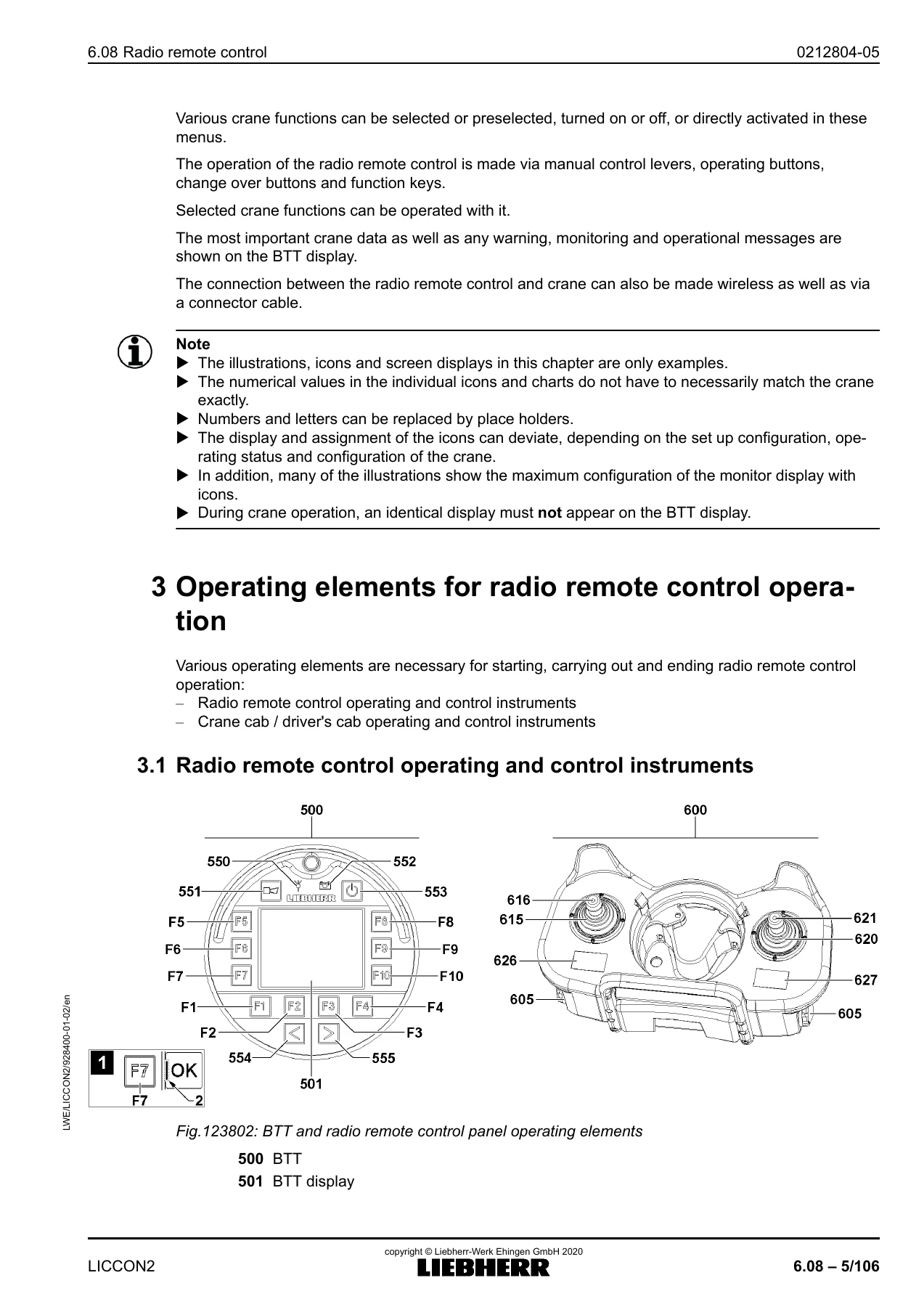
- 3 Operating elements for radio remote control operation – radio remote control operating and control instruments, crane cab / driver’s cab instruments
- 4 Settings and status displays for radio remote control operation – system screen, display brightness, charge condition, connection type
- 5 Aligning the radio remote control with the crane
- 6 Charging the rechargeable battery for the radio remote control
- 7 Radio remote control start menu
- 8 Engine operation menu – engine rpm, engine monitoring functions, icons and function keys
- 9 Supporting the crane / Support automatic menu – manual support, automatic support, sliding beam illumination
- 10 Axle suspension menu – manual level control, driving level, blocking / activating the axle suspension
- 11 Radio remote control operating screen – crane geometry and load information, utilization display, alarm functions, wind speed, chart name/number, monitoring display, winch display, support, manual control lever speed reduction, incline indicator, special functions, main boom length / telescoping target
- 12 Sliding the sliding beam / supporting the crane menu
- 13 Crane superstructure assembly functions menu – assembling the folding jib, ballasting / turntable lock, hydraulic folding jib, crane cab step, controlling the crane cab, fastening the hook block, control floodlight menu, crane floodlight menu
- 14 Test system menu
- 15 Starting up of the radio remote control – activating the unit, starting the crane with the radio remote control, starting with the ignition switch, emergency stop
- 16 Crane operation with radio remote control – manual control lever assignment, rapid gear, turning the superstructure, lifting and lowering the hook, luffing the boom system, luffing in with suspended load, telescoping, changing the set-up configuration, turning the engine off, ending radio operation
- 17 Measures in case of problems – error messages, dark BTT display, faulty radio connection and how to bypass it
- 18 Inspection and maintenance
Read as a whole, this is not a generic crane text. It is a task-by-task operating guide built around the specific hardware installed on the LTM 1120-4.1: the Bluetooth Terminal (BTT) hand-held unit, the radio remote control panel it clips into, the charging cradle, and the LICCON2 monitor and ignition switches in the crane cab. Every menu is documented with its icons, its function key assignments and its manual control lever directions, so an operator can look up a screen and immediately know which key does what.
The Radio Remote Control Hardware Explained
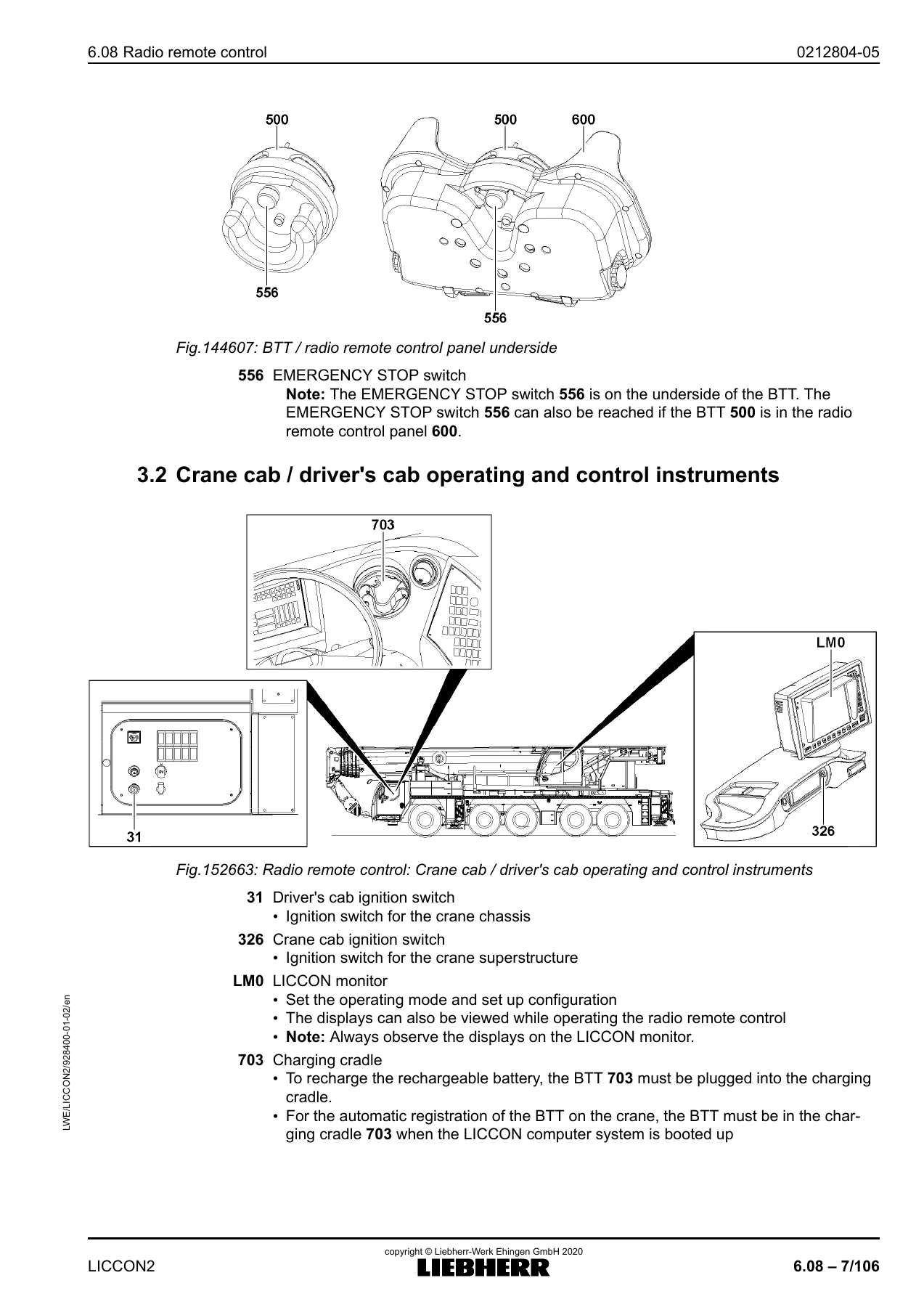
A significant part of the document is devoted to simply describing the equipment. The BTT terminal, its display, transmission signal indicator light, rechargeable battery indicator light, on/off button, change-over keys and the F1 to F10 function keys are all identified and explained. The radio remote control panel is documented alongside it, including both manual control levers, the rapid gear button, the engine rpm button, the graphic displays and the battery compartments. The emergency stop switch on the underside of the BTT is covered, along with the note that it remains reachable even when the BTT sits inside the panel.
On the crane side, the manual identifies the driver’s cab ignition switch, the crane cab ignition switch, the LICCON monitor and the charging cradle, and explains how the system boots, how the BTT registers automatically, and what happens to the touch displays and master switches in the crane cab once radio operation takes over.
Operating Screens, Menus and Confirmation Logic
The menu chapters are the working heart of the document. The start menu is mapped key by key, showing which function key opens the chassis engine menu, the superstructure engine menu, the support menu, the axle suspension menu, the operating screen, the sliding beam menu and the assembly functions menu. From there each menu gets its own section with the icons, the function key table and the manual control lever behaviour.
The radio remote control operating screen chapter is particularly detailed, covering the crane geometry and load display, the utilization bar and its colour thresholds, boom limitation arrows, hoist limit switch monitoring, load chart utilization advance warning and STOP icons, engine monitoring warnings, wind speed display and the operating mode / set-up configuration confirmation logic that has to turn from red to yellow to green before any crane movement is released.
Safety Instructions Built Into the Manual
Safety is not bolted on at the end. The technical safety instructions open the document with warnings about operating errors, personnel in the danger zone, crane alignment on the support, loss of transmission signal, incorrect operator alignment with the crane, abrupt interruption of crane movements and unauthorised crane access. Throughout the menu chapters, warnings repeat where they matter – for example on toppling risk during support, on the tolerances and error behaviour of the support force display, and on the prohibition against picking up a load by luffing the boom up.
Starting Up, Shutting Down and Recovering
The start-up chapter walks through activating the radio remote control with the BTT in its charging cradle, selecting the operating mode and set-up configuration on the LICCON monitor, and confirming it. It then covers two distinct ways of starting the crane – from the radio remote control itself and from the ignition switch – followed by the emergency stop procedure and the steps needed to bring the crane back into service afterwards.
Ending radio operation is documented for both routes too, with a clear warning not to use the on/off key to end radio operation because of the operating error it triggers.
Measures in Case of Problems
The troubleshooting chapter addresses the realistic failures an operator will meet: an error message appearing on the test system icon, a BTT display that stays dark, and a faulty or interrupted radio connection. The manual explains how to read the diagnostic screen, how to silence disengageable acoustic warnings, how to substitute batteries when the rechargeable battery is flat, and how the radio connection can be bypassed with a cable run between the charging cradle and the BTT when wireless transmission is not reliable.
Who This Manual Is For
This is written for the crane operator and for the technicians who prepare, support, assemble and maintain the LTM 1120-4.1. It assumes the reader already works with the machine and needs the authoritative description of how the radio remote control behaves – not a beginner’s introduction to mobile cranes. The inspection and maintenance chapter sets out what to check before crane operation and how to care for the radio remote control, including handling of the manual control lever dust covers and the prohibition on cleaning with solvents, thinners or water jets.
Because the document also reproduces the EU Declaration of Conformity, the CE marking explanation and the Proposition 65 notices, it doubles as a compliance reference for owners operating the crane in regulated markets.
Put It to Work on Your LTM 1120-4.1
With the Liebherr LTM 1120-4.1 LICCON2 Radio Remote Control Operating Instructions on hand, an operator can set up remote operation correctly, move the sliding beams and support cylinders with confidence, level the crane through the axle suspension menu, read every alarm icon before it becomes a shutdown, and work through assembly functions such as ballasting, turntable lock pinning and hook block fastening. It supports the diagnostics side as well, so a technician can pull the error text off the test system rather than guessing at a fault.
Getting the procedures and the displayed limits right matters on a machine of this size. The manual states the support force tolerances, the toppling risks, the boom limitation angles and the load chart utilization thresholds explicitly, which is exactly the information that keeps a lift inside its envelope.
IMAGES PREVIEW
Delivery is instant. The Liebherr LTM 1120-4.1 LICCON2 Radio Remote Control Operating Instructions is supplied as a downloadable PDF after payment – no shipping, no waiting. Open it on a laptop, tablet or phone at the crane, print the menu pages you need for the cab, or keep the whole BAL 928400-01-02 document on file as a permanent reference for the radio remote control system.
Reviews
There are no reviews yet.