
Okuma OSP-U100M OSP-U10M CNC Operation Manual 1998 – Complete PDF Guide
Original price was: $39.95.$24.95Current price is: $24.95.
Complete operation manual for Okuma OSP-U100M and OSP-U10M CNC control systems. Covers operation panels, manual and automatic modes, ATC/APC functions, data setting, parameters, display functions, and more. 511 pages, published 1998.
Description
Okuma OSP-U100M & OSP-U10M CNC Operation Manual
This is the complete Okuma OSP-U100M and OSP-U10M CNC Operation Manual, published in April 1998 as Publication No. 4203-E (ME32-079-R1), First Edition. At 511 pages, it provides the full operating instructions for the OSP-U100M and OSP-U10M CNC control systems as used on Okuma machining centers and related machine tools. Whether you are setting up a machine, running production, editing programs at the control, or adjusting parameters, this manual documents the procedures and screen layouts you need.
File Details
- Manual type: Operation Manual
- Brand: Okuma
- Models covered: OSP-U100M, OSP-U10M
- Language: English
- Page count: 511
- File format: PDF
- Publication number: 4203-E (ME32-079-R1)
- Edition: 1st Edition
- Date: April 1998
Chapters Covered
- Precautions Relating to Machine Installation
- Points to Check before Turning on the Power
- Precautions Relating to Operation
- Precautions Relating to the ATC
- On Finishing Work
- Precautions during Maintenance Inspection and When Trouble Occurs
- General Precautions
- Symbols Used in This Manual
- I. Specifications — OSP Specifications, Basic Functions, Operation Functions, Programming Functions, Interactive Programming, Program Capacity, Gauging Function, Machining Management Function (MacMan), Monitoring Function, External Input/Output and Communication Function, Automation and Unmanned Operation Function, High-Speed High-Accuracy Function
- II. Operation
- Section 1: Basic Construction of Operation Panels, Outline of Controls, Operation Mode Selection Keys, Data Setting Mode Selection Keys, NC Status Indicating Lamps, Other Controls on NC Operation Panel, Controls on Machine Operation Panel, Mode Selection Keys
- Section 2: Power ON/OFF Operation, Emergency Stop
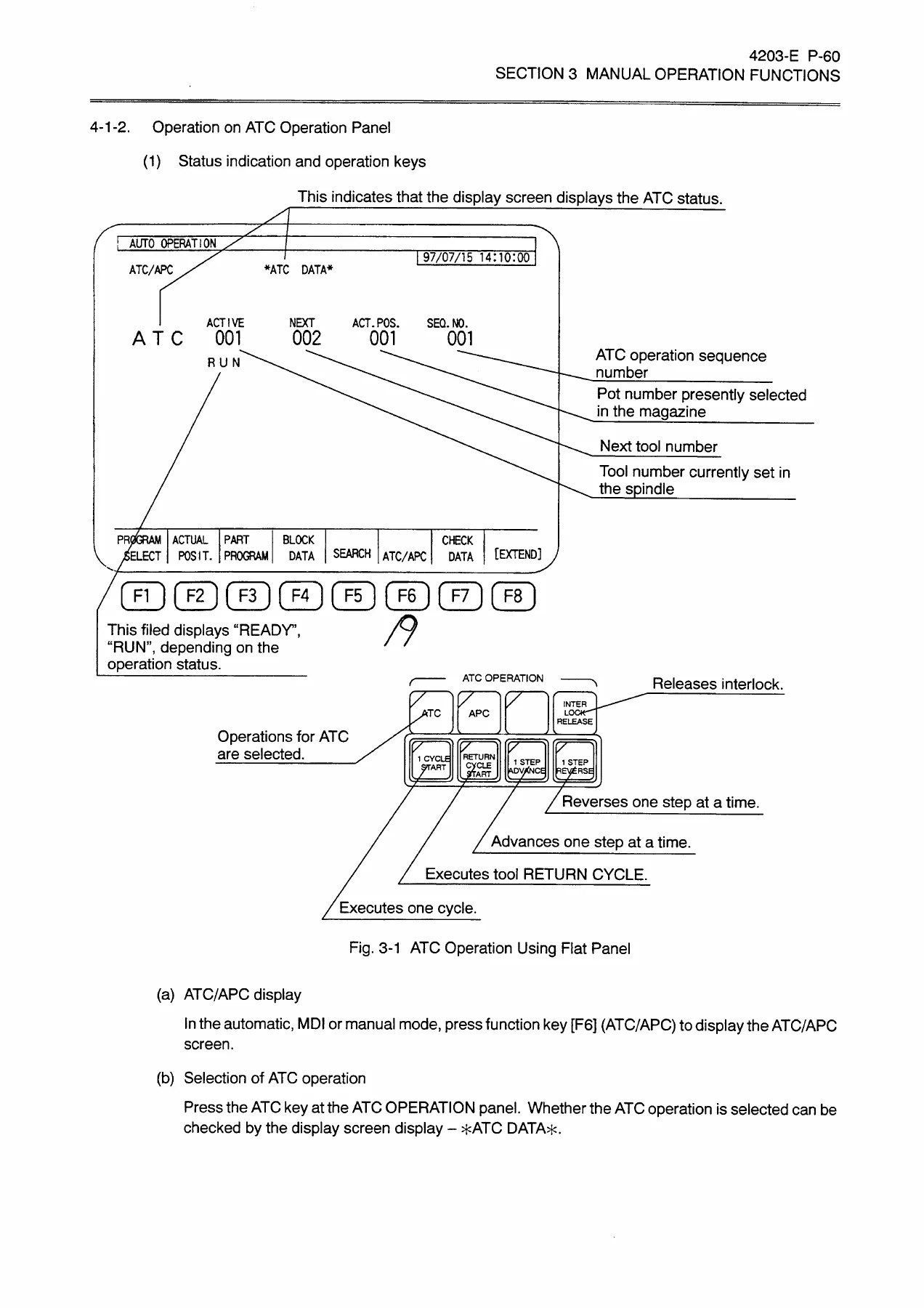
- Section 3: Manual Axis Feed Functions (Rapid, Jog, Pulse Handle), Spindle Operation, Indexing Swivel Head, ATC Operations, Manual Tool Change, Manual Magazine Operation, APC Operations, Other Functions
- Section 4: MDI Operation Procedure, Automatic Mode vs MDI Mode, Subprogram Call in MDI Mode
- Section 5: Main Program Selection and Operation, Schedule Program Selection, Cycle Start and Slide Hold, Resetting NC, Sequence Number Search and Mid-Start, Return Search and Sequence Restart, Sequence Stop, Single Block, Optional Block Skip, Program Branch, Optional Stop, Mirror Image, Override, Manual Intervention During Automatic Operation, Inserting Pulse Handle Operations, Lock Functions, Dry Run, Library Program Registration, Operation End Light/Buzzer, Error Light, Auto Power Off, Work Counter, Hour Meters
- Section 6: Status Indicating Lamps, Actual Position Display, Program Display, Block Display, ATC Tool Setting Data Display, Message Display, Check Display, Run Guide Display
- Section 7: HELP Function — Summary, Operation Procedure, Guidance Display Screen, Alarm History Display Screen, Operation Examples
- III. Data Operation
- Section 1: Data Setting — Mode Selection Keys, Data Set Commands (SET, ADD, CAL), Parameter Selection Commands (ITEM, SEARCH, AXIS CHANGE, Cursor Keys, Page Keys, EXTEND), Input/Output Commands (READ, PUNCH, VERIFY), Back Up Command, Zero Set Commands, Tool Data Set Commands, ATC Pot No./Tool No. Table, Parameter Setting
- Section 2: Program Operation — List of Program Commands, Date, Directory, File Transfer (Read, Punch, Verify, Duplication), Program Editing (One Line Insertion/Deletion, Character Insertion/Deletion, Find, Change, Copy, Move, Extract, Page Mode, Insert Mode), Multi-file Transfer (MPIP), List, Data Arrangement in Memory, Time, Initializing, Deletion, Rename, Free, Protect, Directory-Selection-Based File Operation
- MS-DOS Format Floppy Disk I/O — DIR, COPY, RENAME, DELETE, FREE, PROTECT, Program Input/Output
- OSP Format I/O Function — Operation Commands, Floppy Disk Types
- Tape Punch Interface — Operation Commands, Parameter Settings, Tape Format, RS232C Interface, Connection to Peripheral Devices
- IV. Parameter — Display Select Screen, Common Variables, User Parameters, G/M Code Macro, NC Optional Parameter (Long Word, Word, Bit), Unit Systems for Programming, NC Optional Parameter RS232C, NC Optional Parameter SPINDLE (OKUMA VAC), System Parameter, Pitch Error Compensation, Machine Axis Parameter, Machine User Parameters (Coolant, Power Save/Shutdown, Timers, Indicating Lamp, Buzzer, Spindle, ATC/Tool Exchange, Magazine, External M Command, External Hour Meter, Door Interlock, Axis Lubrication, System Check Mode, External Program Selection, Chuck), Machine System Parameters (Spindle, ATC, APC, AAC, Home Position, MCS, Power Sequence, Axis Exchange, ATC Arm, ATC Arm Torque Limiter)
- V. Appendix — Appended Figures (NC Operation Panel, Machine Operation Panel, Option Panel, Manual Tool Change Operation Panels, Magazine Manual Operation Panels, APC Operation Panels, Attachment Operation Panel), Tables of Command Codes (G Codes, Mnemonic Codes, M Codes)
What This Manual Provides
The Okuma OSP-U100M/OSP-U10M Operation Manual is not a programming textbook or a maintenance guide — it is the practical operating reference for the CNC control itself. It documents how to turn the control on and off safely, how to navigate the NC operation panel and machine operation panel, how to run the machine in manual, MDI, and automatic modes, and how to use the extensive data setting and program editing functions built into the OSP control.
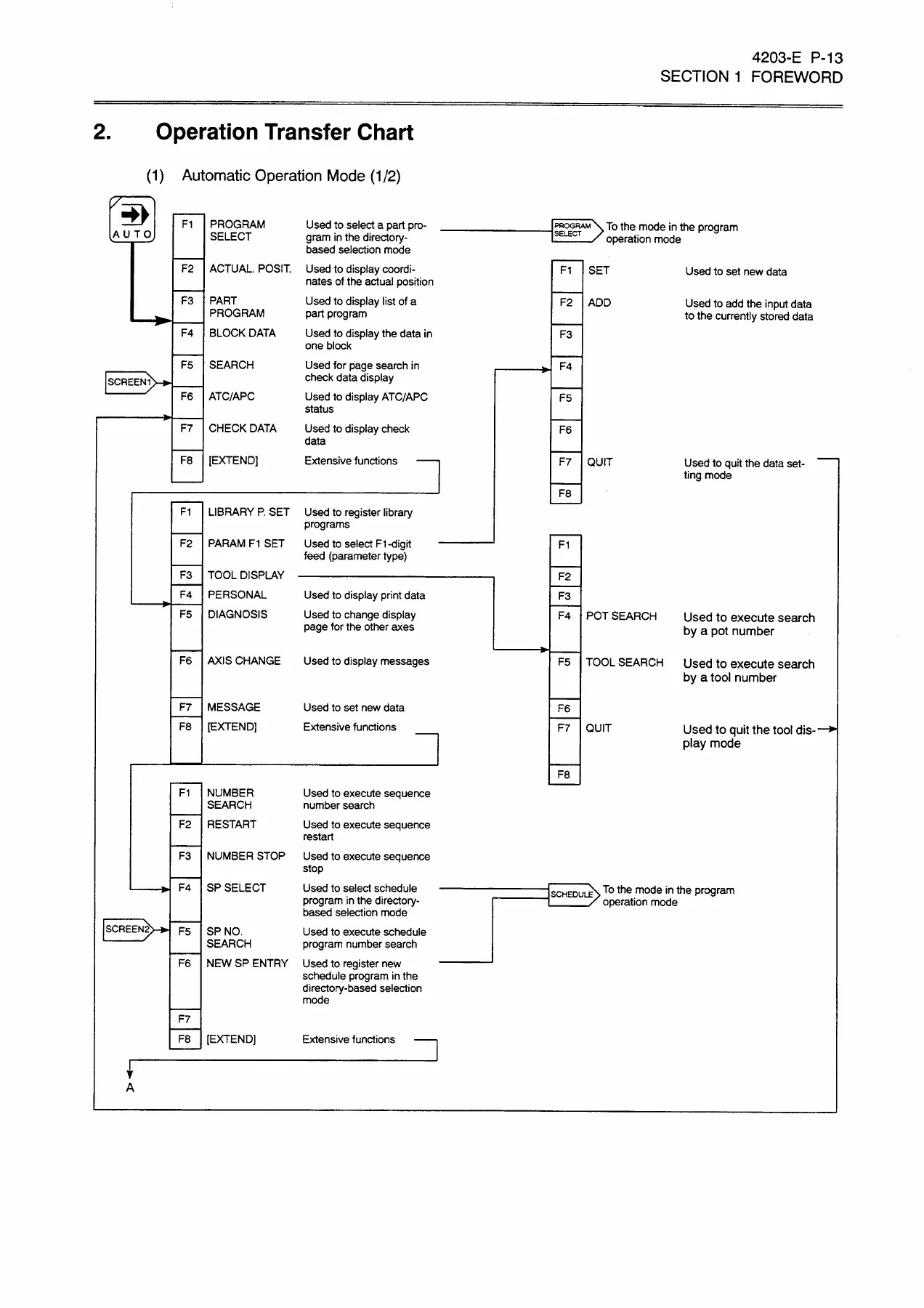
Key areas include the ATC and APC operation procedures (including manual intervention and recovery), the actual position and program display screens, the HELP function for alarm guidance, the full parameter setting framework, and the file transfer and program operation commands. The manual also contains the operation transfer charts that map out the function key navigation for each mode, making it easier to follow the screen flow on the control.
For anyone operating an Okuma machining center with an OSP-U100M or OSP-U10M control, this manual is the reference for understanding what each key, screen, and command does — from setting tool data and work coordinates to editing programs at the machine and transferring files via floppy disk or tape punch interface.
Who This Manual Is For
This operation manual is aimed at machine operators, setup personnel, and workshop technicians who work with Okuma CNC controls daily. It assumes the machine is installed and the reader needs to understand the control’s operating functions. The level of detail — covering everything from basic power-on checks to parameter-level configuration — makes it useful both for training new operators and for experienced hands who need to look up a specific screen or procedure.
Get the Complete Okuma OSP-U100M/OSP-U10M Operation Manual
IMAGES PREVIEW
This Okuma OSP-U100M OSP-U10M CNC Operation Manual gives you the full documented operating procedures for these Okuma control systems: mode selection, axis feed, spindle control, ATC and APC operation, program editing, data setting, parameter access, display functions, and the HELP system. Having the correct procedures on hand reduces the risk of incorrect operation, helps you recover from alarms and interruptions, and lets you use the control’s functions as intended. The manual is delivered as an instant PDF download — no shipping, no waiting, and you can view it on any device or print the pages you need for the shop floor.
Reviews
There are no reviews yet.