
OMRON CX-Simulator Ver. 1.3 CS/CJ Series PLC Simulator Operation Manual WS02-SIMC1-EC
Original price was: $34.95.$21.95Current price is: $21.95.
Official OMRON CX-Simulator Ver. 1.3 Operation Manual (W366-E1-03) for SYSMAC CS/CJ-series PLC simulation on Windows. Covers installation, PLC setup, debug console operation, step run and break points, serial and network communications debugging, virtual external inputs, CPU operation, cycle time, I/O memory allocation, and troubleshooting.
Description
OMRON CX-Simulator Ver. 1.3 Operation Manual – CS/CJ Series PLC Simulation
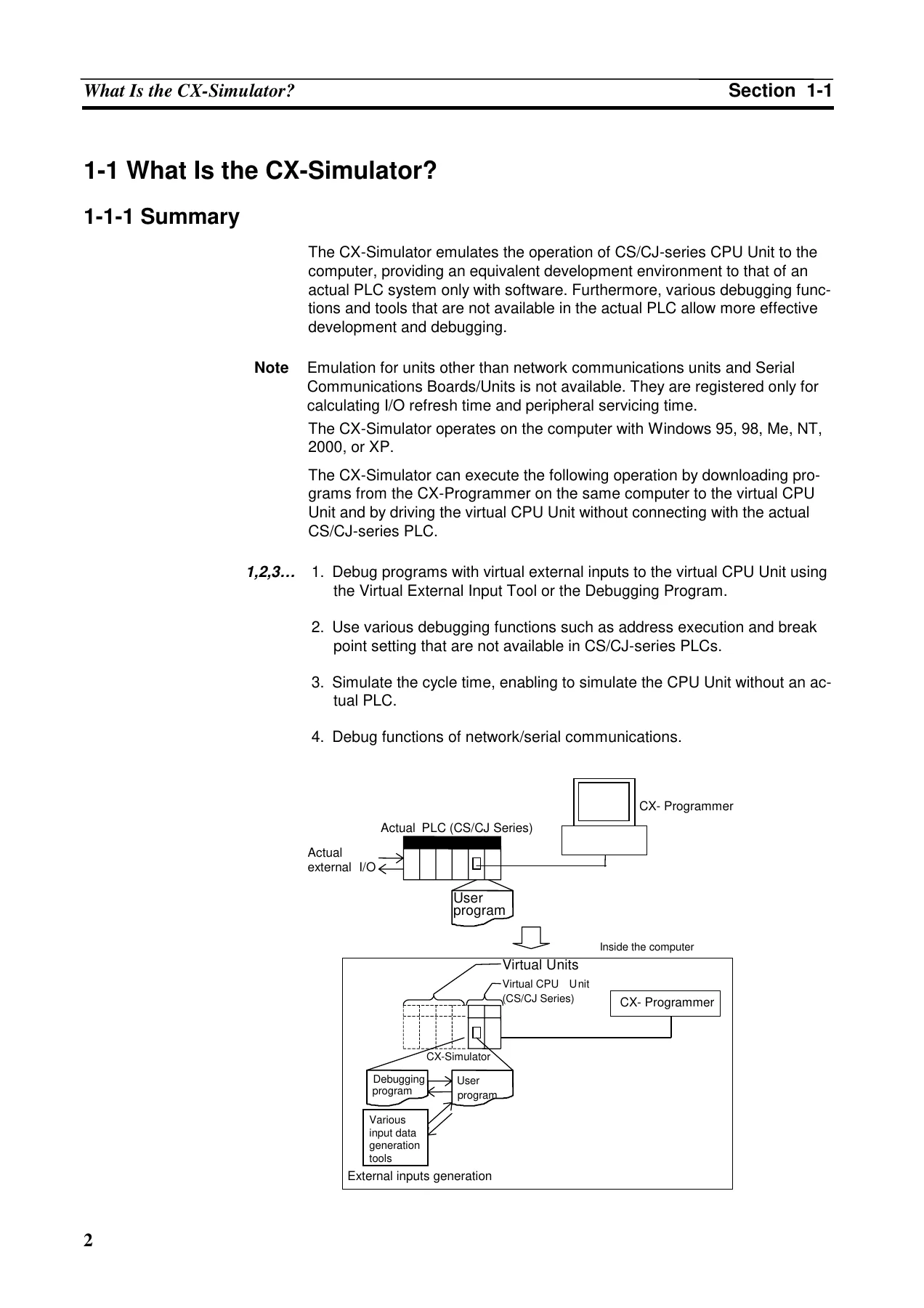
This OMRON CX-Simulator Ver. 1.3 Operation Manual (Cat. No. W366-E1-03) is the official guide for the WS02-SIMC1-EC simulation software, which emulates the operation of SYSMAC CS/CJ-series CPU Units on a Windows computer. The manual explains how to install and configure the CX-Simulator, how to start and connect it with the CX-Programmer, and how to use its debugging tools to develop and test ladder programs, serial communications, network communications, and virtual external inputs without an actual PLC connected.
File Details
- Manual type: Operation Manual
- Product: CX-Simulator Ver. 1.3 (WS02-SIMC1-EC)
- Brand: OMRON
- Series covered: SYSMAC CS/CJ Series Programmable Controllers
- Document number: W366-E1-03 (Cat. No.)
- Revision: 03, Revised May 2002
- Language: English
- File format: PDF
- Page count: 261 pages
Chapters Covered
- Section 1: Outline – What Is the CX-Simulator, Features, Convenient Functions, Applicable PLC Models and Computers, Checking the Product Package, Operation List Arranged by Purpose, Comparison of the CX-Simulator and SYSMAC CS/CJ-series PLCs
- Section 2: Setup – Installing and Uninstalling
- Section 3: Basic Operation – Starting Methods for the CX-Simulator, Starting and Going Online from the CX-Programmer, Starting and Exiting from CX-Simulator Menus, Outline of Operation Procedure, Creating a New PLC, Each Part of the Windows, System Status Setting Window, Connecting to the CX-Programmer Version 2.1 or Lower, Debug Console Window
- Section 4: Debugging Programs – Debugging Using the CX-Programmer, Debugging Operation, Step Run and Break, Task Debugging
- Section 5: Debugging Serial Communications – Outline of Serial Communications, Serial Communications Settings, Serial Communications Connection, Connecting PT via NT Link, Examples of Serial Communications Debugging
- Section 6: Debugging Network Communications – Outline of Network Communications, Network Communications Setting, Network Connection, Example of Debugging Network Communications, Available FINS Commands
- Section 7: Connection with Application Programs – Outline of Connection, Connection with Application Programs
- Section 8: Debugging Using Virtual External Inputs – Outline of Virtual External Input Function, Debugging Using Virtual External Inputs, Generating Virtual External Inputs, Running by Virtual External Inputs, Checking the Result
- Section 9: CPU Unit Operation – CPU Unit Operation, Cycle Time and Time, I/O Memory Allocation, Other Functions
- Section 10: Troubleshooting – Error Processing, Alarms and Remedies, Other Tips for Troubleshooting
- Appendix – How to Use Data Trace Recording Tool
Across its pages, the manual provides a complete reference for operating the CX-Simulator as a virtual PLC development environment. It covers PLC model support, installation and uninstallation, PLC data folder management, system status settings, debug console operation, scan run and step run execution, break point and I/O break condition configuration, task debugging, serial communications debugging with actual COM ports or file-based I/O, FINS network communications with nodes in the computer, virtual external input generation through command logs, data trace files, data replay files, I/O Condition expressions, and debugging ladder programs, plus CPU operation details including cycle time calculation, I/O memory allocation, PLC Setup settings, auxiliary area operation, and troubleshooting. The manual also documents the differences between the CX-Simulator and an actual CS/CJ-series PLC, helping users interpret simulation results correctly.
Who This Manual Supports
This guide is intended for FA system engineers, PLC programmers, and maintenance personnel who need to develop and debug SYSMAC CS/CJ-series programs using the CX-Simulator. The manual documents the CX-Simulator’s simulation capabilities for CS1H, CS1G, CJ1M, CJ1H, and CJ1G CPU Unit models, including the debugging tools that are not available on the actual PLC, such as step run with break points, I/O break conditions, task control, and scan replay.
Virtual External Input and Communications Debugging
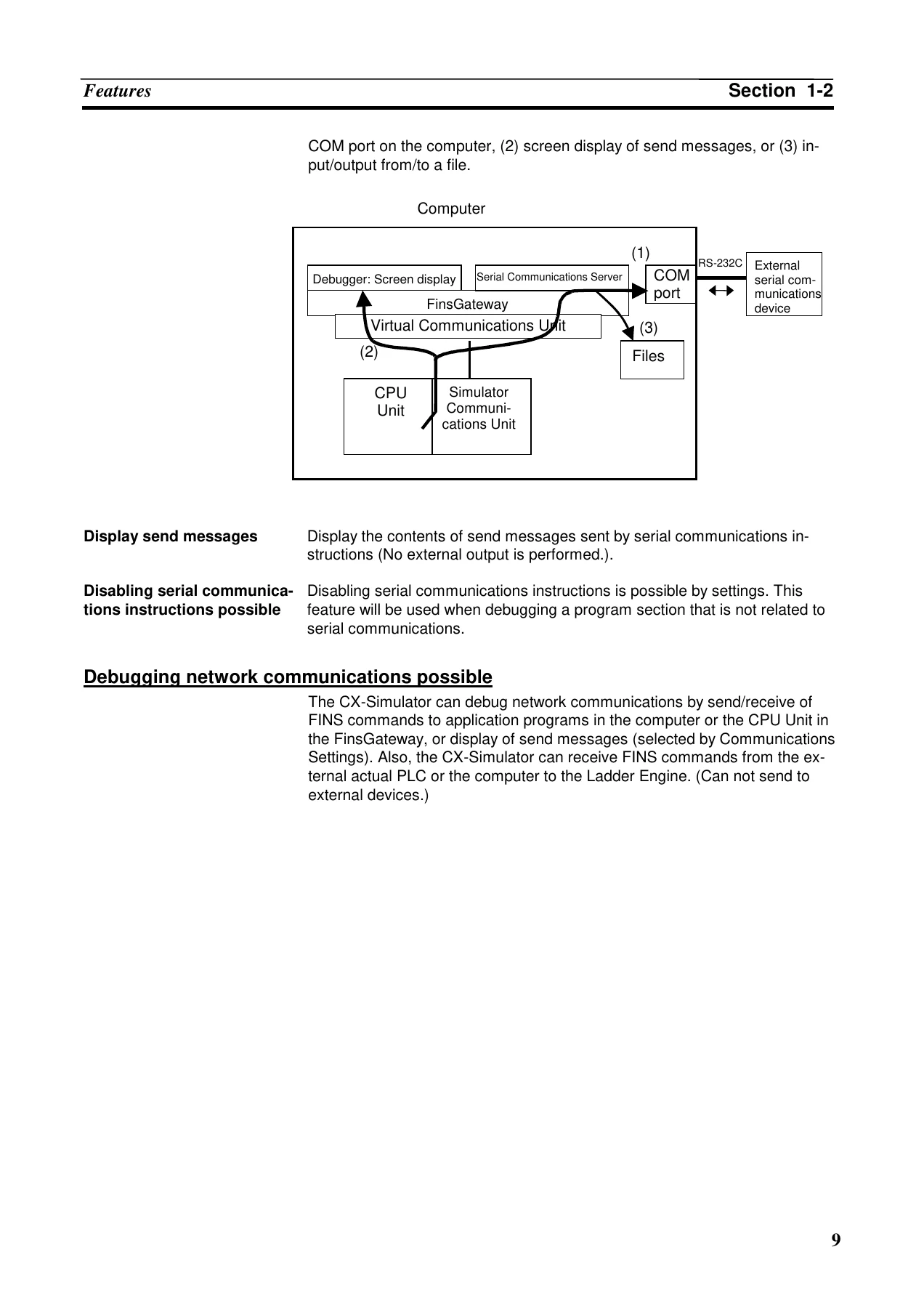
A significant portion of the manual is devoted to creating realistic test conditions without hardware. The CX-Simulator supports virtual external inputs through command logs, data trace files, data replay files, the I/O Condition Tool, and ladder programs in a dedicated debugging program area (UM2). Serial communications can be debugged through message display, file I/O, or actual communications to a COM port using Host Link, NT Link, or No-protocol. Network communications are supported through FINS commands to nodes in the computer, including the CPU Unit itself and FinsGateway application programs. The manual explains how to configure each communications unit, set node addresses, and interpret the message display and error flags.
CPU Operation, Cycle Time, and I/O Memory
Section 9 provides detailed documentation of the virtual CPU Unit’s operation, including startup processing, overseeing processing, computing process for UM1 and UM2, I/O refresh and peripheral servicing, and the two cycle time modes (virtual cycle time and computer cycle time). It also documents the I/O memory allocation for the CIO area, work area, holding area, auxiliary area, DM area, EM area, timer and counter areas, task flags, index registers, and data registers, along with the PLC Setup settings that differ from the actual PLC.
Why This Manual Matters
Correct use of the CX-Simulator requires understanding its architecture, its differences from an actual CS/CJ-series PLC, and the proper configuration of each communications and debugging feature. This manual provides the procedures, parameter settings, dialog box references, and troubleshooting guidance needed to set up the simulation environment, transfer programs from the CX-Programmer, configure serial and network communications, generate virtual external inputs, and interpret system status and error information. It also documents the virtual cycle time and computer cycle time calculation methods, helping users estimate program execution time on the actual PLC.
Whether you are installing the CX-Simulator for the first time, connecting it to the CX-Programmer, debugging a ladder program with break points, testing serial communications with a barcode reader or Programmable Terminal, or troubleshooting a connection error, this OMRON CX-Simulator Ver. 1.3 Operation Manual provides the information needed to carry out the task.
IMAGES PREVIEW
Instant PDF Delivery
This OMRON CX-Simulator Ver. 1.3 CS/CJ Series Operation Manual is delivered as an instant PDF download after payment, with no shipping costs. The file can be viewed on any computer, tablet, or smartphone, and relevant pages can be printed for use at the workstation or in the lab.
Reviews
There are no reviews yet.