
Roland SOLJET PRO III XC-540 / XC-540MT User Manual – Instant PDF Download
Original price was: $52.95.$34.95Current price is: $34.95.
Complete Roland SOLJET PRO III XC-540 and XC-540MT User Manual covering setup, printing, cutting, media heating, maintenance, and troubleshooting. Instant PDF download.
Description
Roland SOLJET PRO III XC-540 / XC-540MT User Manual – Complete Print & Cut Guide
This is the complete user’s manual for the Roland SOLJET PRO III XC-540 and XC-540MT large-format printer/cutters. Whether you are setting up the machine for the first time, loading media, performing a cutting test, or troubleshooting a head-cleaning issue, this manual provides the procedures, settings, and reference tables needed to operate and maintain the equipment correctly.
File Details
- Manual Type: User’s Manual
- Brand: Roland DG Corporation
- Models: SOLJET PRO III XC-540, XC-540MT
- Language: English (with French safety sections)
- Page Count: 172 pages
- File Format: PDF
- Document Number: 1000006542
- Publication Year: 2009
Chapters Covered
- To Ensure Safe Use
- Important Notes on Handling and Use
- Chapter 1: Introduction
- Chapter 2: Basic Operation
- Chapter 3: Using the Cutting Feature
- Chapter 4: The Take-up System
- Chapter 5: Maintenance and Adjustment
- Chapter 6: Feature Reference
- Chapter 7: What to Do If
- Chapter 8: Appendix
Safety and Handling
The manual opens with detailed safety instructions covering electrical hazards, high-temperature areas (platen and dryer), moving print heads, ink toxicity, and proper handling of power cords and grounding. Warning labels affixed to the machine are explained, and important notes on installation location, print head care, ink cartridge storage, and media handling are provided. These sections are essential reading before operating the XC-540 or XC-540MT for the first time.
Chapter 1: Introduction
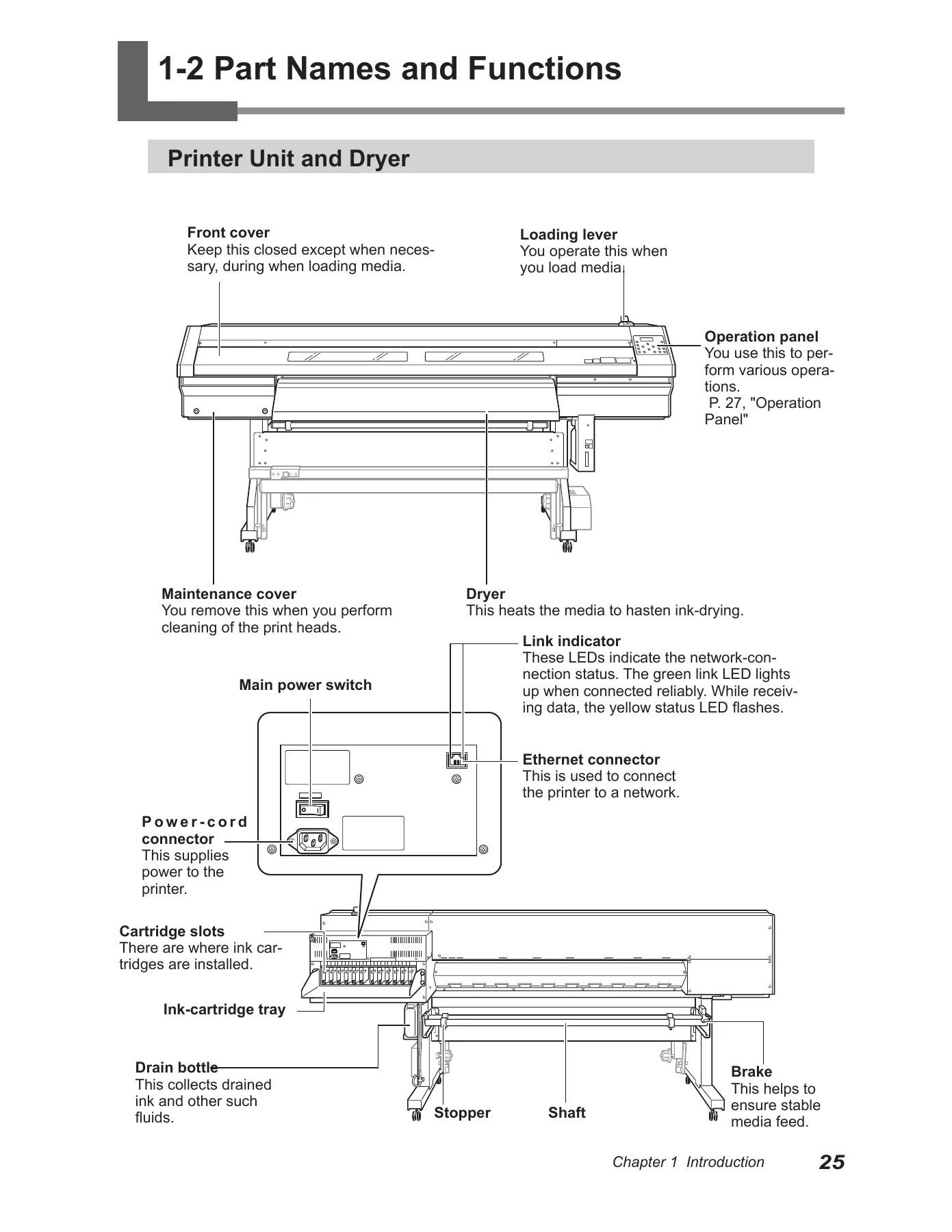
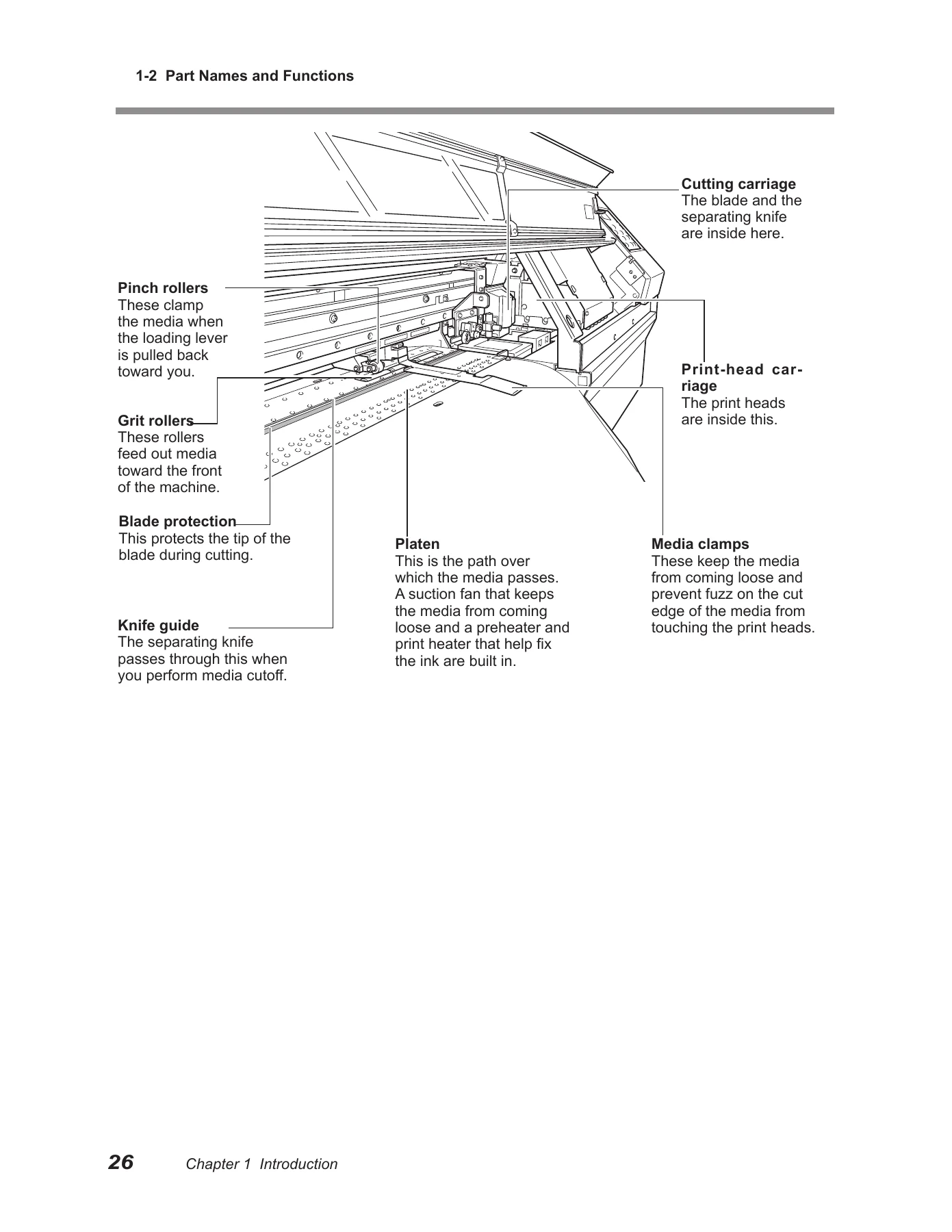
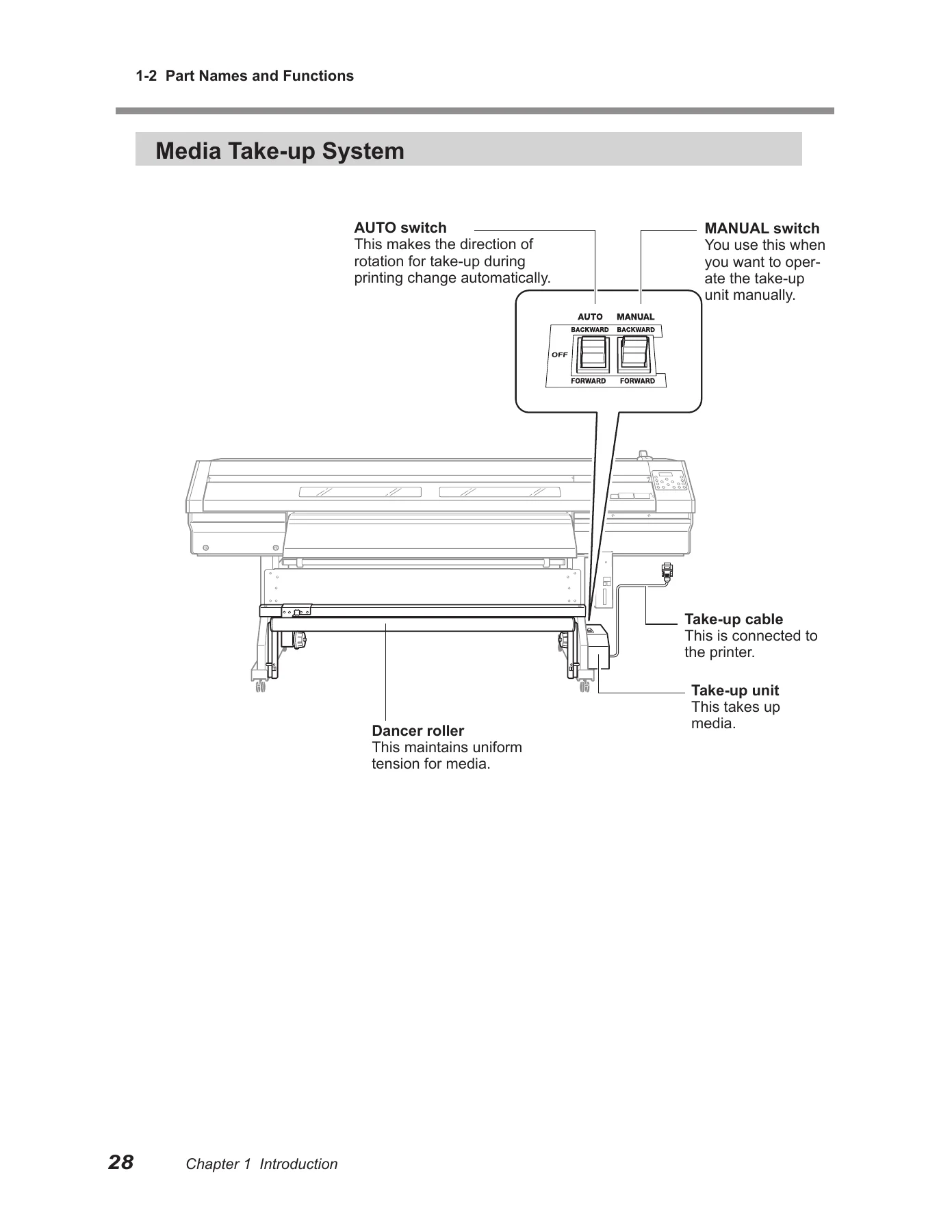
Covers the features of the machine, including the built-in print server, drying systems, media take-up system, and software RIP. Also includes part names and functions for the printer unit, dryer, operation panel, and media take-up system, with clear illustrations of each component.
Chapter 2: Basic Operation
Explains power-on and power-off procedures, the power-saving feature, media loading and cutting, media heating system settings (preheater, print heater, and dryer temperature configuration), starting output, printing tests, head cleaning, and what to do when ink runs out. Temperature preset guides for common media types are included.
Chapter 3: Using the Cutting Feature
Details cutting operations, including performing a cutting test, setting blade force, printing followed immediately by cutting, and using the crop-mark feature for alignment. Both automatic crop-mark detection and manual alignment procedures are covered.
Chapter 4: The Take-up System
Describes the take-up unit, operating conditions, paper tube requirements, how to take up media, and how to remove taken-up media. Important notes on automatic media-cutoff functions and margin settings are included.
Chapter 5: Maintenance and Adjustment
Covers daily care including disposing of discharged ink, cleaning procedures, print head maintenance, more powerful cleaning options, using the cleaning kit, replacing consumable parts (wipers, blade, separating knife), and procedures for prolonged storage or moving the unit.
Chapter 6: Feature Reference
A comprehensive reference covering pausing and canceling output, setting output-start location, matching the printer to the operating environment, accommodating various media types (head height adjustment, transparent media, hard-to-dry media, vacuum power, narrow media, periodic cleaning), printer operating settings (ink cartridge empty behavior, ink type change, sleep mode, prefed, feed for dry, image quality priority, menu language and units, remaining media display), cutting adjustments (distance correction, blade force/speed/offset/up-speed, cutting condition priority), misalignment corrections for bidirectional printing and print-cut positioning, media heating system operation, auxiliary drying unit settings, preset saving, network settings, system information viewing, maintenance procedures, and a full menu list.
Chapter 7: What to Do If
Troubleshooting guide covering situations where the machine doesn’t run, printed results are coarse or contain horizontal stripes, colors are unstable, media becomes soiled, cutting is misaligned, media jams, media cannot be taken up smoothly, media wrinkles or feed is unstable, print heads stopped moving, and explanations of common messages and error messages.
Chapter 8: Appendix
Includes usable media conditions and widths, printing/cutting area dimensions, maximum area when using crop marks, media-cutoff location during continuous printing, blade information, locations of power rating and serial number labels, and full specifications for both XC-540 and XC-540MT models.
What This Manual Enables You to Do
With this Roland SOLJET PRO III XC-540 / XC-540MT user manual, you can confidently handle everything from initial setup and media loading to advanced print-and-cut workflows using crop marks. The manual’s detailed temperature guides, cutting condition tables, and misalignment correction procedures help you achieve consistent output quality. Maintenance chapters walk you through head cleaning, wiper replacement, blade replacement, and internal washing so you can keep the machine running reliably.
For troubleshooting, the “What to Do If” chapter helps you diagnose issues quickly, from dot drop-out and horizontal stripes to media jams and motor errors. The menu reference and system information sections give you full visibility into the machine’s settings and network configuration.
Get Instant Access
IMAGES PREVIEW
This XC-540 / XC-540MT user manual is delivered as an instant PDF download — no shipping, no waiting. Read it on any device, print the pages you need for the shop floor, and keep the full reference available whenever you operate, maintain, or troubleshoot your Roland SOLJET PRO III printer/cutter.
Reviews
There are no reviews yet.