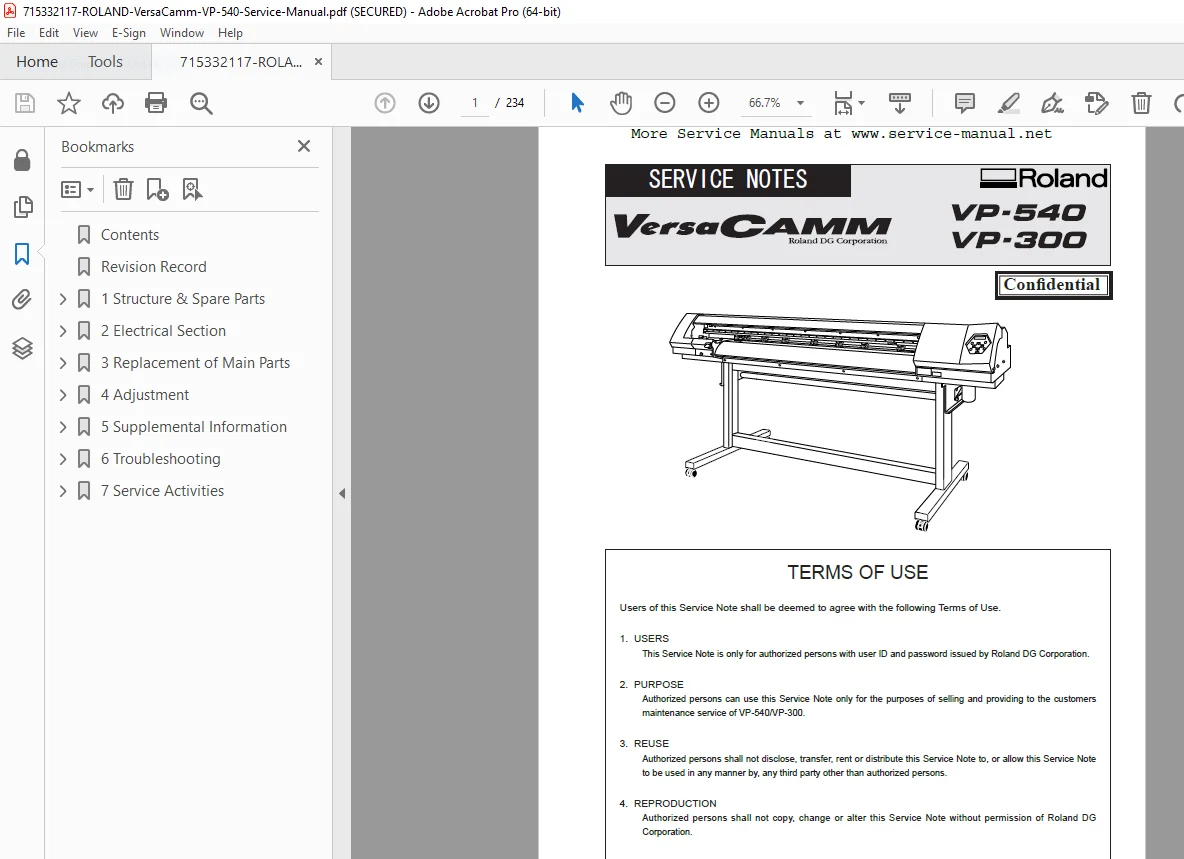
Roland VersaCAMM VP-540 Service Manual PDF
Original price was: $95.00.$18.95Current price is: $18.95.
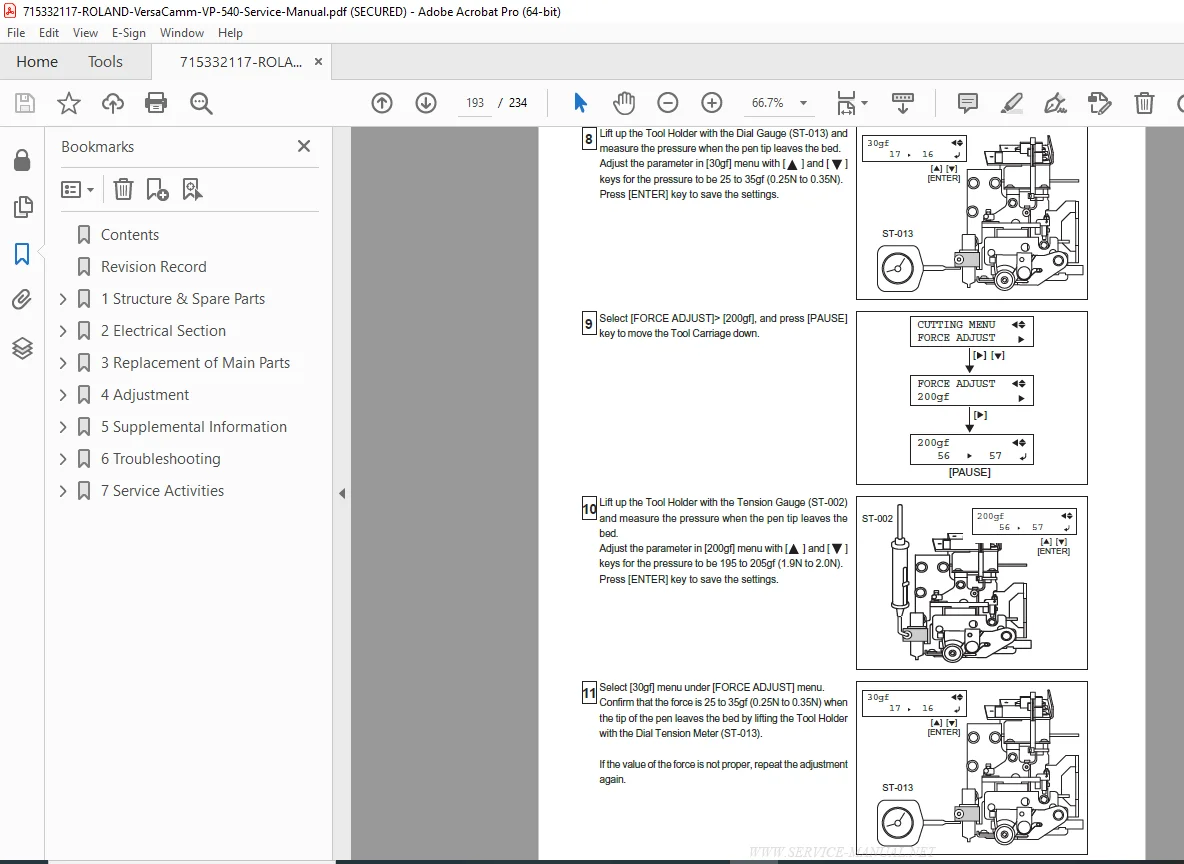
Complete Roland VersaCAMM VP-540 printer/cutter service manual with detailed repair procedures, preventive maintenance schedules, and troubleshooting guides. Covers print head systems, cutting mechanisms, ink delivery, electrical schematics, motor calibration, and media feed systems. Includes exploded parts diagrams, adjustment procedures, error code diagnostics, and alignment protocols. Professional-grade manual for print technicians servicing wide-format eco-solvent inkjet printer/cutters in sign shops and graphics facilities.
Description
Roland VersaCAMM VP-540 Service Manual Complete Repair Maintenance Guide PDF DOWNLOAD
FILE DETAILS
| Detail | Information |
|---|---|
| Manual Name | Roland VersaCAMM VP-540 Service Manual |
| Models Covered | VersaCAMM VP-540 Eco-Solvent Printer/Cutter |
| Year | Professional Service Edition |
| PDF Quality | High Resolution – Searchable Text with Technical Diagrams |
| Total Pages | 234 |
DESCRIPTION
Roland VersaCAMM VP-540 Service Manual – Professional Wide-Format Printer/Cutter Repair Guide
This comprehensive Roland VersaCAMM VP-540 service manual PDF provides complete repair procedures, preventive maintenance protocols, and technical specifications for certified printer technicians and service engineers. This VP-540 printer cutter repair guide download contains factory-level technical information used by authorized Roland service centers worldwide for complete system diagnostics, print head troubleshooting, and precision calibration procedures.
WHAT’S INCLUDED IN THIS ROLAND VERSACAMM VP-540 SERVICE MANUAL:
1. PRINTER/CUTTER SYSTEM OVERVIEW
- Complete VersaCAMM VP-540 Architecture:
- Eco-solvent inkjet printer/cutter specifications
- 54-inch (1371mm) maximum media width
- 4-color CMYK configuration (6-color optional)
- Print resolution specifications (up to 1440 dpi)
- Cutting force specifications
- Component location and identification diagrams
- System block diagrams and signal flow
- Model variations and configuration options
- Serial number identification and decoding
- Environmental operating specifications
- Integrated print-and-cut workflow overview
2. PRINT HEAD SYSTEM SERVICE
- VersaCAMM Print Head Maintenance Procedures:
- Print head removal and installation
- Print head alignment procedures
- Bi-directional adjustment
- Nozzle check and cleaning procedures
- Manual head cleaning protocols
- Automatic cleaning cycle diagnostics
- Head height adjustment (media gap)
- Print head electrical testing
- Head cable inspection
- Head temperature monitoring
- Nozzle recovery procedures
- Head replacement and initialization
- Piezoelectric print head technology overview
3. INK DELIVERY SYSTEM SERVICE
- Roland Eco-Solvent Printer Troubleshooting Manual:
- Ink cartridge system diagnostics
- Ink supply system service
- Damper replacement procedures
- Ink tube inspection and replacement
- Air in lines troubleshooting
- Pump system diagnostics and service
- Capping station maintenance
- Wiper blade replacement
- Waste ink system service
- Ink circulation system
- Ink level sensor diagnostics
- Ink flow verification procedures
- ECO-SOL MAX ink specifications
4. CUTTING SYSTEM SERVICE
- VP-540 Cutting Plotter Service:
- Cutting carriage diagnostics
- Blade holder service and adjustment
- Cutting force calibration
- Blade offset adjustment
- Cutting speed optimization
- Contour cutting alignment
- Registration mark detection service
- Optical sensor calibration
- Cutting strip replacement
- Cutting carriage motor service
- Cutting quality troubleshooting
- Blade specifications and replacement
5. MEDIA FEED SYSTEM SERVICE
- Media Transport Diagnostics:
- Media feed motor service
- Feed roller cleaning and maintenance
- Pinch roller adjustment
- Media sensor calibration
- Media width detection
- Grit roller replacement
- Media skew correction
- Media tension adjustment
- Take-up system service (if equipped)
- Media loading alignment
- Anti-cockle heater service
6. CARRIAGE SYSTEM SERVICE
- Print Carriage Assembly:
- Carriage rail cleaning and lubrication
- Carriage belt inspection and tension
- Carriage motor diagnostics
- Linear encoder service
- Carriage position sensor calibration
- Carriage movement verification
- Belt replacement procedures
- Carriage bearing inspection
- Cable carrier maintenance
- Carriage home position calibration
7. ELECTRICAL SYSTEM SERVICE
- Complete Electrical Schematics:
- Main control board diagnostics
- Power supply board troubleshooting
- Print head driver board service
- Motor driver board diagnostics
- Sensor interface circuits
- Heater control circuits
- Wiring harness diagrams with color codes
- Connector pinout specifications
- Fuse and circuit breaker locations
- Grounding diagrams
- EMI/EMC shielding
- Control panel interface diagnostics
8. HEATING SYSTEM SERVICE
- Media Heater Diagnostics:
- Pre-heater service and calibration
- Print heater temperature control
- Post-heater (dryer) service
- Heater element testing
- Temperature sensor calibration
- Thermal fuse replacement
- Heater control board diagnostics
- Temperature uniformity verification
- Energy-saving heater modes
9. CONTROL SYSTEM & SOFTWARE
- Wide Format Printer Service Technical Manual:
- Main CPU board diagnostics
- Firmware version identification
- Firmware update procedures
- Control panel diagnostics
- LCD display service
- Button and switch testing
- USB interface troubleshooting
- Ethernet network diagnostics
- Serial communication testing
- Parameter backup and restore
- Service mode access procedures
- Error log analysis
10. PREVENTIVE MAINTENANCE PROCEDURES
- Comprehensive Maintenance Schedules:
- Daily maintenance tasks
- Weekly cleaning procedures
- Monthly service intervals
- Quarterly inspection protocols
- Semi-annual maintenance
- Annual comprehensive service
- Print head maintenance schedules
- Cleaning station service intervals
- Lubrication points and schedules
- Media path cleaning
- Environmental filter replacement
- Maintenance log documentation
11. TROUBLESHOOTING GUIDE
- Complete Diagnostic Procedures:
- Error code listing and descriptions
- Print quality problems diagnosis
- Banding troubleshooting
- Color consistency issues
- Cutting quality problems
- Media feed errors
- Registration mark detection failures
- Ink system failures
- Heater malfunctions
- Communication errors
- Motor failure diagnostics
- Sensor error troubleshooting
- Step-by-step fault isolation
12. CALIBRATION & ADJUSTMENT PROCEDURES
- Precision Calibration Protocols:
- Print head alignment (uni/bi-directional)
- Media feed calibration
- Cutting force calibration
- Blade offset adjustment
- Color calibration procedures
- Density adjustment
- Drop position correction
- Scan motor adjustment
- Media sensor calibration
- Registration mark calibration
- Heater temperature calibration
- Calibration verification testing
13. PRINT QUALITY OPTIMIZATION
- Image Quality Enhancement:
- Nozzle check pattern interpretation
- Print test pattern analysis
- Color matching procedures
- Ink limit settings
- Halftone optimization • Print mode configuration
- Pass adjustment
- Drying time optimization
- Media profile management
- ICC profile integration
- Print environment optimization
14. CUTTING PERFORMANCE OPTIMIZATION
- Cutting condition settings
- Material-specific blade selection
- Cutting speed vs. quality balance
- Multi-layer cutting techniques
- Kiss-cut depth adjustment
- Through-cut settings
- Perforation cutting setup
- Tangential cutting optimization
15. MEDIA HANDLING
- Supported Media Types:
- Vinyl film specifications
- Banner material handling
- Heat transfer material
- Reflective media
- Canvas and fabric
- Backlit film
- Magnetic media
- Clear film
- Paper media
- Media compatibility chart
16. INK SYSTEM DIAGNOSTICS
- Ink Flow Analysis:
- Ink viscosity testing
- Ink consumption monitoring
- Ink waste collection service
- Ink cartridge chip diagnostics
- Ink temperature monitoring
- Negative pressure verification
- Air bubble detection and removal
- Ink compatibility verification
- Ink storage and handling
17. PARTS IDENTIFICATION
- Roland VP-540 Cutting Plotter Repair Maintenance Guide Parts:
- Exploded view assembly diagrams
- Print head assembly components
- Ink system parts breakdown
- Carriage assembly parts
- Cutting system components
- Media feed mechanism parts
- Electrical component identification
- Motor and sensor specifications
- Belt and pulley part numbers
- Hardware specifications (screws, clips)
- Cross-reference to Roland part numbers
18. DISASSEMBLY & ASSEMBLY
- Component Service Procedures:
- Major component removal sequences
- Print head removal and installation
- Carriage assembly disassembly
- Cutting unit removal
- Main board replacement
- Media feed roller removal
- Belt replacement procedures
- Cover and panel removal
- Reassembly sequences with torque specs
- Post-assembly verification testing
- Component handling precautions
19. ENVIRONMENTAL CONTROLS
- Operating temperature specifications
- Humidity requirements
- Ventilation recommendations
- Odor control systems
- Electrostatic discharge prevention
- Dust control measures
- Lighting recommendations
- Power quality requirements
20. RIP SOFTWARE INTEGRATION
- VersaWorks RIP software overview
- RIP communication diagnostics
- Print job queue troubleshooting
- Color management in RIP
- Media settings in RIP
- Cutting line generation
- Tiling and nesting functions
- Hot folder monitoring
21. SAFETY SYSTEMS
- Safety Features & Testing:
- Cover interlock switch testing
- Emergency stop verification
- Heater safety cutoff testing
- Electrical safety compliance
- Fire prevention measures
- Ventilation system verification
- Moving parts guarding
- Pinch point protection
- Safety label placement
22. ACCESSORIES & OPTIONS
- Compatible Accessories:
- Take-up system installation and service
- Bulk ink system (if equipped)
- Media basket specifications
- Floor stand maintenance
- Cutting blade types and applications
- Roland Intelligent Pass Control (IPC)
- Spot color capabilities (optional)
- White ink system (if equipped)
- Accessory calibration procedures
23. NETWORK & CONNECTIVITY
- Network interface configuration
- TCP/IP settings
- USB connection troubleshooting
- Printer driver installation
- Network printer sharing
- Firewall configuration
- Remote monitoring setup
- Firmware download procedures
24. CLEANING & MAINTENANCE SUPPLIES
- Approved Cleaning Materials:
- Print head cleaning solution
- Cleaning swabs and wipes
- Approved solvents
- Lubrication specifications
- Wiper blade cleaning
- Capping station cleaning
- Media path cleaning
- Exterior cleaning procedures
- Chemical safety information
25. ENVIRONMENTAL COMPLIANCE
- Waste Management:
- Ink cartridge disposal
- Waste ink disposal procedures
- Cleaning solution disposal
- MSDS/SDS references
- VOC emissions compliance
- Environmental certifications
- Energy Star compliance
- RoHS compliance
- Recycling programs
26. SAFETY INFORMATION
- Service Safety Protocols:
- Personal protective equipment requirements
- Solvent safety and ventilation
- Chemical exposure prevention
- Electrical safety precautions
- Moving parts safety
- Hot surface warnings
- Ink handling safety
- Cleaning solution safety
- Fire extinguisher requirements
- Emergency procedures
- Lockout/tagout procedures
27. REGULATORY COMPLIANCE
- Standards & Certifications:
- CE marking compliance
- FCC compliance (electromagnetic emissions)
- UL/CSA safety certifications
- OSHA workplace safety
- EPA environmental regulations
- International safety standards
- Electromagnetic compatibility (EMC)
- Low voltage directive (LVD)
- Product liability documentation
28. PRODUCTION OPTIMIZATION
- Workflow Efficiency:
- Production mode settings
- Queue management
- Color consistency maintenance
- Media waste reduction
- Ink consumption optimization
- Cutting time reduction
- Multi-job scheduling
- Quality vs. speed optimization
- Preventive maintenance scheduling
29. COLOR MANAGEMENT
- Color calibration procedures
- ICC profile creation
- Spot color matching
- Pantone color reproduction
- Color consistency verification
- Light fastness considerations
- Metamerism prevention
- Proofing procedures
30. APPENDICES
- Technical specifications summary
- Print speed specifications
- Cutting speed specifications
- Resolution specifications
- Ink specifications and MSDS
- Media specifications
- Electrical specifications
- Dimensional specifications
- Weight specifications
- Environmental specifications
- Error code quick reference
- Maintenance schedule summary
- Torque specifications
- Lubrication chart
- Service contact information
- Warranty information
- Recommended spare parts lists
WHY THIS ROLAND VERSACAMM VP-540 SERVICE MANUAL IS ESSENTIAL:
✓ Complete Factory Documentation – OEM-level repair procedures and specifications ✓ Minimize Production Downtime – Fast diagnostics restore printing operations immediately ✓ Print Quality Optimization – Proper calibration ensures consistent color and cutting accuracy ✓ Cost Savings – Perform in-house service vs. expensive dealer service contracts ✓ Extend Equipment Life – Proper maintenance maximizes printer/cutter lifespan ✓ Searchable PDF – Instantly locate error codes, procedures, and diagrams ✓ Print-Friendly – Print specific sections for shop floor reference ✓ Detailed Schematics – High-resolution electrical, mechanical, and ink system diagrams ✓ Step-by-Step Procedures – Clear instructions with adjustment specifications
IDEAL FOR:
- Wide-format printer technicians
- Sign shop production managers
- Print service center technical staff
- Graphics production facilities
- Roland certified service technicians
- Independent printer service companies
- In-house corporate print departments
- Vehicle wrap production facilities
- Screen printing shops with digital capabilities
- Commercial printing service technicians
PRODUCTION APPLICATIONS:
- Vehicle wraps and graphics
- Banners and signage
- Point-of-purchase displays
- Window graphics and decals
- Wall murals and wallcoverings
- Fleet graphics
- Trade show graphics
- Event signage
- Promotional graphics
- Heat transfer applications
- Custom labels and stickers
- Outdoor advertising
INSTANT DIGITAL DELIVERY – RESTORE PRODUCTION IMMEDIATELY!
Printer downtime costs hundreds of dollars per hour in lost production and missed deadlines. Download this professional Roland VersaCAMM VP-540 service manual PDF instantly and get the exact troubleshooting procedures, print head maintenance protocols, and calibration specifications you need to restore your printer/cutter to peak performance. This complete wide format printer service technical manual puts factory-certified expertise at your fingertips – maximize uptime, print quality, and profitability today!
Pricing Rationale:
- Specialized wide-format printing equipment (professional graphics market)
- Critical for production and revenue generation (urgent need)
- Comprehensive print, ink, and cutting system service documentation
- Professional printer technician-level technical content
- Saves thousands in Roland dealer service contracts
- Equipment value justifies premium pricing ($20,000-$35,000 machines)
- Complex eco-solvent inkjet and cutting technologies
- Includes color management and calibration procedures
- Competitive with similar wide-format printer service manual pricing