
SCADAPack E RTU Configuration Technical Reference Manual 8.12.2 – PDF
Original price was: $39.95.$22.95Current price is: $22.95.
Schneider Electric SCADAPack E Configuration Technical Reference, version 8.12.2 (October 2015) – 156 pages covering I/O numbering, point attributes, point properties, trend records, the RTU point database, record exchange and the full binary, analog and string system point maps.
Description
The SCADAPack E Configuration Technical Reference Manual is the document Schneider Electric technical staff and system integrators use to understand how a SCADAPack E remote terminal unit organises, stores and exposes its point data. Covering the SCADAPack E hardware family, this 156-page reference (version 8.12.2, October 2015) explains I/O numbering, point attributes, point properties, trend record configuration, the RTU point database and the system point maps that tie everything together. Where the Configurator user documentation shows which settings to enter, this manual explains what the RTU actually does with those settings once they reach the device.
File Details
- Manual type: Configuration Technical Reference
- Manufacturer: Schneider Electric
- Product line: SCADAPack E RTU / rPAC
- Version: 8.12.2
- Publication date: October 2015
- Language: English
- Page count: 156 pages
- File format: PDF
Chapters Covered
- Configuration Technical (front matter, technical support, safety information)
- Introduction
- Configuration – Concepts
- Configuration – I/O Numbering
- Methodology & System Points
- Physical I/O
- SCADAPack E Physical I/O Numbering
- SCADAPack ES Physical I/O Numbering
- SCADAPack ES Remote I/O Units
- User Points
- Start-Up & Configuration Revisions
- Configurations Becoming Active
- Point Attributes and Properties Becoming Active & Configurations and ISaGRAF
- SCADAPack E I/O Configurations
- SCADAPack ER I/O Configurations
- I/O Card Configuration & Applying I/O Configurations
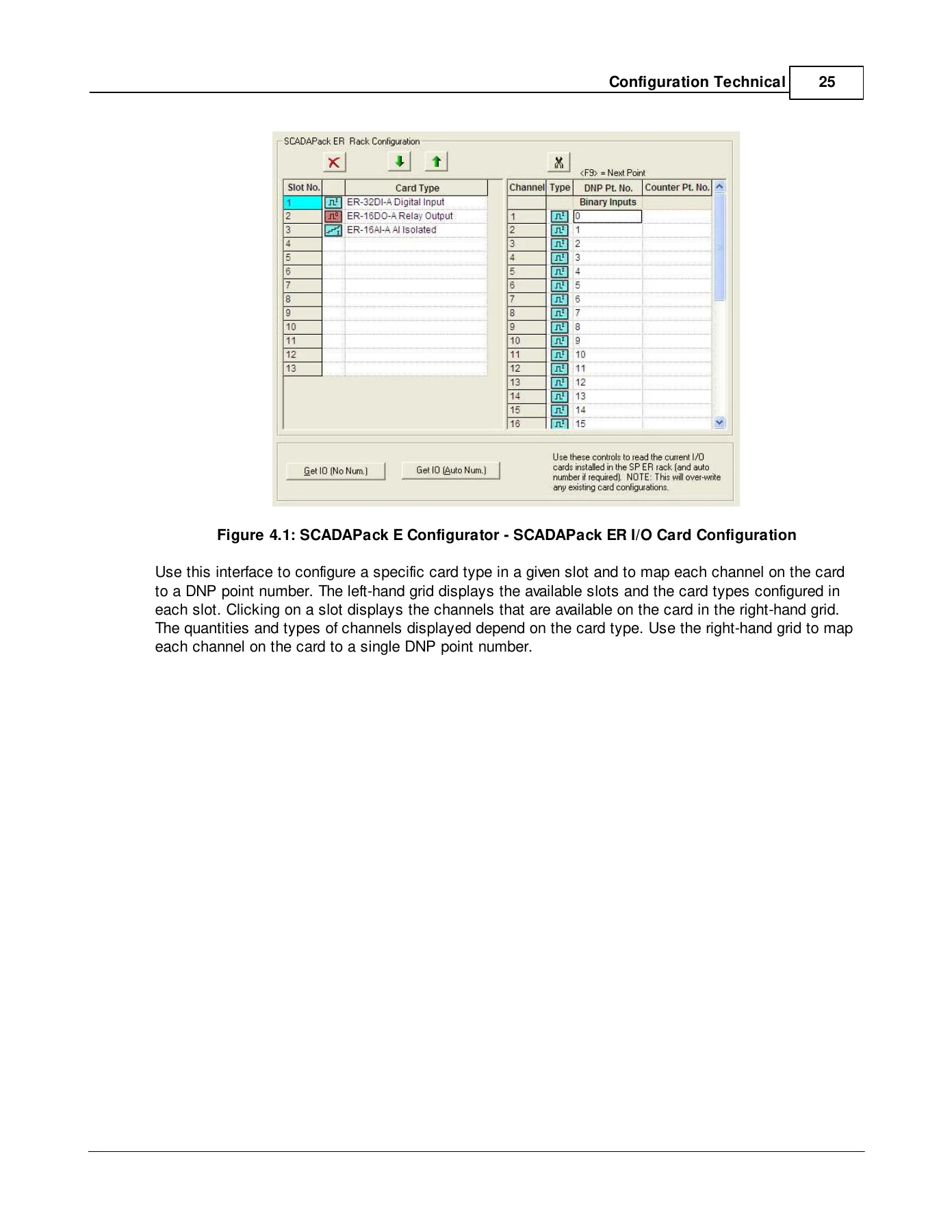
- Assignment of DNP Points to Physical Channels
- Point Attributes
- Common Point Attribute Configurations
- DNP Point Number, Point Type & Data Class
- Slot Channel
- Control Interlocks
- Interlock Alarm Timeout & Point is Bad
- Alarm & Trend Inhibit & Profile ID
- IEC 60870 IOA & ASDU Type
- Conitel Slave Type
- Binary Point Attributes
- DNP Object Type
- Alarm Active, Invert State & Unsolicited
- Time Deadband Into & Out of Alarm
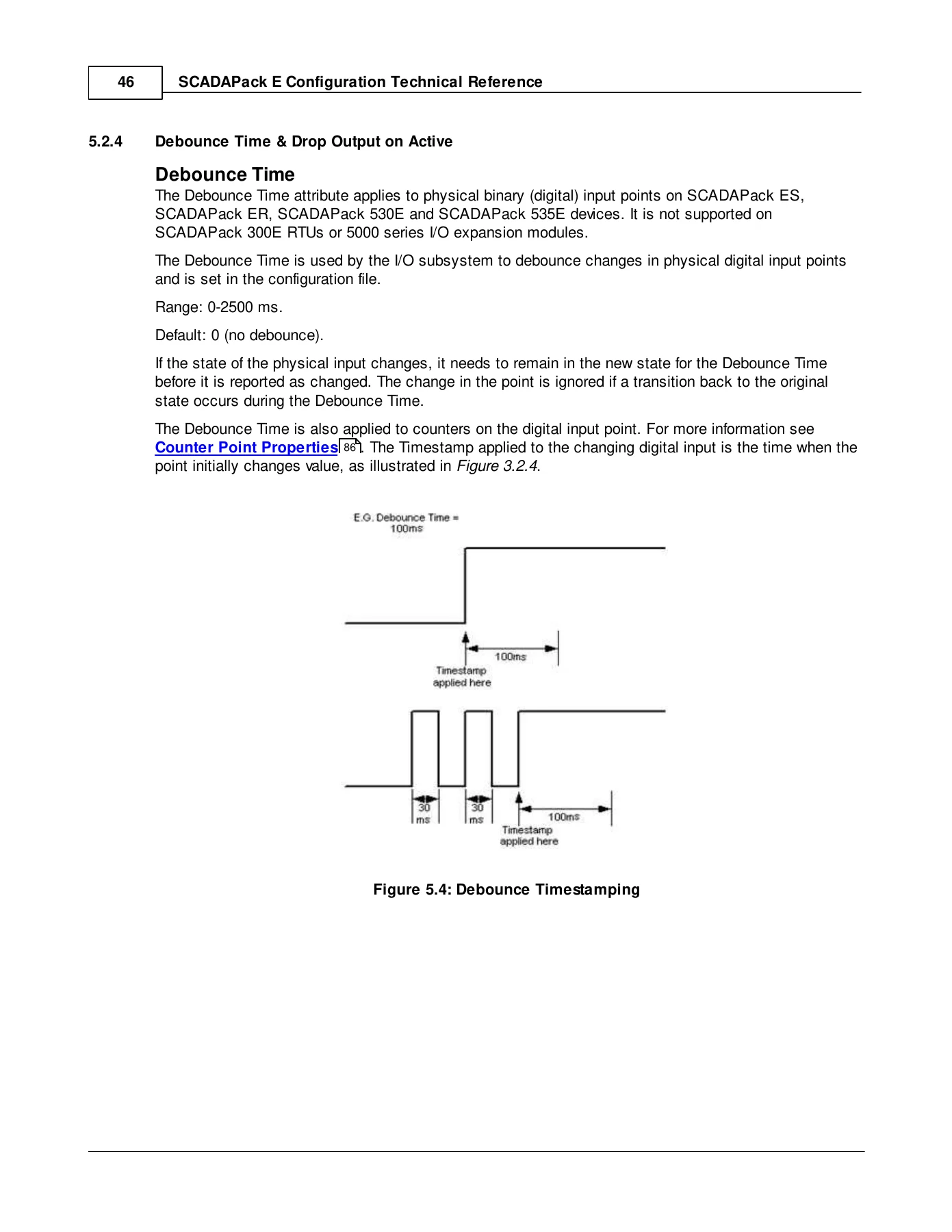
- Debounce Time & Drop Output on Active
- Output Pulse Time
- Trip Close Partner Point
- Analog Point Attributes
- DNP3 Static Object Type
- Point Properties DNP Binary Points
- Engineering Limits & Unsolicited Alarm Limit Events
- Integer to Engineering Conversion & Rate of Rise and Fall
- Over-range and Under-range Limits & IEC 870 Cyclic Scan
- No Change & Value Deadband Out of Alarm
- Time Deadband Into & Out of Alarm
- Zero Threshold Limit
- Limit Transgression – DNP Event Enable
- Event Deviation & Event Deviation Type
- Counter Point Attributes
- DNP Object Type & Unsolicited
- Counter High Limit Exceeded & Significant Change Deviation
- Trend Record Configuration
- Point Properties
- Common Point Properties
- Point Quality Reason
- I/O Not Responding & Remote Control Interlock
- Under ISaGRAF Control & Point is Failed
- Digital Point Properties
- Analog Point Properties
- Current Value Integer & Engineering
- Over-Range & Under-Range
- A/D Reference Error & No Change State
- Rate of Change Rise & Fall States
- Analog Limits Transgressed
- Time Dead-band Active
- Counter Point Properties
- Counter Reset, High Counter Limit & Counter Limit Exceeded
- Point Database Access
- Database Record Exchange Area
- Record Exchange Area System Points
- Reading Database Point Records (Digital, Analog, Counter, Trend)
- Writing Database Point Records (Digital, Analog, Counter, Trend)
- Notes and Limitations of Writing Database Records
- Using Record Exchange to Modify Device Configuration
- Adding & Disabling Points
- Double Status Points
- System Points
- Binary System Point Map
- Analog System Point Map
- String System Point Map
- BOOTP Configuration Records
Read end to end, the SCADAPack E Configuration Technical Reference Manual gives a technician the complete picture of how a SCADAPack E RTU thinks about its data. The early chapters set out the numbering methodology – how physical I/O, derived user points and system points share a single DNP3 16-bit index space, where the SCADAPack ES fixed numbering differs from the assignable numbering on other platforms, and how Remote I/O units extend a Main RTU without colliding with local points. From there the manual moves into the attribute layer, working through the common attributes every configured point carries before breaking out the binary, analog and counter attribute sets in detail, then into the read-only properties that report point condition back to a SCADA master, an ISaGRAF application or the Configurator.
Point Attributes, Point Properties and Configuration Revisions
The attribute chapters are the working heart of this reference. Each attribute is described with its valid range, its default, and – critically – which point types it actually applies to. The manual separates the attributes that are set in a configuration file from those that can be changed dynamically at run time, and it spells out which changes take effect immediately, which need a Configuration Restart, which need a DNP3 Warm Restart and which only become active after a full RTU Restart. The configuration major and minor revision numbers, their system point addresses and the exact conditions that increment or reset them are documented here as well, so a master station or Configurator can tell precisely when a device database has drifted from its stored configuration.
Analog handling gets the deepest treatment, covering the eight engineering alarm limits (4L through 4H), integer-to-engineering conversion with Raw Min/Max and Eng Min/Max pairs, over-range and under-range limits, rate of rise and rate of fall detection, no-change detection, zero threshold clamping, value and time deadbands in and out of alarm, limit transgression event enables and the selectable event deviation types. Binary points are covered with debounce timing, invert state, alarm active state, output pulse time, trip/close partner points and the drop output on interlock behaviour. Counter points are documented with high counter limits, reset-on-startup behaviour and significant change deviation.
The RTU Point Database, Record Exchange and System Points
A substantial section of the manual is devoted to the point database and the record exchange mechanism that external devices use to read and write database records. The exchange areas are mapped into system points, and the manual lists those addresses for digital, analog, counter and trend records, along with the point type enumeration values required for a valid transaction. The read and write record formats are broken out field by field, including the standard fields, the REX II extensions and the REX V extensions, with the signed, unsigned and floating point field layouts shown in order. This is the reference to reach for when building a master station interface, scripting configuration updates, or diagnosing why a write record exchange returned a control status of 4.
The system point maps close out the document, and they are extensive. The binary system point map lists configurable and read-only points covering RTU status, remote I/O module health, IEC 60870-5-101 configuration, AGA12 mixed mode, SCADAPack 300E and 530E/535E hardware controls and more. The analog system point map runs to dozens of tables – firmware and hardware revisions, uptime and restart counters, configuration revision numbers, port function, mode, data rate and format values, DNP3 configuration and timing parameters, communication counters, network timing, IP addresses and subnet masks, route table records, Modbus and IEC slave configuration, Conitel configuration, licensed feature bitmasks and DNP3 additional master settings. The string system point map and the BOOTP configuration records complete the picture, covering modem initialisation strings, GPRS APN strings, PAP credentials and device identification fields.
Put the SCADAPack E Configuration Technical Reference Manual to Work
This is the manual you keep open when a SCADAPack E RTU is not behaving the way the point list says it should. It supports the real work: mapping DNP points to physical channels on a SCADAPack ER I/O card, configuring control interlocks so that a local ISaGRAF application and a remote master do not fight over the same output, setting time and value deadbands so a noisy analog does not flood the event log, wiring up trip/close partner points, building a record exchange interface from a master station, or working out why a counter limit exceeded property never set. Because the manual states the valid range and default for each attribute and names the point types it applies to, it removes the guesswork that turns a configuration change into an outage.
IMAGES PREVIEW
Delivered as an instant PDF download, the SCADAPack E RTU Configuration Technical Reference Manual is ready to open on a laptop, tablet or phone the moment payment clears, with no shipping and no waiting. Keep it on the bench, print the system point map tables for the cabinet door, and hand it to whoever is commissioning the next RTU.
Reviews
There are no reviews yet.