
★ TRUSTED BY 321,897+ PROFESSIONALS WORLDWIDE
🏢
Trusted Business
Verified & Licensed
🛡️
Virus Free Files
100% Safe Downloads
🔒
Secure Payment
SSL Protected
Instant Delivery
Available Immediately
Sale!

Volvo Owner’s Manual TP 36195 – Complete PDF Guide for B3 B4 B5 AWD Vehicles

Original price was: $24.95.Current price is: $14.95.

Complete Volvo Owner’s Manual TP 36195 in PDF format. Covers B3, B4, B5, and B5 AWD engine variants with full operating instructions, maintenance schedules, safety systems, driver support, and technical specifications across 672 pages.

Instant PDF Download
Available immediately
💾
Save to Your Device
Download & keep forever
🛡️
Antivirus Scanned
100% virus-free
🌍
Trusted Worldwide
175,000+ customers

Description

Volvo Owner’s Manual TP 36195 – Your Complete Vehicle Guide

This is the complete Volvo Owner’s Manual, document number TP 36195, provided as a high-quality PDF for immediate download. Whether you have recently purchased a used Volvo, need to replace a missing manual from the glovebox, or simply want a digital copy you can access from any device, this comprehensive guide covers every system, control, and maintenance requirement for vehicles equipped with B3, B4, B5, and B5 AWD engine variants.

File Details

  • Manual Type: Owner’s Manual
  • Brand: Volvo
  • Document Number: TP 36195
  • Language: English
  • Page Count: 672 pages
  • File Format: PDF
  • Covered Engines: B3 (B420T3), B4 (B420T6), B5 (B420T2), B5 AWD (B420T2), B5 AWD (B420T10)

Chapters Covered

The Volvo Owner’s Manual TP 36195 is organised into the following major sections, each containing detailed sub-sections and procedures:

  • Owner Information – Manual usage, centre display navigation, mobile app access, environmental information
  • Your Volvo – Volvo ID, Drive-E efficiency, IntelliSafe driver support, Sensus connectivity, software updates, data recording, privacy policy
  • Safety – Seatbelts, airbags, WHIPS, Pedestrian Protection System, child safety and child seat installation, safety mode
  • Displays and Voice Control – Driver display, centre display, head-up display, voice control, keyboard, driver profiles
  • Lighting – Exterior lighting controls, active main beam, active bending lights, fog lamps, emergency brake lights, interior lighting
  • Windows, Glass and Mirrors – Power windows, pinch protection, panoramic roof, rearview mirrors, wipers and washers
  • Seats and Steering Wheel – Manual and power seat adjustment, massage functions, lumbar support, steering wheel adjustment, rear seat folding
  • Climate Control – Climate zones, air distribution, sensors, CleanZone, preconditioning, parking climate, heated seats and steering wheel
  • Key, Locks and Alarm – Key functions, Key Tag, Care Key, keyless locking/unlocking, private locking, alarm system
  • Driver Support – Adaptive cruise control, Pilot Assist, City Safety, BLIS, Lane assistance, Park Assist, Cross Traffic Alert, Road Sign Information
  • Starting and Driving – Starting procedures, ignition positions, gearbox operation, drive modes, brake functions, towing, fuel handling
  • Sound, Media and Internet – Radio, media player, Bluetooth connectivity, Apple CarPlay, Android Auto, phone functions, Internet connection
  • eCall – Automatic collision alarm, emergency assistance, roadside assistance
  • Wheels and Tyres – Tyre specifications, pressure monitoring, wheel changing, emergency puncture repair, winter tyres, snow chains
  • Loading, Storage and Passenger Compartment – Cargo area, load recommendations, electrical sockets, storage spaces, roof load
  • Maintenance and Service – Volvo service programme, engine oil, coolant, batteries, fuses, bulb replacement, car care
  • Specifications – Dimensions, weights, engine specifications, fluid capacities, fuel consumption, approved wheel and tyre sizes
  • Alphabetical Index – Comprehensive index for quick reference

IMAGES PREVIEW

Volvo Owner's Manual TP 36195 - Complete PDF Guide for B3 B4 B5 AWD Vehicles — PDF page 1 preview
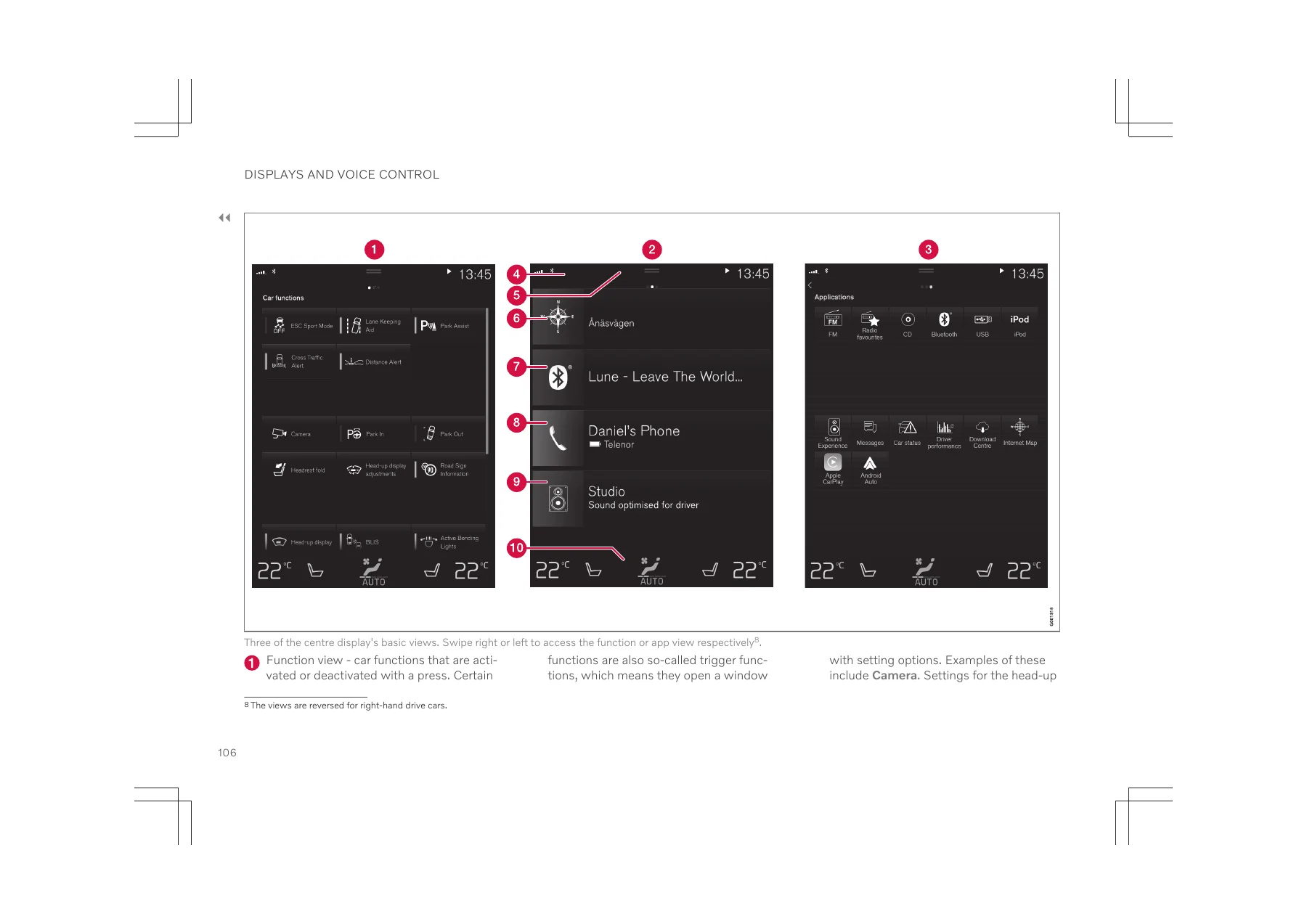
Volvo Owner's Manual TP 36195 - Complete PDF Guide for B3 B4 B5 AWD Vehicles — PDF page 106 preview
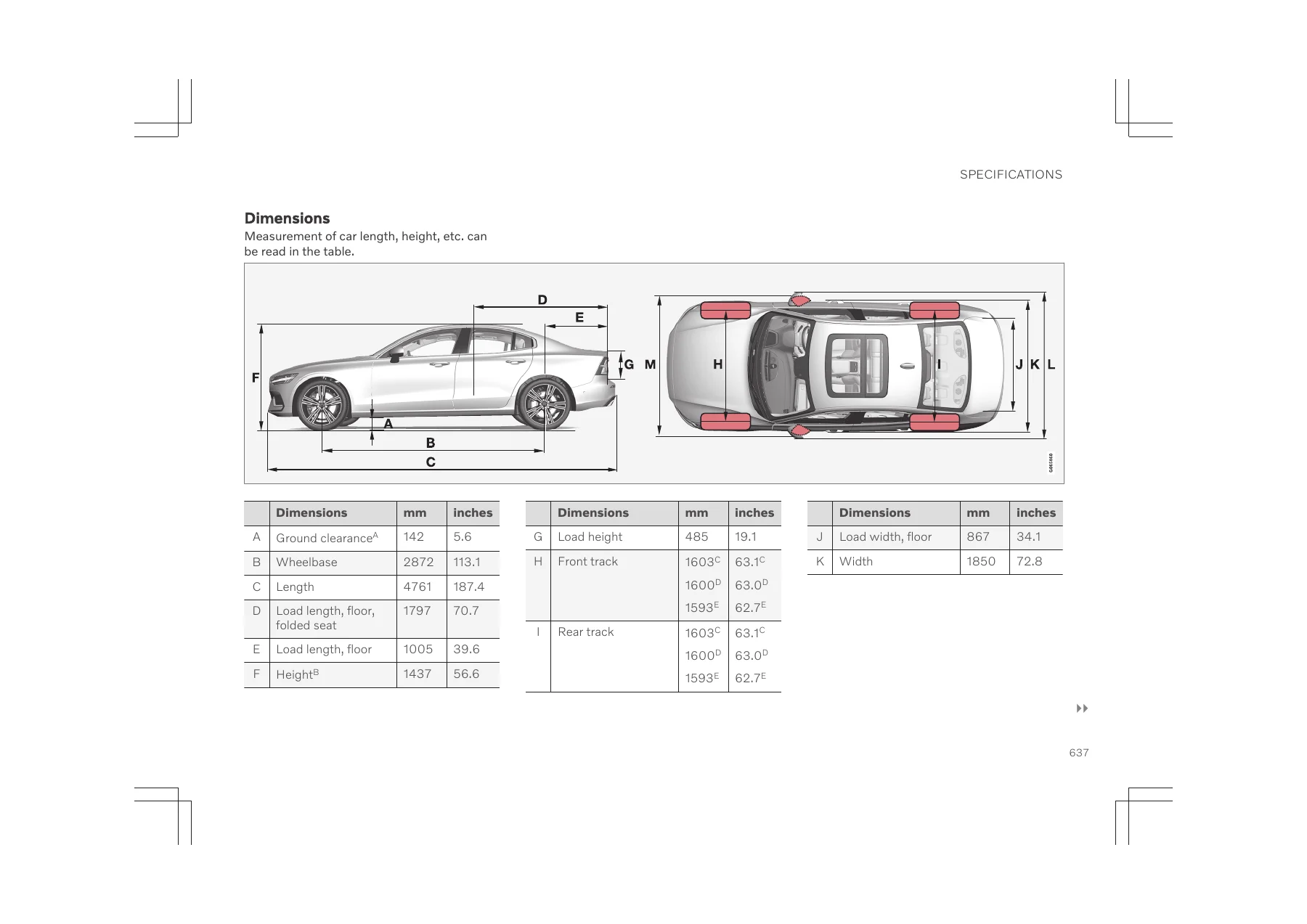
Volvo Owner's Manual TP 36195 - Complete PDF Guide for B3 B4 B5 AWD Vehicles — PDF page 637 preview

This Volvo Owner’s Manual TP 36195 provides a complete reference for operating, maintaining, and understanding your vehicle. From the moment you unlock the doors to the moment you park and lock up, every function is described in clear language with supporting illustrations and diagrams. The manual covers the full spectrum of vehicle ownership: daily operation, seasonal maintenance, troubleshooting, and understanding the advanced safety and driver support systems that Volvo vehicles are known for.

For the DIY-oriented owner, this Volvo Owner’s Manual PDF includes detailed procedures for tasks that can be performed at home, such as checking and topping up engine oil, replacing wiper blades, changing wheels, checking tyre pressures, replacing key batteries, and resetting the tyre pressure monitoring system. It also explains when a workshop visit is required and what to expect from authorised Volvo service.

The driver support chapter is particularly comprehensive, explaining how systems such as adaptive cruise control, Pilot Assist, City Safety, Lane Keeping Aid, Blind Spot Information System (BLIS), Cross Traffic Alert, and Park Assist Pilot function. It details their limitations, operating conditions, and the driver’s responsibilities when using them. This information is essential for safe use of these advanced systems and for understanding what the vehicle can and cannot do.

Safety information is presented throughout the manual, with clear warnings and important notices. The manual covers seatbelt usage, airbag systems including the Passenger Airbag Cut Off Switch (PACOS), Whiplash Protection System (WHIPS), and child seat installation with ISOFIX and i-Size mounting points. The child safety tables provide guidance on which child seats are suitable for each seating position.

Why This Volvo Owner’s Manual Matters

The Volvo Owner’s Manual TP 36195 is not just a reference book – it is the primary source of information for correctly operating and maintaining your vehicle. Using the correct procedures and specifications ensures:

  • Safety: Correct seatbelt, airbag, and child seat usage is critical for protecting occupants in the event of a collision. The manual explains how these systems work together and how to use them correctly.
  • Reliability: Following the recommended maintenance schedules and using the specified fluids and parts helps prevent breakdowns and extends the life of your vehicle.
  • Performance: Understanding drive modes, climate control settings, and driver support systems allows you to get the most from your vehicle in different conditions.
  • Value: A well-maintained vehicle with documented service history retains more value, and this manual helps you follow the correct maintenance procedures.
  • Convenience: Knowing how to operate all features – from the panoramic roof to the wireless phone charger to the voice control system – makes everyday driving more enjoyable.

Complete PDF Bookmark Tree

Complete Bookmarks

The complete bookmarks in the “Volvo Owner's Manual TP 36195 – Complete PDF Guide for B3 B4 B5 AWD Vehicles” are as follows:

Table of contents
Owner information
Owner information
The car's centre display
Mobile app
Volvo Cars support site
Volvo Cars website
Printed information
Related information
Owner's manual in centre display
Finding information in the car's centre display
Shortcut to related owner's information
Printed information, mobile app and support site
Related information
Navigate in the owner's manual in the centre display
Opening the menu in the top menu
Homepage
Categories
Quick Guide
Hotspots for exterior and interior
Favourites
Saving or deleting articles as favourites
Video
Information
Using the search function in the top menu
Related information
Owner's Manual in mobile devices
Related information
Reading the owner's manual
Options/accessories
Special texts
Decals
Warning of personal injury
Risk of property damage
Information
Illustrations and video clips
Related information
The owner's manual and the environment
Related information
Your Volvo
Volvo ID
Related information
Creating a Volvo ID
Registering your Volvo IDto the car
Related information
Drive-E- cleaner driving pleasure
Fuel consumption
Contributing to a better environment
Efficient emission control
Clean air in the passenger compartment
Interior
Volvo workshops and the environment
Recycling
Related information
IntelliSafe– driver support and safety
Support
Prevention
Protection
Related information
Sensus- online connectivity and entertainment
This is Sensus
Information when it is needed, where it is needed
Head-up display
Driver display
Centre display
Voice control system
Related information
Software updates
Related information
Recording data
Event Data Recorder (EDR)
Vehicle Connectivity Module (VCM High)
Terms & Conditions for Services
Related information
Customer Privacy Policy
Related information
Important information on accessories and auxiliary equipment
Related information
Installation of accessories
Related information
Connection of equipment to the car's diagnostic socket
Related information
Showing the car's identification number
Change of market when importing or relocating
Visit an authorised Volvo dealer
Creating a new Volvo ID in your new home market
For cars with Volvo On Call
Related information
Driver distraction
Related information
Safety
Safety
Warning symbol in driver display
Related information
Safety during pregnancy
Seatbelt
Seating position
Related information
Whiplash Protection System
Seating position
WHIPSand child seats
Related information
Pedestrian Protection System
Symbols in the driver display
Related information
Seatbelts
Related information
Putting on and taking off seatbelts
Putting on seatbelts
Taking off seatbelts
Related information
Seatbelt tensioner
Standard seatbelt tensioner
Electric seatbelt tensioner
Related information
Resetting the electric seatbelt tensioner
Related information
Door and seatbelt reminder
Driver display graphics
Seatbelt reminder
Front seat
Rear seat
Reminder for doors, bonnet, boot lid and fuel filler flap
Related information
Airbags
Deployed airbags
Related information
Driver airbags
Steering wheel airbag location
Knee airbaglocation
Related information
Passenger airbag
Passenger airbag location
Label for passenger airbag
Related information
Activating and deactivating passenger airbag
Activating passenger airbag
Deactivating passenger airbag
Related information
Side airbags
Side airbags and child seats
Related information
Inflatable curtains
Related information
Safety mode
Related information
Starting and moving the car after safety mode
Reset and start the car after safety mode
Moving the car after safety mode
Related information
Child safety
Related information
Child seats
Related information
Upper mounting points for child seats
The location of the mounting points
Related information
Lower mounting points for child seats
The location of the mounting points
Related information
i-Size/ISOFIXmounting points for child seats
The location of the mounting points
Related information
Child seat positioning
Label for passenger airbag
Related information
Child seat mounting
Installation in the front seat
Installation in the rear seat
Related information
Overview table for location of child seats
Related information
Table for location of child seats using the car's seatbelts
Related information
Table for location of i-Sizechild seats
Related information
Table for location of ISOFIXchild seats
Related information
Detail information for child seat manufacturers
Displays and voice control
Displays and controls by the driver in a left-hand drive car
Steering wheel and instrument panel
Roof console
Centre and tunnel console
Driver's door
Related information
Displays and controls by the driver in a right-hand drive car
Steering wheel and instrument panel
Roof console
Centre and tunnel console
Driver's door
Related information
Date and time
Clock location
Date and time settings
Automatic time for cars with GPS
Summer time
Related information
Driver display
Driver display, 8-inch
Driver display, 12-inch
Dynamic symbol
Related information
Driver display settings
Settings via the driver display's app menu
Settings via the centre display
Selecting information type
Selecting theme
Selecting language
Related information
Fuel gauge
Related information
Trip computer
Trip meter
Odometer
Instantaneous fuel consumption
Distance to empty tank
Tourist – alternative speedometer
Related information
Show trip data in driver display
Related information
Resetting the trip meter
Related information
Show trip statistics in centre display
Related information
Settings for trip statistics
Related information
Outside temperature gauge
Related information
Indicator and warning symbols
Red symbols
Amber symbols
Blue symbols
Green symbols
White/grey symbols
Related information
License agreement for driver display
Related information
App menu in the driver display
App menu functions
Related information
Managing the app menu in the driver display
Opening/closing the app menu
Navigating and selecting in the app menu
Related information
Messages in the driver display
Related information
Managing messages in the driver display
Related information
Handling a message saved from the driver display
Related information
Overview of centre display
Related information
Managing the centre display
Using the touch screen functionality in the centre display
Returning to home view from another view
Scrolling in a list, article or view
Using the controls in the centre display
Related information
Activating and deactivating centre display
Related information
Navigating in the centre display's views
Home view
Status bar
Top view
Climate view
App view
Function view
Related information
Managing subviews in centre display
Expanding a subview from default mode
Opening or closing a subview in full screen mode
Related information
Function view in centre display
Different types of buttons
The buttons' different modes
Related information
Moving apps and buttons in centre display
Related information
Symbols in the centre display's status bar
Related information
Keyboard in the centre display
Variants of a letter or character
Related information
Changing keyboard language in centre display
Adding or deleting languages in settings
Switching between different languages in the keyboard
Related information
Enter the characters, letters and words manually in the centre display
Related information
Changing appearance in the centre display
Related information
Switching off and changing system sound volume in the centre display
Related information
Changing system units
Related information
Changing system language
Related information
Other settings in the centre display's top view
Related information
Open contextual setup in the centre display
Third party apps
Related information
Resetting user data for change of ownership
Related information
Resetting settings in the centre display
Two types of reset
Resetting settings
Related information
Driver profiles
What settings are saved in the driver profiles?
Global settings
Personal preferences
Related information
Selecting driver profile
Related information
Renaming a driver profile
Related information
Protect driver profile
Related information
Resetting settings in the driver profiles
Related information
Link key to driver profile
Link key to a driver profile
Related information
Message in centre display
Related information
Managing messages in the centre display
Related information
Handling a message saved from the centre display
Related information
Head-up display
City Safetyin the head-up display
Symbols in the head-up display
Related information
Activating and deactivating the head-up display
Related information
Settings for head-up display
Selecting display options
Adjusting brightness and vertical position
Calibrate the horizontal position
Related information
Voice control
What is voice control?
System updating
Related information
Using voice control
Start voice control
Cancel voice control
Example of voice control
Commands/phrases
Digits
Speed and repetition mode
Related information
Controlling a telephone with voice control
Related information
Voice control of radio and media
Related information
Settings for voice control
Sound settings
Language settings
Related information
Lighting
Lighting control
Exterior lighting
Thumbwheel in instrument panel
Related information
Adjusting light functions via the centre display
Related information
Adapting the headlamp pattern from the headlamps
Related information
Position lamps
Related information
Daytime running lights
Related information
Dipped beam
Related information
Using main beam
Main beam flash
Main beam
Related information
Active main beam
Activate active main beam
Adaptive functionality
Limitations for active main beam
Related information
Using direction indicators
Short flash sequence
Continuous flash sequence
Related information
Active bending lights
Deactivating/activating the function
Related information
Front fog lamps/cornering lights
Cornering lights
Related information
Rear fog lamp
Related information
Brake lights
Related information
Emergency brake lights
Related information
Hazard warning flashers
Related information
Using home safe lighting
Related information
Approach light duration
Related information
Interior lighting
Front roof lighting
Reading lighting
Passenger compartment lighting
Auto function for passenger compartment lighting
Rear roof lighting
Glovebox lighting
Sun visor mirror lighting
Ground lighting
Lighting in cargo area
Decor lighting
Ambience lights
Lighting in storage compartments in doors
Lighting in the tunnel console's front cup holder
Related information
Adjusting interior lighting
Adjusting ambient decor illumination
Adjusting ambience light
Changing the brightness of the lights
Changing the colour of the light
Related information
Windows, glass and mirrors
Related information
Pinch protection for windows and sun blinds
Related information
Reset sequence for pinch protection
Related information
Power windows
Related information
Operating power windows
Related information
Using the sun blind
Related information
Rearview and door mirrors
Interior rearview mirror
Door mirrors
Related information
Adjusting rearview mirror dimming
Manual dimming
Automatic dimming
Related information
Angling adjustment of the door mirrors
Using controls for door mirrors
Folding in rearview mirrors electrically
Resetting to neutral
Angling during parking
Automatic angling during parking
Automatic retraction when locking
Related information
Panoramic roof
Wind deflector
Related information
Operating the panoramic roof
Open and close the panoramic roof to/from ventilation position using the roof control
Fully open and close the panoramic roof using the roof control
Manual operation
Automatic operation
Automatic operation – rapid opening or closing
Related information
Automatic closing of the panoramic roof'ssun blind
Related information
Wiper blades and washer fluid
Related information
Using windscreen wipers
Single sweep
Windscreen wipers off
Intermittent wiping
Continuous wiping
Related information
Using the rain sensor
Activating the rain sensor
Deactivating the rain sensor
Related information
Activating and deactivating the rain sensor's memory function
Related information
Using windscreen and headlamp washers
Starting windscreen and headlamp washers
Headlamp washing
Reduced washing
Related information
Seats and steering wheel
Manual front seat
Related information
Powerfront seat
Related information
Adjusting the powerfront seat
Related information
Storing position for seat, door mirrors and head-up display
Storing a position
Related information
Using a stored position for seat, door mirrors and head-up display
Using a stored setting
Open front door
Closed front door
Related information
Massage settingsin the front seat
Settings for massage
Restarting massage
Related information
Adjusting massage settingsin the front seat
Adjusting massage settings in the front seat
Related information
Adjustingthe length of the seat cushion in the front seat
Adjusting the length of the seat cushion using the multifunction control
Adjusting the length of the seat cushion manually
Related information
Adjusting the side supportin the front seat
Related information
Adjusting the lumbar supportin the front seat
Adjust the lumbar support in the car using the four-way lumbar support
Adjust the lumbar support in the car using the two-way lumbar support
Related information
Adjusting the passenger seat from the driver's seat
Activating the function
Adjust passenger seat
Related information
Lowering the backrests in the rear seat
Lowering the backrest
Raising the backrest
Related information
Adjusting the head restraints in the rear seat
Adjust the head restraint for the centre seat
Fold down the rear seat's outer head restraints via the centre display
Related information
Steering wheel controls and horn
Horn
Related information
Steering lock
Activating the steering lock
Deactivating the steering lock
Related information
Adjusting the steering wheel
Related information
Climate control
Climate
Related information
Climate zones
2-zone climate
4-zone climate
Related information
Climate control – sensors
Sensor location
Related information
Perceived temperature
Related information
Controlling climate control with voice control
Related information
Air quality
Materials in the passenger compartment
Air cleaning system
Related information
CleanZone
Related information
Clean Zone Interior Package
Related information
Interior Air Quality System
Related information
Activating and deactivating the air quality sensor
Related information
Passenger compartment filter
Replacing the passenger compartment filter
Related information
Advanced Air Cleaner
Related information
Air distribution
Automatic and manual air distribution
Adjustable air vents
Related information
Changing air distribution
Related information
Opening, closing and aiming the air vents
Opening and closing the air vents
Aiming the air vents
Related information
Table of air distribution options
Related information
Climate controls
Physical buttons in centre console
Climate row in centre display
Climate view in centre display
Main climate
Rear climate control
Parking climate
Climate controls at rear of tunnel console
Related information
Activating and deactivating heated front seat
Related information
Activating and deactivating automatic start of heated front seat
Related information
Activating and deactivating heated rear seat
Activating and deactivating the heated rear seat from the front seat
Activating and deactivating the heated rear seat from the rear seat
Related information
Activating and deactivating ventilated front seat
Related information
Activating and deactivating the heated steering wheel
Related information
Activating and deactivating automatic start of heated steering wheel
Related information
Activating auto climate control
Related information
Activating and deactivating air recirculation
Related information
Activating and deactivating time setting for air recirculation
Related information
Activating and deactivating max defroster
Activating and deactivating max defroster from centre console
Activating and deactivating max defroster from centre display
Related information
Activating and deactivating the heated windscreen
Activating and deactivating heated windscreen from centre console
Activating and deactivating heated windscreen from centre display
Related information
Activating and deactivating automatic start of heated windscreen
Related information
Activating and deactivating the heated rear window and door mirrors
Activating and deactivating heated rear window and door mirrors from centre console
Activating and deactivating heated rear window and door mirrors from centre display
Related information
Activating and deactivating automatic starting of the heated rear window and door mirrors
Related information
Regulating fan level for front seat
Related information
Regulating fan level for rear seat
Regulating the fan level for the rear seat from the front seat
Regulating the fan level for the rear seat from the rear seat
Related information
Regulating temperature for front seat
Related information
Regulating temperature for rear seat
Regulating temperature for rear seat from front seat
Regulating temperature for rear seat from rear seat
Related information
Synchronising temperature
Related information
Activating and deactivating air conditioning
Related information
Parking climate
Related information
Preconditioning
Related information
Start and switch off preconditioning
Start and switch off from car
Starting from the app
Related information
Preconditioning time setting
Related information
Adding and editing time setting for preconditioning
Adding a time setting
Editing a time setting
Related information
Activating and deactivating time setting for preconditioning
Related information
Removing time setting for preconditioning
Related information
Precleaning
Related information
Starting and switching off precleaning
Start and switch off from car
Starting from the app
Related information
Climate comfort when parking
Related information
Starting and switching off climate comfort when parking
Related information
Symbols and messages for parking climate control
Related information
Heater
Battery and charging
Fuel and refuelling
Related information
Parking heater
Related information
Additional heater
Related information
Activating and deactivating automatic start of auxiliary heater
Related information
Key, locks and alarm
Locking and unlocking
Related information
Lock confirmation
Exterior indication
Lock and alarm indicator on the instrument panel
Indication in lock buttons
Front door
Rear door
Other indication
Related information
Lock indication setting
Related information
Keys
Key buttons
Button-less key (Key Tag)
Care Keyrestricted key
If the active key is removed from the car
Interference
Related information
Locking and unlocking with the key's buttons
Locking with the key's buttons
Locking when the boot lid is open
Unlocking with the key's buttons
Automatic relocking
If the key is not working
Related information
Settings for unlocking
Related information
Unlocking the boot lid with a key button
Related information
The key's range
Using the key's buttons
For keylessuse
Related information
Replacing the battery in the key
Opening the key and changing the battery
Related information
Ordering additional keys
If you lose a key
Related information
Care Key– restricted key
Using Care Key
Indication in driver display
Related information
Care Keysettings
Related information
Detachable key blade
The key blade's application areas
Taking out the key blade
Related information
Locking and unlocking with the detachable key blade
Unlocking with the key blade
Locking with the key blade
Related information
Immobiliser
Related information
Type approval for the remote control key system
Lock system keyless start (Passive Start) and keyless locking/unlocking (Passive Entry)
Remote control key
Key Tag
Related information
Keyless locking and unlocking with touch-sensitive surfaces
Touch-sensitive surfaces
Door handle
Boot lid handle
Related information
Keyless locking and unlocking
Keyless locking
Locking when the boot lid is open
Keyless unlocking
Automatic relocking
Related information
Settings for Keyless entry
Related information
Keylessunlocking of boot lid
Related information
Antenna locations for the start and lock systems
Related information
Locking and unlocking from inside the car
Central locking
Unlocking using a button in the front door
Alternative unlocking method
Locking using a button in the front door
Locking using a button in the rear door
Unlocking the rear door
Related information
Unlocking the boot lid from the inside of the car
Related information
Activating and deactivating child safety locks
Manual child lock
Electric child lock
Rear child safety lock enabled
Rear child safety lock disabled
Symbols and messages
Related information
Automatic locking when driving
Related information
Operating the boot lid with foot movement
Opening the boot lid with foot movement
Related information
Private locking
Related information
Activating and deactivating private locking
Enter the security code before using for the first time
Activate private locking
Deactivate private locking
Forgotten PIN code
Forgotten security code
Related information
Alarm
Alarm indicator
Alarm signals
Movement and tilt sensors
Symbols and messages
Related information
Activating and deactivating alarms
Deactivate the alarm without a functioning key
Switching off a triggered alarm
Related information
Reduced alarm level
Activating reduced alarm level
Related information
Double lock
Related information
Driver support
Driving support systems
Related information
Speed-dependent steering force
Reduced power
Change the steering force level
Related information
Electronic stability control
Stability function
Spin control and traction control system
Engine Drag Control
Trailer stability assist
Related information
Electronic Stability Control in sport mode
Related information
Activating and deactivating sport mode for electronic stability control
Related information
Symbols and messages for electronic stability control
Related information
Connected Safety
Alarm on hazard warning flashers
Alarm on slippery driving conditions
Related information
Activating and deactivating Connected Safety
Related information
Limitations of Connected Safety
Related information
Road Sign Information
Related information
Activating and deactivating Road Sign Information
Related information
Display mode for road sign information
Speed limit or end of motorway
Changed speed limit
Additional signs
Sign for "School" and "Children at play"
Related information
Road Sign Information and Sensus Navigation
Related information
Warning for speed limitation and speed camera from road sign information
Warning for speed limit
Warning for speed camera
Related information
Activating and deactivating warnings from road sign information
Related information
Limitations of Road Sign Information
Related information
Steering wheel buttons for the cruise control functions
Related information
Selecting and activating cruise control functions
Criteria
Speed limiter and automatic speed limiter
Cruise control
Adaptive cruise control
Pilot Assist
Related information
Deactivating cruise control functions
Related information
Speed limiter
Temporary acceleration
Steep roads
Related information
Automatic speed limiter
Symbol for automatic speed limiter
Speed information from road signs
Tolerance level for automatic speed limiter
Related information
Cruise control
Using engine braking instead of the foot brake
Related information
Standby mode for cruise control
Standby mode on driver intervention
Automatic standby mode
Related information
Adaptive cruise control
Steep roads and/or heavy load
Related information
Standby mode for adaptive cruise control
Standby mode on driver intervention
Automatic standby mode
Related information
Symbols and messages for adaptive cruise control
Related information
Pilot Assist
Get to know Pilot Assist
Position of the car in the lane
Steering assistance
Temporary disabling of steering assistance
Round bends and when the road splits
Hands on the steering wheel
Steep roads and/or heavy load
Read all warnings before use
Related information
Display for adaptive cruise control and Pilot Assist
Graphic
Speed
Related information
Standby mode for Pilot Assist
Standby mode on driver intervention
Automatic standby mode
Related information
Symbols and messages for Pilot Assist
Related information
Cornering support
Drive modes
Related information
Activating and deactivating cornering support
Related information
Limitations for cornering support
Related information
Overtaking Assistance
Related information
Use Overtaking Assistance
Related information
Warning from cruise control functions in the event of a collision risk
Related information
Change of target with cruise control functions
Change of target
Automatic standby mode with change of target
Related information
Setting the stored speed for cruise control functions
Effect of the accelerator pedal
Possible speed
Automatic gearbox
Related information
Setting time interval to vehicle ahead
Related information
Drive modes when using time interval to vehicles
Related information
Automatic braking with cruise control functions
Brake function in slow queues and while stationary
Cessation of automatic braking
Automatic activation of parking brake
Related information
Lane assistance
Lane assistance does not intervene
Hands on the steering wheel
Related information
Activating and deactivating lane assistance
Related information
Select assistance option for lane assistance
Related information
Limitations of Lane assistance
Related information
Symbols and messages for lane assistance
Related information
Display mode for lane assistance
Related information
City Safety™
Related information
Subfunctions for City Safety
Ability to reduce speed
Vehicles
Cyclists
Pedestrians
Large animals
The steps of City Safety
1 – Collision warning
2 – Brake support
3 – Auto Brake
Related information
Setting the warning distance for City Safety
Related information
Detection of obstacles with City Safety
Vehicles
Cyclists
Pedestrians
Large animals
Related information
City Safetyin cross traffic
Related information
Limitations for City Safetyin cross traffic
Related information
City Safetysteering assistance for evasive manoeuvre
Related information
Limitations of City Safetysteering assistance when taking evasive action
Related information
Automatic braking in the event of an impeded evasive manoeuvre with City Safety
Related information
City Safetybrakes for oncoming vehicles
Related information
Limitations of City Safety
Surroundings
Low objects
Skidding
Oncoming light
Heat
The camera and radar unit's field of view
Driver intervention
Reversing
Low speed
Active driver
Important warnings
Market limitation
Related information
Messages for City Safety
Related information
Steering assistance at risk of collision
Related information
Activating or deactivating steering assistance in the event of a collision risk
Related information
Steering assistance upon risk of run-off
Related information
Steering assistance upon risk of head-on collision
Related information
Steering assistance upon risk of rear-end collision
Related information
Limitations for steering assistance at risk of collision
Related information
Symbols and messages for steering assistance upon risk of collision
Related information
Rear Collision Warning
Related information
Limitations of Rear Collision Warning
Related information
BLIS
Related information
Activating and deactivating BLIS
Related information
Limitations of BLIS
Related information
Messages for BLIS
Related information
Driver Alert Control
Related information
Activating and deactivating Driver Alert Control
Related information
Selecting rest stop guidance in the event of a warning from Driver Alert Control
Related information
Limitations of Driver Alert Control
Related information
Distance Warning
Related information
Activating and deactivating Distance Warning
Related information
Limitations of distance warning
Related information
Cross Traffic Alert
Related information
Activating and deactivating Cross Traffic Alert
Related information
Limitations of Cross Traffic Alert
Related information
Messages for Cross Traffic Alert
Related information
Park Assist
Related information
Park Assist System front, rear and along the sides
Forwards
Backwards
Along the sides
Related information
Activating and deactivating Parking Assistance System
Related information
Limitations of Parking assistance
Related information
Symbols and messages for Park Assist Pilot
Related information
Park assist camera
Related information
Park assist camera locations and surveillance areas
360° view
Backwards
Forwards
The sides
Related information
Park assist lines for park assist camera
Related information
Sensor fields for parking assistance system
Sensor fields backwards and forwards
Sensor field to the sides
Related information
Activate park assist camera
Camera view when reversing
Camera view for manual camera activation
Automatic deactivation of camera
Related information
Symbols and messages for Park assist camera
Related information
Park Assist Pilot
Related information
Parking variants with Park Assist Pilot
Related information
Using Park Assist Pilot
Parking with Park Assist Pilot
Find and measure parking spaces
Reversing in to the parking space
Positioning the car in the parking space
Auto-brake during parking sequence
Related information
Leaving parallel parking with Park Assist Pilot
Related information
Limitations of Park Assist Pilot
Parking is discontinued
Driver responsibility
Related information
Messages for Park Assist Pilot
Related information
Radar unit
Related information
Type approval for radar device
Type approval for radio equipment
Related information
Camera unit
Related information
Limitations for camera and radar units
Common limitations for camera and radar
Blocked unit
High temperature
Damaged windscreen
Further limitations for radar
Vehicle speed
Limited field of vision
Low trailers
Further limitations for camera
Impaired vision
Further limitations for Park assist camera
Blind sectors
Light conditions
Related information
Recommended maintenance for camera and radar units
Related information
Symbols and messages for camera and radar units
Detector blocked
Defective camera
Rear parking camera
Related information
Starting and driving
Starting the car
Error messages
Related information
Switching off the car
Related information
Ignition positions
Related information
Selecting ignition mode
Selecting ignition position
Related information
Alcohol lock
Using the alcohol lock
Bypassing the alcohol lock
Related information
Brake functions
Related information
Foot brake
Anti-lock braking system
Symbols in the driver display
Related information
Brake assistance
Related information
Braking on wet roads
Related information
Braking on gritted roads
Related information
Brake system maintenance
Related information
Parking brake
Related information
Activating and deactivating the parking brake
Activating the parking brake
Symbol in the driver display
Automatic activation
Emergency brake
Deactivating the parking brake
Deactivate manually
Deactivate automatically
Related information
Automatic parking brake activation setting
Related information
Parking on a hill
Related information
In the event of a fault in the parking brake
Low battery voltage
Replacing the brake linings
Symbols in the driver display
Related information
Automatic braking when stationary
Symbols in the driver display
Related information
Activating and deactivating the automatic brake at a standstill
Applicable when switching off
Related information
Help when starting on a hill
Related information
Auto braking after a collision
Related information
Regenerative braking
Related information
Gearbox
Related information
Automatic gearbox
Related information
Changing gear with automatic gearbox
Changing gear
Gear positions
Parking – P
Reverse – R
Neutral – N
Drive position – D
Manual position – M
Related information
Gear selector inhibitor
Automatic gear selector inhibitor
From park position – P or neutral position – N
Message in the driver display
Related information
Deactivate automatic gear selector inhibitor
Related information
Kick-down function
Related information
Launch function
Activate Launch
Related information
Symbols and messages for automatic gearbox
Related information
Gear shift indicator
Related information
All-wheel drive
Related information
Drive modes
Selectable drive modes
Comfort
Eco
Dynamic
Individual
Related information
Changing drive mode
Related information
Drive mode Eco
Free-wheel function Eco Coast
Activating the freewheel function
Limitations
Deactivating and switching off the freewheel function
Cruise control Eco Cruise
Eco gauge in the driver display
ECO climate control
Related information
Activating and deactivating drive mode Ecowith the function button
Selecting Eco drive mode in the centre display function view
Related information
Start/stop function
Points to remember when using the start/stop function
The start/stop function is not activated
The start/stop function is not deactivated
The start/stop function is deactivated without the brake pedal being released
Related information
Activating and deactivating the start/stop function
Activating the start/stop function
Deactivating the start/stop function
Settings in the centre display
Symbols in the driver display
Related information
Economical driving
Before driving
While driving
After driving
Related information
Level controland shock absorption
Shock absorption (Four-C)
Symbols and messages
Related information
Handling of fuel
Related information
Opening and closing the fuel filler flap
Related information
Filling fuel
Refuelling the car at a petrol station
Topping up fuel from a fuel can
Applicable to cars with fuel-driven auxiliary heater
Related information
Petrol
Identifier for petrol
Octane rating
Related information
Petrol particle filter
When driving short distances at low speeds in a petrol car
Related information
Overheating in the engine and drive system
Symbols in the driver display
Related information
Overloading the starter battery
Related information
Using jump starting with another battery
Related information
Towbar
Related information
Specifications for towbar
Related information
Extendable and retractable towbar
Extending the towbar
Retracting the towbar
Related information
Driving with a trailer
Trailer weights
Level control
When driving in hilly terrain
Steep inclines
Parking on a hill
Starting on a hill
Related information
Trailer stability assist
Reasons for snaking
Trailer stability assist function
Related information
Checking trailer lamps
Automatic checking
Switching off automatic checking
Manual checking
Rear fog lamp on trailer
Symbols and messages in the driver display
Related information
Towbar-mounted bicycle rack
Recommendations for loading bicycles on the bicycle rack
Related information
Towing
Preparations and towing
Jump starting
Related information
Fitting and removing the towing eye
Fitting the towing eye
Points to remember before using the towing eye
Removing the towing eye
Related information
Recovery
Related information
Preparations for a long trip
Related information
Winter driving
Slippery driving conditions
Related information
Driving in water
Related information
HomeLink®
More information
Related information
Programming HomeLink®
Programming
Reprogramming individual buttons
Resetting the HomeLink®buttons
Problems with programming
Related information
Using HomeLink®
Related information
Type approval for HomeLink®
Related information
Compass
Related information
Activating and deactivating the compass
Related information
Calibrating the compass
Related information
Sound, media and Internet
Related information
Sound settings
Sound reproduction
Personal preferences
Premium Sound(Bowers & Wilkins)
High Performance Pro(Harman Kardon)
High Performance
Related information
Sound experience
Premium Sound(Bowers & Wilkins)
High Performance Pro(Harman Kardon)
Related information
Apps
Related information
Downloading apps
Related information
Updating apps
Related information
Deleting apps
Related information
Radio
Related information
Start radio
Related information
Changing radio band and radio station
Changing radio band
Changing lists within the frequency band
Changing stations within the selected list
Related information
Searching for radio stations
Manual tuning
Related information
Save radio channels in the Radio Favourites app
Radio Favourites
Adding and removing radio favourites
Related information
Settings for radio
Cancelling traffic messages
Activating and deactivating radio functions
FM Radio
DAB(digital radio)
Related information
RDS radio
Related information
Digital radio
Related information
Link between FM and digital radio
DAB to DAB and DAB to FMlinking
Related information
Media player
Related information
Media playback
Starting the media source
USB memory
Mp3 player and iPod®
Bluetooth connected device
Media with Internet connection
Video
Apple CarPlay
Android Auto
Related information
Controlling and changing media
Related information
Searching media
Related information
Gracenote®
Updating Gracenote
Related information
Video
Related information
Playing a video
Related information
Playing back DivX®
Related information
Settings for video
Related information
Media via Bluetooth®
Related information
Connecting a device via Bluetooth®
Related information
Media via USB port
Related information
Connecting a device via USB port
Related information
Technical specifications for USB devices
Technical specification for USB A connector
Technical specification for USB C connector
Related information
Compatible media formats
Audio files
Video files
Subtitles
DivX®
Related information
Apple® CarPlay®
Related information
Using Apple® CarPlay®
Connect an iOS device and start CarPlay
Starting CarPlay
Switch the connection between CarPlay and iPod
CarPlay to iPod
iPod to CarPlay
Related information
Settings for Apple® CarPlay®
Automatic start
System volumes
Related information
Tips for using Apple® CarPlay®
Related information
Android Auto
Related information
Using Android Auto
Related information
Settings for Android Auto
Automatic start
System volumes
Related information
Tips for using Android Auto
Related information
Phone
Overview
Related information
Connecting a phone to the car via Bluetooth for the first time
Option 1 – search phone from car
Option 2 – search car from phone
Related information
Connecting a phone to the car via Bluetooth automatically
Related information
Connecting a phone to the car via Bluetooth manually
Related information
Disconnecting a Bluetooth-connected phone
Related information
Switch between Bluetooth-connected phones
Related information
Removing devices connected to Bluetooth
Related information
Managing phone calls
Making phone calls
Making multi-party calls
Conference calls
Incoming phone calls
Incoming phone call during an active call
Private call
Related information
Managing text messages
Managing text messages in the centre display
Reading text messages in the centre display
Sending text messages in the centre display
Managing text messages in the driver display
Reading a new text message in the driver display
Dictating a reply in the driver display
Message notification
Related information
Settings for text messages
Related information
Managing the phone book
Related information
Settings for phone
Call notifications in head up display
Related information
Settings for Bluetooth devices
Related information
Wireless phone charger
Related information
Using the wireless telephone charger
Related information
Certificate for wireless charger
Related information
Internet-connected car
Related information
Connect the car to the Internet via a Bluetooth-enabled phone
Related information
Connect the car to the Internet via a phone (Wi-Fi)
Related information
Connect the car to the Internet via car modem (SIM card)
Related information
Settings for car modem
Related information
Sharing Internet access from the car via a Wi-Fihotspot
Related information
No or poor Internet connection
Phone to car
Phone to network operator
Restarting the phone
Related information
Remove Wi-Finetwork
Remove all networks
Related information
Wi-Fitechnologies and security
Related information
User terms and conditions and data sharing
Privacy and data sharing
Related information
Activating and deactivating data sharing
Related information
Data sharing for services
Activate data sharing when you start a service
Activate data sharing when you start an app
Related information
Storage space on hard disk
Related information
License agreement for audio and media
Bowers & Wilkins
Dirac Unison®
DivX®
Patent numbers
Gracenote®
Gracenote®End User License Agreement
Sensus software
Linux software
camellia:1.2.0
Unicode: 5.1.0
Declaration of Conformity
Related information
eCall
eCall
Related information
Automatic collision alarm with eCall
Related information
Emergency assistance with eCall
Related information
Roadside assistance
Related information
Wheels and tyres
Tyres
Recommended tyres
New tyres
Tyre age
Tyre economy
Tyre rotation
Storing wheels and tyres
Related information
Dimension designation for tyre
Designation of dimensions
Load index
Speed rating
Related information
Dimension designation for wheel rim
Related information
Tyres' rotation direction
Related information
Tread wear indicators on the tyres
Related information
Checking tyre pressure
Cold tyres
Related information
Adjusting tyre pressure
Related information
Location of tyre pressure label
Related information
Tyre pressure monitoring system
System description
General information on the tyre monitoring system
To bear in mind
Related information
Saving a new reference value for tyre pressure monitoring
Related information
See tyre pressure status in the centre display
Checking status
Related information
Action in the event of warning for low tyre pressure
Related information
Messages for tyre pressure monitoring
Related information
Changing wheel
Removing a wheel
Mounting a wheel
Related information
Tool kit
Related information
Jack
Related information
Wheel bolts
Lockable wheel bolt kit
Related information
Spare wheel
Related information
Handling the spare wheel
Taking out the spare wheel
Storing the punctured tyre
Related information
Winter tyres
Tips for changing to winter tyres
Studded tyres
Tread depth
Related information
Snow chains
Related information
Emergency puncture repair kit
Location
Sealing fluid expiry date
Related information
Using a puncture repair kit
Overview
Connecting
Related information
Inflating tyres with the compressor from the puncture repair kit
Related information
Loading, storage and passenger compartment
Passenger compartment interior
Front seat
Rear seat
Related information
Tunnel console
Related information
Electrical sockets
12 V electrical socket
Related information
Using electrical sockets
Using 12 V sockets
Related information
Using the glovebox
Related information
Sun visors
Related information
Cargo area
Related information
Recommendations for loading
Loading in the cargo area
Increasing the space in the cargo area
Related information
Roof load and loading on load carriers
Related information
Bag hooks
Along the sides
Under the parcel shelf
Related information
Load retaining eyelets
Related information
Through-load hatch in the rear seat
Related information
First aid kit
Related information
Warning triangle
Storage spaces
Folding up the warning triangle
Related information
Maintenance and service
Volvo service programme
Related information
Data transfer between car and workshop via Wi-Fi
Connection with a key
Related information
Download Center
Related information
Managing system updates via the Download Centre
Searching for update
Update all system software
Update individual system software programs
Cancelling software download
Related information
Car status
Related information
Sending car information to a workshop
Car information content
Related information
Raise the car
Related information
Servicing the climate control system
Troubleshooting and repair
Related information
Head up display when replacing the windscreen
Related information
Opening and closing the bonnet
Open the bonnet
Warning – bonnet not closed
Close the bonnet
Related information
Engine compartment overview
Related information
Engine oil
Symbols for low oil level
Related information
Checking and filling with engine oil
See oil level in the centre display
Fill the engine oil
Related information
Coolant
Related information
Topping up coolant
Related information
Batteries and power supply
Batteries
Related information
Starter battery
The service life and capacity of the starter battery
Location
Specifications for starter battery
Related information
Support battery
Location
Support battery maintenance
Specifications for support battery
Related information
Symbols on the batteries
Related information
Recycling the batteries
Related information
Fuses and central electrical units
Location of central electrical units
Related information
Replacing a fuse
Related information
Fuses in engine compartment
Positions
Related information
Fuses under glovebox
Positions
Related information
Fuses in cargo area
Positions
Related information
Bulb replacement
Cleaning the interior
Related information
Cleaning the centre display
Related information
Cleaning the driver display
Related information
Cleaning the Head-up display
Related information
Cleaning fabric upholstery and headlining
Cleaning fabric upholstery
Cleaning the headlining
Related information
Cleaning the seatbelts
Related information
Cleaning textile floor and entrance mats
Related information
Cleaning leather upholstery
Cleaning the leather upholstery
Protecting the leather upholstery
Related information
Cleaning the leather steering wheel
Related information
Cleaning interior plastic, metal and wood parts
Related information
Cleaning the exterior
Related information
Polishing and waxing
Related information
Handwashing
Important points to remember when handwashing the car
Related information
Automatic car wash
Related information
High-pressure washing
Related information
Cleaning the exterior lamps
Related information
Cleaning the wiper blades
Related information
Cleaning exterior plastic, rubber and trim components
Related information
Cleaning wheel rims
Related information
Rustproofing
Inspection and maintenance
Related information
Car paintwork
Related information
Touching up minor paintwork damage
Applying touch-up paint to the damaged surface
Related information
Colour codes
Colour code
Related information
Replacing windscreen wiper blades
The wiper blades are different lengths
Related information
Setting the wiper blades in service position
Activating/deactivating service mode
Related information
Topping up washer fluid
Related information
Specifications
Type designations
Label location
Related information
Dimensions
Related information
Weights
Related information
Towing capacity and towball load
Max. weight braked trailer
Max. weight unbraked trailer
Related information
Engine specifications
Related information
Engine oil — specifications
Related information
Adverse driving conditions for engine oil
Related information
Transmission fluid – specifications
Automatic gearbox
Related information
Brake fluid – specifications
Related information
Fuel tank – volume
Related information
Air conditioning — specifications
A/C decal
Decal for R134a
Decal for R1234yf
Symbol explanation R1234yf
Refrigerant
Cars with R134a refrigerant
Cars with R1234yf refrigerant
Compressor oil
Evaporator
Related information
Fuel consumption and CO2emissions
WLTP standard
Drive cycle profiles
Related information
Approved wheel and tyre sizes
Related information
Minimum permitted tyre load index and speed rating for tyres
Related information
Approved tyre pressures
Related information

What You Get With This Volvo Owner’s Manual PDF

This Volvo Owner’s Manual TP 36195 PDF download includes the complete text and illustrations of the original printed manual. It covers every aspect of vehicle operation, maintenance, and specification for Volvo vehicles with B3, B4, B5, and B5 AWD engines. The PDF format allows you to:

  • Search for specific topics using your PDF reader’s search function
  • View the manual on any device – smartphone, tablet, laptop, or desktop computer
  • Print individual pages or sections for use in the garage or workshop
  • Keep a permanent digital copy that cannot be lost or damaged
  • Access the information instantly without waiting for a physical book to arrive

Whether you are a new Volvo owner learning about your vehicle’s features, an experienced owner performing routine maintenance, or someone who has purchased a used Volvo without documentation, this Volvo Owner’s Manual TP 36195 provides the information you need. It is the same manual that would have been supplied with the vehicle when new, covering all standard and optional equipment available for the covered engine variants.

The manual covers model-year-specific information for vehicles equipped with the B3, B4, B5, and B5 AWD powertrains. It includes details on the eight-speed automatic gearbox, all-wheel drive systems, regenerative braking, start/stop function, and the various drive modes available. The specifications chapter provides exact dimensions, weights, fluid capacities, engine output figures, torque values, and approved wheel and tyre combinations.

For anyone who values having complete documentation for their vehicle, this Volvo Owner’s Manual TP 36195 PDF is an essential reference. It enables you to perform basic maintenance correctly, understand the advanced systems in your vehicle, and ensure that you are using all features safely and as intended. The manual also helps you communicate effectively with service technicians by understanding the terminology and systems in your vehicle.

Download your copy of the Volvo Owner’s Manual TP 36195 today. This comprehensive PDF manual gives you instant access to all the information you need to operate, maintain, and enjoy your Volvo vehicle. No shipping, no waiting – just immediate access to the complete factory documentation for your vehicle.

Reviews

There are no reviews yet.

Be the first to review “Volvo Owner’s Manual TP 36195 – Complete PDF Guide for B3 B4 B5 AWD Vehicles”

What Our Customers Say

★★★★★ Live reviews from customers
Loading customer reviews...
0
    0
    Your Cart
    Your cart is emptyReturn to Shop
    🛒
    Recently Purchased
    🕒 verified order