Acer Aspire 5935 5935G Laptop Service Manual Repair Guide PDF
Original price was: $120.00.$18.95Current price is: $18.95.
Complete factory service guide for Acer Aspire 5935 / 5935G notebook computers. This comprehensive 232-page professional PDF covers all service, repair, and maintenance procedures including complete disassembly/reassembly, motherboard replacement, LCD panel service, BIOS utilities, troubleshooting flowcharts, POST codes, and FRU parts lists. Includes detailed exploded diagrams, connector locations, screw lists, and step-by-step procedures for this 15.6″ Intel Core 2 Duo multimedia laptop with Blu-ray capability.
Description
Acer Aspire 5935 5935G Laptop Service Manual Repair Guide PDF DOWNLOAD
DESCRIPTION
Official Acer Aspire 5935 Series Service Guide – Complete Workshop Repair Manual
This is the genuine Acer factory service guide for the Aspire 5935 Series notebook computers. Published June 23, 2009, this comprehensive workshop manual provides complete step-by-step instructions for servicing, repairing, and maintaining your Acer Aspire 5935/5935G laptop with factory precision. Designed for professional service technicians and experienced repair specialists.
💻 Model Information:
Acer Aspire 5935 / 5935G Series
- Platform: Intel Centrino 2 processor technology
- Processor: Intel Core 2 Duo mobile processor (also PDC/Celeron)
- Chipset: Mobile Intel PM45/GM45 Express Chipset
- Display: 15.6″ HD (1366×768) or Full HD (1920×1080)
- Graphics: Intel GM45 / ATI Mobility Radeon HD 4570 / NVIDIA GeForce GT 130M
- Optical: Blu-ray/DVD Super Multi or DVD Super Multi
📊 Technical Specifications:
PROCESSOR OPTIONS
| Model | Speed | Cores | Bus Speed | Cache | Package |
|---|---|---|---|---|---|
| P7450 | 2.13 GHz | 2 | 1066 MHz | 3 MB | uPGA-478 |
| P8600 | 2.4 GHz | 2 | 1066 MHz | 3 MB | uPGA-478 |
| P8700 | 2.53 GHz | 2 | 1066 MHz | 3 MB | uPGA-478 |
| P9500 | 2.53 GHz | 2 | 1066 MHz | 6 MB | uPGA-478 |
| T6400 | 2.0 GHz | 2 | 800 MHz | 3 MB | uPGA-478 |
| T6600 | 2.2 GHz | 2 | 800 MHz | 2 MB | uPGA-478 |
| T9400 | 2.53 GHz | 2 | 1066 MHz | 6 MB | uPGA-478 |
| T9550 | 2.66 GHz | 2 | 1066 MHz | 6 MB | uPGA-478 |
CORE LOGIC & BIOS
| Component | Specification |
|---|---|
| Chipset | Intel Cantiga (GM) / ICH9M, FSB 667/800/1066 MHz |
| BIOS | InsydeH20 V0.06, 1MB Flash ROM |
| BIOS Features | ACPI 2.0, DMI utility, PXE support, Wake-on-LAN (S3/S4), Intel SpeedStep |
SYSTEM MEMORY
| Feature | Specification |
|---|---|
| Type | DDR3 dual-channel SDRAM |
| Speed | 800/1066 MHz |
| Voltage | 1.5V |
| Capacity | Up to 4 GB using two soDIMM modules |
| Socket | 2 x 204-pin soDIMM |
| Supported Modules | 512MB, 1GB, 2GB per socket |
| Memory Controller | Intel Cantiga (GM) / ICH9M |
DISPLAY OPTIONS
| LCD Type | Resolution | Brightness | Contrast | Response Time |
|---|---|---|---|---|
| 15.6″ HD | 1366 x 768 | 220 cd/m² typ | 400:1 / 500:1 | 8ms typ / 15ms max |
| 15.6″ Full HD | 1920 x 1080 | Available | High contrast | Fast response |
Display Features:
- 16:9 aspect ratio
- Viewing Angle: H: 45°/45°, V: 15-20°/35-45° (CR=10)
- Vendors: AUO B156XW02, CMO N156B3-L02
- Pixel Pitch: 0.252-0.255mm
- RGB vertical stripe arrangement
- HDMI output with HDCP support
GRAPHICS OPTIONS
| Graphics | Type | Memory |
|---|---|---|
| Intel GM45 | Integrated | Shared system memory |
| ATI Mobility Radeon HD 4570 | Discrete MXM card | Dedicated VRAM |
| NVIDIA GeForce GT 130M | Discrete MXM card | Dedicated VRAM |
STORAGE SYSTEMS
| Component | Interface | Options |
|---|---|---|
| Hard Drive | SATA | 160GB, 250GB, 320GB, 500GB (5400 RPM, 2.5″) |
| HDD Vendors | Seagate, Toshiba, HGST, Western Digital | |
| Optical Drive | SATA | Blu-ray Combo / DVD Super Multi Double-Layer |
| BD Vendors | PLDS DS-4E1S, Pioneer BDC-TD01RS, HLDS CT10 | |
| DVD Vendors | HLDS GT20N, Toshiba TS-L633B, Sony AD-7580S, PLDS DS-8A3S | |
| Card Reader | JMB380 | 6-in-1: SD/MMC/MMCPlus/MS/MS PRO/xD |
NETWORKING
| Feature | Specification |
|---|---|
| LAN | Broadcom BCM5764ML Gigabit Ethernet (10/100/1000), Wake-on-LAN ready |
| WLAN | Intel Wireless WiFi Link 5100/5300/5150/5350 (802.11a/b/g/Draft-N) |
| Wi-Fi/WiMAX | Intel WiFi Link 5150/5350 |
| Bluetooth | Bluetooth 2.0 + Enhanced Data Rate (EDR) |
| Wireless Security | WPA/WPA2, 802.1X, LEAP, EAP-TLS, PEAP, TKIP, AES-CCMP |
AUDIO SYSTEM
| Feature | Specification |
|---|---|
| Codec | Realtek ALC889X-GR High Definition Audio |
| Speakers | 2.1 configuration: 2x 4Ω 2W main + 1x 22Ω 3W subwoofer (Tuba CineBass) |
| Features | Dolby-optimized surround, True 5.1-channel output, S/PDIF support |
| Microphones | Dual built-in stereo (Acer PureZone technology) |
| Audio Ports | Headphone/speaker/line-out (S/PDIF), microphone-in, line-in |
I/O CONNECTIVITY
| Port Type | Specification |
|---|---|
| USB | 4x USB 2.0 ports |
| Video Output | VGA (D-Sub), HDMI with HDCP support |
| eSATA | 1x eSATA port |
| IEEE 1394 | 1x 4-pin FireWire port |
| Network | RJ-45 Gigabit Ethernet |
| ExpressCard | ExpressCard/54 slot |
| RF-in | Digital TV tuner jack (selected models) |
| CIR | Consumer infrared port (remote control receiver) |
POWER SYSTEM
| Component | Specification |
|---|---|
| AC Adapter | 65W or 90W (3-pin) |
| Battery (6-cell) | Li-ion 4400 mAh, 3S2 configuration |
| Battery (8-cell) | Li-ion 4800 mAh, 4S2P configuration |
| Vendors | Sanyo, Sony, Panasonic, Samsung, Simplo |
| Power Management | ACPI 3.0, ENERGY STAR certified |
| Battery Controller | ENE KB926 |
PHYSICAL SPECIFICATIONS
| Feature | Specification |
|---|---|
| Dimensions (W x D x H) | 382 x 274 x 26-39.5 mm (15.0 x 10.8 x 1.0-1.6 inches) |
| Weight | 3.0 kg (6.6 lbs) with 6-cell battery |
| Keyboard | 86/87/91-key with embedded numeric keypad |
| Pointing Device | Touchpad with fingerprint reader (Bio-Protection, selected models) |
ENVIRONMENTAL
| Condition | Operating | Storage |
|---|---|---|
| Temperature | 5°C to 35°C | -20°C to 65°C |
| Humidity | 20% to 80% (non-condensing) | 20% to 80% (non-condensing) |
SPECIAL FEATURES
- Acer Crystal Eye webcam (integrated)
- Acer Bio-Protection fingerprint reader (selected models)
- Acer MediaTouch controls (volume, media playback)
- Acer PowerSmart key (power-saving mode)
- Keyboard backlight (selected models)
- Digital TV tuner support (DVB-T, selected models)
- Consumer infrared remote control support
- Kensington lock slot
📋 Complete Manual Sections:
CHAPTER 1 – SYSTEM SPECIFICATIONS (Pages 1-22)
- Features Overview – Complete feature list and capabilities
- System Block Diagram – Hardware architecture illustration
- Notebook Tour:
- Front view (display, keyboard, touchpad, indicators, buttons)
- Closed front view (CIR receiver)
- Rear view (Tuba subwoofer, ventilation)
- Left view (power, Ethernet, VGA, HDMI, eSATA, USB, audio ports, ExpressCard)
- Right view (FireWire, optical drive, USB, card reader, RF-in)
- Bottom view (battery, HDD bay, memory compartment, ventilation)
- Keyboard Usage:
- Lock keys and embedded numeric keypad
- Windows keys and shortcuts
- Hot keys (Fn combinations for display, brightness, volume, sleep, keyboard backlight)
- Special keys (Euro symbol, dollar sign)
- System Utilities:
- Acer GridVista dual-display management
- Hardware Specifications Tables:
- Processor specifications (8 CPU models detailed)
- CPU fan speed control table and thermal thresholds
- BIOS specifications and features
- System memory configurations (up to 4GB DDR3)
- LAN interface (Gigabit Ethernet)
- Wireless module 802.11b/g/n specifications
- Hard disk drive options (multiple vendors, 160GB-500GB)
- Blu-ray Combo module specifications
- Super-Multi DVD drive specifications
- Audio interface (Realtek HD audio)
- System board major chips
- Keyboard controller
- Battery specifications (6-cell/8-cell)
- LCD panel specifications (15.6″ HD/Full HD)
CHAPTER 2 – SYSTEM UTILITIES (Pages 23-44)
- BIOS Setup Utility:
- Navigation instructions
- Information tab (system details, BIOS version, serial numbers)
- Main menu (system time/date, HDD/optical drive detection)
- Advanced menu (system/display/boot configuration)
- Security menu (supervisor password, user password, HDD password)
- Power menu (ACPI settings, battery conservation mode)
- Boot menu (boot device priority)
- Exit menu (save/discard changes)
- BIOS Flash Utilities:
- DOS Flash Utility procedures with screenshots
- WinFlash Utility procedures for Windows environment
- BIOS update safety procedures
- Remove HDD/BIOS Password Utilities – Password recovery procedures
CHAPTER 3 – MACHINE DISASSEMBLY AND REPLACEMENT (Pages 45-134)
- Disassembly Requirements:
- Required tools and equipment
- ESD precautions
- Workspace preparation
- Pre-disassembly Instructions:
- Power disconnect procedures
- Battery removal requirements
- External device disconnection
- External Module Disassembly Process:
- Disassembly flowchart
- Battery Pack Removal – Step-by-step with photos
- ExpressCard Dummy Card Removal
- SD Dummy Card Removal
- Lower Covers Removal – Multiple cover sections
- Optical Drive Module Removal – Complete procedure
- Hard Disk Drive Module Removal – HDD bracket and mounting
- DIMM Modules Removal – Memory upgrade/replacement
- WLAN Module Removal – Wireless card replacement
- Main Unit Disassembly Process:
- Upper cover disassembly flowchart
- Lower cover disassembly flowchart
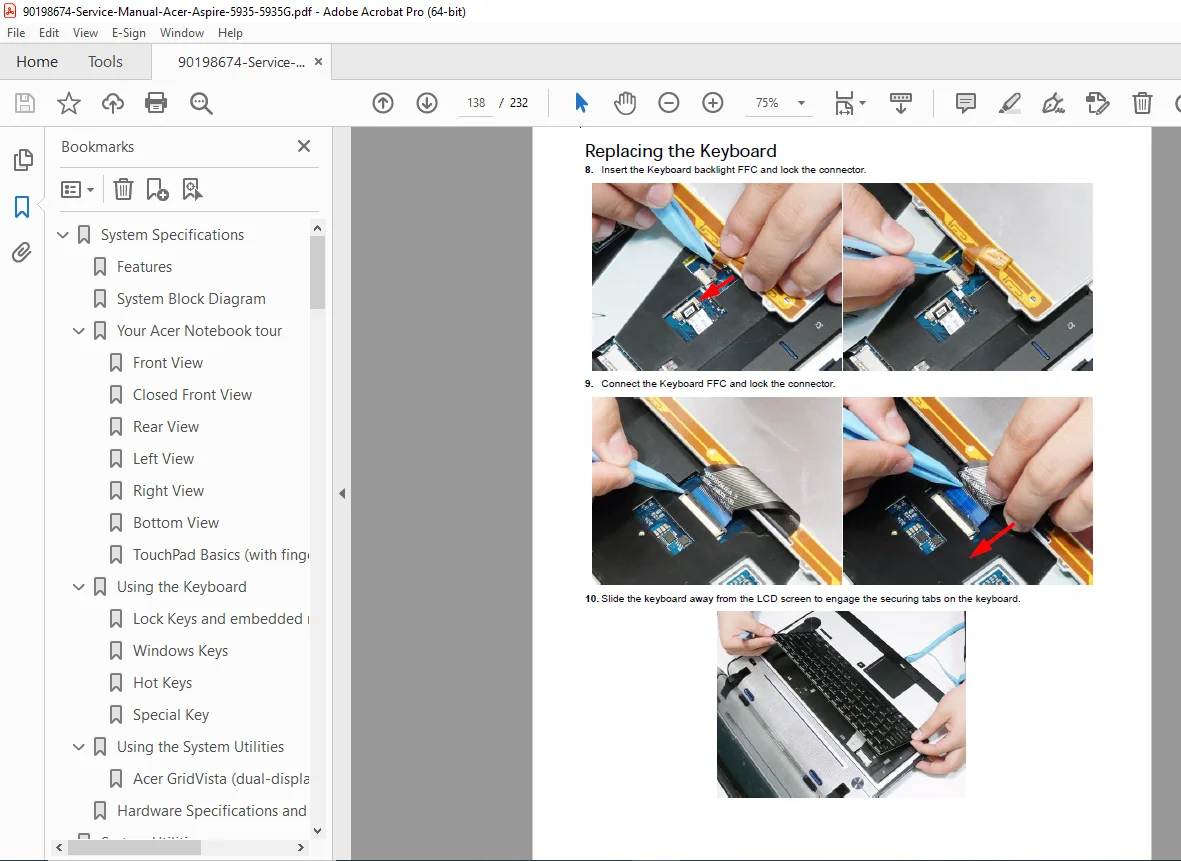
- Keyboard Removal – Detailed step-by-step
- Upper Cover Removal – Palmrest assembly
- Media Board Removal – Acer MediaTouch controls
- Launch Board Removal – Function buttons
- Speaker Module Removal – Left/right speakers
- Power Saving Board Removal
- Volume Control Board Removal
- MIC Board Removal – Microphone module
- Button Board and Fingerprint Reader Removal – Touchpad buttons
- TouchPad Bracket Removal
- LCD Module Removal:
- Complete LCD assembly disassembly
- LCD panel removal from hinges
- LCD bezel removal
- Inverter removal
- Webcam module removal
- LCD cable routing
- Saddles Removal – Hinge mounting points
- USB Board Removal – I/O board
- Subwoofer Removal – Tuba CineBass speaker
- Bluetooth Module Removal
- Card Reader Board Removal – 6-in-1 card reader
- Hinge Wells Removal
- Mainboard Removal:
- Complete motherboard extraction procedure
- Connector disconnection sequence
- Screw location diagrams
- RTC Battery Removal – CMOS battery
- VGA/MXM Card Removal – Discrete graphics card
- Thermal Module Removal:
- Heatsink and fan assembly
- Thermal paste removal/application
- CPU Removal:
- Processor socket unlocking
- CPU extraction procedure
- Main Module Reassembly Procedure:
- Complete reverse procedures for all components
- Thermal paste application procedures
- Cable routing diagrams
- Torque specifications
- Testing procedures after reassembly
CHAPTER 4 – TROUBLESHOOTING (Pages 135-156)
- Common Problems:
- Power On Issues:
- No power when AC adapter connected
- No power when battery installed
- System powers off unexpectedly
- Flowcharts for systematic diagnosis
- No Display Issues:
- Black screen on boot
- External display detection problems
- Brightness control failures
- Random Loss of BIOS Settings:
- RTC battery testing procedures
- CMOS reset procedures
- LCD Failures:
- Backlight problems
- Dead pixels
- Flickering display
- Inverter testing
- Built-In Keyboard Failure:
- Individual key failures
- Keyboard controller issues
- Connector inspection
- TouchPad Failure:
- Cursor movement problems
- Button click failures
- Disable/enable procedures
- Internal Speaker Failure:
- No audio output
- Distorted audio
- Audio codec testing
- Internal Microphone Failure:
- Recording problems
- Microphone detection issues
- HDD Not Operating Correctly:
- BIOS detection failures
- Boot failures
- SMART errors
- Connection testing
- ODD Failure:
- Disc reading problems
- Eject mechanism failures
- Firmware issues
- Modem Function Failure (if equipped)
- Wireless Function Failure:
- WLAN not detected
- Connection drops
- Bluetooth pairing problems
- Thermal Unit Failure:
- Overheating symptoms
- Fan noise issues
- Temperature monitoring
- External Mouse Failure:
- USB port testing
- Driver issues
- Other Failures – Miscellaneous hardware problems
- Power On Issues:
- Intermittent Problems – Diagnosis strategies for sporadic issues
- Undetermined Problems – Advanced troubleshooting approaches
- POST Codes:
- Chipset POST Codes – Complete BIOS POST code reference
- Beep code interpretation
- Error code meanings
- Recovery procedures
CHAPTER 5 – JUMPER AND CONNECTOR LOCATIONS (Pages 157-170)
- Mainboard Connector Locations:
- Top view diagram with labeled connectors
- Bottom view diagram with labeled connectors
- Pin assignments and signal descriptions
- Daughter Board Connectors:
- LS-5011P LCD Backlight Board – Inverter connections
- LS-5012P Launch Board – Function button connections
- LS-5013P Media Board – MediaTouch control connections
- LS-5014P VR Board – Volume/recording board
- LS-5015P Fingerprint Board – Bio-protection reader
- LS-5016P USB Board – I/O expansion
- LS-5017P IO Board – Additional I/O
- LS-5018P Power Saving Board
- LS-5019P TouchPad Button Board
- LS-501AP HDMI Board – HDMI output interface
- Clearing Password Check:
- Jumper procedures for password bypass
- Security considerations
- BIOS Recovery by Crisis Disk:
- Emergency BIOS recovery procedures
- Crisis disk creation
- Recovery mode activation
CHAPTER 6 – FRU (FIELD REPLACEABLE UNIT) LIST (Pages 171-181)
- Aspire 5935 Series Exploded Diagrams:
- Main Assembly – Complete notebook exploded view
- Base Assembly – Bottom case component breakdown
- Numbered component identification
- Complete FRU Parts List:
- Acer part numbers for all components
- Description of each part
- Replacement/ordering information
- Multiple configuration options
- Vendor part numbers cross-reference
- Screw List:
- Complete screw inventory
- Screw type identification
- Length and thread specifications
- Quantity required for each assembly
- Torque specifications
CHAPTER 7 – MODEL DEFINITION AND CONFIGURATION (Pages 182-210)
- Aspire 5935 Series Model Breakdown:
- Complete model number decode guide
- Regional variations
- Configuration differences
- Feature matrix by model
- Processor options by model
- Graphics options by model
- Display options by model
- Memory configurations
- HDD/ODD combinations
- Wireless module variations
- Operating system versions
CHAPTER 8 – TEST COMPATIBLE COMPONENTS (Pages 211-216)
- Microsoft Windows Vista Environment Test:
- Compatible component testing procedures
- Driver verification
- Hardware compatibility checks
- Performance benchmarking
- Stability testing protocols
CHAPTER 9 – ONLINE SUPPORT INFORMATION (Pages 217-218)
- Acer Support Resources:
- CSD web portal information
- Service documentation updates
- Driver download locations
- Technical bulletin access
- Warranty information
INDEX (Pages 219-232)
- Comprehensive alphabetical index of all topics
- Quick reference for specific procedures
- Cross-references to related sections
🔧 Special Features of This Manual:
PROFESSIONAL DISASSEMBLY DOCUMENTATION
- Complete photographic step-by-step procedures
- Component identification callouts
- Connector location diagrams
- Screw type and quantity specifications
- Cable routing guides
- Reassembly sequence verification
COMPREHENSIVE TROUBLESHOOTING SYSTEM
- Flowchart-based diagnosis for systematic problem solving
- Component-level testing procedures
- POST code reference for boot failures
- Intermittent problem diagnosis strategies
- Advanced fault isolation techniques
DETAILED EXPLODED VIEW DIAGRAMS
- Full notebook exploded assembly drawings
- Numbered FRU identification
- Clear component relationships
- Assembly/disassembly sequence guidance
COMPLETE TECHNICAL REFERENCE
- Hardware specification tables
- Motherboard component identification
- Daughter board connector pinouts
- Thermal management specifications
- Power consumption data
BIOS UTILITIES AND PROCEDURES
- Complete BIOS menu documentation
- Flash update procedures (DOS and Windows)
- Password removal utilities
- Crisis recovery procedures
- Settings optimization guide
📁 File Details:
| Detail | Information |
|---|---|
| Manual Title | Acer Aspire 5935 Series Service Guide |
| Models Covered | Aspire 5935, Aspire 5935G (all configurations) |
| Type | Complete Factory Service and Repair Guide |
| Pages | 232 pages |
| Format | PDF (Digital Download) |
| Quality | Factory Original – Professional Quality Text and Images |
| Language | English |
| Publication Date | June 23, 2009 |
| File Size | ~8.6 MB |
| Creator | Acer Incorporated |
| Coverage | Complete service, disassembly, troubleshooting, parts, specifications |
✅ Who Needs This Manual:
✔ Laptop repair technicians servicing Acer notebooks professionally
✔ Computer repair shops expanding laptop service capabilities
✔ IT departments maintaining Acer Aspire laptop fleets
✔ Technical schools teaching laptop repair and maintenance
✔ Refurbishment specialists restoring used Acer laptops for resale
✔ Corporate IT support teams maintaining business laptops
✔ Acer authorized service partners requiring official documentation
✔ Advanced DIY enthusiasts performing laptop upgrades and repairs
✔ Electronics hobbyists learning professional laptop service techniques
🎯 Perfect for All Service Needs:
ROUTINE MAINTENANCE:
- Memory upgrades (up to 4GB DDR3)
- Hard drive replacement and upgrades
- Optical drive replacement
- Battery replacement
- Thermal paste reapplication
- BIOS updates and configuration
- Driver updates and troubleshooting
COMPONENT REPAIRS:
- LCD panel replacement (HD/Full HD)
- Keyboard replacement
- Touchpad and fingerprint reader service
- Webcam replacement
- Speaker system repairs
- Power jack repair
- USB port replacement
- Card reader service
ADVANCED REPAIRS:
- Motherboard replacement
- CPU replacement/upgrade
- VGA/MXM graphics card replacement
- Wireless module replacement
- Bluetooth module service
- BIOS password removal
- Crisis BIOS recovery
- Thermal system overhaul
TROUBLESHOOTING:
- No power diagnosis
- No display troubleshooting
- Overheating issues
- POST error diagnosis
- Intermittent problem solving
- Component-level testing
- System performance optimization
💰 Save Hundreds in Repair Shop Costs
Professional laptop repair rates range from $75-$125 per hour, and common repairs like LCD replacement ($200-$400 total), motherboard replacement ($400-$600), or complete disassembly/cleaning ($150-$300) can be expensive. This manual gives you the exact same procedures Acer-certified technicians use, enabling you to perform professional-quality service and repairs yourself or train your technical staff. Download instantly and start servicing your Acer Aspire 5935/5935G laptop with confidence today!
Pricing Rationale:
- Consumer laptop (not commercial/industrial) = moderate pricing tier
- 232-page comprehensive factory service guide = substantial value
- Covers complete disassembly with detailed photos = essential for repairs
- Blu-ray multimedia laptop (premium consumer segment) = justifies quality pricing
- Includes BIOS utilities and password removal tools = added value
- Can save $150-$600+ per repair (LCD, motherboard, thermal service)
- Competitive range: $19.97-$29.97 for consumer laptop service manuals
- Target market: Repair technicians, IT departments, refurbishers, advanced DIY users
- Older generation laptop (2009) = price slightly lower than current models
- 9-chapter comprehensive coverage = professional technical reference