
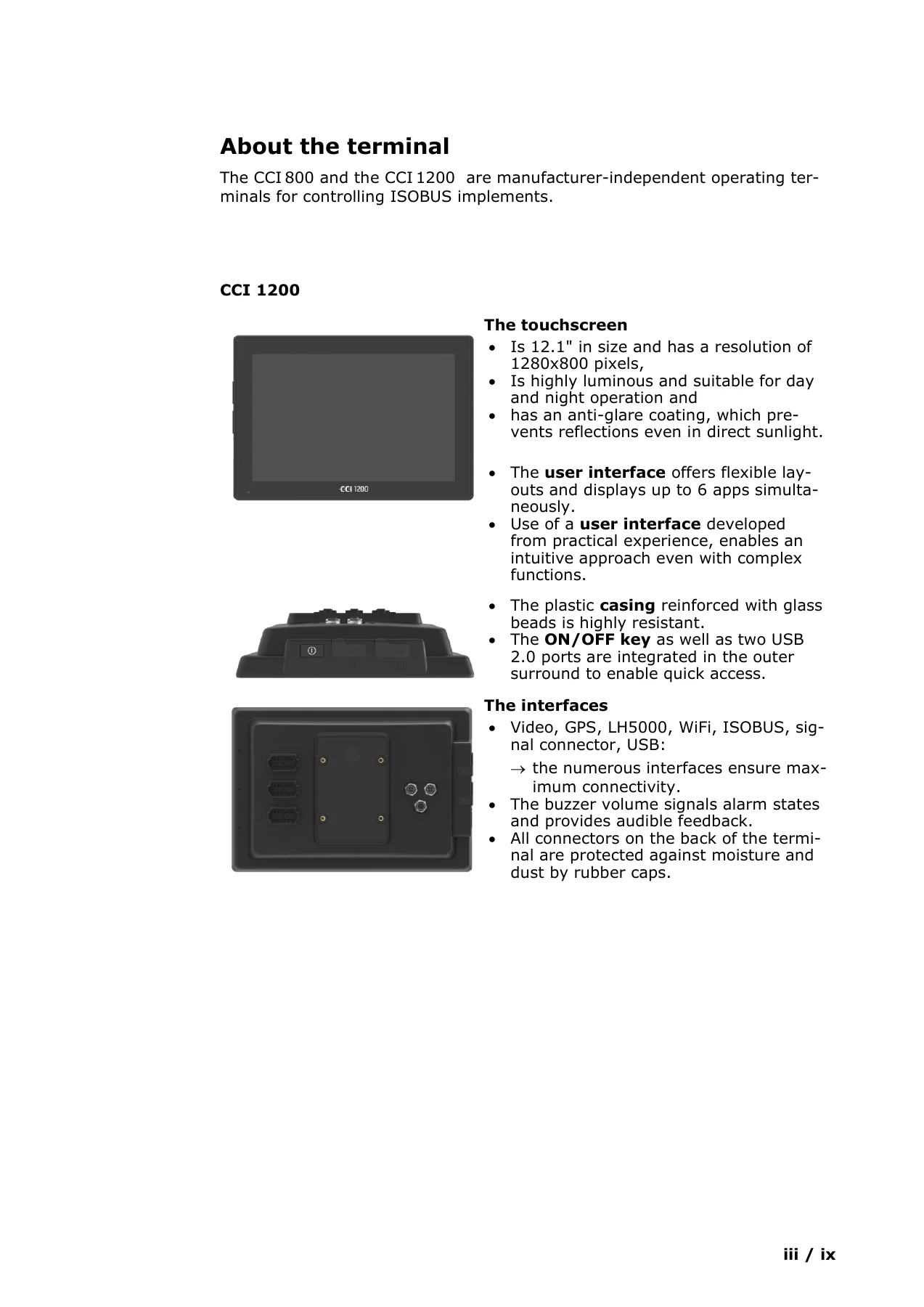
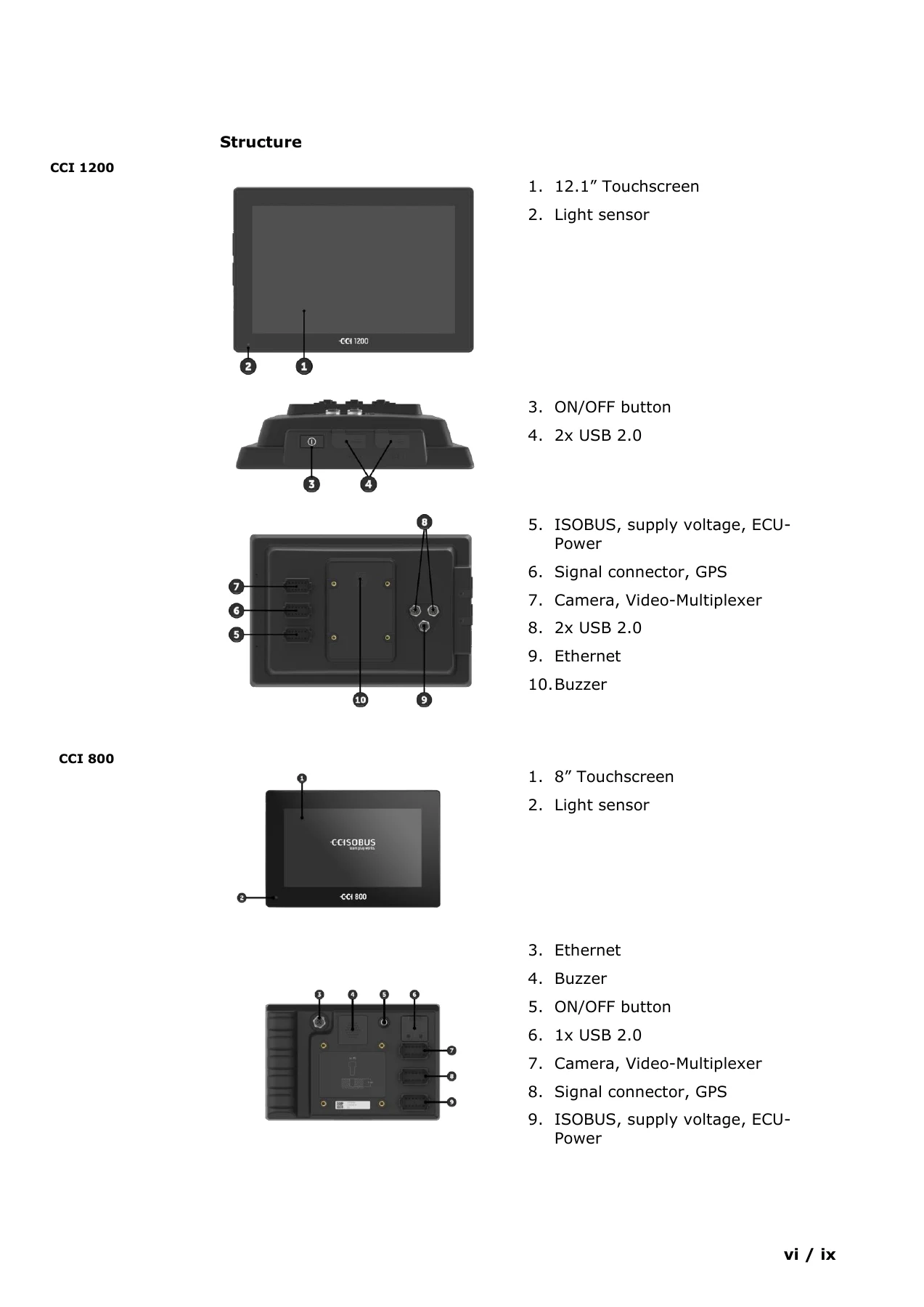
CCI 800 & CCI 1200 ISOBUS Terminal CCI.OS 4.0 Operating Instructions Manual – 2023 PDF
Original price was: $52.95.$34.95Current price is: $34.95.
Operating instructions for the CCI 800 and CCI 1200 ISOBUS terminals running CCI.OS 4.0, covering setup, apps, ISOBUS implement control, AUX assignment, fields and tasks, map view, camera display, and troubleshooting.
Description
File Details
- Manual type: Operating instructions
- Brand / publisher: CCI / Competence Center ISOBUS e.V.
- Models: CCI 800 and CCI 1200 ISOBUS terminals
- Software: CCI.OS 4.0; hardware version 1.0 and higher
- Language: English
- File format: PDF
- Page count: 381 PDF pages
- Document number: 20230201
- Publication date: 2023
Chapters Covered
- 1 Safety
- 2 Setting up for operation
- 3 Graphical user interface
- 4 Settings
- 5 Display of camera images
- 6 Speed, position and geometry
- 7 ISOBUS implement and AUX control
- 8 Fields and tasks
- 9 Map view
- 10 Miscellaneous
- 11 Troubleshooting
- 12 Glossary
- 13 Disposal
- A Technical data
- B Interfaces
- C Cables
- D Application maps
- E GPS receiver
- F AEF functionalities
- G Time zones
1 Safety
This opening chapter sets out intended use, warning-note identification and the safety instructions that apply before installation and commissioning. It also covers electrical-device installation and the precautions required when retrofitting equipment connected to the vehicle electrical system.
2 Setting up for operation
Here the CCI.OS 4.0 operating instructions walk through the first start-up sequence: checking the scope of delivery, installing the terminal, connecting cable A to the ISOBUS and power supply, switching on, changing the layout, selecting the correct time zone, enabling apps, and arranging the user interface for daily work.
3 Graphical user interface
This chapter explains touch gestures, CCI.Help, screen layout and display areas. It describes the status bar, standard view, app menu, mini view, special buttons, the ISB, screenshots, and notification behaviour so the operator can move confidently between apps and operating screens.
4 Settings
The settings section covers user preferences, app management, ISOBUS settings, system information, date and time, CCI.OS updates, backup creation, licence-data updates, Internet/WiFi connection and agrirouter connection. It also explains the ISOBUS functions Universal Terminal, AUX-N Terminal Functions, Task Controller, TECU and File Server, including when to leave them switched on or off.
5 Display of camera images
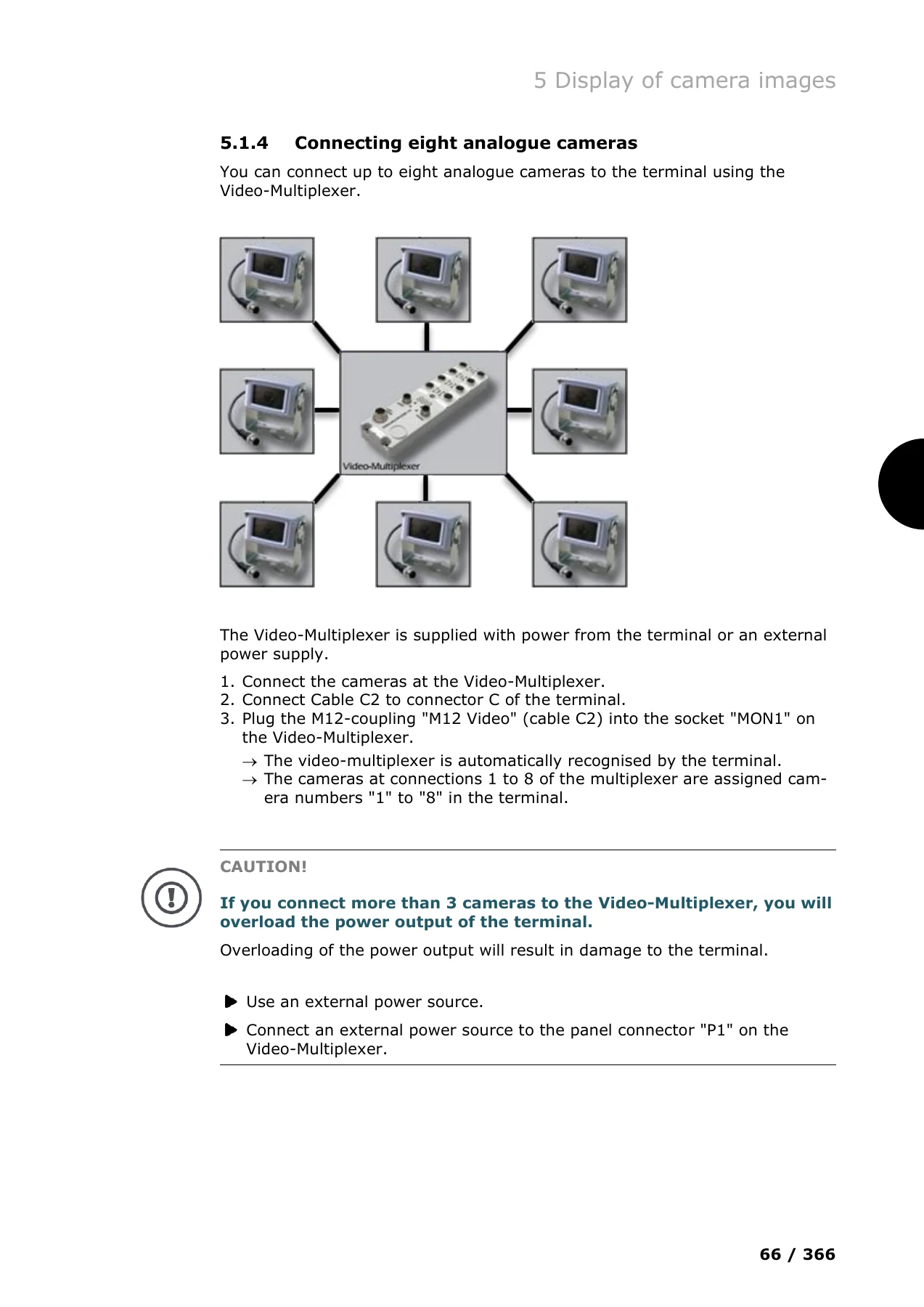
CCI.Cam coverage includes connecting one, two or eight analogue cameras, using a Video-Miniplexer or Video-Multiplexer, connecting compatible digital cameras, and adjusting CCI.Cam. The chapter explains single and dual image display, mirroring, automatic reversing-camera behaviour, event-controlled image switching, changing camera assignments, automatic image switching and AUX-based camera control.
6 Speed, position and geometry
This is the core configuration chapter for location-based work. It covers adding and setting up tractors and implements, GPS speed output, GPS aerial position with distances A and B, mounting type and distance C, tractor data and signal connector settings, wheel/ground speed calibration, rear 3-point hitch calibration, working position thresholds, Power Management and self-propelled implement setup. Implement configuration includes working width, implement type, reference point, section geometry, delay times, overlap settings, headland-only section control and second-implement setup. It also covers GPS receiver settings, tilt sensor, CCI.Convert, the tacho, implement/tractor selection, export, and GPS simulation.
7 ISOBUS implement and AUX control
The ISOBUS chapter explains CCI.UT operation, UT numbers, connecting an AUX control, connecting implements, CCI.UT settings, and the different ways to operate one or two implements with one or two UT apps. It also describes AUX assignment for implement functions and terminal functions, deleting assignments, and managing connected and saved implements, including moving an implement to another UT.
8 Fields and tasks
CCI.Control coverage includes the field list, field detailed view, customers, operations, active task handling, starting and pausing tasks, adding fields, application maps, assigning implements, CCI.Assist, products, operations, drivers, comments and AUTOLOG. Import/export, reports, delete functions, search/filter and context menus are also documented, along with the Field Finder.
9 Map view
CCI.Command is covered through map view setup, Section Control settings, Parallel Tracking setup and Auto Guidance setup. The chapter explains map elements, editing mode, field boundary calculation and recording, headland creation and locking, tracks, markings, worked-area handling, saving fields, correcting GPS drift and automatic steering status information.
10 Miscellaneous and 11 Troubleshooting
The miscellaneous chapter covers testing apps, safely ejecting a flash drive and closing the Rescue System. Troubleshooting then provides practical problem/cause/remedy tables, hardware LED flash information, screenshot capture, Remote View remote maintenance, log export and ISOBUS diagnostics. A detailed message list gives error numbers, message types and remedies.
Appendices A-G
The appendices provide CCI 1200 and CCI 800 technical data, connector pin assignments, cable identifiers and wiring, application-map formats, recommended GPS receiver settings, AEF ISOBUS functionalities and a time-zone list. These are useful when checking interfaces, preparing cables or confirming terminal specifications.
Why This CCI 800 and CCI 1200 Operating Manual Matters
This CCI.OS 4.0 operating instructions manual is aimed at operators, technicians and service personnel who need to set up and run CCI 800 or CCI 1200 ISOBUS terminals in real agricultural work. The manual supports the practical jobs that matter: configuring the terminal for a tractor and implement, setting GPS aerial distances and section geometry, checking delay times and overlap behaviour, assigning implement functions to an AUX control, managing fields and tasks in CCI.Control, and working with field boundaries, headlands and tracks in the CCI.Command map view.
Because CCI.OS 4.0 combines terminal settings, ISOBUS implement operation, Task Controller functions, camera display and documentation in one system, the exact procedure matters. The step-by-step instructions, setup screens, connector details and troubleshooting messages help reduce guesswork when changing implements, updating software, connecting cameras or diagnosing ISOBUS communication problems. The included technical data, cable information and pin assignments are also useful when preparing or checking the installation.
IMAGES PREVIEW
The manual is supplied as an instant PDF download after payment. There is no shipping and no waiting for a printed copy. You can open the CCI 800 / CCI 1200 CCI.OS 4.0 operating instructions on a workshop PC, laptop, tablet or smartphone, print the pages you need for the cab or workshop, and keep the complete PDF handy for future reference.

Reviews
There are no reviews yet.