Dell 1815dn Laser MFP – Service Manual (March 2006 Edition) PDF
Original price was: $65.00.$19.95Current price is: $19.95.
Official Dell factory service manual for the Laser MFP 1815dn multifunction printer. Includes full safety precautions, product specifications, disassembly & reassembly procedures, wiring, HVPS & SMPS schematics, and component diagrams. Essential for technicians servicing Dell 1815dn printers in office or workshop environments.
Description
Dell 1815dn Laser MFP – Service Manual (March 2006 Edition) – PDF DOWNLOAD
description
The Dell 1815dn Laser MFP Service Manual is the complete factory technical documentation released on 27 March 2006 for Dell’s high-speed monochrome multi-function printer.
It provides exhaustive diagnostic, service, and teardown procedures—ideal for certified repair technicians, refurbishers, or advanced users maintaining small-office MFPs.
Chapter 1 — Precautions
1.1 Safety Warning
• Authorized service personnel only
• Use of Dell replacement parts
• Laser safety statement (IEC 825 / DHHS 21 CFR Subchapter J)
• Multilingual laser radiation warnings
1.2 Caution for Safety
1.2.1 Toxic Material (LCD panel liquid, toner)
1.2.2 Electric Shock and Fire Safety Precautions
1.2.3 Handling Precautions (placement, moving the unit, hazards)
1.2.4 Assembly / Disassembly Precautions
– Memory backup before board replacement
– Power and cable removal
– OPC drum light protection and storage
1.2.5 Warnings that May Cause Bodily Injury
– Fuser high temperature
– Rotating parts hazards
– Moving and installing the printer safely
1.3 ESD (Static Electricity) Precautions
• Grounding procedures
• Handling and packaging of ES devices
1.4 Super Capacitor / Lithium Battery Precautions
Chapter 2 — Reference Information
2.1 Tools for Troubleshooting
2.2 Acronyms and Abbreviations
2.3 The Sample Pattern for the Test
2.3.1 A4 ISO 19752 Standard Pattern
Chapter 3 — Product Specifications
3.1 Product Overview
• Concept, Target User, Key Features
3.2 Product General Specifications
• Dimensions / Weight / Noise Level / Power Consumption
• Operating Environment & Duty Cycle
3.3 Functional Specifications
Print – Speed, Resolution, Emulation, Duplex
Scan – CCD type, Speed, Resolution, Depth
Copy – Modes, Zoom, Contrast, FCOT
Fax – Modem, Transmission, Memory, ECM
Paper Handling – Trays, ADF, Paper sizes
Software Compatibility – Windows, Mac, Linux
Accessories and Consumables – Toner cartridge types and yields
Chapter 4 — System Outline
4.1 System Configuration Overview
– Main Control, Scanner, Power, Line Interface
4.1.1 CPU Part (ARM920T @ 300 MHz, Flash, SDRAM)
4.1.2 Fax Section (Conexant DAA solution, CX86710/CX20493 chips)
4.1.3 Line Interface Part (RJ-11 specs & ring detection parameters)
4.1.4 Scan Part (CCD sensor, Gamma & Shading correction process)
4.1.5 OPE Panel Section (Micom controller, matrix keypad, LCD)
4.1.6 Printer Section (Engine mechanics & firmware integration)
4.1.7 Copier Section (Modes, Quality settings, Duplex copy capability)
4.1.8 Telephone Section (Speed dial, Redial, Tone/Pulse modes)
4.1.9 SMPS & HVPS Section
• Switching Power Supply specs (+5 V, +24 V)
• HV outputs (THV+, MHV, DEV, BIAS)
• Fuser AC power control and Triac driver
4.1.10 Toner Cartridge Structure
4.1.11 Laser Scanner Unit (Polygon mirror and sync timing)
4.1.12 Fixing (Fuser) Part
4.1.13 Transfer Assembly (Pre-transfer lamp and transfer roller)
4.1.14 Driver Assembly (BLDC and Step motors)
4.1.15 Feeding Part (Cassette & Bypass rollers and solenoid)
4.1.16 Duty Cycle and Periodic Replacement Parts Schedule
Chapter 5 — Disassembly and Reassembly
5.1 General Precautions on Disassembly (cable routing & plastic latches)
5.2 Front Cover Removal
5.3 MP Tray Assembly Removal
5.4 Rear Cover and Face-Up Cover Removal
5.5 Fuser Assembly (halogen lamp, thermostat, thermistor, rollers)
5.6 Side Covers (Left and Right) and DIMM Cover
5.7 Scanner Assembly (ADF harness, OPE unit, CCD module, motor)
5.8 ADF (Automatic Document Feeder) Assembly
5.9 OPE (Operation Panel) Unit (key removal, PBA board, rubbers)
5.10 Shield Controller Assembly (Main PBA / Modem PBA / Speaker connections)
5.11 Drive Assembly (BVDC motor, gear bracket, screw tightening order)
5.12 Duplex Drive Assembly (motor and connection PCB)
5.13 Shield SMPS Assembly (power board removal and bracket)
Chapter 6 — Troubleshooting and Maintenance
(appears in later pages beyond the provided excerpts)
6.1 Image Defect Diagnosis and Corrective Actions
6.2 Jam Detection and Sensor Logic
6.3 Engine Test Mode and Diagnostics
6.4 Fax/Scan/Copy Error Codes and Recovery
6.5 Periodic Maintenance Procedures
6.6 Adjustment and Calibration (LSU alignment, registration)
Appendices
A. Block and Signal Diagrams
B. Wiring Layouts and Connector Maps
C. Electrical Measurements & Timing Charts
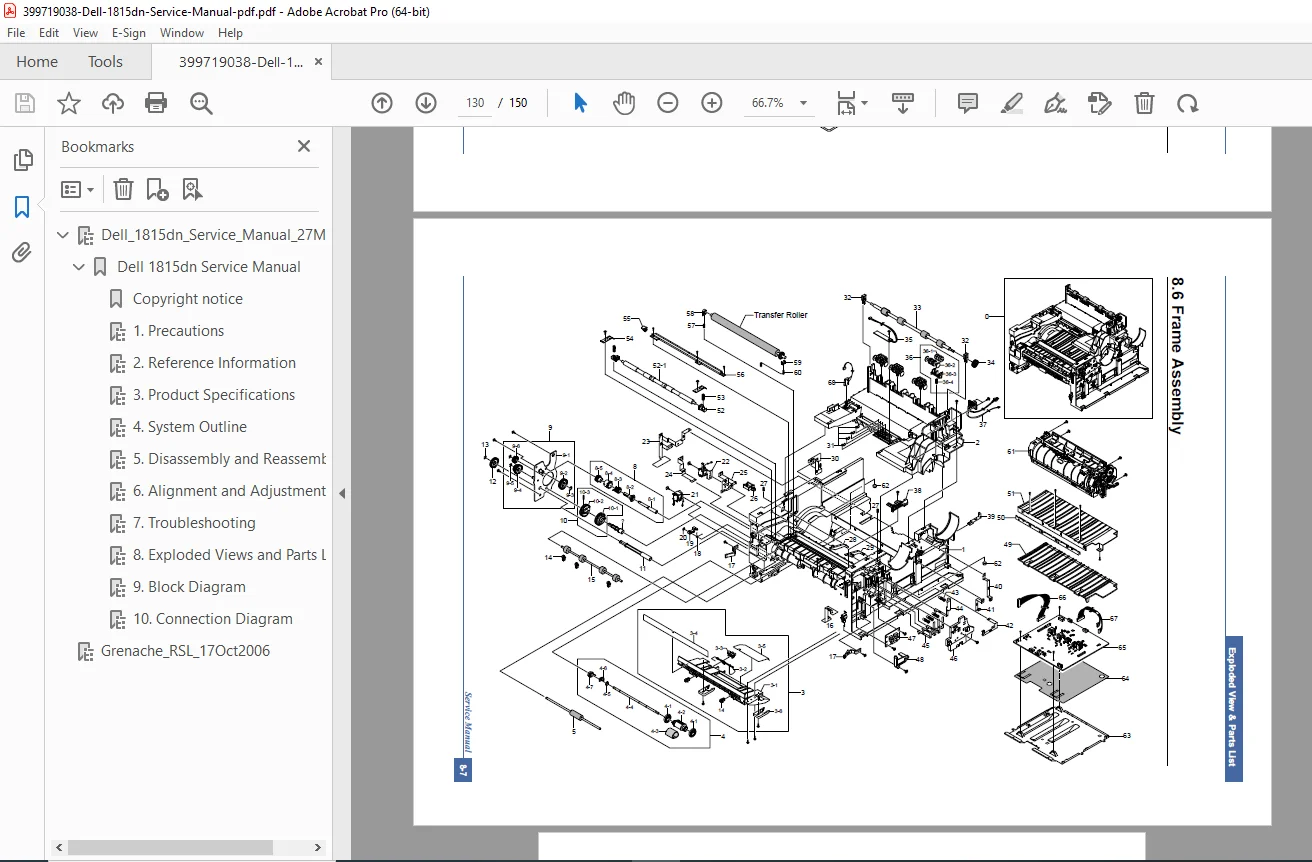
D. Parts List and Exploded Views
E. Specifications Summary Sheet
🧰 Technician highlights
Genuine Dell engineering diagrams for engine board, controller, and laser scanner.
Detailed assembly screw sequences for drive gear trains and fuser units.
Full spec tables for voltage tolerances, duty cycles, and mechanical life expectancy.
Covers all printer subsystems: printing, scanning, copying, faxing, network interface, and power.
File details
| Field | Information |
|---|---|
| Manual name | Dell 1815dn Laser MFP Service Manual |
| Models covered | Dell Laser MFP 1815dn and 1815d series |
| Edition / Date | March 27 2006 – Revision A |
| PDF quality | High-resolution text + illustrations; fully bookmarked |
| No. of pages | ≈ 150 pages |
| File format | Searchable PDF |