Kyocera Copystar CS-1820 Service Repair Manual & Fax System (K)PDF
Original price was: $85.00.$16.95Current price is: $16.95.
Comprehensive Service Manual for the Kyocera Copystar CS-1820, including the Fax System (K). Published in March 2005, this essential guide covers installation, maintenance modes, troubleshooting error codes (C0030-C7990), assembly/disassembly, and electrical diagrams. Perfect for technicians performing repairs, from fixing paper jams to replacing the fuser unit.
Description
Kyocera Copystar CS-1820 Service Repair Manual & Fax System (K) PDF DOWNLOAD
Description
Unlock the full repair potential of your Kyocera Copystar CS-1820 with this official service manual. Whether you are a professional technician or an expert DIYer, this document provides the critical technical data needed to maintain, troubleshoot, and repair the main unit and the Fax System (K).
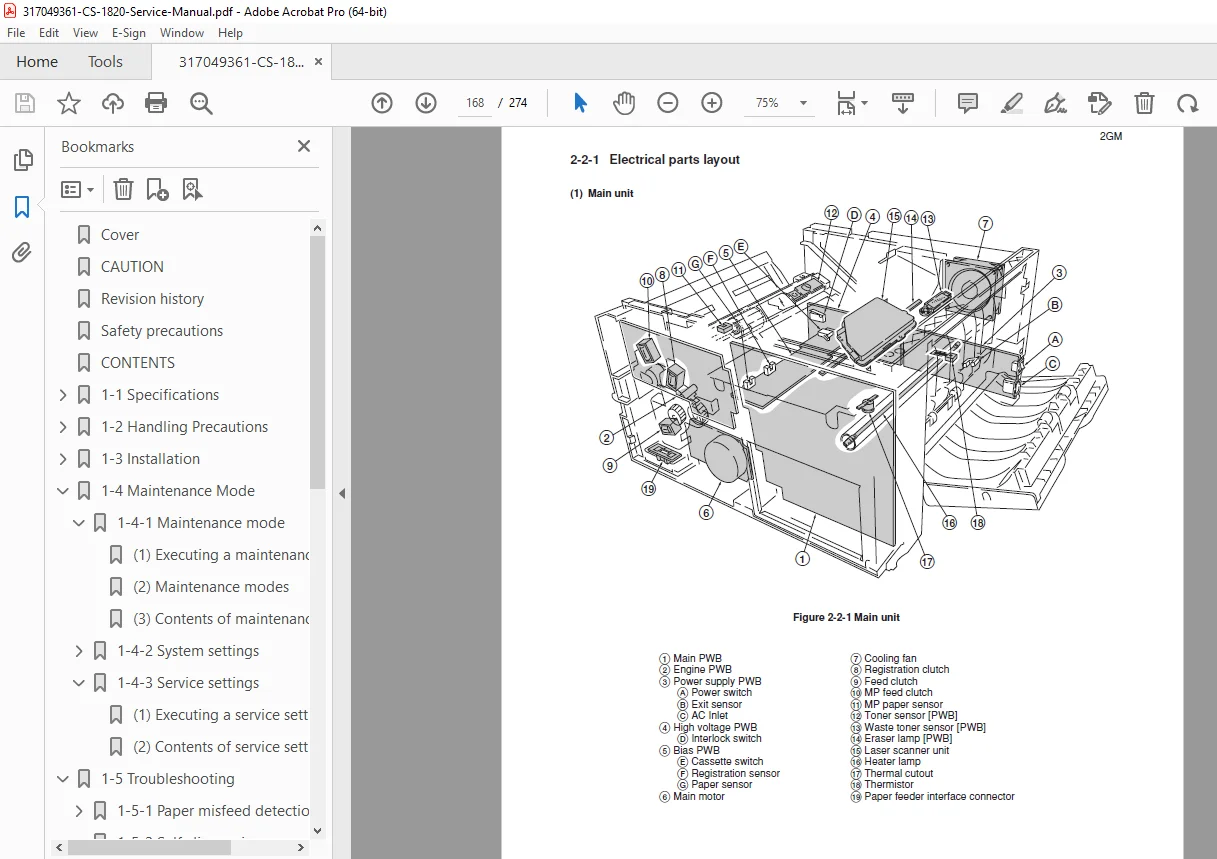
This manual is meticulously organized, offering step-by-step instructions for Kyocera CS-1820 troubleshooting codes, mechanical disassembly, and precise adjustments. It includes detailed illustrations and wiring diagrams to ensure safe and accurate repairs. From routine maintenance to complex component replacement like the CS-1820 fuser unit replacement, this guide is your go-to resource.
Key Topics Covered:
General Specifications:
Copying speeds, resolution, and memory capacity.
Handling precautions and installation environment requirements.
Installation Procedures:
Unpacking and setup.
Installing options: Document Processor, Expanding Memory, and Fax System (K).
Toner container installation and initialization.
Maintenance Mode (Simulation):
System Settings: U000 to U928 (Status reports, Initialization, Drive timing).
Image Quality: Adjusting scanner magnification, margins, and density.
Fax Settings: U600 to U699 (Modem settings, NCU, Protocol lists).
Troubleshooting & Error Codes:
Self-Diagnosis: Full list of C-codes (e.g., C6000 Fuser errors, C3100 Scanner errors) with corrective measures.
Paper Misfeeds: Jam codes (03-7F) and location-specific fixes (Cassette, MP Tray, Fuser, Exit).
Image Defects: Troubleshooting blank copies, black lines, and blurring.
Assembly & Disassembly:
Covers & Rollers: Removing feed rollers, MP feed rollers, and transfer rollers.
Circuit Boards: Engine PWB, Main PWB, Power Supply PWB, High Voltage PWB.
Major Units: Process Unit, Fuser Unit (Heater lamp, Thermostat, Heat roller), Scanner Unit, and Laser Scanner Unit (LSU).
Fax System (K) Specifics:
Fax initialization, software switch settings, and communication troubleshooting.
Appendix:
Timing Charts.
General Wiring Diagrams.
Table of Contents Overview:
Safety Precautions
Laser Safety
Maintenance Warnings
Specifications
Main Body & Operation Panel
Mechanical Construction
Installation
Unpacking & Connections
Installing Options (Fax, Memory, DP)
Maintenance Mode
Maintenance Item List & Contents
Service Status Page
Troubleshooting
Paper Jams & Sensor Checks
Self-Diagnosis (Service Call Codes)
Electrical & Mechanical Problems
Assembly and Disassembly
Process Unit Removal
Fuser Unit Disassembly
Scanner & Motor Replacement
PWB Removal
Fax System (K)
Specifications & Installation
Fax Maintenance Modes
File Details
Manual Name: Kyocera Copystar CS-1820 Service Manual (Includes Fax System K)
Models Covered: Kyocera CS-1820, Copystar CS-1820
Year: March 2005 (Rev. 2GM70940)
File Type: PDF (Searchable, High Quality)
Page Count: 274 pages (Estimated based on section pagination: Section 1, 2, and 3JG)