Kyocera FS-1100 FS-1300D Service Manual PDF
Original price was: $65.00.$13.95Current price is: $13.95.
Official Kyocera FS-1100/FS-1300D laser printer service manual (Document 842HS111, 2HSSM061, Rev.1, March 2008, Author: t a n a k a s). This comprehensive 124-page technical manual covers specifications, installation, maintenance mode, troubleshooting, self-diagnostics, image formation problems, assembly/disassembly, drum unit service, fuser section, paper feed, PWB replacement, mechanical construction, electrical parts layout, wiring diagrams, and complete service information for qualified technicians servicing office monochrome laser printers.
Description
Kyocera FS-1100 FS-1300D Service Manual Laser Printer Repair 842HS111 Rev.1 – PDF DOWNLOAD
DESCRIPTION
This is the official Kyocera FS-1100/FS-1300D Service Manual (Document Number 842HS111, 2HSSM061, Revision 1, Published March 2008, Author: t a n a k a s). This comprehensive 124-page technical manual is intended for qualified service personnel and provides complete maintenance, troubleshooting, repair, adjustment, and assembly/disassembly procedures for the FS-1100 simplex and FS-1300D duplex monochrome laser printers used in business offices, workgroups, and professional document production environments worldwide.
Product Overview
Kyocera FS-1100 / FS-1300D Laser Printers:
The FS-1100 (simplex) and FS-1300D (duplex) represent Kyocera’s desktop monochrome laser printers designed for office and workgroup printing applications. These sophisticated printers combine electrophotographic laser scanning technology, OPC drum imaging, heat roller fixing, and professional print quality to deliver reliable 28-30 ppm output for business-critical document production. The FS-1300D adds automatic duplex printing capability along with expanded paper capacity.
Key Applications:
- Office document printing
- Workgroup printing
- Small business operations
- Professional document production
- Home office productivity
- Corporate branch offices
- Educational institutions
- Healthcare facilities
- Legal document printing
- General business correspondence
Model Information
Models Covered:
- FS-1100 – Simplex (single-sided) printing model
- FS-1300D – Duplex (double-sided) printing model with expanded paper capacity
Document Information:
- Document Number: 842HS111
- Part Number: 2HSSM061
- Revision: 1
- Published: March 2008
- Author: t a n a k a s
Key Specifications
General Specifications:
- Type: Desktop laser printer
- Printing Method: Electrophotography, laser scan
- Print Speed (Simplex model): 28 ppm (A4), 30 ppm (Letter), 17 ppm (A5)
- Print Speed (Duplex model):
- Simplex: 28 ppm (A4), 30 ppm (Letter), 17 ppm (A5)
- Duplex: 14 ppm (A4), 15 ppm (Letter)
- First Print Time: 6 seconds or less (A4, cassette feed)
- Resolution: Fine 1200 mode, Fast 1200 mode, 600 dpi, 300 dpi
- Controller: PowerPC 405F5/360 MHz
- Memory: Standard 32 MB, Maximum 544 MB
Warm-up Time:
120V AC Model:
- Power on: 20 seconds or less (22°C/71.6°F, 60%RH)
- Sleep: 15 seconds or less
220-240V AC Model:
- Power on: 19 seconds or less (22°C/71.6°F, 60%RH)
- Sleep: 14 seconds or less
Paper Handling:
FS-1100 (Simplex Model):
- Cassette 1: 250 sheets (80 g/m², Letter/A4 or smaller)
- Manual feed tray: 1 sheet
- Output tray: 250 sheets (80 g/m²)
FS-1300D (Duplex Model):
- Cassette 1: 250 sheets
- Cassette 2: 250 sheets (optional)
- Cassette 3: 250 sheets (optional)
- MP tray: 50 sheets
- Output tray: 250 sheets simplex, 200 sheets duplex
Paper Specifications:
- Weight (Simplex): Cassette 60-120 g/m², Manual feed 60-220 g/m²
- Weight (Duplex): Cassette 60-120 g/m² (Duplex: 60-105 g/m²), MP tray 60-220 g/m²
- Paper Types: Plain, Preprinted, Bond, Recycled, Rough, Letterhead, Color, Prepunched, Labels, Transparency, Envelope, Cardstock, Thick paper, High quality, Custom 1-8
Imaging System:
- Photoconductor: OPC drum (diameter 30 mm)
- Image Write System: Semiconductor laser (1 beam)
- Charging System: Scorotron (positive charging)
- Developing System: Mono component dry developing, automatic toner replenishing
- Transfer System: Transfer roller (negative-charged)
- Separation System: Small diameter separation, discharger brush
- Cleaning System: Drum counter blade
- Charge Erasing: Exposure by eraser lamp (LED)
- Fixing System: Heat roller system
Physical Specifications:
- Dimensions (W × D × H): 375 × 393 × 250 mm (14 3/4″ × 15 1/2″ × 9 7/8″)
- Weight (without toner): 10 kg (22.1 lb)
Power Specifications:
120V AC Model:
- Power source: 120V AC, 60 Hz, 7.5 A
- Maximum: 842 W
- During printing: 456 W
- During standby: 8.2 W (EcoFuser ON), 90 W (EcoFuser OFF)
- Sleep mode: 4.3 W
220-240V AC Model:
- Power source: 220-240V AC, 50 Hz, 3.9 A
- Maximum: 849 W
- During printing: 439 W
- During standby: 8.3 W (EcoFuser ON), 106 W (EcoFuser OFF)
- Sleep mode: 4.4 W
Interface and Connectivity:
- Standard: Hi-Speed USB × 1
- Optional: Network interface card (IB-23) – 10BASE-T/100BASE-TX
- PDL: PRESCRIBE
- Supported OS: Windows 2000 SP2 or later, Windows Server 2003, Windows XP, Windows Vista, Mac OS X 10.x
Environmental:
- Temperature: 10 to 32.5°C (50 to 90.5°F)
- Humidity: 15 to 80%
- Altitude: 2,500 m (8,202 ft) maximum
- Brightness: 1,500 lux maximum
Operating Noise:
- During printing: LpA = 53 dB (A)
- During standby: LpA = 30 dB (A)
- Sleep mode: Immeasurably low
(ISO7779 standard)
Comprehensive Manual Contents
DOCUMENT INFORMATION:
- Document Number: 842HS111, 2HSSM061
- Title: FS-1100/FS-1300D Service Manual
- Subject: Rev.1
- Author: t a n a k a s
- Creator: FrameMaker 7.1
- Producer: Acrobat Distiller 6.0 (Windows)
- Published: March 2008
- Creation Date: March 13, 2008
- Modified Date: March 14, 2014
- Pages: 124 pages
- Format: A4 (595 x 842 pts)
- PDF Version: 1.4
- File Size: 3.8 MB
REVISION HISTORY
Revision 1 (March 13, 2008):
- Replaced pages: Contents, 1-1-1, 1-1-2, 1-1-3, 1-2-2, 1-2-3, 1-2-4, 1-2-5, 1-3-3, 1-3-5, 1-3-8, 1-4-4, 1-5-1, 1-5-2, 1-5-13, 2-3-3, 2-4-4, 2-4-5
SAFETY PRECAUTIONS
Battery Warning:
- CAUTION: Risk of explosion if battery replaced by incorrect type
- Dispose of used batteries according to instructions
- May be illegal to dispose in municipal waste stream
- Check with local solid waste officials
General Safety:
- Safety warnings and precautions for service personnel
- Protect customers, machines, and technicians
- Read booklet carefully before maintenance
Safety Symbols:
- DANGER: High risk of serious bodily injury or death
- WARNING: Serious bodily injury or death possible
- CAUTION: Bodily injury or property damage possible
Symbol Meanings:
- ▲ Triangle: Warning including danger and caution
- General warning
- Warning of electric shock risk
- Warning of high temperature
- ⊘ Circle with slash: Prohibited action
- ● Circle: Required action (grounding, power plug removal)
COMPLETE TABLE OF CONTENTS
SECTION 1-1: SPECIFICATIONS (Pages 1-1-1 to 1-1-5)
1-1-1 Specifications:
- Complete technical specifications
- Print speeds and capacities
- Paper handling specifications
- Environmental requirements
- Power consumption details
1-1-2 Parts Names:
- Overall printer views (simplex and duplex models)
- External components identification
- Operation panel layout
- Interface connectors
1-1-3 Machine Cross Section:
- Internal component layout
- Paper path diagram
SECTION 1-2: INSTALLATION (Pages 1-2-1 to 1-2-6)
1-2-1 Installation Environment:
- Site preparation requirements
- Environmental considerations
- Space requirements
1-2-2 Unpacking:
- Unpacking procedures
- Removing tapes and protective materials
1-2-3 Installing Expanded Memory (Option):
- Memory installation procedures
- Memory module specifications
1-2-4 Installing Memory Card (Optional):
- Memory card installation
- Compatibility information
1-2-5 Installing Network Interface Card (Optional):
- Network card installation (IB-23)
- Network configuration
SECTION 1-3: MAINTENANCE MODE (Pages 1-3-1 to 1-3-8)
1-3-1 Maintenance Mode:
- Executing service mode
- Service mode functions
- Diagnostic procedures
SECTION 1-4: TROUBLESHOOTING (Pages 1-4-1 to 1-4-16)
1-4-1 Paper Misfeed Detection:
- Paper misfeed indication
- Misfeed detection conditions
- Sensor locations
1-4-2 Self-Diagnostic Function:
- Self-diagnostic function overview
- Self-diagnostic codes indication
- Complete diagnostic codes list
- Error code troubleshooting
1-4-3 Image Formation Problems:
- Completely blank printout
- All-black printout
- Dropouts
- Black dots
- Black horizontal streaks
- Black vertical streaks
- Unsharpness
- Gray background
- Dirt on top edge or back of paper
- Undulated printing at right edge
1-4-4 Electric Problems:
- Electrical system troubleshooting
- Component testing procedures
1-4-5 Mechanical Problems:
- Mechanical system troubleshooting
- Drive system issues
SECTION 1-5: ASSEMBLY AND DISASSEMBLY (Pages 1-5-1 to 1-5-33)
1-5-1 Precautions:
- Assembly/disassembly precautions
- Drum handling
- Toner container identification
- Genuine Kyocera Mita toner verification
1-5-2 Outer Covers:
- Top cover removal/installation
- Right and left covers removal/installation
1-5-3 Paper Feed Section:
- Paper feed assembly (feed roller and pickup roller)
- Retard roller assembly
- MP paper feed roller (duplex model)
1-5-4 Developing Section:
- Developing unit removal/installation
1-5-5 Drum Section:
- Drum unit removal/installation
- Main charger unit service
1-5-6 Transfer/Separation Section:
- Transfer roller removal/installation
1-5-7 Fuser Section:
- Fuser unit removal/installation
- Switching fuser pressure
1-5-8 PWBs (Printed Wiring Boards):
- Control PWB removal/installation
- Power source PWB removal/installation
- Operation panel PWB removal/installation
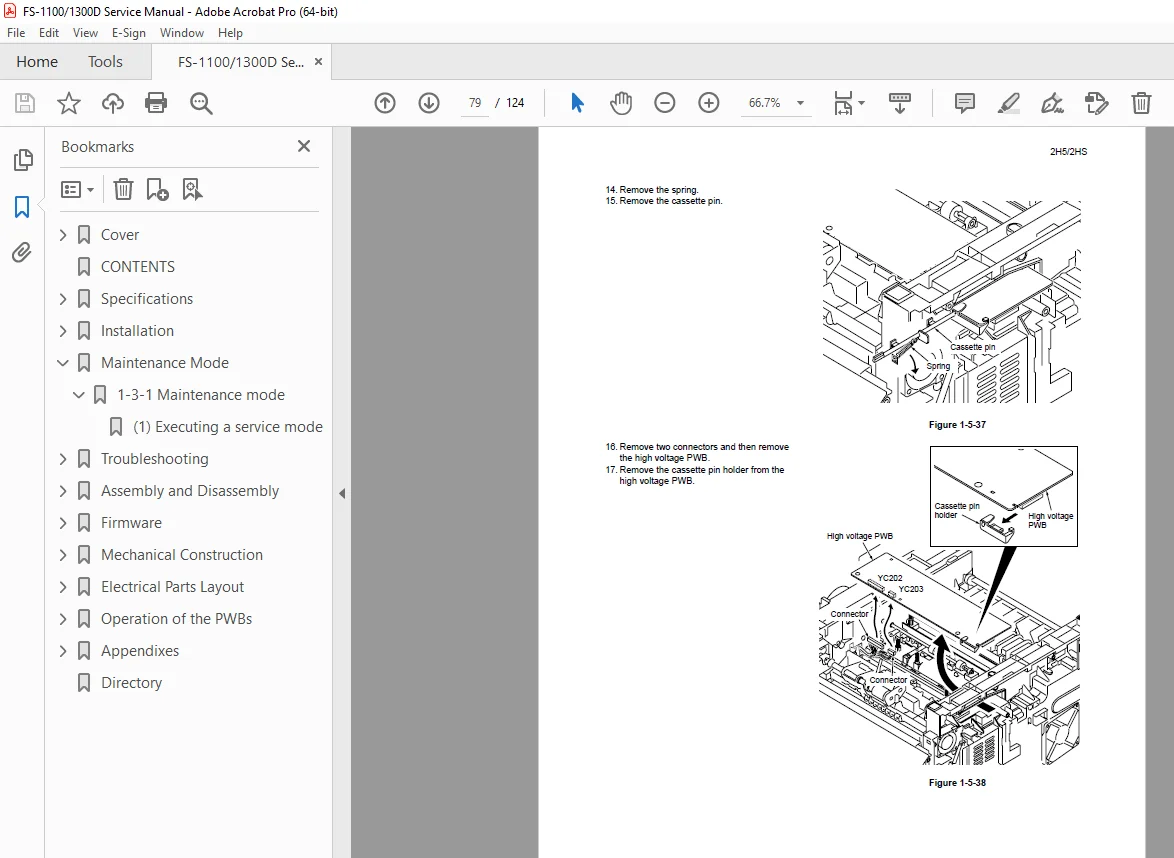
- High voltage PWB removal/installation
1-5-9 Others:
- Main motor removal/installation
- Laser scanner unit removal/installation
- Eraser lamp removal/installation
- Left and right cooling fan motors installation direction
SECTION 1-6: FIRMWARE (Pages 1-6-1 to 1-6-2)
1-6-1 Downloading Firmware:
- Firmware download procedures
- Memory card firmware download
SECTION 2-1: MECHANICAL CONSTRUCTION (Pages 2-1-1 to 2-1-16)
2-1-1 Paper Feed/Conveying Section:
- Cassette paper feed section
- MP tray paper feed section
- Paper conveying section
2-1-2 Drum Section:
- Drum section components
- Main charger unit
2-1-3 Expose Section:
- Laser scanner unit operation
2-1-4 Developing Section:
- Developer system
2-1-5 Transfer/Separation Section:
- Transfer roller system
- Separation mechanisms
2-1-6 Cleaning Section:
- Drum cleaning blade
- Waste toner collection
2-1-7 Fuser Section:
- Heat roller system
- Pressure roller
- Thermal control
2-1-8 Paper Exit Section:
- Output tray delivery
2-1-9 Duplex/Conveying Section (Duplex Model Only):
- Duplex unit operation
- Paper reversal mechanism
SECTION 2-2: ELECTRICAL PARTS LAYOUT (Pages 2-2-1 to 2-2-4)
2-2-1 Electrical Parts Layout:
- PWBs (Printed Wiring Boards) locations
- Switches and sensors
- Other electrical components
SECTION 2-3: OPERATION OF THE PWBs (Pages 2-3-1 to 2-3-3)
2-3-1 Power Source PWB:
- Power supply operation
- Voltage distribution
2-3-2 Control PWB:
- Main controller functions
- Signal processing
SECTION 2-4: APPENDIXES (Pages 2-4-1 to 2-4-5)
2-4-1 Appendixes:
- Wiring diagram
- Repetitive defects gauge
- Self-diagnostic codes indication (animation)
INSTALLATION PRECAUTIONS
⚠ WARNING:
- Use correct voltage power supply
- Avoid multiple connections to one outlet – fire/shock risk
- Connect ground wire to suitable grounding point
- Do not ground to gas pipes, lightning rods, or unapproved water pipes
⚠ CAUTION:
- Do not place on infirm or angled surface
- Avoid humid or dusty locations
- Keep away from heat sources and flammable materials
- Allow sufficient ventilation space
- Use anti-toppling devices
- Avoid inhaling toner or developer
- Follow instruction handbook warnings
MAINTENANCE PRECAUTIONS
⚠ WARNING:
- Remove power plug before disassembly
- Follow service manual procedures
- Never bypass safety features
- Use correct specification parts
- Use specified thermostat or thermal fuse
- Never use wire as replacement – fire risk
- Check ground connection
- Check power cable condition
- Never disassemble optical unit – laser light hazard
- Handle charger sections carefully – high voltage
⚠ CAUTION:
- Wear safe clothing
- Use caution with powered machine
- Handle fixing section carefully – extremely hot
- Check fixing unit thermistor and rollers clean
- Do not remove ozone filter except for replacement
- Do not pull on power cords
- Protect cables from damage
- Remove toner from electronic components
- Check all parts refitted correctly after maintenance
- Check caution labels present and clean
- Handle greases and solvents properly
- Never dispose of toner in fire
- Remove power plug if smoke appears
⚠ MISCELLANEOUS WARNING:
- Never heat drum or expose to organic solvents (except specified refiner) – may generate toxic gas
Who Needs This Manual?
This Kyocera FS-1100/FS-1300D service manual is essential for:
- Kyocera authorized service technicians
- Office equipment service companies
- Printer service specialists
- Corporate IT/technical support staff
- Anyone performing authorized service on FS-1100/FS-1300D printers
Prerequisites:
✓ Qualified service personnel only
✓ Laser printer service experience
✓ Electrical troubleshooting skills
✓ Understanding of electrophotographic process
✓ ESD handling procedures
✓ Proper tools and test equipment
✓ Safety training (high voltage, hot surfaces)
✓ Battery disposal regulations knowledge
FILE DETAILS
| Detail | Specification |
|---|---|
| Document Number | 842HS111, 2HSSM061 |
| Manual Title | FS-1100/FS-1300D Service Manual |
| Subject | Rev.1 |
| Author | t a n a k a s |
| Published | March 2008 (Revision 1: March 13, 2008) |
| Models | FS-1100 (Simplex), FS-1300D (Duplex) |
| Print Speed | 28-30 ppm (simplex), 14-15 ppm (duplex) |
| Resolution | Fine 1200, Fast 1200, 600 dpi, 300 dpi |
| Memory | Standard 32 MB, Maximum 544 MB |
| Pages | 124 pages |
| PDF Quality | Professional technical manual with detailed diagrams |
| File Size | 3.8 MB |
| Page Size | A4 (595 x 842 pts) |
| Language | English |
| Creator | FrameMaker 7.1 |
| Producer | Acrobat Distiller 6.0 (Windows) |
| PDF Version | 1.4 |