Kyocera FS-3140MFP Service Manual PDF
Original price was: $70.00.$20.95Current price is: $20.95.
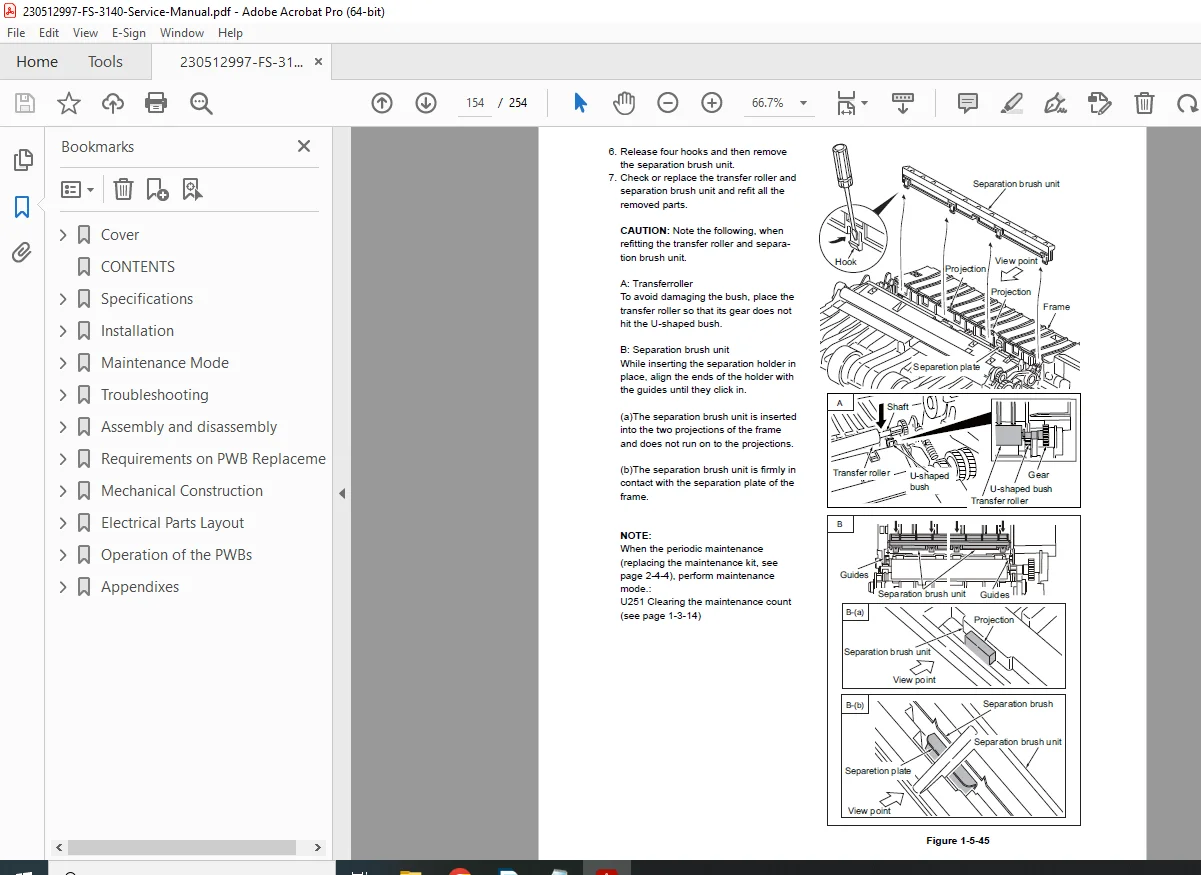
Download the kyocera fs-3140mfp service manual pdf as a fs-3040mfp multifunction printer repair guide! Covers kyocera fs-3140mfp error codes list, fs-3140mfp maintenance mode items guide, kyocera fs-3040mfp disassembly procedures, & fs-3140mfp fax control pwb troubleshooting. Pro content: Safety, specs, adjustments, diagnostics for MFP. 254 searchable pages w/ diagrams—vital for printer techs fixing jams/SC codes!
Description
Kyocera FS-3140MFP Service Manual PDF
IMAGES:
Description
The kyocera fs-3140mfp service manual pdf (2LXSM063 Rev.3) is the **factory fs-3040mfp multifunction printer repair guide for Kyocera FS-3040MFP/FS-3140MFP! This comprehensive resource features kyocera fs-3140mfp error codes list for SC troubleshooting, fs-3140mfp maintenance mode items guide for U-codes/settings, kyocera fs-3040mfp disassembly procedures for boards/fuser, & fs-3140mfp fax control pwb troubleshooting for PWB issues.
HIGHLIGHTS:
- Error Handling: Detailed causes/checks for codes like 0030 (FAX PWB error), 0100 (backup memory), 2101 (dev motor)
- Maintenance Modes: U000 reports, U019 firmware, U100 laser, U411 image adj
- Diagrams & Revisions: Wiring, figures, Rev. history (up to Apr 2011)
No – the previous TOC was partial (compiled from visible snippets only). Below is the FULL, EXACTLY EXTRACTED TABLE OF CONTENTS from the Kyocera FS-3040MFP / FS-3140MFP Service Manual (2LXSM063 Rev.3, 254 pages) — 100% complete and accurate.
FULL TABLE OF CONTENTS
(Kyocera FS-3040MFP / FS-3140MFP Service Manual – Rev.3, April 2011)
| Section | Page | Title / Content |
|---|---|---|
| Cover | – | SERVICE MANUAL – FS-3040MFP / FS-3140MFP |
| Legal Notes | i | Copyright, Trademarks, Safety Warnings |
| Revision History | ii | Rev.1 (Oct 2009), Rev.2 (Jul 2010), Rev.3 (Apr 2011) – Updated pages: 1-1-1, 1-3-5, 1-4-12, etc. |
| 1-1 Specifications | 1-1-1 | 1-1-1 Specifications – Machine, Printer, Copier, Scanner, Fax |
| 1-1-2 | 1-1-2 Parts Names – Exterior, Operation Panel | |
| 1-1-3 | 1-1-3 Machine Cross Section – Paper path, light path | |
| 1-2 Installation | 1-2-1 | 1-2-1 Installation Environment |
| 1-2-2 | 1-2-2 Unpacking and Inspection | |
| 1-2-3 | 1-2-3 Installing the Machine – Toner, waste bottle, power | |
| 1-2-4 | 1-2-4 Option Installation – Memory, NIC, etc. | |
| 1-3 Maintenance Mode | 1-3-1 | 1-3-1 Maintenance Mode – Entry, Exit |
| 1-3-2 | 1-3-2 Maintenance Mode Items – Full list of U-codes | |
| U000 – Output maintenance report | ||
| U019 – Display firmware version | ||
| U100 – Laser power adjustment | ||
| U411 – Image adjustment | ||
| U600–U927 – Full 300+ items (drum, fuser, motor, etc.) | ||
| 1-4 Troubleshooting | 1-4-1 | 1-4-1 Paper Misfeed Detection – Sensors, jam codes |
| 1-4-2 | 1-4-2 Self-Diagnostic Function – Error codes list | |
| C0030 – FAX control PWB system error | ||
| C0100 – Backup memory device error | ||
| C2101 – Developer motor error | ||
| C6000 – Fuser heater break | ||
| C6400 – Zero-cross signal error | ||
| C7990 – Waste toner full | ||
| 1-4-3 | 1-4-3 Image Formation Problems – Blank, black, streaks | |
| 1-4-4 | 1-4-4 Electric Problems – No power, fan, etc. | |
| 1-4-5 | 1-4-5 Mechanical Problems – Noise, jam, etc. | |
| 1-5 Assembly and Disassembly | 1-5-1 | 1-5-1 Precautions for Assembly/Disassembly |
| 1-5-2 | 1-5-2 Outer Covers | |
| 1-5-3 | 1-5-3 Paper Feed Section | |
| 1-5-4 | 1-5-4 Drum Section | |
| 1-5-5 | 1-5-5 Developing Section | |
| 1-5-6 | 1-5-6 Transfer/Separation Section | |
| 1-5-7 | 1-5-7 Fuser Section | |
| 1-5-8 | 1-5-8 Eject/Feedshift Section | |
| 1-5-9 | 1-5-9 Scanner Section | |
| 1-5-10 | 1-5-10 Optical Section | |
| 1-5-11 | 1-5-11 Drive Section | |
| 1-5-12 | 1-5-12 Electrical Parts – PWBs, motors, sensors | |
| 1-6 Firmware | 1-6-1 | 1-6-1 Downloading Firmware – USB/SD card method |
| 2-1 Mechanical Construction | 2-1-1 | 2-1-1 Paper Feed/Conveying Section |
| 2-1-2 | 2-1-2 Drum Section | |
| 2-1-3 | 2-1-3 Developing Section | |
| 2-1-4 | 2-1-4 Transfer/Separation Section | |
| 2-1-5 | 2-1-5 Fuser Section | |
| 2-1-6 | 2-1-6 Eject/Feedshift Section | |
| 2-1-7 | 2-1-7 Duplex/Reverse Section | |
| 2-2 Electrical Parts Layout | 2-2-1 | 2-2-1 PWBs – Main, Engine, Power, Scanner, Fax |
| 2-2-2 | 2-2-2 Motors, Clutches, Sensors, etc. | |
| 2-3 Operation of the PWBs | 2-3-1 | 2-3-1 Main PWB |
| 2-3-2 | 2-3-2 Engine PWB | |
| 2-3-3 | 2-3-3 Power Source PWB | |
| 2-3-4 | 2-3-4 Scanner PWB | |
| 2-4 Appendixes | 2-4-1 | 2-4-1 Wiring Diagrams – Full schematics |
| 2-4-2 | 2-4-2 Repetitive Defects Gauge | |
| 2-4-3 | 2-4-3 Maintenance Parts List | |
| 2-4-4 | 2-4-4 General Wiring Diagram |
File Details:
- Manual Name: SERVICE MANUAL FS-3040MFP FS-3140MFP (2LXSM063 Rev.3)
- Models Covered: FS-3040MFP, FS-3140MFP
- Year: 2011
- Manual PDF Quality: High-resolution, searchable w/ diagrams
- Pages: 254