Lexmark X46x Series Service Manual PDF DOWNLOAD
Original price was: $95.00.$15.95Current price is: $15.95.
Comprehensive Lexmark X46x series service manual PDF for models 7014-431, 7014-636, etc., covering diagnostics, error codes, service checks, repair procedures, parts catalog, and specifications for print engine, scanner, and fax. Includes print quality troubleshooting, paper jam resolutions, and component removals. Ideal for Lexmark X46x service manual download, X46x printer error codes guide, Lexmark X46x print quality troubleshooting, X46x scanner service check, Lexmark X46x parts removal instructions, and X46x fax modem repair. 310 pages, revised 2013.
Description
Lexmark X46x Series Service Manual PDF DOWNLOAD
Description
This detailed Lexmark X46x series service manual PDF is an essential guide for technicians repairing multifunction printers in the X46x lineup, including models 7014-431, 7014-636, 7014-637, 7014-63d, and 7014-63w. It provides thorough coverage of maintenance, diagnostics, error resolution, and component servicing, making it perfect for Lexmark X46x service manual download needs. Sections include safety notices, general specifications for print engine, media handling, digital imaging, and fax; symptom tables and service checks for issues like dead machine, fuser problems, networking, and print quality; diagnostic aids with configuration and diagnostics menus, tests, and adjustments; repair instructions for removals of parts like printhead, fuser, and scanner components; locations diagrams; preventive maintenance; and a parts catalog.
Key features encompass X46x printer error codes guide for 8xx.xx/9xx.xx services and user messages, Lexmark X46x print quality troubleshooting for blank pages, banding, and poor fusing, X46x scanner service check for ADF and flatbed issues, Lexmark X46x parts removal instructions for electronics, frame, and options, and X46x fax modem repair for transmission/reception errors. The manual emphasizes ESD handling and tools required for safe repairs.
File Details:
- Manual Name: 227003271-Lexmark-X46x-Service-Manual-pdf.pdf
- Models Covered: Lexmark X46x series (7014-431, 7014-636, 7014-637, 7014-63d, 7014-63w)
- Year: 2013
- Manual PDF Quality: High (clear text, diagrams, and images; fully readable)
- No. of Pages: 310
Table of Contents (Categorized):
- Notices and Safety Information
- Laser notice
- Lithium warning
- Safety information
- Preface
- Change history
- Conventions
- General Information
- Maintenance approach
- Print engine specifications (memory, print quality, environment, dimensions, connectivity, media trays, types of print media, media guidelines)
- Digital imaging specifications (general, ADF scan speed, document handling, resolution, flatbed specs, operating environments)
- Scan and copy specific specifications (resolutions, duplex, file formats, compressions, destinations, multiple copies, reduce/enlarge)
- Fax specifications (connectivity, resolutions, miscellaneous)
- Tools
- Acronyms
- Diagnostics Information
- Start (symptom tables, service errors, user messages)
- Symptom tables (POST, printer, scan/fax/copy)
- Overview of the operator panel and menus (home screen, touch-screen buttons, menu diagram)
- Messages and error codes (user attendance, cartridge errors, paper jams 200-series, service errors, fax errors)
- Service checks (controller board, engine board, cooling fan, cover interlock, dead machine, fuser, LVPS/HVPS, main motor, media feed clutch, networking, operator panel, paper feed, option card, USB port, print quality, solving print quality problems, printhead, transfer roll, tray 2, 840.xx, black/blank page copy, CCD, flatbed motor/home position, ADF cover/streak/paper jam/feed errors/duplex, modem/fax card, fax transmission/reception, escalating fax issues)
- Diagnostic Aids
- Accessing service menus
- Configuration menu (maintenance counts, reset counters, USB scan, print quality pages, menu settings, event log, panel menus, PPDS emulation, download emuls, factory defaults, energy conserve, min copy memory, num pad job assist, format fax storage, fax storage location, edge erase, scanner manual registration, disable scanner, prompts, jobs on disk, disk encryption, wipe disk, font sharpening, require standby, LES applications, key repeat, wiper message, clear custom status, USB speed/PnP, exit config menu)
- Diagnostics menu (registration, print tests, hardware tests, duplex tests, input tray tests, output bin tests, base sensor test, device tests, printer setup, EP setup, reports, event log, scanner tests, exit diagnostics)
- Printhead assembly electronic/mechanical adjustment
- SE menu (print SE menus, general, code revision, history, MAC, NVRAM, NPAP, TCP/IP)
- Paper jams (avoiding jams, understanding jam numbers/locations, 200/201, 202, 231, 233, 234, 235, 240-249, 250, 251, 290-294)
- Repair Information
- Handling ESD-sensitive parts
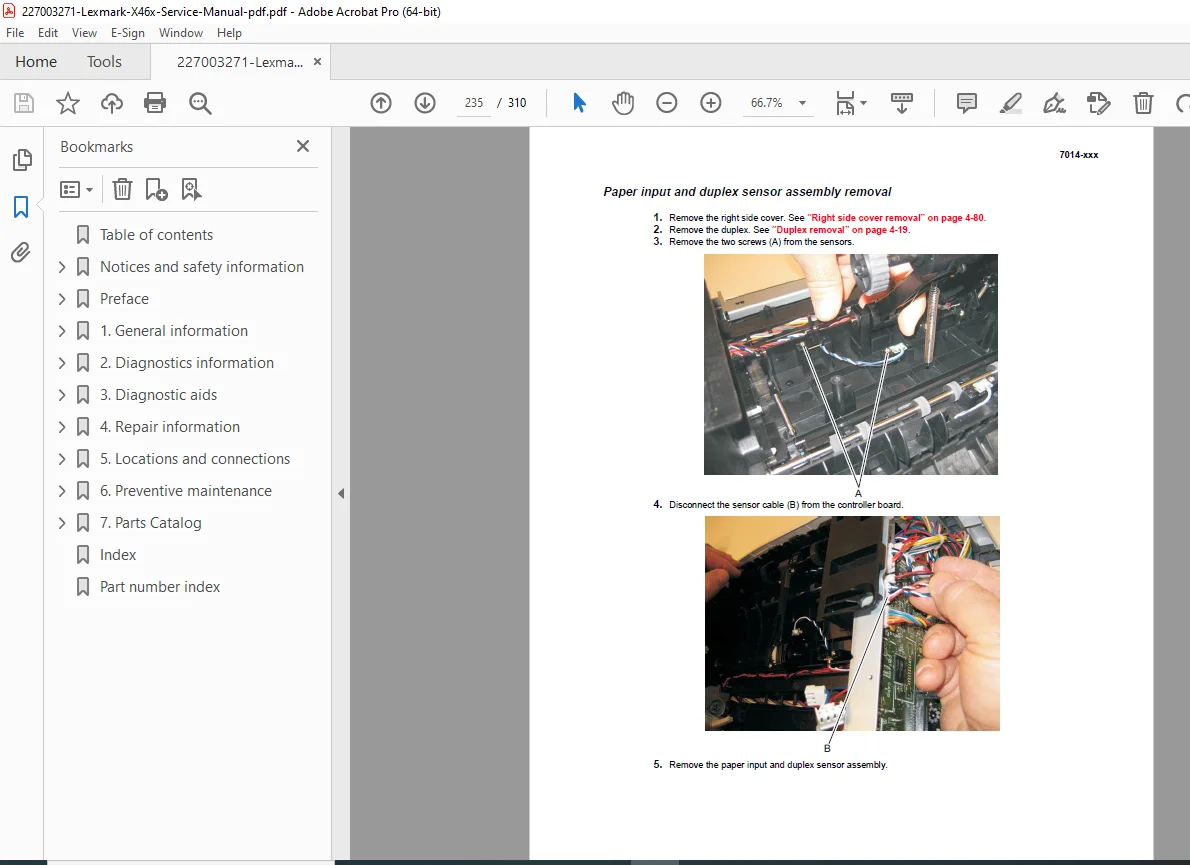
- Removal procedures (ACM pick tire, card reader/covers/cable, controller board/shield/cage/fan, engine board, cover open sensor, door mount, duplex, duplex/main motor gear drive, fan, front access door, fuser, scanner front cover, left/right side covers, front door/lower front covers, LVPS/HVPS, main motor gear drive, manual feed clutch/solenoid, media ACM ASM feeder, media feed clutch, media manual input sensor, multipurpose feeder/feed clutch, nameplate cover, operator panel keypad/display/bezel/UICC cable/USB bracket/support/rotation support, left/right rear frame assembly, tub assembly, paper input/duplex sensor, printhead, mid rear cover, rear door/lower rear cover/exit guide/sensor/reversing solenoid, toner level sensor, top cover, transfer roll, upper front guide, wear strips, imaging component removals: ADF unit/flatbed/scanner assembly/separator pad/roll/kickstand/output bin LED/lens/ADF cable/left/right scanner covers, option board installs/removals: ISP/printer hard disk/fax card)
- Locations and Connections
- Locations (front/rear view, print engine paperpath)
- Main boards (controller board, engine board, connector pin values)
- Preventive Maintenance
- Safety inspection guide
- Lubrication specifications
- Scanner glass cleaning
- Maintenance kits
- Parts Catalog
- How to use this parts catalog
- Assembly 1: Covers
- Assembly 2: Imaging
- Assembly 3: Tray assemblies
- Assembly 4: Electronics 2
- Assembly 5: Frame
- Assembly 6: Options
- Assembly 7: Power cords
This Lexmark X46x series service manual PDF integrates long tail keywords like X46x printer error codes guide, Lexmark X46x print quality troubleshooting, X46x scanner service check, and Lexmark X46x parts removal instructions naturally for optimal reference and search.