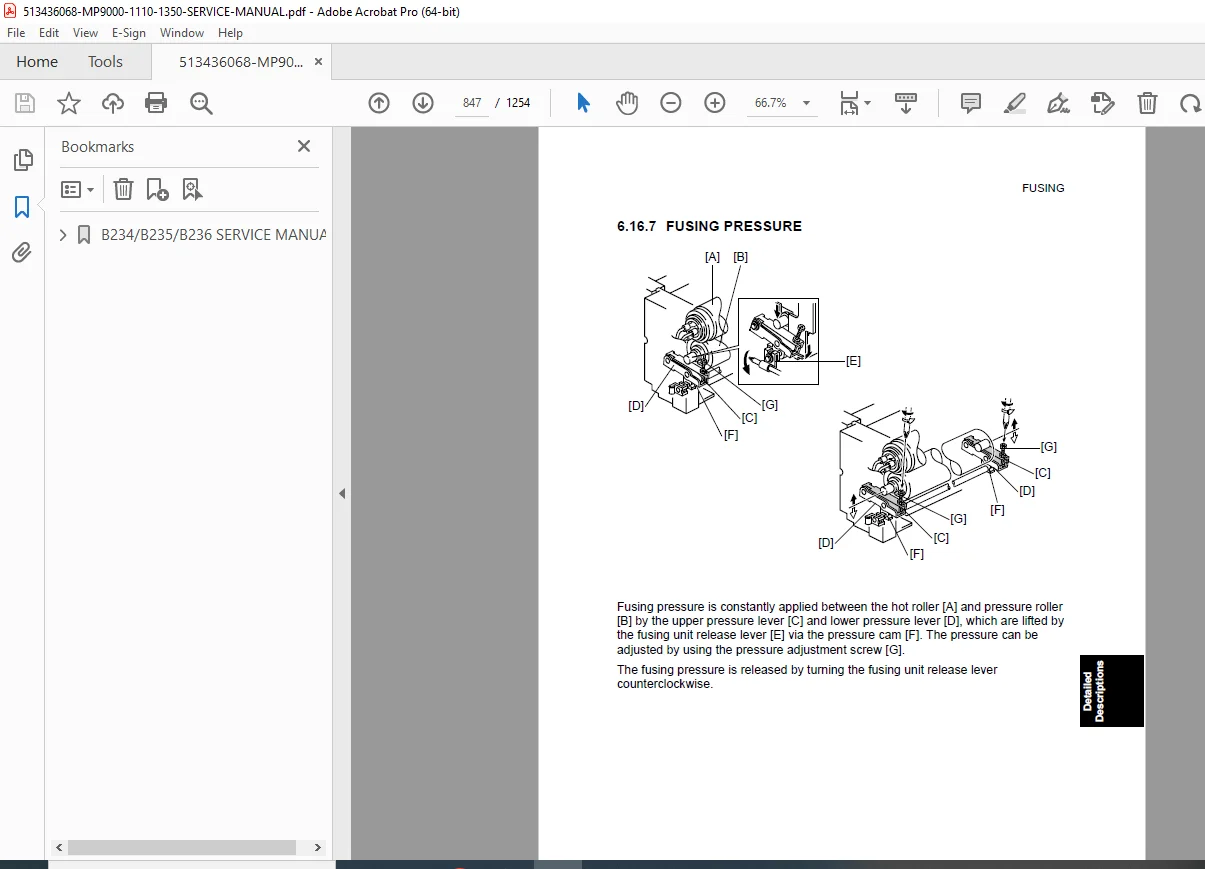
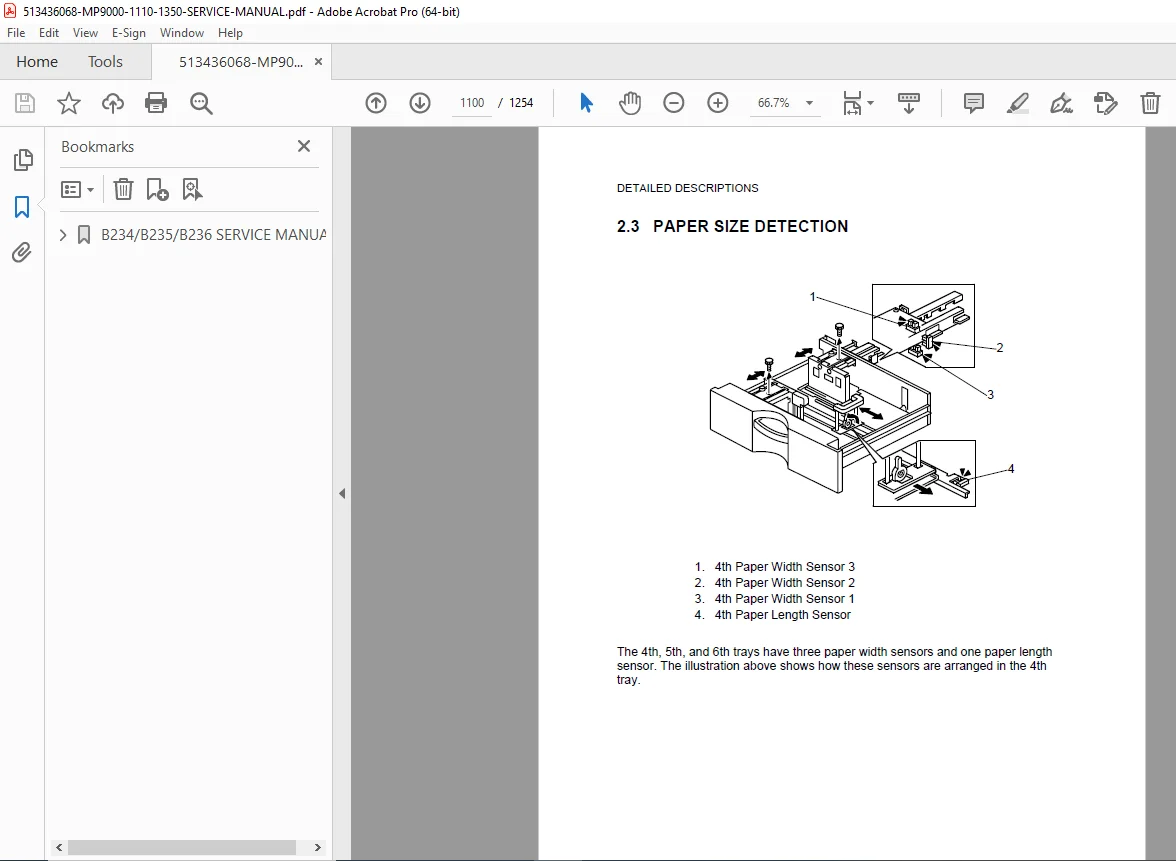
Ricoh Lanier Savin Gestetner B234 B235 B236 MP9000 MP1110 MP1350 Service Manual PDF
Original price was: $85.00.$25.95Current price is: $25.95.
Official service manual for Ricoh B234/B235/B236 series covering Ricoh Aficio MP9000, MP1110, MP1350 and equivalent Gestetner, Lanier, and Savin high-speed multifunction printers. This comprehensive 500+ page technical manual includes installation procedures, preventive maintenance schedules, drum/fusing unit replacement instructions, complete SP mode service program codes, troubleshooting guides, and detailed component replacement procedures for installation technicians and service professionals maintaining these production MFP systems.
Description
Ricoh Lanier Savin Gestetner B234 B235 B236 MP9000 MP1110 MP1350 Service Manual - PDF DOWNLOAD
DESCRIPTION
This is the official SERVICE MANUAL for Ricoh B234/B235/B236 Series (Original Printing May 2006, Revised November 2006), covering the Ricoh Aficio MP9000, MP1110, and MP1350 high-speed multifunction printer (MFP) models, along with their Gestetner, Lanier, and Savin equivalents. This comprehensive 500+ page technical manual is the ultimate resource for installation technicians and service professionals performing installation, adjustment, troubleshooting, and repair on these production-level document management systems.
Product Overview
Ricoh B234/B235/B236 Series High-Speed MFPs:
The Ricoh B234/B235/B236 series represents high-performance multifunction printers designed for high-volume production environments, corporate print rooms, and document management centers. These robust systems combine copying, printing, scanning, and optional finishing capabilities with exceptional speed and reliability.
Key Applications:
- Corporate reprographics departments (CRD)
- Print-for-pay shops
- In-plant print centers
- Educational institutions
- Government agencies
- Large enterprise document production
- Service bureaus
- Commercial printing operations
Models Covered
This comprehensive service manual covers multiple manufacturer brands with identical hardware platforms:
Ricoh Models:
- Ricoh Aficio MP9000 – 90 pages per minute
- Ricoh Aficio MP1110 – 110 pages per minute
- Ricoh Aficio MP1350 – 135 pages per minute
Lanier Models:
- Lanier LD190 – 90 ppm equivalent
- Lanier LD1110 – 110 ppm equivalent
- Lanier LD1135 – 135 ppm equivalent
Savin Models:
- Savin 8090 – 90 ppm equivalent
- Savin 8110 – 110 ppm equivalent
- Savin 8135 – 135 ppm equivalent
Gestetner Models:
- Gestetner DSm790 – 90 ppm equivalent
- Gestetner DSm7110 – 110 ppm equivalent
- Gestetner DSm7135 – 135 ppm equivalent
All models share common service procedures, parts, and diagnostic codes.
Key Features and Technologies
High-Speed Performance:
- Production-level print speeds (90-135 ppm)
- High monthly duty cycle
- Large paper capacity
- Advanced paper handling
- Robust mechanical design
MFP Functionality:
- Black & white copying
- Network printing
- Color scanning
- Optional fax capability
- Document server functions
- Advanced finishing options
Advanced Systems:
- Dual component development system
- Long-life photoconductor drum
- High-capacity toner system
- Precision laser exposure unit
- Advanced fusing technology
- Comprehensive self-diagnostics
Comprehensive Manual Contents
DOCUMENT INFORMATION:
- Original Printing: May 2006
- Revised Edition: November 2006
- Pages: Approximately 500+ pages (extensive multi-chapter document)
- PDF Quality: High-quality digitized text and tables
- Language: English
EXTRACTED TABLE OF CONTENTS
CHAPTER 1: INSTALLATION (Pages 1-1 onwards)
Installation Procedures:
Environment Requirements:
- Temperature specifications
- Humidity specifications
- Ventilation requirements
- Electrical environment
- Space clearances
- Floor load requirements
Machine Level:
- Leveling procedures
- Leveling foot adjustment
- Level verification methods
- Importance of proper leveling
Space Requirements:
- Machine dimensions
- Clearance specifications
- Service access space
- Optional equipment spacing
- Operator access considerations
Power Requirements:
- Voltage specifications
- Current requirements
- Circuit breaker sizing
- Ground connection
- Power quality requirements
- Surge protection recommendations
Copier (B234/B235/B236) Installation:
Accessory Check:
- Verifying included components
- Optional equipment identification
- Documentation verification
- Initial inspection procedures
Pouring Developer:
- Developer specifications
- Pouring procedures
- Developer bottle identification
- Initial fill quantities
- Safety precautions
Initializing the Machine:
- Power-up sequence
- Initial configuration
- System initialization
- Function verification
- Test print procedures
Optional Peripherals Installation:
LCIT RT5000/RT5010 (B832/B834) and Tray Heaters:
- Large Capacity Input Tray installation
- Electrical connections
- Mechanical attachment
- Communication setup
- Tray heater installation (for heavy stocks)
- Function testing
Finishing Options:
Z-Folding Unit ZF4000 (B660):
- Installation procedures
- Paper path configuration
- Fold adjustment
- Function testing
Booklet Finisher BK5000 (B836):
- Installation steps
- Saddle stitch setup
- Fold adjustment
- Trim adjustment (if equipped)
- Stacker capacity
- Function testing
Finisher SR5000 (B830):
- Installation procedures
- Stapling unit setup
- Hole punch integration
- Multi-position stapling
- Function testing
Punch Unit PU5000 (B831):
- Installation procedures
- Hole pattern selection
- Punch die installation
- Waste receptacle setup
- Function testing
MFP Controller Options:
Printer/Scanner Kit (B840):
- Controller board installation
- Network interface setup
- Print driver installation
- Scan driver installation
- Function testing
Data Overwrite Security Unit F (B735):
- Security board installation
- Configuration procedures
- Data overwrite settings
- Compliance verification
Browser Unit (B828):
- Web browser interface installation
- Touch panel integration
- Network configuration
- Function testing
Various Interface Boards:
- IEEE 1284 Interface – Parallel connection
- IEEE 802.11b Interface – Wireless networking
- Bluetooth Interface – Wireless device connection
- Installation procedures for each
- Configuration steps
- Function testing
CHAPTER 2: PREVENTIVE MAINTENANCE (PM) (Pages 2-1 onwards)
PM Counter System:
Displaying the PM Counter:
- Accessing service mode
- Reading counter values
- Interpreting counter data
- Resetting counters after PM
Parts List:
- Complete PM parts listing
- Part numbers
- Replacement intervals
- Quantities required
- Part descriptions
PM Tables:
Main Machine PM Schedule:
- PM intervals based on counters
- Component replacement schedule
- Cleaning procedures
- Adjustment procedures
- Lubrication schedule
ADF PM Schedule:
- Feed roller replacement
- Separation pad replacement
- Belt replacement
- Cleaning procedures
- Lubrication points
Finisher/LCT Accessories PM:
- PM schedules for each optional finisher
- Stapler unit maintenance
- Punch unit maintenance
- Folder maintenance
- Large capacity tray maintenance
Lubrication Points:
Detailed Lubrication Diagrams:
- Transfer Unit Lubrication:
- Bearing locations
- Gear lubrication points
- Lubricant specifications
- Application methods
- Fusing Unit Lubrication:
- Gear train lubrication
- Bearing lubrication
- Pressure mechanism lubrication
- Heat-resistant lubricants
- Main body lubrication points
- Paper path lubrication
- Drive system lubrication
Lubrication Specifications:
- Lubricant types and part numbers
- Application quantities
- Application methods
- Cleaning procedures before lubrication
CHAPTER 3: REPLACEMENT AND ADJUSTMENT (Pages 3-1 onwards)
General Cautions:
Specific Handling Notes:
Drum Handling:
- Photoconductor sensitivity to light
- Proper handling techniques
- Scratch prevention
- Installation precautions
- Disposal procedures
- Safety warnings
Transfer Belt Unit:
- Belt surface protection
- Contamination prevention
- Proper handling
- Alignment importance
- Cleaning restrictions
Scanner Unit:
- Optical component protection
- Mirror alignment preservation
- Lamp handling precautions
- Cable routing importance
Fusing Unit:
- High temperature warnings
- Cool-down requirements
- Roller surface protection
- Thermal sensor handling
- Safety precautions
Key Unit Replacement Procedures:
Document Feeder:
Feed Belt Replacement:
- Belt removal procedures
- Tension adjustment
- Alignment procedures
- Installation steps
Pick-up Roller Replacement:
- Roller removal
- Installation procedures
- Torque specifications
ADF Sensors:
- Sensor locations
- Replacement procedures
- Adjustment procedures
- Function testing
Motors:
- Feed motor replacement
- Scan motor replacement
- Electrical connections
- Function testing
Scanner Unit:
Exposure Glass Replacement:
- Glass removal
- Cleaning procedures
- Installation procedures
- Seal replacement
Lens Block:
- Lens removal
- Cleaning procedures
- Alignment procedures
- Installation steps
Lamps:
- Lamp replacement procedures
- Exposure lamp
- Scanning lamp
- Electrical connections
- Safety precautions
Scanner Motor:
- Motor removal
- Cable disconnection
- Installation procedures
- Timing belt adjustment
Laser Unit:
LD Unit (Laser Diode):
- Safety warnings
- Removal procedures
- Installation procedures
- Alignment verification
- Output power verification
Polygon Mirror Motor:
- Motor removal
- Cable disconnection
- Installation procedures
- Speed verification
- Function testing
Around the Drum (PCU – Photoconductor Unit):
Cleaning Unit:
- Cleaning blade replacement
- Waste toner container service
- Installation procedures
- Adjustment procedures
Pre-Charge Unit:
- Charger wire replacement
- Cleaning procedures
- Installation procedures
- Voltage verification
Drum Potential Sensor:
- Sensor removal
- Cleaning procedures
- Installation procedures
- Calibration procedures
Development and Toner Supply:
Development Unit Removal:
- Complete removal procedures
- Developer disposal
- Cleaning procedures
- Installation procedures
- Developer filling
- Initial rotation procedures
Developer Replacement:
- Developer removal procedures
- New developer installation
- Initial density adjustment
- Break-in procedures
Toner Density Sensor:
- Sensor location
- Cleaning procedures
- Replacement procedures
- Calibration procedures
Paper Feed:
Paper Trays:
- Tray removal procedures
- Feed roller replacement
- Separation roller replacement
- Size plate adjustment
- Installation procedures
Feed Rollers:
- Roller replacement procedures
- Various paper path locations
- Installation procedures
- Torque specifications
LIFT MOTORS:
- Lift motor replacement
- Gear train service
- Electrical connections
- Function testing
Fusing Unit:
Hot Roller Replacement:
- Fusing unit removal
- Hot roller removal
- Cleaning procedures
- Installation procedures
- Temperature sensor installation
Pressure Roller:
- Roller removal
- Surface inspection
- Installation procedures
- Pressure adjustment
Thermostats:
- Location identification
- Replacement procedures
- Temperature specifications
- Testing procedures
Thermistor:
- Thermistor location
- Removal procedures
- Installation procedures
- Temperature calibration
Duplex Unit:
- Duplex unit removal
- Roller replacement
- Sensor replacement
- Installation procedures
- Timing adjustment
Toner Bank:
- Toner bottle replacement
- Bottle installation
- Supply system priming
- Function testing
CHAPTER 4: SERVICE PROGRAM (SP) MODES
Ricoh Aficio MP9000 SP Mode Service Program Table:
Complete SP Mode Listing:
- SP mode access procedures
- Password entry (if applicable)
- Navigation in SP mode
SP Mode Categories:
Diagnostic Modes:
- Input/Output checks
- Sensor verification
- Motor function tests
- Solenoid tests
- Lamp tests
- Fan tests
Adjustment Modes:
- Image quality adjustments
- Density calibration
- Gradation adjustment
- Registration adjustment
- Color balance (if applicable)
- Timing adjustments
System Settings:
- Machine configuration
- Option settings
- Network parameters
- Counter display
- Counter reset procedures
For Each SP Mode:
- SP code number
- Function description
- Access procedures
- Parameters available
- Adjustment procedures
- Default values
- Acceptable ranges
CHAPTER 5: TROUBLESHOOTING
Systematic Troubleshooting:
- Problem isolation procedures
- Using diagnostic codes
- Error message interpretation
- LED indicator patterns
Common Problems:
- Paper feed issues
- Image quality problems
- Jam codes and clearance
- Network connectivity
- Scanner problems
- Finisher malfunctions
For Each Problem:
- Symptoms
- Probable causes
- Diagnostic procedures
- Corrective actions
- Verification steps
CHAPTER 6: SAVIN 8135 COPIER PREVENTATIVE MAINTENANCE PARTS LIST
Complete Parts List:
- Part numbers
- Part descriptions
- Replacement intervals
- Quantities required
- Usage notes
Maintenance Items:
- Feed rollers (all locations)
- Separation pads
- Drive belts
- Cleaning blades
- Charger wires
- Fuser components
- Developer
- Filters
- Sensors
- Lamps
Lubrication Points:
- Detailed location diagrams
- Lubricant specifications
- Application procedures
- Service intervals
CHAPTER 7: CIRCUIT DIAGRAMS AND SCHEMATICS
Electrical Schematics:
- Power distribution
- Control circuits
- Motor drive circuits
- Sensor circuits
- Communication circuits
Pneumatics:
- Air pressure system
- Solenoid valve circuits
Board Layouts:
- Main controller board
- Power supply board
- High voltage board
- Option boards
- Component locations
CHAPTER 8: PARTS CATALOG
Exploded View Diagrams:
- Main body assemblies
- Document feeder
- Paper feed units
- Fusing unit
- Development unit
- Transfer unit
- Optional finishers
For Each Assembly:
- Part numbers
- Descriptions
- Quantities
- Reference numbers
- Installation notes
Highlighted Technical Procedures
Critical Service Operations:
✓ Gestetner DSm7135 Drum Unit Replacement – Complete procedures for photoconductor replacement, handling precautions, and initialization
✓ MP1350 Fusing Unit Replacement and Adjustment – Comprehensive instructions for fuser removal, installation, pressure adjustment, and temperature calibration
✓ Development Unit Service – Complete removal, cleaning, developer replacement, and adjustment procedures
✓ Transfer Belt Replacement – Belt removal, installation, tension adjustment, and cleaning procedures
✓ ADF Feed Roller Replacement – Document feeder roller service and adjustment
✓ Laser Unit Service – LD unit and polygon motor replacement procedures
✓ Complete Finisher Installation – All optional finisher installation and adjustment procedures
✓ Network Controller Setup – Printer/scanner kit installation and configuration
Who Needs This Manual?
This Ricoh/Lanier/Gestetner/Savin service manual is essential for:
- Authorized Ricoh service technicians
- Independent copier service companies
- Corporate print room technical staff
- Educational institution service personnel
- Government facility maintenance teams
- Print-for-pay shop technicians
- Anyone servicing these high-speed production MFPs
Prerequisites:
✓ Copier/MFP service training
✓ Understanding of electrophotographic process
✓ Electronic troubleshooting skills
✓ Mechanical repair aptitude
✓ ESD handling procedures
✓ Safety training for high-voltage and high-temperature components
✓ Network configuration knowledge (for MFP functions)
FILE DETAILS
| Detail | Specification |
|---|---|
| Manual Title | SERVICE MANUAL B234/B235/B236 (RICOH/LANIER/SAVIN) |
| Models Covered | Ricoh Aficio MP9000, MP1110, MP1350; Lanier LD190, LD1110, LD1135; Savin 8090, 8110, 8135; Gestetner DSm790, DSm7110, DSm7135 |
| Original Printing | May 2006 |
| Revised Edition | November 2006 |
| Pages | 1254 |
| PDF Quality | High-quality digitized text and tables |
| Language | English |
| Coverage | Installation, PM, replacement, adjustment, SP modes, troubleshooting |