
Baudouin Monitoring System BMS 2026 User Manual – Marine Propulsion & GEB Engines
Original price was: $39.95.$23.95Current price is: $23.95.
2026 edition Baudouin Monitoring System BMS user manual for marine propulsion and GEB engines. 165 pages covering BMS MINI, ECO, MAXI and MASTER panels, ID-DCU / ID-COM / ID-RPU / IGS-PTM hardware, CAN wiring, starting and stopping logic, DriveConfig setpoints, alarms and full troubleshooting tables.
Description
The Baudouin Monitoring System BMS 2026 User Manual is the complete reference for the Baudouin Monitoring System fitted to marine propulsion and GEB engines. Across 165 pages it moves from the objectives of the system itself through the hardware architecture, the engine-room and bridge panels, the CAN communication layout, the configuration setpoints that govern starting and protection, and finally a full alarm and troubleshooting guide referenced against specific Baudouin engine families. It is written for the technician, commissioning engineer or vessel engineer who has to make the BMS behave correctly rather than simply read about it.
Because the BMS sits between the operator and the engine, most of what goes wrong on a vessel is either a configuration point that has drifted, a sensor that has failed, a CAN segment that has lost its termination, or an alarm threshold that has tripped. This manual addresses all four. The Baudouin BMS user manual explains the DriveConfig tool, the on-controller setpoint menus, the PCS type and BINSigInv presets that decide whether the engine will even accept a start command, and the logic sequences behind pre-heating, pre-lubrication, cranking and normal or emergency stopping.
File Details
- Manual type: Monitoring and control system user manual – architecture, configuration, operation, diagnostics and troubleshooting
- Brand: Baudouin (Moteurs Baudouin)
- System covered: BMS – Baudouin Monitoring System, for marine propulsion and GEB engines
- Edition: 2026 Edition
- Language: English
- Format: PDF
- Length: 165 pages
Chapters Covered
- Monitoring and control system – objectives, why electronic, key capabilities, options and extensions
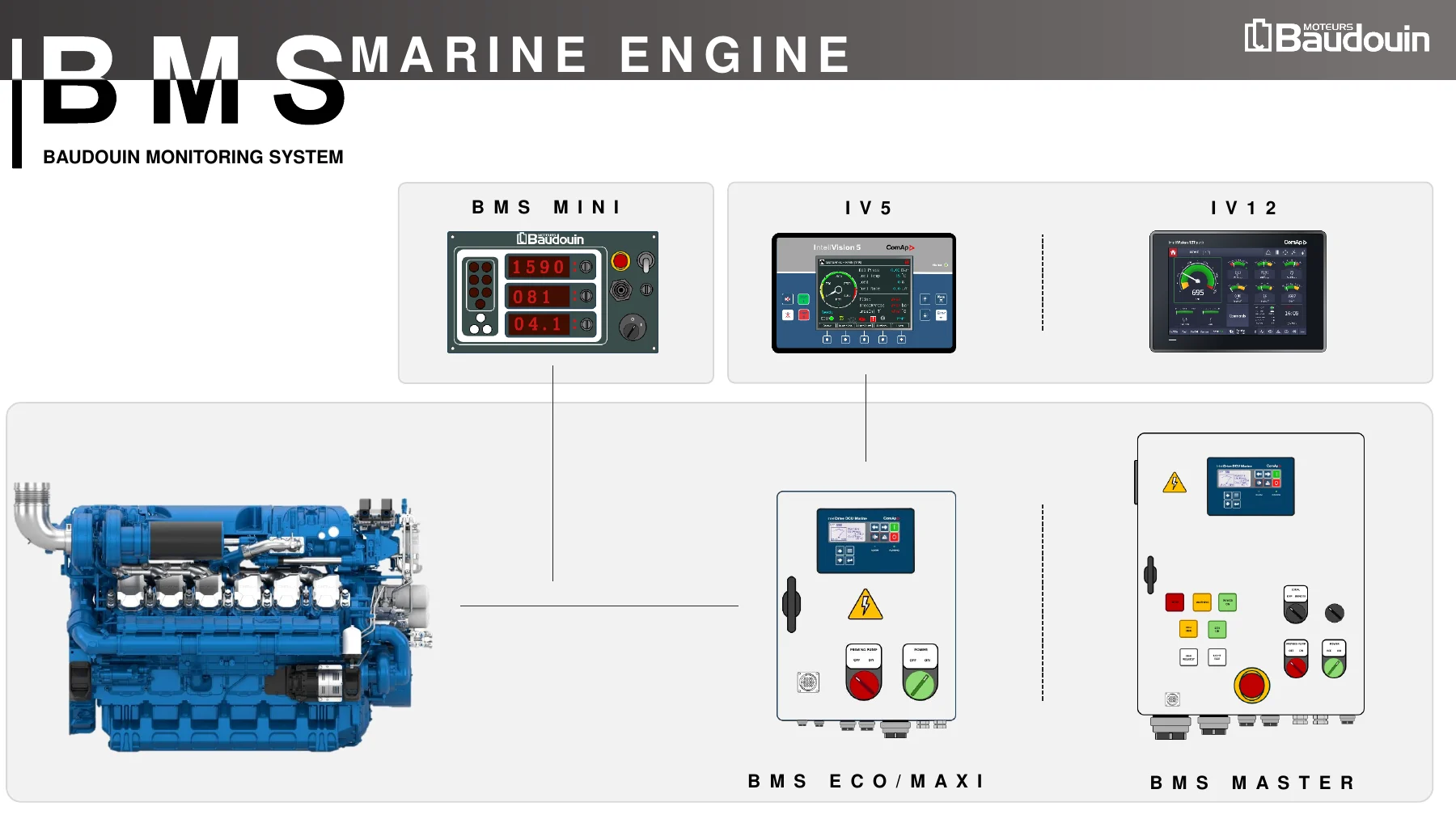
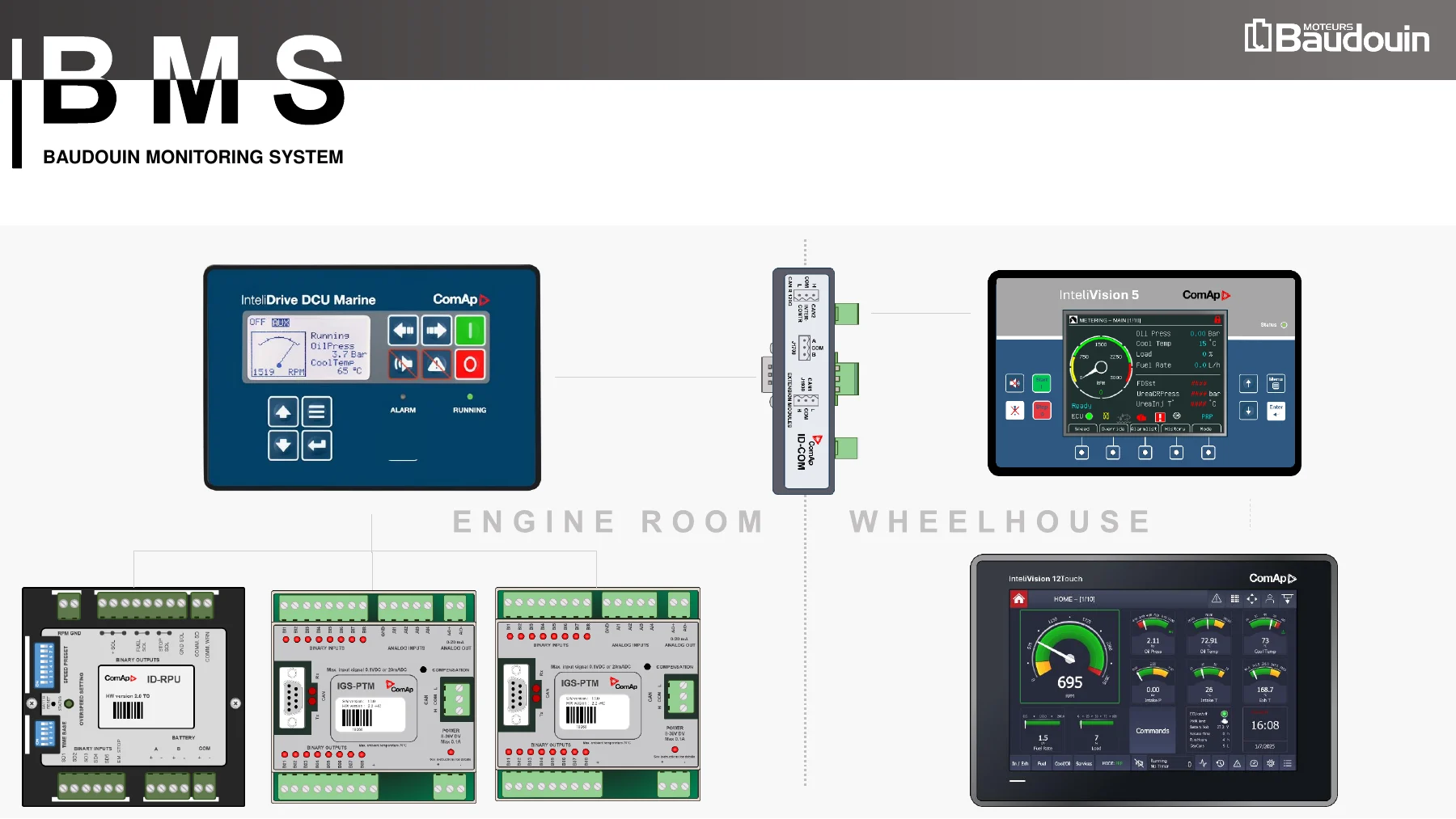
- Architecture and components – BMS MINI, ECO, MAXI and MASTER packages, ID-DCU, ID-COM, ID-RPU, IGS-PTM and IntelVision displays
- Engine room panel – BMS MASTER and ECO panel layout, fuses, relays, breakers and terminal assignments
- BMS logic sequence – power limitation, pre-heater, starting, stopping, air pre-heating, pre-lubrication and BMS shutdown logic
- CAN communication architecture – CAN private, CAN CCP, CAN intersystem and ComAP IV screen networks, plus resistor installation for each
- Auxiliary accessories – gearbox harness and sensors, mono-throttle, twin-throttle and sensor technologies
- Main controller screen explanation – ID-DCU Marine and Industrial keybinds and display fields
- Browsing inside the main controller – mode selection, measurement screens, setpoints, history, contrast, backlight and language
- Bridge panel marine applications IV12
- Bridge panel marine applications IV5
- PCS type adjustment
- BINSigInv adjustment
- Service time adjustment and password access
- Engine starting procedure – locking and unlocking, start sequence and start blocking diagnosis
- Required equipment for diagnostic – PC, FTDI serial cable and InteliDrive Install Suite
- Software manipulation – hardware connection, InteliMonitor connection, history export, programming and pop-up messages
- Drive config quick guide – Modules, I/O, Setpoints, Protections, History, User curves, Languages, PLC Editor and Screen Editor tabs
- Alarms and shutdown – ECU alarms versus BMS alarms, alarm types and colours
- Components replacement – ID-DCU jumper adjustment, IGS-PTM jumper adjustment and ID-RPU replacement
- Troubleshooting – BMS and ECU alarm troubleshooting guide by engine family
Read end to end, the twenty sections form a complete working path through the system. The early chapters establish what each BMS variant contains and how the components are wired together, including the terminal numbers used on the ECO, MASTER and MAXI panels and the fuse, relay and breaker assignments behind them. The middle chapters cover the operational side: how the logic sequences decide when to pre-heat, when to pre-lubricate, when to crank, how the stop sequence handles unloading and cooling, and how the CAN segments are terminated so that losing one line does not lose the engine. The later chapters move into configuration and fault-finding – the DriveConfig quick guide, the PCS type and BINSigInv presets, service time and password handling, and then the alarm and troubleshooting tables that map each BMS alarm name to its sensor type, its action and its trigger threshold for each supported engine family.
BMS Variants, Controllers and Displays Documented
The manual covers four BMS packages. BMS MINI is the compact display-and-button panel. BMS ECO is built around the ID-DCU Marine controller and offers up to 14 binary inputs, 14 binary outputs and 8 analog inputs with RS232, RS485, modem and Modbus communication, applied to auxiliary and propulsion duty. BMS MAXI uses the ID-DCU Industrial controller and extends the count to 22 binary inputs, 22 binary outputs, 12 analog inputs and one analog output for generator applications. BMS MASTER is the fullest package, combining ID-DCU Marine, ID-COM, ID-RPU and IGS-PTM modules with IntelVision 5 or IntelVision 12 Touch displays, supporting up to 30 binary inputs, 30 binary outputs, 16 analog inputs and 2 analog outputs, and carrying IACS certification for GEB, auxiliary and propulsion applications.
On the device side the manual documents the InteliDrive DCU Marine and Industrial controllers, the ID-COM communication module with its CAN1, CAN2 and J1708 interfaces, the ID-RPU redundant engine protection unit with hardwired overspeed protection and five shutdown channels, and the IGS-PTM input/output module with configurable binary and analog channels and PT100 / NI100 measurement support. The bridge-side displays get dedicated chapters: IntelVision 5 with its 5.7 inch colour TFT screen, context buttons and manual speed control, and IntelVision 12 Touch with its status bar, multi-controller support, colour-coded alarm list and Service page manual control.
Alarm and Troubleshooting Coverage
The troubleshooting section is organised as an alarm-by-alarm reference rather than a generic fault list. Each entry gives the BMS alarm name, the sensor type behind it, the action the system takes, and the threshold at which it trips for each relevant engine family. Covered alarms include very low and low lube oil pressure, differential filter lube oil pressure, piston jet oil gallery pressure, very high and high coolant temperature, low coolant pressure, low coolant level, low raw water pressure, boost temperature before and after the charge air cooler, charge air intake temperature, high exhaust temperature for both genset and propulsion duty, overspeed, alternator fault, gearbox oil pressure and level alarms, start blocking, communication errors, CAN timeouts and CAN errors, defective IGS-PTM, defective ID-RPU, CAN throttle communication loss, and ECU alarms reported as SPN and FMI codes.
Diagnostic procedures accompany each alarm. They include checking the sensor against a gauge, verifying oil level, viscosity and dilution, inspecting internal and external leakages, checking regulating and relief valves, replacing filters, checking thermostatic valves and heat exchanger cores, checking raw water pump belts and strainers, verifying CAN line continuity and ohm readings, checking ECU power and the T15 / K-switch, and inspecting turbochargers, air filters and injection equipment for exhaust temperature faults.
What This Manual Lets You Do
With this Baudouin Monitoring System BMS 2026 user manual in hand, a technician can commission a BMS panel against a specific engine, set the correct PCS type for the throttle in use, choose the right BINSigInv preset for the vessel’s neutral switch, turning gear and throttle arrangement, and clear a start blocking condition instead of guessing at it. It supports safe engine starting and stopping through the correct pre-start, pre-lubrication, cranking, unloading and cooling sequences, and it makes override mode and its limits explicit.
Getting these procedures and thresholds right matters because the BMS is a protection system as well as a monitoring system. Setting an alarm threshold from memory, or clearing a shutdown without understanding which sensor produced it, is how an engine gets damaged. The tables in this manual give the actual trip values – the coolant temperature shutdown point differs between engine families, and the overspeed setting differs between genset and propulsion duty – so the system can be configured and diagnosed against the manufacturer’s figures rather than an approximation.
IMAGES PREVIEW
Delivery is instant. The file is a PDF download, no physical book and no shipping, available to read on a laptop, tablet or phone and printable if a paper copy is wanted in the engine room.
Reviews
There are no reviews yet.