Canon DR-4010C Service Manual PDF Download
Original price was: $95.00.$18.95Current price is: $18.95.
Download the official Canon DR-4010C service manual PDF for comprehensive Canon scanner disassembly instructions, DR-4010C error codes troubleshooting, and Canon DR-4010C roller replacement guide. This first edition guide covers product specifications, functions, installation, maintenance, and image processing features like advanced text enhancement in Canon scanners. Essential for technicians handling feed system repairs, electrical circuits, and service mode operations in the DR-4010C model.
Description
Canon DR-4010C Service Manual PDF Download
Description
This Canon DR-4010C service manual PDF download is a vital resource for service personnel and technicians maintaining the Canon DR-4010C document scanner. Published as the first edition in November 2006 by Canon Electronics Inc., it provides detailed insights into product specifications, operational functions, disassembly and reassembly procedures, installation steps, and troubleshooting methods to ensure optimal performance and longevity. Key sections include Canon scanner disassembly instructions for components like rollers, covers, and reading units, as well as a thorough DR-4010C error codes troubleshooting guide to address power indicators, error messages, and common failures such as jams or slow scanning.
The manual highlights advanced features like new image processing in Canon DR-4010C, including advanced text enhancement II, prevent bleed through functions, and auto image type detection. It also covers the Canon DR-4010C roller replacement guide for periodic maintenance of consumable parts like the retard roller and roller unit, ensuring smooth feed error detection and separation mechanisms.
For troubleshooting, it details operation failures, image issues, and service mode tools for adjustments, firmware loading, and device checks, making it an indispensable DR-4010C feed system repair manual. Safety precautions are emphasized to prevent risks during maintenance.
No bookmarks or separate index are present, but the comprehensive table of contents serves as a clear navigation guide, categorized below with bullet points for easy reference:
Chapter 1: General Description
- I. Product Specifications
- Features
- Specifications
- Precautions
- II. Name of Parts
- Front Side
- Operation Section
- Rear Side
- III. User Operation
- Preparation
- CapturePerfect 3.0
- Job Function
- Clearing Jam
Chapter 2: Functions & Operation
- I. Outline
- Basic Configuration
- Motor Drive
- Electrical Circuits
- Timing Chart
- II. Reading System
- Outline
- Reading Unit
- Shading
- CIS Position Correction
- III. Feed System
- Outline
- Pickup Mechanism
- Separation Mechanism
- Straight Path
- Feed Error Detection
- IV. Control System
- Control PCB
- Image Processing Control
- V. New Image Processing
- Advanced Text Enhancement II
- Prevent Bleed Through / Remove Background
- Auto Image Type Detection
- VI. Power Supply
- Power Supply
- Protection Function
- Power Saving Mode
- VII. Electrical Parts Layout
- Upper Unit
- Lower Unit
- VIII. Parts Layout on Each PCB
- Control PCB
- Sub PCB
- Power Supply PCB
Chapter 3: Disassembly & Reassembly
- I. Outline Flowchart
- II. External Covers
- Pickup Tray
- Document Guides/Pickup Cover
- Left Cover
- Job Buttons/Light Guide
- Right Cover
- Front Cover
- Eject Tray
- Upper Cover
- Rear Cover
- Entrance Guide Cover
- Entrance Guide Plate Upper
- III. Feed System (Rollers, Etc.)
- Roller Unit
- Retard Roller
- Registration Roller (Drive)
- Reading Roller Front (Drive)
- Reading Roller Rear (Drive)
- Registration Roller (Follower)
- Follower Roller Unit Front
- Follower Roller Unit Rear
- U-Turn Feed Roller (Drive)
- U-Turn Eject Roller (Drive)
- U-Turn Feed Roller (Follower)
- U-Turn Eject Roller (Follower)
- IV. Drive System (Motor, Etc.)
- Main Motor
- Shading Motor
- Feed Clutch
- Belt Left
- Belt Right
- Roller Unit Drive Shaft
- Roller Unit Retaining Shaft
- Retard Roller Drive Shaft
- Retard Roller Retaining Shaft
- V. Reading System
- Reading Unit (Upper)
- Reading Unit (Lower)
- Reading Glass (Upper)
- Reading Glass (Lower)
- VI. Electrical System (PCB, Etc.)
- Bottom Plate Unit
- Control PCB
- Power Supply PCB
- Sub PCB
- Ultrasonic PCB
- Operation PCB
Chapter 4: Installation & Maintenance
- I. Installation
- Selection of Location
- Checking Accessories
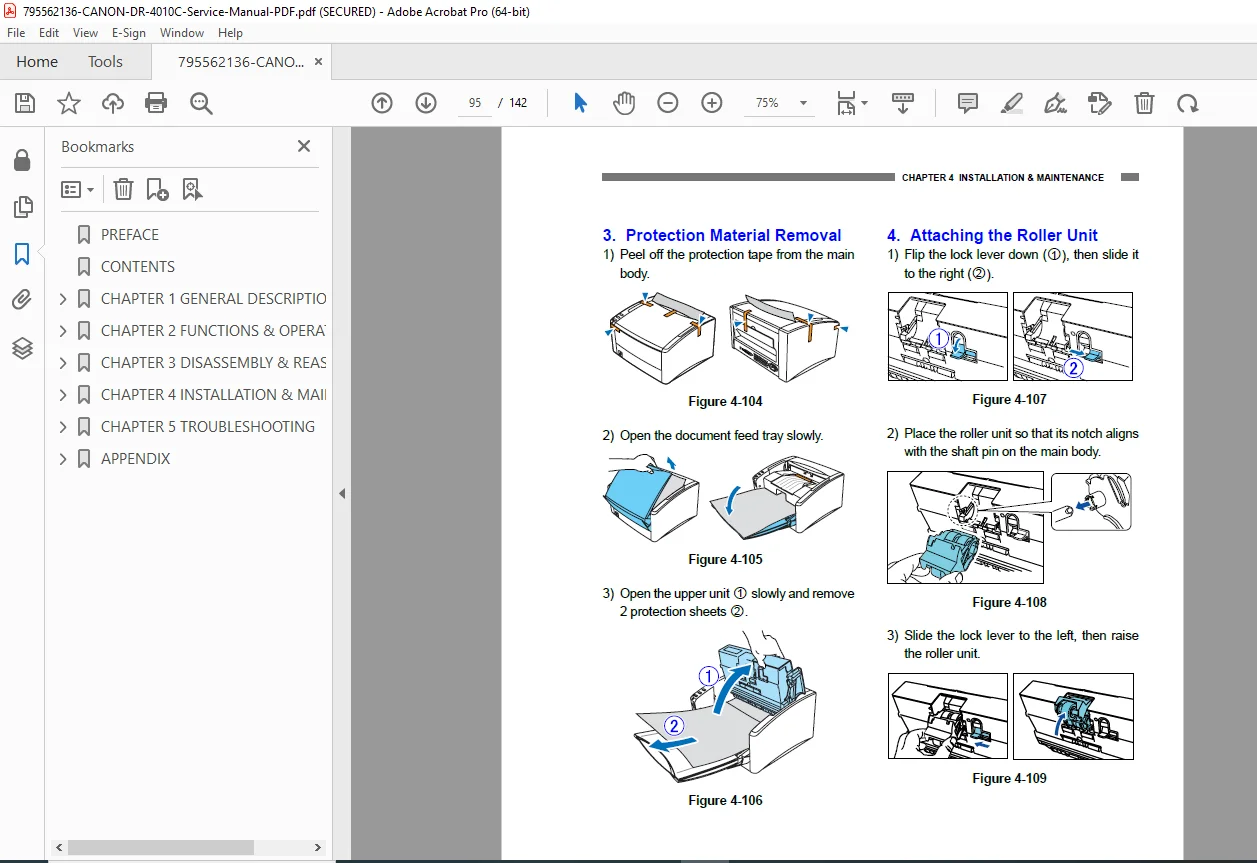
- Protection Material Removal
- Attaching the Roller Unit
- Attaching the Retard Roller
- Installing the Software
- Connecting to the Computer
- Power ON (scanner recognition)
- Scanning
- II. Parts Replacement
- Periodically Replaced Parts
- Consumable Parts
- Major Parts List
- III. Maintenance
- User Maintenance
- Service Maintenance
Chapter 5: Troubleshooting
- I. Error Display
- Power Indicator
- Error Messages
- II. Service Mode
- Outline
- Installation Procedure
- Starting Up and Exiting Service Mode
- All Adjustment
- Individual Adjustments
- Analog
- Firm Load
- About
- Max Document Size
- Dcon Check
- Check Device
- Sleep
- SCSI Transfer
- Counter
- Mechanical Feed Mode
- “About” Screen
- III. List of Failures
- Operation Failures
- Images Failures
- IV. Operation Troubleshooting
- No Power
- Not Recognized by Computer
- Scanning Does Not Start
- Jam, Double Feed, Skew
- Slow Scanning Speed
- V. Image Troubleshooting
Appendix: General diagram etc.
This manual is crucial for new image processing in Canon DR-4010C and DR-4010C feed system repair manual tasks, including ultrasonic double-feed detection and straight path feeding.
File Details
- Manual name: DR-4010C Service Manual
- Models covered: DR-4010C
- Year: 2006
- Manual PDF quality: High (clear text, structured formatting)
- No of pages: 142