
Furuno GP-170 GNSS Navigator Operator’s Manual – Full PDF
Original price was: $34.95.$19.95Current price is: $19.95.
Complete operator’s manual for the FURUNO GP-170 GNSS Navigator, covering plotter and track operation, marks, routes, destinations, notices, alerts, display modes, I/O settings, maintenance and troubleshooting. English, 145-page PDF.
Description
Furuno GP-170 GNSS Navigator Operator’s Manual
This is the full operator’s manual for the FURUNO GP-170 GNSS Navigator, the marine satellite positioning receiver that drives plotter, highway, course and data navigation on board. The document walks through every key on the display unit, every menu layer, and every routine the navigator is expected to perform at sea – from the first power-up through route building, destination setting, notice configuration and fault finding. It is the reference the crew actually works from, written for the person standing at the console rather than for the service bench.
The manual is published under document number OME-44820-P, authored in simplified grammar for international users, and revised with a print date of December 04, 2025. It applies to the GP-170 in both of its build variants – the unit with an internal DGPS/DGLONASS beacon receiver and the unit without one – and the differences are flagged wherever they matter, particularly in the beacon, SBAS and QZSS sections.
File Details
- Manual type: Operator’s Manual
- Brand: FURUNO
- Model: GP-170
- Equipment: GNSS Navigator
- Language: English
- Page count: 145 pages
- File format: PDF
- Publication No.: OME-44820-P
- Date: JUN. 2014 / P: DEC. 04, 2025
- Program No.: MAIN 2051542-03.XX, GPS 48504650XX, BEACON 2051544-01.XX
Chapters Covered
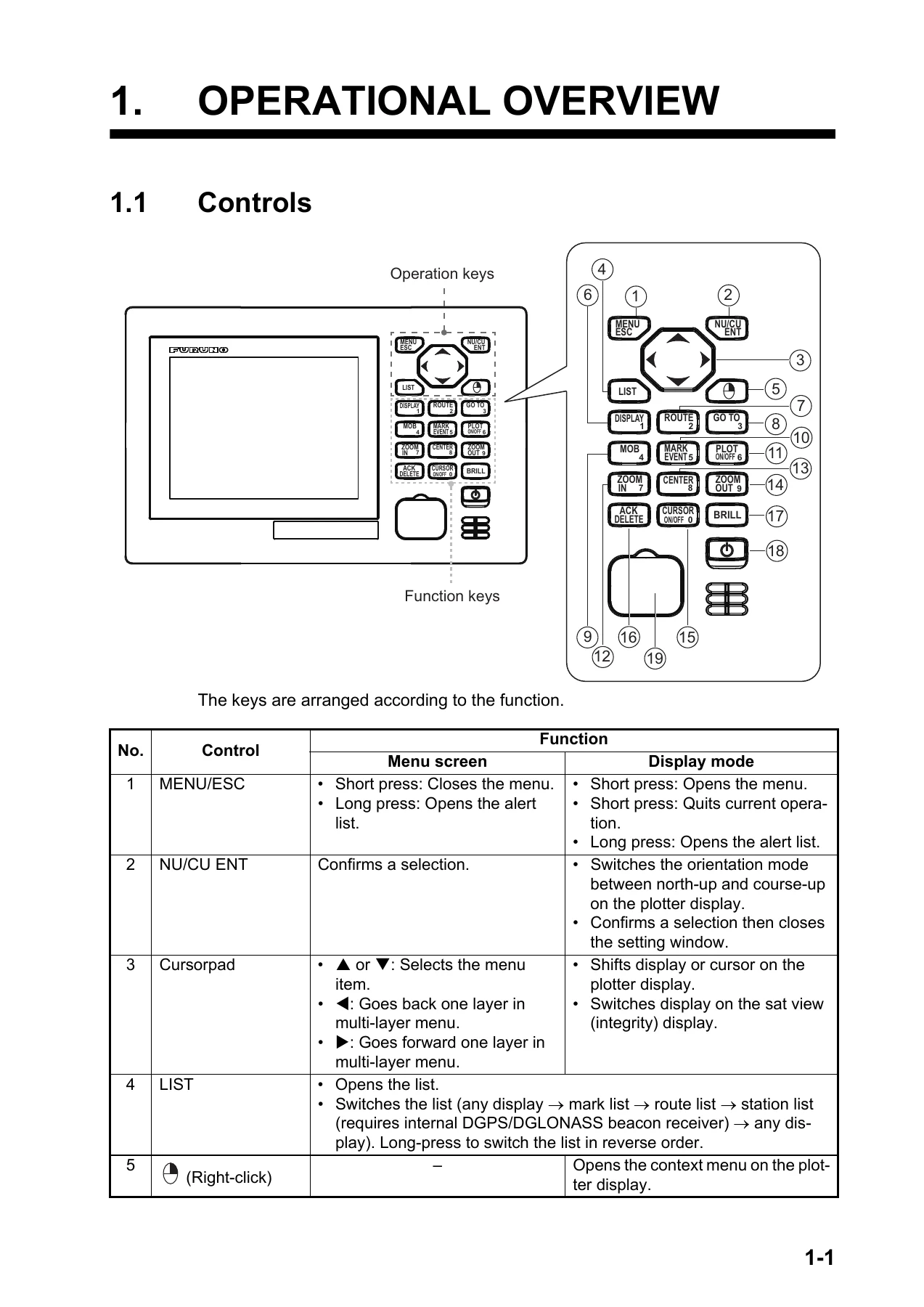
- 1. Operational Overview – Controls, power on/off, display and panel brilliance, display mode selection, main menu overview, list overview, context menu overview
- 2. Plotter Display Overview, Track – Background colour, zoom, display orientation, cursor on/off and size, moving the cursor, shifting and centring, grid, XTL line, heading line, COG vector, time mark, mark/waypoint names, weather data, bearing reference, magnetic variation, track plotting and recording, track interval, track colour, erasing tracks
- 3. Marks – Entering marks on the plotter display, presetting mark appearance, marks at the cursor position, marks from the mark list, event marks, MOB marks, editing marks and event marks, erasing marks
- 4. Routes – Presetting route settings, creating routes with the cursor and the ROUTE key, creating routes from the route list, editing routes, changing route name or colour, editing waypoints, temporarily deselecting a waypoint, deleting, inserting, changing route direction, copying and erasing routes
- 5. Destination – Setting a destination by cursor, waypoint, registered mark or registered route, cancelling a destination, calculating distance, bearing and TTG between two points, displaying ETA and TTG, trip distance, drift averaging
- 6. Notices – Audio notice type, arrival and anchor notices, XTE notice, ship speed notice, trip notice, DC report (Satellite Report for Disaster and Crisis Management), DC report log, popup view and talker setting
- 7. Displays – Sat view display, highway display, course display, data display, LORAN settings
- 8. Alerts – Alert overview, alert list, alert log, acknowledging alerts, silencing alerts, responsibility transfer alert, alert continuation, UTC de-synchronization and alert output
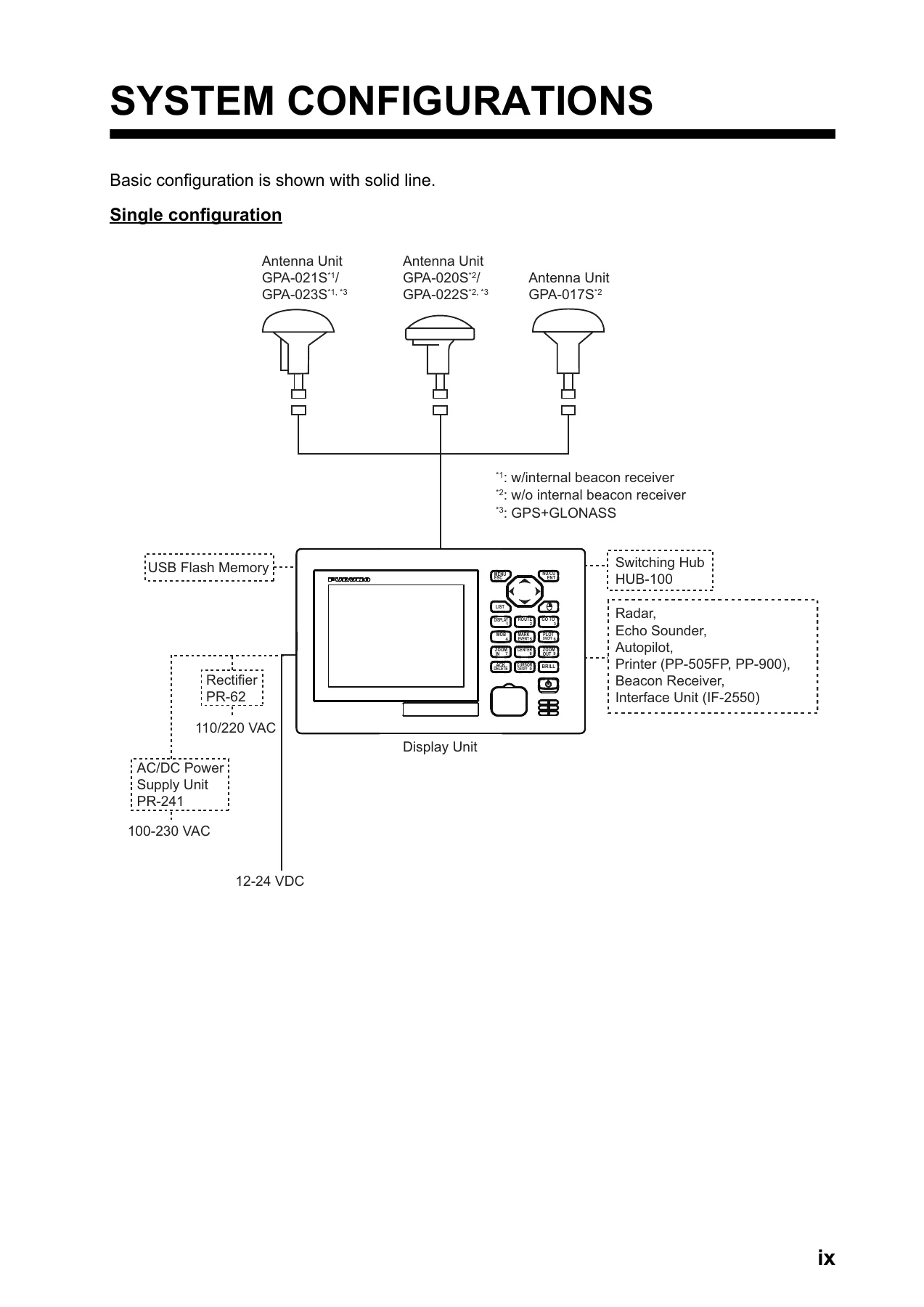
- 9. Other Functions – Unit setup, correction and offset menus, GNSS menu, Beacon/SBAS menu, language, I/O menu, dual configuration, ECDIS sync configuration, user password settings, demo mode
- 10. Maintenance – Maintenance, fuse replacement, troubleshooting, equipment information, self test, audit log, backup, clearing the memory, checking security functions, remedies for cyber incidents
- Appendices – Menu tree, list of terms/icons/symbols, time differences, geodetic chart list, what is SBAS/QZSS (SLAS)/DC Report, parts list and location, alert list
- Specifications and Index
Between the covers the manual covers the whole operating surface of the GP-170: a physical key-by-key breakdown of the display unit, the five display modes and how they cycle, the menu tree down to its third layer, the mark, route and station lists, and the context menus that appear when an object is selected with the cursor. It then moves into the working tasks – laying a track, building a route waypoint by waypoint, setting a destination five different ways, cancelling one, and reading the resulting range, bearing, ETA and TTG. Notice and alert handling is treated in detail, with the visual icons, the audio behaviour, and the difference between a warning and a caution spelled out.
GNSS, Beacon and Correction Settings
A substantial portion of the document is given over to the settings that decide how the navigator actually fixes position. The GNSS section walks through selecting GPS, GLONASS or Multi, position and speed smoothing, elevation mask, disabling individual satellites, the core filter, RAIM and its accuracy level, datum selection, initial position, positioning cycle and the anti-multipath filter. The Beacon/SBAS section covers differential correction modes, SBAS search in auto or manual, beacon station selection by auto, parameter or station ID, the station database and registered station list, disabling SBAS or QZSS satellites, and enabling QZSS positioning and correction. These are the pages that matter when a fix is drifting, a differential signal is being lost, or a receiver is being set up for a new coverage area.
Interfaces, Backup and Security
The I/O chapter documents output data ports 1 through 4, Ethernet setup, data source selection with user priority ordering, the line monitor log, and how to export log data to USB flash memory. There is full coverage of dual configuration and ECDIS sync, user password setup and reset with challenge codes, and the demo mode. The maintenance chapter adds equipment information screens, memory, keyboard, LCD and automatic self tests, the audit log with its event descriptions, and the backup and restore routines for user settings and GPX data – marks, waypoints and routes – through a USB flash memory.
What This Manual Lets You Do
With this manual in hand, the operator can power the GP-170 up, set brilliance for day or night, and move confidently between the plotter, sat view, highway, course and data displays. It supports the full navigation workflow: recording and erasing tracks, placing marks and event marks, marking a man overboard position and navigating back to it, building and editing routes, following them forward or in reverse, and setting or cancelling a destination at a cursor position, a waypoint, a mark or a whole route. It explains how to configure arrival, anchor, XTE, ship speed and trip notices so the unit warns at the right moment, how to read and acknowledge alerts, and how to work the DC report log for disaster and crisis information.
Just as important, it is the source for the numbers and procedures that keep the receiver honest. Datum selection, position offset, magnetic variation, RAIM accuracy level, smoothing times, positioning cycle and the various filter settings all directly affect what the navigator displays and what it feeds to the rest of the bridge network. Getting them wrong produces plausible-looking but incorrect position data. The troubleshooting section gives a first-line route through the common failures – no power, no picture, unresponsive keys, position not fixed, position wrong, bearing wrong, DC reports not received, and no data reaching external equipment – before anything is escalated to a dealer.
Why It Matters On Board
Marine electronics are unforgiving of guesswork. The GP-170 is designed to meet the rigorous demands of the marine environment, but as the manual itself notes, no machine performs its intended function unless properly installed and maintained, and wrong operation can void the warranty or cause injury. The safety instructions are explicit: do not disassemble or modify the equipment, turn the power off immediately if water leaks in or smoke or fire appears, use the correct fuse, and never rely on any single navigation aid – including this one – as the exclusive means of navigating a vessel. The manual reinforces that the navigator is responsible for checking all aids available to confirm position.
Beyond safety, this manual carries the detail that separates a working navigator from a frustrated one: the exact key sequences, the numeric entry rules, the setting ranges and defaults, the confirmation prompts, and the way menus change depending on whether the unit has an internal beacon receiver or is running in GPS, GLONASS or Multi mode. It also documents the conditions under which settings trigger a restart, and which other menu items change automatically as a consequence.
IMAGES PREVIEW
Instant PDF Delivery
The manual is delivered as a downloadable PDF immediately after payment. There is no shipping, no waiting, and no physical book to keep track of. The file can be opened on a laptop at the chart table, a tablet on the bridge, or a phone in the engine room, and any page or section can be printed for the console or the technical file. Whether the goal is learning the equipment from scratch, training a new watchkeeper, checking a setting against the specification, or working through a positioning problem at sea, the Furuno GP-170 GNSS Navigator Operator’s Manual puts the answer within reach in seconds.
Reviews
There are no reviews yet.