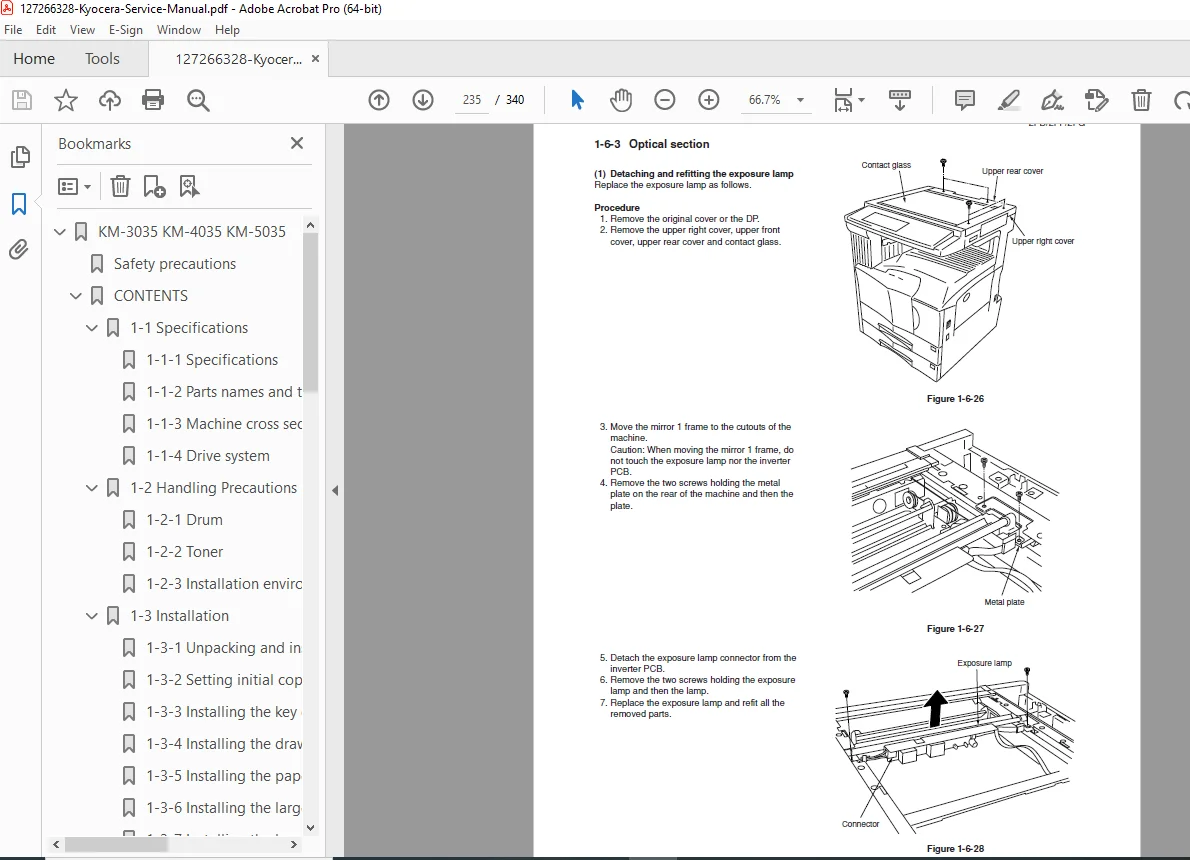
Kyocera KM-3035 KM-4035 KM-5035 Service Manual Digital Copier Guide PDF
Original price was: $85.00.$15.95Current price is: $15.95.
Complete Kyocera KM-3035, KM-4035, and KM-5035 digital copier service manual covering professional multifunctional document systems. This comprehensive 340-page technical guide includes detailed specifications, installation procedures, maintenance mode operations, troubleshooting diagnostics, adjustment procedures, circuit diagrams, and complete parts breakdowns. Essential reference for copier technicians, office equipment service engineers, and certified Kyocera service personnel.
Description
Kyocera KM-3035 KM-4035 KM-5035 Service Manual Digital Copier Guide PDF DOWNLOAD
DESCRIPTION:
Official Kyocera Service Manual – Complete Technical Documentation for KM-3035/4035/5035 Digital Copiers
This is the official Kyocera KM-3035, KM-4035, and KM-5035 Service Manual (Part Number 842FG110, Published June 2003, 340 pages) providing comprehensive technical service documentation for Kyocera’s professional digital copier systems. This essential professional service manual is designed exclusively for qualified service technicians responsible for installing, maintaining, and repairing Kyocera KM series digital copiers in corporate offices, educational institutions, and commercial printing environments.
⚠️ CRITICAL SAFETY WARNING: This service manual contains safety warnings and precautions for service personnel to ensure customer safety, equipment integrity, and technician safety during maintenance activities. Service personnel must read all safety information carefully before performing any service procedures.
📋 COMPREHENSIVE MANUAL COVERAGE – COMPLETE SECTION BREAKDOWN:
SAFETY PRECAUTIONS (Critical Pre-Service Reading)
- Safety Warnings and Precautions:
- DANGER Warnings: High-risk situations that may result in serious bodily injury or death
- WARNING Messages: Situations that may result in serious bodily injury or death
- CAUTION Messages: Situations that may result in bodily injury or property damage
- Safety Symbols:
- Triangle symbol (⚠) for warnings and cautions
- General warning indicators
- Electric shock risk warnings
- High temperature warnings
- Prohibited action symbols
- Required action symbols
- Ground connection requirements
1. INSTALLATION PRECAUTIONS
- WARNING – Electrical Safety:
- Power supply voltage specifications and requirements
- Ground wire connection to approved grounding points
- Extension cable current capacity requirements
- Multiple connection hazards prevention
- Gas pipe, lightning rod, and water pipe grounding prohibitions
- CAUTION – Physical Installation:
- Surface stability requirements
- Environmental conditions (humidity, dust)
- Heat source proximity restrictions
- Ventilation space requirements
- Proper handling locations for moving equipment
- Anti-toppling and locking device installation
- Toner and developer handling safety
- Customer safety instruction requirements
2. PRECAUTIONS FOR MAINTENANCE
- WARNING – Service Safety:
- Power plug removal before disassembly (mandatory)
- Service manual procedure compliance
- Safety mechanism bypass prohibition
- Correct parts specification requirements
- Thermostat and thermal fuse replacement specifications
- Installation distance and gap measurement accuracy
- Ground connection verification
- Power cable condition inspection
- Laser optical unit disassembly prohibition (eyesight hazard)
- High-voltage charger section handling precautions
- CAUTION – Maintenance Procedures:
- Safe clothing and accessory requirements
- Powered machine safety precautions
- Fixing section burn hazard awareness (extremely hot)
- Thermistor and roller cleanliness verification
- Ozone filter handling procedures
- Power cord and connector wire handling
- Cable routing and protection
- Charger wire end treatment
- Toner removal from electronic components
- Wire harness routing verification
- Parts, screws, connectors, and wire reinstallation checks
- Caution label condition verification
- Grease and solvent handling procedures
- Toner disposal safety (fire hazard)
- Smoke emergency procedures
3. MISCELLANEOUS SAFETY
- WARNING – Chemical Hazards:
- Drum heating prohibition
- Organic solvent exposure restrictions
- Toxic gas generation prevention
SECTION 1-1: SPECIFICATIONS
- 1-1-1 Specifications:
- Complete technical specifications for KM-3035, KM-4035, and KM-5035 models
- Copy speed specifications (pages per minute)
- Resolution specifications
- Paper size capabilities
- Warm-up time
- First copy out time
- Zoom range specifications
- Memory capacity
- Monthly duty cycle
- 1-1-2 Parts Names and Their Functions:
- (1) Copier:
- Main unit component identification
- Document feeder components
- Paper cassette locations
- Control panel layout
- Output tray identification
- Optional unit mounting locations
- (2) Operation Panel:
- Control button functions
- Display panel functions
- Mode selection keys
- Numerical keypad
- Start/stop controls
- Indicator lights
- (1) Copier:
- 1-1-3 Machine Cross Section:
- Detailed cross-sectional diagrams
- Paper path illustration
- Component location reference
- Internal mechanism layout
- 1-1-4 Drive System:
- (1) Drive System 1: Drive motor and eject motor drive trains
- (2) Drive System 2: Paper feed motor drive train
- (3) Drive System 3: Duplex section drive mechanism
SECTION 1-2: HANDLING PRECAUTIONS
- 1-2-1 Drum:
- Photoreceptor drum handling procedures
- Light exposure protection
- Physical damage prevention
- Cleaning and maintenance precautions
- 1-2-2 Toner:
- Toner cartridge handling
- Spill prevention and cleanup
- Environmental disposal requirements
- Health and safety precautions
- 1-2-3 Installation Environment:
- Temperature range requirements
- Humidity specifications
- Ventilation requirements
- Space clearance specifications
- Electrical environment requirements
SECTION 1-3: INSTALLATION (Comprehensive Installation Procedures)
- 1-3-1 Unpacking and Installation:
- (1) Installation Procedure:
- Unpacking procedures and packaging removal
- Machine positioning and leveling
- Transportation lock removal
- Protective material removal
- Initial setup verification
- (1) Installation Procedure:
- 1-3-2 Setting Initial Copy Modes:
- Default copy settings configuration
- Machine parameter initialization
- System startup procedures
- 1-3-3 Installing the Key Counter (Option):
- Key counter mounting procedures
- Electrical connections
- Programming and initialization
- 1-3-4 Installing the Drawer Heater (Option):
- Heater installation for humid environments
- Electrical connections
- Temperature control settings
- 1-3-5 Installing the Paper Feeder (Option):
- Additional paper cassette installation
- Paper capacity expansion
- Drive mechanism connection
- 1-3-6 Installing the Large Paper Deck (Option):
- High-capacity paper deck mounting
- Paper lift mechanism installation
- Sensor connection and calibration
- 1-3-7 Installing the Booklet Stitcher/Switchback Unit (Option):
- Stitching finisher installation
- Switchback mechanism setup
- Staple cartridge loading
- Fold mechanism adjustment
- 1-3-8 Installing the Sheet-Through Document Processor (Option):
- Automatic document feeder installation
- Document path verification
- Sensor alignment
- 1-3-9 Installing the Printing System (Option):
- Network printing module installation
- Interface connections
- Driver installation requirements
- 1-3-10 Installing the Scanning System (Option):
- Scanning functionality module
- Network scan-to-email setup
- Scan destination configuration
- 1-3-11 Installing the Built-In Finisher (Option):
- Integrated finishing unit installation
- Stapling mechanism setup
- Output tray configuration
- 1-3-12 Installing the Job Separator (Option):
- Job separator tray installation
- Output sorting configuration
- 1-3-13 Installing the Facsimile System (Option):
- Fax board installation
- Telephone line connection
- Fax parameter configuration
- 1-3-14 Installing the Hard Disk (Option):
- Hard disk drive installation
- Document storage functionality
- File management system setup
- 1-3-15 Installing the 1000-Sheet Finisher (Option):
- High-capacity finisher installation
- Multi-position stapling setup
- Large output tray configuration
- 1-3-16 Installing the 3000-Sheet Finisher (Option):
- Ultra-high-capacity finisher installation
- Heavy-duty stapling mechanism
- Multiple output bin configuration
SECTION 1-4: MAINTENANCE MODE
- 1-4-1 Copier Management:
- (1) Using the Copier Management Mode:
- Service mode access procedures
- Management function overview
- (2) Setting Department Management Items:
- User account creation
- Department code assignment
- Copy limit settings
- (3) Copy Default:
- Default copy parameter settings
- Paper size defaults
- Density defaults
- Zoom ratio defaults
- (4) Machine Default:
- System-level default configurations
- Timeout settings
- Auto-clear settings
- (5) Bypass Setting:
- Manual feed tray configuration
- Paper size detection settings
- (6) Original Size Registration:
- Custom paper size registration
- Non-standard format setup
- (7) User Adjustment:
- Image quality adjustments
- Density calibration
- Registration adjustments
- (8) Checking Total Counter and Printing Counter Report:
- Usage statistics retrieval
- Counter report generation
- Billing information extraction
- (9) Document Management Default Setting:
- Document storage settings
- File retention policies
- (1) Using the Copier Management Mode:
ADDITIONAL SECTIONS (Indicated in 340-Page Manual):
SECTION 2: THEORY OF OPERATION
- Image Formation Process:
- Photoreceptor charging
- Laser exposure system
- Development process
- Transfer mechanism
- Fixing process
- Cleaning process
- Paper Path and Feed System:
- Paper cassette feed mechanism
- Registration roller operation
- Duplex path operation
- Exit roller system
- Control System:
- Main CPU control
- Motor control circuits
- Sensor input processing
- Display and keypad interface
- Power Supply System:
- AC power distribution
- DC voltage generation
- High-voltage power supply
- Low-voltage power supply
SECTION 3: TROUBLESHOOTING AND DIAGNOSTICS
- Diagnostic Mode Access:
- Service code entry
- Diagnostic menu navigation
- Test pattern printing
- Error Code Reference:
- Complete error code listing
- Error description and causes
- Troubleshooting procedures for each code
- Symptom-Based Troubleshooting:
- Image quality problems
- Paper jam troubleshooting
- Feed problems
- Electrical failures
- Mechanical failures
- Sensor Testing Procedures:
- Sensor location diagrams
- Sensor function verification
- Sensor replacement procedures
SECTION 4: ADJUSTMENT PROCEDURES
- Image Quality Adjustments:
- Laser power adjustment
- Development bias adjustment
- Transfer voltage adjustment
- Fixing temperature calibration
- Image density calibration
- Registration Adjustments:
- Leading edge registration
- Side registration
- Skew correction
- Duplex registration
- Mechanical Adjustments:
- Paper cassette positioning
- Feed roller pressure
- Registration roller timing
- Exit roller alignment
- Electrical Adjustments:
- High-voltage calibration
- Motor speed calibration
- Sensor threshold adjustment
SECTION 5: DISASSEMBLY AND ASSEMBLY
- Major Unit Removal:
- Scanner unit removal
- Drum unit removal
- Developer unit removal
- Fixing unit removal
- Paper feed units
- Component-Level Disassembly:
- Drive motor removal
- PCB replacement procedures
- Sensor replacement
- Roller replacement
- Belt replacement
- Reassembly Procedures:
- Assembly sequence
- Torque specifications
- Alignment verification
- Function testing after assembly
SECTION 6: CIRCUIT DIAGRAMS AND SCHEMATICS
- Power Supply Circuits:
- AC power distribution
- DC power supply schematics
- High-voltage circuits
- Control Circuits:
- Main CPU board schematics
- I/O interface circuits
- Communication circuits
- Motor Drive Circuits:
- Main motor drive
- Paper feed motor control
- Scanner motor control
- Sensor Circuits:
- Optical sensor circuits
- Temperature sensor circuits
- Mechanical sensor circuits
SECTION 7: PARTS CATALOG
- Exploded View Diagrams:
- Main unit assembly
- Paper feed section
- Image formation section
- Finisher units
- Parts Lists with Part Numbers:
- Mechanical components
- Electrical components
- Consumables
- Optional unit parts
- Recommended Spare Parts:
- High-wear items
- Service parts kits
- Maintenance kits
📄 FILE DETAILS:
Manual Name: KM-3035, KM-4035, KM-5035 Service Manual
Part Number: 842FG110
Publication Date: June 2003
Models Covered:
- Kyocera KM-3035 – Digital Multifunctional Copier
- Kyocera KM-4035 – Digital Multifunctional Copier
- Kyocera KM-5035 – Digital Multifunctional Copier
Equipment Type: Professional digital copiers with optional printing, scanning, and fax capabilities
Applications: - Corporate office document management
- Educational institution copying needs
- Commercial print shops
- Government agencies
- Healthcare facilities documentation
- Legal office document production
Optional Features Covered: - Network printing system
- Scanning system (scan-to-email)
- Facsimile system
- Various paper feeders and decks
- Multiple finisher options (1000-sheet and 3000-sheet)
- Booklet stitcher/switchback unit
- Job separator
- Hard disk storage
- Key counter for billing
Manual Quality: Professional high-quality PDF with detailed technical illustrations, cross-sectional diagrams, electrical schematics, and parts breakdowns
Total Pages: 340 pages
Language: English
File Size: Approximately 4.7 MB
Format: PDF (unencrypted)
Publisher: Kyocera Corporation
Copyright: © 2003 Kyocera
Created With: Adobe PageMaker 6.0 / Acrobat Distiller 4.0
🔧 WHO NEEDS THIS MANUAL:
This Kyocera KM-3035/4035/5035 service manual is essential for:
- Copier and printer service technicians
- Office equipment repair specialists
- Kyocera authorized service engineers
- Facility maintenance technicians
- Corporate IT support personnel
- Educational institution maintenance staff
- Independent office equipment repair shops
- Managed print service providers
- Technical training instructors
- Equipment refurbishment specialists
- Anyone responsible for servicing Kyocera KM series copiers
⚡ KEY TECHNICAL INFORMATION INCLUDED:
✓ Complete specifications for all three models (KM-3035/4035/5035)
✓ Detailed installation procedures for base unit and all optional accessories
✓ Comprehensive safety precautions for service personnel
✓ Machine cross-section and component identification
✓ Complete drive system diagrams and descriptions
✓ Maintenance mode access and configuration procedures
✓ Department management and copy counter setup
✓ Image quality adjustment procedures
✓ Registration and alignment calibration
✓ Complete error code reference with troubleshooting
✓ Diagnostic mode procedures and test patterns
✓ Circuit diagrams and electrical schematics
✓ Disassembly and assembly procedures with torque specs
✓ Parts catalog with exploded view diagrams
✓ Optional unit installation for all accessories
✓ Theory of operation for all major systems
💎 SPECIAL FEATURES:
Triple-Model Coverage: Single manual covers three copier models (KM-3035, KM-4035, KM-5035), providing comprehensive documentation for the entire product line.
Extensive Optional Equipment Documentation: Includes installation procedures for 16 different optional accessories including multiple finisher types, scanning systems, printing systems, and facsimile capabilities.
Professional MFP Platform: Covers Kyocera’s professional multifunctional platform combining copying, printing, scanning, and fax capabilities in a single device.
High-Capacity Output Options: Documentation for massive finishing options including 1000-sheet and 3000-sheet finishers for high-volume environments.
Booklet Production: Detailed procedures for booklet stitcher installation enabling saddle-stitch booklet production.
Network Integration: Complete setup procedures for network printing and scanning functionality.
Department Management: Comprehensive user account, billing, and copy limit management features.
Service Mode Access: Detailed maintenance mode procedures for service-level diagnostics and adjustments.
Safety-First Approach: Extensive safety documentation protecting both service personnel and equipment during maintenance operations.
2003 Digital Technology: Represents Kyocera’s digital copier technology from the early 2000s, a significant era in office equipment evolution.
⚠️ IMPORTANT SAFETY AND SERVICE NOTES:
Qualified Service Personnel Only: This manual is intended exclusively for trained and qualified service technicians. Improper service may cause equipment damage, fire, electric shock, or personal injury.
Mandatory Power Disconnect: Always remove the power plug from the wall outlet before starting any disassembly or service procedures.
High Voltage Hazards: Copier contains high-voltage charger sections. Improper handling may cause electric shock. Follow all safety procedures.
High Temperature Warning: Fixing section operates at extremely high temperatures and may cause severe burns. Allow adequate cooling time before service.
Laser Safety: Never attempt to disassemble the optical/laser unit. Leaking laser light may cause permanent eye damage.
Battery Replacement Caution: Danger of explosion if battery is incorrectly replaced. Use only same or equivalent type recommended by manufacturer.
Toner Handling: Avoid excessive inhalation of toner or developer. Protect eyes. If ingested, drink water to dilute and seek medical attention immediately.
Ground Connection Critical: Always verify proper grounding to prevent fire or electric shock hazards.
Double-Pole/Neutral Fusing: Equipment uses double-pole/neutral fusing configuration for enhanced safety.
Prohibited Grounding Points: Never connect ground wire to gas pipes, lightning rods, telephone ground cables, or unapproved water pipes.
Toxic Gas Warning: Never heat the drum or expose to organic solvents other than specified refiner as it may generate toxic gas.
Parts Specification: Always use parts having correct specifications. Never substitute thermostats or thermal fuses with unauthorized components.
Ventilation Required: Allow sufficient space for ventilation to prevent heat buildup and ensure proper operation.
Fire Hazard – Toner Disposal: Never dispose of toner or toner bottles in fire. Toner may cause sparks when exposed to flame.
⚡ INSTANT DOWNLOAD – ESSENTIAL FOR KYOCERA KM SERIES SERVICE! Get immediate access to this comprehensive Kyocera service manual and properly install, maintain, troubleshoot, and repair KM-3035, KM-4035, and KM-5035 digital copiers. Download now and service your equipment with factory-authorized procedures used by Kyocera certified technicians worldwide!